display RENAULT CLIO 2009 X85 / 3.G User Guide
[x] Cancel search | Manufacturer: RENAULT, Model Year: 2009, Model line: CLIO, Model: RENAULT CLIO 2009 X85 / 3.GPages: 264, PDF Size: 15.68 MB
Page 68 of 264
Downloaded from www.Manualslib.com manuals search engine
1.62
ENG_UD13453_3Ordinateur de bord (X85 - B85 - C85 - S85 - K85 - Renault)ENG_NU_853-3_BCSK85_Renault_1
JauneNoirNoir texte
TRIP COMPUTER AND WARNING SYSTEM (4/10)
The display of information shown below DEPENDS ON THE VEHICLE EQUIPMENT \
AND COUNTRY.
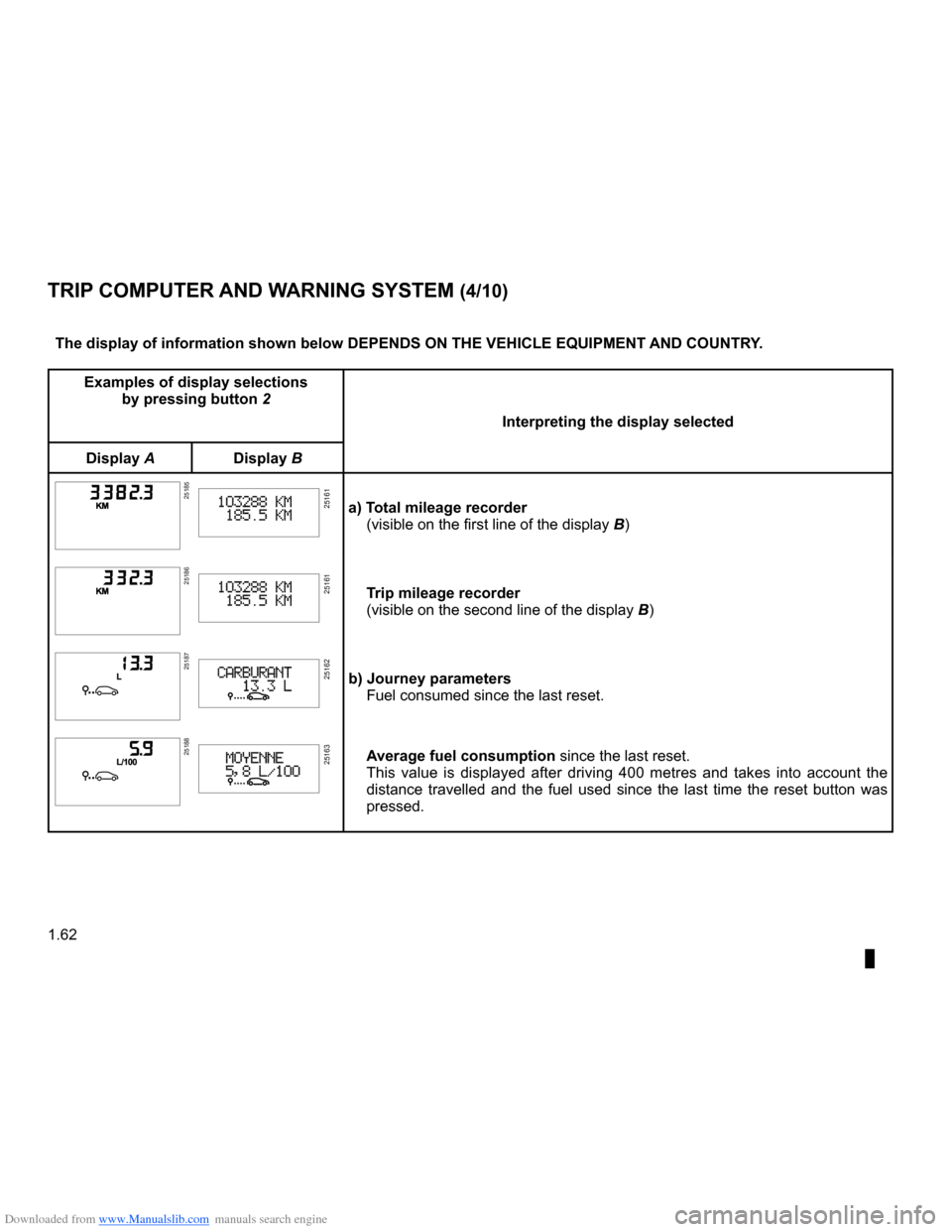
Examples of display selections by pressing button 2
Interpreting the display selected
Display ADisplay B
251852518525161a) Total mileage recorder(visible on the first line of the display B)
251862518625161Trip mileage recorder
(visible on the second line of the display B)
251872518725162b) Journey parametersFuel consumed since the last reset.
251882518825163Average fuel consumption since the last reset.This value is displayed after driving 400 metres and takes into account the distance travelled and the fuel used since the last time the reset button was pressed.
Page 69 of 264
Downloaded from www.Manualslib.com manuals search engine
JauneNoirNoir texte
1.63
ENG_UD13453_3Ordinateur de bord (X85 - B85 - C85 - S85 - K85 - Renault)ENG_NU_853-3_BCSK85_Renault_1
TRIP COMPUTER AND WARNING SYSTEM (5/10)
The display of information shown below DEPENDS ON THE VEHICLE EQUIPMENT \
AND COUNTRY.
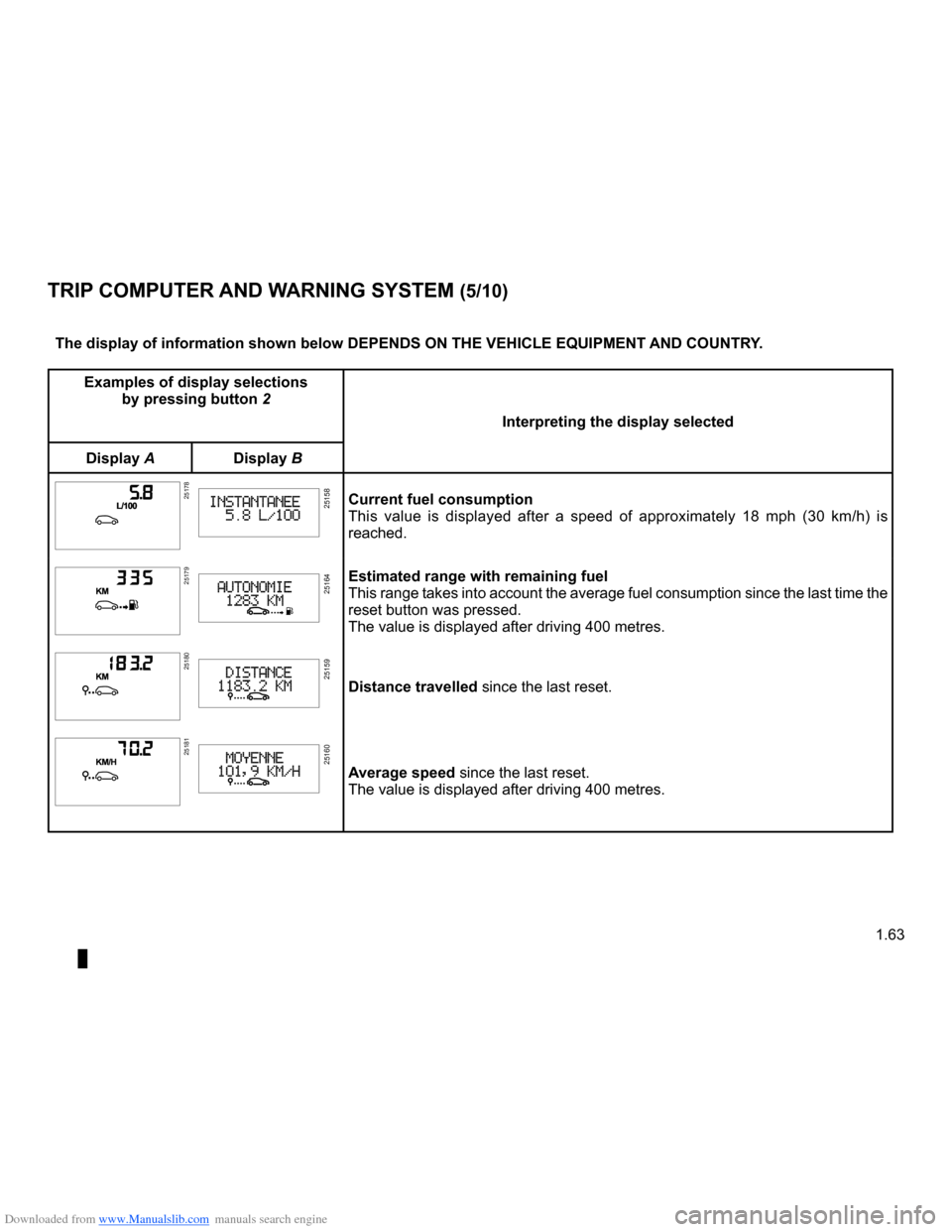
Examples of display selections by pressing button 2
Interpreting the display selected
Display ADisplay B
251782517825158Current fuel consumptionThis value is displayed after a speed of approximately 18 mph (30 km/h) is reached.
251792517925164Estimated range with remaining fuelThis range takes into account the average fuel consumption since the last time the reset button was pressed.The value is displayed after driving 400 metres.
251802518025159Distance travelled since the last reset.
251812518125160Average speed since the last reset.The value is displayed after driving 400 metres.
Page 70 of 264
Downloaded from www.Manualslib.com manuals search engine
1.64
ENG_UD13453_3Ordinateur de bord (X85 - B85 - C85 - S85 - K85 - Renault)ENG_NU_853-3_BCSK85_Renault_1
JauneNoirNoir texte
TRIP COMPUTER AND WARNING SYSTEM (6/10)
The display of information shown below DEPENDS ON THE VEHICLE EQUIPMENT \
AND COUNTRY.
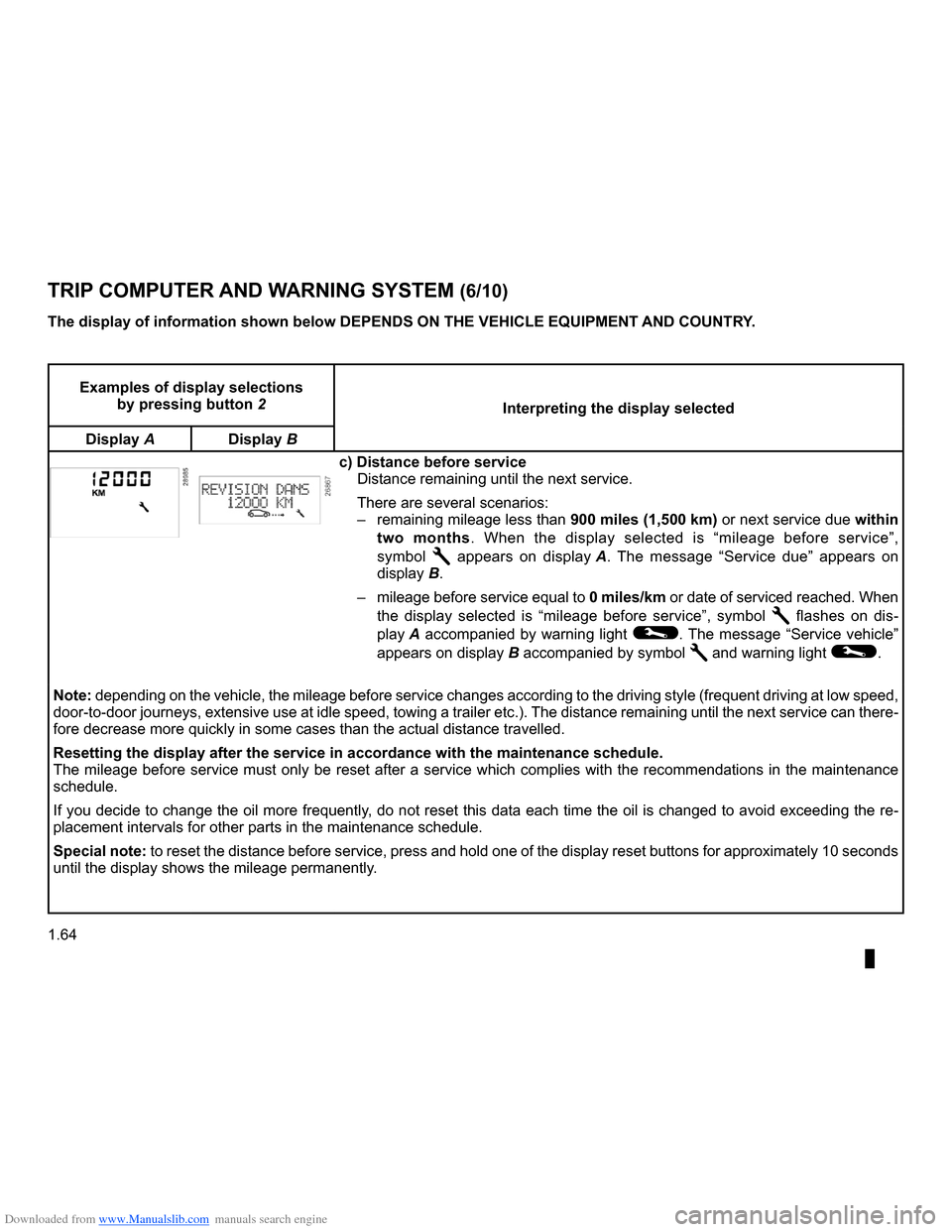
Examples of display selections by pressing button 2Interpreting the display selected
Display ADisplay B
c) Distance before serviceDistance remaining until the next service.
There are several scenarios:
– remaining mileage less than 900 miles (1,500 km) or next service due within
two months. When the display selected is “mileage before service”,
symbol Ê appears on display A. The message “Service due” appears on
display B.
– mileage before service equal to
0 miles/km or date of serviced reached. When
the display selected is “mileage before service”, symbol Ê flashes on dis-
play
A accompanied by warning light ©. The message “Service vehicle”
appears on display
B accompanied by symbol Ê and warning light ©.
Note: depending on the vehicle, the mileage before service changes according to the driving style (frequent driving at low speed, door-to-door journeys, extensive use at idle speed, towing a trailer etc.). The distance remaining until the next service can there- fore decrease more quickly in some cases than the actual distance travel\
led.
Resetting the display after the service in accordance with the maintenan\
ce schedule.The mileage before service must only be reset after a service which complies with the recommendations in the maintenance schedule.
If you decide to change the oil more frequently, do not reset this data each time the oil is changed to avoid exceeding the re- placement intervals for other parts in the maintenance schedule.
Special note: to reset the distance before service, press and hold one of the display reset buttons for approximately 10 seconds until the display shows the mileage permanently.
Page 71 of 264
Downloaded from www.Manualslib.com manuals search engine
JauneNoirNoir texte
1.65
ENG_UD13453_3Ordinateur de bord (X85 - B85 - C85 - S85 - K85 - Renault)ENG_NU_853-3_BCSK85_Renault_1
TRIP COMPUTER AND WARNING SYSTEM (7/10)
The display of information shown below DEPENDS ON THE VEHICLE EQUIPMENT \
AND COUNTRY.
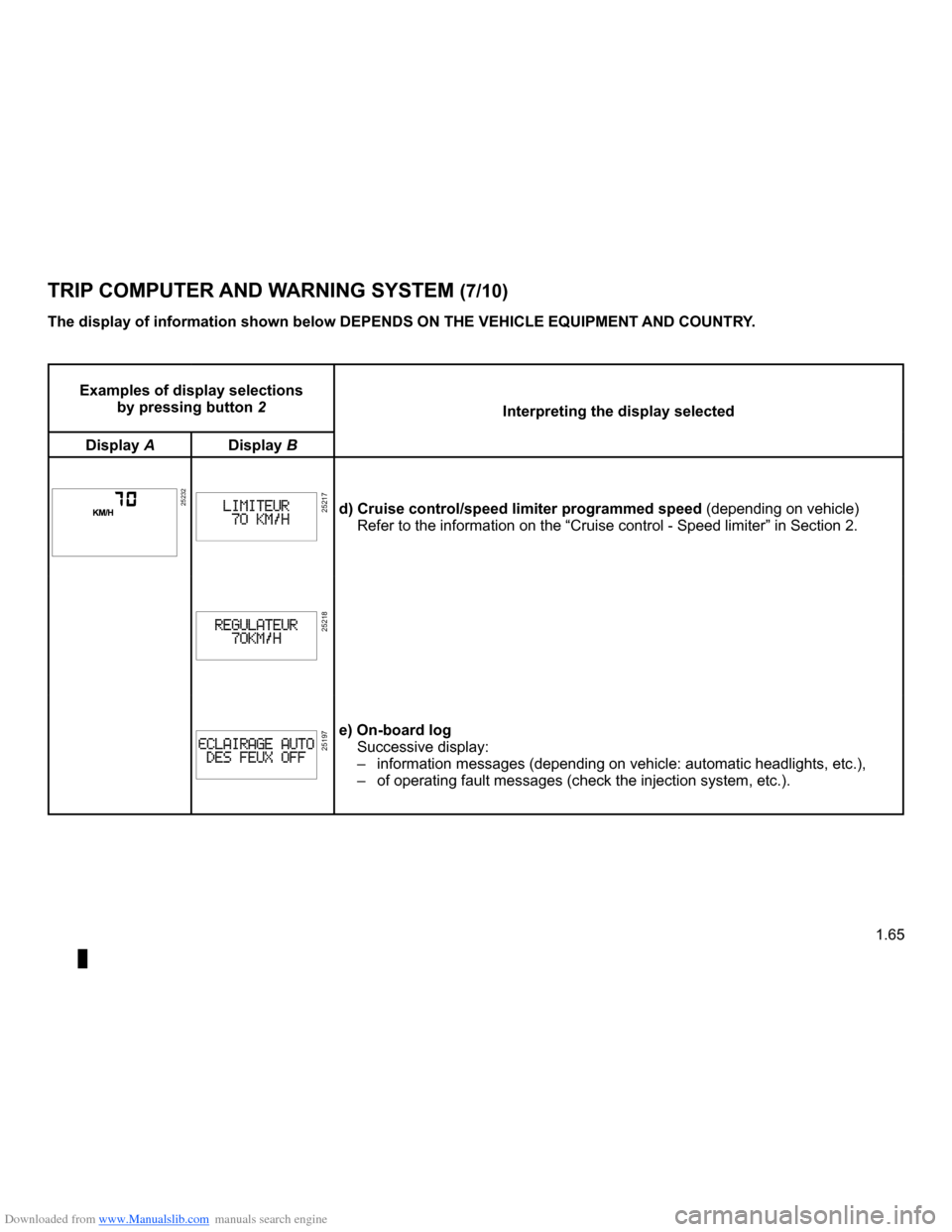
Examples of display selections by pressing button 2Interpreting the display selected
Display ADisplay B
252322523225217d) Cruise control/speed limiter programmed speed (depending on vehicle)Refer to the information on the “Cruise control - Speed limiter” i\
n Section 2.
25218
25197e) On-board logSuccessive display:
– information messages (depending on vehicle: automatic headlights, etc.)\
,
– of operating fault messages (check the injection system, etc.).
Page 73 of 264
Downloaded from www.Manualslib.com manuals search engine
JauneNoirNoir texte
1.67
ENG_UD13453_3Ordinateur de bord (X85 - B85 - C85 - S85 - K85 - Renault)ENG_NU_853-3_BCSK85_Renault_1
TRIP COMPUTER AND WARNING SYSTEM (9/10)
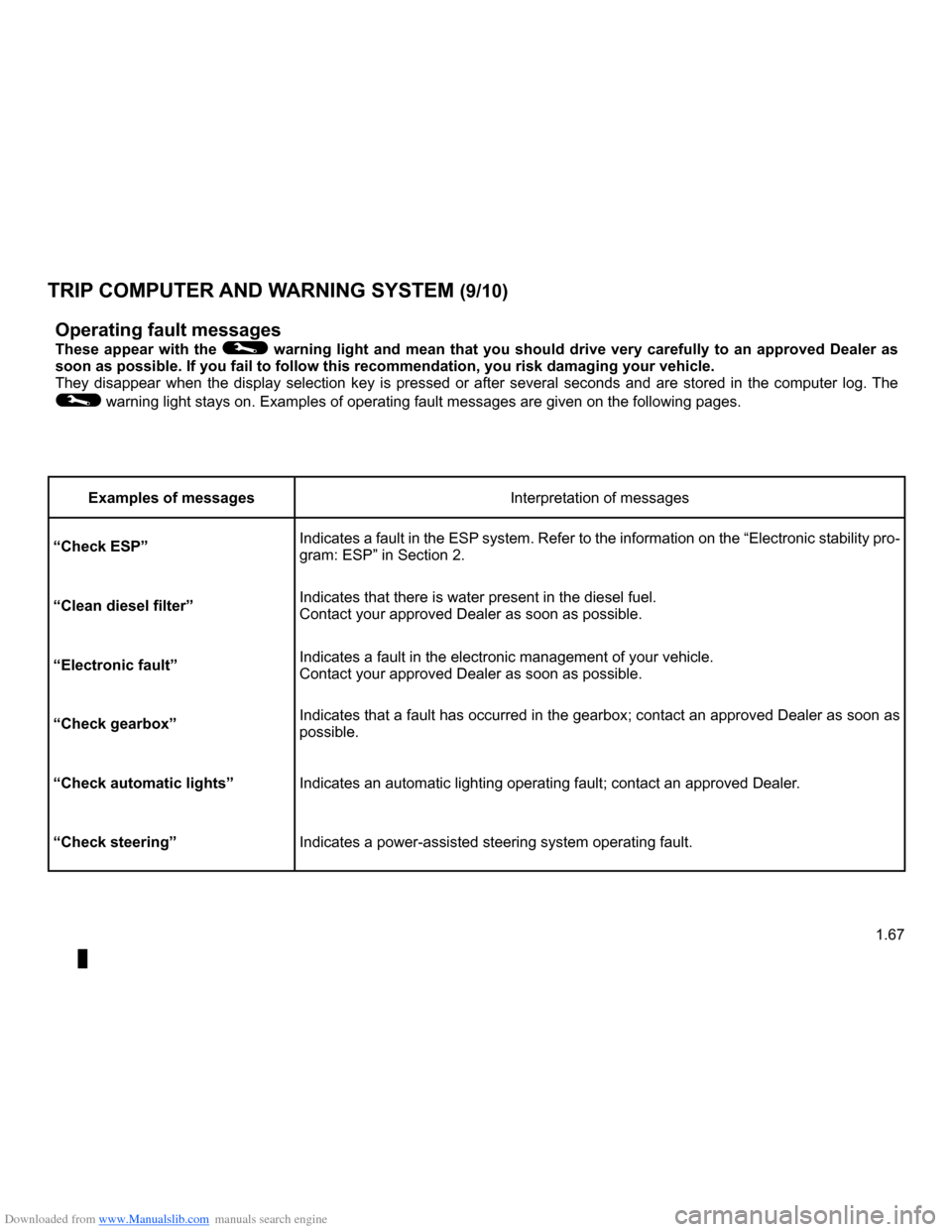
Operating fault messages
These appear with the © warning light and mean that you should drive very carefully to an approved Dealer as soon as possible. If you fail to follow this recommendation, you risk da\
maging your vehicle.They disappear when the display selection key is pressed or after several seconds and are stored in the computer log. The
© warning light stays on. Examples of operating fault messages are given \
on the following pages.
Examples of messagesInterpretation of messages
“Check ESP”Indicates a fault in the ESP system. Refer to the information on the “Electronic stability pro- gram: ESP” in Section 2.
“Clean diesel filter”Indicates that there is water present in the diesel fuel.Contact your approved Dealer as soon as possible.
“Electronic fault”Indicates a fault in the electronic management of your vehicle.Contact your approved Dealer as soon as possible.
“Check gearbox”Indicates that a fault has occurred in the gearbox; contact an approved Dealer as soon as possible.
“Check automatic lights”Indicates an automatic lighting operating fault; contact an approved Dea\
ler.
“Check steering”Indicates a power-assisted steering system operating fault.
Page 74 of 264
Downloaded from www.Manualslib.com manuals search engine
1.68
ENG_UD13453_3Ordinateur de bord (X85 - B85 - C85 - S85 - K85 - Renault)ENG_NU_853-3_BCSK85_Renault_1
TRIP COMPUTER AND WARNING SYSTEM (10/10)
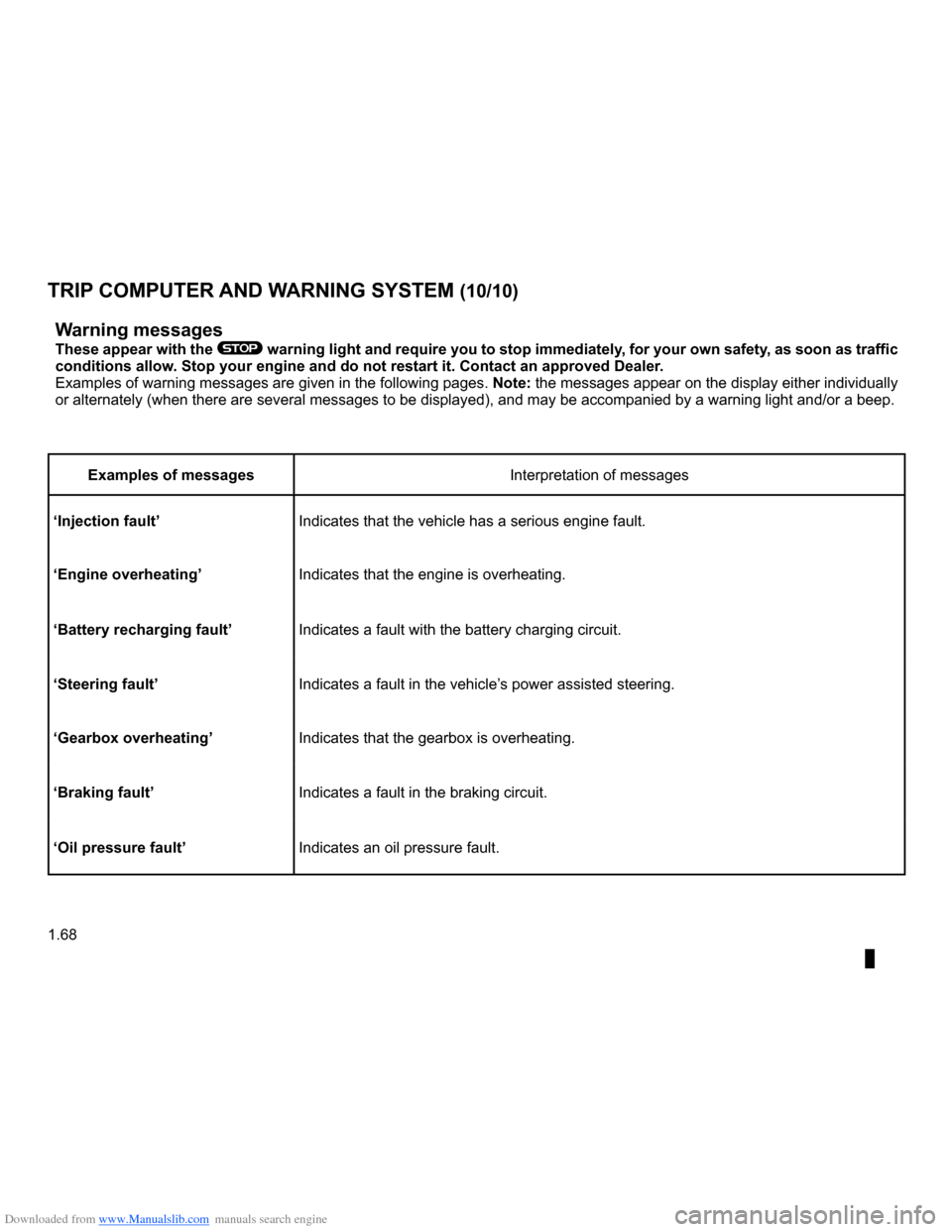
Warning messages
These appear with the ® warning light and require you to stop immediately, for your own safety, as soon as traffic conditions allow. Stop your engine and do not restart it. Contact an approved Dealer.Examples of warning messages are given in the following pages. Note: the messages appear on the display either individually or alternately (when there are several messages to be displayed), and \
may be accompanied by a warning light and/or a beep.
Examples of messagesInterpretation of messages
‘Injection fault’Indicates that the vehicle has a serious engine fault.
‘Engine overheating’Indicates that the engine is overheating.
‘Battery recharging fault’Indicates a fault with the battery charging circuit.
‘Steering fault’Indicates a fault in the vehicle’s power assisted steering.
‘Gearbox overheating’Indicates that the gearbox is overheating.
‘Braking fault’Indicates a fault in the braking circuit.
‘Oil pressure fault’Indicates an oil pressure fault.
Page 75 of 264
Downloaded from www.Manualslib.com manuals search engine
clock .....................................................(up to the end of the DU)clock .....................................................(up to the end of the DU)control instruments ...............................(up to the end of the DU)
1.69
ENG_UD10538_1Heure (X85 - B85 - C85 - S85 - K85 - Renault)ENG_NU_853-3_BCSK85_Renault_1
Clock and exterior temperature
If the electrical supply is cut (battery disconnected, broken supply wire, etc.), the clock will lose its time set- ting.
The time must then be set.
We recommend that you do not adjust these settings while driving.
251772531425314
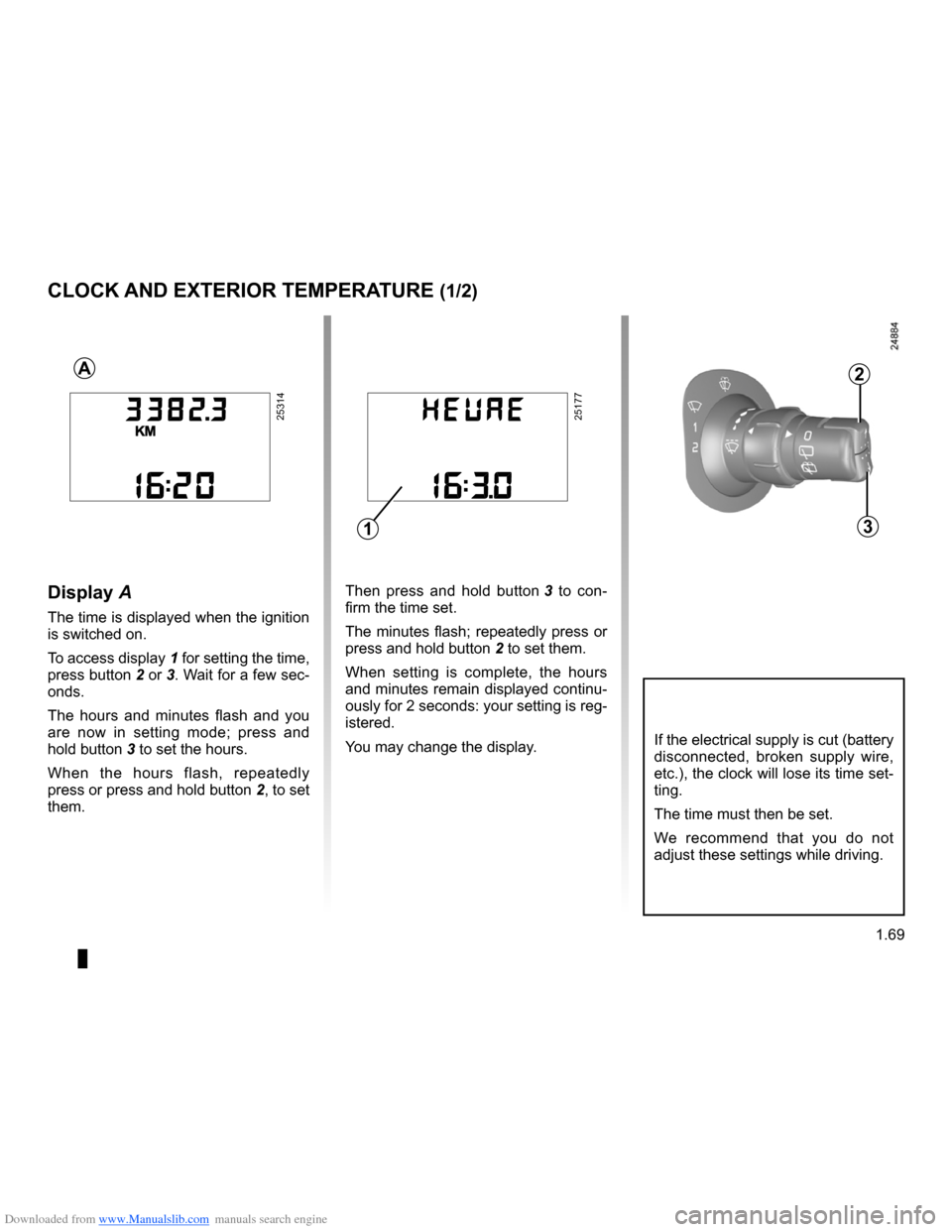
Then press and hold button 3 to con- firm the time set.
The minutes flash; repeatedly press or
press and hold button 2 to set them.
When setting is complete, the hours and minutes remain displayed continu- ously for 2 seconds: your setting is reg- istered.
You may change the display.
Display A
The time is displayed when the ignition is switched on.
To access display
1 for setting the time,
press button 2 or 3. Wait for a few sec- onds.
The hours and minutes flash and you are now in setting mode; press and
hold button 3 to set the hours.
When the hours flash, repeatedly
press or press and hold button 2, to set them.
CLOCK AND EXTERIOR TEMPERATURE (1/2)
A2
31
Page 76 of 264

Downloaded from www.Manualslib.com manuals search engine
external temperature .............................................(current page)
1.70
ENG_UD10538_1Heure (X85 - B85 - C85 - S85 - K85 - Renault)ENG_NU_853-3_BCSK85_Renault_1
Vehicles fitted with navigation aid systems, telephones, etc.
Refer to the separate instructions for the function to understand the special features of this equipment.
External temperature
indicator
Special note:
When the outside temperature is –3°C to +3°C, the °C characters flash (signal- ling a risk of ice on the road).
If the electrical supply is cut (battery disconnected, broken supply wire, etc.), the clock will lose its time set- ting.
The time must then be set.
We recommend that you do not adjust these settings while driving.
External temperature in- dicator
As ice formation is related to climatic exposure, local air humidity and temperature, the external temperature alone is not sufficient to detect ice.
Display B
The display B shows:
– the radio;
– the time;
– the exterior temperature.
The time and/or external tempera- ture are displayed when the ignition is switched on.
Resetting the clock
Press button:
H for the hours, M for the minutes.
CLOCK AND EXTERIOR TEMPERATURE (2/2)
B
H
M
Page 82 of 264
Downloaded from www.Manualslib.com manuals search engine
lights:dipped beam headlights ...................................(current page)lighting:see-me-home ...................................................(current page)
1.76
ENG_UD10541_1Éclairages et signalisations extérieures (X85 - B85 - C85 - S85 -\
K85 - Renault)ENG_NU_853-3_BCSK85_Renault_1
JauneNoirNoir texte
EXTERIOR LIGHTING AND SIGNALS (2/5)
kDipped beam
headlights
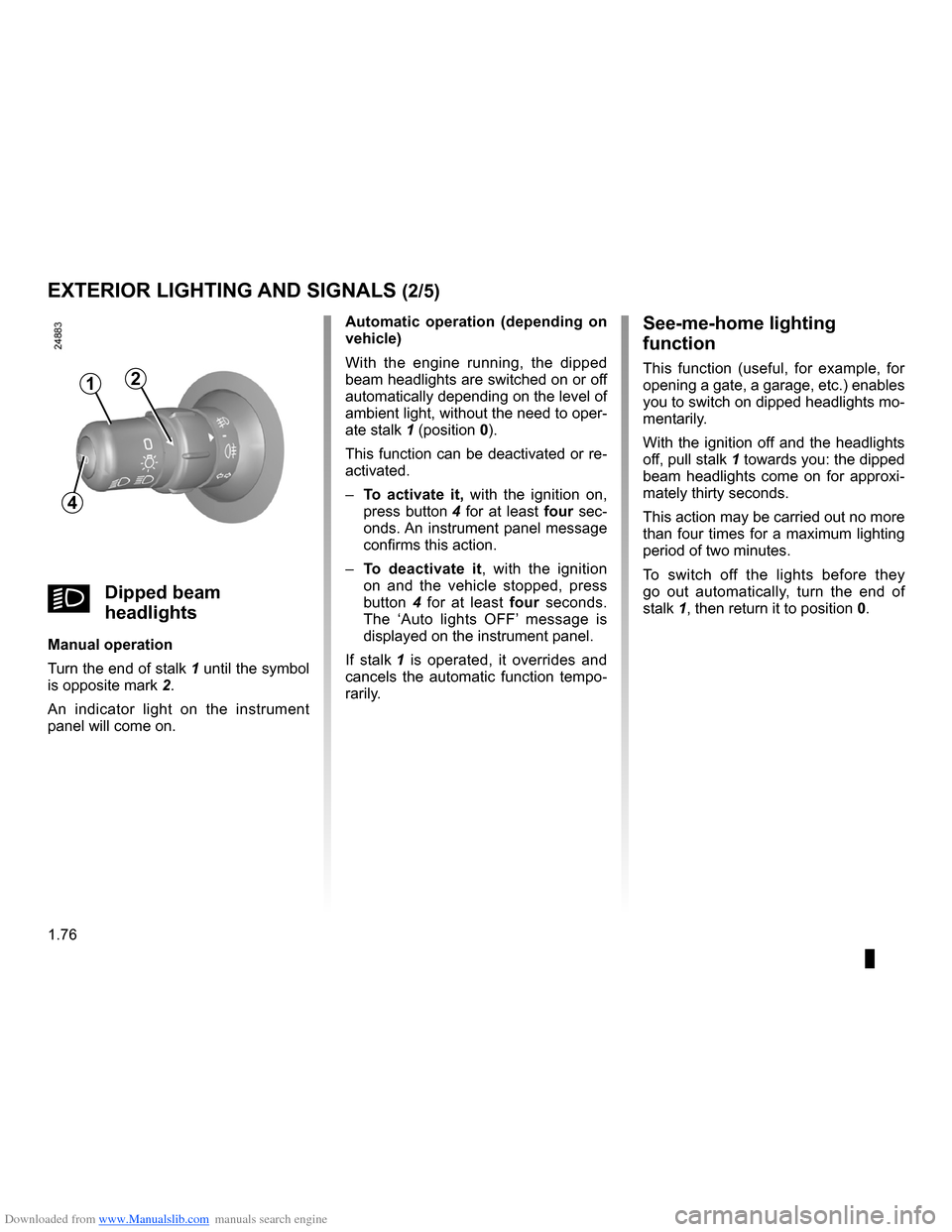
Manual operation
Turn the end of stalk
1 until the symbol
is opposite mark 2.
An indicator light on the instrument panel will come on.
Automatic operation (depending on vehicle)
With the engine running, the dipped beam headlights are switched on or off automatically depending on the level of ambient light, without the need to oper-
ate stalk 1 (position 0).
This function can be deactivated or re- activated.
–
To activate it, with the ignition on,
press button 4 for at least four sec- onds. An instrument panel message confirms this action.
–
To deactivate it, with the ignition on and the vehicle stopped, press button 4 for at least four seconds. The ‘Auto lights OFF’ message is displayed on the instrument panel.
If stalk
1 is operated, it overrides and cancels the automatic function tempo- rarily.
See-me-home lighting
function
This function (useful, for example, for opening a gate, a garage, etc.) enables you to switch on dipped headlights mo- mentarily.
With the ignition off and the headlights
off, pull stalk 1 towards you: the dipped beam headlights come on for approxi- mately thirty seconds.
This action may be carried out no more than four times for a maximum lighting period of two minutes.
To switch off the lights before they go out automatically, turn the end of
stalk 1, then return it to position 0.
4
12
Page 95 of 264
Downloaded from www.Manualslib.com manuals search engine
engine start/stop button ........................(up to the end of the DU)ignition switch .......................................(up to the end of the DU)starting the engine ................................(up to the end of the DU)starting the engine ................................(up to the end of the DU)switching on the vehicle ignition ...........(up to the end of the DU)
2.3
ENG_UD10549_1Contacteur de démarrage : véhicule avec clé / télécommand\
e à radiofréquence (X85 - B85 - C85 - S85 - K85 - Renault)ENG_NU_853-3_BCSK85_Renault_2
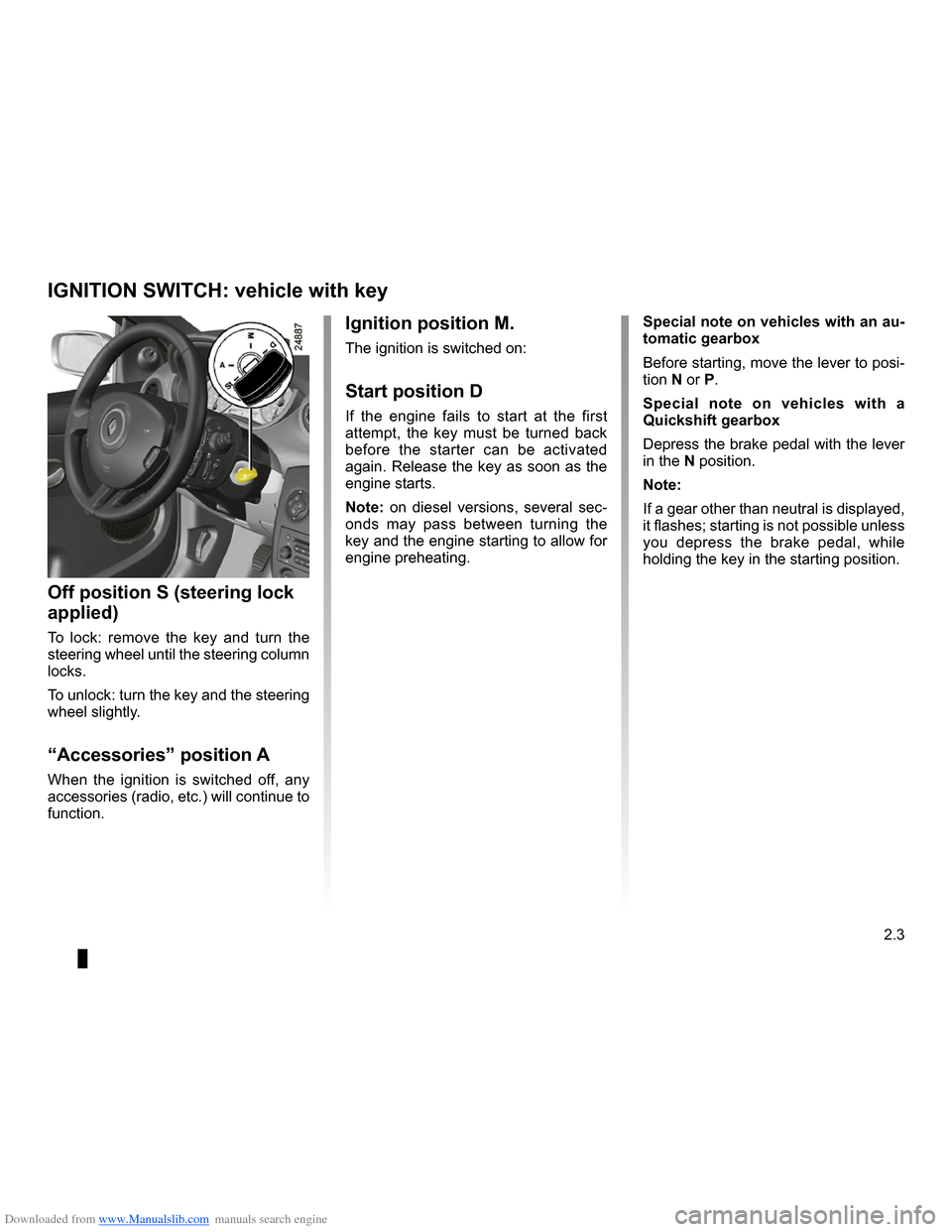
Ignition switch
Special note on vehicles with an au- tomatic gearbox
Before starting, move the lever to posi- tion N or P.
Special note on vehicles with a Quickshift gearbox
Depress the brake pedal with the lever in the N position.
Note:
If a gear other than neutral is displayed, it flashes; starting is not possible unless you depress the brake pedal, while holding the key in the starting position.
Ignition position M.
The ignition is switched on:
Start position D
If the engine fails to start at the first attempt, the key must be turned back before the starter can be activated again. Release the key as soon as the engine starts.
Note: on diesel versions, several sec- onds may pass between turning the
key and the engine starting to allow for engine preheating.
Off position S (steering lock
applied)
To lock: remove the key and turn the steering wheel until the steering column locks.
To unlock: turn the key and the steering wheel slightly.
“Accessories” position A
When the ignition is switched off, any accessories (radio, etc.) will continue to function.
IGNITION SWITCH: vehicle with key