Auto RENAULT CLIO 2009 X85 / 3.G Service Manual
[x] Cancel search | Manufacturer: RENAULT, Model Year: 2009, Model line: CLIO, Model: RENAULT CLIO 2009 X85 / 3.GPages: 264, PDF Size: 15.68 MB
Page 140 of 264
Downloaded from www.Manualslib.com manuals search engine
air conditioning .....................................(up to the end of the DU)heating system .....................................(up to the end of the DU)air conditioning .....................................(up to the end of the DU)heated windscreen ...............................(up to the end of the DU)temperature regulation .........................(up to the end of the DU)ventilation .............................................(up to the end of the DU)
3.8
ENG_UD12579_2Air conditionné automatique (X85 - B85 - C85 - S85 - K85 - Renault)\
ENG_NU_853-3_BCSK85_Renault_3
JauneNoirNoir texte
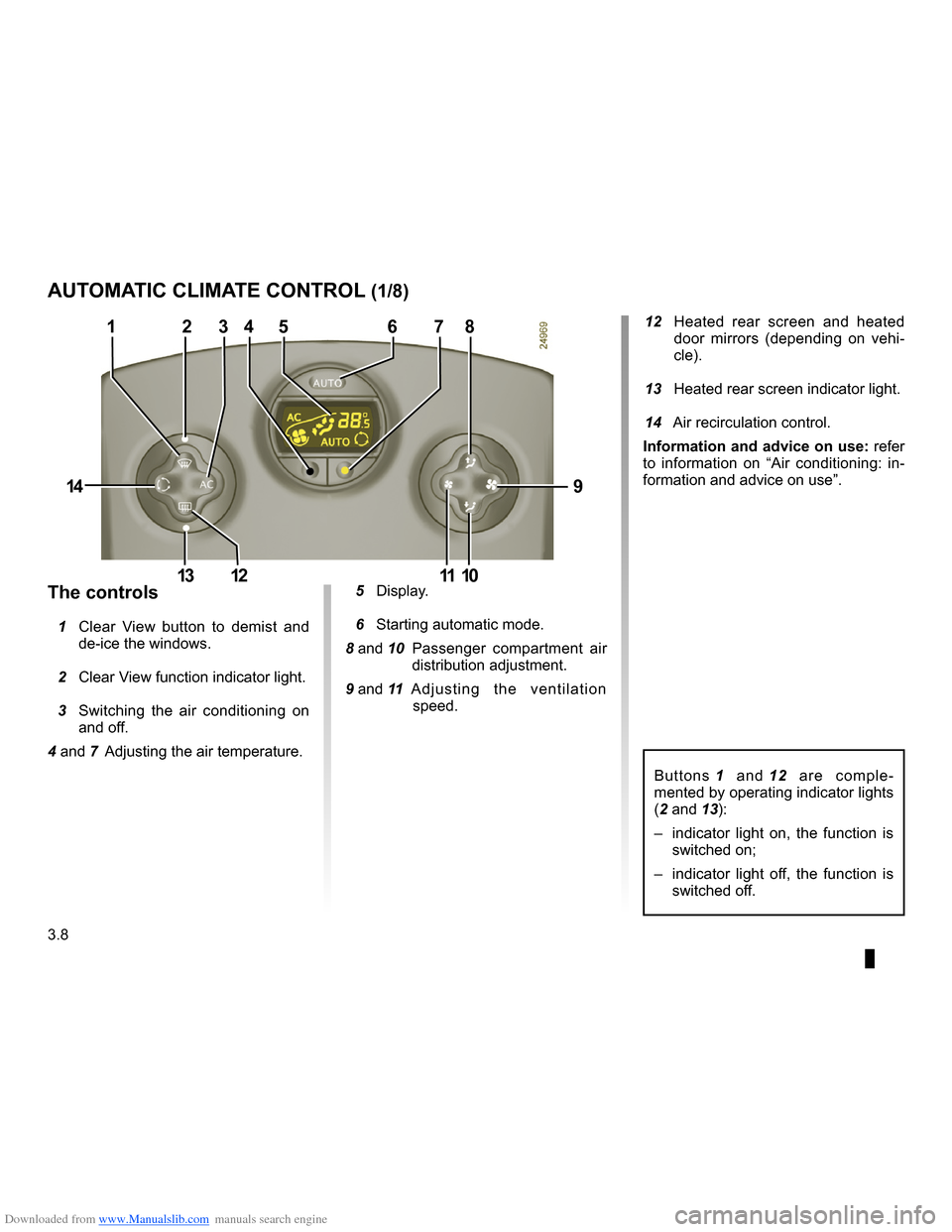
12 Heated rear screen and heated door mirrors (depending on vehi- cle).
13 Heated rear screen indicator light.
14 Air recirculation control.
Information and advice on use: refer to information on “Air conditioning: in- formation and advice on use”.
Buttons 1 and 12 are comple- mented by operating indicator lights (2 and 13):
– indicator light on, the function is
switched on;
– indicator light off, the function is
switched off.
5 Display.
6 Starting automatic mode.
8 and 10 Passenger compartment air distribution adjustment.
9 and 11 A d j u s t i n g t h e v e n t i l a t i o n speed.
The controls
1 Clear View button to demist and de-ice the windows.
2 Clear View function indicator light.
3 Switching the air conditioning on and off.
4 and 7 Adjusting the air temperature.
AUTOMATIC CLIMATE CONTROL (1/8)
12345678
9
10111213
14
Page 141 of 264
\
ENG_NU_853-3_BCSK85_Renault_3
–")
Downloaded from www.Manualslib.com manuals search engine
JauneNoirNoir texte
3.9
ENG_UD12579_2Air conditionné automatique (X85 - B85 - C85 - S85 - K85 - Renault)\
ENG_NU_853-3_BCSK85_Renault_3
– press button 7 to increase the tem- perature;
– press button
4 to decrease the tem- perature.
Note: The maximum and minimum settings of 15°C and 27°C allow the system to produce a minimum or maxi- mum temperature, whatever the ambi- ent conditions.In automatic mode (AUTO indicator light on the display is lit), all heating and air conditioning functions are controlled by the system.
When you modify certain functions the AUTO indicator light goes out. Only the modified function is not controlled by the system.
The automatic heating and air con- ditioning system guarantees comfort in the passenger compartment and good visibility (except in the event of extreme conditions), while optimis- ing consumption.
This is the recommended mode of use.
Ambient temperature :
automatic mode
Press button 6.
Only the temperature and the AUTO symbol are displayed.
Functions managed in automatic mode are not displayed.
AUTOMATIC CLIMATE CONTROL (2/8)
746
Page 142 of 264
\
ENG_NU_853-3_BCSK85_Renault_3
JauneNoirNoir texte
Ad")
Downloaded from www.Manualslib.com manuals search engine
3.10
ENG_UD12579_2Air conditionné automatique (X85 - B85 - C85 - S85 - K85 - Renault)\
ENG_NU_853-3_BCSK85_Renault_3
JauneNoirNoir texte
Adjusting automatic mode
The automatic mode is the system’s normal operating mode (AUTO light on) but you may alter the selections made by the system (air distribution, etc.).
These options are explained on the fol- lowing pages.
AUTOMATIC CLIMATE CONTROL (3/8)
This is the recommended mode of use: the automatic heating and air conditioning system guarantees comfort (except in the event of ex- treme conditions) in the passenger compartment and good visibility while optimising consumption.
Return to automatic mode as
soon as possible.
Ambient temperature:
automatic mode (continued)
Operation
To reach and keep the chosen comfort level and to maintain good visibility, the system controls:
– ventilation speed;
– air distribution;
– air recirculation management;
– air conditioning start/stop;
– the air temperature.
The displayed temperature values show a comfort level.
When starting the engine, increasing or decreasing the value displayed will not allow the comfort level to be reached any more quickly. The system will always optimise the tem- perature increase or decrease (the ventilation system does not start in- stantly at maximum speed: it gradu- ally increases). This may take several minutes.
Generally speaking, unless there is a particular reason not to, the dashboard air vents should remain open.
Page 143 of 264
\
ENG_NU_853-3_BCSK85_Renault_3
GT")
Downloaded from www.Manualslib.com manuals search engine
JauneNoirNoir texte
3.11
ENG_UD12579_2Air conditionné automatique (X85 - B85 - C85 - S85 - K85 - Renault)\
ENG_NU_853-3_BCSK85_Renault_3
GThe air flow is directed to- wards the dashboard vents and the footwells.
FThe air flow is directed mainly towards the footwells.
The manual air distribution option causes the AUTO (automatic mode) operating tell-tale light on the dis-
play 5 to go out, but only air distri- bution is no longer controlled auto- matically by the system.
Press button
6 to return to auto- matic mode.
õAll the air flow is directed to the demisting vents for the windscreen and the side windows.
÷The air flow is directed to the windscreen and side window demisting vents, and the passenger footwells.
ôAll the air flow is directed to the dashboard vents.
Distribution of air in the
passenger compartment
There are five possible combinations for air distribution, which may be se-
lected by pressing buttons 8 and 10 re-
peatedly. The arrows on display 5 indi- cate the setting selected:
AUTOMATIC CLIMATE CONTROL (4/8)
568
10
Page 144 of 264
\
ENG_NU_853-3_BCSK85_Renault_3
JauneNoirNoir texte
No")
Downloaded from www.Manualslib.com manuals search engine
3.12
ENG_UD12579_2Air conditionné automatique (X85 - B85 - C85 - S85 - K85 - Renault)\
ENG_NU_853-3_BCSK85_Renault_3
JauneNoirNoir texte
Note: the Clear View function auto- matically activates the air conditioning system (indicator light on). Press but-
ton 6 to return to automatic mode.
AUTOMATIC CLIMATE CONTROL (5/8)
In automatic mode, in cold weather, the ventilation will not start imme- diately at maximum power but will increase progressively until the engine temperature is warm enough to heat the passenger compartment air. This may take from a few sec- onds to several minutes.
Varying the ventilation speed
In automatic mode, the system uses the most suitable amount of air to reach and maintain the desired comfort level.
Automatic mode is switched off by
pressing buttons 9 and 11.
These buttons allow you to increase or decrease ventilation speed. If you set it to zero, the system switches off.
Switching air conditioning on
or off
In automatic mode, the system switches the air conditioning system on or off, depending on the climate conditions.
Exit automatic mode by pressing
button 3: the AUTO warning light on
display 5 goes out.
Button
3 activates (display warning light comes on) or stops (warning light goes out) the air conditioning function.
356
9
11
Page 145 of 264
Downloaded from www.Manualslib.com manuals search engine
demistingrear screen .......................................................(current page)
JauneNoirNoir texte
3.13
ENG_UD12579_2Air conditionné automatique (X85 - B85 - C85 - S85 - K85 - Renault)\
ENG_NU_853-3_BCSK85_Renault_3
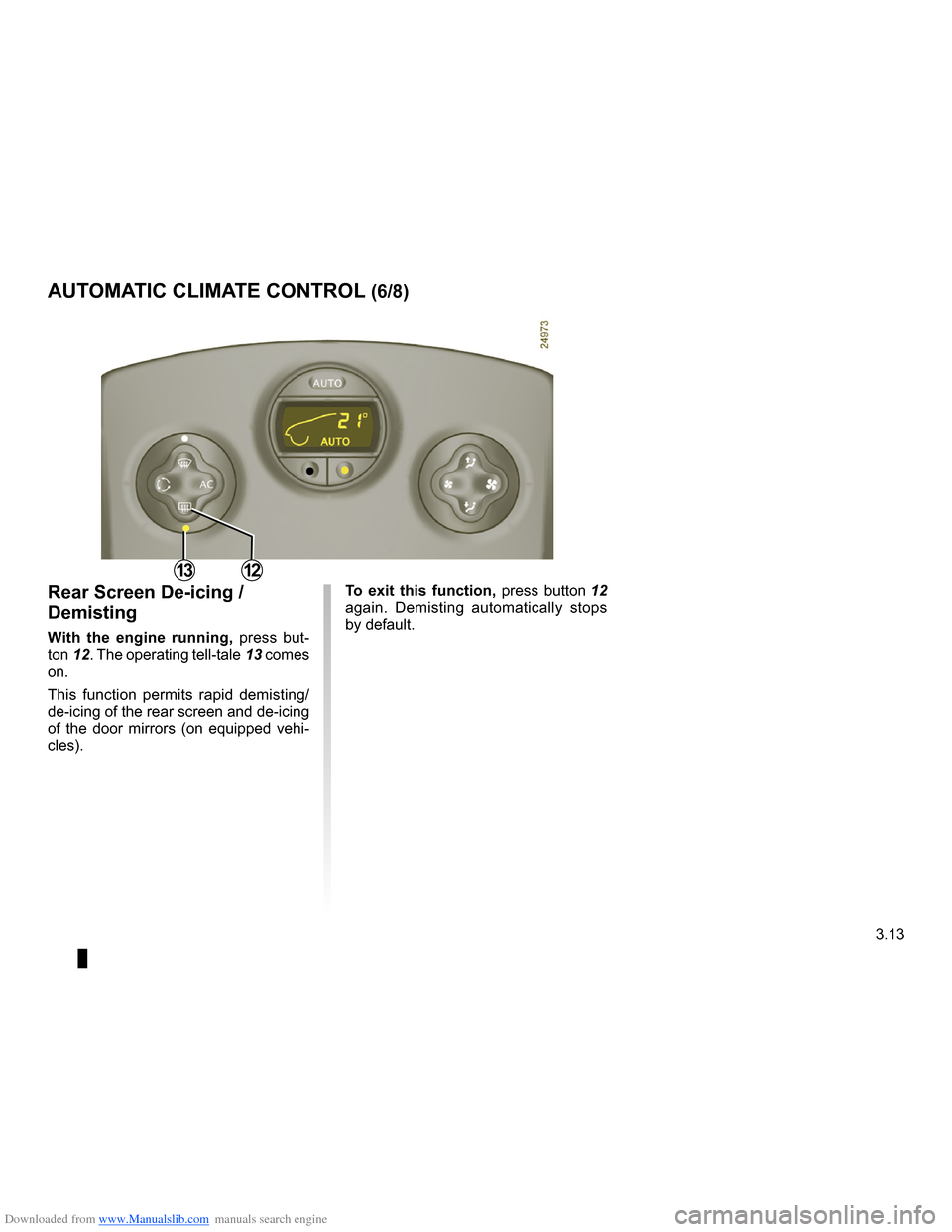
To exit this function, press button 12 again. Demisting automatically stops by default.
Rear Screen De-icing /
Demisting
With the engine running, press but-
ton 12 . The operating tell-tale 13 comes on.
This function permits rapid demisting/ de-icing of the rear screen and de-icing of the door mirrors (on equipped vehi- cles).
AUTOMATIC CLIMATE CONTROL (6/8)
1312
Page 146 of 264
Downloaded from www.Manualslib.com manuals search engine
demistingwindscreen .......................................................(current page)
3.14
ENG_UD12579_2Air conditionné automatique (X85 - B85 - C85 - S85 - K85 - Renault)\
ENG_NU_853-3_BCSK85_Renault_3
JauneNoirNoir texte
AUTOMATIC CLIMATE CONTROL (7/8)
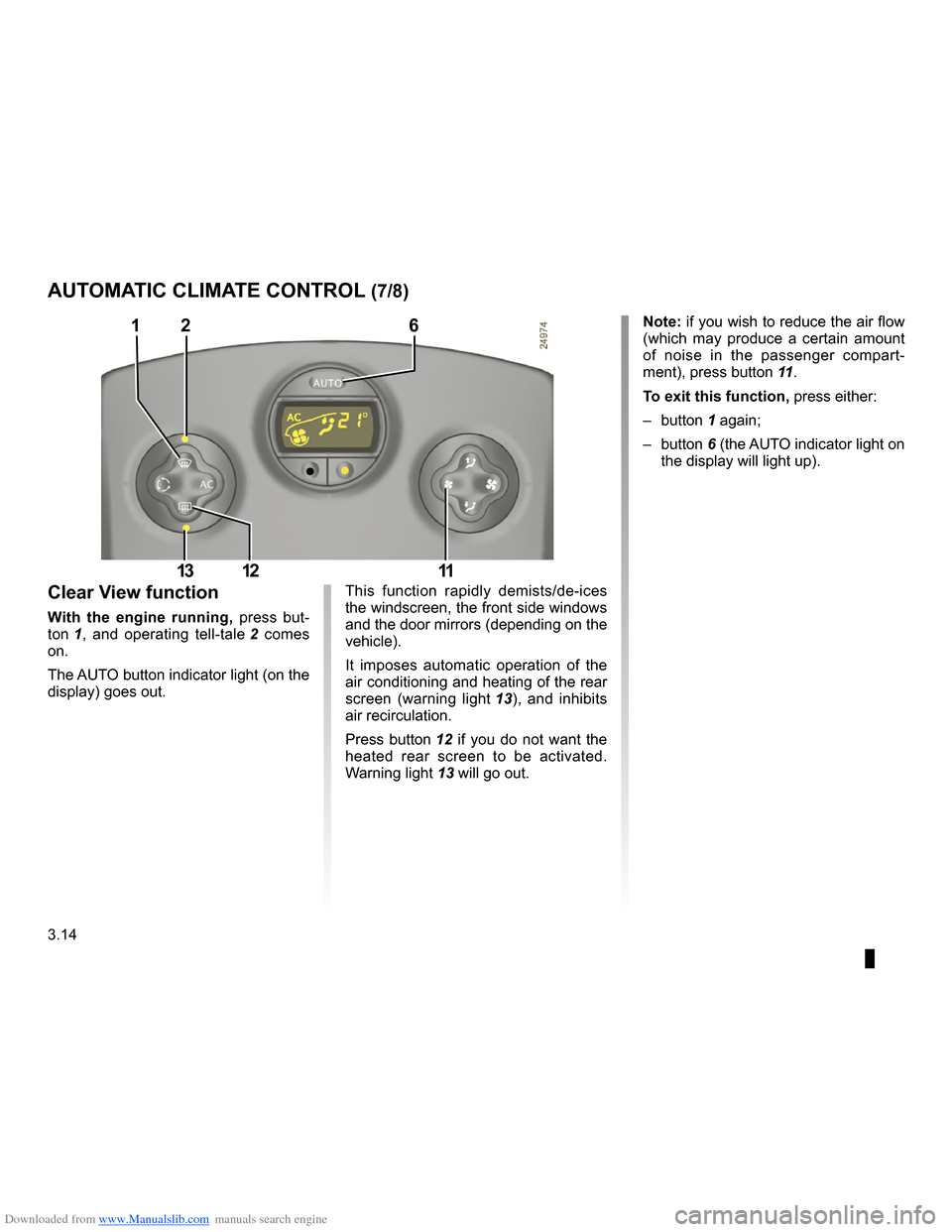
Note: if you wish to reduce the air flow (which may produce a certain amount of noise in the passenger compart-
ment), press button 11.
To exit this function, press either:
– button
1 again;
– button
6 (the AUTO indicator light on the display will light up).
This function rapidly demists/de-ices the windscreen, the front side windows and the door mirrors (depending on the vehicle).
It imposes automatic operation of the air conditioning and heating of the rear
screen (warning light 13), and inhibits air recirculation.
Press button
12 if you do not want the heated rear screen to be activated.
Warning light 13 will go out.
Clear View function
With the engine running, press but-
ton 1, and operating tell-tale 2 comes on.
The AUTO button indicator light (on the display) goes out.
126
111213
Page 147 of 264
\
ENG_NU_853-3_BCSK85_Renault_3
Pr")
Downloaded from www.Manualslib.com manuals search engine
JauneNoirNoir texte
3.15
ENG_UD12579_2Air conditionné automatique (X85 - B85 - C85 - S85 - K85 - Renault)\
ENG_NU_853-3_BCSK85_Renault_3
Prolonged use of the air recirculation mode may cause the windows to mist up or lead to odours, as the air is not renewed.
We therefore advise you to return to normal mode (external air) by pressing
button 14 again as soon as the air recir- culation function is no longer required, or return to automatic recirculation by
pressing the AUTO button.
Air recirculation mode
Pressing button 14 activates air recir- culation (the symbol lights up on the display).
During recirculation, air is taken from the passenger compartment and is re- cycled, with no air being taken from out- side the vehicle.
Air recirculation allows the external at- mosphere to be cut off (when driving in polluted areas, etc.).
AUTOMATIC CLIMATE CONTROL (8/8)
14
Page 176 of 264
Downloaded from www.Manualslib.com manuals search engine
bonnet...................................................(up to the end of the DU)
4.2
ENG_UD14669_3Capot moteur (X85 - B85 - C85 - S85 - K85 - Renault)ENG_NU_853-3_BCSK85_Renault_4
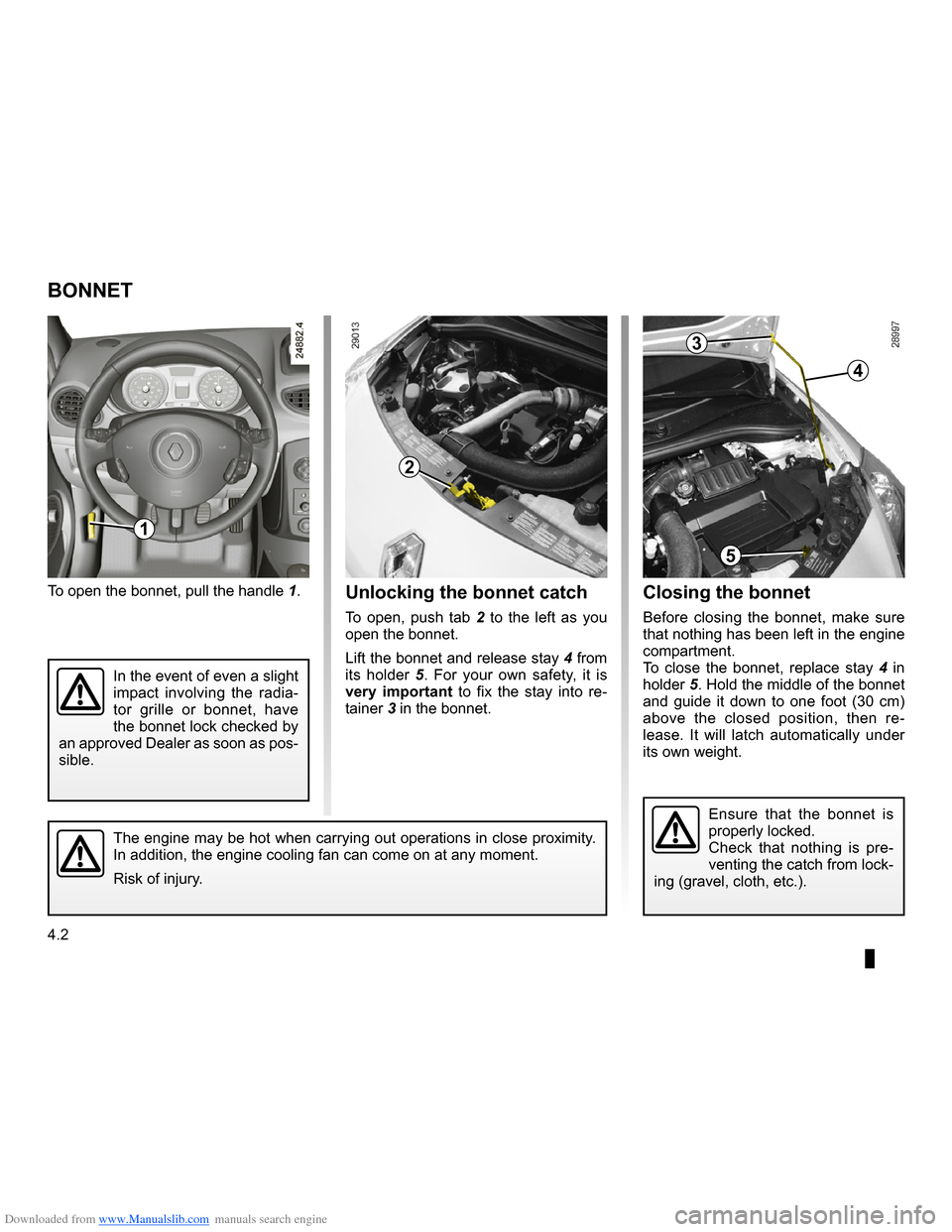
Closing the bonnet
Before closing the bonnet, make sure that nothing has been left in the engine compartment.To close the bonnet, replace stay 4 in holder 5. Hold the middle of the bonnet and guide it down to one foot (30 cm) above the closed position, then re- lease. It will latch automatically under its own weight.
Bonnet
To open the bonnet, pull the handle 1.
BONNET
1
2
The engine may be hot when carrying out operations in close proximity. In addition, the engine cooling fan can come on at any moment.
Risk of injury.
3
4
5
Unlocking the bonnet catch
To open, push tab 2 to the left as you open the bonnet.
Lift the bonnet and release stay 4 from its holder 5. For your own safety, it is very important to fix the stay into re- tainer 3 in the bonnet.
In the event of even a slight impact involving the radia- tor grille or bonnet, have the bonnet lock checked by an approved Dealer as soon as pos- sible.
2
Ensure that the bonnet is properly locked.Check that nothing is pre- venting the catch from lock- ing (gravel, cloth, etc.).
Page 199 of 264
Downloaded from www.Manualslib.com manuals search engine
changing a wheel..................................(up to the end of the DU)lifting the vehiclechanging a wheel ............................(up to the end of the DU)
5.11
ENG_UD10600_1Changement de roue (X85 - B85 - C85 - S85 - K85 - Renault)ENG_NU_853-3_BCSK85_Renault_5
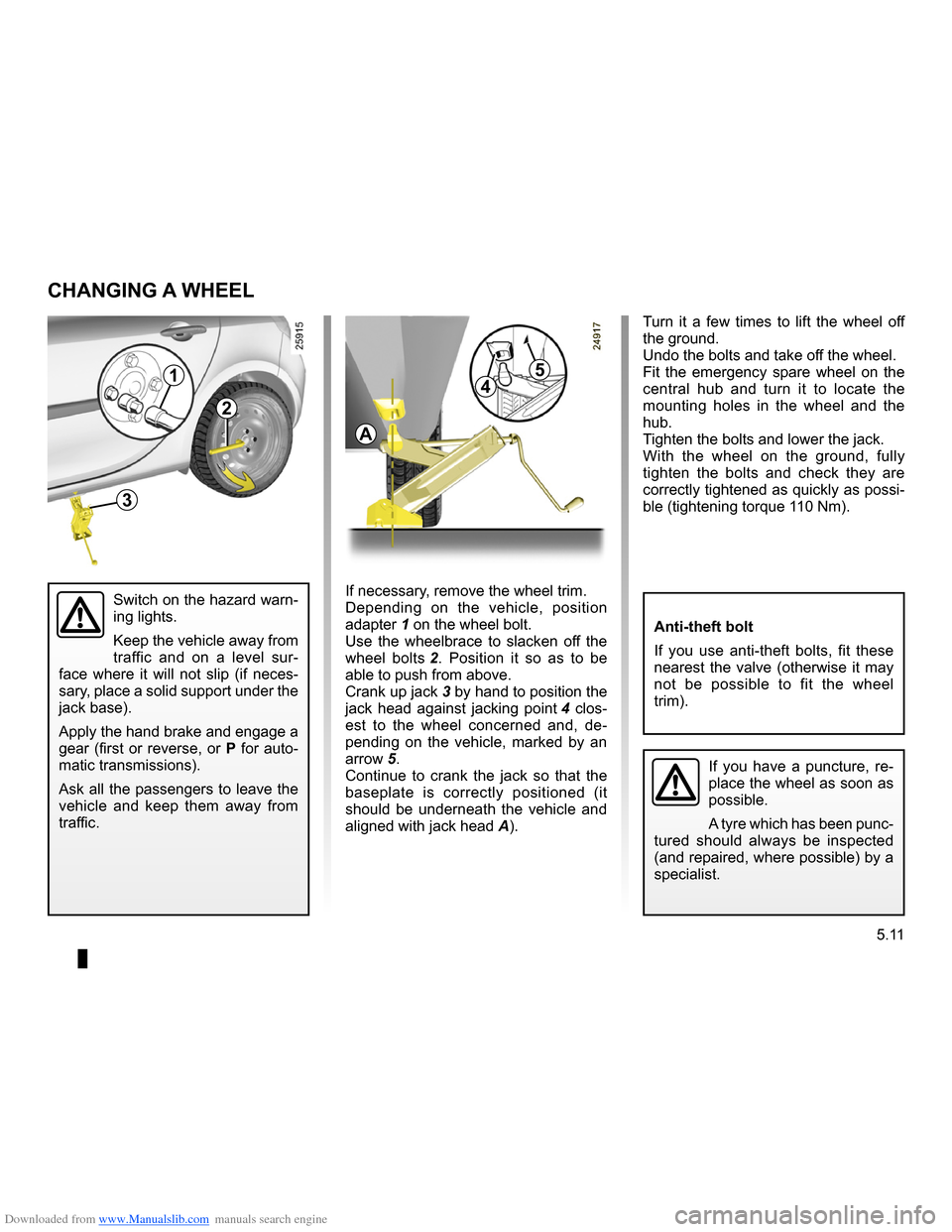
Turn it a few times to lift the wheel off the ground.Undo the bolts and take off the wheel.Fit the emergency spare wheel on the central hub and turn it to locate the mounting holes in the wheel and the hub.Tighten the bolts and lower the jack.With the wheel on the ground, fully tighten the bolts and check they are correctly tightened as quickly as possi- ble (tightening torque 110 Nm).
Changing a wheel
If you have a puncture, re- place the wheel as soon as possible.
A tyre which has been punc- tured should always be inspected (and repaired, where possible) by a specialist.
Switch on the hazard warn- ing lights.
Keep the vehicle away from traffic and on a level sur- face where it will not slip (if neces- sary, place a solid support under the jack base).
Apply the hand brake and engage a gear (first or reverse, or P for auto- matic transmissions).
Ask all the passengers to leave the vehicle and keep them away from traffic.
CHANGING A WHEEL
A
5
4
3
2
1
Anti-theft bolt
If you use anti-theft bolts, fit these nearest the valve (otherwise it may not be possible to fit the wheel trim).
If necessary, remove the wheel trim.Depending on the vehicle, position adapter 1 on the wheel bolt.Use the wheelbrace to slacken off the
wheel bolts 2. Position it so as to be able to push from above.
Crank up jack 3 by hand to position the
jack head against jacking point 4 clos- est to the wheel concerned and, de- pending on the vehicle, marked by an
arrow 5.Continue to crank the jack so that the baseplate is correctly positioned (it should be underneath the vehicle and
aligned with jack head A).