tailgate RENAULT CLIO 2012 X85 / 3.G User Guide
[x] Cancel search | Manufacturer: RENAULT, Model Year: 2012, Model line: CLIO, Model: RENAULT CLIO 2012 X85 / 3.GPages: 268, PDF Size: 8.73 MB
Page 21 of 268
Downloaded from www.Manualslib.com manuals search engine central door locking .............................. (up to the end of the DU)
doors/tailgate ........................................ (up to the end of the DU)
locking the doors .................................. (up to the end of the DU)
unlocking the doors .............................. (up to the end of the DU)
closing the doors .................................. (up to the end of the DU)
opening the doors ................................. (up to the end of the DU)
1.15
ENG_UD19715_3
Verrouillage / Déverrouillage des portes (X85 - B85 - C85 - S85 - K85\
- Renault)
ENG_NU_853-7_BCSK85_Renault_1
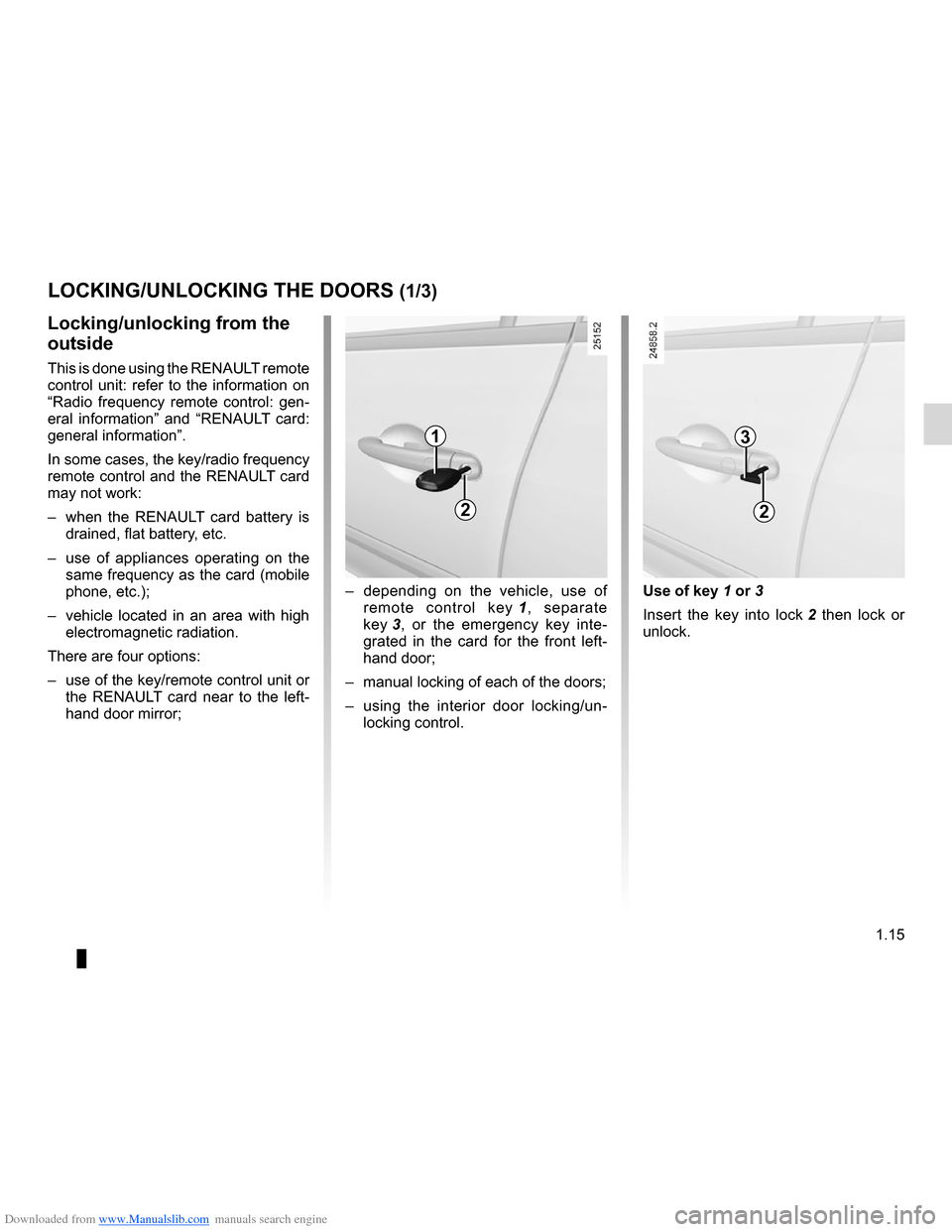
Use of key 1 or 3
Insert the key into lock 2 then lock or
unlock.
–
depending on the vehicle, use of
remote control key 1 , separate
key 3 , or the emergency key inte -
grated in the card for the front left-
hand door;
– manual locking of each of the doors;
– using the interior door locking/un -
locking control.
Locking/unlocking from the
outside
This is done using the RENAULT remote
control unit: refer to the information on
“Radio frequency remote control: gen -
eral information” and “RENAULT card:
general information”.
In some cases, the key/radio frequency
remote control and the RENAULT card
may not work:
– when the RENAULT card battery is
drained, flat battery, etc.
– use of appliances operating on the
same frequency as the card (mobile
phone, etc.);
– vehicle located in an area with high
electromagnetic radiation.
There are four options:
– use of the key/remote control unit or
the RENAULT card near to the left -
hand door mirror;
LOCKING/UNLOCKING THE DOORS (1/3)
1
2
3
2
Page 23 of 268

ENG_NU_853-7_BCSK85_")
Downloaded from www.Manualslib.com manuals search engine JauneNoirNoir texte
1.17
ENG_UD19715_3
Verrouillage / Déverrouillage des portes (X85 - B85 - C85 - S85 - K85\
- Renault)
ENG_NU_853-7_BCSK85_Renault_1
Driver’s responsibility
Never leave your vehicle
with the key or RENAULT
card inside.
If you decide to keep the doors
locked whilst driving, remember that
it may be more difficult for those as-
sisting you to gain access to your
vehicle in the event of an emer -
gency.
To lock the vehicle leaving a door
open (e.g. when transporting some-
thing in the luggage compartment
which prevents it from closing),
or when the vehicle is located in a
zone where there is a high level of
electromagnetic radiation, or if the
key or RENAULT card fails: with the
ignition off, press switch 7 for more
than five seconds.
Doors and tailgate status
indicator
When the ignition is on, the indicator
light integrated in switch 7 informs you
of the status of the doors and tailgate:
– indicator light on, the doors and tail-
gate are locked;
– light off, the doors and tailgate are
unlocked.
When the ignition is off, the indicator
light remains lit and then goes out when
you lock the doors.
Using the door locking/unlocking in-
terior control.
With the ignition off and a front door
open, press switch 7 for more than five
seconds.
Make sure you have your key or
RENAULT card with you before leaving
your vehicle.
When the door is closed, all the doors
and the tailgate will be locked.
Unlocking from outside the vehicle is
only possible with the key, RENAULT
card or emergency key.
Locking/unlocking from the
inside: switch
7
This simultaneously controls the open -
ing elements (doors and tailgate) and
the fuel filler flap.
If a door is open or not properly closed,
the doors lock and then quickly unlock.
LOCKING/UNLOCKING THE DOORS (3/3)
7
Page 24 of 268
Downloaded from www.Manualslib.com manuals search engine central door locking .............................. (up to the end of the DU)
doors/tailgate ........................................ (up to the end of the DU)
locking the doors .................................. (up to the end of the DU)
RENAULT ANTI-INTRUDER DEVICE (RAID) .......(current page)
closing the doors ................................................... (current page)
1.18
ENG_UD19716_2
Condamnation automatique des ouvrants en roulage (X85 - B85 - C85 - S85\
- K85 - Renault)
ENG_NU_853-7_BCSK85_Renault_1
Operating principle
After the vehicle is started, the system
automatically locks the doors once your
speed reaches approximately 5 mph
(7 km/h).
The door can be unlocked:
– by pressing the door unlocking
button 1.
– when stationary, by opening a front
door.
Note: if a door is opened, it will auto-
matically lock again when the vehicle
reaches a speed of 5 mph (7 km/h).
Operating faults
If you find an operating fault (no auto -
matic locking, the indicator light incor -
porated in button 1 does not light up
when trying to lock the doors and tail -
gate, etc.), firstly check that the doors
and tailgate are properly closed. If they
are closed correctly, contact an ap -
proved Dealer.
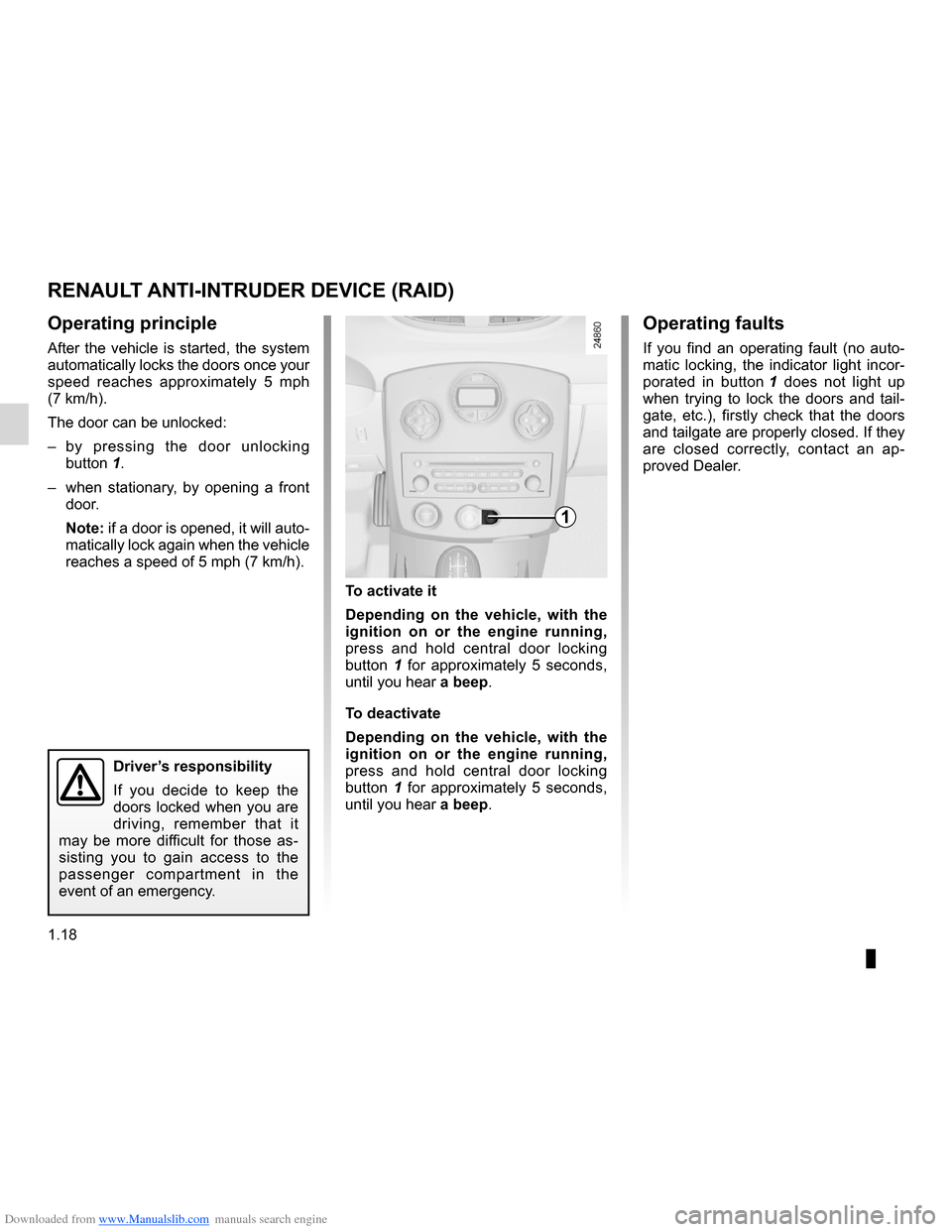
To activate it
Depending on the vehicle, with the
ignition on or the engine running,
press and hold central door locking
button 1 for approximately 5 seconds,
until you hear a beep.
To deactivate
Depending on the vehicle, with the
ignition on or the engine running,
press and hold central door locking
button 1 for approximately 5 seconds,
until you hear a beep.
Automatic locking when driving
RENAULT ANTI-INTRUDER DEVICE (RAID)
1
Driver’s responsibility
If you decide to keep the
doors locked when you are
driving, remember that it
may be more difficult for those as -
sisting you to gain access to the
passenger compartment in the
event of an emergency.
Page 68 of 268
Downloaded from www.Manualslib.com manuals search engine 1.62
ENG_UD10345_1
Tableau de bord : afficheurs et indicateurs (X85 - B85 - C85 - S85 - K85 - Renault)
ENG_NU_853-7_BCSK85_Renault_1
INSTRUMENT PANEL: displays and indicators (3/3)
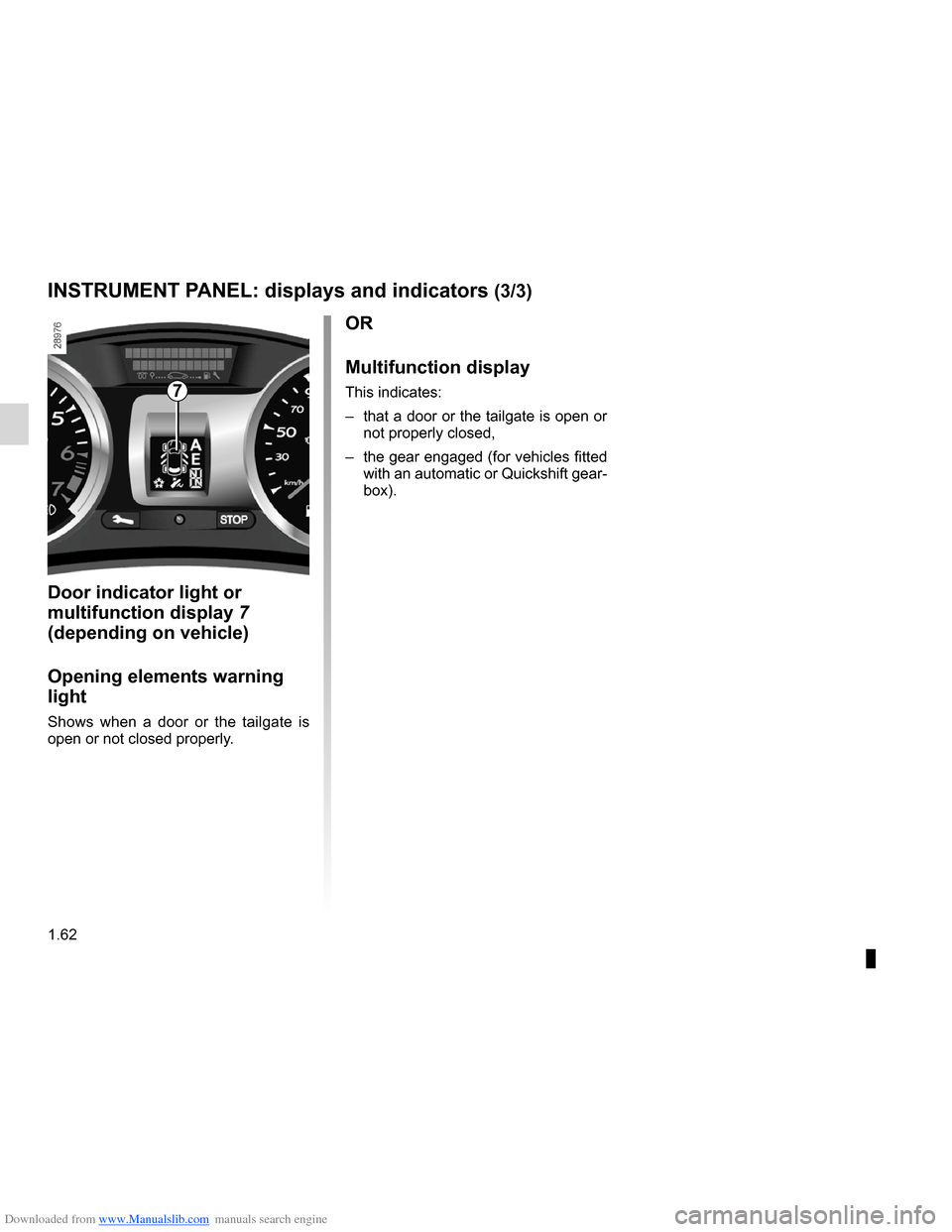
Door indicator light or
multifunction display 7
(depending on vehicle)
Opening elements warning
light
Shows when a door or the tailgate is
open or not closed properly.
OR
Multifunction display
This indicates:
– that a door or the tailgate is open or
not properly closed,
– the gear engaged (for vehicles fitted
with an automatic or Quickshift gear-
box).7
Page 76 of 268

ENG_NU_853-7_BCSK85_Renault_1
TRIP C")
Downloaded from www.Manualslib.com manuals search engine 1.70
ENG_UD24931_1
Ordinateur de bord : messages d’information (X85 - B85 - C85 - S85 -\
K85 - Renault)
ENG_NU_853-7_BCSK85_Renault_1
TRIP COMPUTER AND WARNING SYSTEM: information messages
These can help in the vehicle starting phase, or give information about \
a selection or a driving status.
Examples of information messages are given in the following pages.
Examples of messages Interpretation of messages
“BOOT OPEN ”Indicates that the tailgate has been left open.
“OIL LEVEL OK” Indicates that the oil level is correct when the ignition is switched on\
.
“AUTO LIGHTS DE- ACTIVATED” Indicates that the automatic lights function is deactivated.
Page 90 of 268
\
ENG_NU_853-7_BCSK85_Renault_1
Before any action")
Downloaded from www.Manualslib.com manuals search engine 1.84
ENG_UD19811_2
Essuie-vitre / lave-vitre avant (X85 - B85 - C85 - S85 - K85 - Renault)\
ENG_NU_853-7_BCSK85_Renault_1
Before any action involving
the windscreen (washing
the vehicle, de-icing, clean -
ing the windscreen, etc.)
return stalk 1 to position A (park).
Risk of injury and/or damage.
Windscreen washer,
headlight washers
(depending on vehicle)
With the ignition on, pull stalk 1 to -
wards you.
– Headlights off
A short press triggers one sweep
cycle of the wiper.
A longer press triggers three sweeps
followed by a final sweep after sev-
eral seconds.
– Headlights on
The headlight washers will be acti -
vated at the same time.
WINDSCREEN WASH/WIPE (2/2)
A
B
C
D
11In freezing or snowy weather, ensure
they are not stuck to the windscreen
(including the central area located
behind the interior rear-view mirror)
and the rear screen before starting
the wipers (risk of motor overheat -
ing).
Check the condition of the wiper
blades. You are responsible for their
service life:
– they must remain clean: clean
the blades, windscreen and
rear screen regularly with soapy
water;
– do not use them when the wind-
screen or rear screen are dry;
– free them from the windscreen or
rear screen when they have not
been used for a long time.
In all cases, replace them as soon
as they begin to lose efficiency: ap-
proximately once a year.
Before using the rear wiper, check
that no object obstructs the travel of
the blade.
Do not use the wiper arm to open or
close the tailgate.
Page 91 of 268
Downloaded from www.Manualslib.com manuals search engine wipers ................................................... (up to the end of the DU)
windscreen washer ............................... (up to the end of the DU)
1.85
ENG_UD10544_1
Essuie-vitre / Lave-vitre arrière (X85 - B85 - C85 - S85 - K85 - Ren\
ault)
ENG_NU_853-7_BCSK85_Renault_1
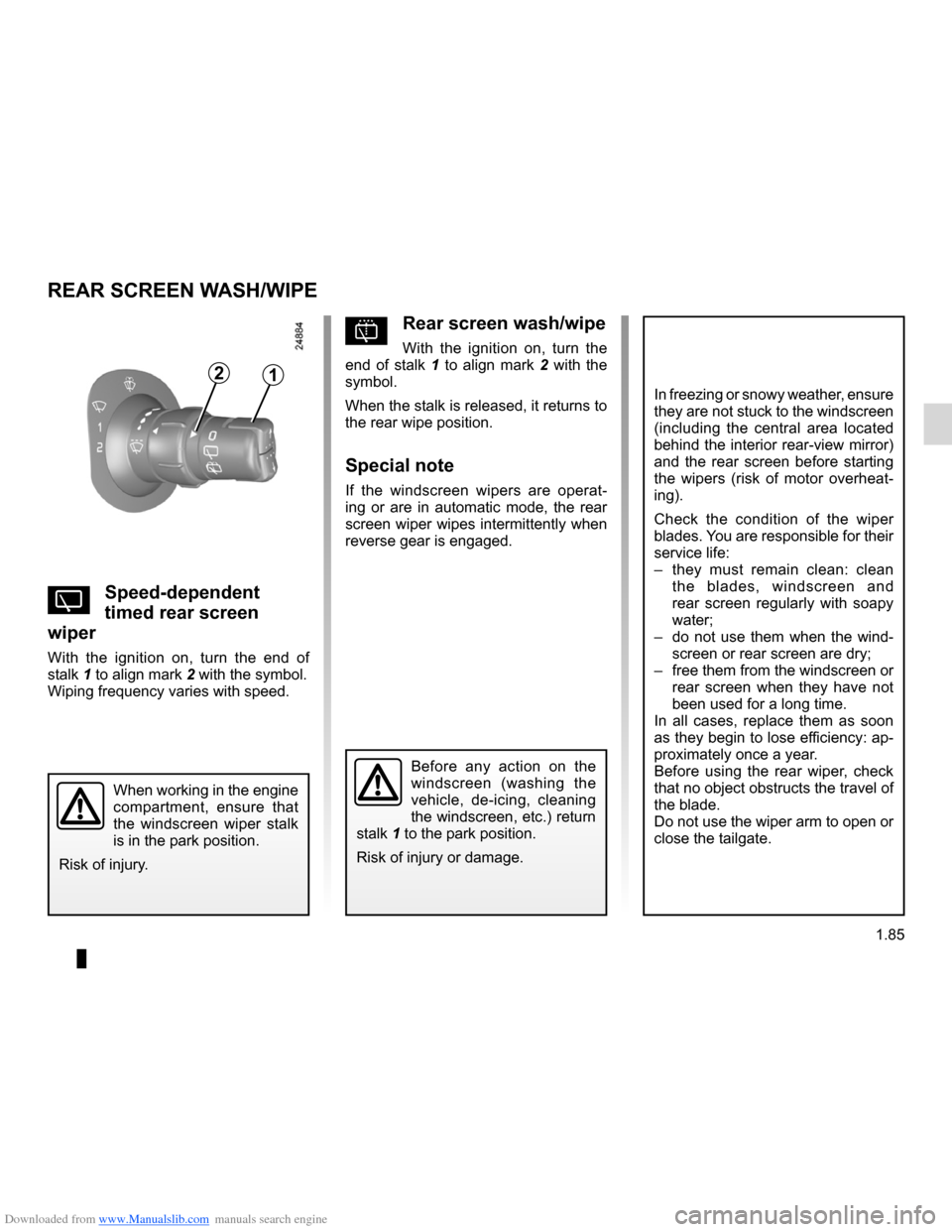
pRear screen wash/wipe
With the ignition on, turn the
end of stalk 1 to align mark 2 with the
symbol.
When the stalk is released, it returns to
the rear wipe position.
Special note
If the windscreen wipers are operat -
ing or are in automatic mode, the rear
screen wiper wipes intermittently when
reverse gear is engaged.
YSpeed-dependent
timed rear screen
wiper
With the ignition on, turn the end of
stalk 1 to align mark 2 with the symbol.
Wiping frequency varies with speed.
REAR SCREEN WASH/WIPE
12
In freezing or snowy weather, ensure
they are not stuck to the windscreen
(including the central area located
behind the interior rear-view mirror)
and the rear screen before starting
the wipers (risk of motor overheat -
ing).
Check the condition of the wiper
blades. You are responsible for their
service life:
– they must remain clean: clean
the blades, windscreen and
rear screen regularly with soapy
water;
– do not use them when the wind -
screen or rear screen are dry;
– free them from the windscreen or
rear screen when they have not
been used for a long time.
In all cases, replace them as soon
as they begin to lose efficiency: ap-
proximately once a year.
Before using the rear wiper, check
that no object obstructs the travel of
the blade.
Do not use the wiper arm to open or
close the tailgate.
Before any action on the
windscreen (washing the
vehicle, de-icing, cleaning
the windscreen, etc.) return
stalk 1 to the park position.
Risk of injury or damage.
When working in the engine
compartment, ensure that
the windscreen wiper stalk
is in the park position.
Risk of injury.
Page 101 of 268
Downloaded from www.Manualslib.com manuals search engine switching on the vehicle ignition ............................ (current page)
JauneNoirNoir texte
2.7
ENG_UD10551_1
Démarrage moteur : véhicule avec carte Renault (X85 - B85 - C85 -\
S85 - K85 - Renault)
ENG_NU_853-7_BCSK85_Renault_2
STARTING THE ENGINE: vehicle with RENAULT CARD (3/3)
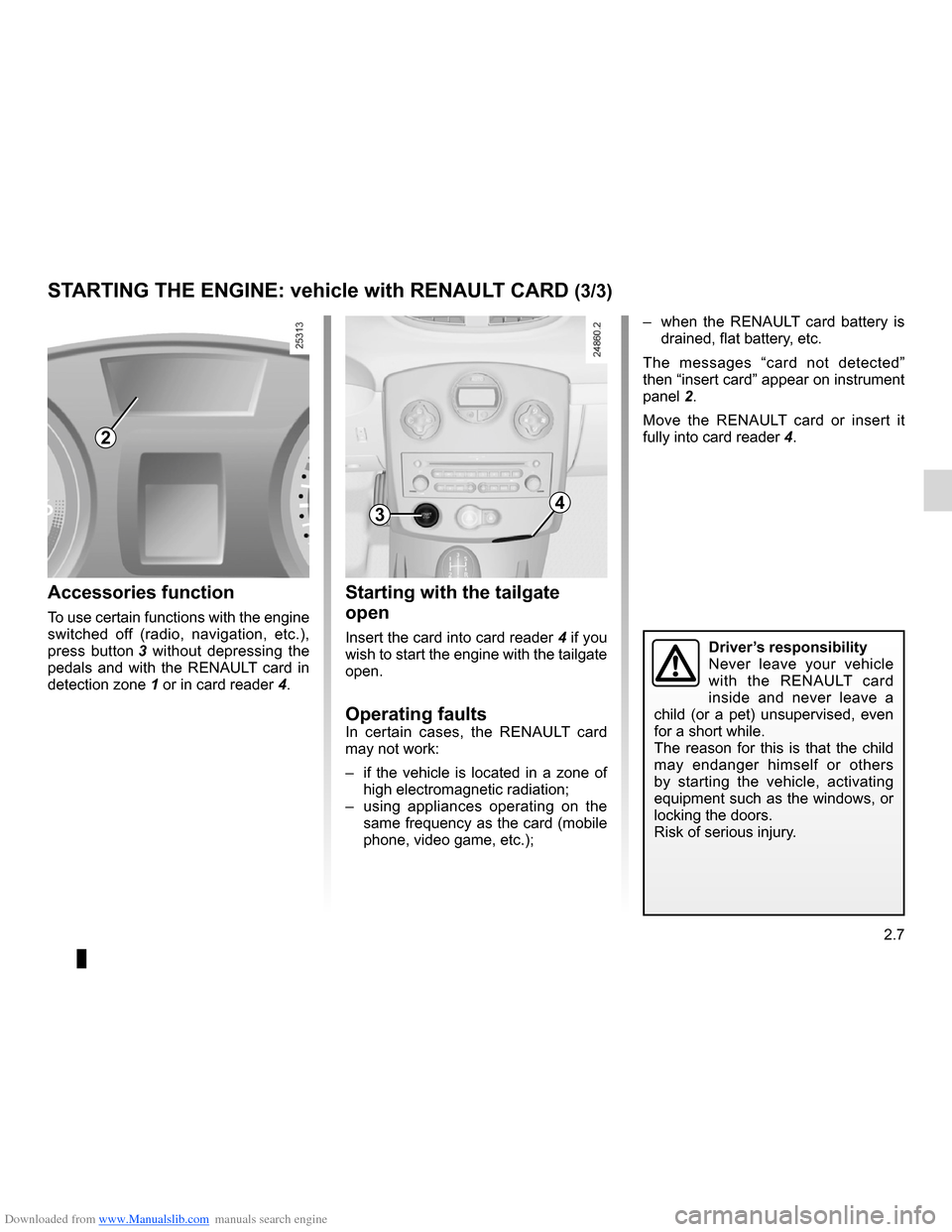
– when the RENAULT card battery is
drained, flat battery, etc.
The messages “card not detected”
then “insert card” appear on instrument
panel 2.
Move the RENAULT card or insert it
fully into card reader 4.
Starting with the tailgate
open
Insert the card into card reader 4 if you
wish to start the engine with the tailgate
open.
Operating faultsIn certain cases, the RENAULT card
may not work:
– if the vehicle is located in a zone of
high electromagnetic radiation;
– using appliances operating on the
same frequency as the card (mobile
phone, video game, etc.);
Accessories function
To use certain functions with the engine
switched off (radio, navigation, etc.),
press button 3 without depressing the
pedals and with the RENAULT card in
detection zone 1 or in card reader 4.
2
34
Driver’s responsibility
Never leave your vehicle
with the RENAULT card
inside and never leave a
child (or a pet) unsupervised, even
for a short while.
The reason for this is that the child
may endanger himself or others
by starting the vehicle, activating
equipment such as the windows, or
locking the doors.
Risk of serious injury.
Page 157 of 268
Downloaded from www.Manualslib.com manuals search engine lighting:interior ............................................. (up to the end of the DU)
courtesy light ........................................ (up to the end of the DU)
map reading lights ................................ (up to the end of the DU)
3.23
ENG_UD10578_1
Eclairage intérieur (X85 - B85 - C85 - S85 - K85 - Renault)
ENG_NU_853-7_BCSK85_Renault_3
Interior lighting
Unlocking and opening the doors or
tailgate switches on the timed cour-
tesy lights and lights.
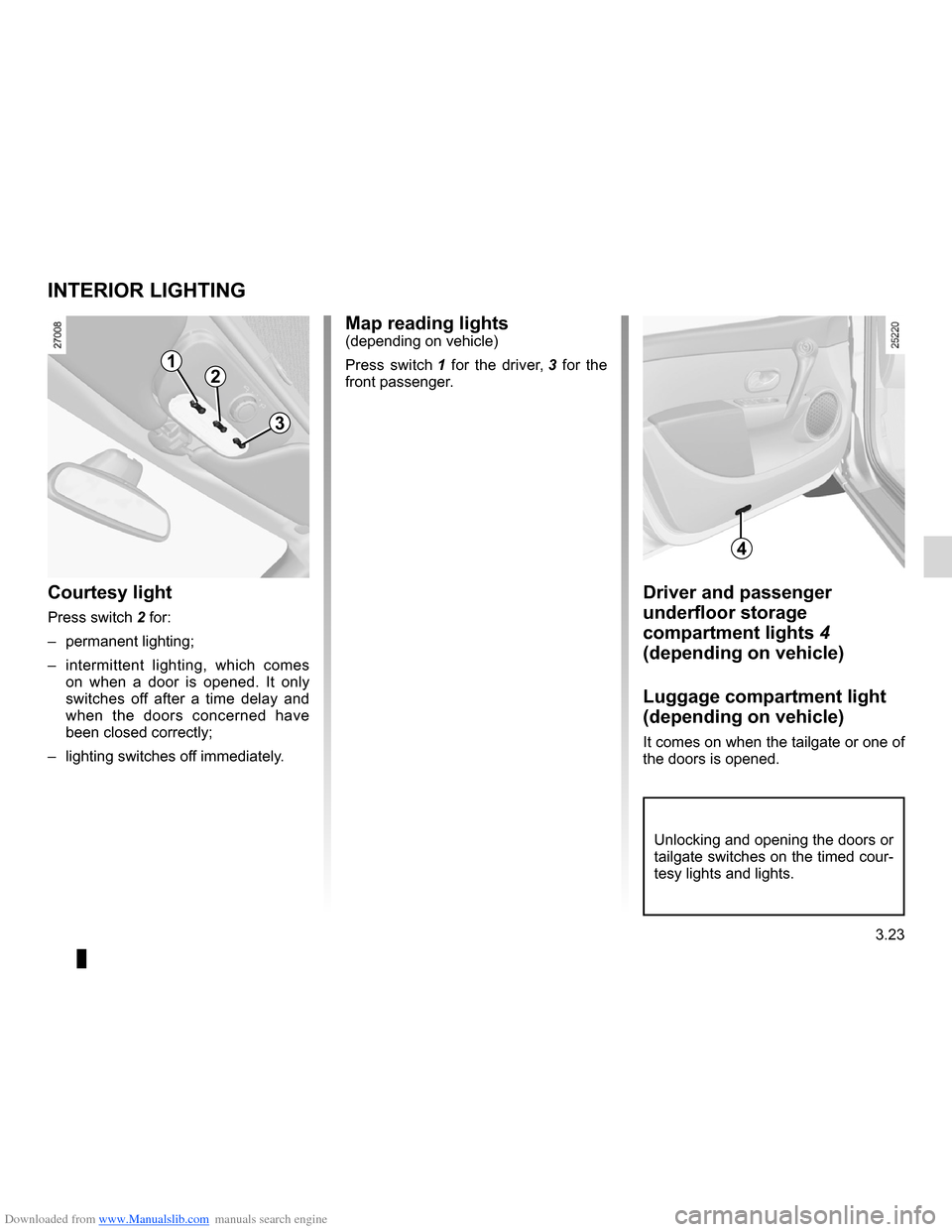
Driver and passenger
underfloor storage
compartment lights 4
(depending on vehicle)
Luggage compartment light
(depending on vehicle)
It comes on when the tailgate or one of
the doors is opened.
Map reading lights(depending on vehicle)
Press switch 1 for the driver, 3 for the
front passenger.
Courtesy light
Press switch 2 for:
– permanent lighting;
– intermittent lighting, which comes
on when a door is opened. It only
switches off after a time delay and
when the doors concerned have
been closed correctly;
– lighting switches off immediately.
interiOr LiGHtinG
12
3
4
Page 166 of 268

Downloaded from www.Manualslib.com manuals search engine rear parcel shelf .................................... (up to the end of the DU)
rear parcel shelf .................................... (up to the end of the DU)
tailgate .................................................. (up to the end of the DU)
3.32
ENG_UD25585_2
Coffre à bagages / tablette arrière (X85 - B85 - C85 - S85 - K85 - R\
enault)
ENG_NU_853-7_BCSK85_Renault_3
Boot
Rear parcel shelf
Do not place any objects,
especially heavy or hard
objects, on the parcel shelf.
These may pose a risk to
the vehicle occupants if the driver
has to brake suddenly or if the vehi-
cle is involved in an accident.
rear parcel shelf
To remove:
– unhook both straps 2;
– unhook sun visor 3 (depending on
vehicle);
– detach the flexible section attached
to the rear bench seatback (depend-
ing on vehicle);
– lift the parcel shelf then unclip it up-
wards.
To refit, proceed in the reverse order to
removal.
BOOt/rear P arCeL sHeLF
3
Maximum weight on rear parcel
shelf: 25 kg, evenly distributed.
to open
Press button 1 and lift the tailgate.
t o close
Lower the boot lid.
2
1