ignition RENAULT CLIO 2017 X98 / 4.G User Guide
[x] Cancel search | Manufacturer: RENAULT, Model Year: 2017, Model line: CLIO, Model: RENAULT CLIO 2017 X98 / 4.GPages: 260, PDF Size: 7.98 MB
Page 68 of 260
1.62
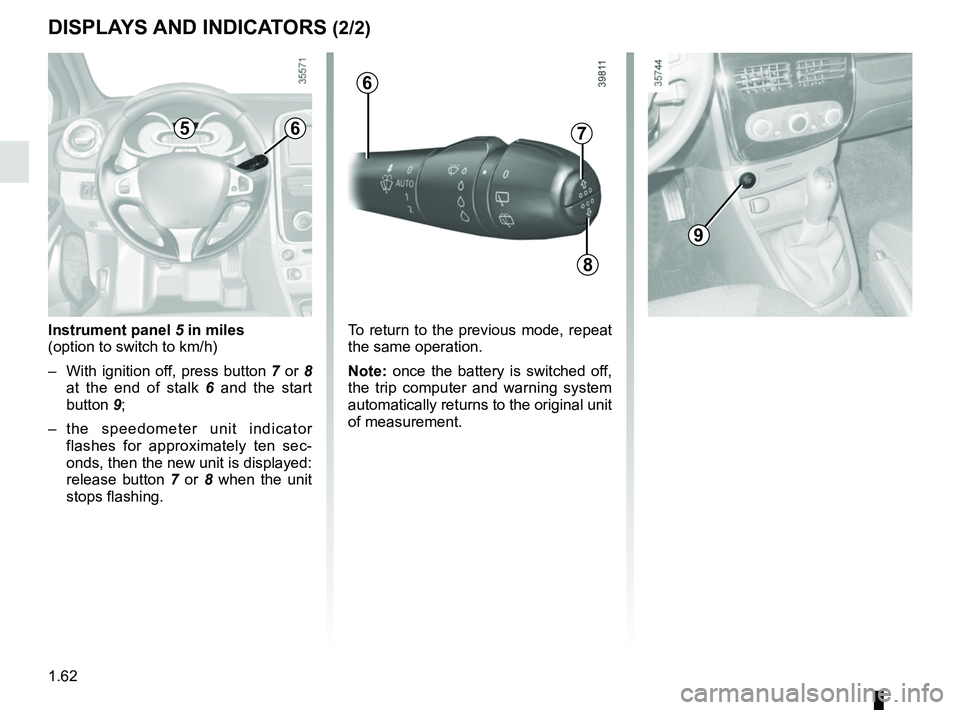
Instrument panel 5 in miles
(option to switch to km/h)
– With ignition off, press button 7 or 8 at the end of stalk 6 and the start
button 9;
– the speedometer unit indicator flashes for approximately ten sec-
onds, then the new unit is displayed:
release button 7 or 8 when the unit
stops flashing.
7
8
5
9
6
6
To return to the previous mode, repeat
the same operation.
Note: once the battery is switched off,
the trip computer and warning system
automatically returns to the original unit
of measurement.
DISPLAYS AND INDICATORS (2/2)
Page 73 of 260

The display of information shown below DEPENDS ON THE VEHICLE EQUIPMENT \
AND COUNTRY.
Examples of selectionsInterpreting the display selected
On-board computer")
1.67
TRIP COMPUTER: trip settings (3/5)
The display of information shown below DEPENDS ON THE VEHICLE EQUIPMENT \
AND COUNTRY.
Examples of selectionsInterpreting the display selected
On-board computer with mileage-
before-service message
h) Mileage before service or oil change.Mileage before service
With the ignition switched on, and the engine not running
and the selected display is “Mileage before service”, press one
of buttons 2 or 3 for about 5 seconds to display the mileage
before service (distance or time to the next service). When the
distance value approaches its limit, there are several possible
scenarios:
– distance/time remaining less than 900 miles (1,500 km) or
one month : the message “Service due in” is displayed ac-
companied by the nearest term (distance or time);
– distance equal to 0 miles or service date reached: the
message “service vehicle” is displayed accompanied by the
© warning light.
The vehicle requires a service as soon as possible.
SERVICE
INTERVALS
SERVICE IN
30 000 Kms / 12 MO
SERVICE DUE IN
300 Kms / 24 DAYS
SERVICE REQUIRED
Reset : to reset the distance before service, press and hold button 2 or 3 for approximately 10 seconds until the display shows
the mileage permanently.
NB: if a service is performed without changing the engine oil, only the mi\
leage before the next service should be reset. In the
event of an oil change, both the distance before the next service and th\
e next oil change should be reset.
Page 74 of 260

Examples of selectionsInterpreting the display selected
On-board computer")
1.68
The display of information shown below DEPENDS ON THE VEHICLE EQUIPMENT \
AND COUNTRY.
TRIP COMPUTER: trip settings (4/5)
Examples of selectionsInterpreting the display selected
On-board computer with distance before
next service message (cntd.)
h) Mileage before service or oil change.Mileage before service
With the ignition switched on and the engine not running ,
and the selected display is “Mileage before service”, press one
of buttons 2 or 3 for about 5 seconds to display the mileage
before a service, then briefly press one of buttons 2 or 3 to view
the range (distance or time remaining before the next service).
When the distance value approaches its limit, there are several
possible scenarios:
– distance/time remaining less than 900 miles (1,500 km) or
one month : the message “Service due in” is displayed ac-
companied by the nearest term (distance or time);
– range equal to 0 km/miles or service date reached: the
message “service vehicle” is displayed accompanied by the
© warning light.
The vehicle requires an oil change as soon as possible.
SERVICE
INTERVALS
OIL CHANGE IN
30 000 Kms / 24 MO
SERVICE DUE IN
300 Kms / 24 DAYS
SERVICE REQUIRED
Depending on the vehicle, the mileage before an oil change varies accord\
ing to the driving style (frequent driving at low speed ,
door-to-door journeys, extensive use at idling speed, towing a trailer, etc.). The distance remaining until the next oil change can
therefore decrease more quickly in some cases than the actual distance t\
ravelled.
Reset : to reset the distance before service, press and hold button 2 or 3 for approximately 10 seconds until the display shows
the mileage permanently.
NB: if a service is performed without changing the engine oil, only the mi\
leage before the next service should be reset. In the
event of an oil change, both the distance before the next service and th\
e next oil change should be reset.
Page 81 of 260
1.75
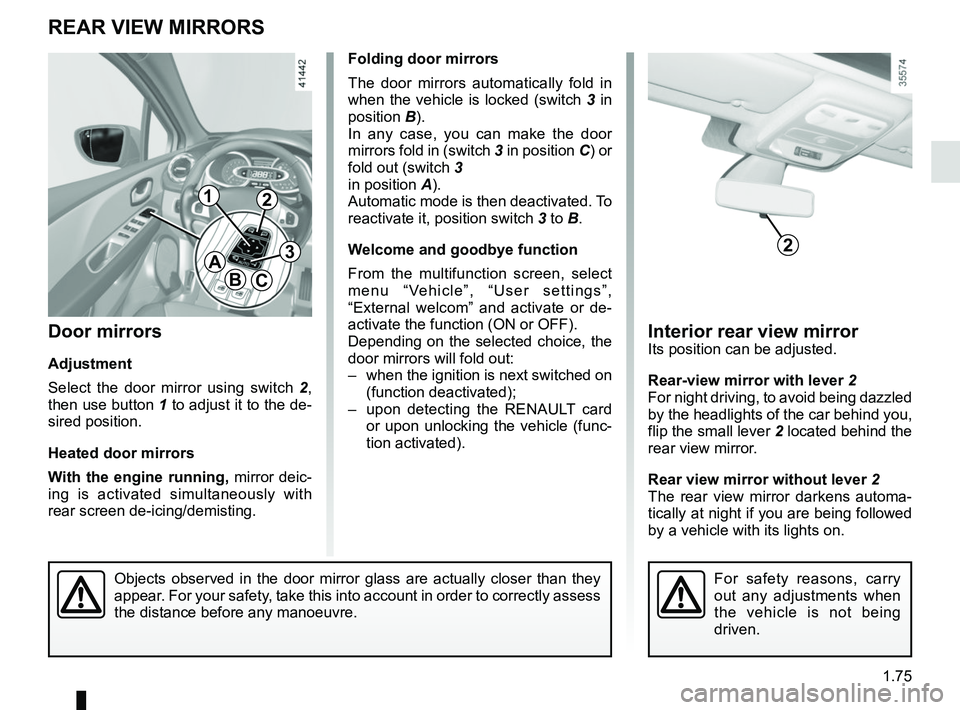
Interior rear view mirrorIts position can be adjusted.
Rear-view mirror with lever 2
For night driving, to avoid being dazzled
by the headlights of the car behind you,
flip the small lever 2 located behind the
rear view mirror.
Rear view mirror without lever 2
The rear view mirror darkens automa-
tically at night if you are being followed
by a vehicle with its lights on.
Objects observed in the door mirror glass are actually closer than they \
appear. For your safety, take this into account in order to correctly assess
the distance before any manoeuvre.
Door mirrors
Adjustment
Select the door mirror using switch 2 ,
then use button 1 to adjust it to the de-
sired position.
Heated door mirrors
With the engine running, mirror deic-
ing is activated simultaneously with
rear screen de-icing/demisting.
REAR VIEW MIRRORS
A
BC
For safety reasons, carry
out any adjustments when
the vehicle is not being
driven.
2
12
3
Folding door mirrors
The door mirrors automatically fold in
when the vehicle is locked (switch 3 in
position B).
In any case, you can make the door
mirrors fold in (switch 3 in position C) or
fold out (switch 3
in position A).
Automatic mode is then deactivated. To
reactivate it, position switch 3 to B.
Welcome and goodbye function
From the multifunction screen, select
menu “Vehicle”, “User settings”,
“External welcom” and activate or de-
activate the function (ON or OFF).
Depending on the selected choice, the
door mirrors will fold out:
– when the ignition is next switched on (function deactivated);
– upon detecting the RENAULT card or upon unlocking the vehicle (func-
tion activated).
Page 88 of 260
1.82
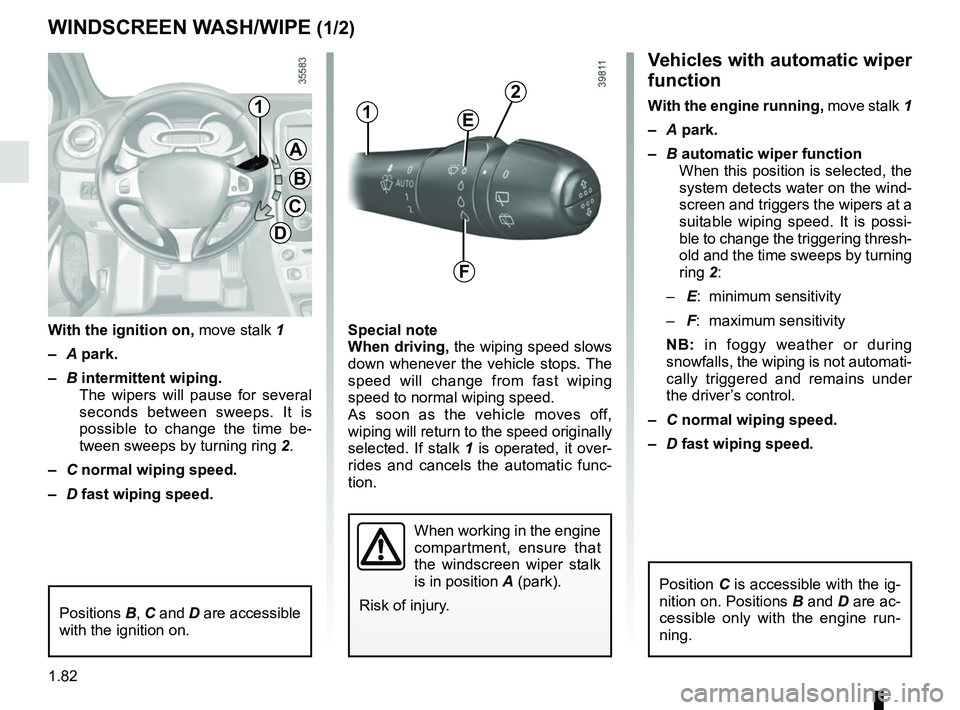
Vehicles with automatic wiper
function
With the engine running, move stalk 1
– A park.
– B automatic wiper function
When this position is selected, the
system detects water on the wind-
screen and triggers the wipers at a
suitable wiping speed. It is possi-
ble to change the triggering thresh-
old and the time sweeps by turning
ring 2:
– E: minimum sensitivity
– F: maximum sensitivity
NB: in foggy weather or during
snowfalls, the wiping is not automati-
cally triggered and remains under
the driver’s control.
– C normal wiping speed.
– D fast wiping speed.
Special note
When driving,
the wiping speed slows
down whenever the vehicle stops. The
speed will change from fast wiping
speed to normal wiping speed.
As soon as the vehicle moves off,
wiping will return to the speed originally
selected. If stalk 1 is operated, it over-
rides and cancels the automatic func-
tion.
With the ignition on,
move stalk 1
– A park.
– B intermittent wiping.
The wipers will pause for several
seconds between sweeps. It is
possible to change the time be-
tween sweeps by turning ring 2.
– C normal wiping speed.
– D fast wiping speed.
WINDSCREEN WASH/WIPE (1/2)
A
B
C
D
11
When working in the engine
compartment, ensure that
the windscreen wiper stalk
is in position A (park).
Risk of injury.
2
E
F
Positions B, C and D are accessible
with the ignition on.
Position C is accessible with the ig-
nition on. Positions B and D are ac-
cessible only with the engine run-
ning.
Page 89 of 260
1.83
Before any action involving
the windscreen (washing
the vehicle, de-icing, clean-
ing the windscreen, etc.)
return stalk 1 to position A (park).
Risk of injury and/or damage.
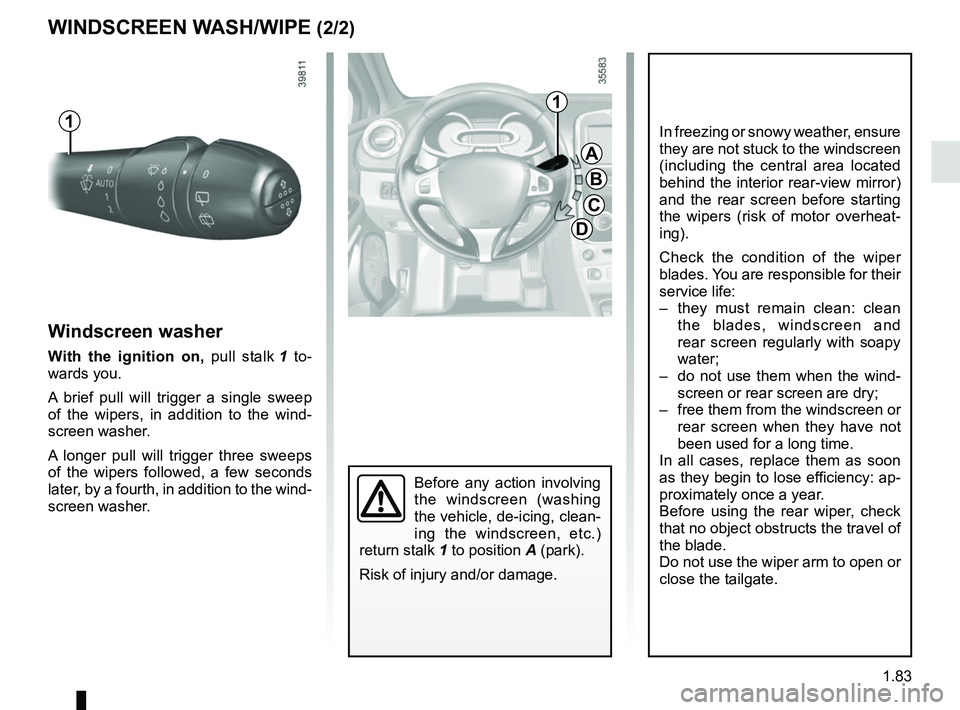
Windscreen washer
With the ignition on, pull stalk 1 to-
wards you.
A brief pull will trigger a single sweep
of the wipers, in addition to the wind-
screen washer.
A longer pull will trigger three sweeps
of the wipers followed, a few seconds
later, by a fourth, in addition to the wind-
screen washer.
WINDSCREEN WASH/WIPE (2/2)
A
B
C
D
1
1
In freezing or snowy weather, ensure
they are not stuck to the windscreen
(including the central area located
behind the interior rear-view mirror)
and the rear screen before starting
the wipers (risk of motor overheat-
ing).
Check the condition of the wiper
blades. You are responsible for their
service life:
– they must remain clean: clean the blades, windscreen and
rear screen regularly with soapy
water;
– do not use them when the wind- screen or rear screen are dry;
– free them from the windscreen or rear screen when they have not
been used for a long time.
In all cases, replace them as soon
as they begin to lose efficiency: ap-
proximately once a year.
Before using the rear wiper, check
that no object obstructs the travel of
the blade.
Do not use the wiper arm to open or
close the tailgate.
Page 90 of 260
1.84
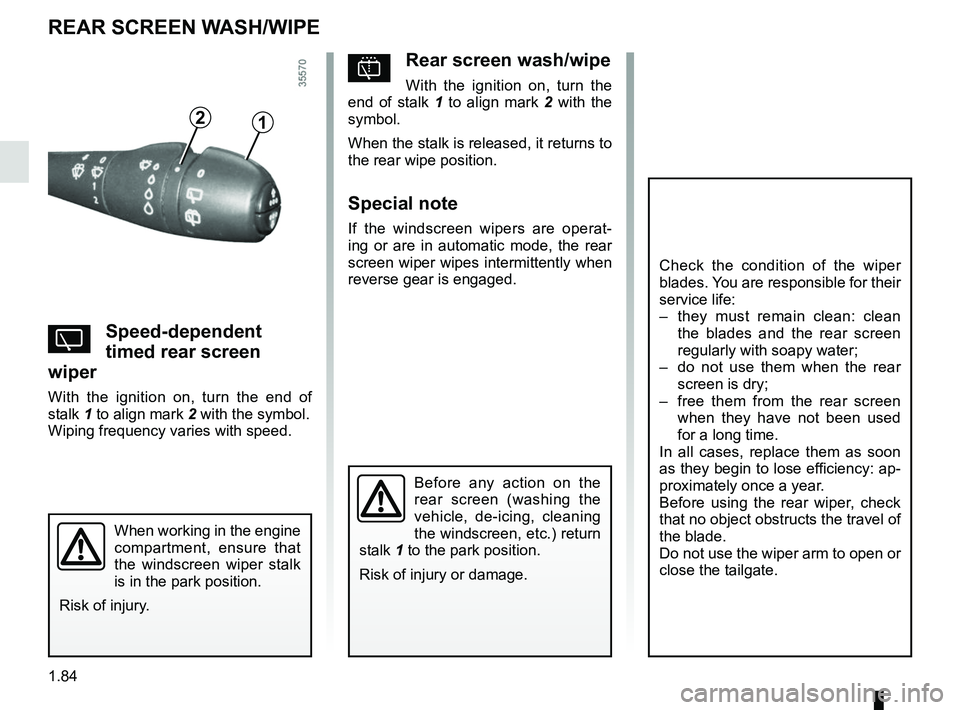
pRear screen wash/wipe
With the ignition on, turn the
end of stalk 1 to align mark 2 with the
symbol.
When the stalk is released, it returns to
the rear wipe position.
Special note
If the windscreen wipers are operat-
ing or are in automatic mode, the rear
screen wiper wipes intermittently when
reverse gear is engaged.
YSpeed-dependent
timed rear screen
wiper
With the ignition on, turn the end of
stalk 1 to align mark 2 with the symbol.
Wiping frequency varies with speed.
REAR SCREEN WASH/WIPE
12
Check the condition of the wiper
blades. You are responsible for their
service life:
– they must remain clean: clean the blades and the rear screen
regularly with soapy water;
– do not use them when the rear screen is dry;
– free them from the rear screen when they have not been used
for a long time.
In all cases, replace them as soon
as they begin to lose efficiency: ap-
proximately once a year.
Before using the rear wiper, check
that no object obstructs the travel of
the blade.
Do not use the wiper arm to open or
close the tailgate.
Before any action on the
rear screen (washing the
vehicle, de-icing, cleaning
the windscreen, etc.) return
stalk 1 to the park position.
Risk of injury or damage.
When working in the engine
compartment, ensure that
the windscreen wiper stalk
is in the park position.
Risk of injury.
Page 92 of 260
1.86
Filling with fuel
With the ignition off, insert the nozzle
and insert it fully before turning it on to
fill the fuel tank (risk of splashing).
Keep the nozzle in this position through-
out the entire filling operation.
When the pump cuts out automatically
at the end of the filling procedure, a
maximum of two further filling attempts
may be made, as there must be suffi-
cient space in the fuel tank to allow for
expansion.
Make sure that no water enters the fuel
tank during filling. The cover A and its
surround must remain clean.
Petrol versions
Using leaded petrol will damage the
antipollution system and may lead to a
loss of warranty.
To ensure that the fuel tank is not filled
with leaded petrol, the fuel tank filler
neck contains a restrictor fitted with a
foolproof system which only allows
the nozzle for unleaded petrol to be
used (at the pump).
FUEL TANK (2/3)
Vehicle fitted with the Stop and
Start function
To fill up with fuel, the engine must
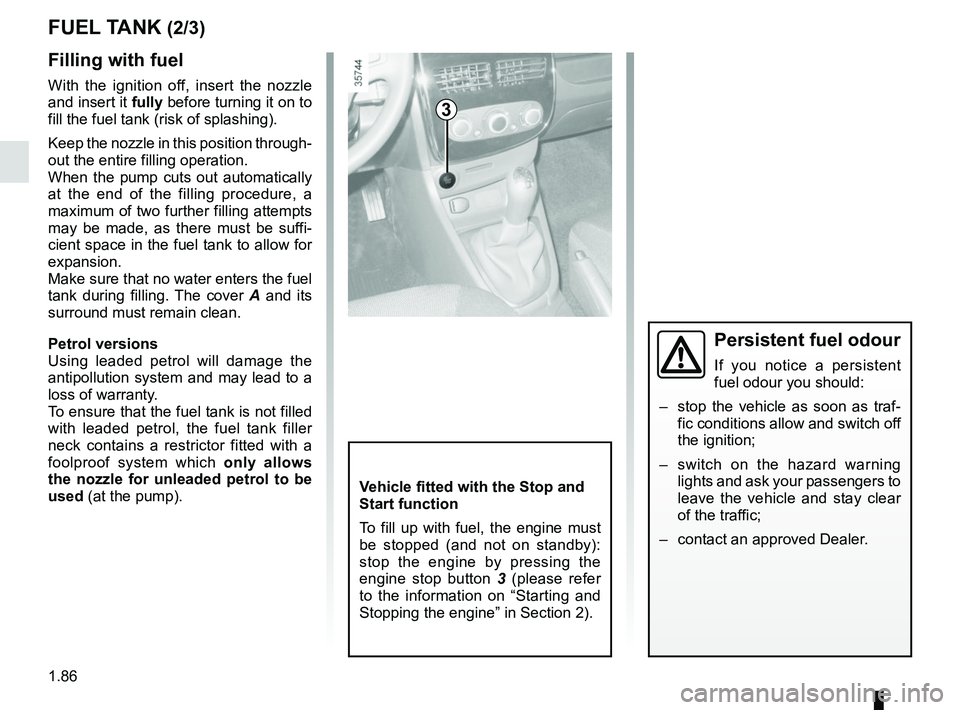
be stopped (and not on standby):
stop the engine by pressing the
engine stop button 3 (please refer
to the information on “Starting and
Stopping the engine” in Section 2).
3
Persistent fuel odour
If you notice a persistent
fuel odour you should:
– stop the vehicle as soon as traf- fic conditions allow and switch off
the ignition;
– switch on the hazard warning lights and ask your passengers to
leave the vehicle and stay clear
of the traffic;
– contact an approved Dealer.
Page 98 of 260
2.4
Operating faults
In certain cases, the hands-free
RENAULT card may not work:
– when the RENAULT card battery is drained, flat battery, etc.
– near to appliances operating on the same frequency as the card (mo-
nitor, mobile phone, video game,
etc.);
– vehicle located in a high electroma- gnetic radiation zone.
The message “PLEASE INSERT
KEYCARD” appears on the instrument
panel.
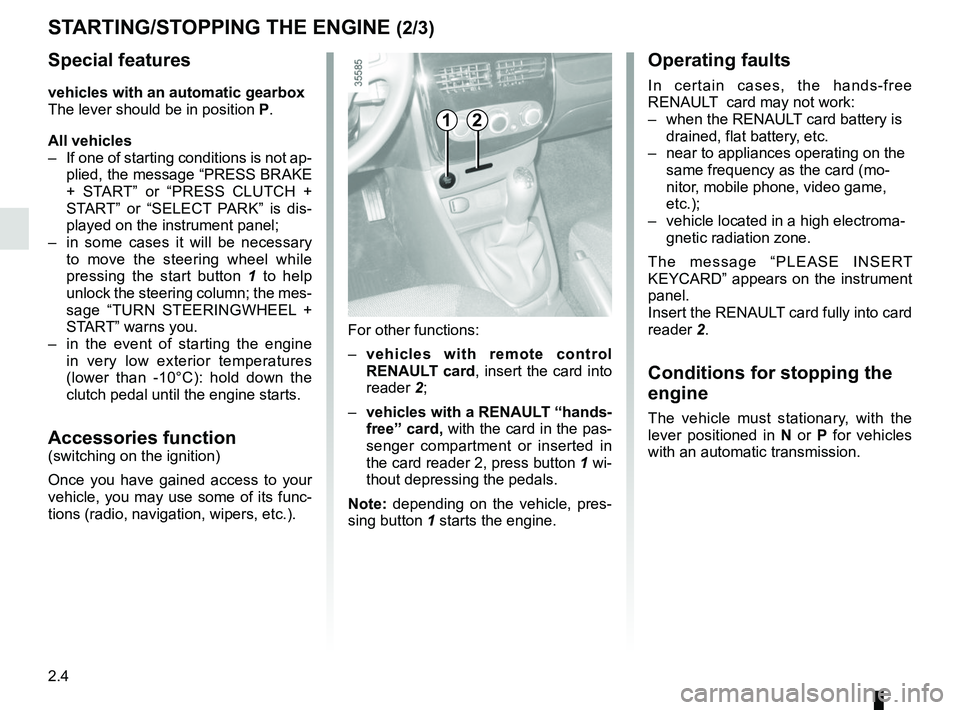
Insert the RENAULT card fully into card
reader 2.
Conditions for stopping the
engine
The vehicle must stationary, with the
lever positioned in N or P for vehicles
with an automatic transmission.
STARTING/STOPPING THE ENGINE (2/3)
For other functions:
– vehicles with remote control
RENAULT card, insert the card into
reader 2;
– vehicles with a RENAULT “hands-
free” card, with the card in the pas-
senger compartment or inserted in
the card reader 2, press button 1 wi-
thout depressing the pedals.
Note: depending on the vehicle, pres-
sing button 1 starts the engine.
12
Special features
vehicles with an automatic gearbox
The lever should be in position P.
All vehicles
– If one of starting conditions is not ap- plied, the message “PRESS BRAKE
+ START” or “PRESS CLUTCH +
START” or “SELECT PARK” is dis-
played on the instrument panel;
– in some cases it will be necessary to move the steering wheel while
pressing the start button 1 to help
unlock the steering column; the mes-
sage “TURN STEERINGWHEEL +
START” warns you.
– in the event of starting the engine in very low exterior temperatures
(lower than -10°C): hold down the
clutch pedal until the engine starts.
Accessories function(switching on the ignition)
Once you have gained access to your
vehicle, you may use some of its func-
tions (radio, navigation, wipers, etc.).
Page 100 of 260
2.6
STOP AND START FUNCTION (1/4)
This system enables a reduced fuel
consumption and lower greenhouse
gas emissions. The system is acti-
vated automatically when the vehicle is
started. While driving, the system stops
the engine (standby) when the vehicle
is at a standstill (traffic jam, traffic lights,
etc).
Conditions for engine
standby
The vehicle has set off from where it
was parked;
For vehicles equipped with auto-
matic gearboxes:
– the gearbox is in position D, M or N;
and
– the brake pedal is depressed (suffi-ciently hard);
and
– the accelerator pedal is not de- pressed;
and
– the speed is zero for around 1 second.
The engine remains on standby if posi-
tion P is selected, or if position N is se-
lected with the handbrake engaged and
the brake pedal released. For vehicles equipped with manual
gearboxes:
– the gearbox is in neutral;
and
– the clutch pedal is released.
If the warning light
flashes,
this means that the clutch pedal is
not sufficiently released;
and
– the vehicle speed is less than ap- proximately 7 mph (3 km/h).
In all vehicles, the warning light
on the instrument panel is lit when the
engine is on standby.
The vehicle equipment remain opera-
tional while the engine is stopped.
If the engine stalls while the system
is in operation, pressing the clutch
pedal right down will start it again.
Before getting out of the
vehicle, you must switch
off the ignition by pressing
the engine stop (please see
“Starting, stopping the engine”).
Keep your vehicle station-
ary when the engine is
on standby (shown by the
warning light
on the
instrument panel).
Engine on standby - braking
assistance is no longer op-
erational.
Engine on standby - power-
assisted steering is no
longer operational.