wheel RENAULT CLIO 2017 X98 / 4.G User Guide
[x] Cancel search | Manufacturer: RENAULT, Model Year: 2017, Model line: CLIO, Model: RENAULT CLIO 2017 X98 / 4.GPages: 260, PDF Size: 7.98 MB
Page 85 of 260
1.79
Switching off the lights
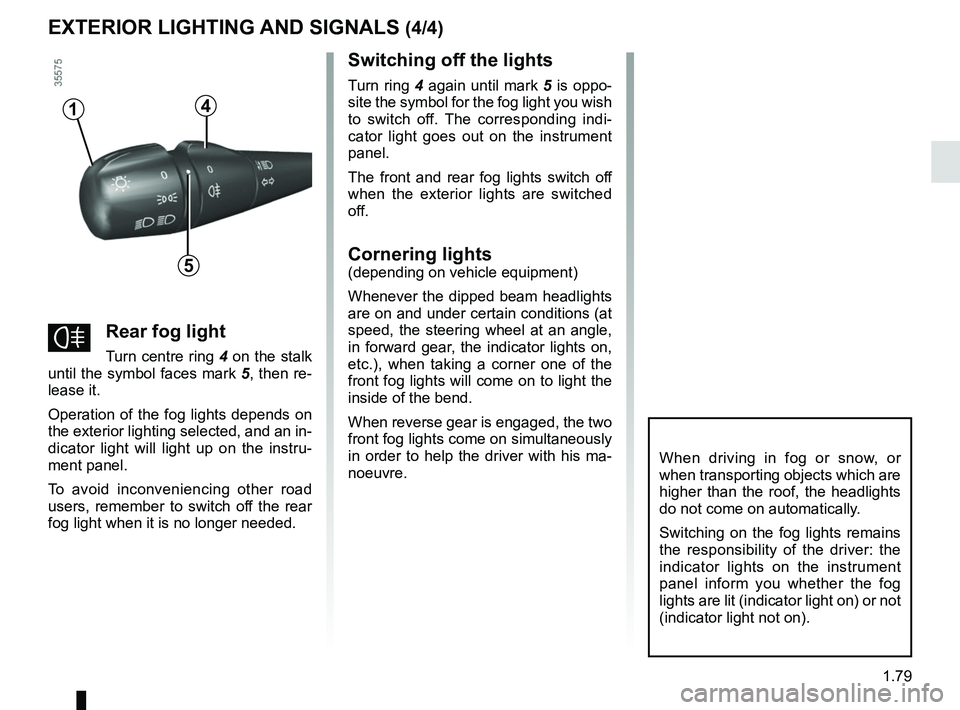
Turn ring 4 again until mark 5 is oppo-
site the symbol for the fog light you wish
to switch off. The corresponding indi-
cator light goes out on the instrument
panel.
The front and rear fog lights switch off
when the exterior lights are switched
off.
Cornering lights
(depending on vehicle equipment)
Whenever the dipped beam headlights
are on and under certain conditions (at
speed, the steering wheel at an angle,
in forward gear, the indicator lights on,
etc.), when taking a corner one of the
front fog lights will come on to light the
inside of the bend.
When reverse gear is engaged, the two
front fog lights come on simultaneously
in order to help the driver with his ma-
noeuvre.
4
5
1
fRear fog light
Turn centre ring 4 on the stalk
until the symbol faces mark 5, then re-
lease it.
Operation of the fog lights depends on
the exterior lighting selected, and an in-
dicator light will light up on the instru-
ment panel.
To avoid inconveniencing other road
users, remember to switch off the rear
fog light when it is no longer needed.
When driving in fog or snow, or
when transporting objects which are
higher than the roof, the headlights
do not come on automatically.
Switching on the fog lights remains
the responsibility of the driver: the
indicator lights on the instrument
panel inform you whether the fog
lights are lit (indicator light on) or not
(indicator light not on).
EXTERIOR LIGHTING AND SIGNALS (4/4)
Page 86 of 260
1.80
éHazard warning lights
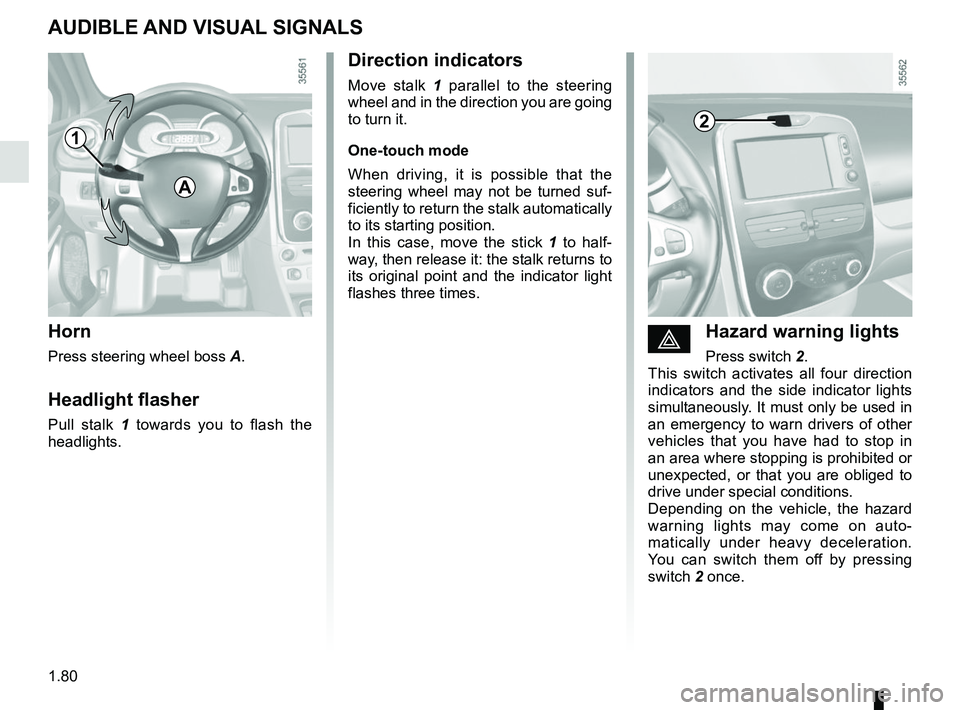
Press switch 2.
This switch activates all four direction
indicators and the side indicator lights
simultaneously. It must only be used in
an emergency to warn drivers of other
vehicles that you have had to stop in
an area where stopping is prohibited or
unexpected, or that you are obliged to
drive under special conditions.
Depending on the vehicle, the hazard
warning lights may come on auto-
matically under heavy deceleration.
You can switch them off by pressing
switch 2 once.
Direction indicators
Move stalk 1 parallel to the steering
wheel and in the direction you are going
to turn it.
One-touch mode
When driving, it is possible that the
steering wheel may not be turned suf-
ficiently to return the stalk automatically
to its starting position.
In this case, move the stick 1 to half-
way, then release it: the stalk returns to
its original point and the indicator light
flashes three times.
Horn
Press steering wheel boss A.
Headlight flasher
Pull stalk 1 towards you to flash the
headlights.
AUDIBLE AND VISUAL SIGNALS
A
21
Page 98 of 260
2.4
Operating faults
In certain cases, the hands-free
RENAULT card may not work:
– when the RENAULT card battery is drained, flat battery, etc.
– near to appliances operating on the same frequency as the card (mo-
nitor, mobile phone, video game,
etc.);
– vehicle located in a high electroma- gnetic radiation zone.
The message “PLEASE INSERT
KEYCARD” appears on the instrument
panel.
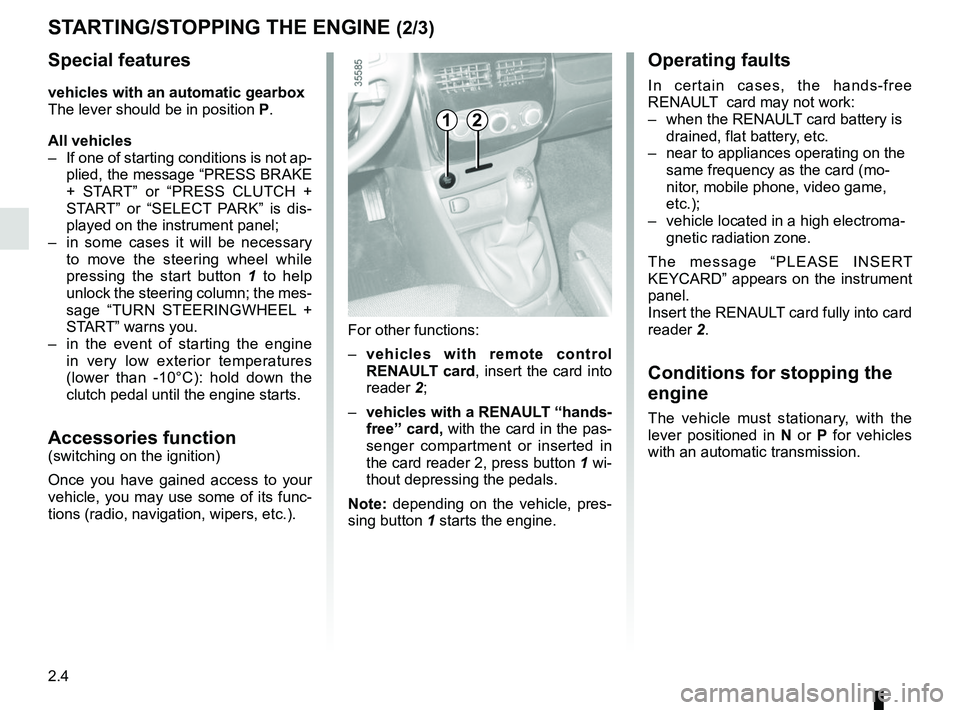
Insert the RENAULT card fully into card
reader 2.
Conditions for stopping the
engine
The vehicle must stationary, with the
lever positioned in N or P for vehicles
with an automatic transmission.
STARTING/STOPPING THE ENGINE (2/3)
For other functions:
– vehicles with remote control
RENAULT card, insert the card into
reader 2;
– vehicles with a RENAULT “hands-
free” card, with the card in the pas-
senger compartment or inserted in
the card reader 2, press button 1 wi-
thout depressing the pedals.
Note: depending on the vehicle, pres-
sing button 1 starts the engine.
12
Special features
vehicles with an automatic gearbox
The lever should be in position P.
All vehicles
– If one of starting conditions is not ap- plied, the message “PRESS BRAKE
+ START” or “PRESS CLUTCH +
START” or “SELECT PARK” is dis-
played on the instrument panel;
– in some cases it will be necessary to move the steering wheel while
pressing the start button 1 to help
unlock the steering column; the mes-
sage “TURN STEERINGWHEEL +
START” warns you.
– in the event of starting the engine in very low exterior temperatures
(lower than -10°C): hold down the
clutch pedal until the engine starts.
Accessories function(switching on the ignition)
Once you have gained access to your
vehicle, you may use some of its func-
tions (radio, navigation, wipers, etc.).
Page 110 of 260
2.16
Driving advice and ECO
driving
Behaviour
– Drive carefully for the first few miles until the engine reaches its normal
operating temperature, rather than
let it warm up while the vehicle is sta-
tionary.
– Speed is expensive.
– Sporty driving uses a lot of fuel: drive with a light right foot.
– Do not overrev the engine in the in- termediate gears.
You should always use the highest gear possible.
Obstructions to the driver
On the driver’s side, only
use mats adapted to the ve-
hicle that attach to the pre-
installed parts, and regularly check
their mounting. Do not place several
mats on top of each other.
There is a risk of wedging the
pedals
DRIVING ADVICE, ECO DRIVING (4/5)
– Avoid sudden acceleration.
– Brake as little as possible. If you an- ticipate an obstacle or bend in ad-
vance, you may then simply release
the accelerator pedal.
– Do not try to maintain the same speed up a hill, accelerate no more
than you would on the level. Keep
your foot in the same position on the
accelerator pedal.
– Double declutching and accelerating before switching off are unnecessary
in modern vehicles.
– Bad weather, flooded roads:
Do not drive through
floods if the water is
above the lower edge of
the wheel rims.
Page 114 of 260
2.20
TYRE PRESSURE LOSS WARNING (1/3)
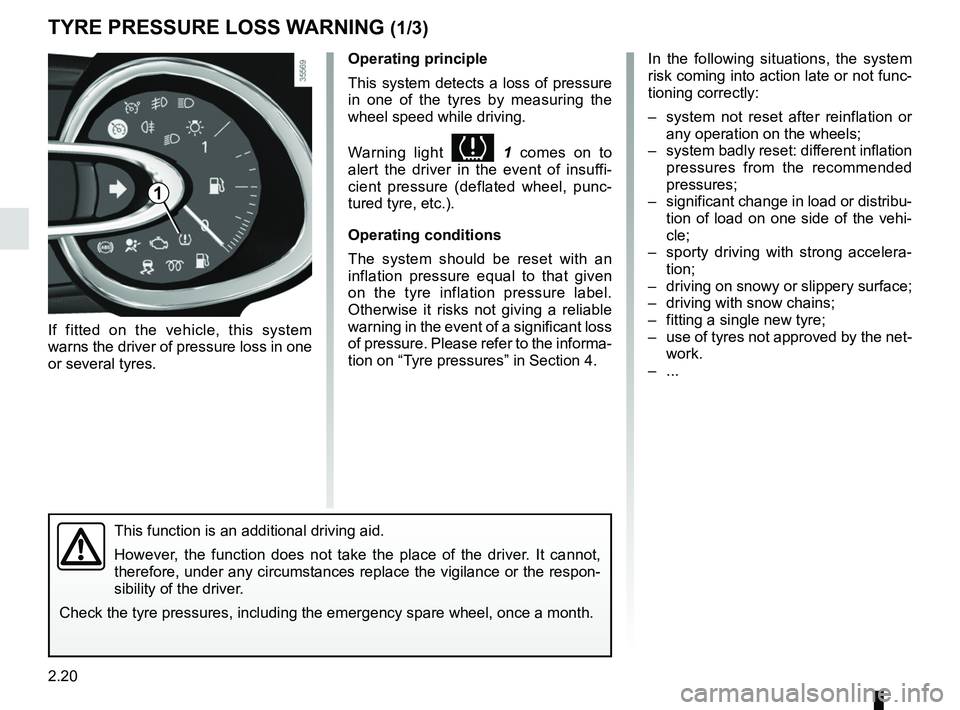
If fitted on the vehicle, this system
warns the driver of pressure loss in one
or several tyres.
In the following situations, the system
risk coming into action late or not func-
tioning correctly:
– system not reset after reinflation or any operation on the wheels;
– system badly reset: different inflation pressures from the recommended
pressures;
– significant change in load or distribu- tion of load on one side of the vehi-
cle;
– sporty driving with strong accelera- tion;
– driving on snowy or slippery surface;
– driving with snow chains;
– fitting a single new tyre;
– use of tyres not approved by the net- work.
– ...
1
Operating principle
This system detects a loss of pressure
in one of the tyres by measuring the
wheel speed while driving.
Warning light
1 comes on to
alert the driver in the event of insuffi-
cient pressure (deflated wheel, punc-
tured tyre, etc.).
Operating conditions
The system should be reset with an
inflation pressure equal to that given
on the tyre inflation pressure label.
Otherwise it risks not giving a reliable
warning in the event of a significant loss
of pressure. Please refer to the informa-
tion on “Tyre pressures” in Section 4.
This function is an additional driving aid.
However, the function does not take the place of the driver. It cannot,
therefore, under any circumstances replace the vigilance or the respon-
sibility of the driver.
Check the tyre pressures, including the emergency spare wheel, once a mo\
nth.
Page 115 of 260
2.21
TYRE PRESSURE LOSS WARNING (2/3)
Resetting the standard level for the
tyre pressures
This should be done:
– after each reinflation or readjustment of the pressure of one of the tyres;
– when the standard tyre pressure needs to be changed to adapt to
usage conditions (empty, carrying a
load, motorway driving, etc.);
– after changing a wheel;
– after using the tyre inflation kit;
– after swapping a wheel (however, this practice is not recommended).
It should always be done after checking
the tyre pressure of all four tyres when
cold.
Tyre pressures must correspond to the
current usage of the vehicle (empty,
carrying a load, motorway driving, etc.).
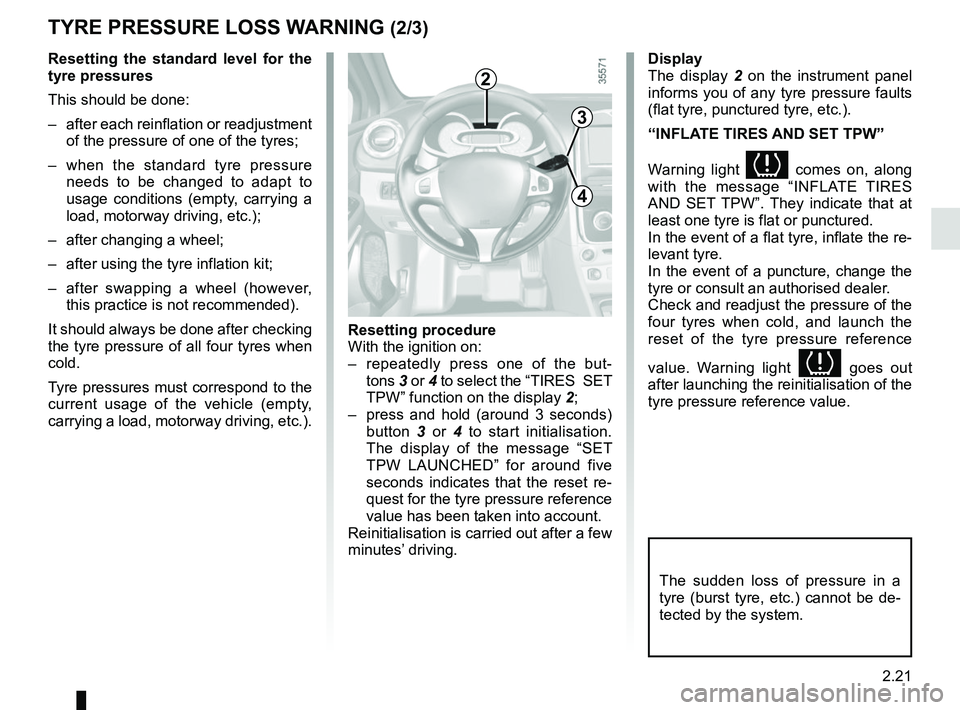
2
3
4
Resetting procedure
With the ignition on:
– repeatedly press one of the but- tons 3 or 4 to select the “TIRES SET
TPW” function on the display 2;
– press and hold (around 3 seconds) button 3 or 4 to start initialisation.
The display of the message “SET
TPW LAUNCHED” for around five
seconds indicates that the reset re-
quest for the tyre pressure reference
value has been taken into account.
Reinitialisation is carried out after a few
minutes’ driving.
The sudden loss of pressure in a
tyre (burst tyre, etc.) cannot be de-
tected by the system.
Display
The display 2 on the instrument panel
informs you of any tyre pressure faults
(flat tyre, punctured tyre, etc.).
“INFLATE TIRES AND SET TPW”
Warning light
comes on, along
with the message “INFLATE TIRES
AND SET TPW”. They indicate that at
least one tyre is flat or punctured.
In the event of a flat tyre, inflate the re-
levant tyre.
In the event of a puncture, change the
tyre or consult an authorised dealer.
Check and readjust the pressure of the
four tyres when cold, and launch the
reset of the tyre pressure reference
value. Warning light
goes out
after launching the reinitialisation of the
tyre pressure reference value.
Page 116 of 260
2.22
TYRE PRESSURE LOSS WARNING (3/3)
“RECALIBRATE SET TPW”
The warning light
flashes for
several seconds, then stays on, along
with the message “RECALIBRATE SET
TPW”.
They indicate that the request to reset
the reference value of the tyre pres-
sures must be restarted.
“TPW NOT AVAILABLE ”
The warning light
flashes for sev-
eral seconds, then stays on, along with
the message “TPW NOT AVAILABLE”.
They indicate that the vehicle is
equipped with an emergency spare
wheel which is smaller than the other
four and that it is fitted to the vehicle.
“CHECK TPW”
The warning light
flashes for
several seconds, then stays on, along
with the message “CHECK TPW”.
This message is accompanied by the
warning light
©.
They indicate a system fault. Please
consult an authorised dealer. Readjustment of tyre pressures
The tyre pressures must be adjusted
when cold
(please refer to the label lo-
cated on the edge of the driver’s door).
If tyre pressures cannot be checked
when the tyres are cold, the recom-
mended pressures should be increased
by 0.2 to 0.3 bar (3 PSI).
Never deflate a hot tyre.
After each reinflation or readjustment of
the tyre pressure, launch the reinitiali-
sation of the tyre pressure reference
value.
Replacing wheels/tyres
Only use equipment approved by the
brand network, or the system risks
being activated late or not operating
correctly. Please see the information on
“Tyres” in Section 5. After each change of wheel/tyre, read-
just the tyre pressure and launch the
reset of the tyre pressure reference
value.
Emergency spare wheel
If fitted on the vehicle, readjust the tyre
pressure and launch the reinitialisation
of the tyre pressure reference value.
Tyre repair product and inflation kit
Only use equipment approved by the
brand network, or the system risks
being activated late or not operating
correctly. Please refer to “Tyre inflation
kit” in Section 5.
After using the tyre inflation kit, readjust
the tyre pressure and launch the reini-
tialisation of the tyre pressure reference
value.
Page 117 of 260
2.23
Depending on the vehicle, this is com-
posed of:
– anti-lock braking system (ABS);
– electronic stability program (ESC) with understeer control and trac-
tion control;
– emergency brake assist;
– hill start assistance.Operating faults:
–
© and x lit up on the in-
strument panel alongside messages
“CHECK ABS”, “CHECK BRAKING
SYSTEM” and “CHECK ESC”: ABS,
ESC and emergency brake assist
are deactivated. Braking is always
enabled;
–
x, D, © and ® lit
up on the instrument panel alongside
the message “BRAKING SYSTEM
FAULT”: this indicates a fault in
the braking system.
In both cases, consult an approved
Dealer.
Anti-lock braking system
(ABS)
Under heavy braking, the ABS prevents
the wheels from locking, allowing the
stopping distance to be managed and
keeping control of the vehicle.
Under these circumstances, the vehi-
cle can be steered to avoid an obstacle
whilst braking. In addition, this system
can increase stopping distances, par-
ticularly on roads with low surface grip
(wet ground etc.).
You will feel a pulsation through the
brake pedal each time the system is
activated. The ABS does not in any
way improve the vehicle's physical per-
formance relating to the road surface
and road-holding. It is still essential to
follow the rules of good driving practice
(such as driving at a safe distance from
the vehicle in front etc.).
DRIVER CORRECTION DEVICES AND AIDS (1/4)
These functions are an ad-
ditional aid in the event of
critical driving conditions,
enabling the vehicle behav-
iour to be adapted to suit the driving
conditions.
However, the functions do not take
the place of the driver. They do
not increase the vehicle’s limits
and should not encourage you
to drive more quickly. Therefore,
they can under no circumstances
replace the vigilance or responsibil-
ity of the driver when manoeuvring
the vehicle (the driver must always
be ready for sudden incidents which
may occur when driving).
In an emergency, apply firm and
continuous pressure to the brake
pedal. There is no need to pump
it repeatedly. The ABS will modu-
late the force applied in the braking
system.
Your braking systems
are partially operational.
However, it is dangerous
to brake suddenly and
it is essential to stop immediately,
as soon as traffic conditions allow.
Contact an approved dealer.
Page 118 of 260
2.24
Electronic stability program
(ESC) with understeer control
and traction control
Electronic stability control ESC
This system helps you to keep control
of the vehicle in critical driving condi-
tions (avoiding an obstacle, loss of grip
on a bend, etc.).
Operating principle
A sensor in the steering wheel detects
the direction selected by the driver.
Other sensors throughout the vehicle
measure the actual direction.
The system compares driver input to
the actual trajectory of the vehicle and
corrects the trajectory if necessary by
controlling the braking of certain wheels
and/or engine power. In the event that
the system is engaged, indicator light
flashes on the instrument panel.
DRIVER CORRECTION DEVICES AND AIDS (2/4)
Understeer control
This system optimises the action of the
ESC in the case of pronounced under-
steer (loss of front axle road holding).
Traction control
This system helps to limit wheelspin of
the drive wheels and to control the ve-
hicle when pulling away accelerating or
decelerating.
Operating principle
Using the wheel sensors, the system
measures and compares the speed of
the drive wheels at all times and slows
down their over-rotation. If a wheel is
starting to slip, the system brakes au-
tomatically until the drive supplied be-
comes compatible with the level of grip
under the wheel again.
The system also adjusts the engine
speed to the grip available under the
wheels, independently of the pressure
exerted on the accelerator pedal.Operating faults
When the system detects an operating
fault the message “CHECK ESC” and
warning light
© and appear
on the instrument panel. In this case,
the ESC and traction control system
are deactivated.
Consult an approved dealer.
Disabling the traction control
system
In some situations (driving on very wet
ground: snow, mud, etc. or driving with
snow chains fitted), the system may
reduce the engine output to limit whee-
lspin.
Page 130 of 260
2.36
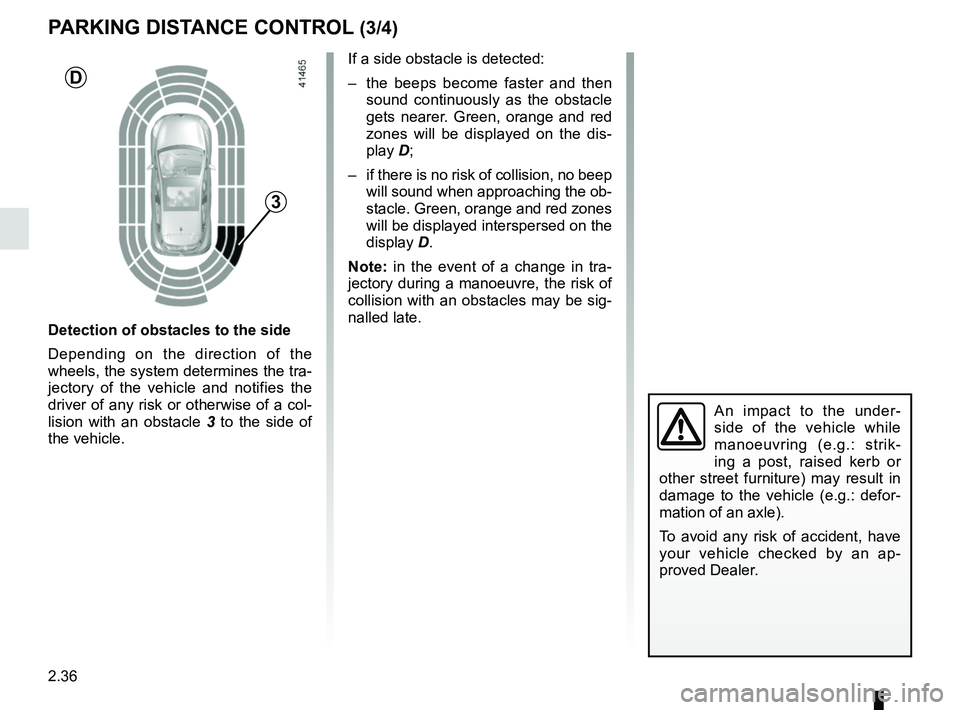
If a side obstacle is detected:
– the beeps become faster and then sound continuously as the obstacle
gets nearer. Green, orange and red
zones will be displayed on the dis-
play D;
– if there is no risk of collision, no beep will sound when approaching the ob-
stacle. Green, orange and red zones
will be displayed interspersed on the
display D.
Note: in the event of a change in tra-
jectory during a manoeuvre, the risk of
collision with an obstacles may be sig-
nalled late.
An impact to the under-
side of the vehicle while
manoeuvring (e.g.: strik-
ing a post, raised kerb or
other street furniture) may result in
damage to the vehicle (e.g.: defor-
mation of an axle).
To avoid any risk of accident, have
your vehicle checked by an ap-
proved Dealer.
PARKING DISTANCE CONTROL (3/4)
Detection of obstacles to the side
Depending on the direction of the
wheels, the system determines the tra-
jectory of the vehicle and notifies the
driver of any risk or otherwise of a col-
lision with an obstacle 3 to the side of
the vehicle.
3
D