door RENAULT CLIO 2017 X98 / 4.G Owner's Manual
[x] Cancel search | Manufacturer: RENAULT, Model Year: 2017, Model line: CLIO, Model: RENAULT CLIO 2017 X98 / 4.GPages: 260, PDF Size: 7.98 MB
Page 45 of 260

X = Seat not suitable for fitting child seats of this type.
U = Seat which allows a child seat with “Universal” approval to be ins\
talled using")
1.39
CHILD SEATS: attachment by seat belt (2/5)
X = Seat not suitable for fitting child seats of this type.
U = Seat which allows a child seat with “Universal” approval to be ins\
talled using a seat belt; check that it can be fitted.
(2) Raise the seat to the maximum and position it as far back as possible, t\
ilting the seatback slightly (approximately 25°).
(3) A carrycot can be installed across the vehicle and will take up at least \
two seats. Position the child with his or her feet nea rest
the door.
(4) Move the front seat as far forward as possible to install a rear-facing \
child seat, then move back the seat in front as far as it will
go, although without allowing it to come into contact with the child sea\
t.
(5) Forward-facing child seat; position the seatback of the child seat in co\
ntact with the seatback of the vehicle seat. Adjust the
headrest, or remove it if necessary. Do not push the seat in front of the child more than halfway back on i\
ts runners and do no t
recline the seatback more than 25°.
(6) Make sure that the child seat or the child’s feet do not prevent the front seat from locking correctly. Refer to the information on
the “Front seat” in Section 1.
Page 46 of 260
1.40
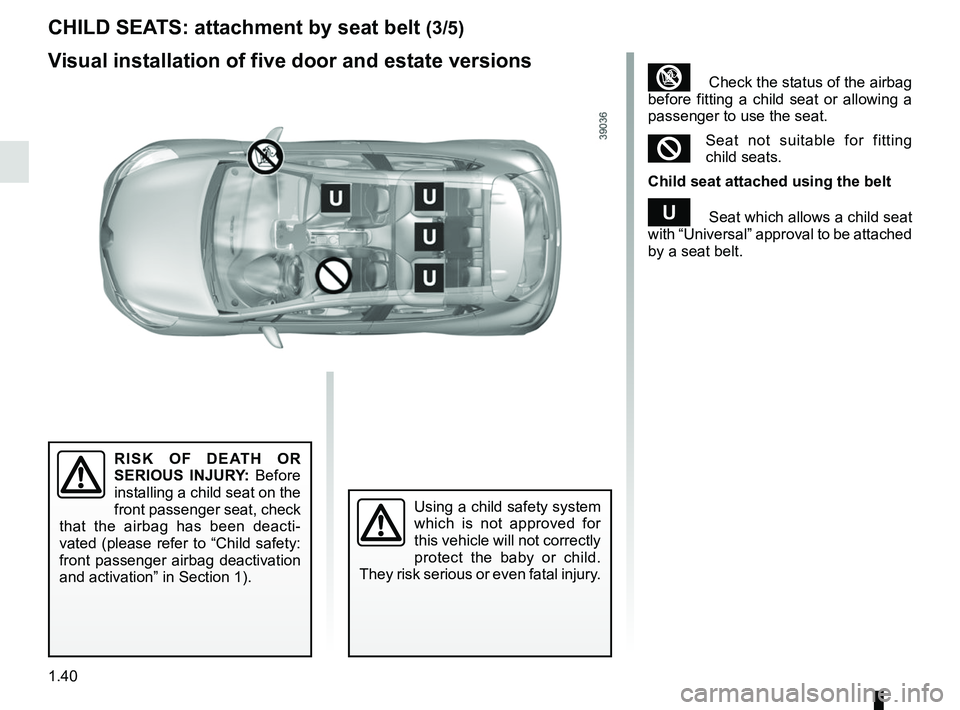
CHILD SEATS: attachment by seat belt (3/5)
³ Check the status of the airbag
before fitting a child seat or allowing a
passenger to use the seat.
²Seat not suitable for fitting
child seats.
Child seat attached using the belt
¬ Seat which allows a child seat
with “Universal” approval to be attached
by a seat belt.
Using a child safety system
which is not approved for
this vehicle will not correctly
protect the baby or child.
They risk serious or even fatal injury.
RISK OF DEATH OR
SERIOUS INJURY: Before
installing a child seat on the
front passenger seat, check
that the airbag has been deacti-
vated (please refer to “Child safety:
front passenger airbag deactivation
and activation” in Section 1).
Visual installation of five door and estate versions
Page 49 of 260
1.43
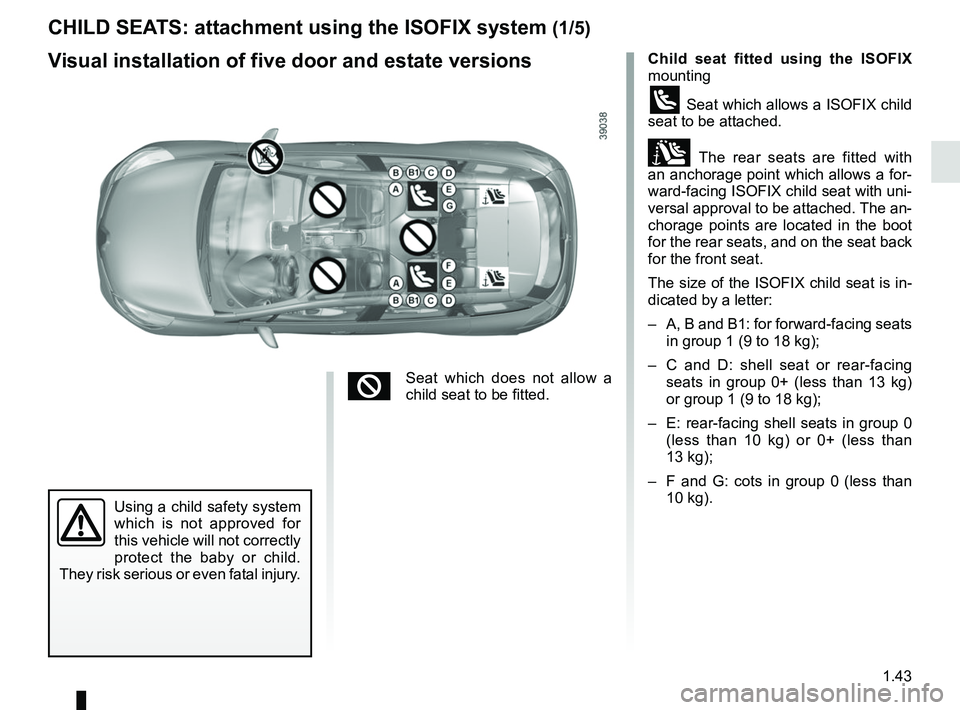
CHILD SEATS: attachment using the ISOFIX system (1/5)
Child seat fitted using the ISOFIX
mounting
ü Seat which allows a ISOFIX child
seat to be attached.
± The rear seats are fitted with
an anchorage point which allows a for-
ward-facing ISOFIX child seat with uni-
versal approval to be attached. The an-
chorage points are located in the boot
for the rear seats, and on the seat back
for the front seat.
The size of the ISOFIX child seat is in-
dicated by a letter:
– A, B and B1: for forward-facing seats in group 1 (9 to 18 kg);
– C and D: shell seat or rear-facing seats in group 0+ (less than 13 kg)
or group 1 (9 to 18 kg);
– E: rear-facing shell seats in group 0 (less than 10 kg) or 0+ (less than
13 kg);
– F and G: cots in group 0 (less than 10 kg).
Using a child safety system
which is not approved for
this vehicle will not correctly
protect the baby or child.
They risk serious or even fatal injury.
Visual installation of five door and estate versions
²Seat which does not allow a
child seat to be fitted.
Page 50 of 260
1.44
Five door and estate versions
Type of child seat Weight of
the child Seat size ISOFIX Front passenger
seat Rear side seats (4) Rear centre seat
Carrycot fitted
across the vehicle
Group 0 < 10 kg F, G X IL (1) X
Rear-facing shell
seat
Groups 0 or 0 + < 10 kg and
< 13 kg
E X IL (2) X
Shell seat/rear-facing
seat
Groups 0+ and 1 < 13 kg and 9 to
18 kg
C, D X IL (2) X
Forward-facing seat
Group 1 9 to 18 kg A, B, B1 X IUF - IL (3) X
Booster seat
Groups 2 and 3 15 to 25 kg and
22 to 36 kg
XXX
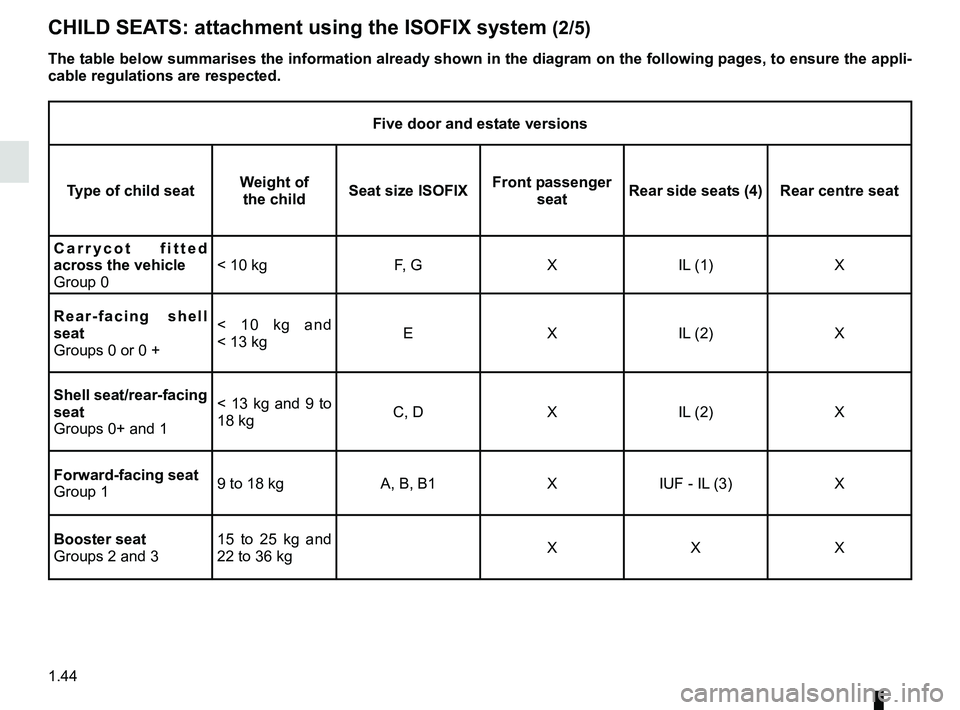
CHILD SEATS: attachment using the ISOFIX system (2/5)
The table below summarises the information already shown in the diagram \
on the following pages, to ensure the appli-
cable regulations are respected.
Page 51 of 260

X = Seat not suitable for fitting child seats ISOFIX.
IUF/IL = On equipped vehicles, seat which allows an approved “Universal/semi-u\
n")
1.45
CHILD SEATS: attachment using the ISOFIX system (3/5)
X = Seat not suitable for fitting child seats ISOFIX.
IUF/IL = On equipped vehicles, seat which allows an approved “Universal/semi-u\
niversal” or “vehicle specific” child seat to be at-
tached using the ISOFIX system; check that it can be fitted.
(1) A carrycot can be installed across the vehicle and will take up at least \
two seats. Position the child with his or her feet nea rest
the door.
(2) Move the front seat as far forward as possible to install a rear-facing \
child seat, then move back the seat in front as far as it will
go, although without allowing it to come into contact with the child sea\
t.
(3) Forward-facing child seat; position the seatback of the child seat in co\
ntact with the seatback of the vehicle seat. Adjust the
headrest, or remove it if necessary. Do not push the seat in front of the child more than halfway back on i\
ts runners and do no t
recline the seatback more than 25°.
(4) Make sure that the child seat or the child’s feet do not prevent the front seat from locking correctly. Refer to the information on
the “Front seat” in Section 1.
Page 59 of 260
1.53
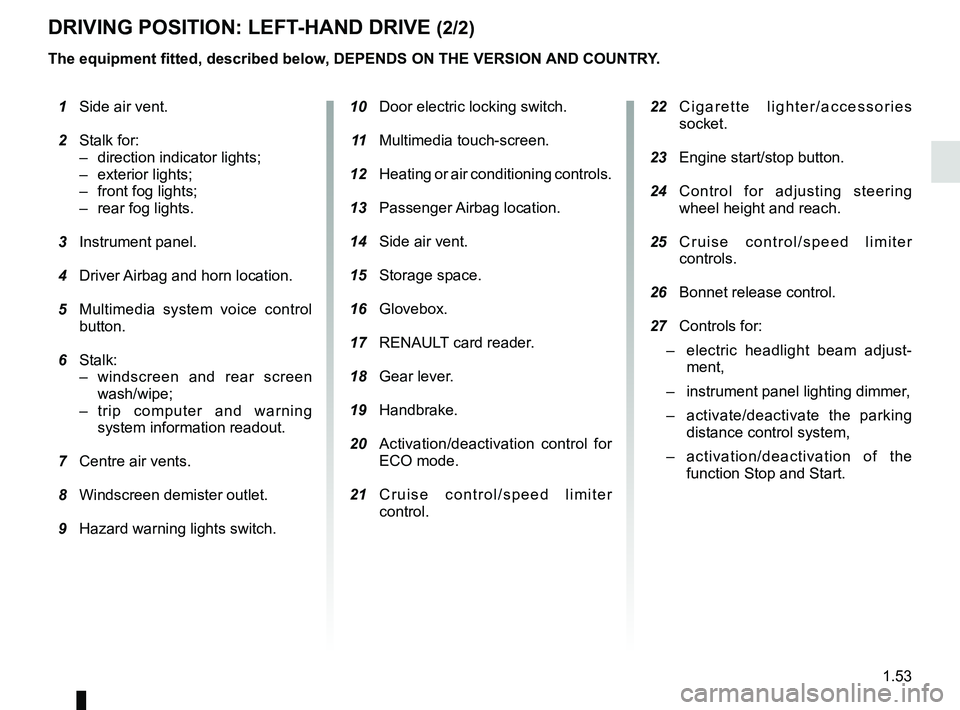
DRIVING POSITION: LEFT-HAND DRIVE (2/2)
1 Side air vent.
2 Stalk for:
– direction indicator lights;
– exterior lights;
– front fog lights;
– rear fog lights.
3 Instrument panel.
4 Driver Airbag and horn location.
5 Multimedia system voice control
button.
6 Stalk:
– windscreen and rear screen wash/wipe;
– trip computer and warning system information readout.
7 Centre air vents.
8 Windscreen demister outlet.
9 Hazard warning lights switch.
The equipment fitted, described below, DEPENDS ON THE VERSION AND COUNTRY.
10 Door electric locking switch.
11 Multimedia touch-screen.
12 Heating or air conditioning controls.
13 Passenger Airbag location.
14 Side air vent.
15 Storage space.
16 Glovebox.
17 RENAULT card reader.
18 Gear lever.
19 Handbrake.
20 Activation/deactivation control for
ECO mode.
21 Cruise control/speed limiter
control.
22 Cigarette lighter/accessories
socket.
23 Engine start/stop button.
24 Control for adjusting steering
wheel height and reach.
25 Cruise control/speed limiter
controls.
26 Bonnet release control.
27 Controls for:
– electric headlight beam adjust-
ment,
– instrument panel lighting dimmer,
– activate/deactivate the parking
distance control system,
– activation/deactivation of the
function Stop and Start.
Page 61 of 260
1.55
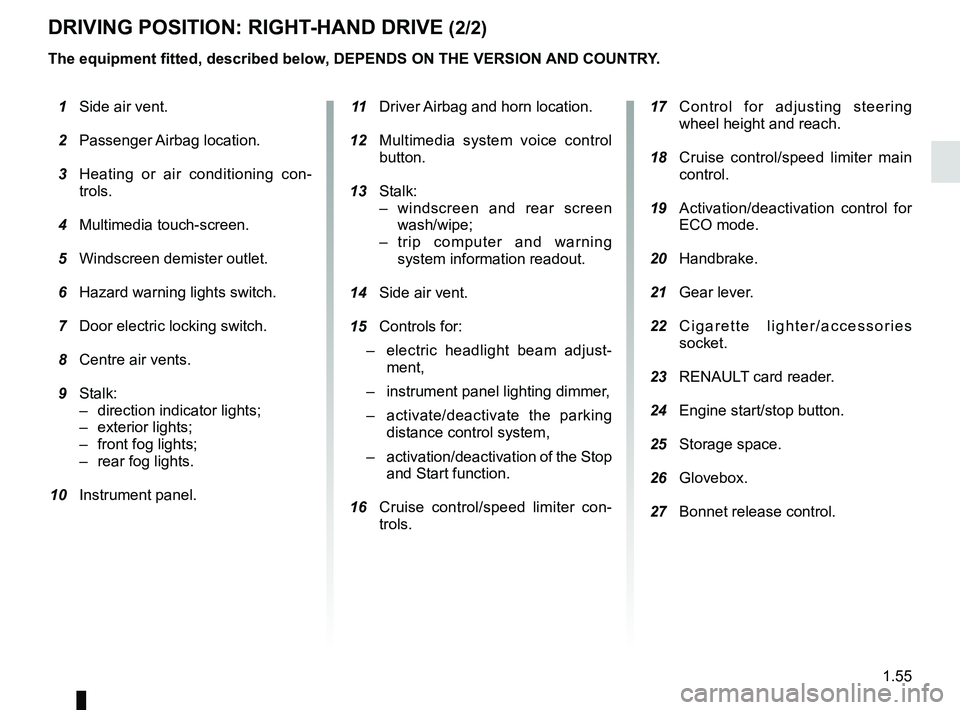
DRIVING POSITION: RIGHT-HAND DRIVE (2/2)
The equipment fitted, described below, DEPENDS ON THE VERSION AND COUNTRY.
1 Side air vent.
2 Passenger Airbag location.
3 Heating or air conditioning con-
trols.
4 Multimedia touch-screen.
5 Windscreen demister outlet.
6 Hazard warning lights switch.
7 Door electric locking switch.
8 Centre air vents.
9 Stalk:
– direction indicator lights;
– exterior lights;
– front fog lights;
– rear fog lights.
10 Instrument panel. 11 Driver Airbag and horn location.
12 Multimedia system voice control
button.
13 Stalk:
– windscreen and rear screen wash/wipe;
– trip computer and warning system information readout.
14 Side air vent.
15 Controls for:
– electric headlight beam adjust-
ment,
– instrument panel lighting dimmer,
– activate/deactivate the parking
distance control system,
– activation/deactivation of the Stop
and Start function.
16 Cruise control/speed limiter con-
trols.
17 Control for adjusting steering
wheel height and reach.
18 Cruise control/speed limiter main
control.
19 Activation/deactivation control for
ECO mode.
20 Handbrake.
21 Gear lever.
22 Cigarette lighter/accessories
socket.
23 RENAULT card reader.
24 Engine start/stop button.
25 Storage space.
26 Glovebox.
27 Bonnet release control.
Page 65 of 260
1.59
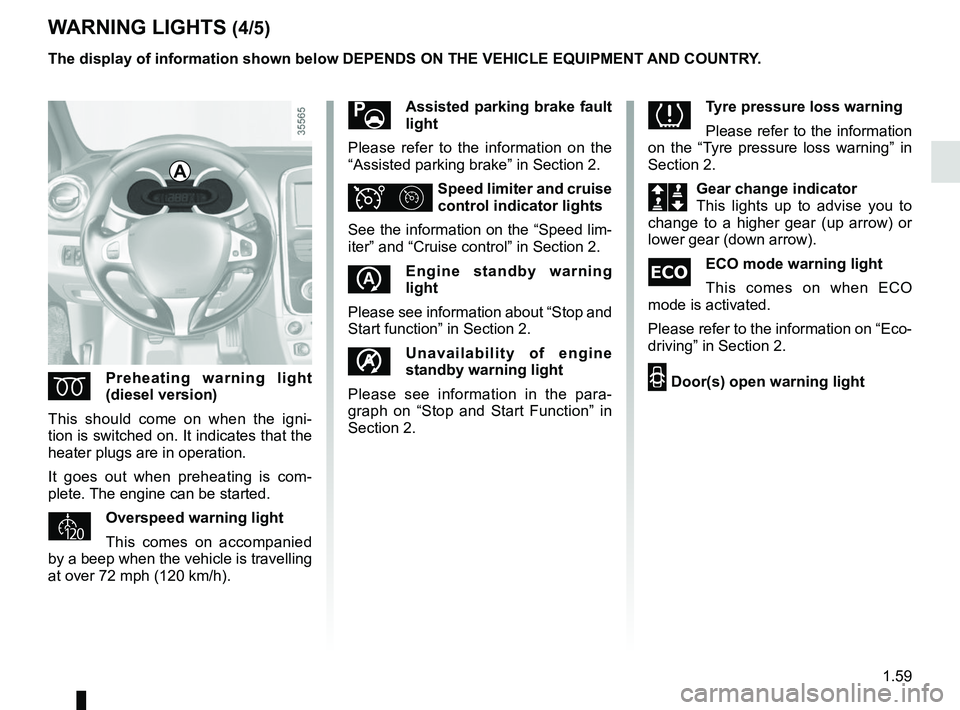
WARNING LIGHTS (4/5)
ÉPreheating warning light
(diesel version)
This should come on when the igni-
tion is switched on. It indicates that the
heater plugs are in operation.
It goes out when preheating is com-
plete. The engine can be started.
Overspeed warning light
This comes on accompanied
by a beep when the vehicle is travelling
at over 72 mph (120 km/h).
\bAssisted parking brake fault
light
Please refer to the information on the
“Assisted parking brake” in Section 2.
ΦSpeed limiter and cruise
control indicator lights
See the information on the “Speed lim-
iter” and “Cruise control” in Section 2.
Engine standby warning
light
Please see information about “Stop and
Start function” in Section 2.
Unavailability of engine
standby warning light
Please see information in the para-
graph on “Stop and Start Function” in
Section 2.
A
The display of information shown below DEPENDS ON THE VEHICLE EQUIPMENT \
AND COUNTRY.
Tyre pressure loss warning
Please refer to the information
on the “Tyre pressure loss warning” in
Section 2.
Š‰Gear change indicator
This lights up to advise you to
change to a higher gear (up arrow) or
lower gear (down arrow).
\fECO mode warning light
This comes on when ECO
mode is activated.
Please refer to the information on “Eco-
driving” in Section 2.
2 Door(s) open warning light
Page 66 of 260

The display of information shown below DEPENDS ON THE VEHICLE EQUIPMENT \
AND COUNTRY.
On display B
Passenger airbag ON
Please refer to the information
on “Child safe")
1.60
WARNING LIGHTS (5/5)
The display of information shown below DEPENDS ON THE VEHICLE EQUIPMENT \
AND COUNTRY.
On display B
Passenger airbag ON
Please refer to the information
on “Child safety: deactivating/activating
the front passenger airbag” in Section 1.
¹Passenger airbag OFF
Please refer to the information
on “Child safety: deactivating/activating
the front passenger airbag” in Section 1.
ßFront seat belt reminder
warning light
This lights up on the central display
when the engine is started then, if the
driver’s or front passenger’s seat belt
(if this seat is occupied) is not fastened
and the vehicle has reached approxi-
mately 12 mph (20 km/h), it flashes and
a bleep sounds for around 2 minutes.
Note: an object placed on the passen-
ger seat base may activate the warning
light in some cases.
B
Rear seat belt reminder (depending
on vehicle)
the
ß warning light on the cen-
tral display lights up accompanied by a
message on the instrument panel indi-
cating the number of seat belts buck-
led for approximately 30 seconds each
time:
– the vehicle is started;
– a door is opened;
– a rear seat belt is fastened or unfas- tened.
Check that the rear passengers are
wearing seat belts and that the number
of seat belt shown as fastened corre-
sponds to the number of rear bench
seat places occupied.
Page 74 of 260

Examples of selectionsInterpreting the display selected
On-board computer")
1.68
The display of information shown below DEPENDS ON THE VEHICLE EQUIPMENT \
AND COUNTRY.
TRIP COMPUTER: trip settings (4/5)
Examples of selectionsInterpreting the display selected
On-board computer with distance before
next service message (cntd.)
h) Mileage before service or oil change.Mileage before service
With the ignition switched on and the engine not running ,
and the selected display is “Mileage before service”, press one
of buttons 2 or 3 for about 5 seconds to display the mileage
before a service, then briefly press one of buttons 2 or 3 to view
the range (distance or time remaining before the next service).
When the distance value approaches its limit, there are several
possible scenarios:
– distance/time remaining less than 900 miles (1,500 km) or
one month : the message “Service due in” is displayed ac-
companied by the nearest term (distance or time);
– range equal to 0 km/miles or service date reached: the
message “service vehicle” is displayed accompanied by the
© warning light.
The vehicle requires an oil change as soon as possible.
SERVICE
INTERVALS
OIL CHANGE IN
30 000 Kms / 24 MO
SERVICE DUE IN
300 Kms / 24 DAYS
SERVICE REQUIRED
Depending on the vehicle, the mileage before an oil change varies accord\
ing to the driving style (frequent driving at low speed ,
door-to-door journeys, extensive use at idling speed, towing a trailer, etc.). The distance remaining until the next oil change can
therefore decrease more quickly in some cases than the actual distance t\
ravelled.
Reset : to reset the distance before service, press and hold button 2 or 3 for approximately 10 seconds until the display shows
the mileage permanently.
NB: if a service is performed without changing the engine oil, only the mi\
leage before the next service should be reset. In the
event of an oil change, both the distance before the next service and th\
e next oil change should be reset.