engine RENAULT CLIO 2017 X98 / 4.G Owner's Manual
[x] Cancel search | Manufacturer: RENAULT, Model Year: 2017, Model line: CLIO, Model: RENAULT CLIO 2017 X98 / 4.GPages: 260, PDF Size: 7.98 MB
Page 66 of 260

The display of information shown below DEPENDS ON THE VEHICLE EQUIPMENT \
AND COUNTRY.
On display B
Passenger airbag ON
Please refer to the information
on “Child safe")
1.60
WARNING LIGHTS (5/5)
The display of information shown below DEPENDS ON THE VEHICLE EQUIPMENT \
AND COUNTRY.
On display B
Passenger airbag ON
Please refer to the information
on “Child safety: deactivating/activating
the front passenger airbag” in Section 1.
¹Passenger airbag OFF
Please refer to the information
on “Child safety: deactivating/activating
the front passenger airbag” in Section 1.
ßFront seat belt reminder
warning light
This lights up on the central display
when the engine is started then, if the
driver’s or front passenger’s seat belt
(if this seat is occupied) is not fastened
and the vehicle has reached approxi-
mately 12 mph (20 km/h), it flashes and
a bleep sounds for around 2 minutes.
Note: an object placed on the passen-
ger seat base may activate the warning
light in some cases.
B
Rear seat belt reminder (depending
on vehicle)
the
ß warning light on the cen-
tral display lights up accompanied by a
message on the instrument panel indi-
cating the number of seat belts buck-
led for approximately 30 seconds each
time:
– the vehicle is started;
– a door is opened;
– a rear seat belt is fastened or unfas- tened.
Check that the rear passengers are
wearing seat belts and that the number
of seat belt shown as fastened corre-
sponds to the number of rear bench
seat places occupied.
Page 67 of 260
1.61
DISPLAYS AND INDICATORS (1/2)
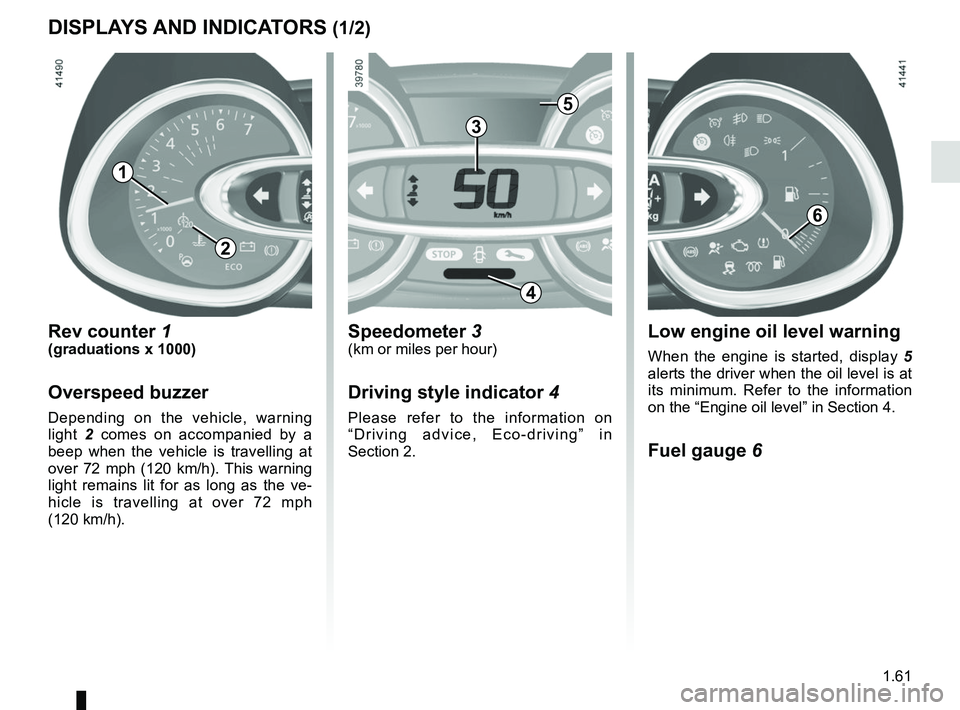
Rev counter 1(graduations x 1000)
Overspeed buzzer
Depending on the vehicle, warning
light 2 comes on accompanied by a
beep when the vehicle is travelling at
over 72 mph (120 km/h). This warning
light remains lit for as long as the ve-
hicle is travelling at over 72 mph
(120 km/h).
3
Speedometer 3(km or miles per hour)
Driving style indicator 4
Please refer to the information on
“Driving advice, Eco-driving” in
Section 2.
Low engine oil level warning
When the engine is started, display 5
alerts the driver when the oil level is at
its minimum. Refer to the information
on the “Engine oil level” in Section 4.
Fuel gauge 6
5
1
6
4
2
Page 70 of 260
1.64
ON-BOARD COMPUTER: general information (2/2)
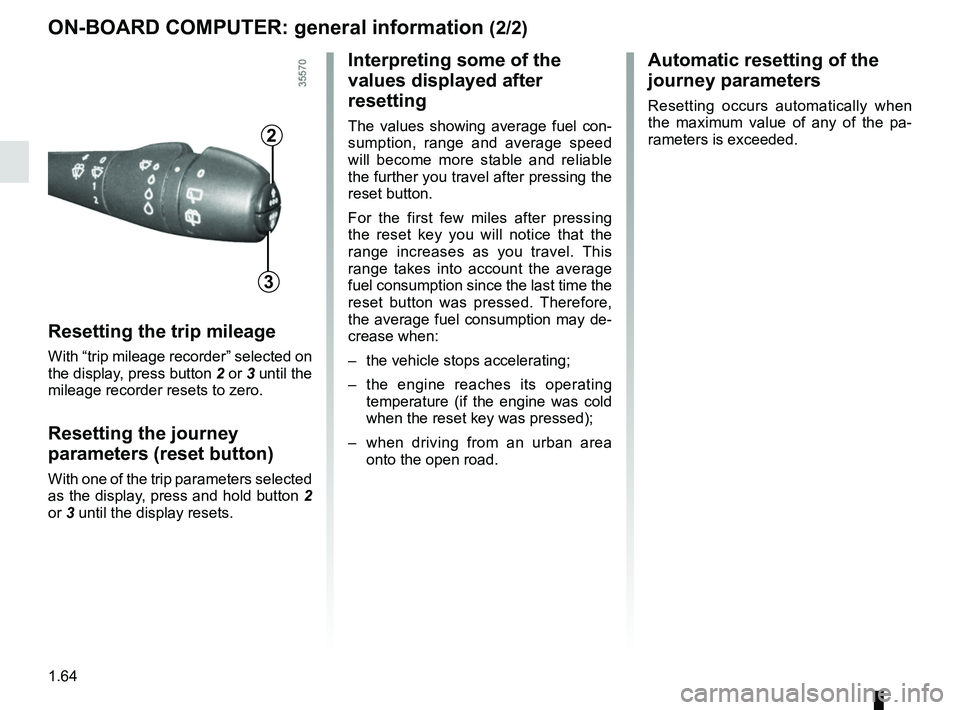
Resetting the trip mileage
With “trip mileage recorder” selected on
the display, press button 2 or 3 until the
mileage recorder resets to zero.
Resetting the journey
parameters (reset button)
With one of the trip parameters selected
as the display, press and hold button 2
or 3 until the display resets.
Interpreting some of the
values displayed after
resetting
The values showing average fuel con-
sumption, range and average speed
will become more stable and reliable
the further you travel after pressing the
reset button.
For the first few miles after pressing
the reset key you will notice that the
range increases as you travel. This
range takes into account the average
fuel consumption since the last time the
reset button was pressed. Therefore,
the average fuel consumption may de-
crease when:
– the vehicle stops accelerating;
– the engine reaches its operating
temperature (if the engine was cold
when the reset key was pressed);
– when driving from an urban area
onto the open road.
Automatic resetting of the
journey parameters
Resetting occurs automatically when
the maximum value of any of the pa-
rameters is exceeded.
2
3
Page 73 of 260

The display of information shown below DEPENDS ON THE VEHICLE EQUIPMENT \
AND COUNTRY.
Examples of selectionsInterpreting the display selected
On-board computer")
1.67
TRIP COMPUTER: trip settings (3/5)
The display of information shown below DEPENDS ON THE VEHICLE EQUIPMENT \
AND COUNTRY.
Examples of selectionsInterpreting the display selected
On-board computer with mileage-
before-service message
h) Mileage before service or oil change.Mileage before service
With the ignition switched on, and the engine not running
and the selected display is “Mileage before service”, press one
of buttons 2 or 3 for about 5 seconds to display the mileage
before service (distance or time to the next service). When the
distance value approaches its limit, there are several possible
scenarios:
– distance/time remaining less than 900 miles (1,500 km) or
one month : the message “Service due in” is displayed ac-
companied by the nearest term (distance or time);
– distance equal to 0 miles or service date reached: the
message “service vehicle” is displayed accompanied by the
© warning light.
The vehicle requires a service as soon as possible.
SERVICE
INTERVALS
SERVICE IN
30 000 Kms / 12 MO
SERVICE DUE IN
300 Kms / 24 DAYS
SERVICE REQUIRED
Reset : to reset the distance before service, press and hold button 2 or 3 for approximately 10 seconds until the display shows
the mileage permanently.
NB: if a service is performed without changing the engine oil, only the mi\
leage before the next service should be reset. In the
event of an oil change, both the distance before the next service and th\
e next oil change should be reset.
Page 74 of 260

Examples of selectionsInterpreting the display selected
On-board computer")
1.68
The display of information shown below DEPENDS ON THE VEHICLE EQUIPMENT \
AND COUNTRY.
TRIP COMPUTER: trip settings (4/5)
Examples of selectionsInterpreting the display selected
On-board computer with distance before
next service message (cntd.)
h) Mileage before service or oil change.Mileage before service
With the ignition switched on and the engine not running ,
and the selected display is “Mileage before service”, press one
of buttons 2 or 3 for about 5 seconds to display the mileage
before a service, then briefly press one of buttons 2 or 3 to view
the range (distance or time remaining before the next service).
When the distance value approaches its limit, there are several
possible scenarios:
– distance/time remaining less than 900 miles (1,500 km) or
one month : the message “Service due in” is displayed ac-
companied by the nearest term (distance or time);
– range equal to 0 km/miles or service date reached: the
message “service vehicle” is displayed accompanied by the
© warning light.
The vehicle requires an oil change as soon as possible.
SERVICE
INTERVALS
OIL CHANGE IN
30 000 Kms / 24 MO
SERVICE DUE IN
300 Kms / 24 DAYS
SERVICE REQUIRED
Depending on the vehicle, the mileage before an oil change varies accord\
ing to the driving style (frequent driving at low speed ,
door-to-door journeys, extensive use at idling speed, towing a trailer, etc.). The distance remaining until the next oil change can
therefore decrease more quickly in some cases than the actual distance t\
ravelled.
Reset : to reset the distance before service, press and hold button 2 or 3 for approximately 10 seconds until the display shows
the mileage permanently.
NB: if a service is performed without changing the engine oil, only the mi\
leage before the next service should be reset. In the
event of an oil change, both the distance before the next service and th\
e next oil change should be reset.
Page 78 of 260
1.72
TRIP COMPUTER AND WARNING SYSTEM: warning message
These appear with the ® warning light and require you to stop immediately, for your own safety, as soon as traf-
fic conditions allow. Stop your engine and do not restart it. Contact an approved Dealer.
Examples of warning messages are given in the following pages. Note: the messages appear on the display either individually
or alternately (when there are several messages to be displayed), and \
may be accompanied by a warning light and/or a beep.
Examples of messages Interpreting the display selected
« ENGINE FAILURE HAZARD » Indicates an injection fault, the vehicle’s engine has overheated or there is a
serious engine fault.
« BRAKING SYSTEM FAULT » Indicates a fault in the braking system.
« BATTERY CHARGING FAULT » Indicates a fault in the vehicle battery charging circuit (alternator e\
tc.).
« PUNCTURE » Indicates that at least one wheel is punctured or severely underinflated\
.
Page 81 of 260
1.75
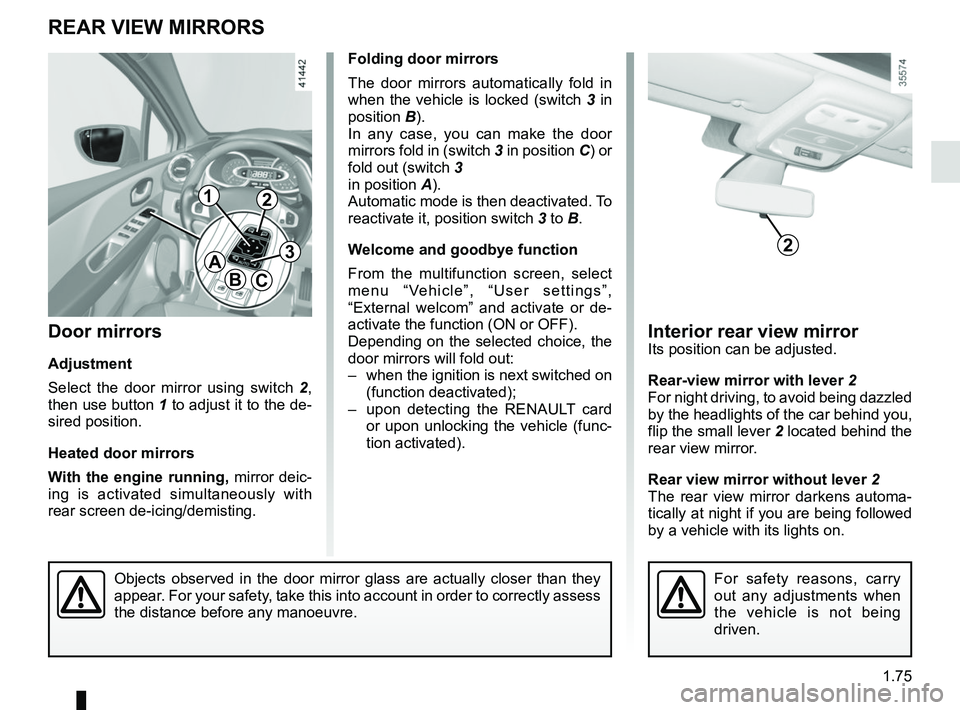
Interior rear view mirrorIts position can be adjusted.
Rear-view mirror with lever 2
For night driving, to avoid being dazzled
by the headlights of the car behind you,
flip the small lever 2 located behind the
rear view mirror.
Rear view mirror without lever 2
The rear view mirror darkens automa-
tically at night if you are being followed
by a vehicle with its lights on.
Objects observed in the door mirror glass are actually closer than they \
appear. For your safety, take this into account in order to correctly assess
the distance before any manoeuvre.
Door mirrors
Adjustment
Select the door mirror using switch 2 ,
then use button 1 to adjust it to the de-
sired position.
Heated door mirrors
With the engine running, mirror deic-
ing is activated simultaneously with
rear screen de-icing/demisting.
REAR VIEW MIRRORS
A
BC
For safety reasons, carry
out any adjustments when
the vehicle is not being
driven.
2
12
3
Folding door mirrors
The door mirrors automatically fold in
when the vehicle is locked (switch 3 in
position B).
In any case, you can make the door
mirrors fold in (switch 3 in position C) or
fold out (switch 3
in position A).
Automatic mode is then deactivated. To
reactivate it, position switch 3 to B.
Welcome and goodbye function
From the multifunction screen, select
menu “Vehicle”, “User settings”,
“External welcom” and activate or de-
activate the function (ON or OFF).
Depending on the selected choice, the
door mirrors will fold out:
– when the ignition is next switched on (function deactivated);
– upon detecting the RENAULT card or upon unlocking the vehicle (func-
tion activated).
Page 82 of 260
1.76
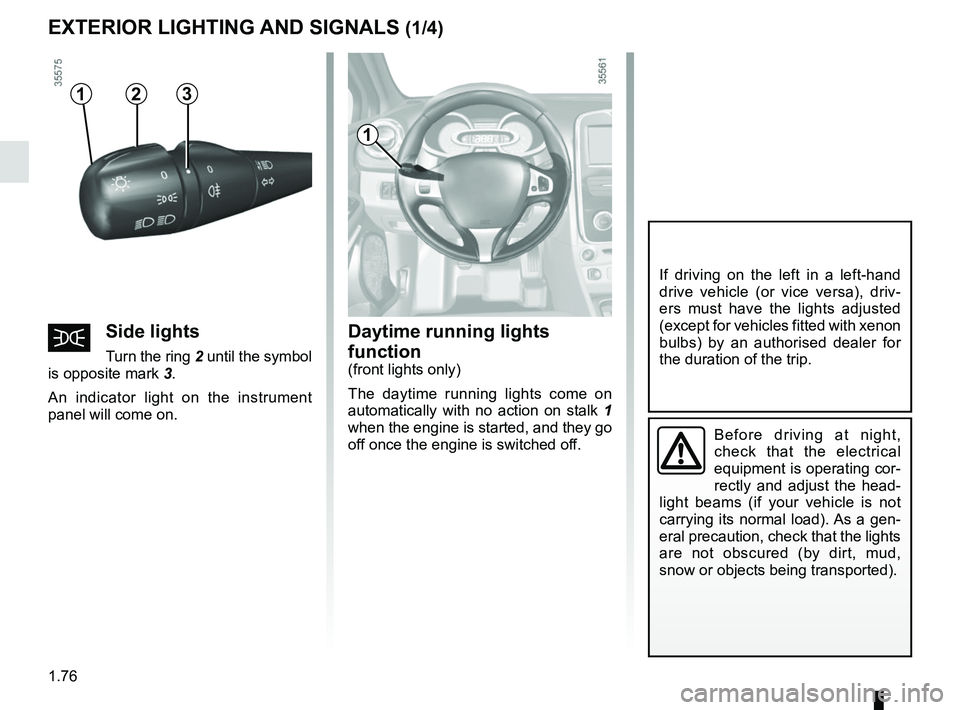
Daytime running lights
function
(front lights only)
The daytime running lights come on
automatically with no action on stalk 1
when the engine is started, and they go
off once the engine is switched off.
EXTERIOR LIGHTING AND SIGNALS (1/4)
šSide lights
Turn the ring 2 until the symbol
is opposite mark 3.
An indicator light on the instrument
panel will come on.
1
Before driving at night,
check that the electrical
equipment is operating cor-
rectly and adjust the head-
light beams (if your vehicle is not
carrying its normal load). As a gen-
eral precaution, check that the lights
are not obscured (by dirt, mud,
snow or objects being transported).
If driving on the left in a left-hand
drive vehicle (or vice versa), driv-
ers must have the lights adjusted
(except for vehicles fitted with xenon
bulbs) by an authorised dealer for
the duration of the trip.
312
Page 83 of 260
1.77
EXTERIOR LIGHTING AND SIGNALS (2/4)
Depending on the vehicle, the dipped
beam headlights come on automati-
cally after several sweeps of the wind-
screen wiper blades.
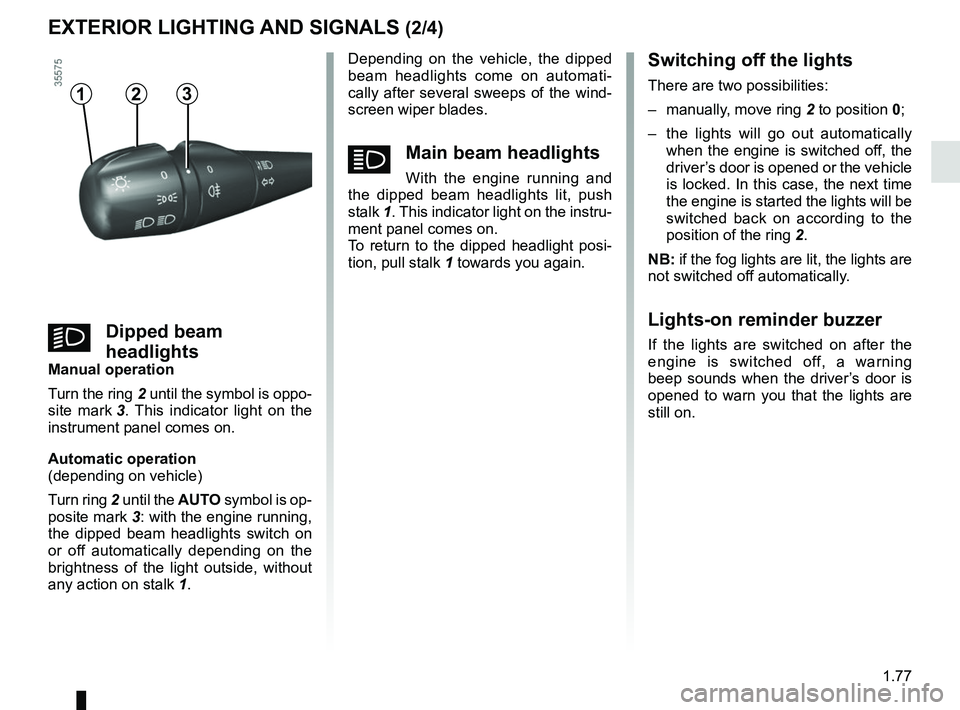
áMain beam headlights
With the engine running and
the dipped beam headlights lit, push
stalk 1. This indicator light on the instru-
ment panel comes on.
To return to the dipped headlight posi-
tion, pull stalk 1 towards you again.
Switching off the lights
There are two possibilities:
– manually, move ring 2 to position 0;
– the lights will go out automatically when the engine is switched off, the
driver’s door is opened or the vehicle
is locked. In this case, the next time
the engine is started the lights will be
switched back on according to the
position of the ring 2.
NB: if the fog lights are lit, the lights are
not switched off automatically.
Lights-on reminder buzzer
If the lights are switched on after the
engine is switched off, a warning
beep sounds when the driver’s door is
opened to warn you that the lights are
still on.
312
kDipped beam
headlights
Manual operation
Turn the ring 2 until the symbol is oppo-
site mark 3. This indicator light on the
instrument panel comes on.
Automatic operation
(depending on vehicle)
Turn ring 2 until the AUTO symbol is op-
posite mark 3: with the engine running, the dipped beam headlights switch on
or off automatically depending on the
brightness of the light outside, without
any action on stalk 1.
Page 84 of 260
1.78
EXTERIOR LIGHTING AND SIGNALS (3/4)
Welcome and goodbye
function
(depending on vehicle)
Once the function is activated, the
lights come on automatically when the
vehicle is unlocked.
They switch off automatically:
– approximately one minute after light-ing up;
– when starting the engine based on the position of the lighting stalk;
or
– upon locking the vehicle.
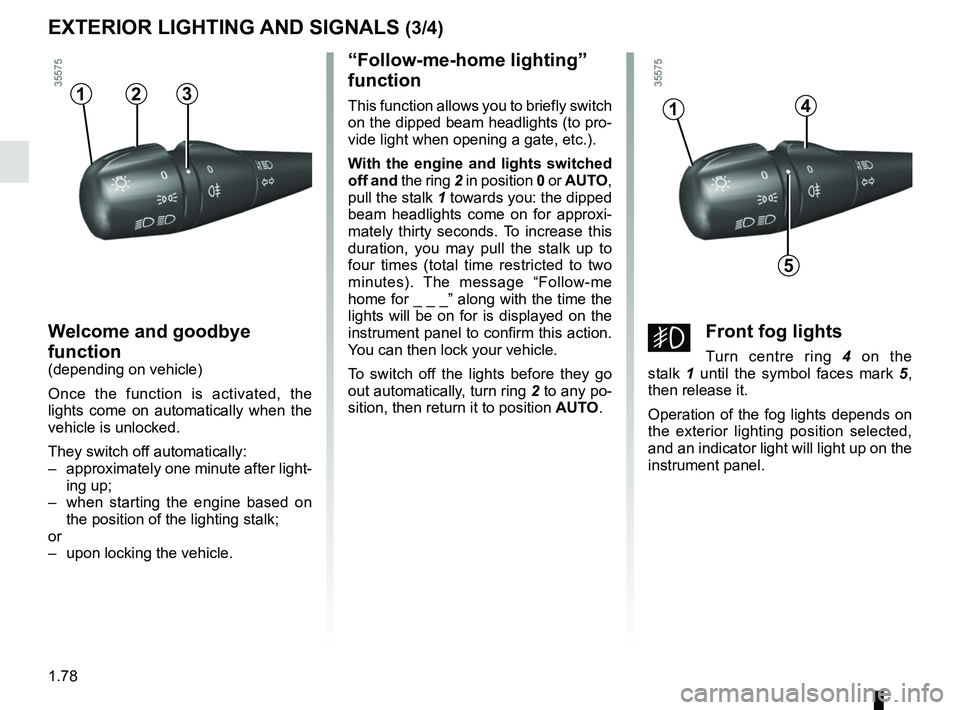
“Follow-me-home lighting”
function
This function allows you to briefly switch
on the dipped beam headlights (to pro-
vide light when opening a gate, etc.).
With the engine and lights switched
off and the ring 2 in position 0 or AUTO,
pull the stalk 1 towards you: the dipped
beam headlights come on for approxi-
mately thirty seconds. To increase this
duration, you may pull the stalk up to
four times (total time restricted to two
minutes). The message “Follow-me
home for _ _ _” along with the time the
lights will be on for is displayed on the
instrument panel to confirm this action.
You can then lock your vehicle.
To switch off the lights before they go
out automatically, turn ring 2 to any po-
sition, then return it to position AUTO.4
5
1
gFront fog lights
Turn centre ring 4 on the
stalk 1 until the symbol faces mark 5 ,
then release it.
Operation of the fog lights depends on
the exterior lighting position selected,
and an indicator light will light up on the
instrument panel.
312