stop start RENAULT CLIO 2017 X98 / 4.G Owner's Manual
[x] Cancel search | Manufacturer: RENAULT, Model Year: 2017, Model line: CLIO, Model: RENAULT CLIO 2017 X98 / 4.GPages: 260, PDF Size: 7.98 MB
Page 98 of 260
2.4
Operating faults
In certain cases, the hands-free
RENAULT card may not work:
– when the RENAULT card battery is drained, flat battery, etc.
– near to appliances operating on the same frequency as the card (mo-
nitor, mobile phone, video game,
etc.);
– vehicle located in a high electroma- gnetic radiation zone.
The message “PLEASE INSERT
KEYCARD” appears on the instrument
panel.
Insert the RENAULT card fully into card
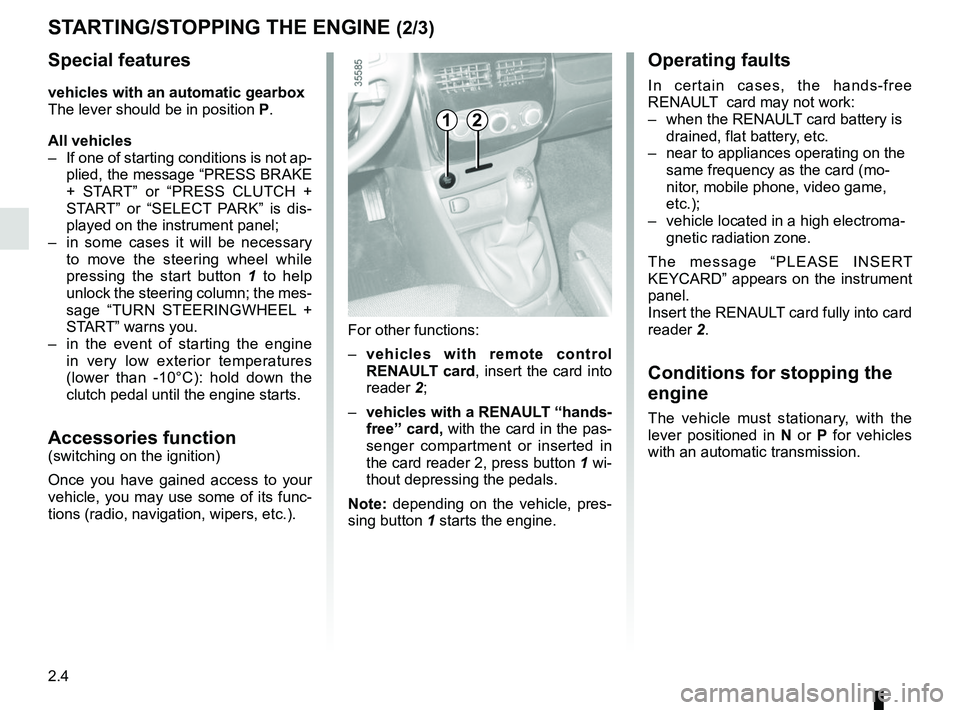
reader 2.
Conditions for stopping the
engine
The vehicle must stationary, with the
lever positioned in N or P for vehicles
with an automatic transmission.
STARTING/STOPPING THE ENGINE (2/3)
For other functions:
– vehicles with remote control
RENAULT card, insert the card into
reader 2;
– vehicles with a RENAULT “hands-
free” card, with the card in the pas-
senger compartment or inserted in
the card reader 2, press button 1 wi-
thout depressing the pedals.
Note: depending on the vehicle, pres-
sing button 1 starts the engine.
12
Special features
vehicles with an automatic gearbox
The lever should be in position P.
All vehicles
– If one of starting conditions is not ap- plied, the message “PRESS BRAKE
+ START” or “PRESS CLUTCH +
START” or “SELECT PARK” is dis-
played on the instrument panel;
– in some cases it will be necessary to move the steering wheel while
pressing the start button 1 to help
unlock the steering column; the mes-
sage “TURN STEERINGWHEEL +
START” warns you.
– in the event of starting the engine in very low exterior temperatures
(lower than -10°C): hold down the
clutch pedal until the engine starts.
Accessories function(switching on the ignition)
Once you have gained access to your
vehicle, you may use some of its func-
tions (radio, navigation, wipers, etc.).
Page 99 of 260
2.5
When you leave your vehicle, especially if you have your RENAULT card
with you, check that the engine is completely switched off.
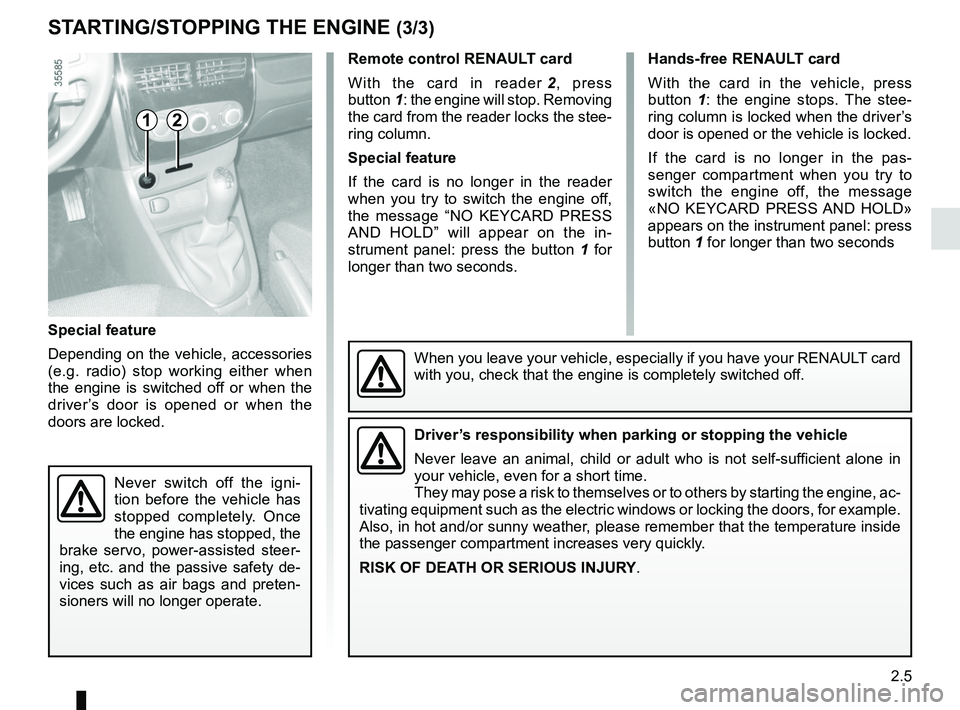
Remote control RENAULT card
With the card in reader 2, press
button 1: the engine will stop. Removing
the card from the reader locks the stee-
ring column.
Special feature
If the card is no longer in the reader
when you try to switch the engine off,
the message “NO KEYCARD PRESS
AND HOLD” will appear on the in-
strument panel: press the button 1 for
longer than two seconds.
Special feature
Depending on the vehicle, accessories
(e.g. radio) stop working either when
the engine is switched off or when the
driver’s door is opened or when the
doors are locked.
STARTING/STOPPING THE ENGINE (3/3)
Driver’s responsibility when parking or stopping the vehicle
Never leave an animal, child or adult who is not self-sufficient alone in
your vehicle, even for a short time.
They may pose a risk to themselves or to others by starting the engine, \
ac-
tivating equipment such as the electric windows or locking the doors, fo\
r example.
Also, in hot and/or sunny weather, please remember that the temperature inside
the passenger compartment increases very quickly.
RISK OF DEATH OR SERIOUS INJURY.
12
Hands-free RENAULT card
With the card in the vehicle, press
button 1: the engine stops. The stee-
ring column is locked when the driver’s
door is opened or the vehicle is locked.
If the card is no longer in the pas-
senger compartment when you try to
switch the engine off, the message
«NO KEYCARD PRESS AND HOLD»
appears on the instrument panel: press
button 1 for longer than two seconds
Never switch off the igni-
tion before the vehicle has
stopped completely. Once
the engine has stopped, the
brake servo, power-assisted steer-
ing, etc. and the passive safety de-
vices such as air bags and preten-
sioners will no longer operate.
Page 100 of 260
2.6
STOP AND START FUNCTION (1/4)
This system enables a reduced fuel
consumption and lower greenhouse
gas emissions. The system is acti-
vated automatically when the vehicle is
started. While driving, the system stops
the engine (standby) when the vehicle
is at a standstill (traffic jam, traffic lights,
etc).
Conditions for engine
standby
The vehicle has set off from where it
was parked;
For vehicles equipped with auto-
matic gearboxes:
– the gearbox is in position D, M or N;
and
– the brake pedal is depressed (suffi-ciently hard);
and
– the accelerator pedal is not de- pressed;
and
– the speed is zero for around 1 second.
The engine remains on standby if posi-
tion P is selected, or if position N is se-
lected with the handbrake engaged and
the brake pedal released. For vehicles equipped with manual
gearboxes:
– the gearbox is in neutral;
and
– the clutch pedal is released.
If the warning light
flashes,
this means that the clutch pedal is
not sufficiently released;
and
– the vehicle speed is less than ap- proximately 7 mph (3 km/h).
In all vehicles, the warning light
on the instrument panel is lit when the
engine is on standby.
The vehicle equipment remain opera-
tional while the engine is stopped.
If the engine stalls while the system
is in operation, pressing the clutch
pedal right down will start it again.
Before getting out of the
vehicle, you must switch
off the ignition by pressing
the engine stop (please see
“Starting, stopping the engine”).
Keep your vehicle station-
ary when the engine is
on standby (shown by the
warning light
on the
instrument panel).
Engine on standby - braking
assistance is no longer op-
erational.
Engine on standby - power-
assisted steering is no
longer operational.
Page 101 of 260
2.7
STOP AND START FUNCTION (2/4)
To fill up with fuel, the engine must
be stopped (and not on standby):
always stop the engine by pressing
the engine stop button (please see
“Starting, stopping the engine)”.
Preventing the engine from
standing by
In certain situations, such as negotiat-
ing a crossroads for instance, it is pos-
sible to keep the engine running so as
to be ready to move off quickly.
For vehicles equipped with auto-
matic gearboxes:
Keep the vehicle stationary without
pressing too hard on the brake pedal
For vehicles equipped with manual
gearboxes:
Keep the clutch pedal pressed right
down
Conditions for coming out of
engine standby
For vehicles equipped with auto-
matic gearboxes:
– the brake pedal is released, position D or M engaged or,
– the brake pedal is released, position N engaged and the handbrake off, or
– the brake pedal is pressed again, with position P engaged or position
N engaged with the handbrake ap-
plied, or
– position R is engaged or,
– the accelerator pedal is pressed.
For vehicles equipped with manual
gearboxes:
– the gearbox is in neutral and the clutch pedal is slightly depressed, or
– the engine is in gear and the clutch pedal is pressed right down. Special note:
depending on the vehi-
cle, if you switch off the ignition when
the engine is on standby, the warning
light Ä is displayed for a few sec-
onds on the instrument panel.
Page 102 of 260
2.8
STOP AND START FUNCTION (3/4)
Conditions preventing the
standby of the engine
Certain conditions prevent the system
from using the engine standby function,
including when:
– reverse gear is engaged;
– the bonnet is not locked;
– the driver’s door is not closed;
– the driver’s seatbelt is not fastened;
– the outdoor temperature is too low or too high (less than around 0 °C or
higher than around 30 °C);
– the battery is not sufficiently charged;
– the difference between the vehicle interior temperature and the auto-
matic climate control instruction is
too high; – for vehicles with automatic gear-
boxes, the gradient is steeper than
approximately 12%;
– the “Clear View” function is activated (please see “Automatic Climate
Control” in Section 3);
– the engine temperature is too low;
– the emission control system is being regenerated;
or
– ...
The warning light
or, depend-
ing on the vehicle, the message “AUTO
STOP UNAVAILABLE” appears on the
instrument panel indicating that engine
standby is not available.
Deactivate the Stop and
Start function for any opera-
tion performed in the engine
compartment.
Special cases
With the engine on standby (traffic jam,
traffic lights, etc.), if the driver unfastens
their seat belt, opens the driver’s door
or gets out of their seat, the ignition will
be switched off.
To restart and reactivate the Stop and
Start system, press the start button
(please refer to “Starting, stopping the
engine” in Section 2).
Page 103 of 260
2.9
STOP AND START FUNCTION (4/4)
1
2
Special feature of the automatic
engine re-start
Under certain conditions, the engine
can restart on its own in order to guar-
antee your safety and comfort.
This can occur especially when:
– the outdoor temperature is too low or too high (less than around 0 °C or
higher than around 30 °C);
– the “Clear View” function is activated (please see “Automatic Climate
Control” in Section 3);
– the battery is not sufficiently charged;
– the vehicle speed is above 3 mph (5 km/h) (downhill slope, etc.);
– repeated pressing on the brake pedal or braking system require-
ment;
– ...
In the event of an emer-
gency, the engine can be
restarted by pressing on the
clutch pedal if the Stop and
Start function is activated.
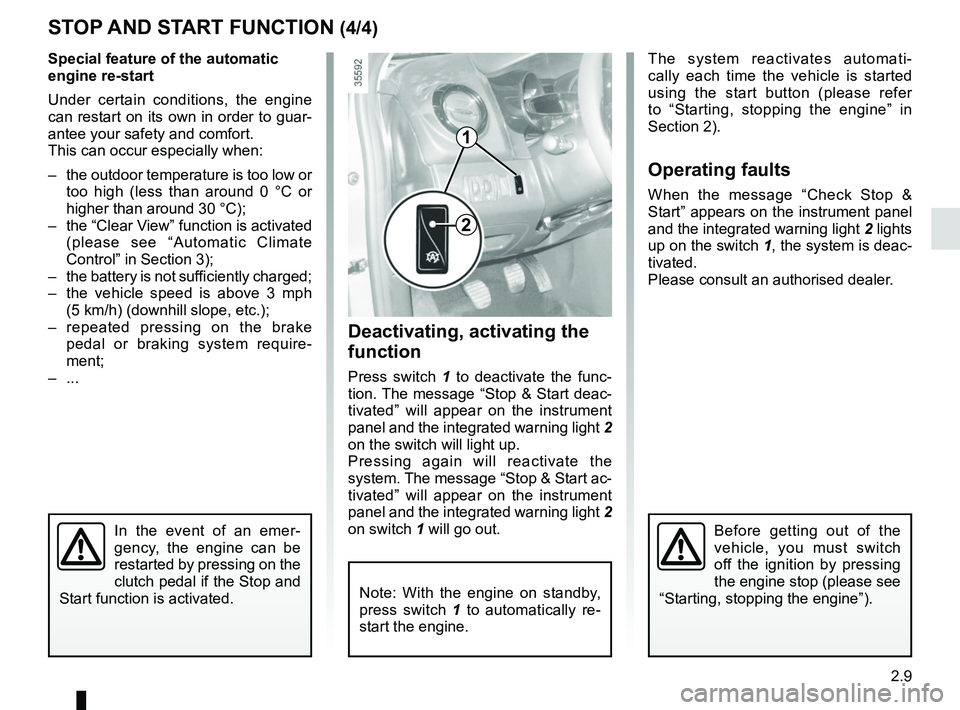
Deactivating, activating the
function
Press switch 1 to deactivate the func-
tion. The message “Stop & Start deac-
tivated” will appear on the instrument
panel and the integrated warning light 2
on the switch will light up.
Pressing again will reactivate the
system. The message “Stop & Start ac-
tivated” will appear on the instrument
panel and the integrated warning light 2
on switch 1 will go out. The system reactivates automati-
cally each time the vehicle is started
using the start button (please refer
to “Starting, stopping the engine” in
Section 2).
Operating faults
When the message “Check Stop &
Start” appears on the instrument panel
and the integrated warning light
2 lights
up on the switch 1, the system is deac-
tivated.
Please consult an authorised dealer.
Before getting out of the
vehicle, you must switch
off the ignition by pressing
the engine stop (please see
“Starting, stopping the engine”).
Note: With the engine on standby,
press switch 1 to automatically re-
start the engine.
Page 112 of 260
2.18
MAINTENANCE AND ANTIPOLLUTION ADVICE
Your vehicle complies with criteria for
recycling and recovering vehicles at the
end of their service life which will come
into force in 2015.
Some parts of your vehicle have there-
fore been designed to facilitate future
recycling.
These parts are easy to remove so
that they can be recovered and repro-
cessed by recycling companies.
By virtue of its design, moderate fuel
consumption and initial settings, your
vehicle also conforms to current anti-
pollution regulations. The manufactu-
rer is actively striving to reduce pollu-
tant exhaust gas emissions and to save
energy. But the fuel consumption of
your vehicle and the level of pollutant
exhaust gas emissions are also your
responsibility. Ensure that it is maintai-
ned and used correctly.
Maintenance
It is important to remember that fai-
lure to respect antipollution regulations
could lead to legal action being taken
against the vehicle owner.In addition, replacing engine, fuel
supply system and exhaust compo-
nents with parts other than those origi-
nally recommended by the manufac-
turer may alter your vehicle so that it
no longer complies with anti-pollution
regulations.
Have your vehicle adjusted and
checked by an authorised dealer, in ac-
cordance with the instructions given in
your maintenance schedule: they will
have all the equipment necessary for
ensuring that your vehicle is maintained
to its original standard.
Engine adjustments
– Spark plugs:
for optimum condi-
tions of use, output and performance
the specifications laid down by our
Design Department must be strictly
applied.
If the spark plugs have to be changed, use the make, type and gap specified
for your vehicle’s engine. Contact an
authorised dealer for this.
– Air filter, fuel filter: a choked ele-
ment will reduce efficiency. It must
be replaced.
– Ignition and idle speed: no adjust-
ment is needed.
Exhaust gas monitoring
system
The exhaust gas monitoring system will
detect any operating faults in the vehi-
cle’s antipollution system.
If this system malfunctions, toxic subs-
tances may be released into the atmos-
phere or damage may occur.
ÄThis warning light on the in-
strument panel will indicate if
there are any faults in the system:
This lights up when the ignition is
switched on and goes out when the
engine is started.
– If it lights up continuously, consult an approved Dealer as soon as possi-
ble;
– if it flashes, reduce the engine speed until the light stops flashing. Contact
an authorised dealer as soon as pos-
sible.
Page 117 of 260
2.23
Depending on the vehicle, this is com-
posed of:
– anti-lock braking system (ABS);
– electronic stability program (ESC) with understeer control and trac-
tion control;
– emergency brake assist;
– hill start assistance.Operating faults:
–
© and x lit up on the in-
strument panel alongside messages
“CHECK ABS”, “CHECK BRAKING
SYSTEM” and “CHECK ESC”: ABS,
ESC and emergency brake assist
are deactivated. Braking is always
enabled;
–
x, D, © and ® lit
up on the instrument panel alongside
the message “BRAKING SYSTEM
FAULT”: this indicates a fault in
the braking system.
In both cases, consult an approved
Dealer.
Anti-lock braking system
(ABS)
Under heavy braking, the ABS prevents
the wheels from locking, allowing the
stopping distance to be managed and
keeping control of the vehicle.
Under these circumstances, the vehi-
cle can be steered to avoid an obstacle
whilst braking. In addition, this system
can increase stopping distances, par-
ticularly on roads with low surface grip
(wet ground etc.).
You will feel a pulsation through the
brake pedal each time the system is
activated. The ABS does not in any
way improve the vehicle's physical per-
formance relating to the road surface
and road-holding. It is still essential to
follow the rules of good driving practice
(such as driving at a safe distance from
the vehicle in front etc.).
DRIVER CORRECTION DEVICES AND AIDS (1/4)
These functions are an ad-
ditional aid in the event of
critical driving conditions,
enabling the vehicle behav-
iour to be adapted to suit the driving
conditions.
However, the functions do not take
the place of the driver. They do
not increase the vehicle’s limits
and should not encourage you
to drive more quickly. Therefore,
they can under no circumstances
replace the vigilance or responsibil-
ity of the driver when manoeuvring
the vehicle (the driver must always
be ready for sudden incidents which
may occur when driving).
In an emergency, apply firm and
continuous pressure to the brake
pedal. There is no need to pump
it repeatedly. The ABS will modu-
late the force applied in the braking
system.
Your braking systems
are partially operational.
However, it is dangerous
to brake suddenly and
it is essential to stop immediately,
as soon as traffic conditions allow.
Contact an approved dealer.
Page 120 of 260
2.26
DRIVER CORRECTION DEVICES AND AIDS (4/4)
Hill start assistance
Depending on the gradient of the in-
cline, this system assists the driver
when starting on a hill. It prevents the
vehicle from rolling backwards, de-
pending on the slope, by automatically
applying the brakes when the driver lifts
his/her foot off the brake pedal to de-
press the accelerator pedal.
System operation
It only operates when the gear lever is
in a position other than neutral (other
than N or P for automatic transmis-
sions) and the vehicle is completely
stationary (brake pedal depressed)
The system holds the vehicle for ap-
proximately 2 seconds. The brakes are
then gradually released (the vehicle will
move according to the slope).The hill start assistance
system cannot completely
prevent the vehicle from
rolling backwards in all sit-
uations (extremely steep gradients,
etc.).
In all cases, the driver may depress
the brake pedal to prevent the ve-
hicle from rolling forwards or back-
wards.
The hill start assistance function
should not be used for prolonged
stops: use the brake pedal.
This function is not designed to im-
mobilise the vehicle permanently.
If necessary, use the brake pedal to
stop the vehicle.
The driver must remain particularly
vigilant when driving on slippery or
low-grip surfaces and/or on hills.
Risk of serious injury.
Page 135 of 260
2.41
ASSISTED PARKING (2/4)
Choice of manoeuvre
The system can perform four types of
manoeuvres:
– parallel parking;
– perpendicular parking;
– angle parking;
– moving out of a parallel parking space.
From the multifunction screen, select
the manoeuvre to be performed.
Note: when starting the vehicle, or after
having successfully completed parallel
parking using the system, the default
manoeuvre proposed by the system is
assistance in exiting a parallel parking
space. In other cases, the default ma-
noeuvre can be set from the multifunc-
tion screen.
Operation
Parking
As long as the vehicle speed is less
than 20 mph (30 km/h), the system
looks for available parking spaces on
both sides of the vehicle.
Once a space has been found, it is dis-
played on the multifunction screen, in-
dicated by a small letter “P”. So that
the vehicle can detect a space, drive
slowly, with the indicators activated on
the same side as the space, until the
message "Stop” is displayed, along
with a beep.
The space is then indicated on the mul-
tifunction screen by a capital “P”.
– Stop the vehicle;
– select reverse gear.
The
indicator light lights up
on the instrument panel and a beep
sounds;
– release the steering wheel;
– follow the system instructions pro- vided on the multifunction screen. Your speed should not exceed around
4 mph (7 km/h).
Once the warning light
on the
instrument panel goes off and a beep
sounds, the manoeuvre has been com-
pleted.