lock RENAULT CLIO 2017 X98 / 4.G Repair Manual
[x] Cancel search | Manufacturer: RENAULT, Model Year: 2017, Model line: CLIO, Model: RENAULT CLIO 2017 X98 / 4.GPages: 260, PDF Size: 7.98 MB
Page 193 of 260
5.5
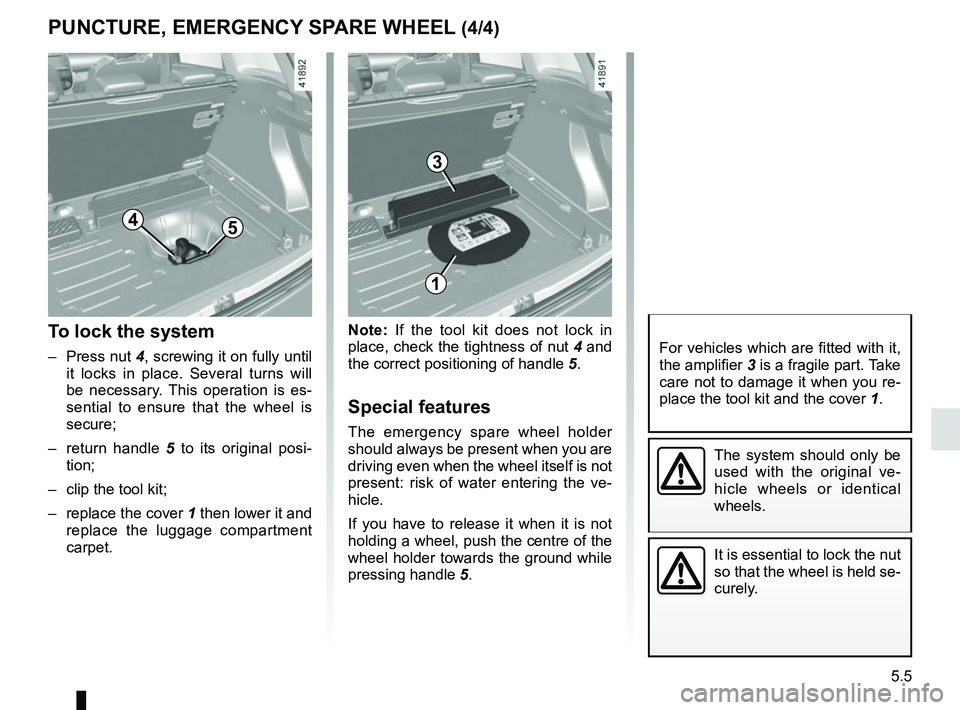
Note: If the tool kit does not lock in
place, check the tightness of nut 4 and
the correct positioning of handle 5.
Special features
The emergency spare wheel holder
should always be present when you are
driving even when the wheel itself is not
present: risk of water entering the ve-
hicle.
If you have to release it when it is not
holding a wheel, push the centre of the
wheel holder towards the ground while
pressing handle 5.
To lock the system
– Press nut 4, screwing it on fully until
it locks in place. Several turns will
be necessary. This operation is es-
sential to ensure that the wheel is
secure;
– return handle 5 to its original posi-
tion;
– clip the tool kit;
– replace the cover 1 then lower it and replace the luggage compartment
carpet.
PUNCTURE, EMERGENCY SPARE WHEEL (4/4)
The system should only be
used with the original ve-
hicle wheels or identical
wheels.
It is essential to lock the nut
so that the wheel is held se-
curely.
For vehicles which are fitted with it,
the amplifier 3 is a fragile part. Take
care not to damage it when you re-
place the tool kit and the cover 1.
45
1
3
Page 197 of 260
5.9
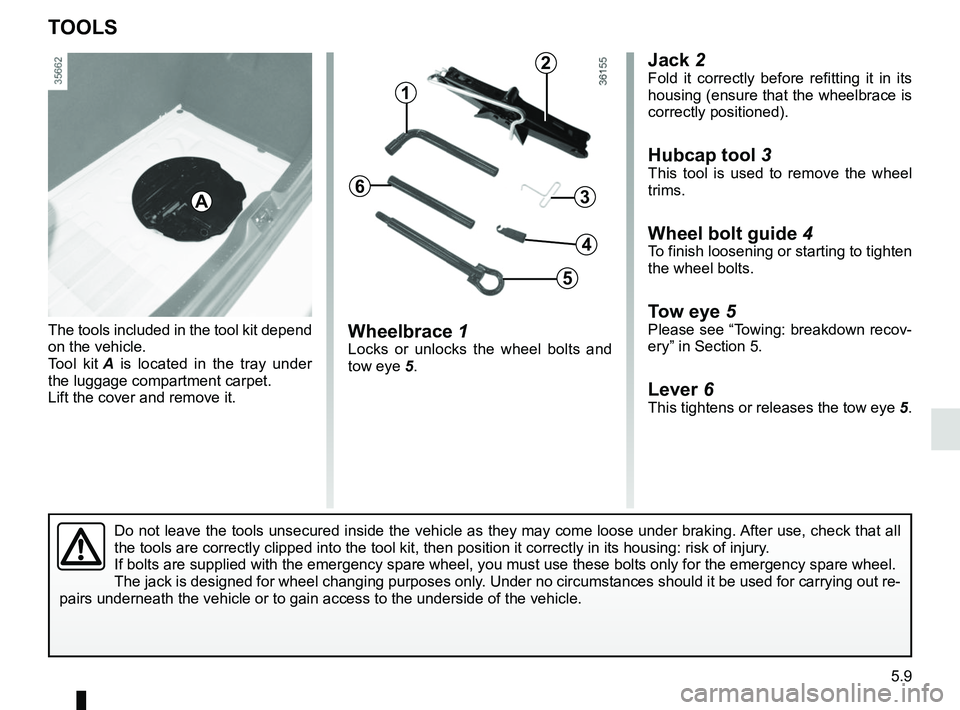
Jack 2Fold it correctly before refitting it in its
housing (ensure that the wheelbrace is
correctly positioned).
Hubcap tool 3
This tool is used to remove the wheel
trims.
Wheel bolt guide 4To finish loosening or starting to tighten
the wheel bolts.
Tow eye 5Please see “Towing: breakdown recov-
ery” in Section 5.
Lever 6This tightens or releases the tow eye 5.
Wheelbrace 1Locks or unlocks the wheel bolts and
tow eye 5.
The tools included in the tool kit depend
on the vehicle.
Tool kit
A is located in the tray under
the luggage compartment carpet.
Lift the cover and remove it.
TOOLS
A
Do not leave the tools unsecured inside the vehicle as they may come loo\
se under braking. After use, check that all
the tools are correctly clipped into the tool kit, then position it corr\
ectly in its housing: risk of injury.
If bolts are supplied with the emergency spare wheel, you must use these\
bolts only for the emergency spare wheel.
The jack is designed for wheel changing purposes only. Under no circumstances should it be used for carrying out re-
pairs underneath the vehicle or to gain access to the underside of the v\
ehicle.
2
1
3
5
4
6
Page 207 of 260
5.19
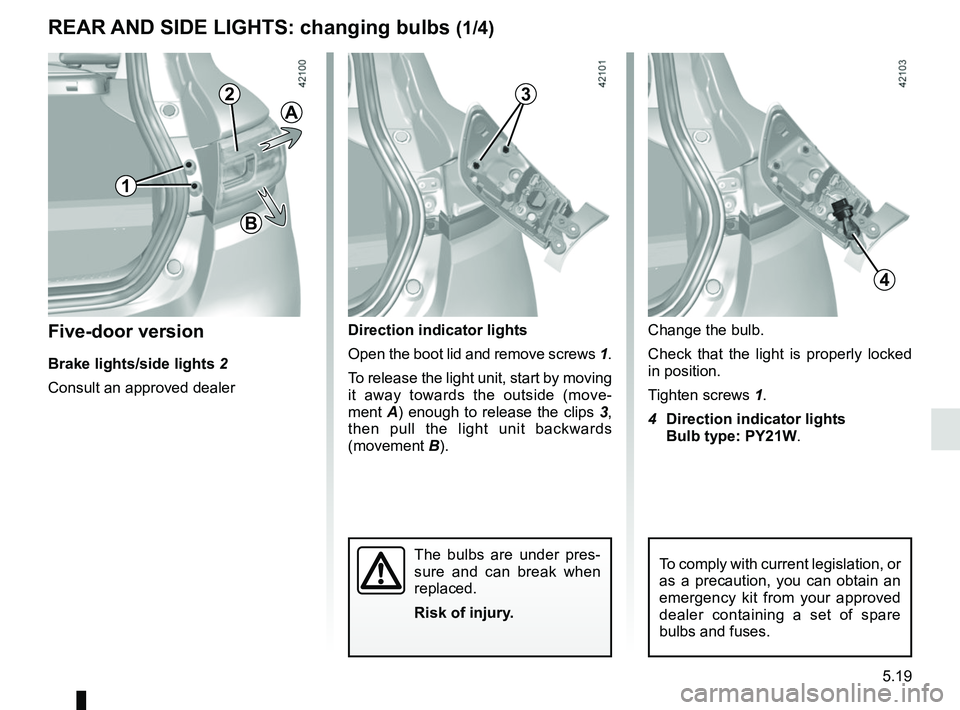
Direction indicator lights
Open the boot lid and remove screws 1.
To release the light unit, start by moving
it away towards the outside (move-
ment A) enough to release the clips 3,
then pull the light unit backwards
(movement B).
The bulbs are under pres-
sure and can break when
replaced.
Risk of injury.
Change the bulb.
Check that the light is properly locked
in position.
Tighten screws 1.
4 Direction indicator lights
Bulb type: PY21W.Five-door version
Brake lights/side lights 2
Consult an approved dealer
REAR AND SIDE LIGHTS: changing bulbs (1/4)
4
1
To comply with current legislation, or
as a precaution, you can obtain an
emergency kit from your approved
dealer containing a set of spare
bulbs and fuses.
B
A
23
Page 208 of 260
5.20
REAR AND SIDE LIGHTS: changing bulbs (2/4)
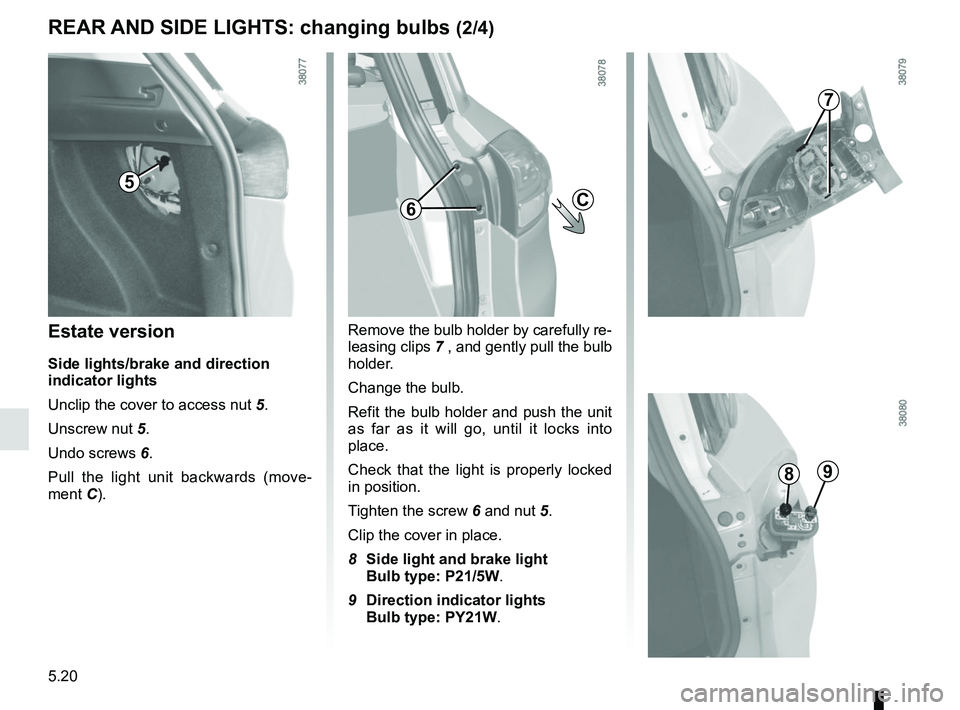
Estate version
Side lights/brake and direction
indicator lights
Unclip the cover to access nut 5.
Unscrew nut 5.
Undo screws 6.
Pull the light unit backwards (move-
ment C). Remove the bulb holder by carefully re-
leasing clips
7 , and gently pull the bulb
holder.
Change the bulb.
Refit the bulb holder and push the unit
as far as it will go, until it locks into
place.
Check that the light is properly locked
in position.
Tighten the screw 6 and nut 5.
Clip the cover in place.
8 Side light and brake light
Bulb type: P21/5W.
9 Direction indicator lights
Bulb type: PY21W.
5
6
7
89
C
Page 209 of 260
5.21
REAR AND SIDE LIGHTS: changing bulbs (3/4)
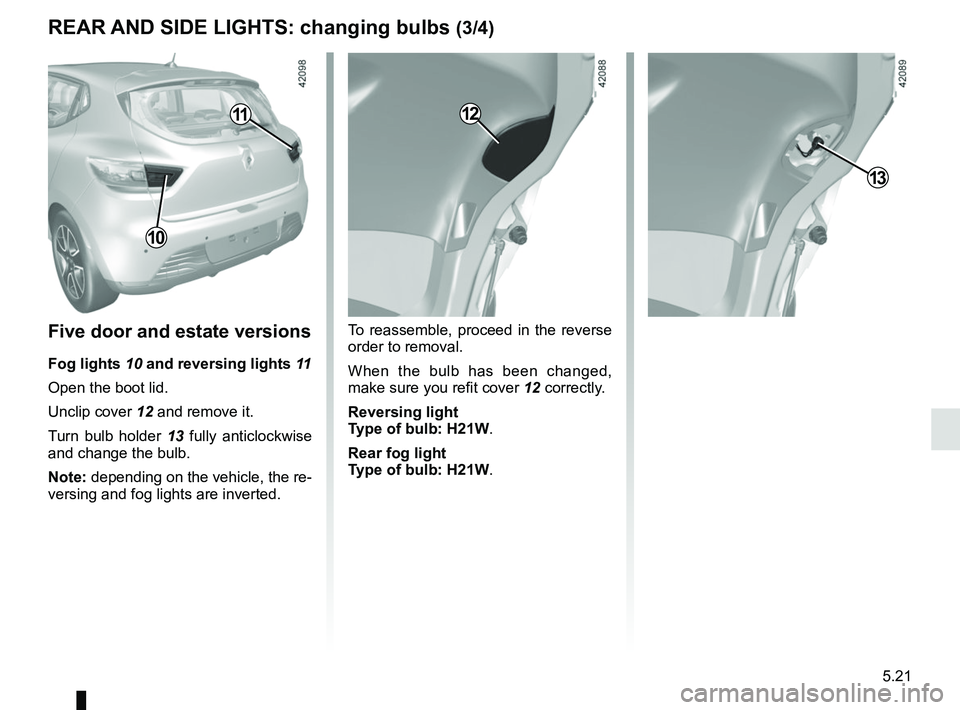
Five door and estate versions
Fog lights 10 and reversing lights 11
Open the boot lid.
Unclip cover 12 and remove it.
Turn bulb holder 13 fully anticlockwise
and change the bulb.
Note: depending on the vehicle, the re-
versing and fog lights are inverted. To reassemble, proceed in the reverse
order to removal.
When the bulb has been changed,
make sure you refit cover 12 correctly.
Reversing light
Type of bulb: H21W.
Rear fog light
Type of bulb: H21W.
13
12
10
11
Page 215 of 260
5.27
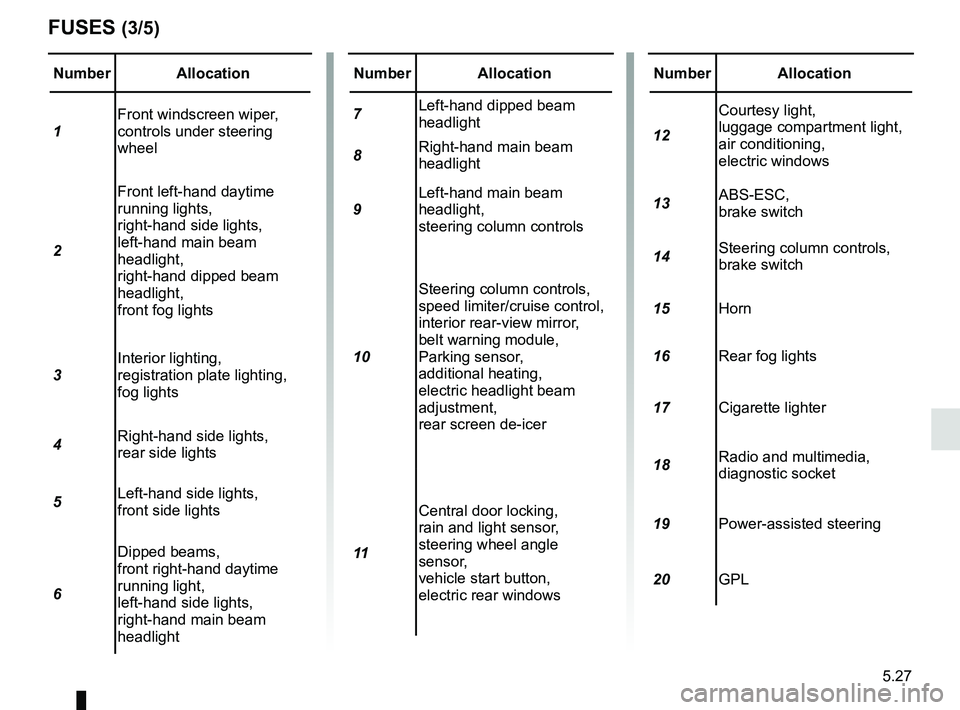
Number Allocation
1 Front windscreen wiper,
controls under steering
wheel
2 Front left-hand daytime
running lights,
right-hand side lights,
left-hand main beam
headlight,
right-hand dipped beam
headlight,
front fog lights
3 Interior lighting,
registration plate lighting,
fog lights
4 Right-hand side lights,
rear side lights
5 Left-hand side lights,
front side lights
6 Dipped beams,
front right-hand daytime
running light,
left-hand side lights,
right-hand main beam
headlight
FUSES (3/5)
Number Allocation
7 Left-hand dipped beam
headlight
8 Right-hand main beam
headlight
9 Left-hand main beam
headlight,
steering column controls
10 Steering column controls,
speed limiter/cruise control,
interior rear-view mirror,
belt warning module,
Parking sensor,
additional heating,
electric headlight beam
adjustment,
rear screen de-icer
11 Central door locking,
rain and light sensor,
steering wheel angle
sensor,
vehicle start button,
electric rear windowsNumber Allocation
12 Courtesy light,
luggage compartment light,
air conditioning,
electric windows
13 ABS-ESC,
brake switch
14 Steering column controls,
brake switch
15 Horn
16 Rear fog lights
17 Cigarette lighter
18 Radio and multimedia,
diagnostic socket
19 Power-assisted steering
20 GPL
Page 217 of 260
5.29
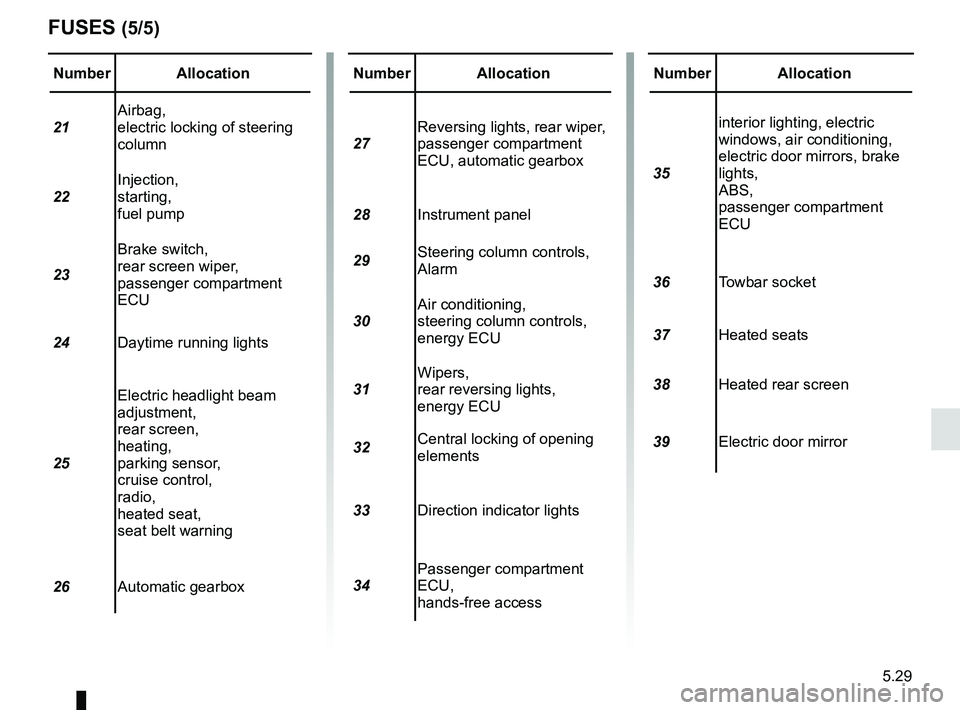
Number Allocation
21 Airbag,
electric locking of steering
column
22 Injection,
starting,
fuel pump
23 Brake switch,
rear screen wiper,
passenger compartment
ECU
24 Daytime running lights
25 Electric headlight beam
adjustment,
rear screen,
heating,
parking sensor,
cruise control,
radio,
heated seat,
seat belt warning
26 Automatic gearbox
FUSES (5/5)
Number Allocation
27 Reversing lights, rear wiper,
passenger compartment
ECU, automatic gearbox
28 Instrument panel
29 Steering column controls,
Alarm
30 Air conditioning,
steering column controls,
energy ECU
31 Wipers,
rear reversing lights,
energy ECU
32 Central locking of opening
elements
33 Direction indicator lights
34 Passenger compartment
ECU,
hands-free accessNumber Allocation
35 interior lighting, electric
windows, air conditioning,
electric door mirrors, brake
lights,
ABS,
passenger compartment
ECU
36 Towbar socket
37 Heated seats
38 Heated rear screen
39 Electric door mirror
Page 218 of 260
5.30
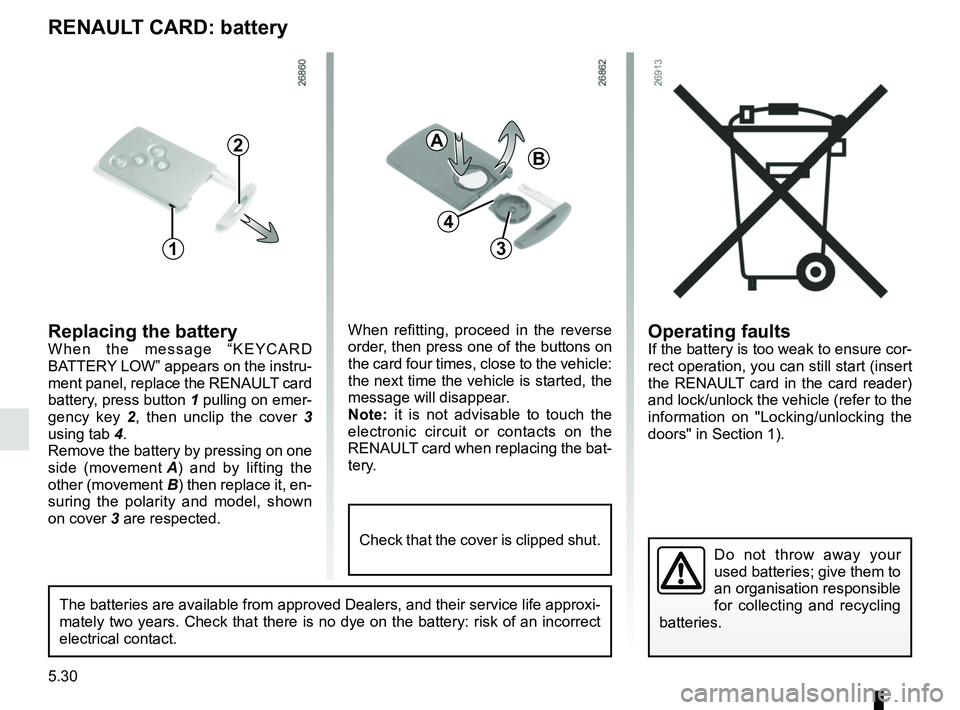
Operating faultsIf the battery is too weak to ensure cor-
rect operation, you can still start (insert
the RENAULT card in the card reader)
and lock/unlock the vehicle (refer to the
information on "Locking/unlocking the
doors" in Section 1).
RENAULT CARD: battery
Replacing the batteryWhen the message “KEYCARD
BATTERY LOW” appears on the instru-
ment panel, replace the RENAULT card
battery, press button 1 pulling on emer-
gency key 2, then unclip the cover 3
using tab 4.
Remove the battery by pressing on one
side (movement A) and by lifting the
other (movement B) then replace it, en-
suring the polarity and model, shown
on cover 3 are respected.
Do not throw away your
used batteries; give them to
an organisation responsible
for collecting and recycling
batteries.
1
2
When refitting, proceed in the reverse
order, then press one of the buttons on
the card four times, close to the vehicle:
the next time the vehicle is started, the
message will disappear.
Note: it is not advisable to touch the
electronic circuit or contacts on the
RENAULT card when replacing the bat-
tery.
A
B
3
The batteries are available from approved Dealers, and their service lif\
e approxi-
mately two years. Check that there is no dye on the battery: risk of an \
incorrect
electrical contact.
4
Check that the cover is clipped shut.
Page 223 of 260
5.35
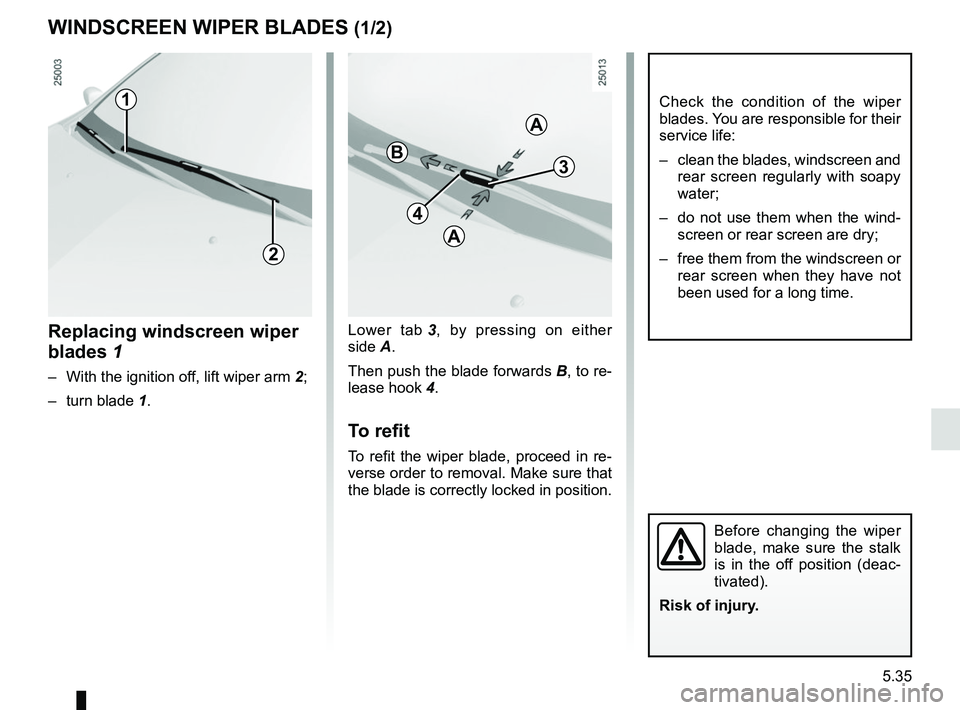
Lower tab 3, by pressing on either
side A.
Then push the blade forwards B, to re-
lease hook 4.
To refit
To refit the wiper blade, proceed in re-
verse order to removal. Make sure that
the blade is correctly locked in position.
Replacing windscreen wiper
blades 1
– With the ignition off, lift wiper arm 2;
– turn blade 1.
WINDSCREEN WIPER BLADES (1/2)
2
1
4
3B
A
A
Check the condition of the wiper
blades. You are responsible for their
service life:
– clean the blades, windscreen and
rear screen regularly with soapy
water;
– do not use them when the wind- screen or rear screen are dry;
– free them from the windscreen or rear screen when they have not
been used for a long time.
Before changing the wiper
blade, make sure the stalk
is in the off position (deac-
tivated).
Risk of injury.
Page 224 of 260
5.36
To refit
To refit the wiper blade, proceed in re-
verse order to removal. Make sure that
the blade is correctly locked in position.
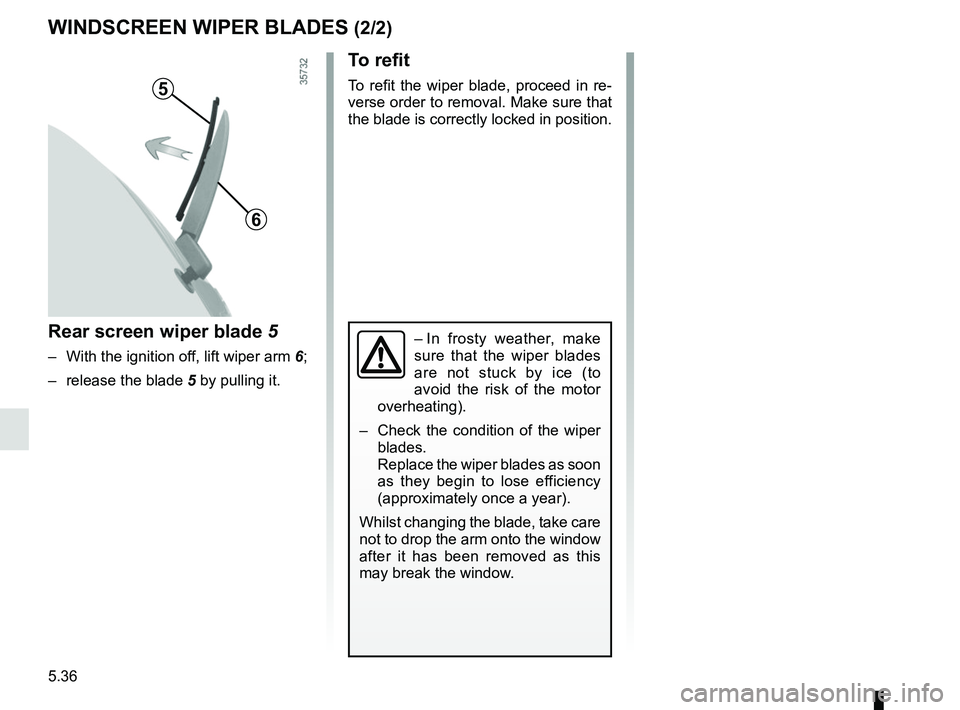
Rear screen wiper blade 5
– With the ignition off, lift wiper arm 6;
– release the blade 5 by pulling it.
WINDSCREEN WIPER BLADES (2/2)
5
6
– In frosty weather, make
sure that the wiper blades
are not stuck by ice (to
avoid the risk of the motor
overheating).
– Check the condition of the wiper
blades.
Replace the wiper blades as soon
as they begin to lose efficiency
(approximately once a year).
Whilst changing the blade, take care
not to drop the arm onto the window
after it has been removed as this
may break the window.