brake RENAULT DUSTER 2016 User Guide
[x] Cancel search | Manufacturer: RENAULT, Model Year: 2016, Model line: DUSTER, Model: RENAULT DUSTER 2016Pages: 256, PDF Size: 6.49 MB
Page 93 of 256
2.17
DRIVING ADVICE, ECO-DRIVING (3/5)
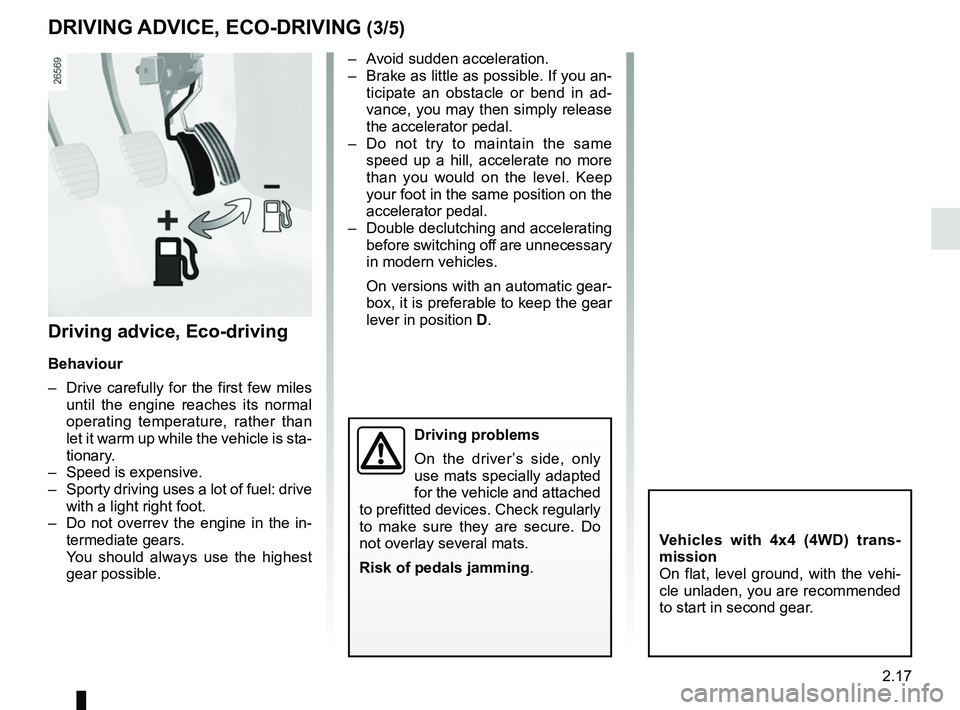
– Avoid sudden acceleration.
– Brake as little as possible. If you an-ticipate an obstacle or bend in ad-
vance, you may then simply release
the accelerator pedal.
– Do not try to maintain the same speed up a hill, accelerate no more
than you would on the level. Keep
your foot in the same position on the
accelerator pedal.
– Double declutching and accelerating before switching off are unnecessary
in modern vehicles.
On versions with an automatic gear-
box, it is preferable to keep the gear
lever in position D.
Vehicles with 4x4 (4WD) trans-
mission
On flat, level ground, with the vehi-
cle unladen, you are recommended
to start in second gear.
Driving advice, Eco-driving
Behaviour
– Drive carefully for the first few miles
until the engine reaches its normal
operating temperature, rather than
let it warm up while the vehicle is sta-
tionary.
– Speed is expensive.
– Sporty driving uses a lot of fuel: drive with a light right foot.
– Do not overrev the engine in the in- termediate gears.
You should always use the highest gear possible.
Driving problems
On the driver’s side, only
use mats specially adapted
for the vehicle and attached
to prefitted devices. Check regularly
to make sure they are secure. Do
not overlay several mats.
Risk of pedals jamming .
Page 105 of 256
2.29
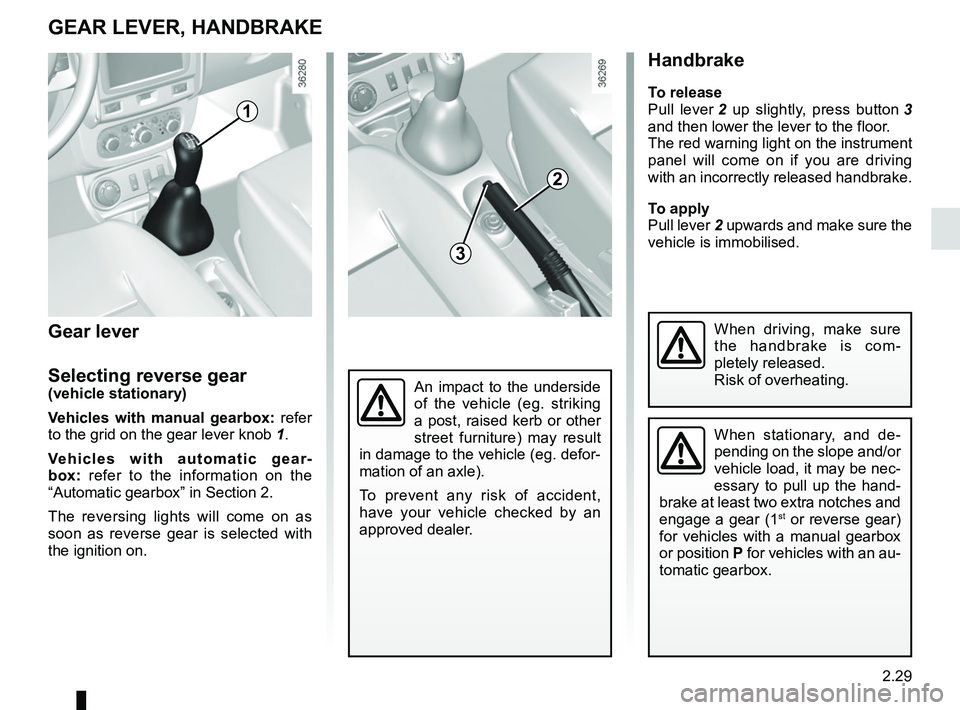
Handbrake
To release
Pull lever 2 up slightly, press button 3
and then lower the lever to the floor.
The red warning light on the instrument
panel will come on if you are driving
with an incorrectly released handbrake.
To apply
Pull lever 2 upwards and make sure the
vehicle is immobilised.
An impact to the underside
of the vehicle (eg. striking
a post, raised kerb or other
street furniture) may result
in damage to the vehicle (eg. defor-
mation of an axle).
To prevent any risk of accident,
have your vehicle checked by an
approved dealer.
GEAR LEVER, HANDBRAKE
When stationary, and de-
pending on the slope and/or
vehicle load, it may be nec-
essary to pull up the hand-
brake at least two extra notches and
engage a gear (1
st or reverse gear)
for vehicles with a manual gearbox
or position P for vehicles with an au-
tomatic gearbox.
When driving, make sure
the handbrake is com-
pletely released.
Risk of overheating.
1
2
3
Gear lever
Selecting reverse gear
(vehicle stationary)
Vehicles with manual gearbox: refer
to the grid on the gear lever knob 1.
Vehicles with automatic gear-
box: refer to the information on the
“Automatic gearbox” in Section 2.
The reversing lights will come on as
soon as reverse gear is selected with
the ignition on.
Page 108 of 256
2.32
TRANSMISSION: 4-wheel drive (4WD) (3/4)
Electronic stability program and
traction control when driving off-
road
(vehicles equipped with ESC)
When driving on soft ground (sand,
mud, deep snow), we recommend that
you deactivate the ESC function by
pressing the “ ESC” switch.
In this case, only individual wheel bra-
king remains active. This function ap-
plies the brake to any wheel that is slip-
ping, allowing the engine torque to be
transferred to the wheels with the most
grip. This is particularly useful when
crossing a bridge.
All the ESC functions will be reactivated
when the vehicle speed reaches ap-
proximately 30 mph (50 km/h) (36 mph
(60 km/h) in 4WD Lock mode), when
the engine is restarted or when the
“ESC” button is pressed again.Operating faults
If the system detects an operating
fault, it automatically switches to “2WD”
mode, and the
‘ and Ò war-
ning lights come on.
Drive as soon as possible at a mode-
rate speed to an approved dealer.
For certain operating faults, the system
may not be able to switch to “2WD" or
"4WD Lock" mode. "AUTO" mode re-
mains active.
Contact an approved dealer as soon as
possible.
In this case, we recommend that you
stop as soon as possible to allow the
system to cool down (until the warning
light stops flashing).
Cooling may take up to five minutes.
If the system detects excessive whee-
lspin on the front wheels, it adapts the
engine to run in a way that reduces
wheelspin.
Anti-lock braking in “
LOCK” mode
(vehicles equipped with ABS)
When “4WD Lock" mode is active, the
ABS switches to off-road mode. In this
case, the wheels may lock intermit-
tently to achieve better grip, thus redu-
cing braking distances on soft ground.
When this mode is active:
– the vehicle’s manoeuvrability is limi- ted during braking. This operating
mode is therefore not recommended
in very low-grip conditions (eg. ice).
– there may be some noise. This is normal, and does not indicate an
operating fault.
Page 110 of 256
2.34
ABS (anti-lock braking
system)
Under heavy braking, the ABS prevents
the wheels from locking, allowing the
stopping distance to be managed and
keeping control of the vehicle. Under
these circumstances, the vehicle can
be steered to avoid an obstacle whilst
braking. In addition, this system can
increase stopping distances, particu-
larly on roads with low surface grip (wet
ground etc.).
You will feel a pulsation through the
brake pedal each time the system is
activated. The ABS does not in any way
improve the vehicle's physical perform-
ance relating to the road surface and
roadholding. It is still essential to follow
the rules of good driving practice (such
as driving at a safe distance from the
vehicle in front etc.).
DRIVER CORRECTION DEVICES/AIDS (1/4)
Depending on the vehicle, this is com-
posed of:
– the ABS (anti-lock braking
system);
– the emergency brake assist;
– electronic stability control (ESC)
with understeer control and trac-
tion control.
– hill start assistance.
These functions are an ad-
ditional aid in the event of
critical driving conditions,
enabling the vehicle behav-
iour to be adapted to suit the driving
conditions.
However, the functions do not take
the place of the driver. They do
not increase the vehicle’s limits
and should not encourage you
to drive more quickly. Therefore,
they can under no circumstances
replace the vigilance or responsibil-
ity of the driver when manoeuvring
the vehicle (the driver must always
be ready for sudden incidents which
may occur when driving).
In an emergency, apply firm and
continuous pressure to the brake
pedal. There is no need to pump
it repeatedly. The ABS will modu-
late the force applied in the braking
system.
Special feature of 4-wheel drive ve-
hicles
In 4WD Lock mode, the system may
lock the wheels briefly to optimise the
braking distance on very wet ground
(snow, mud, sand, etc.).
Page 111 of 256
2.35
DRIVER CORRECTION DEVICES/AIDS (2/4)
Emergency brake assist with
electronic brake distribution
(depending on the vehicle)
This system supplements the ABS
and helps reduce vehicle stopping dis-
tances.
Operating principle
The system is for detecting an emer-
gency braking situation. In this case,
the braking assistance immediately de-
velops maximum power and may trig-
ger ABS regulation.
ABS braking is maintained as long as
the brake pedal is applied.
Operating faults
– If the x warning light on the in-
strument panel comes on while you
are driving, the brakes will still
work normally without ABS;
– If the
x and D warning
lights on the instrument panel come
on while you are driving, there is a
fault in the braking system.
In both cases, consult an approved
Dealer.
Your braking systems
are partially operational.
However, it is dangerous
to brake suddenly and
it is essential to stop immediately,
as soon as traffic conditions allow.
Contact an approved dealer.
Page 113 of 256
2.37
DRIVER CORRECTION DEVICES/AIDS (4/4)
Hill start assistance
Depending on the gradient of the in-
cline, this system assists the driver
when starting on a hill. It prevents the
vehicle from rolling backwards by au-
tomatically applying the brakes when
the driver lifts his/her foot off the brake
pedal to depress the accelerator pedal.
It only operates when the gear lever is
in a position other than neutral (other
than N or P for automatic transmis-
sions) and the vehicle is completely
stationary (brake pedal depressed).
The system holds the vehicle for ap-
proximately 2 seconds. The brakes are
then released (the vehicle will move ac-
cording to the slope).
Operating principle
A sensor in the steering wheel detects
the direction selected by the driver.
Other sensors throughout the vehicle
measure the actual direction.
The system compares driver input to
the actual trajectory of the vehicle and
corrects the trajectory if necessary by
controlling the braking of certain wheels
and/or engine power. In the event that
the system is engaged, the indicator
light
flashes on the instrument
panel.
Operating faults
When the system detects an opera-
ting fault the warning lights
Ò and
appear on the instrument panel.
In this case, the Electronic Stability
Program ESC with understeer control
and traction control are deactivated.
Please consult an authorised dealer if
these warning lights remain displayed
on the instrument panel after the igni-
tion is switched off and on again.
The hill start assistance
system cannot completely
prevent the vehicle from
rolling backwards in all sit-
uations (extremely steep gradients
etc.).
In all cases, the driver may depress
the brake pedal to prevent the vehi-
cle from rolling backwards.
The hill start assistance function
should not be used for prolonged
stops: use the brake pedal.
This function is not designed to im-
mobilise the vehicle permanently.
If necessary, use the brake pedal to
stop the vehicle.
The driver must remain particularly
vigilant when driving on slippery or
low-grip surfaces and/or on hills.
Risk of serious injury.
Page 117 of 256
2.41
The cruise control function helps you to
maintain your driving speed at a speed
that you choose, called the cruising
speed.
This cruising speed may be set at any
speed above 20 mph (30 km/h).
This function is an addi-
tional driving aid. However,
the function does not take
the place of the driver.
Therefore, it can under no circum-
stances replace the driver’s respon-
sibility to respect speed limits and to
be vigilant (the driver must always
be ready to brake).
Cruise control must not be used in
heavy traffic, on undulating or slip-
pery roads (black ice, aquaplan-
ing, gravel) and during bad weather
(fog, rain, side winds etc.).
There is a risk of accidents.
The cruise control function
is in no way linked to the
braking system.
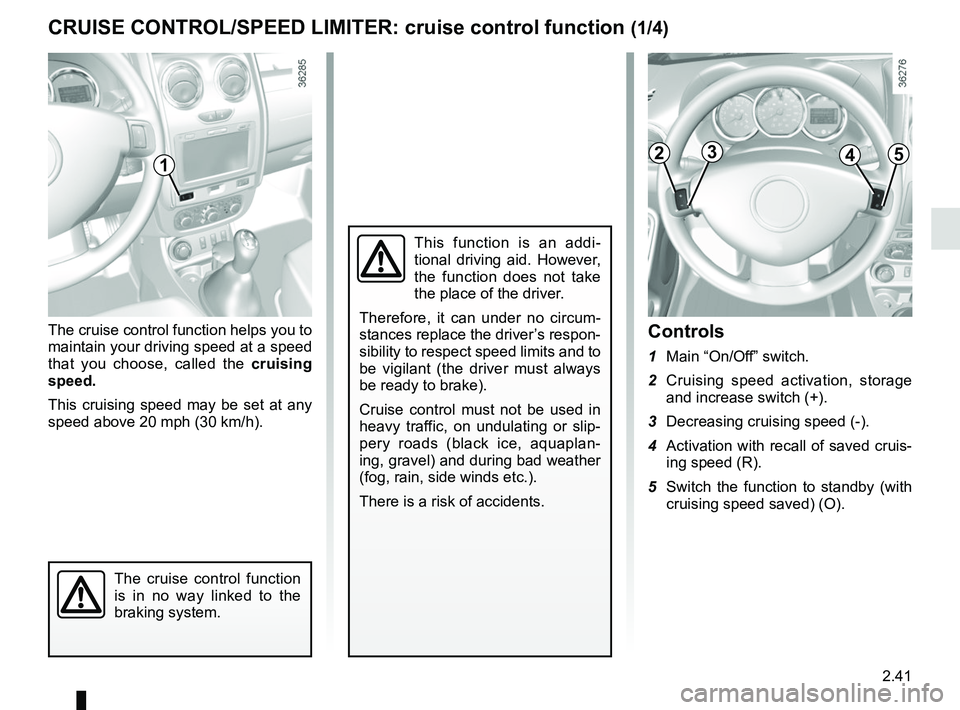
Controls
1 Main “On/Off” switch.
2 Cruising speed activation, storage and increase switch (+).
3 Decreasing cruising speed (-).
4 Activation with recall of saved cruis- ing speed (R).
5 Switch the function to standby (with cruising speed saved) (O).
CRUISE CONTROL/SPEED LIMITER: cruise control function (1/4)
12345
Page 120 of 256
2.44
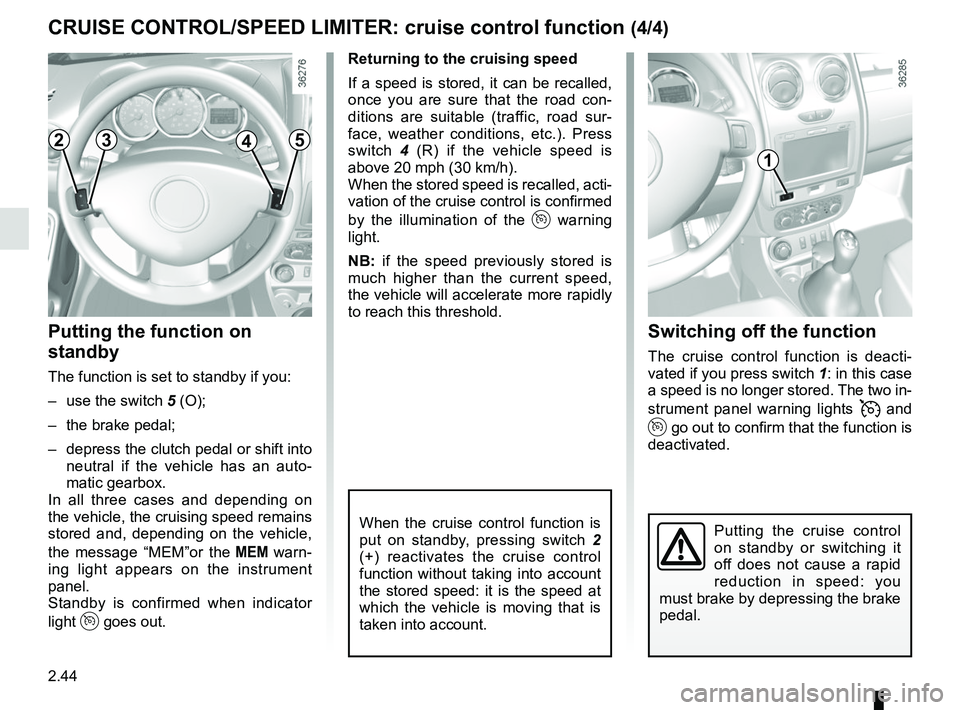
Switching off the function
The cruise control function is deacti-
vated if you press switch 1: in this case
a speed is no longer stored. The two in-
strument panel warning lights
and
go out to confirm that the function is
deactivated.
Returning to the cruising speed
If a speed is stored, it can be recalled,
once you are sure that the road con-
ditions are suitable (traffic, road sur-
face, weather conditions, etc.). Press
switch
4 (R) if the vehicle speed is
above 20 mph (30 km/h).
When the stored speed is recalled, acti-
vation of the cruise control is confirmed
by the illumination of the
warning
light.
NB: if the speed previously stored is
much higher than the current speed,
the vehicle will accelerate more rapidly
to reach this threshold.
When the cruise control function is
put on standby, pressing switch 2
(+) reactivates the cruise control
function without taking into account
the stored speed: it is the speed at
which the vehicle is moving that is
taken into account.
Putting the function on
standby
The function is set to standby if you:
– use the switch 5 (O);
– the brake pedal;
– depress the clutch pedal or shift into neutral if the vehicle has an auto-
matic gearbox.
In all three cases and depending on
the vehicle, the cruising speed remains
stored and, depending on the vehicle,
the message “MEM”or the
warn-
ing light appears on the instrument
panel.
Standby is confirmed when indicator
light
goes out.
CRUISE CONTROL/SPEED LIMITER: cruise control function (4/4)
Putting the cruise control
on standby or switching it
off does not cause a rapid
reduction in speed: you
must brake by depressing the brake
pedal.
2345
1
Page 121 of 256
2.45
AUTOMATIC GEARBOX (1/4)
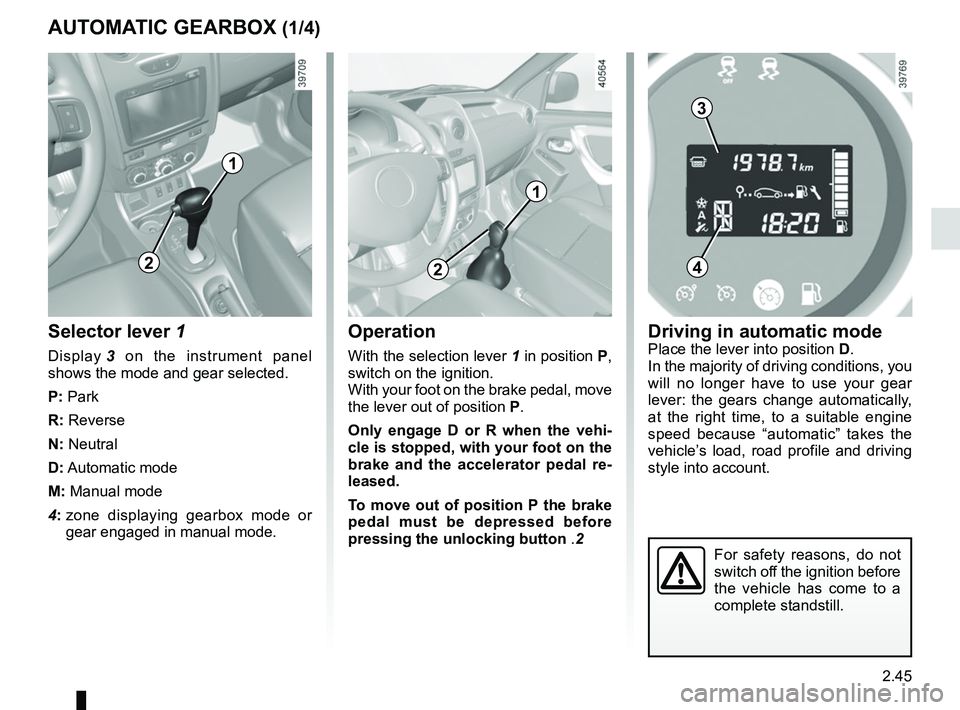
Selector lever 1
Display 3 on the instrument panel
shows the mode and gear selected.
P: Park
R: Reverse
N: Neutral
D: Automatic mode
M: Manual mode
4: zone displaying gearbox mode or
gear engaged in manual mode.
Operation
With the selection lever 1 in position P,
switch on the ignition.
With your foot on the brake pedal, move
the lever out of position P.
Only engage D or R when the vehi-
cle is stopped, with your foot on the
brake and the accelerator pedal re-
leased.
To move out of position P the brake
pedal must be depressed before
pressing the unlocking button .2
For safety reasons, do not
switch off the ignition before
the vehicle has come to a
complete standstill.
1
2
3
4
Driving in automatic modePlace the lever into position D.
In the majority of driving conditions, you
will no longer have to use your gear
lever: the gears change automatically,
at the right time, to a suitable engine
speed because “automatic” takes the
vehicle’s load, road profile and driving
style into account.
2
1
Page 124 of 256
2.48
AUTOMATIC GEARBOX (4/4)
Parking the vehicle
When the vehicle is stopped, move the
lever to position P while keeping your
foot on the brake pedal: the gearbox is
in neutral and the drive wheels are me-
chanically locked by the driveshaft.
Apply the handbrake.
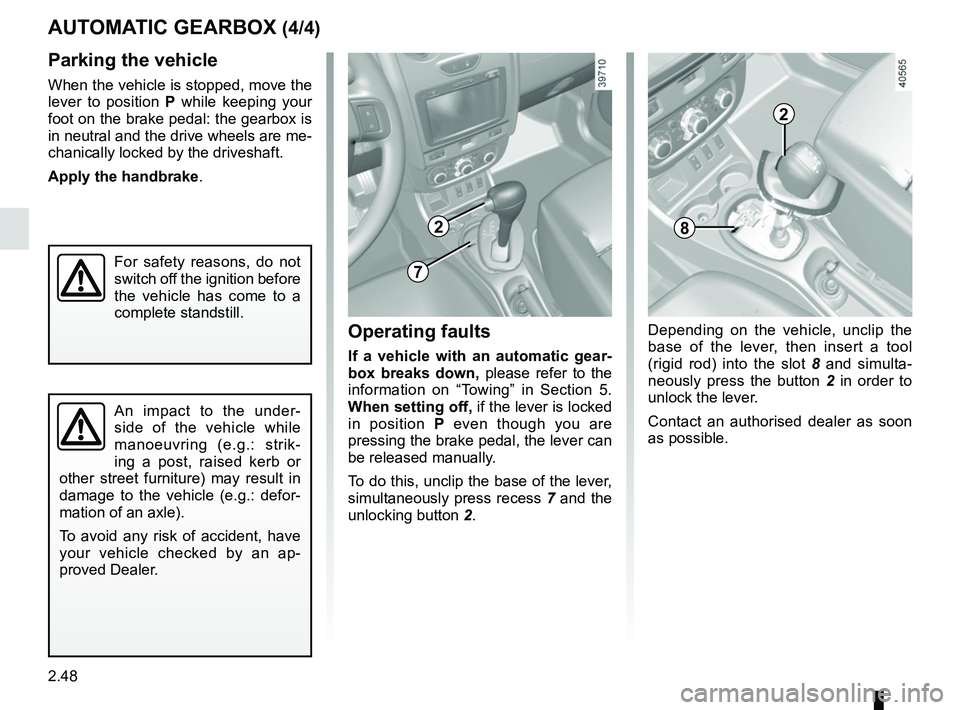
Operating faults
If a vehicle with an automatic gear-
box breaks down, please refer to the
information on “Towing” in Section 5.
When setting off, if the lever is locked
in position P even though you are
pressing the brake pedal, the lever can
be released manually.
To do this, unclip the base of the lever,
simultaneously press recess 7 and the
unlocking button 2.
An impact to the under-
side of the vehicle while
manoeuvring (e.g.: strik-
ing a post, raised kerb or
other street furniture) may result in
damage to the vehicle (e.g.: defor-
mation of an axle).
To avoid any risk of accident, have
your vehicle checked by an ap-
proved Dealer.
For safety reasons, do not
switch off the ignition before
the vehicle has come to a
complete standstill.
2
7
Depending on the vehicle, unclip the
base of the lever, then insert a tool
(rigid rod) into the slot 8 and simulta-
neously press the button 2 in order to
unlock the lever.
Contact an authorised dealer as soon
as possible.
8
2