ECO mode RENAULT DUSTER 2016 Owners Manual
[x] Cancel search | Manufacturer: RENAULT, Model Year: 2016, Model line: DUSTER, Model: RENAULT DUSTER 2016Pages: 256, PDF Size: 6.49 MB
Page 3 of 256

0.1
The descriptions of the models given in this handbook are based on the t\
echnical specifications at the time of writing. This hand-
book covers all items of equipment (both standard and optional) available for these models, but whether or not these are
fitted to the vehicle depends on the version, options selected and the c\
ountry where the vehicle is sold.
This handbook may also contain information about items of equipment to b\
e introduced later in the model year.
Throughout the manual, the «approved dealer» is your DACIA dealer.
Welcome aboard your vehicle
This Driver’s Handbook contains the information necessary:
– for you to familiarise yourself with your vehicle, to use it to its best\
advantage and to benefit fully from the all the func tions and
the technical developments it incorporates.
– to ensure that it always gives the best performance by following the sim\
ple, but comprehensive advice concerning regular main -
tenance.
– to enable you to deal quickly with minor faults not requiring specialist\
attention.
It is well worth taking a few minutes to read this handbook to familiari\
se yourself with the information and guidelines it cont ains
about the vehicle and its functions and new features. If certain points \
are still unclear, our Network technicians will be only too
pleased to provide you with any additional information.
The following symbol will help you when reading this handbook:
Translated from French. Copying or translation, in part or in full, is fo\
rbidden unless prior written permission has been obtained from the vehicle manufac- turer.
To indicate a hazard, danger or safety recommendation.
Enjoy driving your new vehicle.
Page 44 of 256
1.38
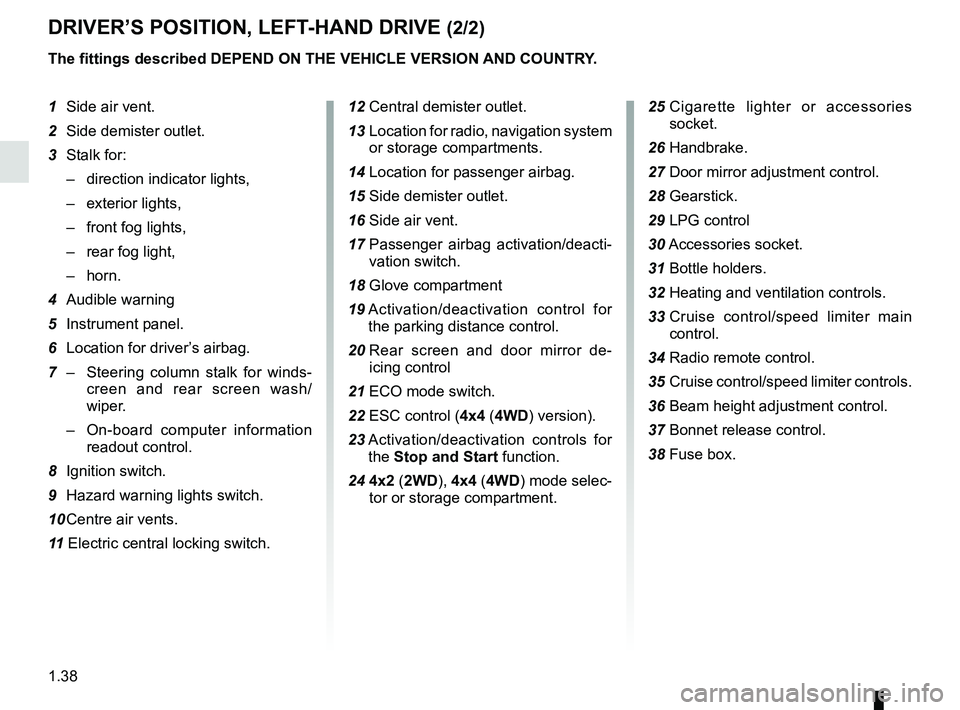
DRIVER’S POSITION, LEFT-HAND DRIVE (2/2)
The fittings described DEPEND ON THE VEHICLE VERSION AND COUNTRY.
1 Side air vent.
2 Side demister outlet.
3 Stalk for:
– direction indicator lights,
– exterior lights,
– front fog lights,
– rear fog light,
– horn.
4 Audible warning
5 Instrument panel.
6 Location for driver’s airbag.
7 – Steering column stalk for winds-
creen and rear screen wash/
wiper.
– On-board computer information
readout control.
8 Ignition switch.
9 Hazard warning lights switch.
10 Centre air vents.
11 Electric central locking switch. 12 Central demister outlet.
13 Location for radio, navigation system
or storage compartments.
14 Location for passenger airbag.
15 Side demister outlet.
16 Side air vent.
17 Passenger airbag activation/deacti-
vation switch.
18 Glove compartment
19 Activation/deactivation control for
the parking distance control.
20 Rear screen and door mirror de-
icing control
21 ECO mode switch.
22 ESC control (4x4 (4WD) version).
23 Activation/deactivation controls for
the Stop and Start function.
24 4x2 ( 2WD), 4x4 (4WD) mode selec-
tor or storage compartment. 25
Cigarette lighter or accessories
socket.
26 Handbrake.
27 Door mirror adjustment control.
28 Gearstick. 29 LPG control
30 Accessories socket.
31 Bottle holders.
32 Heating and ventilation controls.
33 Cruise control/speed limiter main
control.
34
Radio remote control.
35 Cruise control/speed limiter controls.
36 Beam height adjustment control.
37 Bonnet release control.
38 Fuse box.
Page 46 of 256
1.40
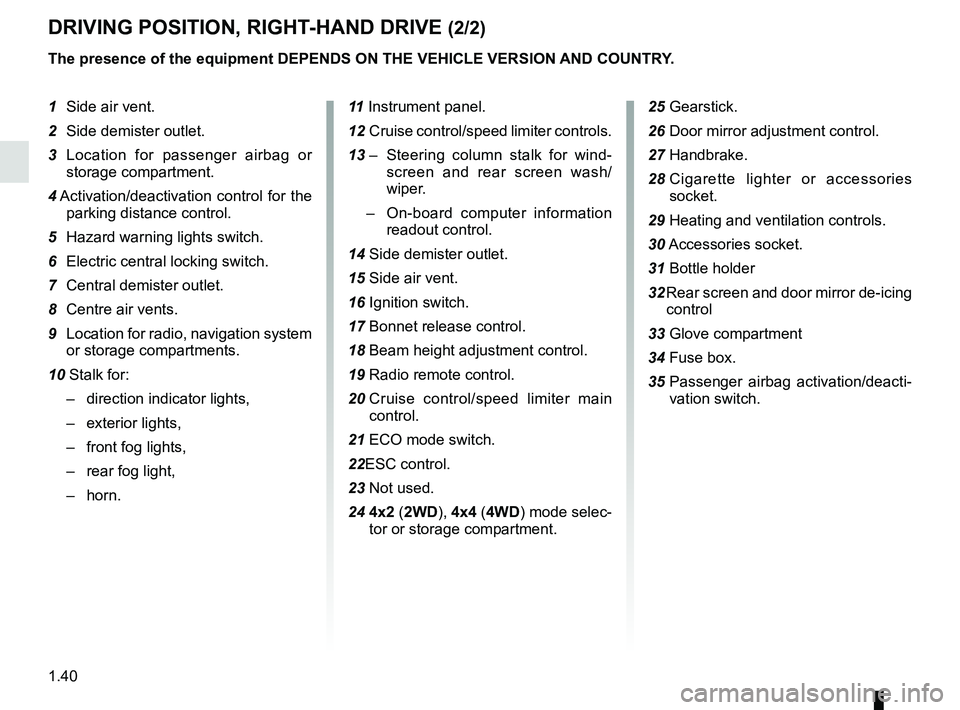
DRIVING POSITION, RIGHT-HAND DRIVE (2/2)
The presence of the equipment DEPENDS ON THE VEHICLE VERSION AND COUNTRY.
1 Side air vent.
2 Side demister outlet.
3 Location for passenger airbag or storage compartment.
4 Activation/deactivation control for the
parking distance control.
5 Hazard warning lights switch.
6 Electric central locking switch.
7 Central demister outlet.
8 Centre air vents.
9 Location for radio, navigation system or storage compartments.
10 Stalk for: – direction indicator lights,
– exterior lights,
– front fog lights,
– rear fog light,
– horn. 11
Instrument panel.
12 Cruise control/speed limiter controls.
13 – Steering column stalk for wind-
screen and rear screen wash/
wiper.
– On-board computer information
readout control.
14 Side demister outlet.
15 Side air vent.
16 Ignition switch.
17 Bonnet release control.
18 Beam height adjustment control.
19 Radio remote control.
20 Cruise control/speed limiter main
control.
21 ECO mode switch.
22ESC control.
23 Not used.
24 4x2 ( 2WD), 4x4 (4WD) mode selec-
tor or storage compartment.
25 Gearstick.
26 Door mirror adjustment control.
27 Handbrake.
28 Cigarette lighter or accessories
socket.
29 Heating and ventilation controls.
30 Accessories socket.
31 Bottle holder
32 Rear screen and door mirror de-icing control
33 Glove compartment
34 Fuse box.
35 Passenger airbag activation/deacti-
vation switch.
Page 50 of 256
1.44
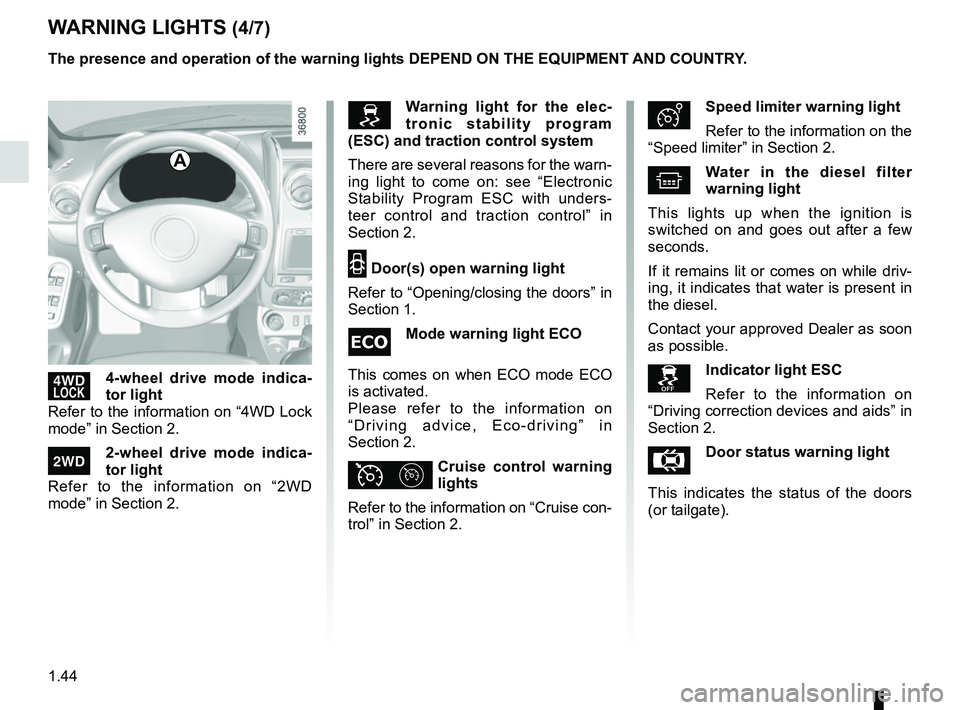
’4-wheel drive mode indica-
tor light
Refer to the information on “4WD Lock
mode” in Section 2.
‘2-wheel drive mode indica-
tor light
Refer to the information on “2WD
mode” in Section 2.
ÐSpeed limiter warning light
Refer to the information on the
“Speed limiter” in Section 2.
^Water in the diesel filter
warning light
This lights up when the ignition is
switched on and goes out after a few
seconds.
If it remains lit or comes on while driv-
ing, it indicates that water is present in
the diesel.
Contact your approved Dealer as soon
as possible.
Indicator light ESC
Refer to the information on
“Driving correction devices and aids” in
Section 2.
ÅDoor status warning light
This indicates the status of the doors
(or tailgate).
WARNING LIGHTS (4/7)
A
Warning light for the elec-
tronic stability program
(ESC) and traction control system
There are several reasons for the warn-
ing light to come on: see “Electronic
Stability Program ESC with unders-
teer control and traction control” in
Section 2.
2 Door(s) open warning light
Refer to “Opening/closing the doors” in
Section 1.
Mode warning light ECO
This comes on when ECO mode ECO
is activated.
Please refer to the information on
“Driving advice, Eco-driving” in
Section 2.
ϦCruise control warning
lights
Refer to the information on “Cruise con-
trol” in Section 2.
The presence and operation of the warning lights DEPEND ON THE EQUIPMENT\
AND COUNTRY.
Page 63 of 256
1.57
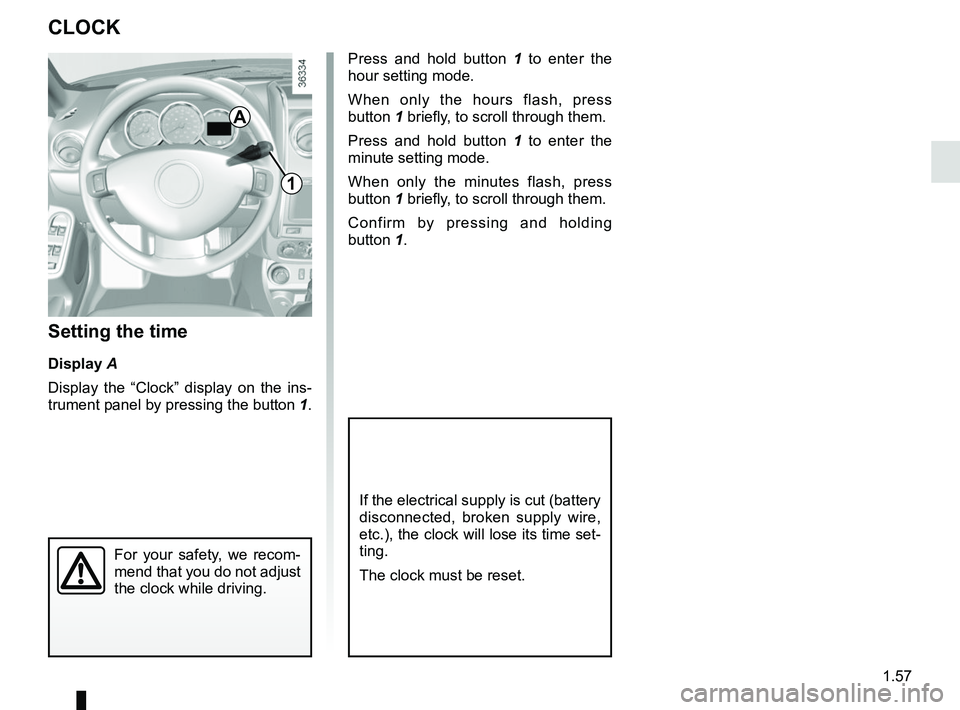
CLOCK
Setting the time
Display A
Display the “Clock” display on the ins-
trument panel by pressing the button 1.
If the electrical supply is cut (battery
disconnected, broken supply wire,
etc.), the clock will lose its time set-
ting.
The clock must be reset.
For your safety, we recom-
mend that you do not adjust
the clock while driving.
Press and hold button 1 to enter the
hour setting mode.
When only the hours flash, press
button 1 briefly, to scroll through them.
Press and hold button 1 to enter the
minute setting mode.
When only the minutes flash, press
button 1 briefly, to scroll through them.
Confirm by pressing and holding
button 1.
1
A
Page 79 of 256
2.3
LPG versions
The engine is always started using
petrol:
– activate the starter without accelerat-ing;
– release the key as soon as the engine starts.
The system will automatically deter-
mine the switchover from petrol to LPG.
When operating on LPG, the fuel gauge
may indicate a drop in the petrol level
and the on-board computer will not op-
erate.
Under certain winter conditions the
system may delay or disable operation
with LPG.
After stopping the engine, if the envi-
ronmental conditions are once again
suitable, the system may once again
permit LPG mode.
Starting the engineIn very cold conditions (temperatures
below –20°C): so that it is easier to
start the engine, switch on the ignition
for several seconds before starting the
engine.
When starting the engine, if the outdoor
temperature is very low (below -10°C):
hold down the clutch pedal until the
engine starts.
Make sure the engine immobiliser is not
activated. Refer to the information on
the “Engine immobiliser” in Section 1.
Petrol injection
– Turn the key to the start position without depressing the accelera-
tor.
– Release the key as soon as the engine starts.
ÉDiesel injection
Turn the ignition key to ignition “On” po-
sition M, and hold this position until the
preheating warning light goes out.
Turn the key to starter position D with-
out depressing the accelerator
pedal.
Release the key as soon as the engine
starts.
STARTING, STOPPING THE ENGINE (1/4)
At temperatures close to 0°C or less, it
is recommended to use ECO mode to
maximise the use of LPG. Please refer
to the information on “Driving advice,
Eco-driving” in Section 2.
To enable the system to operate
smoothly and to prevent any wear to
the vehicle’s electric petrol pump, the
petrol tank should always be around
1/4 full.
Page 90 of 256
2.14
SPECIAL FEATURES OF LPG VERSIONS (3/3)
If driving under severe
conditions
If driving under severe conditions (hea-
vily laden vehicle, high outside tempe-
rature, starting on a steep slope, etc),
you are recommended to switch to
petrol mode.
At temperatures close to 0°C or less, it
is recommended to use ECO mode to
maximise the use of LPG. Please refer
to the information on “Driving advice,
Eco-driving” in Section 2.
In the event of an accident
The main precautions to be taken are
the same as with petrol vehicles:
– apply the handbrake;
– stop the engine (a safety device that stops LPG from entering the engine
is automatically triggered);
– switch off the ignition;
– observe local regulations.
LPG has a very specific
smell so you will be able to
detect any leaks easily. If
you smell gas in your vehi-
cle or immediately surrounding your
vehicle:
– switch to petrol mode immedia- tely and make sure there are no
flames or sources of fire near the
vehicle;
– go to an authorised dealer.
Do not touch, hit or dis-
mantle any part of the LPG
system components.
Operating fault
In the event of a fault which may affect
the correct operation of the engine, the
system automatically switches from
LPG to petrol mode.
This is confirmed by:
– the appearance of the yellow war- ning light B;
– slow flashing of the green warning light D;
– a beep sounds.
Page 91 of 256
2.15
Fuel consumption is accredited in ac-
cordance with a standard regulatory
method. Identical for all manufactur-
ers, this enables vehicles to be com-
pared with one another. Consumption
in real time depends on vehicle usage
conditions, the equipment fitted and the
user’s driving style. To optimise fuel
consumption, please refer to the follow-
ing advice.
Depending on the vehicle, you will have
various functions which enable you to
lower your fuel consumption:
– the rev counter;
– gear change indicator;
– ECO mode – activated by the ECO button.
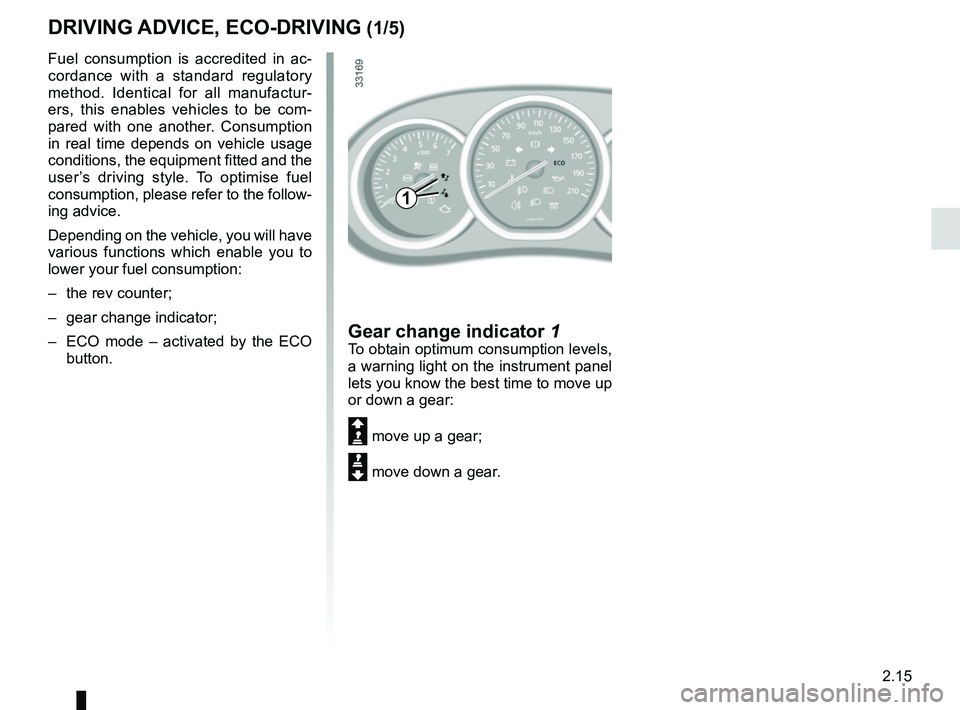
Gear change indicator 1To obtain optimum consumption levels,
a warning light on the instrument panel
lets you know the best time to move up
or down a gear:
Š move up a gear;
‰ move down a gear.
DRIVING ADVICE, ECO-DRIVING (1/5)
1
Page 92 of 256
2.16
DRIVING ADVICE, ECO-DRIVING (2/5)
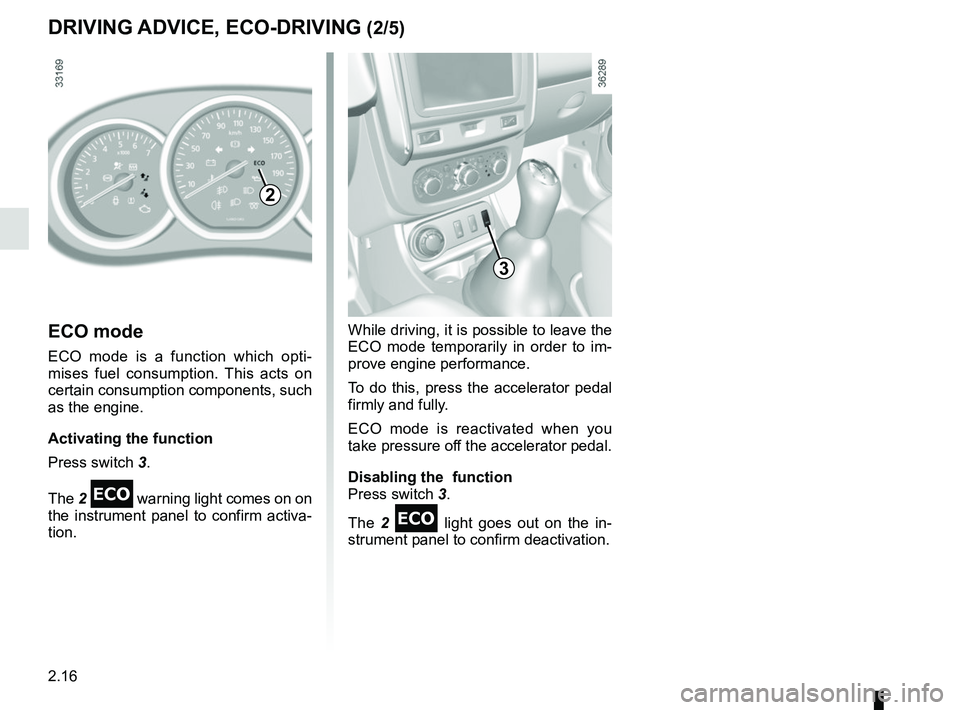
ECO mode
ECO mode is a function which opti-
mises fuel consumption. This acts on
certain consumption components, such
as the engine.
Activating the function
Press switch 3.
The 2
warning light comes on on
the instrument panel to confirm activa-
tion.
While driving, it is possible to leave the
ECO mode temporarily in order to im-
prove engine performance.
To do this, press the accelerator pedal
firmly and fully.
ECO mode is reactivated when you
take pressure off the accelerator pedal.
Disabling the function
Press switch 3.
The 2
light goes out on the in-
strument panel to confirm deactivation.
2
3
Page 93 of 256
2.17
DRIVING ADVICE, ECO-DRIVING (3/5)
– Avoid sudden acceleration.
– Brake as little as possible. If you an-ticipate an obstacle or bend in ad-
vance, you may then simply release
the accelerator pedal.
– Do not try to maintain the same speed up a hill, accelerate no more
than you would on the level. Keep
your foot in the same position on the
accelerator pedal.
– Double declutching and accelerating before switching off are unnecessary
in modern vehicles.
On versions with an automatic gear-
box, it is preferable to keep the gear
lever in position D.
Vehicles with 4x4 (4WD) trans-
mission
On flat, level ground, with the vehi-
cle unladen, you are recommended
to start in second gear.
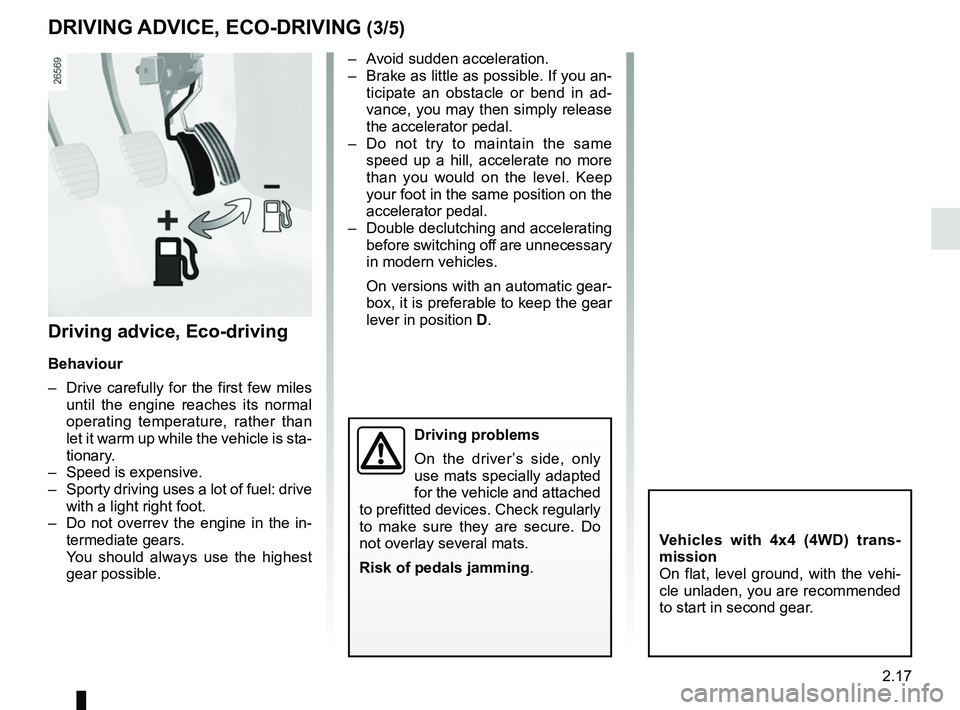
Driving advice, Eco-driving
Behaviour
– Drive carefully for the first few miles
until the engine reaches its normal
operating temperature, rather than
let it warm up while the vehicle is sta-
tionary.
– Speed is expensive.
– Sporty driving uses a lot of fuel: drive with a light right foot.
– Do not overrev the engine in the in- termediate gears.
You should always use the highest gear possible.
Driving problems
On the driver’s side, only
use mats specially adapted
for the vehicle and attached
to prefitted devices. Check regularly
to make sure they are secure. Do
not overlay several mats.
Risk of pedals jamming .