heating RENAULT ESPACE 2012 J81 / 4.G User Guide
[x] Cancel search | Manufacturer: RENAULT, Model Year: 2012, Model line: ESPACE, Model: RENAULT ESPACE 2012 J81 / 4.GPages: 267, PDF Size: 8.95 MB
Page 87 of 267
JauneNoirNoir texte
2.5
ENG_UD25550_3
Démarrage/arrêt moteur avec carte RENAULT mains libres (X81 - J81 - Renault)
ENG_NU_932-3_X81ph3_Renault_2
3
1
STARTING/STOPPING THE ENGINE (3/3)
“Engine start” position
(continued)
For diesel versions, wait for the pre -
heating warning light
É to go out
on the instrument panel before press -
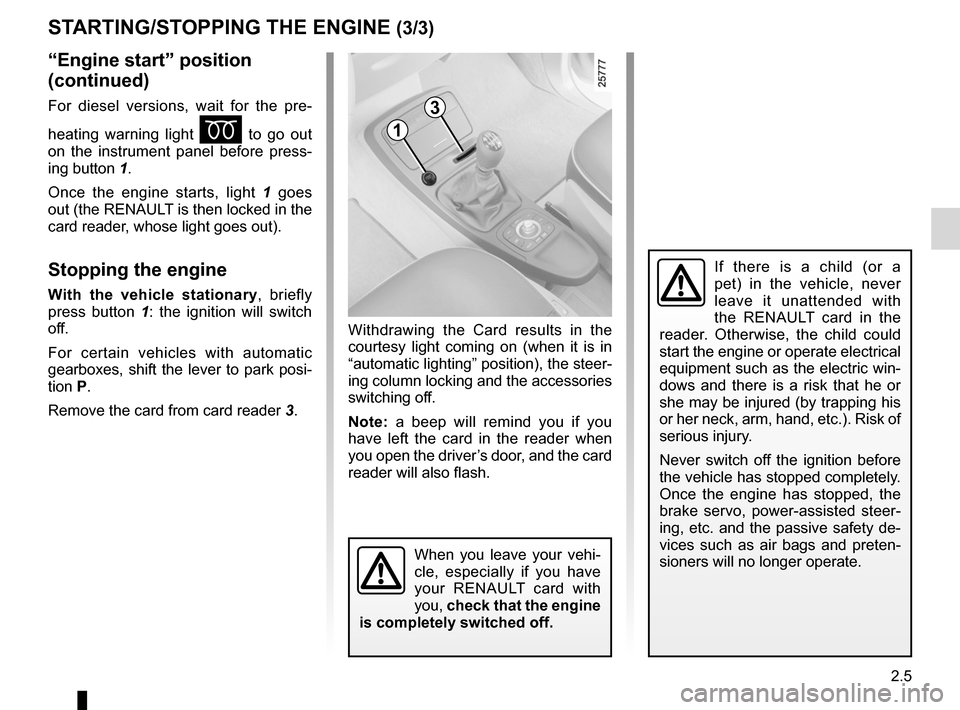
ing button 1.
Once the engine starts, light 1 goes
out (the RENAULT is then locked in the
card reader, whose light goes out).
Stopping the engine
With the vehicle stationary , briefly
press button 1 : the ignition will switch
off.
For certain vehicles with automatic
gearboxes, shift the lever to park posi-
tion P.
Remove the card from card reader 3.Withdrawing the Card results in the
courtesy light coming on (when it is in
“automatic lighting” position), the steer-
ing column locking and the accessories
switching off.
Note:
a beep will remind you if you
have left the card in the reader when
you open the driver’s door, and the card
reader will also flash.
When you leave your vehi -
cle, especially if you have
your RENAULT card with
you, check that the engine
is completely switched off.
If there is a child (or a
pet) in the vehicle, never
leave it unattended with
the RENAULT card in the
reader. Otherwise, the child could
start the engine or operate electrical
equipment such as the electric win-
dows and there is a risk that he or
she may be injured (by trapping his
or her neck, arm, hand, etc.). Risk of
serious injury.
Never switch off the ignition before
the vehicle has stopped completely.
Once the engine has stopped, the
brake servo, power-assisted steer -
ing, etc. and the passive safety de-
vices such as air bags and preten -
sioners will no longer operate.
Page 122 of 267
2.40
ENG_UD24090_2
Boîte automatique (X81 - J81 - Renault)
ENG_NU_932-3_X81ph3_Renault_2
AUTOMATIc GEARBOX (continued)
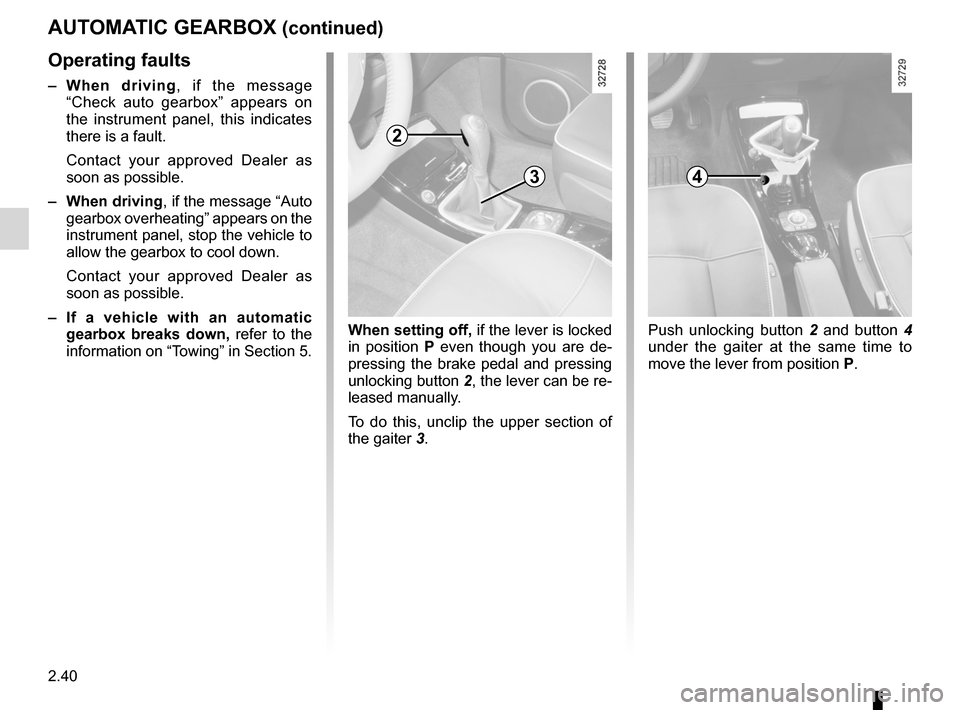
When setting off, if the lever is locked
in position P even though you are de -
pressing the brake pedal and pressing
unlocking button 2, the lever can be re-
leased manually.
To do this, unclip the upper section of
the gaiter 3.Push unlocking button 2 and button 4
under the gaiter at the same time to
move the lever from position P.
4
2
3
Operating faults
– When driving , if the message
“ Check auto gearbox ” appears on
the instrument panel, this indicates
there is a fault.
Contact your approved Dealer as
soon as possible.
– When driving, if the message “Auto
gearbox overheating” appears on the
instrument panel, stop the vehicle to
allow the gearbox to cool down.
Contact your approved Dealer as
soon as possible.
– If a vehicle with an automatic
gearbox breaks down, refer to the
information on “Towing” in Section 5.
Page 123 of 267

ENG_NU_932-3_X81ph3_Renault_3
Section 3: Your comfort
Air vents. . . . . . . . . . . . . . . . . . . . . . . . . . . . . . . . . . . . \
. . . . . .")
3.1
ENG_UD25602_4
Sommaire 3 (X81 - J81 - Renault)
ENG_NU_932-3_X81ph3_Renault_3
Section 3: Your comfort
Air vents. . . . . . . . . . . . . . . . . . . . . . . . . . . . . . . . . . . . \
. . . . . . . . . . . . . . . . . . . . . . . . . . . . . . . . . . . 3.2
Heating and air conditioning . . . . . . . . . . . . . . . . . . . . . . . . . . . . . . . . . . . . . . . . . . . . . . . . . . . . . . . 3.5
Electric windows . . . . . . . . . . . . . . . . . . . . . . . . . . . . . . . . . . . . . . . . . . . . . . . . . . . . . . . . . . . . . . . . 3.26
Windscreen . . . . . . . . . . . . . . . . . . . . . . . . . . . . . . . . . . . . . . . . . . . . . . . . . . . . . . . . . . . . . . . . . . . . 3.30
Fixed glass roof . . . . . . . . . . . . . . . . . . . . . . . . . . . . . . . . . . . . . . . . . . . . . . . . . . . . . . . . . . . . . . . . . 3.30
Electric sunroof . . . . . . . . . . . . . . . . . . . . . . . . . . . . . . . . . . . . . . . . . . . . . . . . . . . . . . . . . . . . . . . . . 3.31
Sun visor . . . . . . . . . . . . . . . . . . . . . . . . . . . . . . . . . . . . . . . . . . . . . . . . . . . . . . . . . . . . . . . . . . . . . . 3.33
Interior lighting . . . . . . . . . . . . . . . . . . . . . . . . . . . . . . . . . . . . . . . . . . . . . . . . . . . . . . . . . . . . . . . . . . 3.35
Passenger compartment storage/fittings . . . . . . . . . . . . . . . . . . . . . . . . . . . . . . . . . . . . . . . . . . . . . . 3.37
Ashtrays – Cigarette lighter . . . . . . . . . . . . . . . . . . . . . . . . . . . . . . . . . . . . . . . . . . . . . . . . . . . . . . . . 3.41
Rear seats . . . . . . . . . . . . . . . . . . . . . . . . . . . . . . . . . . . . . . . . . . . . . . . . . . . . . . . . . . . . . . . . . . . . . 3.42
Luggage compartment . . . . . . . . . . . . . . . . . . . . . . . . . . . . . . . . . . . . \
. . . . . . . . . . . . . . . . . . . . . . . . 3.51
Opening rear screen . . . . . . . . . . . . . . . . . . . . . . . . . . . . . . . . . . . . . . . . . . . . . . . . . . . . . . . . . . . . . 3.52
Luggage cover . . . . . . . . . . . . . . . . . . . . . . . . . . . . . . . . . . . . . . . . . . . . . . . . . . . . . . . . . . . . . . . . . . 3.53
Transporting objects in the boot . . . . . . . . . . . . . . . . . . . . . . . . . . . . . . . . . . . . . . . . . . . . . . . . . . . . 3.55
Luggage net . . . . . . . . . . . . . . . . . . . . . . . . . . . . . . . . . . . . \
. . . . . . . . . . . . . . . . . . . . . . . . . . . . . . . . 3.56
Roof bars . . . . . . . . . . . . . . . . . . . . . . . . . . . . . . . . . . . . . . . . . . . . . . . . . . . . . . . . . . . . . . . . . . . . . . 3.57
Hands-free telephone integrated control . . . . . . . . . . . . . . . . . . . . . . . . . . . . . . . . . . . . . . . . . . . . . . 3.59
Page 124 of 267
air vents ................................................ (up to the end of the DU)
air conditioning ..................................... (up to the end of the DU)
heating system ..................................... (up to the end of the DU)
air conditioning ..................................... (up to the end of the DU)
temperature regulation ......................... (up to the end of the DU)
ventilation ............................................. (up to the end of the DU)
3.2
ENG_UD20380_1
Aérateurs (X81 - J81 - Renault)
ENG_NU_932-3_X81ph3_Renault_3
Jaune NoirNoir texte
Air vents
AIR VENTS: air outlets (1/3)
12345654321
77
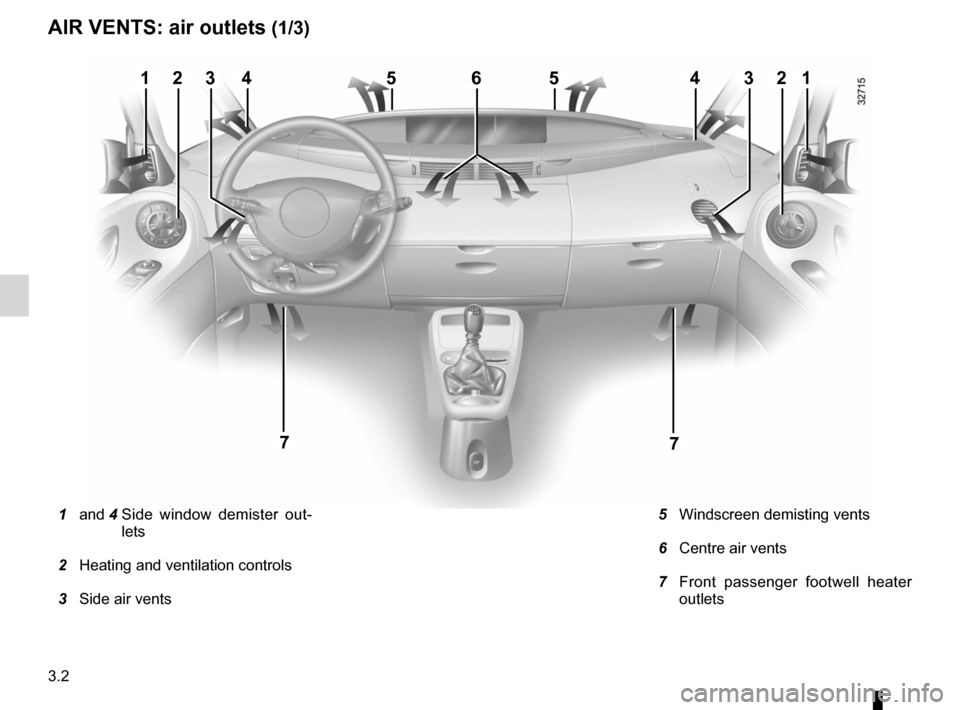
1 and 4 Side window demister out -
lets
2 Heating and ventilation controls
3 Side air vents
5 Windscreen demisting vents
6 Centre air vents
7 Front passenger footwell heater
outlets
Page 127 of 267
air conditioning ..................................... (up to the end of the DU)
heating system ..................................... (up to the end of the DU)
air conditioning ..................................... (up to the end of the DU)
demisting windscreen ....................................................... (current page)
demisting rear screen ....................................................... (current page)
rear screen demisting ......................................................... (current page)
temperature regulation ......................... (up to the end of the DU)
ventilation ............................................. (up to the end of the DU)
3.5
ENG_UD20381_1
Chauffage/Air conditionné (X81 - J81 - Renault)
ENG_NU_932-3_X81ph3_Renault_3
Heating and air conditioning
HEATING/AIR CONDITIONING (1/7)
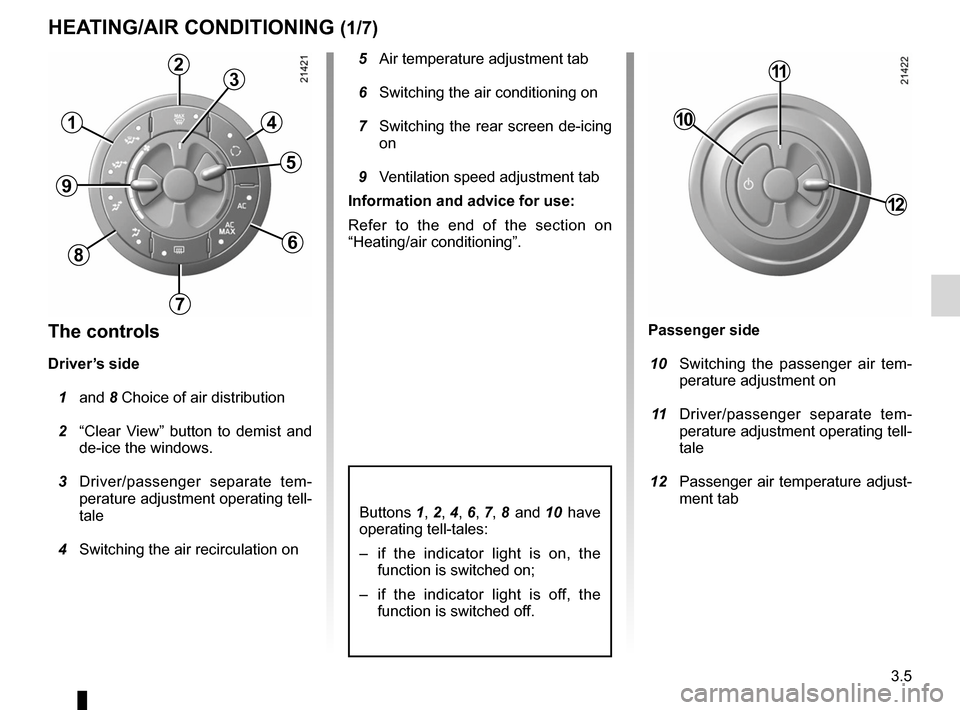
5 Air temperature adjustment tab
6 Switching the air conditioning on
7 Switching the rear screen de-icing
on
9 Ventilation speed adjustment tab
Information and advice for use:
Refer to the end of the section on
“Heating/air conditioning”.
The controls
Driver’s side
1 and 8 Choice of air distribution
2 “Clear View” button to demist and
de-ice the windows.
3 Driver/passenger separate tem -
perature adjustment operating tell-
tale
4 Switching the air recirculation on
Buttons 1 , 2 , 4 , 6 , 7 , 8 and 10 have
operating tell-tales:
– if the indicator light is on, the
function is switched on;
– if the indicator light is off, the
function is switched off.
Passenger side
10 Switching the passenger air tem -
perature adjustment on
11 Driver/passenger separate tem -
perature adjustment operating tell-
tale
12 Passenger air temperature adjust-
ment tab
1
23
4
5
6
7
8
9
10
11
12
Page 128 of 267
3.6
ENG_UD20381_1
Chauffage/Air conditionné (X81 - J81 - Renault)
ENG_NU_932-3_X81ph3_Renault_3
Jaune NoirNoir texte
HEATING/AIR CONDITIONING (2/7)
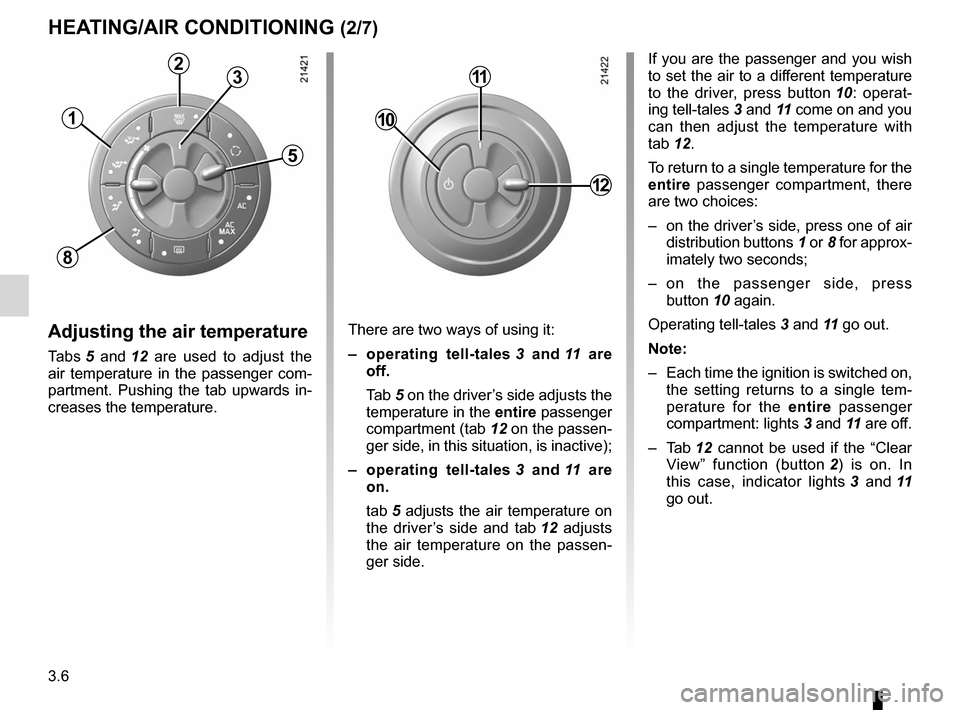
If you are the passenger and you wish
to set the air to a different temperature
to the driver, press button 10 : operat -
ing tell-tales 3 and 11 come on and you
can then adjust the temperature with
tab 12.
To return to a single temperature for the
entire passenger compartment, there
are two choices:
– on the driver’s side, press one of air
distribution buttons 1 or 8 for approx-
imately two seconds;
– on the passenger side, press
button 10 again.
Operating tell-tales 3 and 11 go out.
Note:
– Each time the ignition is switched on,
the setting returns to a single tem -
perature for the entire passenger
compartment: lights 3 and 11 are off.
– Tab 12 cannot be used if the “Clear
View” function (button 2 ) is on. In
this case, indicator lights 3 and 11
go out.
Adjusting the air temperature
Tabs 5 and 12 are used to adjust the
air temperature in the passenger com-
partment. Pushing the tab upwards in-
creases the temperature. There are two ways of using it:
–
operating tell-tales 3 and 11 are
off.
Tab 5 on the driver’s side adjusts the
temperature in the entire passenger
compartment (tab 12 on the passen-
ger side, in this situation, is inactive);
– operating tell-tales 3 and 11 are
on.
tab 5 adjusts the air temperature on
the driver’s side and tab 12 adjusts
the air temperature on the passen -
ger side.
1
23
5
8
10
11
12
Page 129 of 267
demistingwindscreen ....................................................... (current page)
demisting rear screen ....................................................... (current page)
rear screen demisting ......................................................... (current page)
JauneNoirNoir texte
3.7
ENG_UD20381_1
Chauffage/Air conditionné (X81 - J81 - Renault)
ENG_NU_932-3_X81ph3_Renault_3
HEATING/AIR CONDITIONING (3/7)
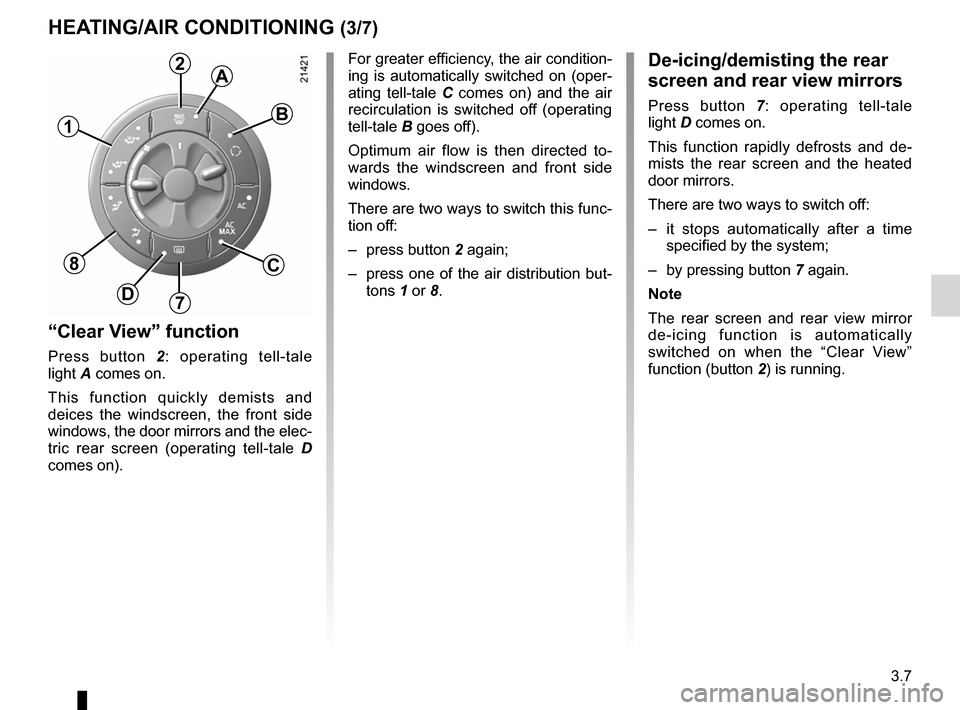
“Clear View” function
Press button 2: operating tell-tale
light A comes on.
This function quickly demists and
deices the windscreen, the front side
windows, the door mirrors and the elec-
tric rear screen (operating tell-tale D
comes on). For greater efficiency, the air condition
-
ing is automatically switched on (oper-
ating tell-tale C comes on) and the air
recirculation is switched off (operating
tell-tale B goes off).
Optimum air flow is then directed to -
wards the windscreen and front side
windows.
There are two ways to switch this func-
tion off:
– press button 2 again;
– press one of the air distribution but-
tons 1 or 8.
De-icing/demisting the rear
screen and rear view mirrors
Press button 7: operating tell-tale
light D comes on.
This function rapidly defrosts and de -
mists the rear screen and the heated
door mirrors.
There are two ways to switch off:
– it stops automatically after a time
specified by the system;
– by pressing button 7 again.
Note
The rear screen and rear view mirror
de-icing function is automatically
switched on when the “Clear View”
function (button 2) is running.
1
2A
B
C
7D
8
Page 130 of 267
3.8
ENG_UD20381_1
Chauffage/Air conditionné (X81 - J81 - Renault)
ENG_NU_932-3_X81ph3_Renault_3
Jaune NoirNoir texte
HEATING/AIR CONDITIONING (4/7)
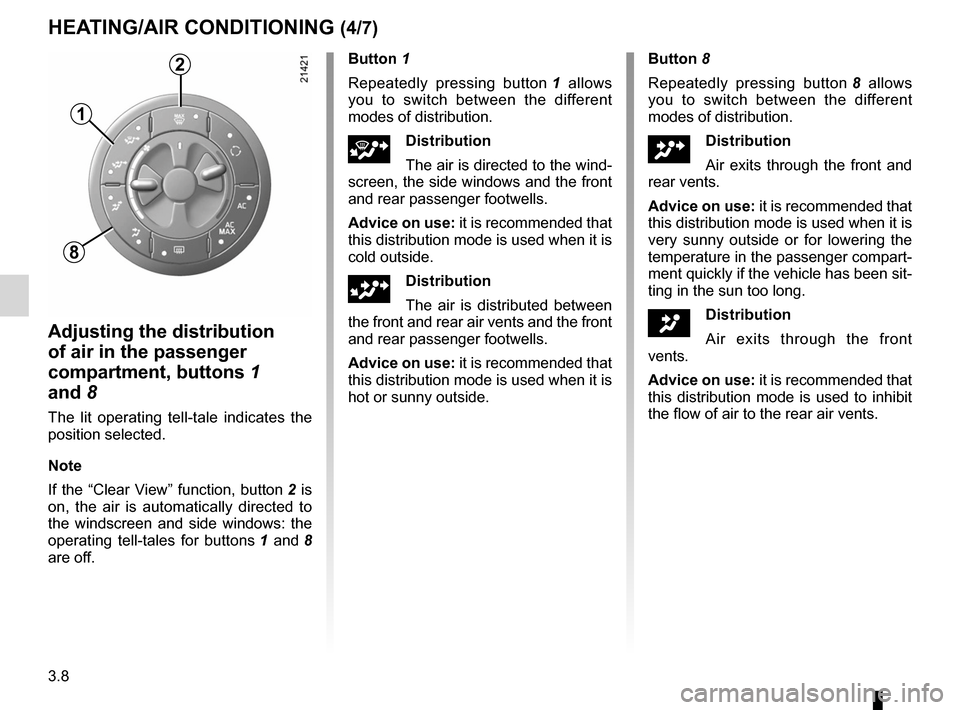
Adjusting the distribution
of air in the passenger
compartment, buttons 1
and 8
The lit operating tell-tale indicates the
position selected.
Note
If the “Clear View” function, button 2 is
on, the air is automatically directed to
the windscreen and side windows: the
operating tell-tales for buttons 1 and 8
are off. Button 1
Repeatedly pressing button
1 allows
you to switch between the different
modes of distribution.
jDistribution
The air is directed to the wind -
screen, the side windows and the front
and rear passenger footwells.
Advice on use: it is recommended that
this distribution mode is used when it is
cold outside.
lDistribution
The air is distributed between
the front and rear air vents and the front
and rear passenger footwells.
Advice on use: it is recommended that
this distribution mode is used when it is
hot or sunny outside.
Button 8
Repeatedly pressing button 8 allows
you to switch between the different
modes of distribution.
ODistribution
Air exits through the front and
rear vents.
Advice on use: it is recommended that
this distribution mode is used when it is
very sunny outside or for lowering the
temperature in the passenger compart-
ment quickly if the vehicle has been sit-
ting in the sun too long.
JDistribution
Air exits through the front
vents.
Advice on use: it is recommended that
this distribution mode is used to inhibit
the flow of air to the rear air vents.
1
2
8
Page 131 of 267
JauneNoirNoir texte
3.9
ENG_UD20381_1
Chauffage/Air conditionné (X81 - J81 - Renault)
ENG_NU_932-3_X81ph3_Renault_3
HEATING/AIR CONDITIONING (5/7)
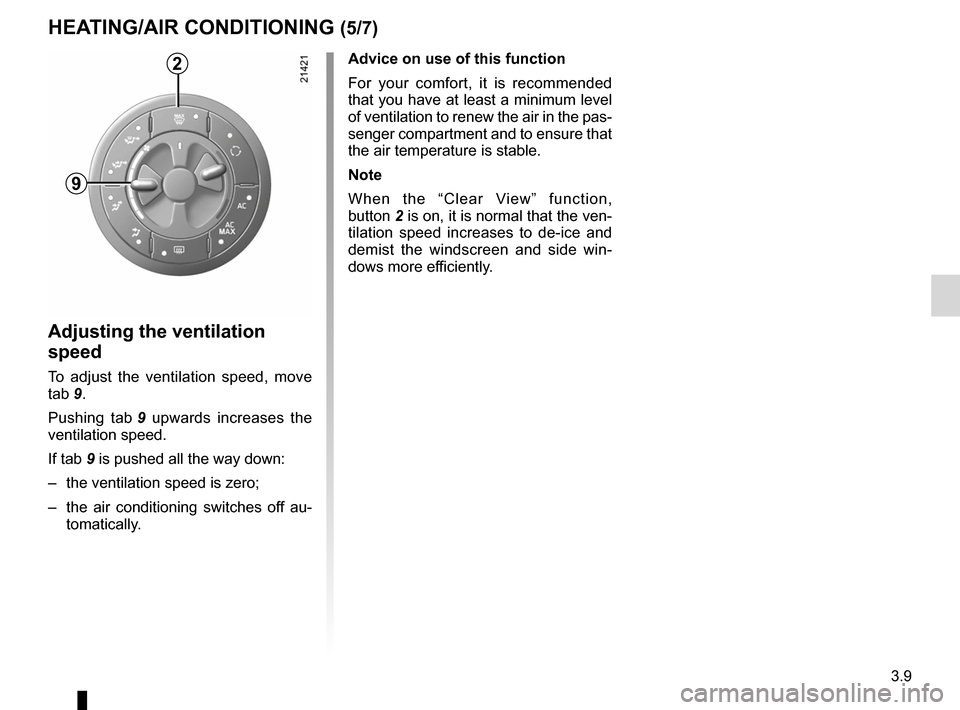
Adjusting the ventilation
speed
To adjust the ventilation speed, move
tab 9.
Pushing tab 9 upwards increases the
ventilation speed.
If tab 9 is pushed all the way down:
– the ventilation speed is zero;
– the air conditioning switches off au -
tomatically.
Advice on use of this function
For your comfort, it is recommended
that you have at least a minimum level
of ventilation to renew the air in the pas-
senger compartment and to ensure that
the air temperature is stable.
Note
When the “Clear View” function,
button 2 is on, it is normal that the ven-
tilation speed increases to de-ice and
demist the windscreen and side win -
dows more efficiently.2
9
Page 132 of 267
3.10
ENG_UD20381_1
Chauffage/Air conditionné (X81 - J81 - Renault)
ENG_NU_932-3_X81ph3_Renault_3
Jaune NoirNoir texte
HEATING/AIR CONDITIONING (6/7)
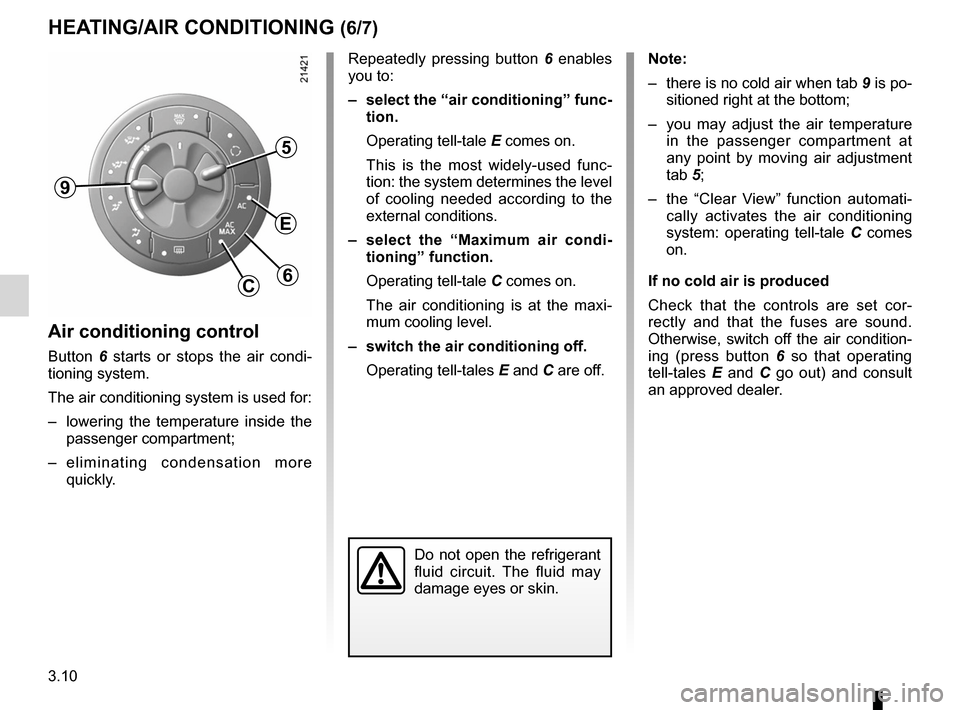
Air conditioning control
Button 6 starts or stops the air condi -
tioning system.
The air conditioning system is used for:
– lowering the temperature inside the
passenger compartment;
– e l i m i n a t i n g c o n d e n s a t i o n m o r e
quickly. Repeatedly pressing button
6 enables
you to:
– select the “air conditioning” func-
tion.
Operating tell-tale E comes on.
This is the most widely-used func -
tion: the system determines the level
of cooling needed according to the
external conditions.
– select the “Maximum air condi -
tioning” function.
Operating tell-tale C comes on.
The air conditioning is at the maxi -
mum cooling level.
– switch the air conditioning off.
Operating tell-tales E and C are off.
Note:
– there is no cold air when tab 9 is po-
sitioned right at the bottom;
– you may adjust the air temperature
in the passenger compartment at
any point by moving air adjustment
tab 5;
– the “Clear View” function automati -
cally activates the air conditioning
system: operating tell-tale C comes
on.
If no cold air is produced
Check that the controls are set cor -
rectly and that the fuses are sound.
Otherwise, switch off the air condition -
ing (press button 6 so that operating
tell-tales E and C go out) and consult
an approved dealer.
Do not open the refrigerant
fluid circuit. The fluid may
damage eyes or skin.
9
5
E
6C