lights RENAULT ESPACE 2012 J81 / 4.G Owner's Guide
[x] Cancel search | Manufacturer: RENAULT, Model Year: 2012, Model line: ESPACE, Model: RENAULT ESPACE 2012 J81 / 4.GPages: 267, PDF Size: 8.95 MB
Page 90 of 267
parking brake ........................................ (up to the end of the DU)
driving ................................................... (up to the end of the DU)
2.8
ENG_UD20366_1
Frein de parking assisté (X81 - J81 - Renault)
ENG_NU_932-3_X81ph3_Renault_2
Jaune NoirNoir texte
Electronic parking brake
ASSISTED PARKING BRAKE
Applying the assisted
parking brake
Manual mode
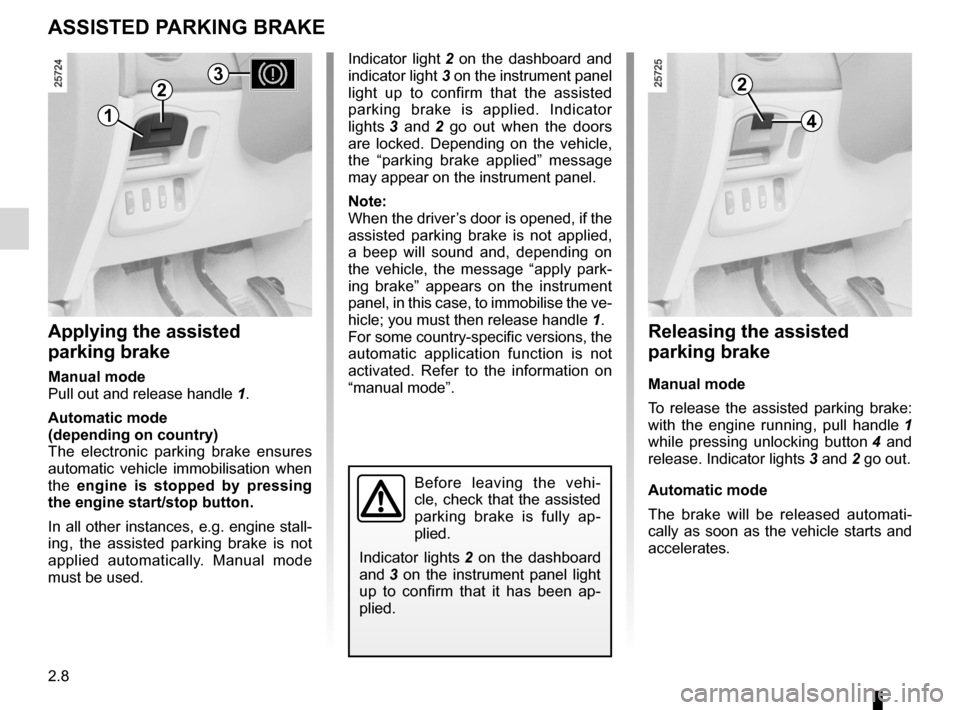
Pull out and release handle 1.
Automatic mode
(depending on country)
The electronic parking brake ensures
automatic vehicle immobilisation when
the engine is stopped by pressing
the engine start/stop button.
In all other instances, e.g. engine stall-
ing, the assisted parking brake is not
applied automatically. Manual mode
must be used.
Indicator light 2 on the dashboard and
indicator light 3 on the instrument panel
light up to confirm that the assisted
parking brake is applied. Indicator
lights 3 and 2 go out when the doors
are locked. Depending on the vehicle,
the “parking brake applied” message
may appear on the instrument panel.
Note:
When the driver’s door is opened, if the
assisted parking brake is not applied,
a beep will sound and, depending on
the vehicle, the message “apply park -
ing brake” appears on the instrument
panel, in this case, to immobilise the ve-
hicle; you must then release handle 1.
For some country-specific versions, the
automatic application function is not
activated. Refer to the information on
“manual mode”.
Releasing the assisted
parking brake
Manual mode
To release the assisted parking brake:
with the engine running, pull handle 1
while pressing unlocking button 4 and
release. Indicator lights 3 and 2 go out.
Automatic mode
The brake will be released automati -
cally as soon as the vehicle starts and
accelerates.
Before leaving the vehi -
cle, check that the assisted
parking brake is fully ap -
plied.
Indicator lights 2 on the dashboard
and 3 on the instrument panel light
up to confirm that it has been ap -
plied.
1
22
4
3
Page 91 of 267
JauneNoirNoir texte
2.9
ENG_UD20366_1
Frein de parking assisté (X81 - J81 - Renault)
ENG_NU_932-3_X81ph3_Renault_2
ASSISTED PARKING BRAKE (continued)
Special cases
If you have to park on a slope or are
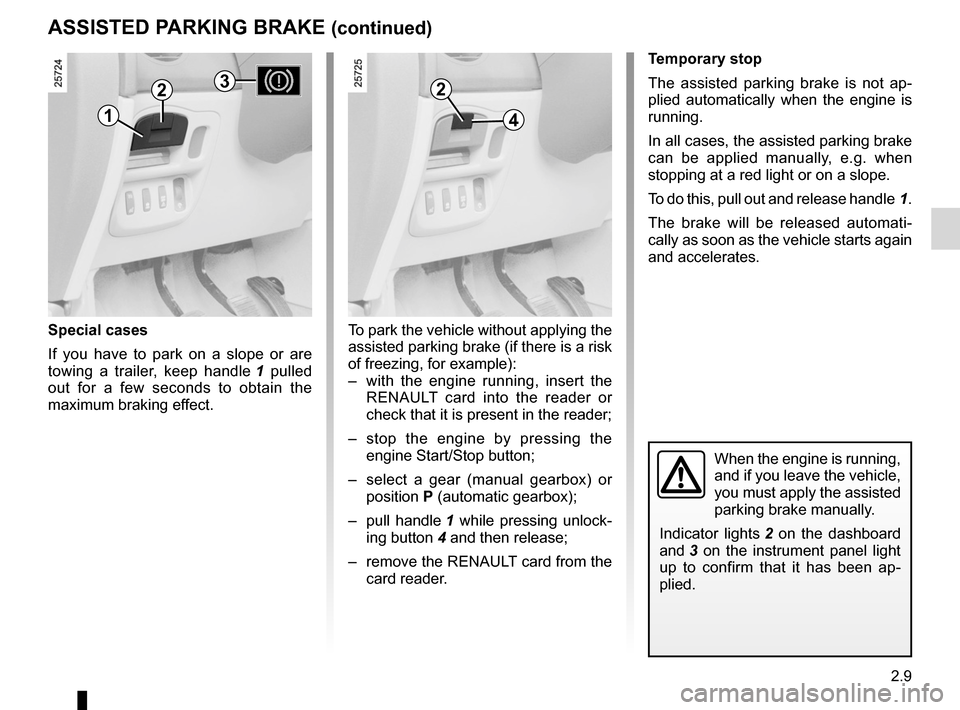
towing a trailer, keep handle 1 pulled
out for a few seconds to obtain the
maximum braking effect.
Temporary stop
The assisted parking brake is not ap -
plied automatically when the engine is
running.
In all cases, the assisted parking brake
can be applied manually, e.g. when
stopping at a red light or on a slope.
To do this, pull out and release handle 1.
The brake will be released automati -
cally as soon as the vehicle starts again
and accelerates.
When the engine is running,
and if you leave the vehicle,
you must apply the assisted
parking brake manually.
Indicator lights 2 on the dashboard
and 3 on the instrument panel light
up to confirm that it has been ap -
plied.
To park the vehicle without applying the
assisted parking brake (if there is a risk
of freezing, for example):
– with the engine running, insert the
RENAULT card into the reader or
check that it is present in the reader;
– stop the engine by pressing the
engine Start/Stop button;
– select a gear (manual gearbox) or
position P (automatic gearbox);
– pull handle 1 while pressing unlock-
ing button 4 and then release;
– remove the RENAULT card from the
card reader.
2
41
23
Page 92 of 267
2.10
ENG_UD20366_1
Frein de parking assisté (X81 - J81 - Renault)
ENG_NU_932-3_X81ph3_Renault_2
ASSISTED PARKING BRAKE (continued)
v ersions with an automatic
gearbox
Never leave your vehicle without
moving the selector lever to position N
or P.
For safety reasons, if the lever is not in
one of these positions and the driver’s
door is open or incorrectly shut, the au-
tomatic release function is deactivated.
Emergency unlocking(battery fault or system failure).
To release the assisted parking brake:
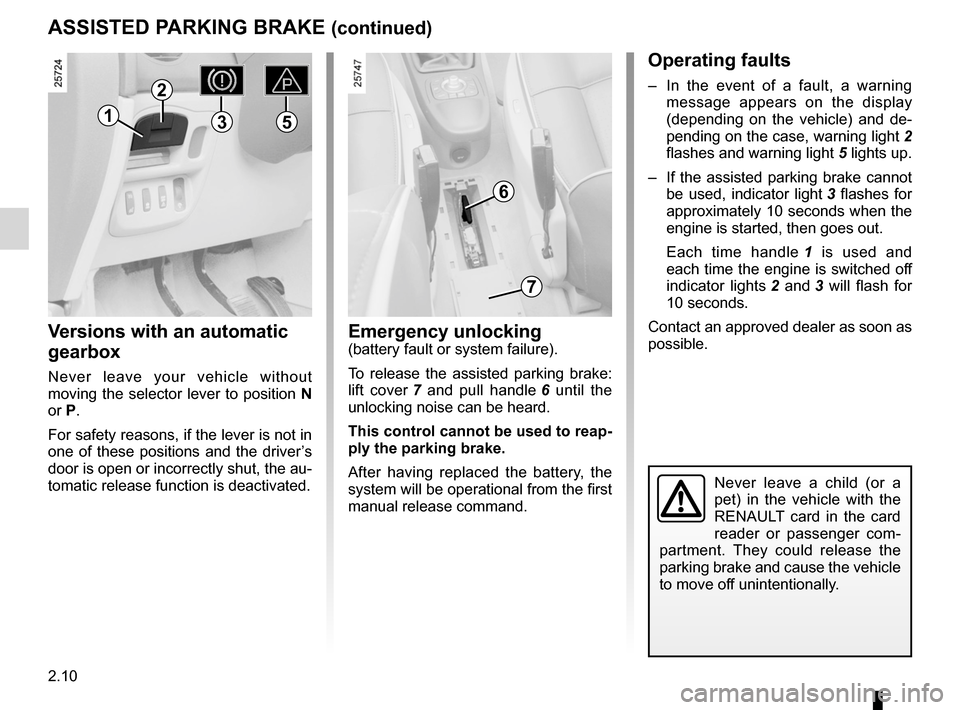
lift cover 7 and pull handle 6 until the
unlocking noise can be heard.
This control cannot be used to reap-
ply the parking brake.
After having replaced the battery, the
system will be operational from the first
manual release command.
Operating faults
– In the event of a fault, a warning
message appears on the display
(depending on the vehicle) and de -
pending on the case, warning light 2
flashes and warning light 5 lights up.
– If the assisted parking brake cannot
be used, indicator light 3 flashes for
approximately 10 seconds when the
engine is started, then goes out.
Each time handle 1 is used and
each time the engine is switched off
indicator lights 2 and 3 will flash for
10 seconds.
Contact an approved dealer as soon as
possible.
Never leave a child (or a
pet) in the vehicle with the
RENAULT card in the card
reader or passenger com -
partment. They could release the
parking brake and cause the vehicle
to move off unintentionally.
1
2
6
7
35
Page 93 of 267
power-assisted steering......................................... (current page)
reverse gear selecting ........................................................... (current page)
power-assisted steering ........................(up to the end of the DU)
driving ................................................... (up to the end of the DU)
gear lever .............................................. (up to the end of the DU)
2.11
ENG_UD15398_2
Levier de vitesses/Direction assistée (X81 - Renault)
ENG_NU_932-3_X81ph3_Renault_2
Gear lever
Power-assisted steering
GEAR LEvER/POWER-ASSISTED STEERING
Gear lever
Selecting reverse gear
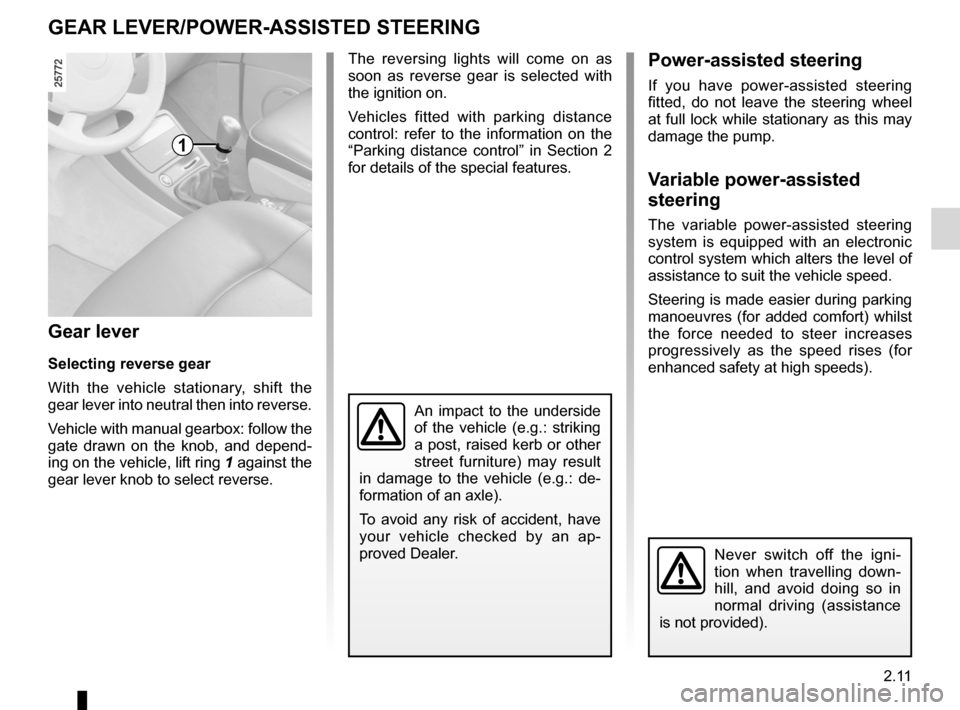
With the vehicle stationary, shift the
gear lever into neutral then into reverse.
Vehicle with manual gearbox: follow the
gate drawn on the knob, and depend -
ing on the vehicle, lift ring 1 against the
gear lever knob to select reverse.
The reversing lights will come on as
soon as reverse gear is selected with
the ignition on.
Vehicles fitted with parking distance
control: refer to the information on the
“Parking distance control” in Section 2
for details of the special features.Power-assisted steering
If you have power-assisted steering
fitted, do not leave the steering wheel
at full lock while stationary as this may
damage the pump.
v ariable power-assisted
steering
The variable power-assisted steering
system is equipped with an electronic
control system which alters the level of
assistance to suit the vehicle speed.
Steering is made easier during parking
manoeuvres (for added comfort) whilst
the force needed to steer increases
progressively as the speed rises (for
enhanced safety at high speeds).
Never switch off the igni -
tion when travelling down -
hill, and avoid doing so in
normal driving (assistance
is not provided).
1
An impact to the underside
of the vehicle (e.g.: striking
a post, raised kerb or other
street furniture) may result
in damage to the vehicle (e.g.: de -
formation of an axle).
To avoid any risk of accident, have
your vehicle checked by an ap -
proved Dealer.
Page 95 of 267
ENG_NU_932-3_X81ph3_Renault_2
– Brake as little as possible by suitably
anti")
JauneNoirNoir texte
2.13
ENG_UD20368_1
Conseils antipollution, économies de carburant, conduite (X81 - J81 \
- Renault)ENG_NU_932-3_X81ph3_Renault_2
– Brake as little as possible by suitably
anticipating an obstacle or bend and
then simply releasing the accelerator
pedal.
– Avoid sudden acceleration.
– Do not try to maintain the same
speed up a hill, accelerate no more
than you would on the level. Keep
your foot in the same position on the
accelerator pedal.
– Double declutching and accelerating
before switching off are unnecessary
in modern vehicles.
– Bad weather, flooded roads.
ADvIcE: antipollution, fuel economy and driving (continued)
Do not drive through floods if
the water is above the lower
edge of the wheel rims.
Exhaust gas monitoring
system
The exhaust gas monitoring system will
detect any operating faults in the vehi-
cle’s antipollution system.
If this system malfunctions, toxic sub-
stances may be released into the at -
mosphere or damage may occur.
ÄThis warning light on the in -
strument panel will indicate if
there are any faults in the system:
This lights up when the ignition is
switched on and goes out when the
engine is started.
– If it lights up continuously, consult
your approved dealer as soon as
possible;
– if it flashes, reduce the engine speed
until the light stops flashing. Contact
your approved dealer as soon as
possible.
Driving– Drive carefully for the first few miles
until the engine reaches its normal
operating temperature, rather than
let it warm up while the vehicle is sta-
tionary.
– Speed is expensive.
– Sporty driving uses a lot of fuel: drive
with a light right foot.
– Do not overrev the engine in the in-
termediate gears.
Always use the highest gear possi -
ble without labouring the engine.
On versions with an automatic trans-
mission, it is preferable to keep the
gear lever in position D.
Obstructions to the driver
On the driver ’s side, only
use mats adapted to the ve-
hicle that attach to the pre-
installed parts, and regularly check
their mounting. Do not place several
mats on top of each other.
Risk of pedals jamming
Page 96 of 267
ENG_NU_932-3_X81ph3_Renault_2
ADvIcE: antipollution, fuel economy and driving (continued)
Advice on")
2.14
ENG_UD20368_1
Conseils antipollution, économies de carburant, conduite (X81 - J81 \
- Renault)ENG_NU_932-3_X81ph3_Renault_2
ADvIcE: antipollution, fuel economy and driving (continued)
Advice on use
– Electricity is fuel: switch off all electri-
cal components when you no longer
need them. However (safety first),
keep your lights on when the visibil -
ity is poor (“see and be seen”).
– Use the air vents. Driving with the
windows open at 60 mph (100 km/h)
will increase fuel consumption by
4%.
– Do not leave an empty roof rack
fitted to the vehicle. –
In vehicles fitted with air condi -
tioning , it is normal to observe an
increase in fuel consumption (es -
pecially in city conditions) when
it is used. For vehicles fitted with
manual air conditioning, switch off
the system when it is not required.
In order to minimise consumption
and help to protect the environ -
ment: it is recommended to drive
with the air vents on and the win -
dows closed. If the vehicle has been
parked in the sun, open the doors
for a few moments to let the hot air
escape before starting the engine.
– Never fill the fuel tank right to the
brim to avoid overflow.
– It is better to fit a trailer for bulky ob-
jects.
– When towing a caravan, fit a wind
deflector and adjust it carefully. –
Avoid using the vehicle for door -
to-door calls (short journeys with
long waits in between) because the
engine never reaches its normal op-
erating temperature.
Tyres
– Under-inflated tyres increase fuel
consumption.
– The use of non-recommended tyres
can increase fuel consumption.
Page 107 of 267
emergency brake assist......................................... (current page)
emergency braking ............................... (up to the end of the DU)
driving ................................................... (up to the end of the DU)
2.25
ENG_UD1792_1
Assistance au freinage d’urgence (X81 - Renault)
ENG_NU_932-3_X81ph3_Renault_2
Assistance au freinage d’urgence
EMERGENcY BRAKE ASSIST
This system is complementary to the
ABS and helps reduce vehicle stopping
distances.
Operating principle
The system allows an emergency brak-
ing situation to be detected via a sensor
that measures the speed with which the
brake pedal is depressed. In this case,
the braking assistance instantly pro -
vides its maximum power.
ABS braking is maintained as long as
the brake pedal is applied.
Hazard warning lights
activation
These may light up in the event of rapid
deceleration.
In this case, the hazard warning lights
may be switched off by pressing the
hazard warning lights switch twice.
This function is an addi -
tional aid in the event of
critical driving conditions,
enabling the vehicle behav -
iour to be adapted to suit the driving
conditions.
However, the function does not take
the place of the driver. It does not
increase the vehicle’s limits and
should not encourage you to
drive more quickly.
Therefore, it can under no circum -
stances replace the vigilance or re-
sponsibility of the driver when ma -
noeuvring the vehicle (the driver
must always be ready for sudden in-
cidents which may occur when driv-
ing).
Page 108 of 267
cruise control-speed limiter....................................(current page)
speed limiter ......................................... (up to the end of the DU)
driving ................................................... (up to the end of the DU)
2.26
ENG_UD1793_1
Régulateur-Limiteur de vitesse : fonction limiteur (X81 - Renault)
ENG_NU_932-3_X81ph3_Renault_2
Jaune NoirNoir texte
Limiteur de vitesse
cRUISE cONTROL - SPEED LIMITER: limiter function
The speed limiter function helps you
stay within the driving speed limit that
you choose.
This may be useful, for example, driving
in urban areas or areas with a speed re-
striction (roadworks), etc.
The system operates from a driving
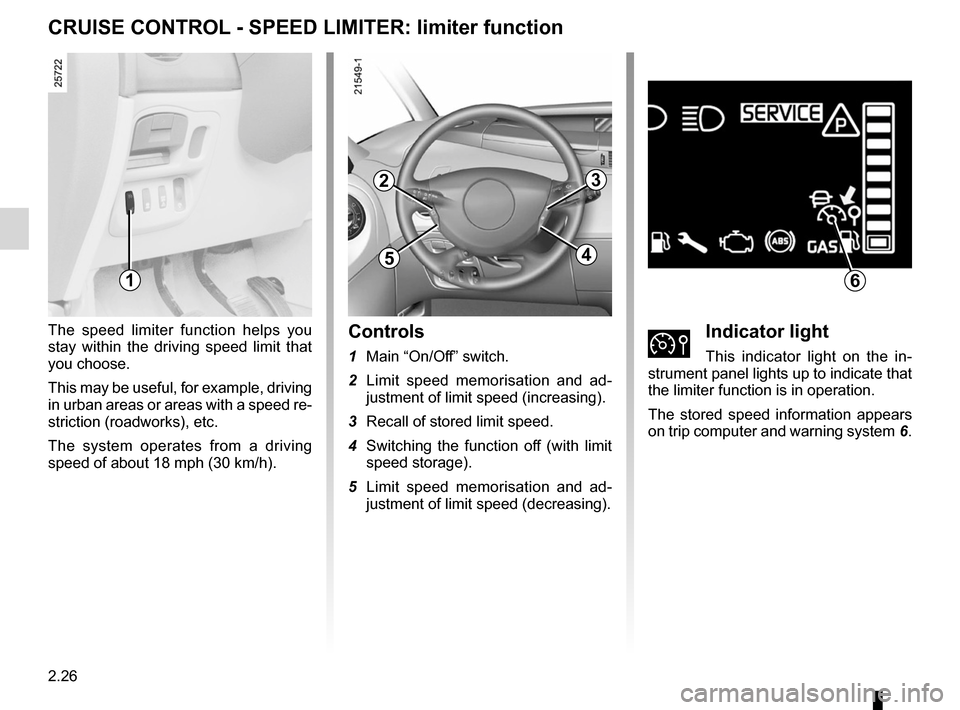
speed of about 18 mph (30 km/h).controls
1 Main “On/Off” switch.
2 Limit speed memorisation and ad -
justment of limit speed (increasing).
3 Recall of stored limit speed.
4 Switching the function off (with limit
speed storage).
5 Limit speed memorisation and ad -
justment of limit speed (decreasing).ÌIndicator light
This indicator light on the in -
strument panel lights up to indicate that
the limiter function is in operation.
The stored speed information appears
on trip computer and warning system 6.
1
2
5
3
4
6
Page 109 of 267
JauneNoirNoir texte
2.27
ENG_UD1793_1
Régulateur-Limiteur de vitesse : fonction limiteur (X81 - Renault)
ENG_NU_932-3_X81ph3_Renault_2
cRUISE cONTROL - SPEED LIMITER: limiter function (continued)
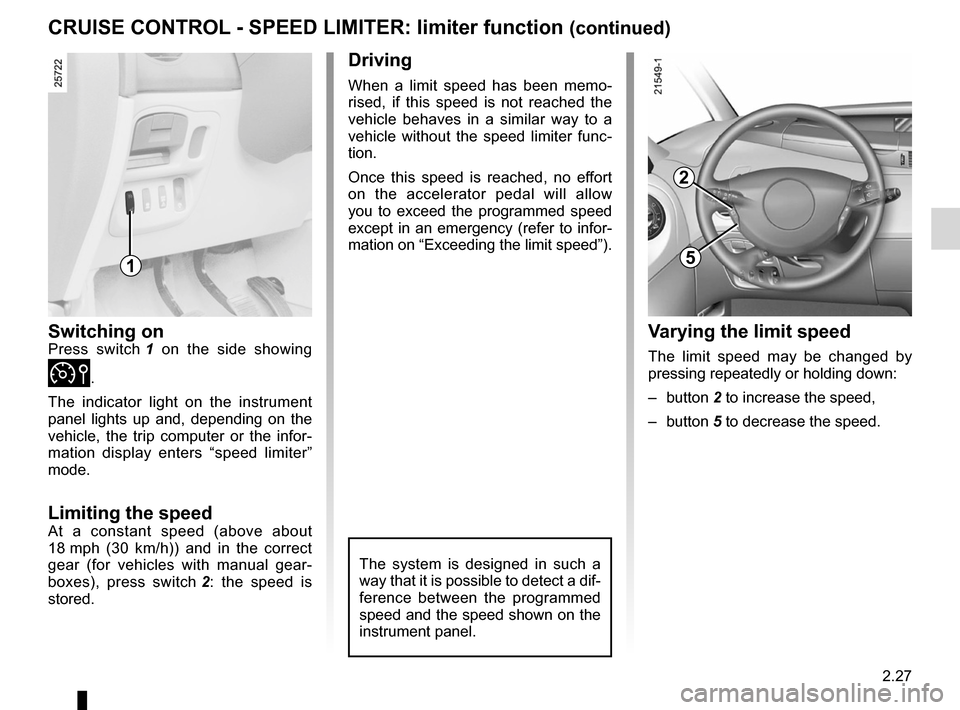
Switching onPress switch 1 on the side showing
Ì.
The indicator light on the instrument
panel lights up and, depending on the
vehicle, the trip computer or the infor -
mation display enters “speed limiter”
mode.
Limiting the speedAt a constant speed (above about
18 mph (30 km/h)) and in the correct
gear (for vehicles with manual gear -
boxes), press switch 2 : the speed is
stored.
Driving
When a limit speed has been memo -
rised, if this speed is not reached the
vehicle behaves in a similar way to a
vehicle without the speed limiter func -
tion.
Once this speed is reached, no effort
on the accelerator pedal will allow
you to exceed the programmed speed
except in an emergency (refer to infor-
mation on “Exceeding the limit speed”).
The system is designed in such a
way that it is possible to detect a dif-
ference between the programmed
speed and the speed shown on the
instrument panel.
v arying the limit speed
The limit speed may be changed by
pressing repeatedly or holding down:
– button 2 to increase the speed,
– button 5 to decrease the speed.
1
2
5
Page 112 of 267

ENG_NU_932-3_X81ph3_Renault_2
Jaune NoirNoir texte
cRUISE cONTROL - SPEED LIMITER: cruise control function (")
2.30
ENG_UD1794_1
Régulateur-Limiteur de vitesse : fonction régulateur (X81 - Renau\
lt)
ENG_NU_932-3_X81ph3_Renault_2
Jaune NoirNoir texte
cRUISE cONTROL - SPEED LIMITER: cruise control function (continued)
Driving
Once a cruising speed is memorised
and the cruise control function is active,
you may lift your foot off the accelera -
tor pedal.
Important: you are never -
theless advised to keep
your feet close to the pedals
in order to react if neces -
sary.
The system is designed in such a
way that it is possible to detect a dif-
ference between the programmed
speed and the speed shown on the
instrument panel.
Switching on
Press switch 1 on the side showing
Í.
The indicator light in the instrument
panel lights up and, depending on the
vehicle, the trip computer or the infor -
mation display enters cruise control
mode.
Activating cruise control
At a steady speed (above 18 mph
(30 km/h)) and in the correct gear (for
vehicles with manual gearboxes), press
switch 2 or 5 : the function is activated
and the speed is stored.
1
2
5