light RENAULT ESPACE 2015 5.G Owners Manual
[x] Cancel search | Manufacturer: RENAULT, Model Year: 2015, Model line: ESPACE, Model: RENAULT ESPACE 2015 5.GPages: 316, PDF Size: 6.98 MB
Page 194 of 316
3.2
MULTI-SENSE (1/2)
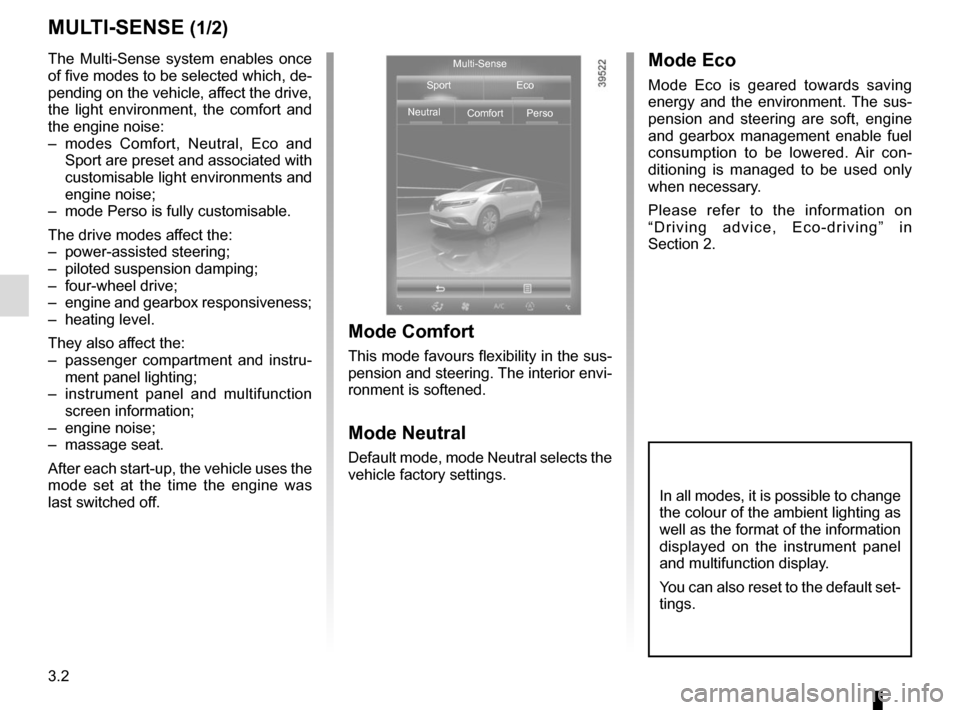
The Multi-Sense system enables once
of five modes to be selected which, de-
pending on the vehicle, affect the drive,
the light environment, the comfort and
the engine noise:
– modes Comfort, Neutral, Eco and Sport are preset and associated with
customisable light environments and
engine noise;
– mode Perso is fully customisable.
The drive modes affect the:
– power-assisted steering;
– piloted suspension damping;
– four-wheel drive;
– engine and gearbox responsiveness;
– heating level.
They also affect the:
– passenger compartment and instru- ment panel lighting;
– instrument panel and multifunction screen information;
– engine noise;
– massage seat.
After each start-up, the vehicle uses the
mode set at the time the engine was
last switched off.
Mode Comfort
This mode favours flexibility in the sus-
pension and steering. The interior envi-
ronment is softened.
Mode Neutral
Default mode, mode Neutral selects the
vehicle factory settings.
Mode Eco
Mode Eco is geared towards saving
energy and the environment. The sus-
pension and steering are soft, engine
and gearbox management enable fuel
consumption to be lowered. Air con-
ditioning is managed to be used only
when necessary.
Please refer to the information on
“Driving advice, Eco-driving” in
Section 2.
Multi-Sense
Sport Eco
Neutral Comfort Perso
In all modes, it is possible to change
the colour of the ambient lighting as
well as the format of the information
displayed on the instrument panel
and multifunction display.
You can also reset to the default set-
tings.
Page 195 of 316
3.3
MULTI-SENSE (2/2)Accessing the menu
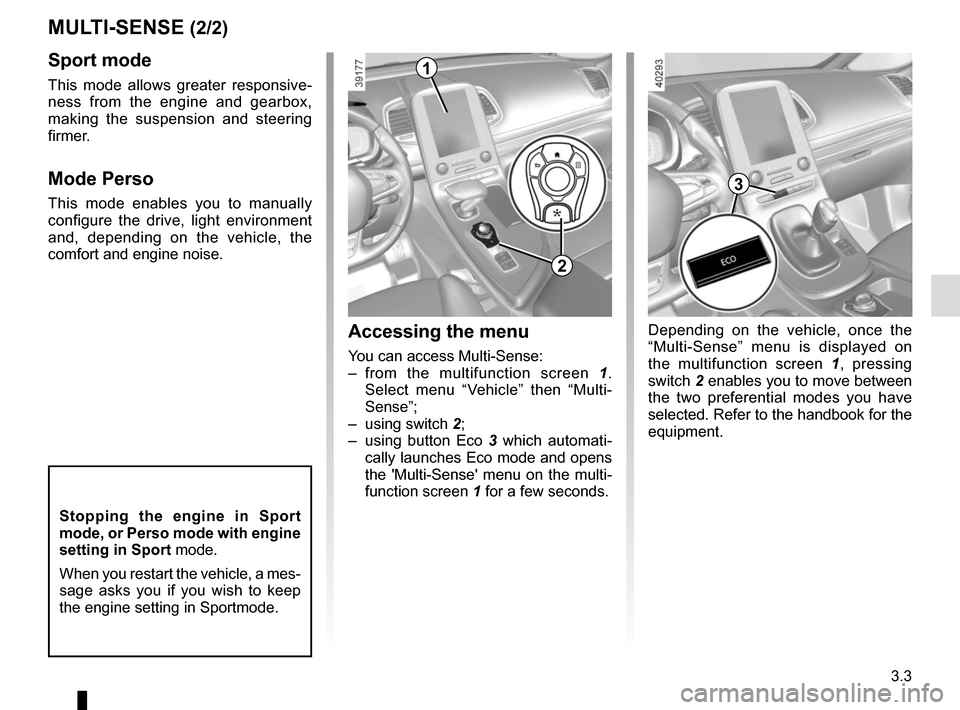
You can access Multi-Sense:
– from the multifunction screen 1.
Select menu “Vehicle” then “Multi-
Sense”;
– using switch 2;
– using button Eco 3 which automati-
cally launches Eco mode and opens
the 'Multi-Sense' menu on the multi-
function screen 1 for a few seconds.
Sport mode
This mode allows greater responsive-
ness from the engine and gearbox,
making the suspension and steering
firmer.
Mode Perso
This mode enables you to manually
configure the drive, light environment
and, depending on the vehicle, the
comfort and engine noise.
1
2
3
Depending on the vehicle, once the
“Multi-Sense” menu is displayed on
the multifunction screen 1 , pressing
switch 2 enables you to move between
the two preferential modes you have
selected. Refer to the handbook for the
equipment.
Stopping the engine in Sport
mode, or Perso mode with engine
setting in Sport mode.
When you restart the vehicle, a mes-
sage asks you if you wish to keep
the engine setting in Sportmode.
Page 199 of 316
3.7
10
AUTOMATIC CLIMATE CONTROL (1/5)
15
6543
9
1216
17
18
19
11
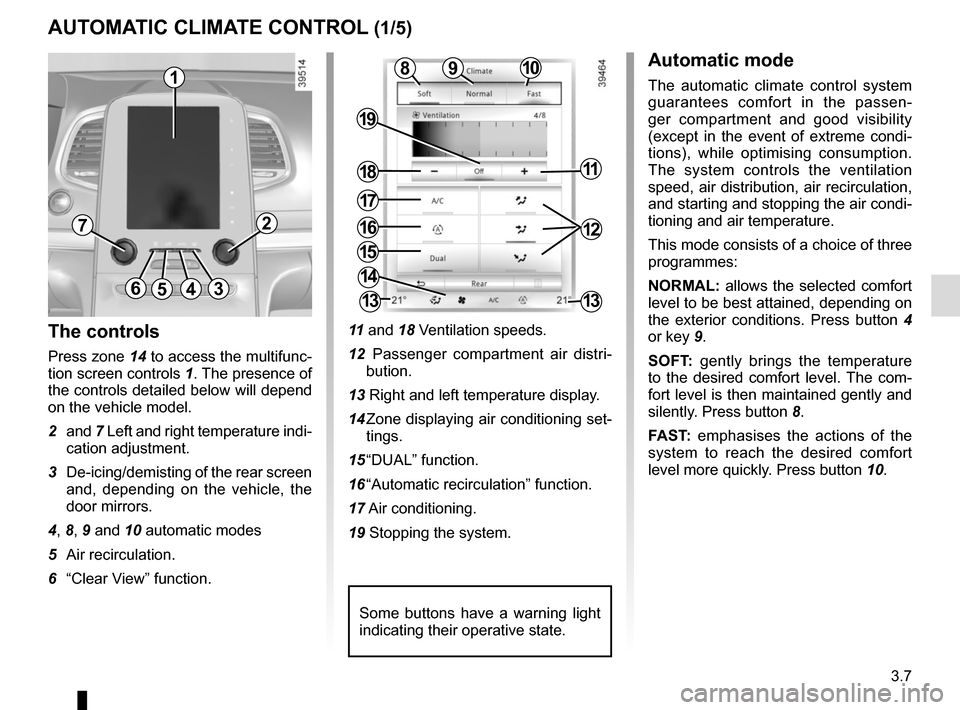
The controls
Press zone 14 to access the multifunc-
tion screen controls 1. The presence of
the controls detailed below will depend
on the vehicle model.
2 and 7 Left and right temperature indi-
cation adjustment.
3 De-icing/demisting of the rear screen and, depending on the vehicle, the
door mirrors.
4, 8, 9 and 10 automatic modes
5 Air recirculation.
6 “Clear View” function. 11
and 18 Ventilation speeds.
12 Passenger compartment air distri- bution.
13 Right and left temperature display.
14 Zone displaying air conditioning set- tings.
15 “DUAL” function.
16 “Automatic recirculation” function.
17 Air conditioning.
19 Stopping the system.
Automatic mode
The automatic climate control system
guarantees comfort in the passen-
ger compartment and good visibility
(except in the event of extreme condi-
tions), while optimising consumption.
The system controls the ventilation
speed, air distribution, air recirculation,
and starting and stopping the air condi-
tioning and air temperature.
This mode consists of a choice of three
programmes:
NORMAL: allows the selected comfort
level to be best attained, depending on
the exterior conditions. Press button 4
or key 9.
SOFT: gently brings the temperature
to the desired comfort level. The com-
fort level is then maintained gently and
silently. Press button 8.
FAST: emphasises the actions of the
system to reach the desired comfort
level more quickly. Press button 10.8
14
13
72
13
1
Some buttons have a warning light
indicating their operative state.
Page 201 of 316
3.9
AUTOMATIC CLIMATE CONTROL (3/5)
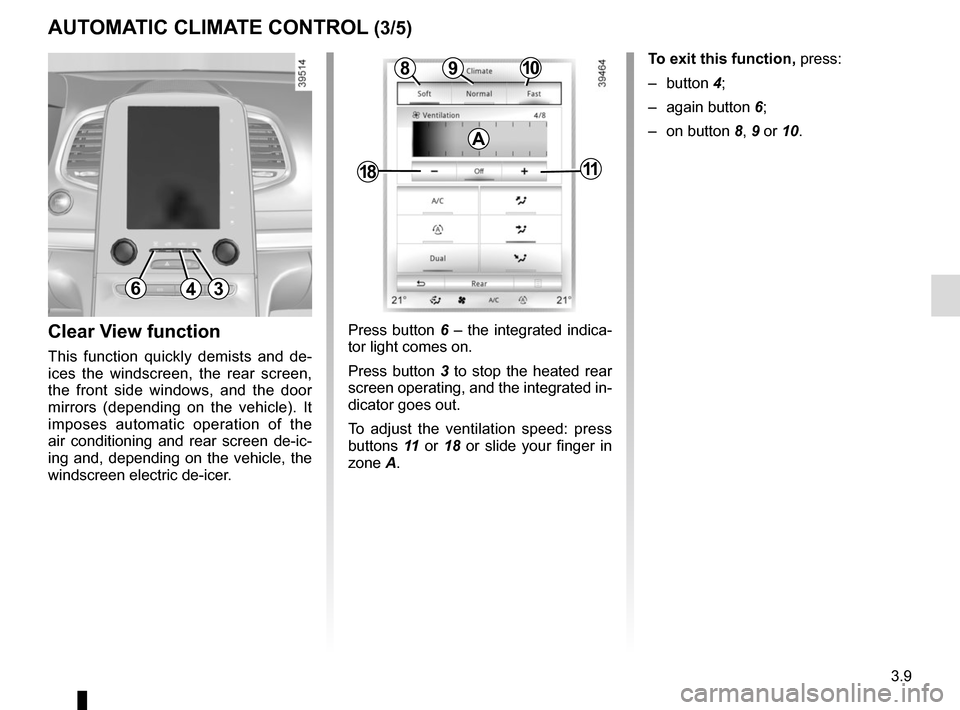
Press button 6 – the integrated indica-
tor light comes on.
Press button 3 to stop the heated rear
screen operating, and the integrated in-
dicator goes out.
To adjust the ventilation speed: press
buttons 11 or 18 or slide your finger in
zone A.Clear View function
This function quickly demists and de-
ices the windscreen, the rear screen,
the front side windows, and the door
mirrors (depending on the vehicle). It
imposes automatic operation of the
air conditioning and rear screen de-ic-
ing and, depending on the vehicle, the
windscreen electric de-icer.
643
109
1811
8
A
To exit this function, press:
– button 4;
– again button 6;
– on button 8, 9 or 10.
Page 202 of 316
3.10
AUTOMATIC CLIMATE CONTROL (4/5)
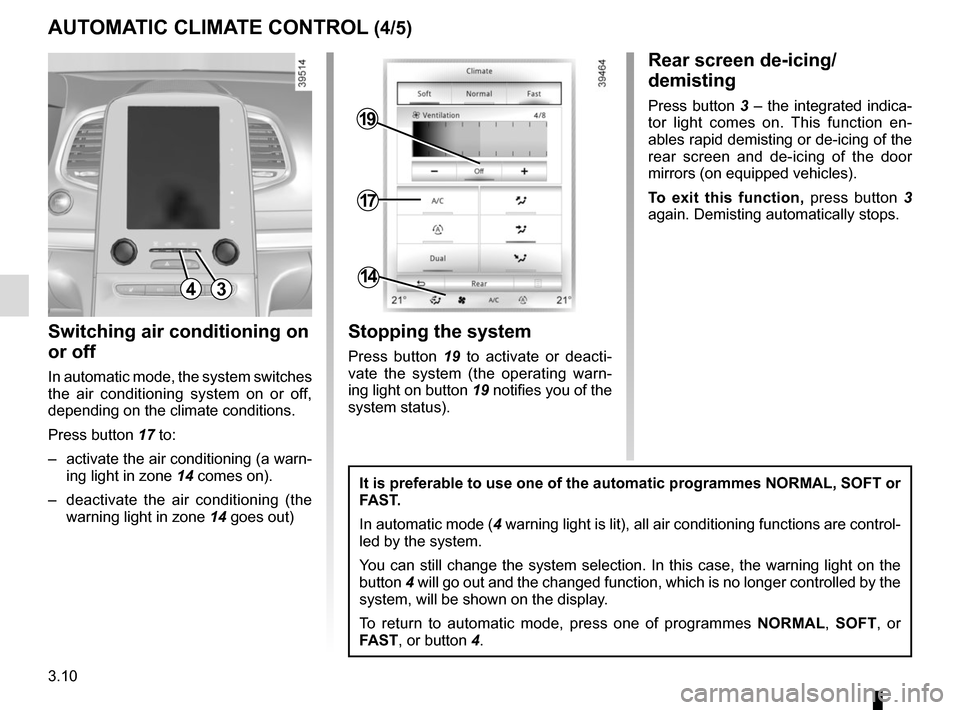
Switching air conditioning on
or off
In automatic mode, the system switches
the air conditioning system on or off,
depending on the climate conditions.
Press button 17 to:
– activate the air conditioning (a warn- ing light in zone 14 comes on).
– deactivate the air conditioning (the warning light in zone 14 goes out)
4
17
19
14
Stopping the system
Press button 19 to activate or deacti-
vate the system (the operating warn-
ing light on button 19 notifies you of the
system status).
It is preferable to use one of the automatic programmes NORMAL, SOFT or
FAST.
In automatic mode (4 warning light is lit), all air conditioning functions are control-
led by the system.
You can still change the system selection. In this case, the warning ligh\
t on the
button 4 will go out and the changed function, which is no longer controlled by \
the
system, will be shown on the display.
To return to automatic mode, press one of programmes NORMAL, SOFT, or
FAST, or button 4.
Rear screen de-icing/
demisting
Press button 3 – the integrated indica-
tor light comes on. This function en-
ables rapid demisting or de-icing of the
rear screen and de-icing of the door
mirrors (on equipped vehicles).
To exit this function, press button 3
again. Demisting automatically stops.
3
Page 203 of 316
3.11
AUTOMATIC CLIMATE CONTROL (5/5)
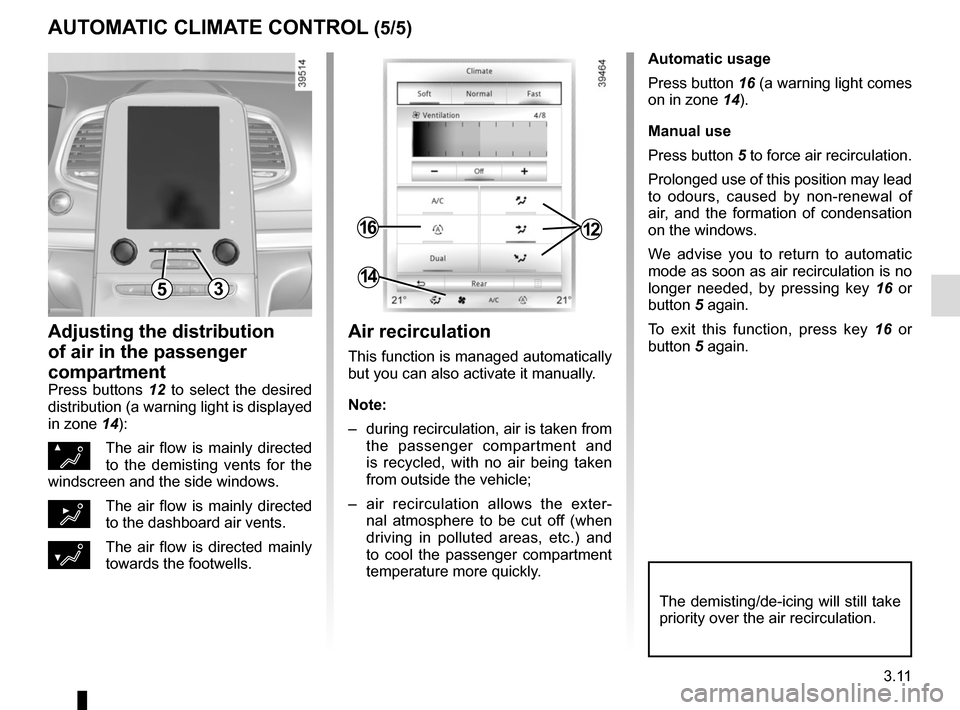
Automatic usage
Press button 16 (a warning light comes
on in zone 14).
Manual use
Press button 5 to force air recirculation.
Prolonged use of this position may lead
to odours, caused by non-renewal of
air, and the formation of condensation
on the windows.
We advise you to return to automatic
mode as soon as air recirculation is no
longer needed, by pressing key 16 or
button 5 again.
To exit this function, press key 16 or
button 5 again.
Adjusting the distribution
of air in the passenger
compartment
Press buttons 12 to select the desired
distribution (a warning light is displayed
in zone 14):
ØThe air flow is mainly directed
to the demisting vents for the
windscreen and the side windows.
½The air flow is mainly directed
to the dashboard air vents.
¿The air flow is directed mainly
towards the footwells.
The demisting/de-icing will still take
priority over the air recirculation.
53
1216
14
Air recirculation
This function is managed automatically
but you can also activate it manually.
Note:
– during recirculation, air is taken from the passenger compartment and
is recycled, with no air being taken
from outside the vehicle;
– air recirculation allows the exter- nal atmosphere to be cut off (when
driving in polluted areas, etc.) and
to cool the passenger compartment
temperature more quickly.
Page 205 of 316
3.13
4
ADDITIONAL AIR CONDITIONING (2/2)
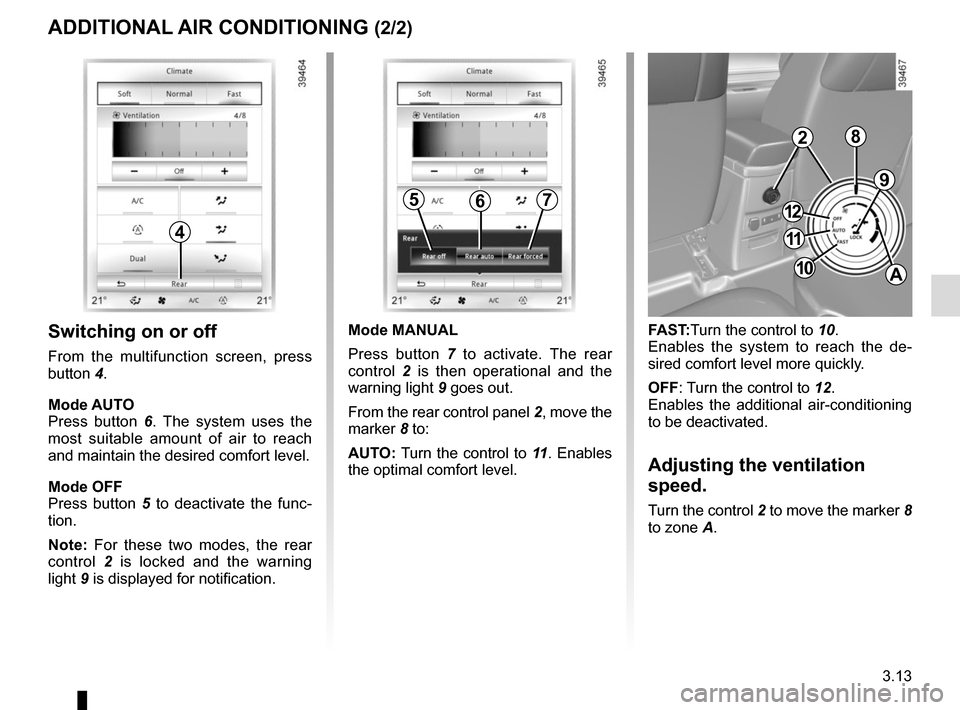
Switching on or off
From the multifunction screen, press
button 4.
Mode AUTO
Press button 6. The system uses the
most suitable amount of air to reach
and maintain the desired comfort level.
Mode OFF
Press button 5 to deactivate the func-
tion.
Note: For these two modes, the rear
control 2 is locked and the warning
light 9 is displayed for notification.
9
FAST:Turn the control to 10.
Enables the system to reach the de-
sired comfort level more quickly.
OFF: Turn the control to 12.
Enables the additional air-conditioning
to be deactivated.
Adjusting the ventilation
speed.
Turn the control 2 to move the marker 8
to zone A.
567
Mode MANUAL
Press button 7 to activate. The rear
control 2 is then operational and the
warning light 9 goes out.
From the rear control panel 2, move the
marker 8 to:
AUTO: Turn the control to 11 . Enables
the optimal comfort level.
2
11
10
12
A
8
Page 212 of 316
3.20
When the doors or boot are un-
locked and opened, the reading and
footwell lights come on temporarily.
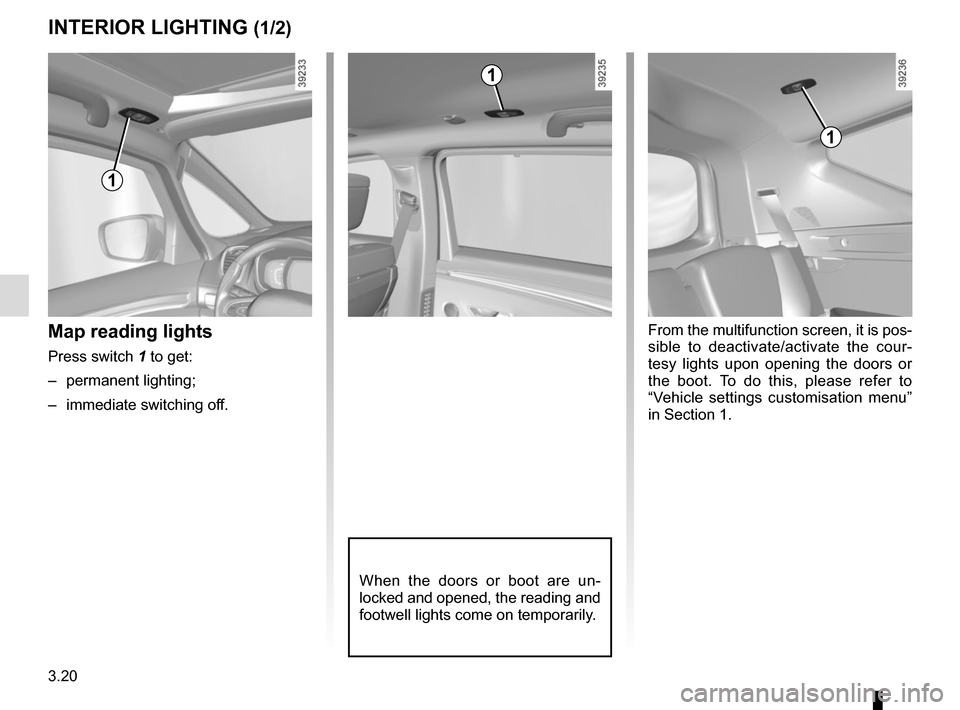
Map reading lights
Press switch 1 to get:
– permanent lighting;
– immediate switching off.
1
1
From the multifunction screen, it is pos-
sible to deactivate/activate the cour-
tesy lights upon opening the doors or
the boot. To do this, please refer to
“Vehicle settings customisation menu”
in Section 1.
INTERIOR LIGHTING (1/2)
1
Page 213 of 316
3.21
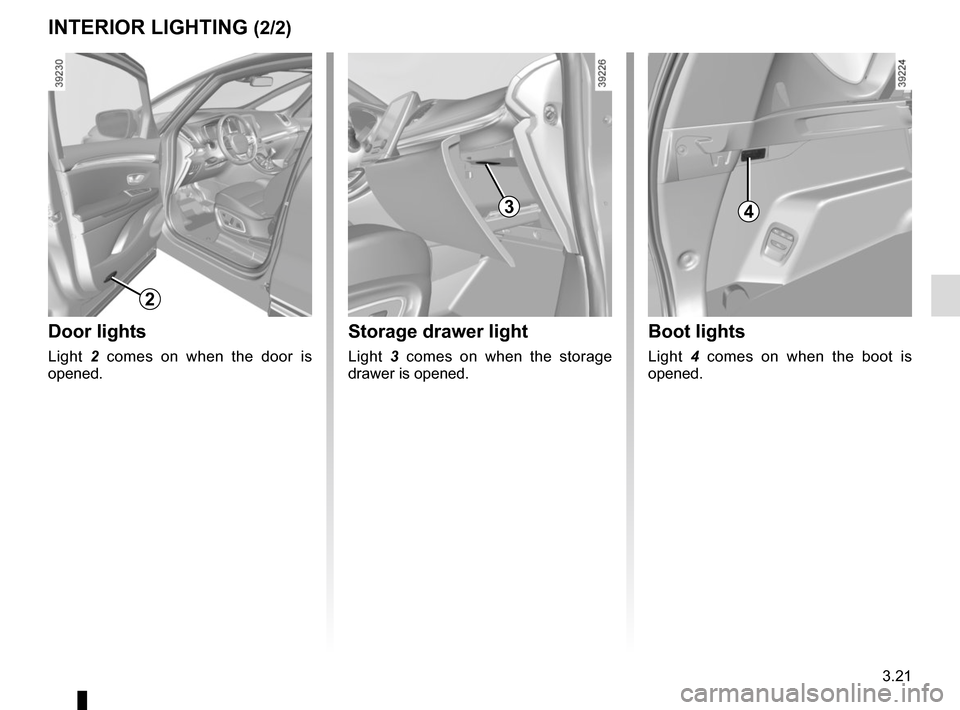
Boot lights
Light 4 comes on when the boot is
opened.
Storage drawer light
Light 3 comes on when the storage
drawer is opened.
INTERIOR LIGHTING (2/2)
3
Door lights
Light 2 comes on when the door is
opened.
2
4
Page 214 of 316
3.22
SUN VISOR, BLINDS
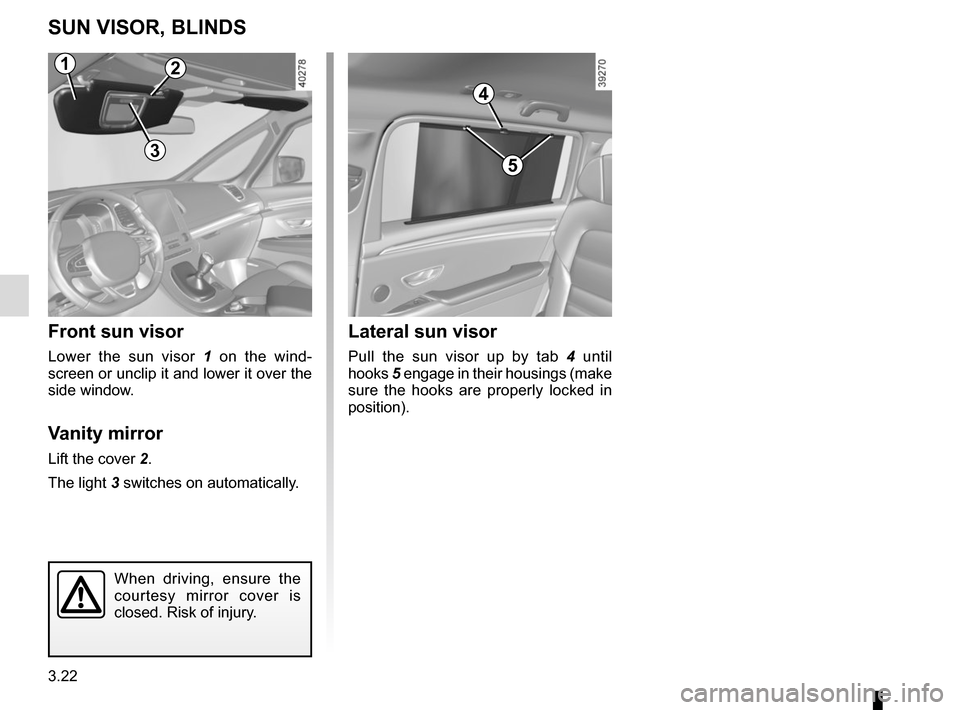
Front sun visor
Lower the sun visor 1 on the wind-
screen or unclip it and lower it over the
side window.
Vanity mirror
Lift the cover 2.
The light 3 switches on automatically.
Lateral sun visor
Pull the sun visor up by tab 4 until
hooks 5 engage in their housings (make
sure the hooks are properly locked in
position).
4
5
2
3
When driving, ensure the
courtesy mirror cover is
closed. Risk of injury.
1