air condition RENAULT ESPACE 2015 5.G User Guide
[x] Cancel search | Manufacturer: RENAULT, Model Year: 2015, Model line: ESPACE, Model: RENAULT ESPACE 2015 5.GPages: 316, PDF Size: 6.98 MB
Page 196 of 316
3.4
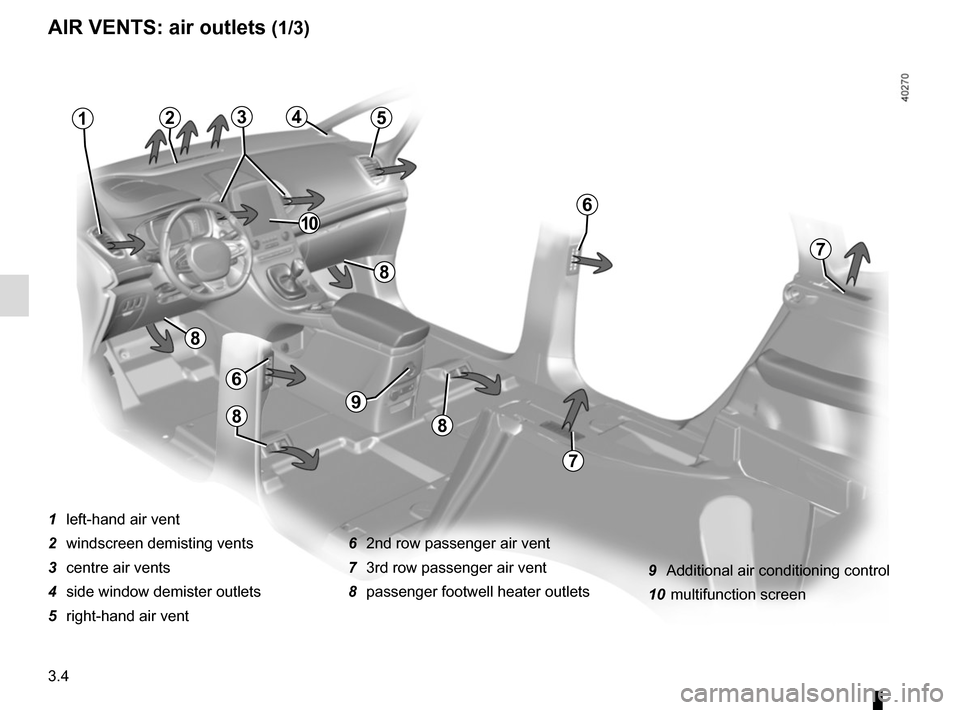
AIR VENTS: air outlets (1/3)
1 left-hand air vent
2 windscreen demisting vents
3 centre air vents
4 side window demister outlets
5 right-hand air vent6 2nd row passenger air vent
7 3rd row passenger air vent
8 passenger footwell heater outlets
21
6
7
5
7
6
8
8
9
88
43
10
9 Additional air conditioning control
10 multifunction screen
Page 199 of 316
3.7
10
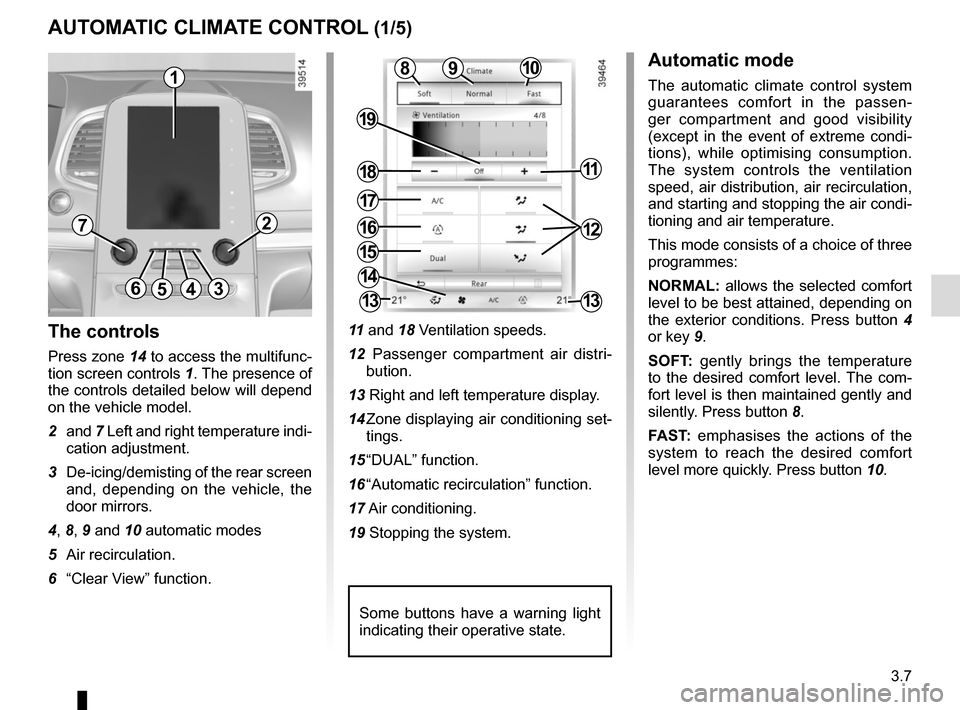
AUTOMATIC CLIMATE CONTROL (1/5)
15
6543
9
1216
17
18
19
11
The controls
Press zone 14 to access the multifunc-
tion screen controls 1. The presence of
the controls detailed below will depend
on the vehicle model.
2 and 7 Left and right temperature indi-
cation adjustment.
3 De-icing/demisting of the rear screen and, depending on the vehicle, the
door mirrors.
4, 8, 9 and 10 automatic modes
5 Air recirculation.
6 “Clear View” function. 11
and 18 Ventilation speeds.
12 Passenger compartment air distri- bution.
13 Right and left temperature display.
14 Zone displaying air conditioning set- tings.
15 “DUAL” function.
16 “Automatic recirculation” function.
17 Air conditioning.
19 Stopping the system.
Automatic mode
The automatic climate control system
guarantees comfort in the passen-
ger compartment and good visibility
(except in the event of extreme condi-
tions), while optimising consumption.
The system controls the ventilation
speed, air distribution, air recirculation,
and starting and stopping the air condi-
tioning and air temperature.
This mode consists of a choice of three
programmes:
NORMAL: allows the selected comfort
level to be best attained, depending on
the exterior conditions. Press button 4
or key 9.
SOFT: gently brings the temperature
to the desired comfort level. The com-
fort level is then maintained gently and
silently. Press button 8.
FAST: emphasises the actions of the
system to reach the desired comfort
level more quickly. Press button 10.8
14
13
72
13
1
Some buttons have a warning light
indicating their operative state.
Page 200 of 316
3.8
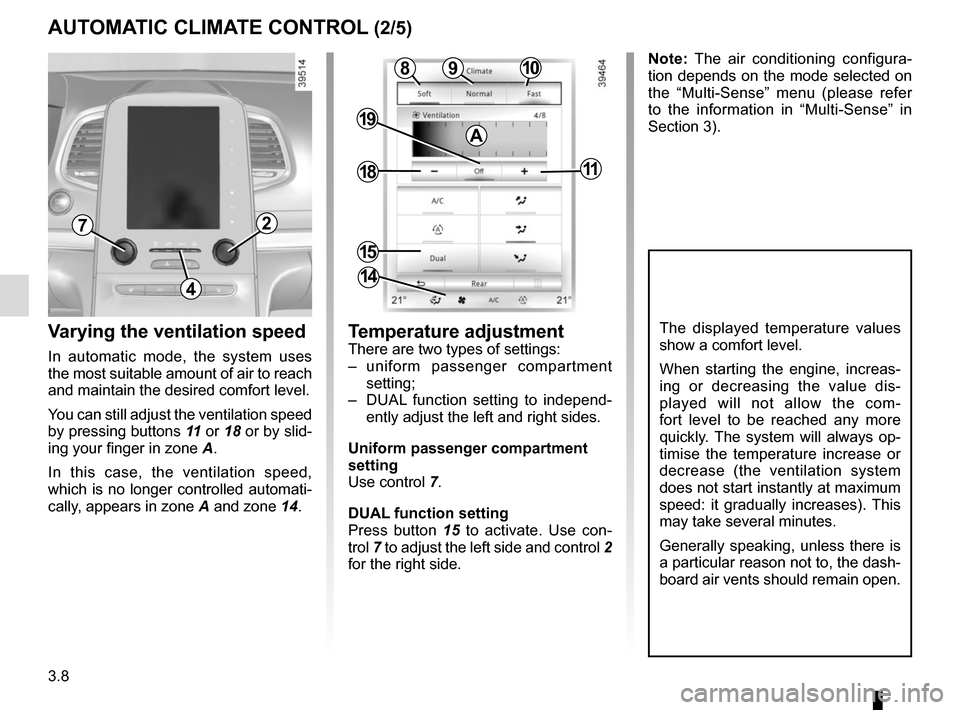
Varying the ventilation speed
In automatic mode, the system uses
the most suitable amount of air to reach
and maintain the desired comfort level.
You can still adjust the ventilation speed
by pressing buttons 11 or 18 or by slid-
ing your finger in zone A.
In this case, the ventilation speed,
which is no longer controlled automati-
cally, appears in zone A and zone 14.
AUTOMATIC CLIMATE CONTROL (2/5)
Temperature adjustment
There are two types of settings:
– uniform passenger compartment setting;
– DUAL function setting to independ- ently adjust the left and right sides.
Uniform passenger compartment
setting
Use control 7.
DUAL function setting
Press button 15 to activate. Use con-
trol 7 to adjust the left side and control 2
for the right side.
The displayed temperature values
show a comfort level.
When starting the engine, increas-
ing or decreasing the value dis-
played will not allow the com-
fort level to be reached any more
quickly. The system will always op-
timise the temperature increase or
decrease (the ventilation system
does not start instantly at maximum
speed: it gradually increases). This
may take several minutes.
Generally speaking, unless there is
a particular reason not to, the dash-
board air vents should remain open.
4
72
10
15
9
18
19
11
8
14
Note: The air conditioning configura-
tion depends on the mode selected on
the “Multi-Sense” menu (please refer
to the information in “Multi-Sense” in
Section 3).
A
Page 201 of 316
3.9
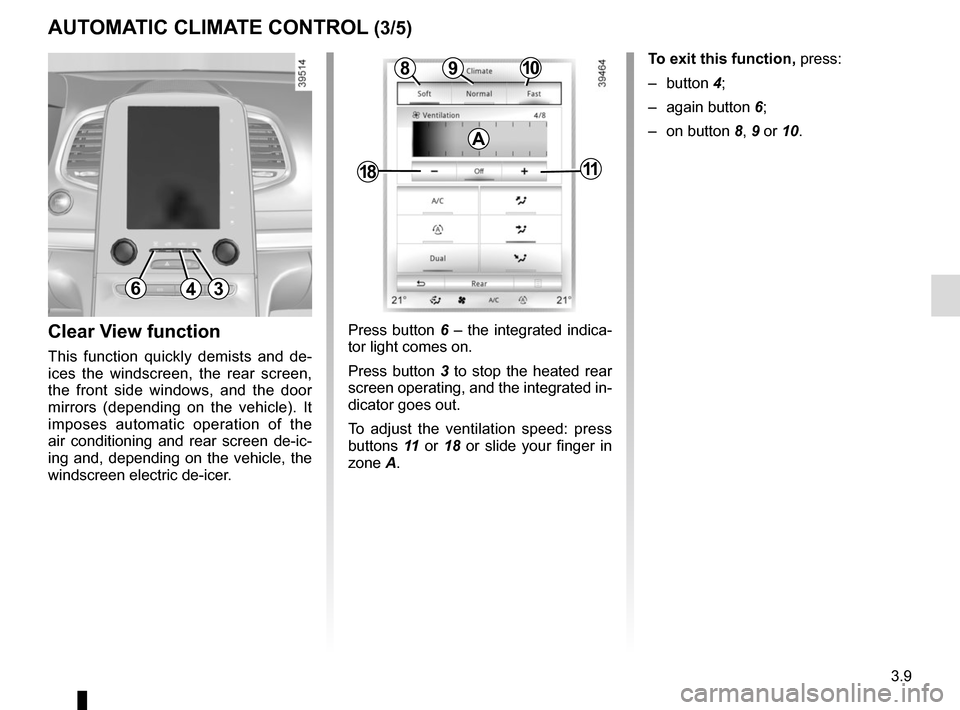
AUTOMATIC CLIMATE CONTROL (3/5)
Press button 6 – the integrated indica-
tor light comes on.
Press button 3 to stop the heated rear
screen operating, and the integrated in-
dicator goes out.
To adjust the ventilation speed: press
buttons 11 or 18 or slide your finger in
zone A.Clear View function
This function quickly demists and de-
ices the windscreen, the rear screen,
the front side windows, and the door
mirrors (depending on the vehicle). It
imposes automatic operation of the
air conditioning and rear screen de-ic-
ing and, depending on the vehicle, the
windscreen electric de-icer.
643
109
1811
8
A
To exit this function, press:
– button 4;
– again button 6;
– on button 8, 9 or 10.
Page 202 of 316
3.10
AUTOMATIC CLIMATE CONTROL (4/5)
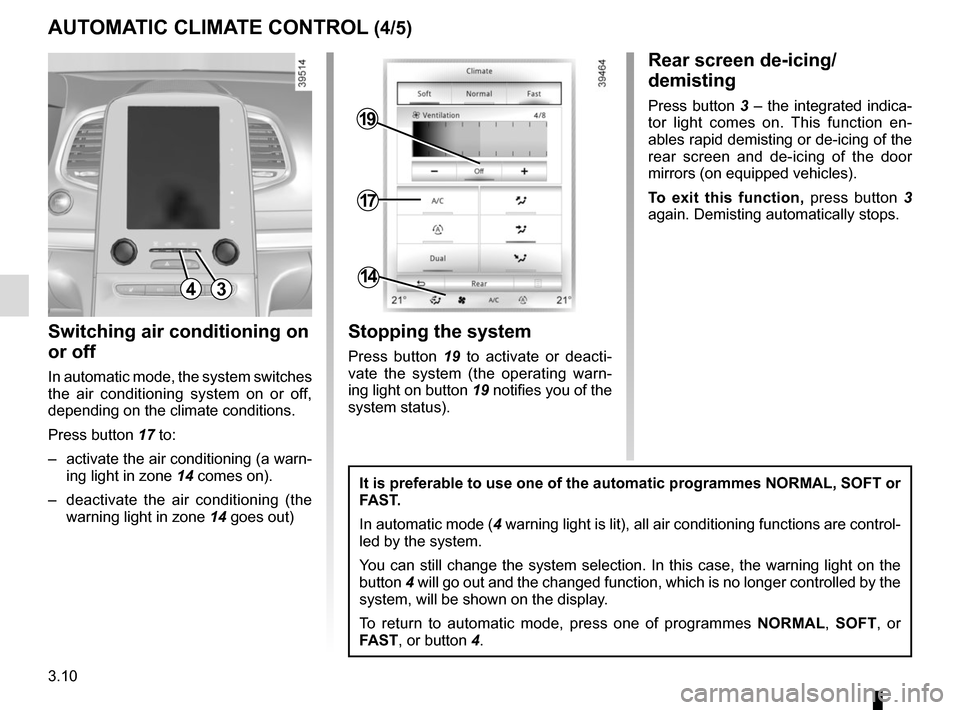
Switching air conditioning on
or off
In automatic mode, the system switches
the air conditioning system on or off,
depending on the climate conditions.
Press button 17 to:
– activate the air conditioning (a warn- ing light in zone 14 comes on).
– deactivate the air conditioning (the warning light in zone 14 goes out)
4
17
19
14
Stopping the system
Press button 19 to activate or deacti-
vate the system (the operating warn-
ing light on button 19 notifies you of the
system status).
It is preferable to use one of the automatic programmes NORMAL, SOFT or
FAST.
In automatic mode (4 warning light is lit), all air conditioning functions are control-
led by the system.
You can still change the system selection. In this case, the warning ligh\
t on the
button 4 will go out and the changed function, which is no longer controlled by \
the
system, will be shown on the display.
To return to automatic mode, press one of programmes NORMAL, SOFT, or
FAST, or button 4.
Rear screen de-icing/
demisting
Press button 3 – the integrated indica-
tor light comes on. This function en-
ables rapid demisting or de-icing of the
rear screen and de-icing of the door
mirrors (on equipped vehicles).
To exit this function, press button 3
again. Demisting automatically stops.
3
Page 204 of 316
3.12
ADDITIONAL AIR CONDITIONING (1/2)
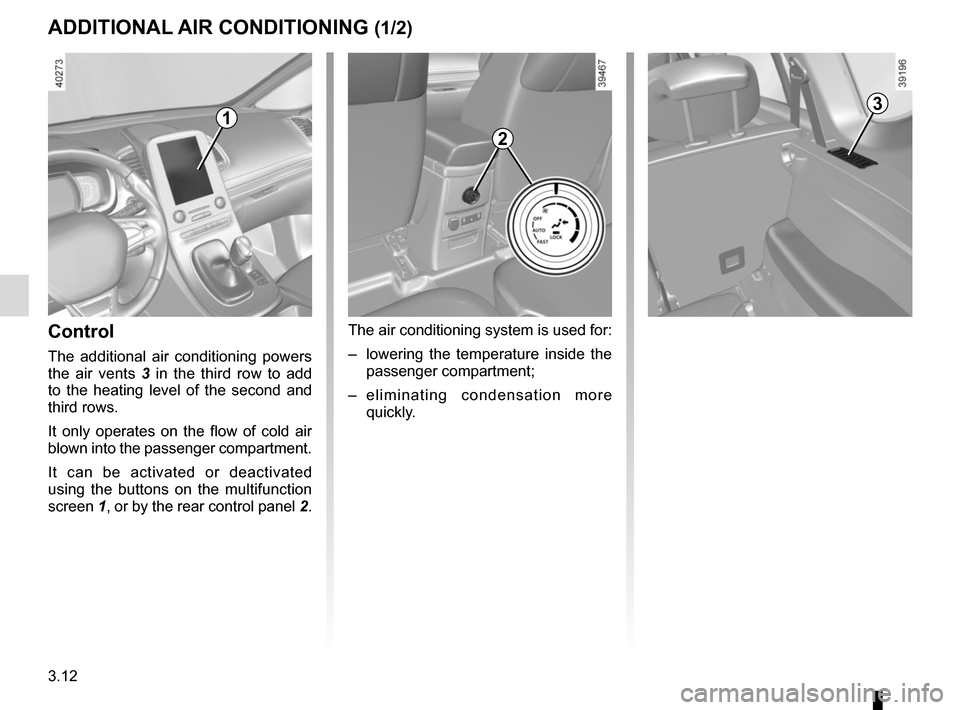
Control
The additional air conditioning powers
the air vents 3 in the third row to add
to the heating level of the second and
third rows.
It only operates on the flow of cold air
blown into the passenger compartment.
It can be activated or deactivated
using the buttons on the multifunction
screen 1, or by the rear control panel 2.
2
The air conditioning system is used for:
– lowering the temperature inside the
passenger compartment;
– eliminating condensation more quickly.
31
Page 205 of 316
3.13
4
ADDITIONAL AIR CONDITIONING (2/2)
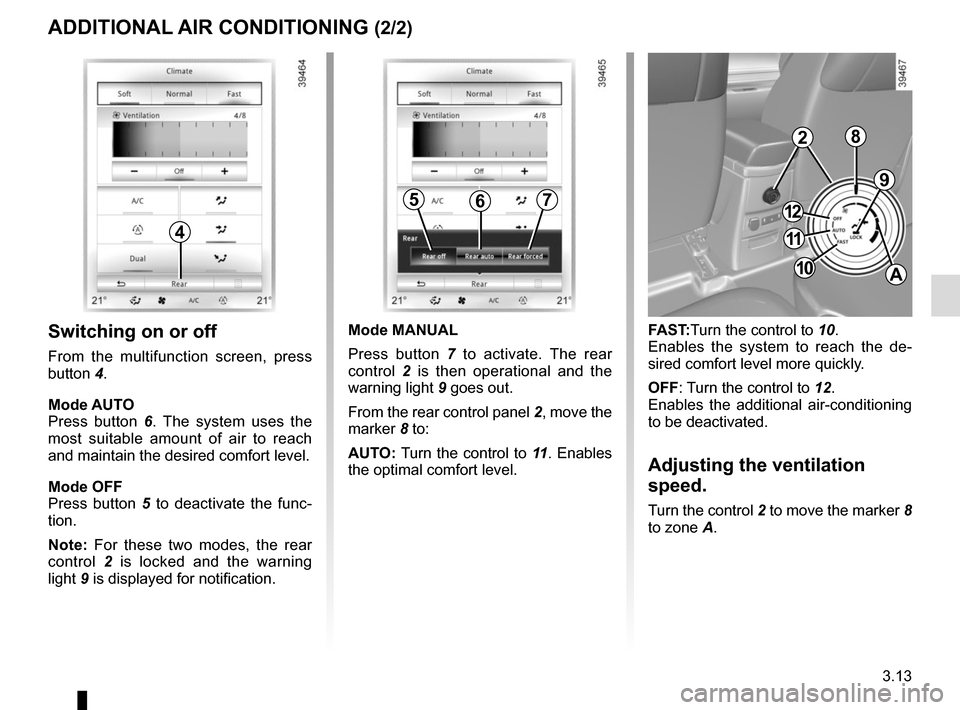
Switching on or off
From the multifunction screen, press
button 4.
Mode AUTO
Press button 6. The system uses the
most suitable amount of air to reach
and maintain the desired comfort level.
Mode OFF
Press button 5 to deactivate the func-
tion.
Note: For these two modes, the rear
control 2 is locked and the warning
light 9 is displayed for notification.
9
FAST:Turn the control to 10.
Enables the system to reach the de-
sired comfort level more quickly.
OFF: Turn the control to 12.
Enables the additional air-conditioning
to be deactivated.
Adjusting the ventilation
speed.
Turn the control 2 to move the marker 8
to zone A.
567
Mode MANUAL
Press button 7 to activate. The rear
control 2 is then operational and the
warning light 9 goes out.
From the rear control panel 2, move the
marker 8 to:
AUTO: Turn the control to 11 . Enables
the optimal comfort level.
2
11
10
12
A
8
Page 206 of 316
3.14
AIR CONDITIONING: information and advice on use
Do not add anything to the
vehicle’s ventilation circuit
(for example, to remove
bad odours).
There is a risk of damage or of
fire.
Do not open the refriger-
ant fluid circuit. The fluid
may damage eyes or skin.
Fuel consumption
You will normally notice an increase in
fuel consumption (especially in town)
when the air conditioning is operating.
For vehicles fitted with air conditioning
with no automatic mode, switch off the
system when it is not required.
Advice for reducing consumption
and helping to preserve the environ-
ment
Drive with the air vents open and the
windows closed.
If the vehicle has been parked in the
sun, open the doors for a few moments
to let the hot air escape before starting
the engine.
Maintenance
Refer to the Maintenance Document
for your vehicle for the inspection fre-
quency.
Operating faults
As a general rule, contact your ap-
proved dealer in the event of an oper-
ating fault.
– Reduction in de-icing, demisting or air conditioning performance.
This may be caused by the passen-
ger compartment filter cartridge be-
coming clogged.
– No cold air is being produced .
Check that the controls are set cor-
rectly and that the fuses are sound.
Otherwise, switch off the system.
Presence of water under the
vehicle
After prolonged use of the air condi-
tioning system, it is normal for water
to be present under the vehicle. This is
caused by condensation.
Advice on use
In some situations, (air conditioning
off, air recirculation activated, ventila-
tion speed at zero or low, etc.) you may
notice that condensation starts to form
on the windows and windscreen.
If there is condensation, use the “Clear
View” function to remove it, then use
the air conditioning in automatic mode
to stop it forming again.
Vehicles equipped with the
ECOmode: once activated, ECO
mode can reduce the perform-
ance of the automatic air condition-
ing. Please refer to the information
on “Driving advice, Eco-driving” in
Section 2.
Page 228 of 316
3.36
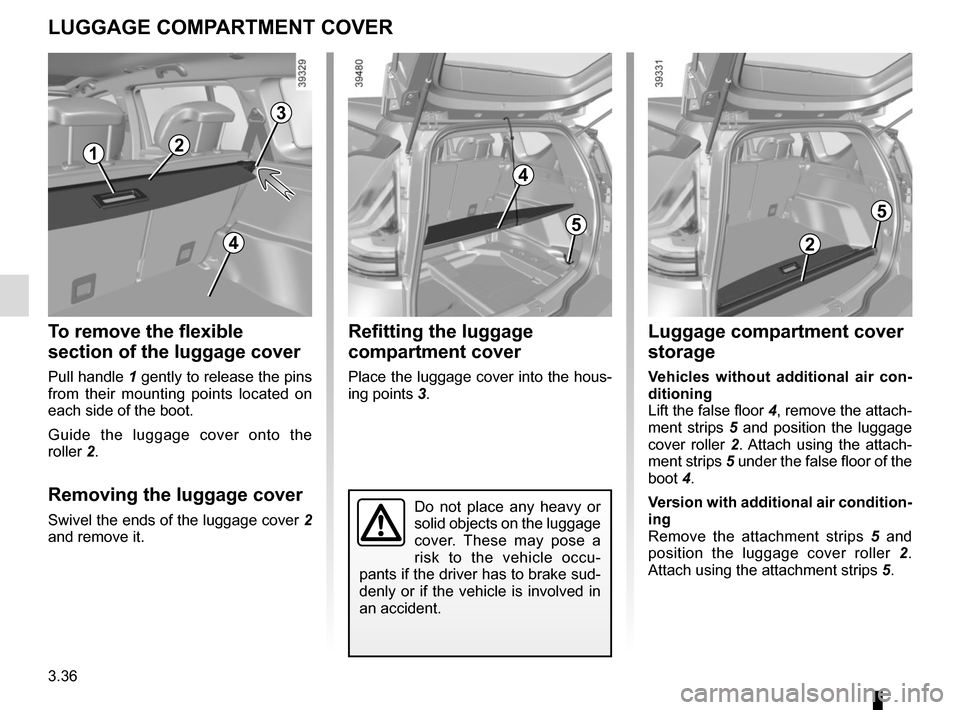
Refitting the luggage
compartment cover
Place the luggage cover into the hous-
ing points 3.
To remove the flexible
section of the luggage cover
Pull handle 1 gently to release the pins
from their mounting points located on
each side of the boot.
Guide the luggage cover onto the
roller 2.
Removing the luggage cover
Swivel the ends of the luggage cover 2
and remove it.
LUGGAGE COMPARTMENT COVER
3
4
5
2
Do not place any heavy or
solid objects on the luggage
cover. These may pose a
risk to the vehicle occu-
pants if the driver has to brake sud-
denly or if the vehicle is involved in
an accident.
1
2
5
4
Luggage compartment cover
storage
Vehicles without additional air con-
ditioning
Lift the false floor 4, remove the attach-
ment strips 5 and position the luggage
cover roller 2. Attach using the attach-
ment strips 5 under the false floor of the
boot 4.
Version with additional air condition-
ing
Remove the attachment strips 5 and
position the luggage cover roller 2.
Attach using the attachment strips 5.
Page 259 of 316
5.5
TYRE PRESSURE KIT (1/3)
The kit is only approved
for inflating the tyres of the
vehicle originally equipped
with the kit.
It must never be used to inflate
the tyres of another vehicle, or any
other inflatable object (rubber ring,
rubber boat, etc.).
Avoid spillage on skin when han-
dling the repair liquid bottle. If dro-
plets do leak out, rinse them off with
plenty of water.
Keep the repair kit away from chil-
dren.
Do not dispose of the empty bottle
in the countryside. Return it to your
approved dealer or to a recycling or-
ganisation.
The bottle has a limited service
life which is indicated on its label.
Check the expiry date.
Contact an approved dealer to re-
place the inflation tube and repair
product bottle.
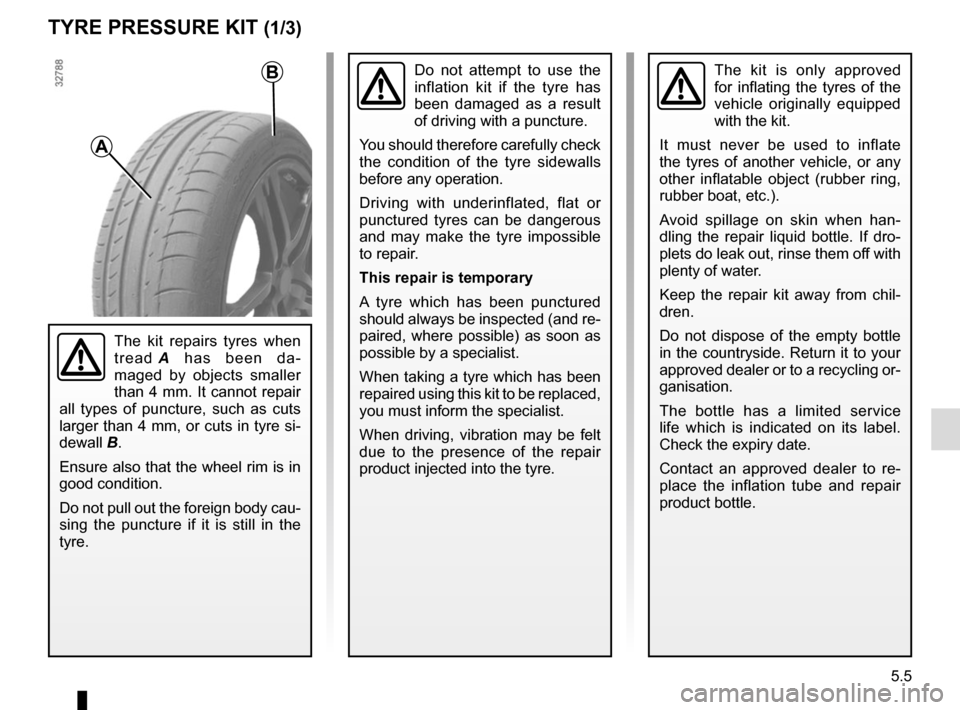
A
B
The kit repairs tyres when
tread A has been da-
maged by objects smaller
than 4 mm. It cannot repair
all types of puncture, such as cuts
larger than 4 mm, or cuts in tyre si-
dewall B.
Ensure also that the wheel rim is in
good condition.
Do not pull out the foreign body cau-
sing the puncture if it is still in the
tyre.
Do not attempt to use the
inflation kit if the tyre has
been damaged as a result
of driving with a puncture.
You should therefore carefully check
the condition of the tyre sidewalls
before any operation.
Driving with underinflated, flat or
punctured tyres can be dangerous
and may make the tyre impossible
to repair.
This repair is temporary
A tyre which has been punctured
should always be inspected (and re-
paired, where possible) as soon as
possible by a specialist.
When taking a tyre which has been
repaired using this kit to be replaced,
you must inform the specialist.
When driving, vibration may be felt
due to the presence of the repair
product injected into the tyre.