windscreen RENAULT ESPACE 2016 5.G User Guide
[x] Cancel search | Manufacturer: RENAULT, Model Year: 2016, Model line: ESPACE, Model: RENAULT ESPACE 2016 5.GPages: 318, PDF Size: 3.32 MB
Page 101 of 318
1.95
Note:
In temperatures below zero, the washer
liquid risks freezing to the windscreen,
thereby reducing visibility. Heat the
windscreen using the demister control
before cleaning.
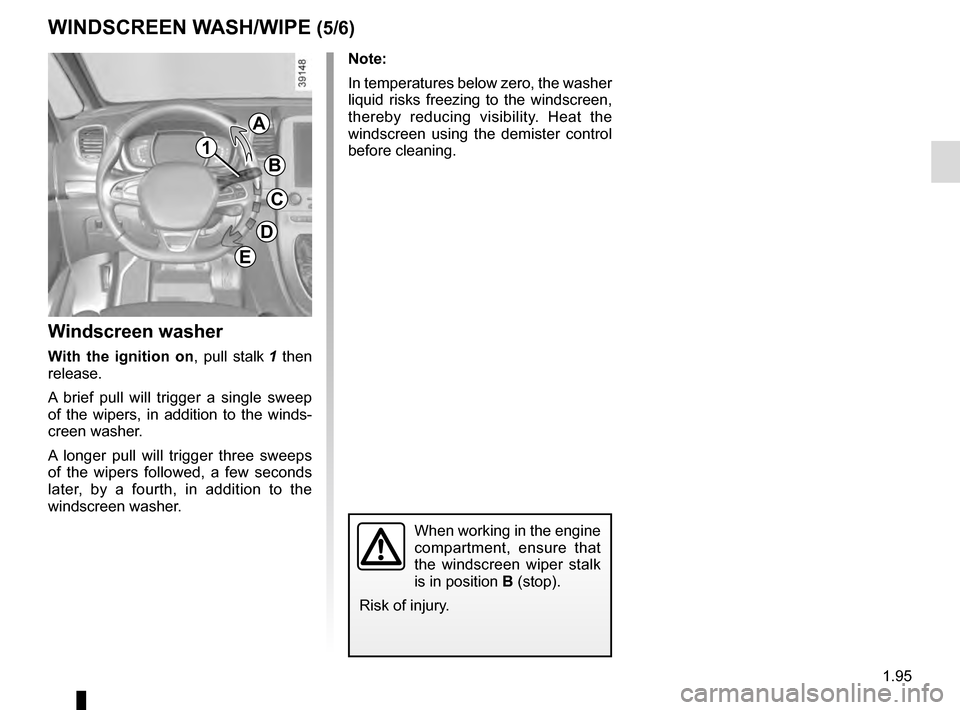
Windscreen washer
With the ignition on, pull stalk 1 then
release.
A brief pull will trigger a single sweep
of the wipers, in addition to the winds-
creen washer.
A longer pull will trigger three sweeps
of the wipers followed, a few seconds
later, by a fourth, in addition to the
windscreen washer.
When working in the engine
compartment, ensure that
the windscreen wiper stalk
is in position B (stop).
Risk of injury.
WINDSCREEN WASH/WIPE (5/6)
G
1
A
B
C
D
E
Page 102 of 318
1.96
Note:
To ensure the headlight washers ope-
rate correctly in winter, remove snow
from the jet trims and de-ice the jet
trims using an aerosol de-icer.
You are recommended to regularly
remove dirt encrusted on the headlight
glass.
When the minimum windscreen washer
fluid level is reached, the headlight
washer system may be deprimed.
Fill the windscreen washer fluid and
then activate the windscreen washer,
with the engine running, to reprime
the system.
WINDSCREEN WASH/WIPE (6/6)
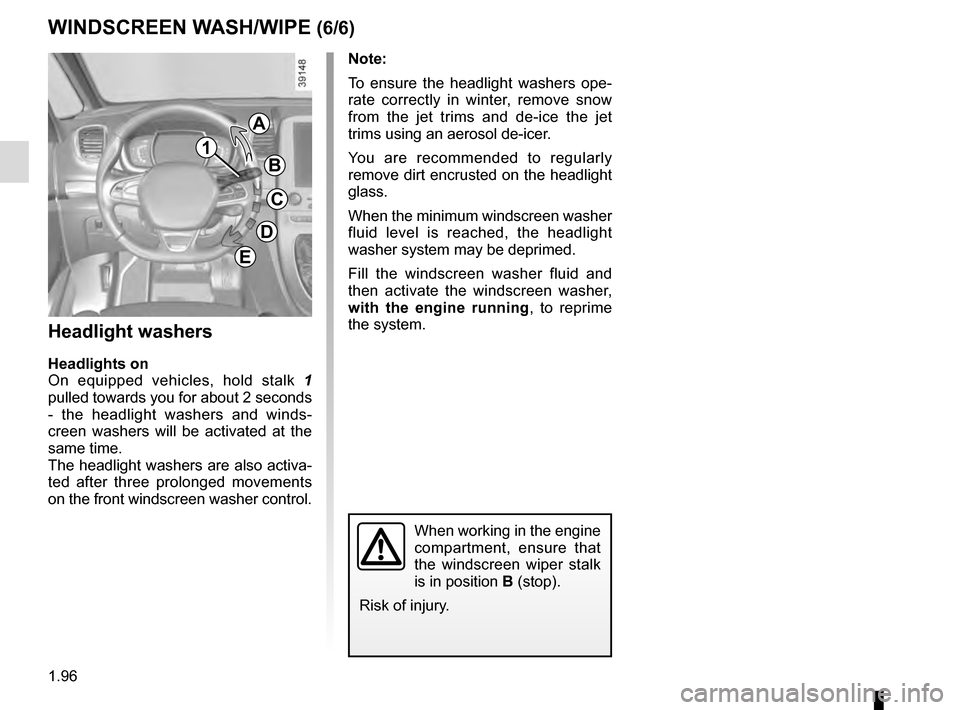
Headlight washers
Headlights on
On equipped vehicles, hold stalk 1
pulled towards you for about 2 seconds
- the headlight washers and winds-
creen washers will be activated at the
same time.
The headlight washers are also activa-
ted after three prolonged movements
on the front windscreen washer control.
When working in the engine
compartment, ensure that
the windscreen wiper stalk
is in position B (stop).
Risk of injury.
G
1
A
B
C
D
E
Page 103 of 318
1.97
REAR SCREEN WASH/WIPE (1/2)
1
3
Check the condition of the wiper
blades. You are responsible for their
service life:
– they must remain clean: clean the blades, windscreen and
rear screen regularly with soapy
water;
– do not use them when the winds- creen or rear screen are dry;
– free them from the windscreen or rear screen when they have not
been used for a long time.
In all cases, replace them as soon
as they begin to lose efficiency: ap-
proximately once a year.
Before using the rear wiper, check
that no object obstructs the travel of
the blade.
Do not use the wiper arm to open or
close the tailgate.
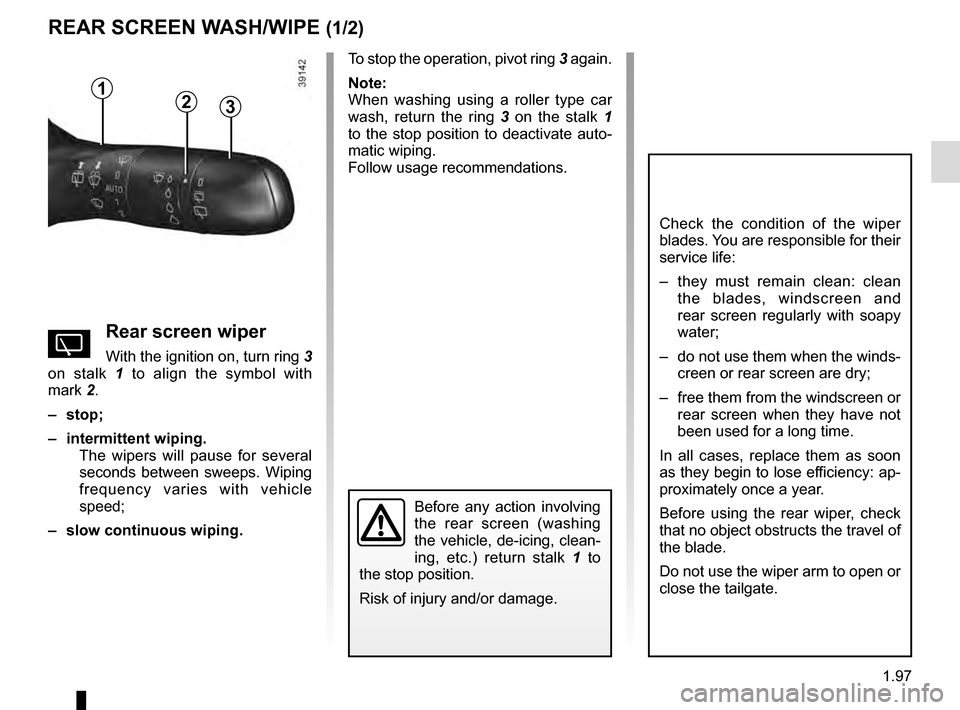
YRear screen wiper
With the ignition on, turn ring 3
on stalk 1 to align the symbol with
mark 2.
– stop;
– intermittent wiping. The wipers will pause for several
seconds between sweeps. Wiping
frequency varies with vehicle
speed;
– slow continuous wiping. To stop the operation, pivot ring
3 again.
Note:
When washing using a roller type car
wash, return the ring 3 on the stalk 1
to the stop position to deactivate auto-
matic wiping.
Follow usage recommendations.
Before any action involving
the rear screen (washing
the vehicle, de-icing, clean-
ing, etc.) return stalk 1 to
the stop position.
Risk of injury and/or damage.
2
Page 146 of 318

This function is a driving aid in the event of the accidental crossing o\
f
a continuous or broken line in the road. However, the function is not in-
tended to repla")
2.38
LANE DEPARTURE WARNING (1/3)
This function is a driving aid in the event of the accidental crossing o\
f
a continuous or broken line in the road. However, the function is not in-
tended to replace the driver. The function can be disrupted under certain
conditions, including:
– poor visibility (rain, snow, fog, dirty windscreen, glare of the sun, partially obs- cured road lines, etc.);
– roads with tight bends;
– closely following a vehicle in the same lane;
– worn road markings, difficult to distinguish or spaced very widely apart;
– narrow roads;
– ...
In this case, the line visibility indicators remain uncoloured on the in\
strument
panel to indicate that the function will not operate (lines not detecte\
d).
Under no circumstances should this function replace the driver’s care or res-
ponsibility whilst performing manoeuvres.
This system notifies the driver when
they accidentally cross a continuous or
broken line.
This function uses a camera attached
to the windscreen, behind the rear-view
mirror.
On equipped vehicles, some infor-
mation is given on the head-up dis-
play.
Page 157 of 318
2.49
OVERSPEED ALERT (1/3)
The overspeed alert with signage panel
recognition notifies the driver that they
are exceeding the speed limit for the
section of road on which they are cur-
rently travelling.Special situations
– If the vehicle is travelling in a coun-
try where the speed units differ from
those of the vehicle, the system dis-
plays the speed limit sign in the unit
of the country, alongside the speed
limit converted to the unit used by the
vehicle’s instrument panel.
– For countries where the speed limit is reduced during rainy weather on
some types of roads, the system can
modify the limited speed after a few
seconds of wiping the windscreen.
– The system does not take into ac- count exceptional speed limit meas-
ures, such as peak pollution days.
On equipped vehicles, some infor-
mation is given on the head-up dis-
play.
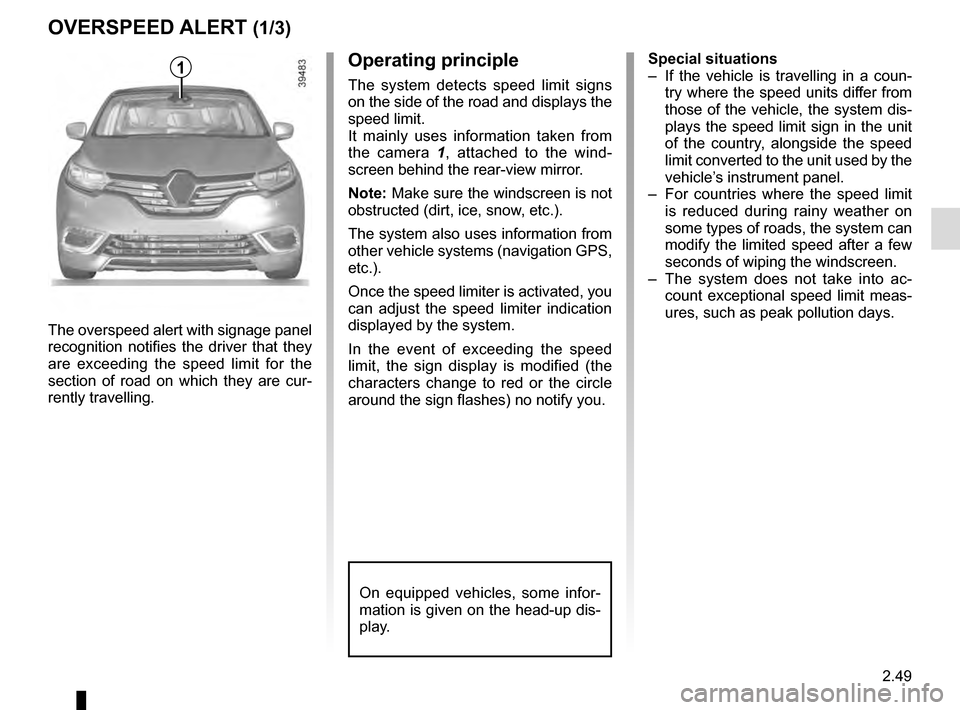
1Operating principle
The system detects speed limit signs
on the side of the road and displays the
speed limit.
It mainly uses information taken from
the camera 1 , attached to the wind-
screen behind the rear-view mirror.
Note: Make sure the windscreen is not
obstructed (dirt, ice, snow, etc.).
The system also uses information from
other vehicle systems (navigation GPS,
etc.).
Once the speed limiter is activated, you
can adjust the speed limiter indication
displayed by the system.
In the event of exceeding the speed
limit, the sign display is modified (the
characters change to red or the circle
around the sign flashes) no notify you.
Page 158 of 318
2.50
OVERSPEED ALERT (2/3)
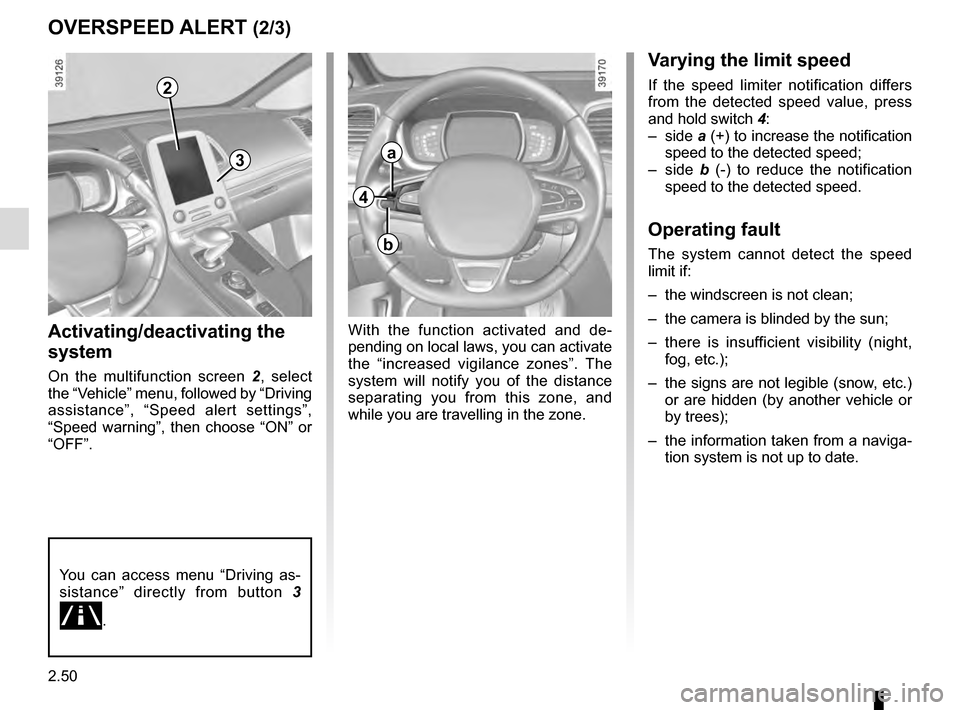
Activating/deactivating the
system
On the multifunction screen 2, select
the “Vehicle” menu, followed by “Driving
assistance”, “Speed alert settings”,
“Speed warning”, then choose “ON” or
“OFF”.
With the function activated and de-
pending on local laws, you can activate
the “increased vigilance zones”. The
system will notify you of the distance
separating you from this zone, and
while you are travelling in the zone.
Varying the limit speed
If the speed limiter notification differs
from the detected speed value, press
and hold switch 4:
– side a (+) to increase the notification
speed to the detected speed;
– side b (-) to reduce the notification
speed to the detected speed.
Operating fault
The system cannot detect the speed
limit if:
– the windscreen is not clean;
– the camera is blinded by the sun;
– there is insufficient visibility (night, fog, etc.);
– the signs are not legible (snow, etc.) or are hidden (by another vehicle or
by trees);
– the information taken from a naviga- tion system is not up to date.
2
3
You can access menu “Driving as-
sistance” directly from button 3
\b.
4
a
b
Page 192 of 318
3.4
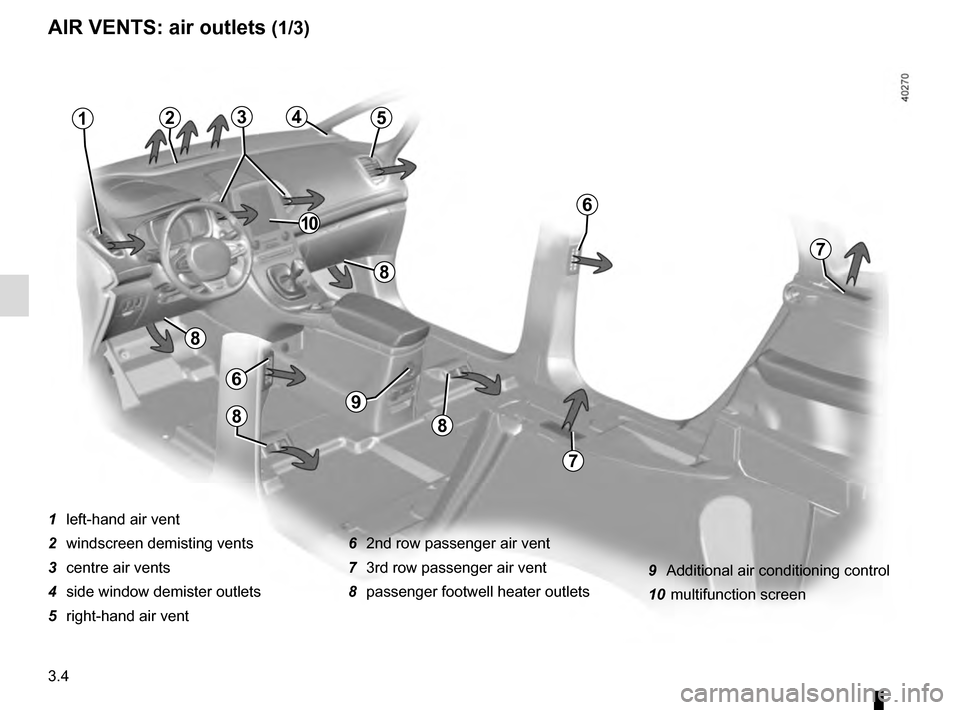
AIR VENTS: air outlets (1/3)
1 left-hand air vent
2 windscreen demisting vents
3 centre air vents
4 side window demister outlets
5 right-hand air vent6 2nd row passenger air vent
7 3rd row passenger air vent
8 passenger footwell heater outlets
21
6
7
5
7
6
8
8
9
88
43
10
9 Additional air conditioning control
10 multifunction screen
Page 197 of 318
3.9
AUTOMATIC CLIMATE CONTROL (3/5)
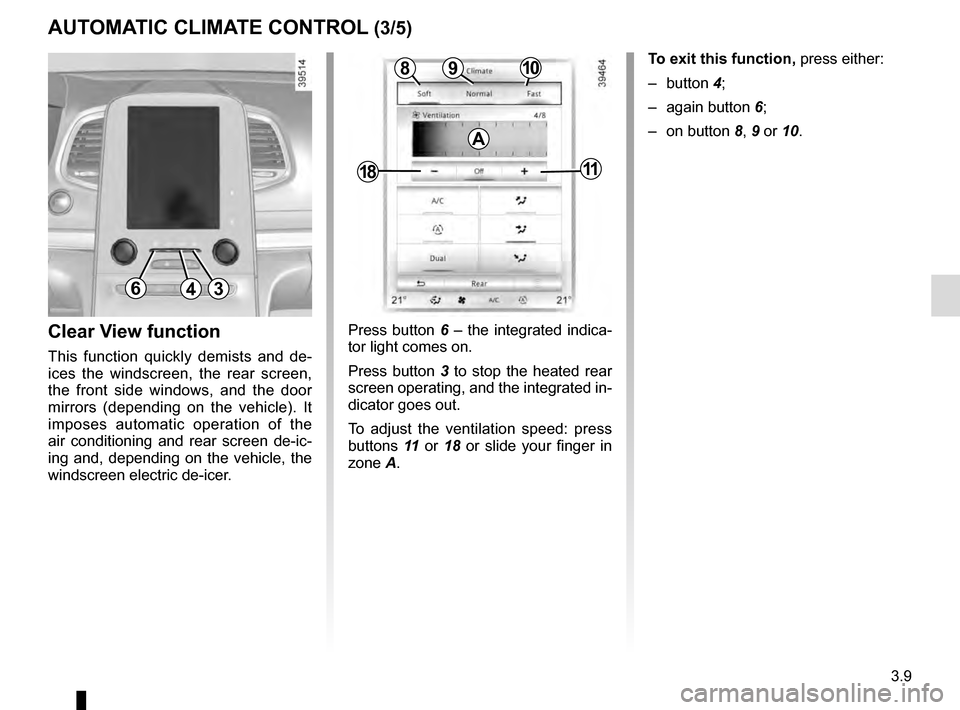
Press button 6 – the integrated indica-
tor light comes on.
Press button 3 to stop the heated rear
screen operating, and the integrated in-
dicator goes out.
To adjust the ventilation speed: press
buttons 11 or 18 or slide your finger in
zone A.Clear View function
This function quickly demists and de-
ices the windscreen, the rear screen,
the front side windows, and the door
mirrors (depending on the vehicle). It
imposes automatic operation of the
air conditioning and rear screen de-ic-
ing and, depending on the vehicle, the
windscreen electric de-icer.
643
109
1811
8
A
To exit this function, press either:
– button 4;
– again button 6;
– on button 8, 9 or 10.
Page 199 of 318
3.11
AUTOMATIC CLIMATE CONTROL (5/5)
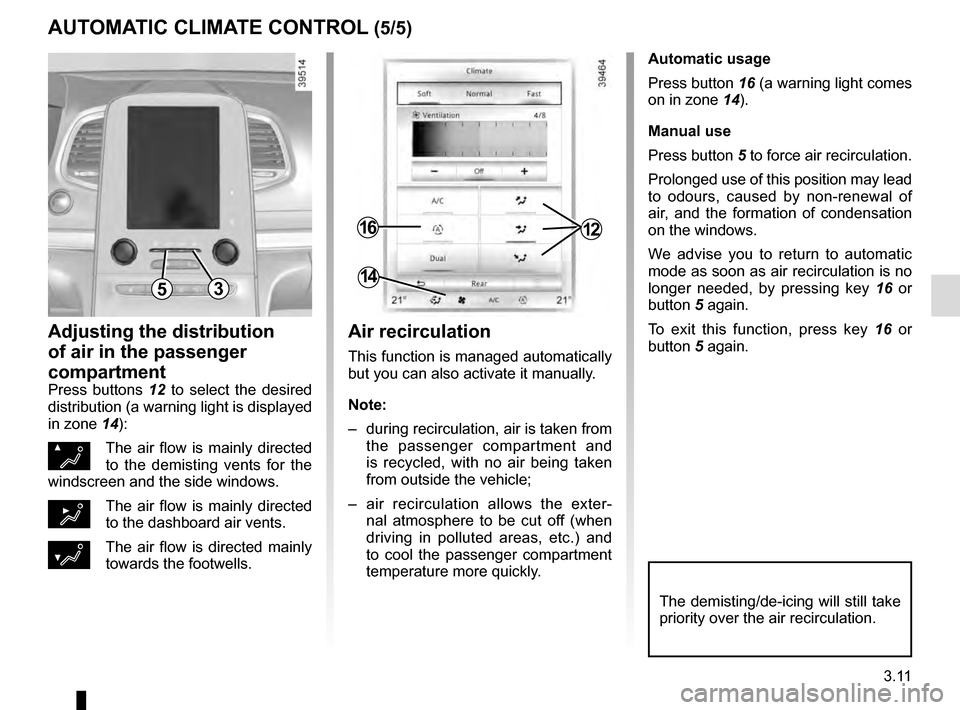
Automatic usage
Press button 16 (a warning light comes
on in zone 14).
Manual use
Press button 5 to force air recirculation.
Prolonged use of this position may lead
to odours, caused by non-renewal of
air, and the formation of condensation
on the windows.
We advise you to return to automatic
mode as soon as air recirculation is no
longer needed, by pressing key 16 or
button 5 again.
To exit this function, press key 16 or
button 5 again.
Adjusting the distribution
of air in the passenger
compartment
Press buttons 12 to select the desired
distribution (a warning light is displayed
in zone 14):
ØThe air flow is mainly directed
to the demisting vents for the
windscreen and the side windows.
½The air flow is mainly directed
to the dashboard air vents.
¿The air flow is directed mainly
towards the footwells.
The demisting/de-icing will still take
priority over the air recirculation.
53
1216
14
Air recirculation
This function is managed automatically
but you can also activate it manually.
Note:
– during recirculation, air is taken from the passenger compartment and
is recycled, with no air being taken
from outside the vehicle;
– air recirculation allows the exter- nal atmosphere to be cut off (when
driving in polluted areas, etc.) and
to cool the passenger compartment
temperature more quickly.
Page 202 of 318
3.14
AIR CONDITIONING: information and advice on use
Do not add anything to the
vehicle’s ventilation circuit
(for example, to remove
bad odours).
There is a risk of damage or of
fire.
Do not open the refriger-
ant fluid circuit. The fluid
may damage eyes or skin.
Fuel consumption
You will normally notice an increase in
fuel consumption (especially in town)
when the air conditioning is operating.
For vehicles fitted with air conditioning
with no automatic mode, switch off the
system when it is not required.
Advice for reducing consumption
and helping to preserve the environ-
ment
Drive with the air vents open and the
windows closed.
If the vehicle has been parked in the
sun, open the doors for a few moments
to let the hot air escape before starting
the engine.
Maintenance
Refer to the Maintenance Document
for your vehicle for the inspection fre-
quency.
Operating faults
As a general rule, contact your ap-
proved dealer in the event of an oper-
ating fault.
– Reduction in de-icing, demisting or air conditioning performance.
This may be caused by the passen-
ger compartment filter cartridge be-
coming clogged.
– No cold air is being produced .
Check that the controls are set cor-
rectly and that the fuses are sound.
Otherwise, switch off the system.
Presence of water under the
vehicle
After prolonged use of the air condi-
tioning system, it is normal for water
to be present under the vehicle. This is
caused by condensation.
Advice on use
In some situations, (air conditioning
off, air recirculation activated, ventila-
tion speed at zero or low, etc.) you may
notice that condensation starts to form
on the windows and windscreen.
If there is condensation, use the “Clear
View” function to remove it, then use
the air conditioning in automatic mode
to stop it forming again.
Vehicles equipped with the
ECOmode: once activated, ECO
mode can reduce the perform-
ance of the automatic air condition-
ing. Please refer to the information
on “Driving advice, Eco-driving” in
Section 2.