wheel RENAULT ESPACE 2016 5.G Owner's Manual
[x] Cancel search | Manufacturer: RENAULT, Model Year: 2016, Model line: ESPACE, Model: RENAULT ESPACE 2016 5.GPages: 318, PDF Size: 3.32 MB
Page 173 of 318
2.65
An impact to the under-
side of the vehicle while
manoeuvring (e.g.: stri-
king a post, raised kerb or
other street furniture) may result in
damage to the vehicle (e.g.: defor-
mation of an axle).
To avoid any risk of accident, have
your vehicle checked by an appro-
ved Dealer.
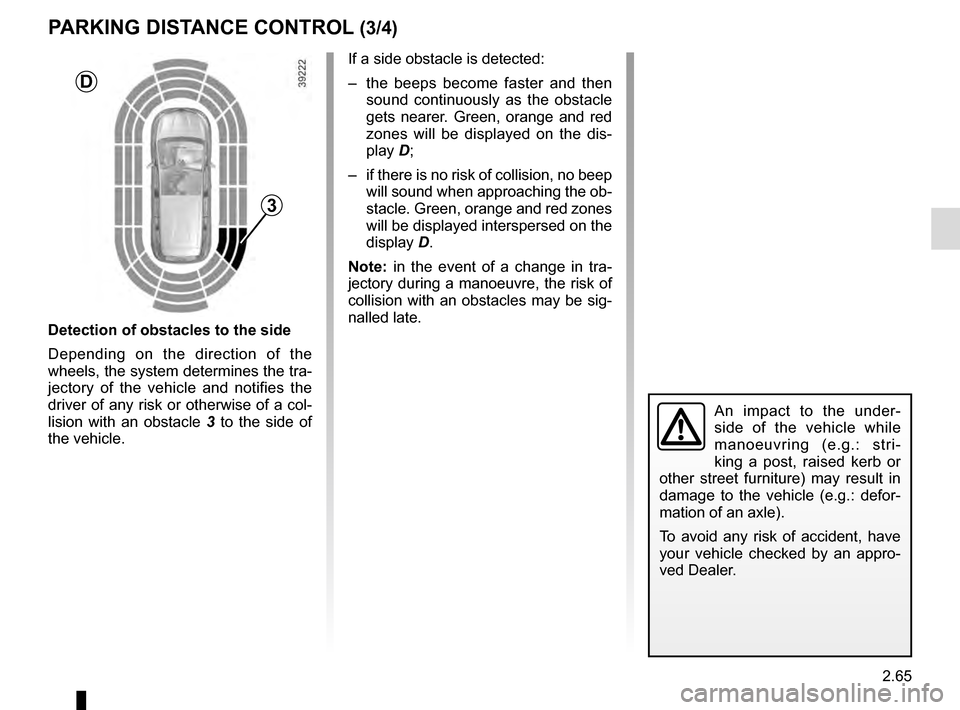
Detection of obstacles to the side
Depending on the direction of the
wheels, the system determines the tra-
jectory of the vehicle and notifies the
driver of any risk or otherwise of a col-
lision with an obstacle 3 to the side of
the vehicle.
PARKING DISTANCE CONTROL (3/4)
If a side obstacle is detected:
– the beeps become faster and then sound continuously as the obstacle
gets nearer. Green, orange and red
zones will be displayed on the dis-
play D;
– if there is no risk of collision, no beep will sound when approaching the ob-
stacle. Green, orange and red zones
will be displayed interspersed on the
display D.
Note: in the event of a change in tra-
jectory during a manoeuvre, the risk of
collision with an obstacles may be sig-
nalled late.
3
D
Page 175 of 318
2.67
REVERSING CAMERA (1/2)
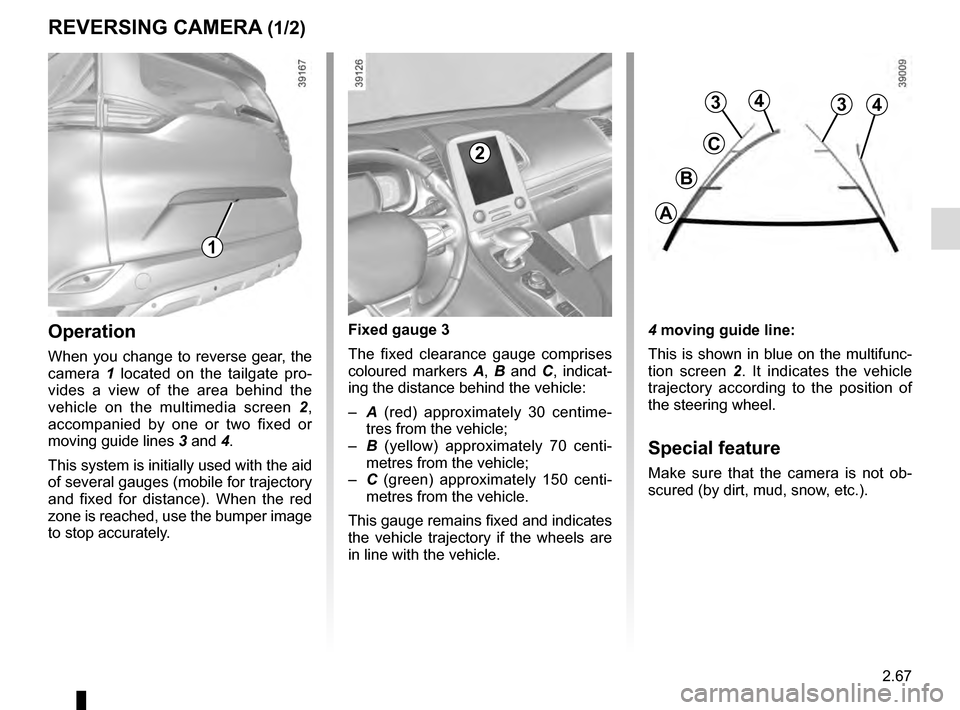
4 moving guide line:
This is shown in blue on the multifunc-
tion screen 2. It indicates the vehicle
trajectory according to the position of
the steering wheel.
Special feature
Make sure that the camera is not ob-
scured (by dirt, mud, snow, etc.).
Operation
When you change to reverse gear, the
camera 1 located on the tailgate pro-
vides a view of the area behind the
vehicle on the multimedia screen 2,
accompanied by one or two fixed or
moving guide lines 3 and 4.
This system is initially used with the aid
of several gauges (mobile for trajectory
and fixed for distance). When the red
zone is reached, use the bumper image
to stop accurately. Fixed gauge 3
The fixed clearance gauge comprises
coloured markers
A, B and C , indicat-
ing the distance behind the vehicle:
– A (red) approximately 30 centime-
tres from the vehicle;
– B (yellow) approximately 70 centi-
metres from the vehicle;
– C (green) approximately 150 centi-
metres from the vehicle.
This gauge remains fixed and indicates
the vehicle trajectory if the wheels are
in line with the vehicle.
1
2
4
C
B
A
334
Page 177 of 318
2.69
ASSISTED PARKING (1/4)
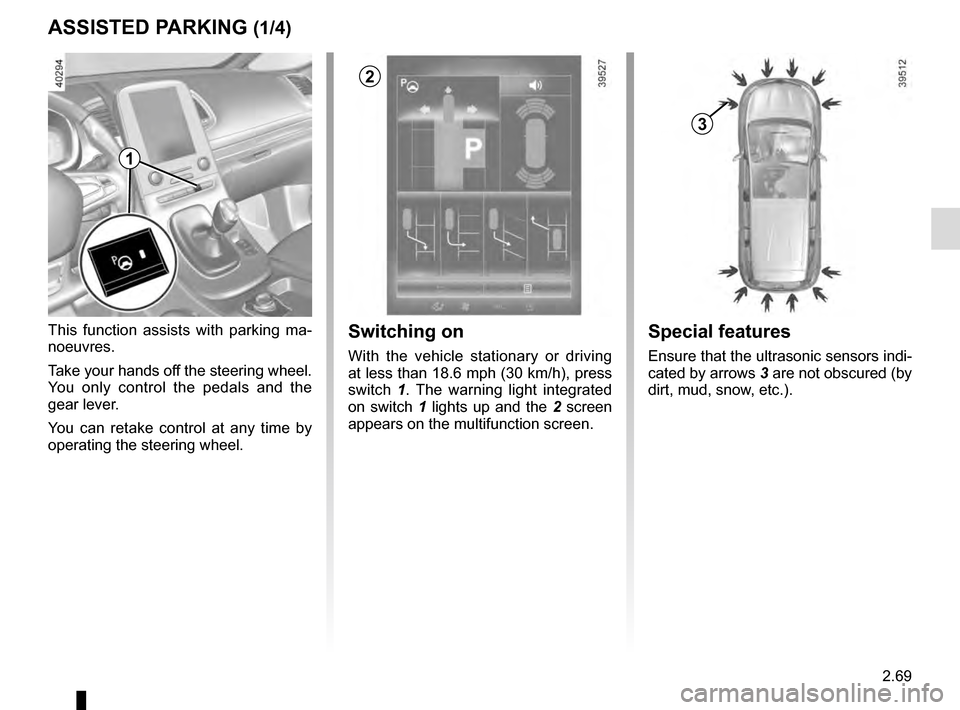
This function assists with parking ma-
noeuvres.
Take your hands off the steering wheel.
You only control the pedals and the
gear lever.
You can retake control at any time by
operating the steering wheel.Switching on
With the vehicle stationary or driving
at less than 18.6 mph (30 km/h), press
switch 1. The warning light integrated
on switch 1 lights up and the 2 screen
appears on the multifunction screen.
1
2
Special features
Ensure that the ultrasonic sensors indi-
cated by arrows 3 are not obscured (by
dirt, mud, snow, etc.).
3
Page 178 of 318
2.70
Choice of manoeuvre
The system can perform four types of
manoeuvres:
– parallel parking;
– perpendicular parking;
– angle parking;
– moving out of a parallel parking space.
From the multifunction screen, select
the manoeuvre to be performed.
Note: When starting the vehicle, or
after successfully completed parallel
parking using the system, the default
manoeuvre proposed by the system is
assistance in exiting a parallel parking
space. In other cases, the default ma-
noeuvre can be set from the multifunc-
tion screen.
ASSISTED PARKING (2/4)
Operation
Parking
As long as the vehicle speed is less
than 20 mph (30 km/h), the system
looks for available parking spaces on
both sides of the vehicle.
Once a space has been found, it is dis-
played on the multifunction screen, indi-
cated by a small letter “P”. Drive slowly,
with the indicators activated on the side
of the space, until the message “Stop”
is displayed, alongside a beep.
The space is then indicated on the mul-
tifunction screen by a capital “P”.
– Stop the vehicle;
– select reverse gear.
Warning light
lights up on the in-
strument panel, along with a beep.
– release the steering wheel;
– follow the system instructions pro- vided on the multifunction screen. Your speed should not exceed around 4
mph (7 km/h).
Once the warning light
on the
instrument panel goes off and a beep
sounds, the manoeuvre has been com-
pleted.
Page 179 of 318
2.71
ASSISTED PARKING (3/4)
Your speed should not exceed around
4 mph (7 km/h).
Once in position to exit the space, the
system will notify you of the end of the
manoeuvre.
Once the warning light
on the
instrument panel goes off and a beep
sounds, the manoeuvre has been com-
pleted.
Suspending the manoeuvreThe manoeuvre is suspended in the fol-
lowing circumstances:
– you take control of the wheel;
– a door or the boot is opened;
– the vehicle is at a standstill for too long;
– an obstacle in the direction of move- ment prevents the manoeuvre from
being completed;
– the engine will stop.
Once the warning light
on the
instrument panel goes off and a beep
sounds, the manoeuvre has been sus-
pended. Then to resume the manoeu-
vre, press and hold the system activa-
tion switch. In this case, the reason for suspending
the manoeuvre will be displayed on the
multifunction screen.
Make sure:
– you have released the steering wheel
and;
– that all doors and the boot are closed, and;
– that no obstacles are in the way of the direction of movement, and;
– that the engine is started.
Cancelling the manoeuvre
The manoeuvre can be stopped in the
following cases:
– by pressing the system activation switch;
– the vehicle speed has exceeded 4 mph (7 km/h);
– You have performed more than ten forwards/backwards movements in
one manoeuvre;
– the parking distance control sensors are dirty or blocked;
– the vehicle wheels have skidded.
Once the warning light
on the
instrument panel goes off and a beep
sounds, the manoeuvre has been
ended.
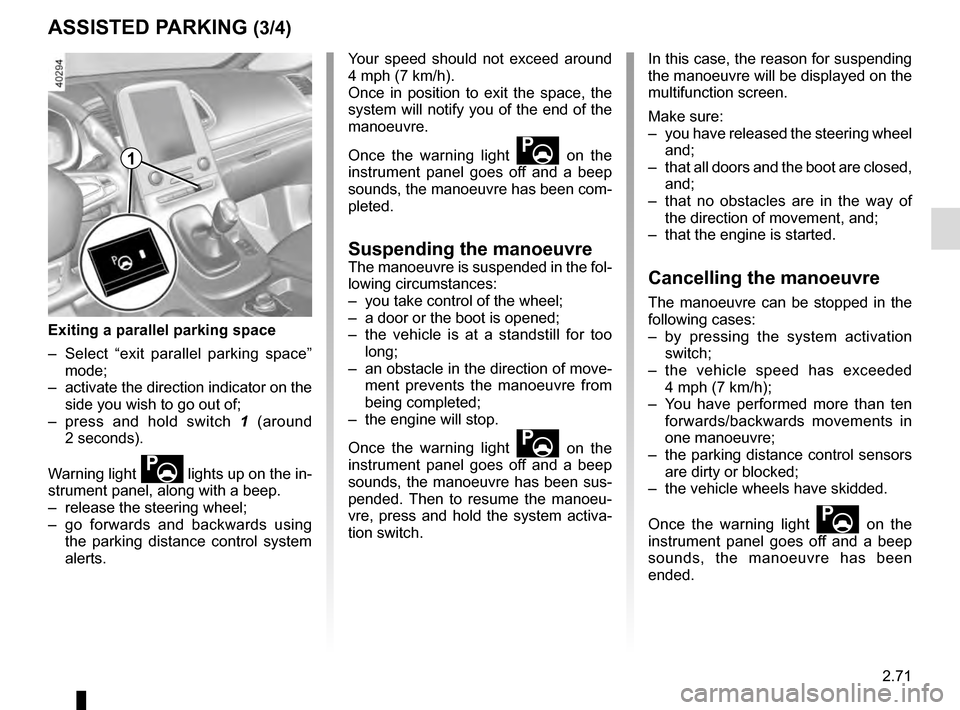
Exiting a parallel parking space
– Select “exit parallel parking space” mode;
– activate the direction indicator on the side you wish to go out of;
– press and hold switch 1 (around
2 seconds).
Warning light
lights up on the in-
strument panel, along with a beep.
– release the steering wheel;
– go forwards and backwards using the parking distance control system
alerts.
1
Page 180 of 318
2.72
ASSISTED PARKING (4/4)
This function is an additional driving aid. However, this function is not under any circumstances intended to replace the
due care and attention of the driver, who should at all times be in control of the vehicle.
Make sure that the manoeuvre complies with the applicable traffic regulations at your location.
– The driver should always look out for sudden hazards during driving: alw\
ays ensure that there are no moving obstacles (such as a child, animal, pram, bicycle, etc.) or small, narrow object\
s such as stones or posts in your path when manoeu-
vring.
– The system cannot detect objects located in the sensor blind spots.
– During manoeuvring, the steering wheel may turn quickly: do not place yo\
ur hands inside the wheel, and ensure nothing is located in this space.
– Always visually check that the parking space proposed by the system is s\
till available and contains no obstacles.
– The system should be deactivated when towing a trailer.
Page 190 of 318
3.2
MULTI-SENSE (1/2)
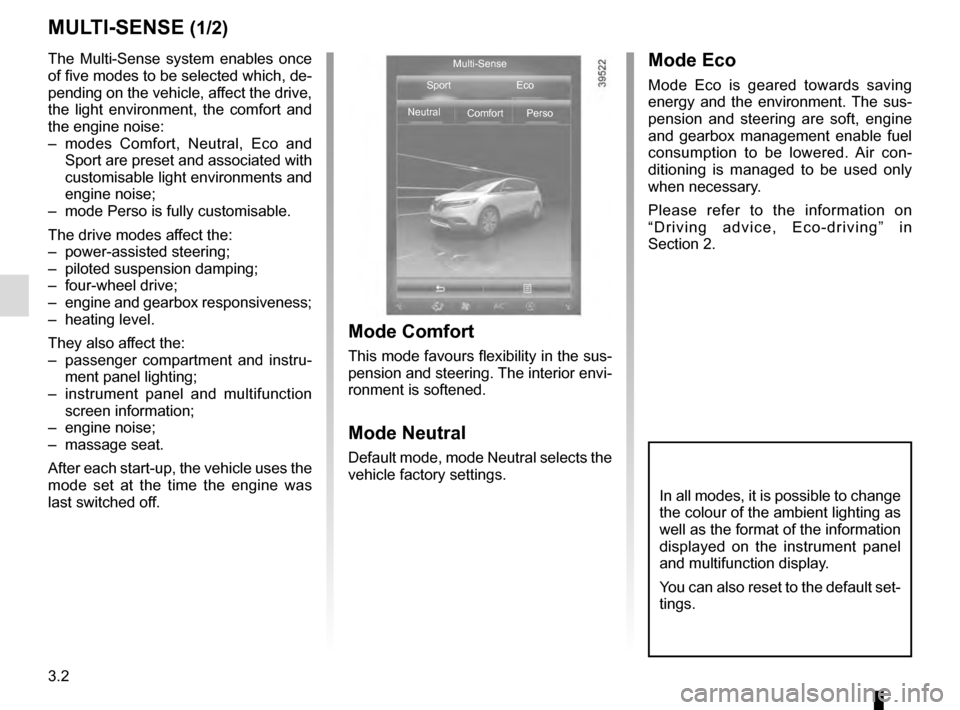
The Multi-Sense system enables once
of five modes to be selected which, de-
pending on the vehicle, affect the drive,
the light environment, the comfort and
the engine noise:
– modes Comfort, Neutral, Eco and Sport are preset and associated with
customisable light environments and
engine noise;
– mode Perso is fully customisable.
The drive modes affect the:
– power-assisted steering;
– piloted suspension damping;
– four-wheel drive;
– engine and gearbox responsiveness;
– heating level.
They also affect the:
– passenger compartment and instru- ment panel lighting;
– instrument panel and multifunction screen information;
– engine noise;
– massage seat.
After each start-up, the vehicle uses the
mode set at the time the engine was
last switched off.
Mode Comfort
This mode favours flexibility in the sus-
pension and steering. The interior envi-
ronment is softened.
Mode Neutral
Default mode, mode Neutral selects the
vehicle factory settings.
Mode Eco
Mode Eco is geared towards saving
energy and the environment. The sus-
pension and steering are soft, engine
and gearbox management enable fuel
consumption to be lowered. Air con-
ditioning is managed to be used only
when necessary.
Please refer to the information on
“Driving advice, Eco-driving” in
Section 2.
Multi-Sense
Sport Eco
Neutral Comfort Perso
In all modes, it is possible to change
the colour of the ambient lighting as
well as the format of the information
displayed on the instrument panel
and multifunction display.
You can also reset to the default set-
tings.
Page 229 of 318
3.41
AUTOMATIC TAILGATE (5/5)Operating faults
If you activate the automatic tailgate
continuously for around a minute (se-
quence of opening and closing), it will
stop in order to avoid overheating. The
operation will return to normal after
about a minute.
The automatic tailgate will not operate
if the battery is on low charge. In this
case, operate the automatic tailgate
with the engine started.
In very cold weather conditions, the au-
tomatic opening or closing may not op-
erate if the tailgate joints are frozen.
Precautions during use
Before opening/closing the tailgate,
ensure that the surrounding space is
sufficient to allow the tailgate to ope-
rate. If not, stop the tailgate movement
with the external tailgate control and
hold the tailgate in position by hand
(the tailgate may continue to open ma-
nually).
If the tailgate is moving and the engine
is started, the movement will stop for a
seconds before continuing.
Avoid multiple manual stops during the
automatic tailgate movement (risk of
damaging the tailgate system).
Driver’s responsibility
when parking or stopping
the vehicle
Never leave your vehicle
with a child, an adult who is not self-
sufficient or a pet inside or at the
rear of the tailgate, even for a short
while.
They may pose a risk to themselves
or to others by starting the engine,
activating equipment such as the
electric windows, the automatic
tailgate or by locking the doors.
RISK OF DEATH OR SERIOUS
INJURY.
Disable the «hands-free»
function before washing the
vehicle manually or han-
dling the emergency spare
wheel or the towbar.
Risk of accidental opening or clo-
sing of the tailgate which may
cause injury.
The attaching of any
carrying device (bike rack,
luggage box, etc.) resting
on the luggage compart-
ment lid is prohibited. To install a
carrying device on your vehicle,
contact an Approved Dealer.
Page 233 of 318
3.45
Permissible nose weight, maxi-
mum permissible towing weight,
braked and unbraked: refer to
the information on “Weights” in
Section 6.
Choice and fitting of towing
equipment
Maximum weight of towing equip-
ment: 32 kg
For fitting and conditions of use,
refer to the equipment’s fitting ins-
tructions.
Please keep these instructions with
the rest of the vehicle documenta-
tion.
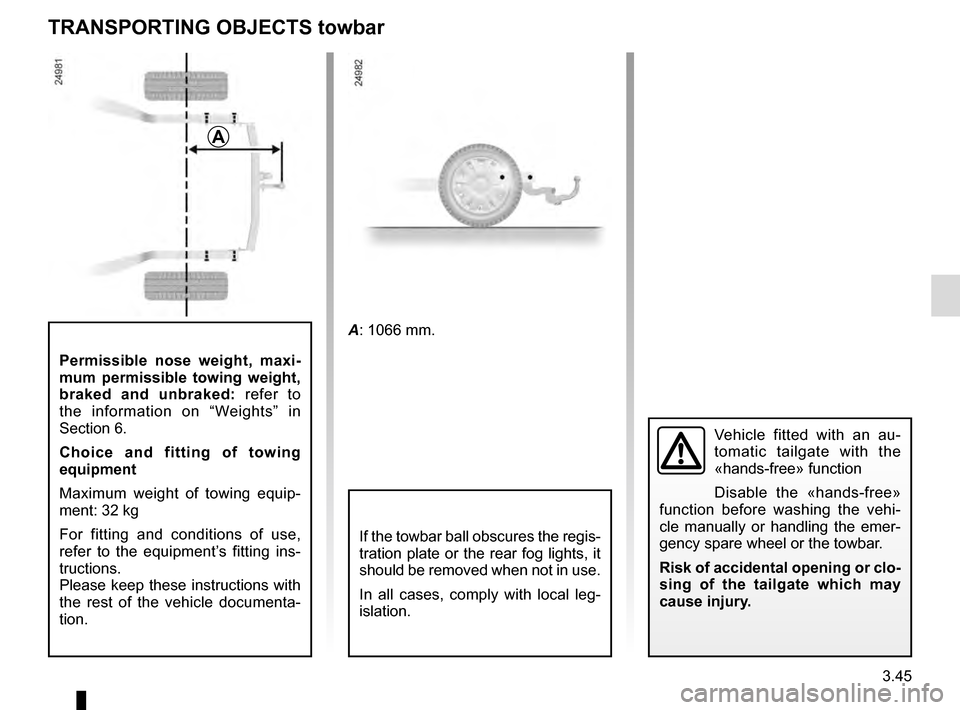
TRANSPORTING OBJECTS towbar
A
A: 1066 mm.
If the towbar ball obscures the regis-
tration plate or the rear fog lights, it
should be removed when not in use.
In all cases, comply with local leg-
islation.
Vehicle fitted with an au-
tomatic tailgate with the
«hands-free» function
Disable the «hands-free»
function before washing the vehi-
cle manually or handling the emer-
gency spare wheel or the towbar.
Risk of accidental opening or clo-
sing of the tailgate which may
cause injury.
Page 237 of 318
3.49
MULTIMEDIA EQUIPMENT (1/2)
Using the telephone
We remind you of the need
to conform to the legislation
in force concerning the use
of such equipment.
5
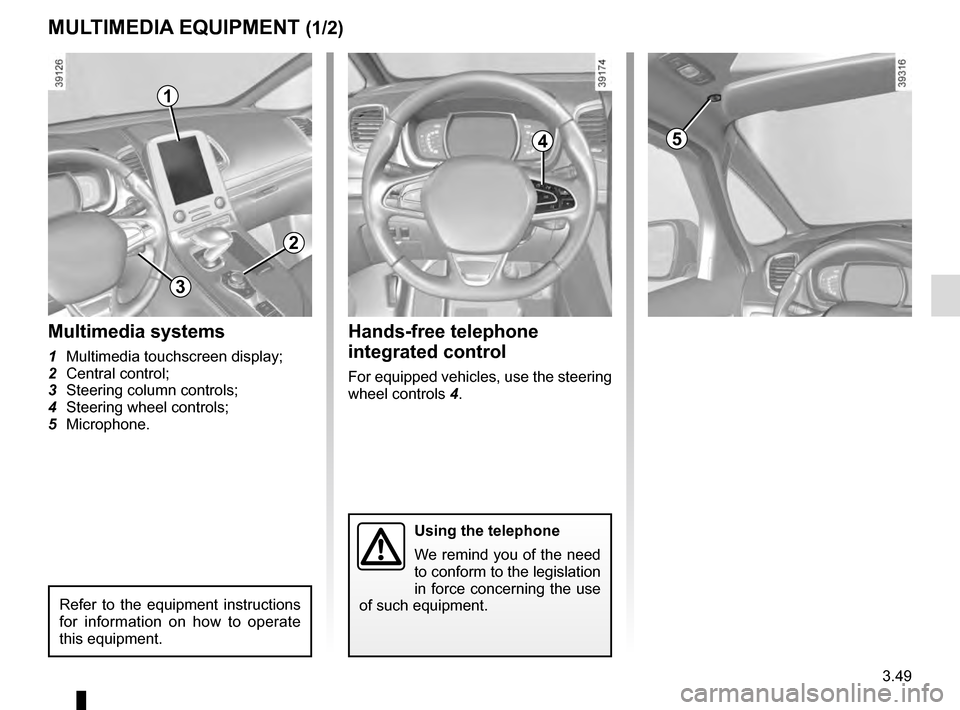
Hands-free telephone
integrated control
For equipped vehicles, use the steering
wheel controls 4.
Multimedia systems
1 Multimedia touchscreen display;
2 Central control;
3 Steering column controls;
4 Steering wheel controls;
5 Microphone.
1
2
4
Refer to the equipment instructions
for information on how to operate
this equipment.
3