instrument panel RENAULT FLUENCE 2012 1.G User Guide
[x] Cancel search | Manufacturer: RENAULT, Model Year: 2012, Model line: FLUENCE, Model: RENAULT FLUENCE 2012 1.GPages: 241, PDF Size: 6.5 MB
Page 59 of 241
JauneNoirNoir texte
1.55
ENG_UD27176_4
Afficheurs et indicateurs (L38 - X38 - Renault)
ENG_NU_891_892-7_L38-B32_Renault_1
DIspLAYs AND INDICATORs (2/4)
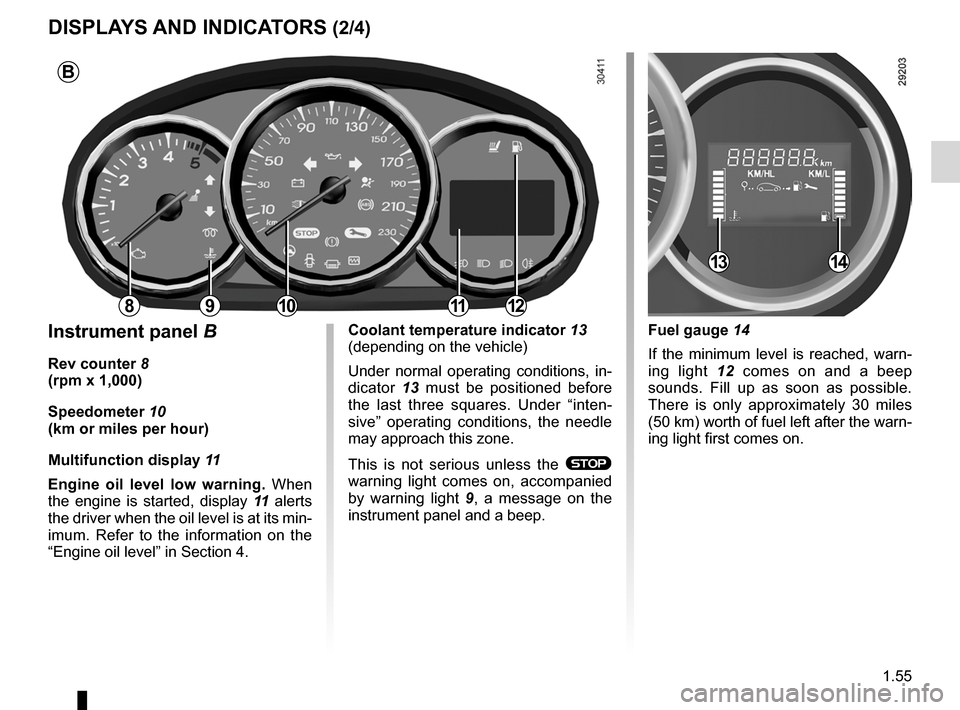
Instrument panel B
Rev counter 8
(rpm x 1,000)
speedometer 10
(km or miles per hour)
Multifunction display 11
Engine oil level low warning. When
the engine is started, display 11 alerts
the driver when the oil level is at its min-
imum. Refer to the information on the
“Engine oil level” in Section 4.
Fuel gauge 14
If the minimum level is reached, warn-
ing light 12 comes on and a beep
sounds. Fill up as soon as possible.
There is only approximately 30 miles
(50 km) worth of fuel left after the warn-
ing light first comes on.Coolant temperature indicator 13
(depending on the vehicle)
Under normal operating conditions, in-
dicator 13 must be positioned before
the last three squares. Under “inten -
sive” operating conditions, the needle
may approach this zone.
This is not serious unless the
®
warning light comes on, accompanied
by warning light 9 , a message on the
instrument panel and a beep.
B
81011
1314
912
Page 60 of 241

1.56
ENG_UD27176_4
Afficheurs et indicateurs (L38 - X38 - Renault)
ENG_NU_891_892-7_L38-B32_Renault_1
Jaune NoirNoir texte
DIspLAYs AND INDICATORs (3/4)
Instrument panel C
Rev counter 15 (rpm × 1,000) Fuel gauge
19
If the minimum level is reached, warn-
ing light 20 comes on and a beep
sounds. Fill up as soon as possible.
There is only approximately 30 miles
(50 km) worth of fuel left after the warn-
ing light first comes on.
Coolant temperature indicator 18
In normal use, indicator 18 should be
before area D . Under severe condi -
tions, the needle may enter this area.
This is not serious unless the
®
warning light comes on, accompanied
by a message on the instrument panel
and a beep.
Trip computer and warning system
Refer to the information on the “Trip
computer and warning system” in
Section 1.
Engine oil level low warning
When the engine is started, display 17
alerts the driver when the oil level is at
its minimum. Refer to the information
on the “Engine oil level” in Section 4.
The first time the warning appears, it
can be cleared by pressing one of the
buttons on the end of stalk 16.
Subsequent warnings will disappear
automatically after 30 seconds.
1516
192018
D
17
C
C
Page 61 of 241
JauneNoirNoir texte
1.57
ENG_UD27176_4
Afficheurs et indicateurs (L38 - X38 - Renault)
ENG_NU_891_892-7_L38-B32_Renault_1
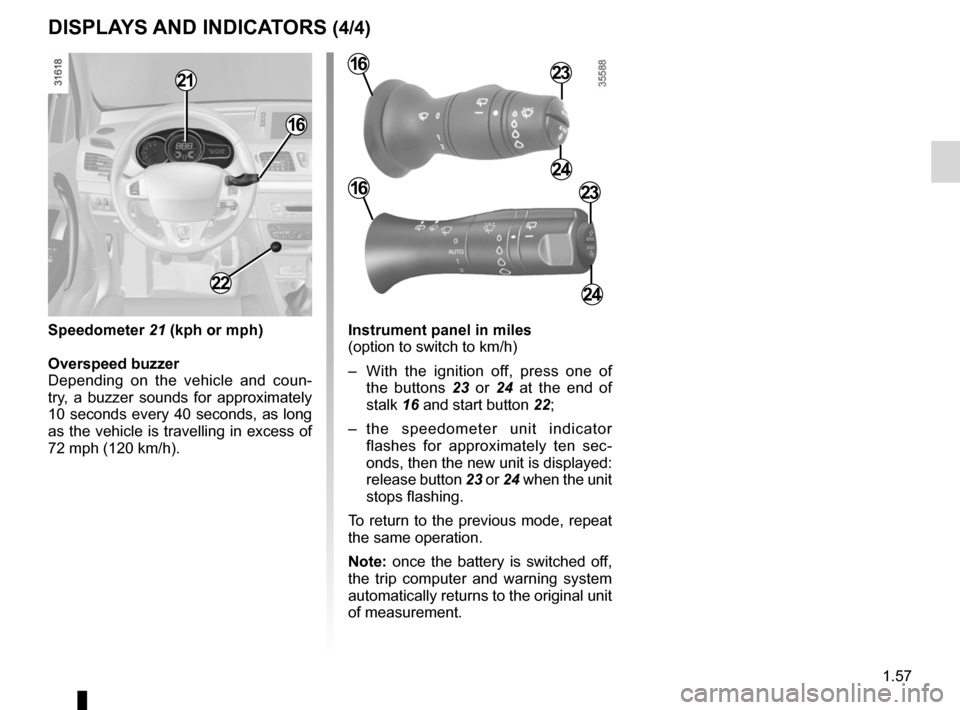
Instrument panel in miles
(option to switch to km/h)
– With the ignition off, press one of
the buttons 23 or 24 at the end of
stalk 16 and start button 22;
– the speedometer unit indicator
flashes for approximately ten sec -
onds, then the new unit is displayed:
release button 23 or 24 when the unit
stops flashing.
To return to the previous mode, repeat
the same operation.
Note: once the battery is switched off,
the trip computer and warning system
automatically returns to the original unit
of measurement.
DIspLAYs AND INDICATORs (4/4)
23
24
16
16
22
speedometer 21 (kph or mph)
Overspeed buzzer
Depending on the vehicle and coun -
try, a buzzer sounds for approximately
10 seconds every 40 seconds, as long
as the vehicle is travelling in excess of
72 mph (120 km/h).
21
23
24
16
Page 62 of 241
control instruments ............................... (up to the end of the DU)
indicators: instrument panel ............................. (up to the end of the DU)
trip computer and warning system ........(up to the end of the DU)
instrument panel ................................... (up to the end of the DU)
warning lights ........................................ (up to the end of the DU)
instrument panel messages ..................(up to the end of the DU)
1.58
ENG_UD25556_5
Ordinateur de bord : généralités (L38 - X38 - X32 - B32 - Ren\
ault)
ENG_NU_891_892-7_L38-B32_Renault_1
Jaune NoirNoir texte
on-board computer
TRIp COMpUTER: general information (1/3)
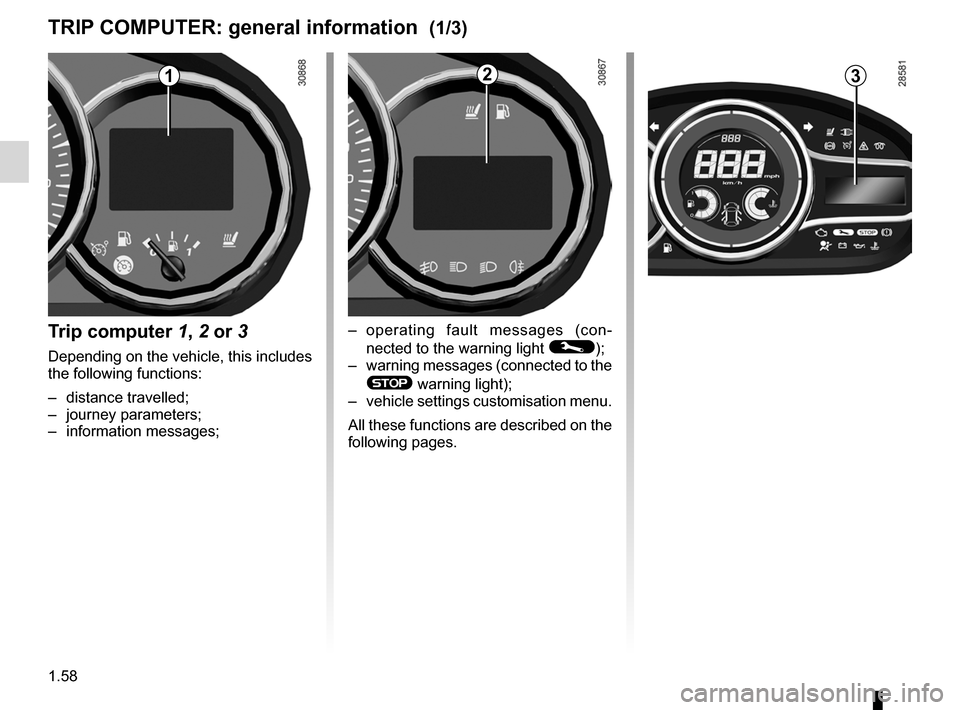
Trip computer 1, 2 or 3
Depending on the vehicle, this includes
the following functions:
– distance travelled;
– journey parameters;
– information messages;
123
– operating fault messages (con -
nected to the warning light
©);
– warning messages (connected to the
® warning light);
– vehicle settings customisation menu.
All these functions are described on the
following pages.
Page 69 of 241

ENG_NU_891_892-7_L38-B32_Renault_1
TRIp COMpUTER: trip settings (5/5)
The display")
JauneNoirNoir texte
1.65
ENG_UD25557_2
Ordinateur de bord : paramètres de voyage (L38 - X38 - X32 - B32 - R\
enault)
ENG_NU_891_892-7_L38-B32_Renault_1
TRIp COMpUTER: trip settings (5/5)
The display of information shown below DEpENDs ON ThE VEhICLE EQUIpMENT AND COUNTRY.
Examples of selections Interpreting the display selected
e) Vehicle settings customisation menu.
Enables certain vehicle functions to be set (instrument panel language, parking
distance control, etc.). Refer to the information on “Vehicle settings customisation
menu” in Section 1.
Settings menu:
press and hold
f) Trip log.
Successive display:
– information messages (passenger airbag OFF etc.),
– operating fault messages (check the injection system, etc.).
No message available
Page 72 of 241

ENG_NU_891_892-7_L38-B32_Renault_1
These appear with the ® warning light and require you to stop immed")
1.68
ENG_UD23769_1
Ordinateur de bord : messages d’alerte (L38 - X38 - X32 - B32 - Rena\
ult)
ENG_NU_891_892-7_L38-B32_Renault_1
These appear with the ® warning light and require you to stop immediately, for your own safety, as soon as traffic
conditions allow. stop your engine and do not restart it. Contact an approved Dealer.
Examples of warning messages are given in the following pages. Note: the messages appear on the display either individually
or alternately (when there are several messages to be displayed), and \
may be accompanied by a warning light and/or a beep.
Examples of messages Interpreting the display selected
« Engine failure hazard »Indicates engine overheating, or an injection or engine oil pressure fau\
lt.
“power steering fault” or
“Risk of steering locking ”Indicates a fault in the steering.
« Battery charging fault » Indicates a fault in the vehicle battery charging circuit (alternator e\
tc.).
« puncture » Indicates a puncture on the tyre displayed on the instrument panel.
TRIp COMpUTER AND WARNINg sYsTEM : warning messages
Page 79 of 241
lighting:exterior ............................................ (up to the end of the DU)
instrument panel .................................................... (current page)
lights: side lights ......................................................... (current page)
lights: dipped beam headlights ................................... (current page)
hazard warning lights signal .................................. (current page)
signals and lights .................................. (up to the end of the DU)
lighting: instrument panel .............................................. (current page)
daytime running lights ............................................ (current page)
1.75
ENG_UD27178_2
Éclairages et signalisations extérieurs (L38 - X38 - Renault)
ENG_NU_891_892-7_L38-B32_Renault_1
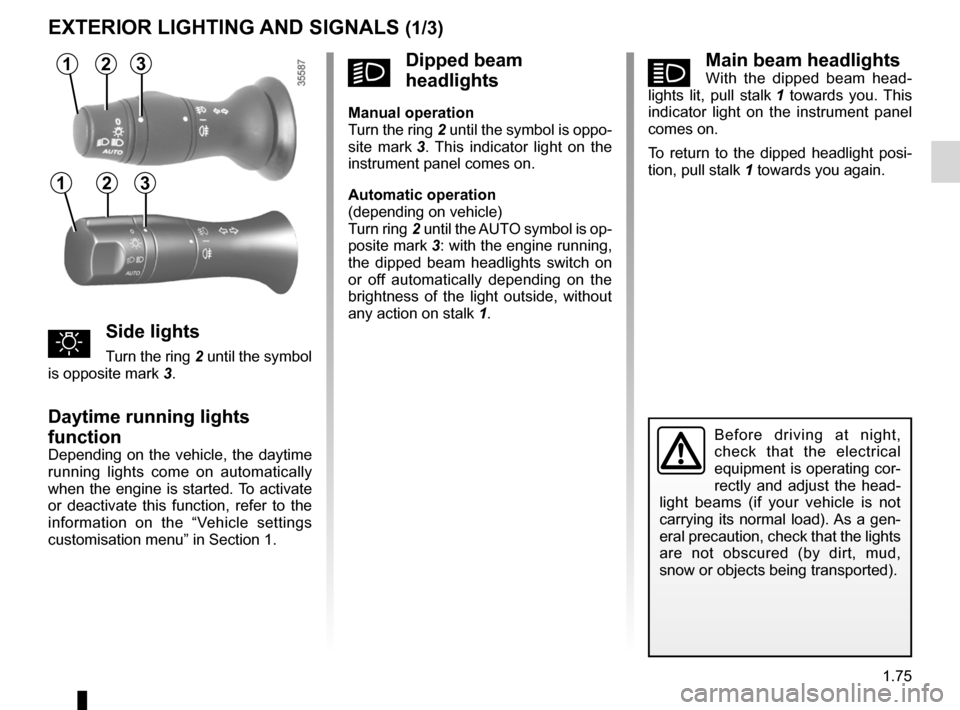
áMain beam headlightsWith the dipped beam head -
lights lit, pull stalk 1 towards you. This
indicator light on the instrument panel
comes on.
To return to the dipped headlight posi-
tion, pull stalk 1 towards you again.
Exterior lighting and signals
Before driving at night,
check that the electrical
equipment is operating cor-
rectly and adjust the head -
light beams (if your vehicle is not
carrying its normal load). As a gen-
eral precaution, check that the lights
are not obscured (by dirt, mud,
snow or objects being transported).
EXTERIOR LIghTINg AND sIgNALs (1/3)
31
uside lights
Turn the ring 2 until the symbol
is opposite mark 3.
Daytime running lights
function
Depending on the vehicle, the daytime
running lights come on automatically
when the engine is started. To activate
or deactivate this function, refer to the
information on the “Vehicle settings
customisation menu” in Section 1.
kDipped beam
headlights
Manual operation
Turn the ring 2 until the symbol is oppo -
site mark 3 . This indicator light on the
instrument panel comes on.
Automatic operation
(depending on vehicle)
Turn ring 2 until the AUTO symbol is op-
posite mark 3: with the engine running,
the dipped beam headlights switch on
or off automatically depending on the
brightness of the light outside, without
any action on stalk 1.
2
312
Page 80 of 241
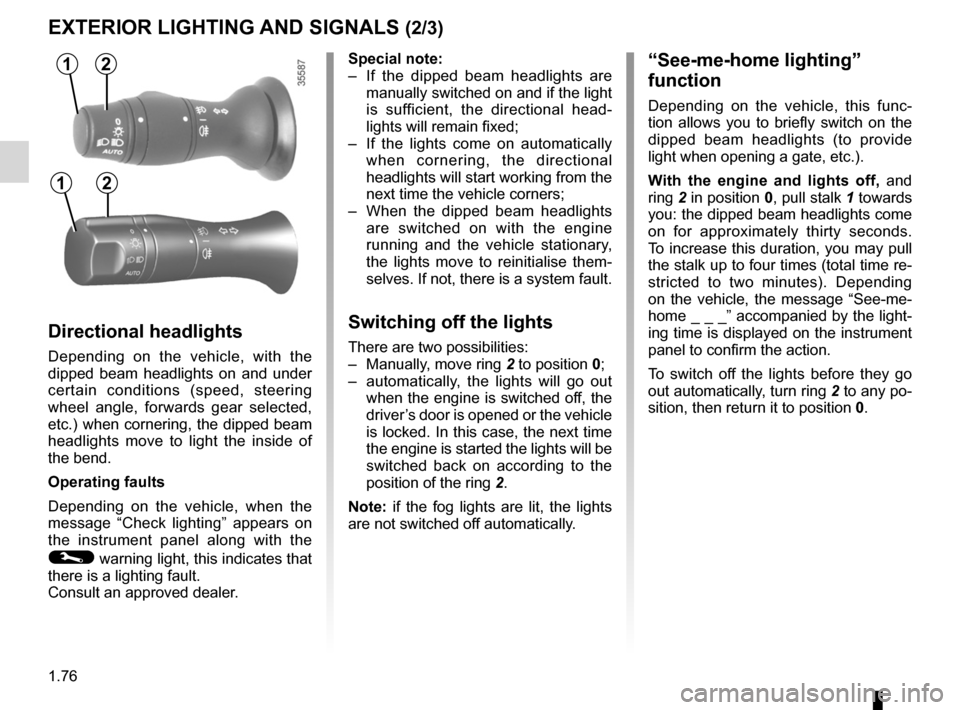
lights:main beam headlights ...................................... (current page)
warning buzzer ...................................................... (current page)
see-me-home lighting ............................................ (current page)
lights mobile directional ............................................. (current page)
1.76
ENG_UD27178_2
Éclairages et signalisations extérieurs (L38 - X38 - Renault)
ENG_NU_891_892-7_L38-B32_Renault_1
Jaune NoirNoir texte
EXTERIOR LIghTINg AND sIgNALs (2/3)
special note:
– If the dipped beam headlights are
manually switched on and if the light
is sufficient, the directional head -
lights will remain fixed;
– If the lights come on automatically
when cornering, the directional
headlights will start working from the
next time the vehicle corners;
– When the dipped beam headlights
are switched on with the engine
running and the vehicle stationary,
the lights move to reinitialise them -
selves. If not, there is a system fault.
switching off the lights
There are two possibilities:
– Manually, move ring 2 to position 0;
– automatically, the lights will go out
when the engine is switched off, the
driver’s door is opened or the vehicle
is locked. In this case, the next time
the engine is started the lights will be
switched back on according to the
position of the ring 2.
Note: if the fog lights are lit, the lights
are not switched off automatically.
“see-me-home lighting”
function
Depending on the vehicle, this func -
tion allows you to briefly switch on the
dipped beam headlights (to provide
light when opening a gate, etc.).
With the engine and lights off, and
ring 2 in position 0, pull stalk 1 towards
you: the dipped beam headlights come
on for approximately thirty seconds.
To increase this duration, you may pull
the stalk up to four times (total time re-
stricted to two minutes). Depending
on the vehicle, the message “See-me-
home _ _ _” accompanied by the light-
ing time is displayed on the instrument
panel to confirm the action.
To switch off the lights before they go
out automatically, turn ring 2 to any po-
sition, then return it to position 0.
Directional headlights
Depending on the vehicle, with the
dipped beam headlights on and under
certain conditions (speed, steering
wheel angle, forwards gear selected,
etc.) when cornering, the dipped beam
headlights move to light the inside of
the bend.
Operating faults
Depending on the vehicle, when the
message “Check lighting ” appears on
the instrument panel along with the
© warning light, this indicates that
there is a lighting fault.
Consult an approved dealer.
12
12
Page 81 of 241
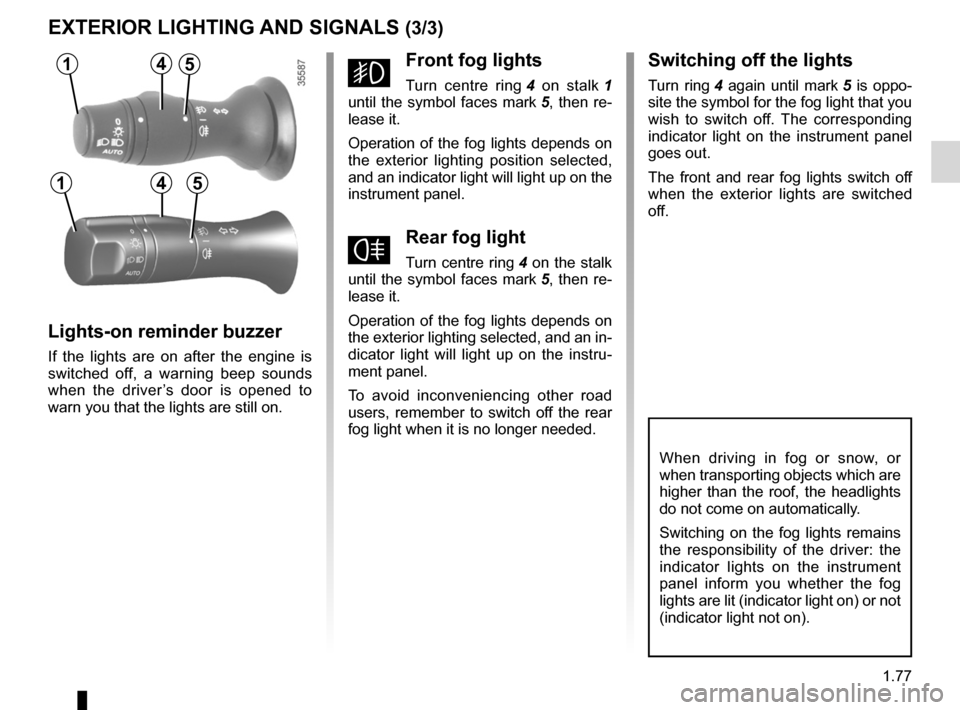
lights:fog lights .......................................................... (current page)
JauneNoirNoir texte
1.77
ENG_UD27178_2
Éclairages et signalisations extérieurs (L38 - X38 - Renault)
ENG_NU_891_892-7_L38-B32_Renault_1
EXTERIOR LIghTINg AND sIgNALs (3/3)
When driving in fog or snow, or
when transporting objects which are
higher than the roof, the headlights
do not come on automatically.
Switching on the fog lights remains
the responsibility of the driver: the
indicator lights on the instrument
panel inform you whether the fog
lights are lit (indicator light on) or not
(indicator light not on).
gFront fog lights
Turn centre ring 4 on stalk 1
until the symbol faces mark 5, then re-
lease it.
Operation of the fog lights depends on
the exterior lighting position selected,
and an indicator light will light up on the
instrument panel.
fRear fog light
Turn centre ring 4 on the stalk
until the symbol faces mark 5, then re-
lease it.
Operation of the fog lights depends on
the exterior lighting selected, and an in-
dicator light will light up on the instru -
ment panel.
To avoid inconveniencing other road
users, remember to switch off the rear
fog light when it is no longer needed.
Lights-on reminder buzzer
If the lights are on after the engine is
switched off, a warning beep sounds
when the driver ’s door is opened to
warn you that the lights are still on.
switching off the lights
Turn ring 4 again until mark 5 is oppo -
site the symbol for the fog light that you
wish to switch off. The corresponding
indicator light on the instrument panel
goes out.
The front and rear fog lights switch off
when the exterior lights are switched
off.
14
145
5
Page 89 of 241

2.1
ENG_UD27180_7
Sommaire 2 (L38 - X38 - Renault)
ENG_NU_891_892-7_L38-B32_Renault_2
Section 2: Driving
(Advice on use relating to fuel economy and the environment)
Running in . . . . . . . . . . . . . . . . . . . . . . . . . . . . . . . . . . . . . . . . . . . . . . . . . . . . . . . . . . . . . . . . . . . . . 2.2
Starting, stopping the engine: vehicle with key . . . . . . . . . . . . . . . . . . . . . . . . . . . . . . . . . . . . . . . . . 2.3
Starting, stopping the engine: vehicle with RENAULT card . . . . . . . . . . . . . . . . . . . . . . . . . . . . . . . . 2.5
Special features of petrol versions . . . . . . . . . . . . . . . . . . . . . . . . . . . . . . . . . . . . . . . . . . . . . . . . . . 2.8
Special features of diesel versions . . . . . . . . . . . . . . . . . . . . . . . . . . . . . . . . . . . . . . . . . . . . . . . . . . 2.9
Gear lever . . . . . . . . . . . . . . . . . . . . . . . . . . . . . . . . . . . . . . . . . . . . . . . . . . . . . . . . . . . . . . . . . . . . . 2.10
Handbrake . . . . . . . . . . . . . . . . . . . . . . . . . . . . . . . . . . . . . . . . . . . . . . . . . . . . . . . . . . . . . . . . . . . . . 2.10
Advice: anti-pollution and fuel economy . . . . . . . . . . . . . . . . . . . . . . . . . . . . . . . . . . . . . . . . . . . . . . 2.11
Environment . . . . . . . . . . . . . . . . . . . . . . . . . . . . . . . . . . . . . . . . . . . . . . . . . . . . . . . . . . . . . . . . . . . 2.14
Tyre pressure monitoring system . . . . . . . . . . . . . . . . . . . . . . . . . . . . . . . . . . . . . . . . . . . . . . . . . . . 2.15
Driver correction devices and aids . . . . . . . . . . . . . . . . . . . . . . . . . . . . . . . . . . . . . . . . . . . . . . . . . . 2.18
Speed limiter (Analogue instrument panel) . . . . . . . . . . . . . . . . . . . . . . . . . . . . . . . . . . . . . . . . . . . . 2.22
Cruise control (Analogue Instrument panel) . . . . . . . . . . . . . . . . . . . . . . . . . . . . . . . . . . . . . . . . . . . 2.28
Parking sensor . . . . . . . . . . . . . . . . . . . . . . . . . . . . . . . . . . . . \
. . . . . . . . . . . . . . . . . . . . . . . . . . . . . . 2.36
Automatic gearbox . . . . . . . . . . . . . . . . . . . . . . . . . . . . . . . . . . . . \
. . . . . . . . . . . . . . . . . . . . . . . . . . . 2.38