wheel RENAULT FLUENCE 2012 1.G User Guide
[x] Cancel search | Manufacturer: RENAULT, Model Year: 2012, Model line: FLUENCE, Model: RENAULT FLUENCE 2012 1.GPages: 241, PDF Size: 6.5 MB
Page 91 of 241
ignition switch ....................................... (up to the end of the DU)
starting the engine ................................ (up to the end of the DU)
starting the engine ................................ (up to the end of the DU)
switching on the vehicle ignition ........... (up to the end of the DU)
2.3
ENG_UD21624_2
Démarrage, arrêt moteur : véhicule avec clé (L38 - X38 - X3\
2 - B32 - Renault)
ENG_NU_891_892-7_L38-B32_Renault_2
Starting/stopping the engine: vehicle with key
Special note on vehicles with a
manual gearbox
Depending on the vehicle, warning
light
 flashes when the engine
is started to indicate that a gear is en-
gaged: select neutral or depress the
clutch.
Special note on vehicles with an
automatic gearbox
Before starting, move the lever to posi-
tion P.
Note: If a gear other than neutral is dis-
played, it flashes; starting is not pos -
sible unless you depress the brake
pedal, while holding the key in the start-
ing position.
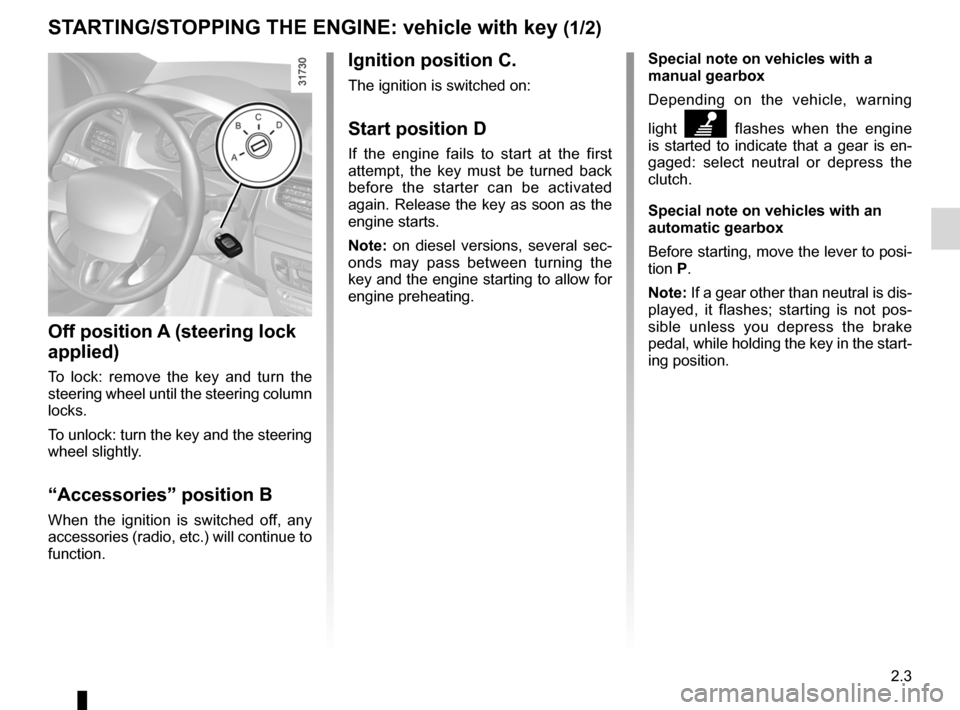
Ignition position C.
The ignition is switched on:
Start position D
If the engine fails to start at the first
attempt, the key must be turned back
before the starter can be activated
again. Release the key as soon as the
engine starts.
Note: on diesel versions, several sec -
onds may pass between turning the
key and the engine starting to allow for
engine preheating.
Off position A (steering lock
applied)
To lock: remove the key and turn the
steering wheel until the steering column
locks.
To unlock: turn the key and the steering
wheel slightly.
“Accessories” position B
When the ignition is switched off, any
accessories (radio, etc.) will continue to
function.
St ARtING/St OPPING the eNGINe: vehicle with key (1/2)
Page 93 of 241

starting the engine ................................ (up to the end of the DU)
engine start/stop button ........................ (up to the end of the DU)
starting the engine ................................ (up to the end of the DU)
driving ................................................... (up to the end of the DU)
2.5
ENG_UD13650_1
Démarrage / Arrêt moteur avec carte RENAULT mains libres (L38 - X38 - Renault)
ENG_NU_891_892-7_L38-B32_Renault_2
Starting/stopping the engine: vehicle with Renault card
St ARtING/St OPPING the eNGINe: vehicle with ReNAULt CARD (1/3)
hands-free ReNAUL t card
The RENAULT card must be inserted
in card reader 2 or in detection zone 3.
To start, depress the brake or clutch
pedal and press button 1 . If a gear
is engaged, the vehicle may only be
started by depressing the clutch pedal.
Starting
vehicles with an automatic gearbox
The lever should be in position P.
For all vehicles:
– if one of the starting conditions is
not met the message “Press brake +
START”, “Press clutch + START” or
“Gear lever to P” is displayed on the
instrument panel.
– In some cases it will be necessary to
move the steering wheel while press-
ing start button 1 to assist in unlock -
ing the steering column; a message
on the instrument panel “Turn steer-
ing wheel + START” warns of this.
3
12
Starting with the tailgate
open (in hands-free mode)
In this case, the RENAULT card must
not be located in the luggage compart-
ment.
Page 100 of 241

2.12
ENG_UD20973_7
Conseils antipollution, économie de carburant, conduite (X45 - H45 -\
X85 - B85 - C85 - S85 - X91 - X83 - X61 - F61 - K61 - K85 - X95 - B95 -\
D95 - J95 - R95 - L38 - X61
ENG_NU_891_892-7_L38-B32_Renault_2
Jaune NoirNoir texte
ADVICe: antipollution, fuel economy and driving (2/3)
– Sporty driving uses a lot of fuel: drive
with a light right foot.
– Brake as little as possible. If you an-
ticipate an obstacle or bend in ad -
vance, you may then simply release
the accelerator pedal.
– Do not try to maintain the same
speed up a hill, accelerate no more
than you would on the level. Keep
your foot in the same position on the
accelerator pedal.
– Double declutching and accelerating
before switching off are unnecessary
in modern vehicles.
– Bad weather, flooded roads:
Do not drive through floods
if the water is above the
lower edge of the wheel
rims.Driving– Drive carefully for the first few miles
until the engine reaches its normal
operating temperature, rather than
let it warm up while the vehicle is sta-
tionary.
– Speed is expensive.
– Do not overrev the engine in the in-
termediate gears.
Always use the highest gear possi -
ble without labouring the engine.
On versions with an automatic gear-
box, it is preferable to keep the gear
lever in position D.
– Avoid sudden acceleration.
exhaust gas monitoring
system
The exhaust gas monitoring system will
detect any operating faults in the vehi-
cle’s antipollution system.
If this system malfunctions, toxic sub -
stances may be released into the at -
mosphere or damage may occur.
ÄThis warning light on the in -
strument panel will indicate if
there are any faults in the system:
This lights up when the ignition is
switched on and goes out when the
engine is started.
– If it lights up continuously, consult an
approved Dealer as soon as possi -
ble;
– if it flashes, reduce the engine speed
until the light stops flashing. Contact
your approved dealer as soon as
possible.
Obstructions to the driver
On the driver ’s side, only
use mats adapted to the ve-
hicle that attach to the pre-
installed parts, and regularly check
their mounting. Do not place several
mats on top of each other.
Risk of pedals jamming
Page 103 of 241
tyres ...................................................... (up to the end of the DU)
tyre pressure monitor ............................(up to the end of the DU)
tyre pressure ......................................... (up to the end of the DU)
driving ................................................... (up to the end of the DU)
2.15
ENG_UD24232_3
Système de surveillance de pression des pneumatiques (L38 - X38 - Re\
nault)
ENG_NU_891_892-7_L38-B32_Renault_2
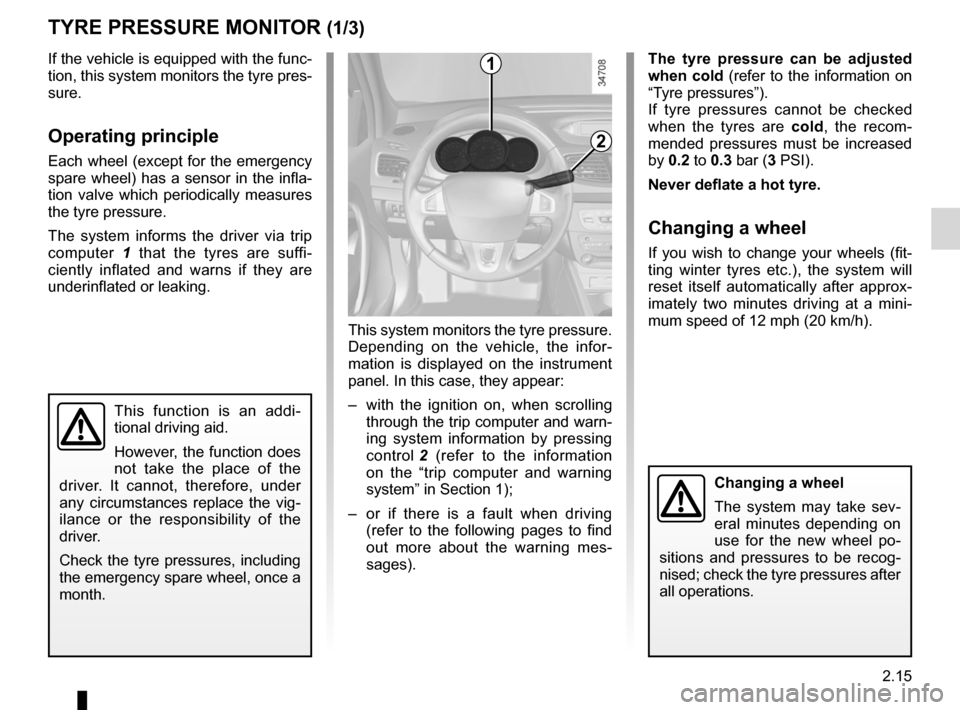
This system monitors the tyre pressure.
Depending on the vehicle, the infor -
mation is displayed on the instrument
panel. In this case, they appear:
– with the ignition on, when scrolling
through the trip computer and warn-
ing system information by pressing
control 2 (refer to the information
on the “trip computer and warning
system” in Section 1);
– or if there is a fault when driving
(refer to the following pages to find
out more about the warning mes -
sages).
Tyre pressure monitor
This function is an addi -
tional driving aid.
However, the function does
not take the place of the
driver. It cannot, therefore, under
any circumstances replace the vig -
ilance or the responsibility of the
driver.
Check the tyre pressures, including
the emergency spare wheel, once a
month.
tyRe PReSSURe MONIt OR (1/3)
If the vehicle is equipped with the func-
tion, this system monitors the tyre pres-
sure.
Operating principle
Each wheel (except for the emergency
spare wheel) has a sensor in the infla-
tion valve which periodically measures
the tyre pressure.
The system informs the driver via trip
computer 1 that the tyres are suffi -
ciently inflated and warns if they are
underinflated or leaking.
t he tyre pressure can be adjusted
when cold (refer to the information on
“Tyre pressures”).
If tyre pressures cannot be checked
when the tyres are cold, the recom -
mended pressures must be increased
by 0.2 to 0.3 bar (3 PSI).
Never deflate a hot tyre.
Changing a wheel
If you wish to change your wheels (fit-
ting winter tyres etc.), the system will
reset itself automatically after approx -
imately two minutes driving at a mini -
mum speed of 12 mph (20 km/h).
1
Changing a wheel
The system may take sev -
eral minutes depending on
use for the new wheel po -
sitions and pressures to be recog -
nised; check the tyre pressures after
all operations.
2
Page 104 of 241

ENG_NU_891_892-7_L38-B32_Renault_2
Jaune NoirNoir texte
Display
The trip computer 3 and, dependin")
2.16
ENG_UD24232_3
Système de surveillance de pression des pneumatiques (L38 - X38 - Re\
nault)
ENG_NU_891_892-7_L38-B32_Renault_2
Jaune NoirNoir texte
Display
The trip computer 3 and, depending
on the vehicle, display 4 informs you of
any tyre pressure faults (flat tyre, punc-
tured tyre, system fault, etc.).
“Inflate tyres for motorway”
If all four wheels B are shaded, the tyre
pressure is not adapted to the driving
speed. Slow down or inflate all four
tyres to “motorway pressure” (refer to
the label located on the label on the
edge of the driver’s door).
tyRe PReSSURe MONIt OR (2/3)
“tyre pressure sensors absent ” or
“Check tyre pressure sensors ”
One wheel A disappears, indicating
that the sensor on this wheel is missing
or faulty (e.g. if the emergency spare
wheel is fitted).
“Adjust tyre pressure
”
A shaded wheel A indicates a deflated
tyre.
“Puncture”
Wheel B indicates that the tyre con -
cerned is punctured or severely un -
derinflated. Replace it or contact an
approved Dealer if it is punctured. Top
up the tyre pressure if the wheel is de-
flated.
This message appears along with the
® warning light.
A
B
34
3
Page 105 of 241

ENG_NU_891_892-7_L38-B32_Renault_2
t yre repair product and
inflation kit
Because")
JauneNoirNoir texte
2.17
ENG_UD24232_3
Système de surveillance de pression des pneumatiques (L38 - X38 - Re\
nault)
ENG_NU_891_892-7_L38-B32_Renault_2
t yre repair product and
inflation kit
Because the valves are specially de -
signed, only use equipment approved
by the approved network.
tyRe PReSSURe MONIt OR (3/3)
emergency spare wheel
If the vehicle is equipped with an emer-
gency spare wheel, it will not have a
sensor. When it is fitted to the vehicle,
the message “ Tyre pressure sensors
absent” is displayed on the instrument
panel.
Replacing wheels/tyres
This system requires specific equip -
ment (wheels, tyres, sensors, etc.).
Contact an approved dealer to replace
the tyres and to find out about avail -
able accessories compatible with the
system: the use of any other accessory
could affect the correct operation of the
system or damage a sensor.
Page 106 of 241
ABS ...................................................... (up to the end of the DU)
anti-lock braking system: ABS ..............(up to the end of the DU)
emergency brake assist ........................(up to the end of the DU)
emergency braking ............................... (up to the end of the DU)
driving ................................................... (up to the end of the DU)
ASR (traction control) ........................... (up to the end of the DU)
traction control: ASR .............................(up to the end of the DU)
traction control system: ASR ................(up to the end of the DU)
electronic stability control: ESC ............ (up to the end of the DU)
ESC: electronic stability control ............ (up to the end of the DU)
Hill Start Assist...................................... (up to the end of the DU)
hill descent control ................................ (up to the end of the DU)
2.18
ENG_UD26632_2
Dispositifs de correction et d’assistance à la conduite (X95 - B\
95 - D95 - E95 - K95 - Renault)
ENG_NU_891_892-7_L38-B32_Renault_2
Jaune NoirNoir texte
Driver correction devices and aids
DRIVeR CORReCtION DeVICeS/AIDS (1/4)
Depending on the vehicle, this is com-
posed of:
– t h e A B S ( a n t i - l o c k b r a k i n g
system);
– electronic stability control e SC
with understeer control and trac -
tion control ASR ;
– emergency brake assist with, de -
pending on the vehicle, braking
anticipation.
In an emergency, apply firm and
continuous pressure to the brake
pedal. There is no need to pump
it repeatedly. The ABS will modu -
late the force applied in the braking
system.
These functions are an ad-
ditional aid in the event of
critical driving conditions,
enabling the vehicle behav -
iour to be adapted to suit the driving
conditions.
However, the functions do not take
the place of the driver. they do
not increase the vehicle’s limits
and should not encourage you
to drive more quickly. Therefore,
they can under no circumstances
replace the vigilance or responsibil -
ity of the driver when manoeuvring
the vehicle (the driver must always
be ready for sudden incidents which
may occur when driving).
Yo u r b r a k i n g s y s t e m s
are partially operational.
However, it is dangerous
to brake suddenly and
it is essential to stop immediately,
as soon as traffic conditions allow.
Contact an approved dealer.
Operating faults:
–
© and x lit up on the in -
strument panel alongside mes -
sages “ Check ABS ”, “Check brak -
ing system” and “Check ESC”: ABS,
ESC and emergency brake assist
are deactivated. Braking is always
enabled;
–
x, D, © and ® lit
up on the instrument panel alongside
the message “Braking system fault”:
this indicates a fault in the braking
system.
In both cases, consult an approved
Dealer.
ABS (anti-lock braking
system)
Under heavy braking, the ABS prevents
the wheels from locking, allowing the
stopping distance to be managed and
keeping control of the vehicle.
Under these circumstances, the vehi -
cle can be steered to avoid an obstacle
whilst braking. In addition, this system
can increase stopping distances, par -
ticularly on roads with low surface grip
(wet ground etc.).
You will feel a pulsation through the
brake pedal each time the system is
activated. The ABS does not in any way
improve the vehicle’s physical perform-
ance relating to the road surface and
roadholding. It is still essential to follow
the rules of good driving practice (such
as driving at a safe distance from the
vehicle in front etc.).
Page 108 of 241

ENG_NU_891_892-7_L38-B32_Renault_2
Jaune NoirNoir texte
DRIVeR CORReCtION DeVIC")
2.20
ENG_UD26632_2
Dispositifs de correction et d’assistance à la conduite (X95 - B\
95 - D95 - E95 - K95 - Renault)
ENG_NU_891_892-7_L38-B32_Renault_2
Jaune NoirNoir texte
DRIVeR CORReCtION DeVICeS/AIDS (3/4)
electronic stability control
eSC with understeer control
and traction control ASR
electronic stability control eSC
This system helps you to keep control
of the vehicle in critical driving condi -
tions (avoiding an obstacle, loss of grip
on a bend, etc.).
Operating principle
A sensor in the steering wheel detects
the direction selected by the driver.
Other sensors throughout the vehicle
measure the actual direction.
The system compares driver input to
the actual trajectory of the vehicle and
corrects the trajectory if necessary by
controlling the braking of certain wheels
and/or engine power. In the event that
the system is engaged, indicator light
flashes on the instrument panel. Understeer control
This system optimises the action of the
ESC in the case of pronounced under
-
steer (loss of front axle road holding).
t raction control ASR
This system helps to limit wheelspin of
the drive wheels and to control the ve-
hicle when pulling away accelerating or
decelerating.
Operating principle
Using the wheel sensors, the system
measures and compares the speed of
the drive wheels at all times and slows
down their over-rotation. If a wheel is
starting to slip, the system brakes au -
tomatically until the drive supplied be -
comes compatible with the level of grip
under the wheel again.
The system also adjusts the engine
speed to the grip available under the
wheels, independently of the pressure
exerted on the accelerator pedal. Operating faults
When the system detects an operat
-
ing fault the message “Check ESC” and
warning light
© appear on the in-
strument panel. In this case, the ESC
and ASR are deactivated.
Consult an approved dealer.
Page 109 of 241

ENG_NU_891_892-7_L38-B32_Renault_2
The traction control")
JauneNoirNoir texte
2.21
ENG_UD26632_2
Dispositifs de correction et d’assistance à la conduite (X95 - B\
95 - D95 - E95 - K95 - Renault)
ENG_NU_891_892-7_L38-B32_Renault_2
The traction control ASR offers addi -
tional safety, it is recommended that
you do not drive with the function disa-
bled. Correct this as soon as possible
by pressing switch 1 again.
Note: the function is reactivated auto -
matically when the ignition is switched
on or when a speed of approximately
24 mph (40 km/h) is exceeded.
emergency brake assist
This system supplements the ABS
and helps reduce vehicle stopping dis-
tances.
Operating principle
The system is for detecting an emer -
gency braking situation. In this case,
the braking assistance immediately de-
velops maximum power and may trig -
ger ABS regulation.
ABS braking is maintained as long as
the brake pedal is applied.
hazard warning lights switching on
Depending on the vehicle, these may
light up in the event of sudden decel -
eration.
Operating faults
When the system detects an operat -
ing fault the message “ Check brak-
ing system” appears on the instrument
panel along with the
© warning
light.
Consult an approved dealer.
Braking anticipation
Depending on the vehicle, when you
rapidly release the accelerator, the
system anticipates the braking ma -
noeuvre in order to reduce stopping
distances.
Special cases
When using the cruise control:
– if you use the accelerator, when you
release it, the system may be trig -
gered;
– if you do not use the accelerator, the
system will not be triggered.
DRIVeR CORReCtION DeVICeS/AIDS (4/4)
Disabling the function ASR
In some situations (driving on very wet
ground: snow, mud, etc. or driving with
snow chains fitted), the system may
reduce the engine output to limit wheel -
spin. If this is not required, it is possible
to deactivate the function by pressing
switch 1.
The message “ Traction control off ” is
displayed on the instrument panel to
inform you.
1
Page 127 of 241
JauneNoirNoir texte
2.39
ENG_UD27296_4
Boîte automatique (L38 - X38 - Renault)
ENG_NU_891_892-7_L38-B32_Renault_2
Parking the vehicle
When the vehicle is stopped, move the
lever to position P while keeping your
foot on the brake pedal: the gearbox is
in neutral and the drive wheels are me-
chanically locked by the driveshaft.
Apply the handbrake or, depending
on the vehicle, ensure that the elec-
tronic parking brake is applied.
Special circumstances
– If the road contours and bends
do not allow you to stay in auto -
matic mode (e.g.: in the mountains),
we recommend that you change to
manual mode.
This will prevent the automatic gear-
box from changing gears repeatedly
when climbing, and permit engine
braking on long descents.
– In cold weather, to prevent the
engine from stalling, wait a few mo-
ments before shifting the selector
lever from position P or N and en -
gaging D or R.
Driving in manual mode
With the selector lever in position D,
move the lever to the left. Shifting the
lever repeatedly allows you to change
gears manually:
– To move down through the gears,
push the lever backwards.
– To move up through the gears, push
the lever forwards.
The gear selected is displayed on the
instrument panel.
Special cases
Under certain driving conditions (e.g.
engine protection, electronic stability
program (ESP) operational etc.: ESC)
the automatic system may change gear
automatically.
Likewise, to prevent incorrect manoeu -
vres, a gear change may be refused by
the automatic system: in this case the
gear display flashes for a few seconds
as a warning.
AUt OMA tIC tRANSMISSION (2/3)
In very cold weather, the system
may prevent the gears from being
shifted in manual mode until the
gearbox reaches the right tempera-
ture.
An impact to the underside
of the vehicle (e.g.: striking
a post, raised kerb or other
street furniture) may result
in damage to the vehicle (e.g.: de -
formation of an axle).
To avoid any risk of accident, have
your vehicle checked by an ap -
proved Dealer.