Eco mode RENAULT KADJAR 2016 1.G User Guide
[x] Cancel search | Manufacturer: RENAULT, Model Year: 2016, Model line: KADJAR, Model: RENAULT KADJAR 2016 1.GPages: 300, PDF Size: 3.29 MB
Page 137 of 300
2.33
Advanced traction control
If fitted on the vehicle, grip control
makes it easier to control the vehicle on
low grip surfaces (soft ground, etc.).
DRIVING CORRECTION DEVICES AND AIDS (5/10)
For your safety, please re-
spect the speed limit.
When they need to be re-
placed, only tyres of the
same make, size, type and profile
should be used on a single axle.
They must: either have a load ca-
pacity and speed rating at least
equal to those of the original
tyres, or conform to those recom-
mended by an authorised dealer.
Failure to heed these instructions
could endanger your safety and
affect your vehicle’s roadworthi-
ness.
Risk of loss of control of the ve-
hicle.
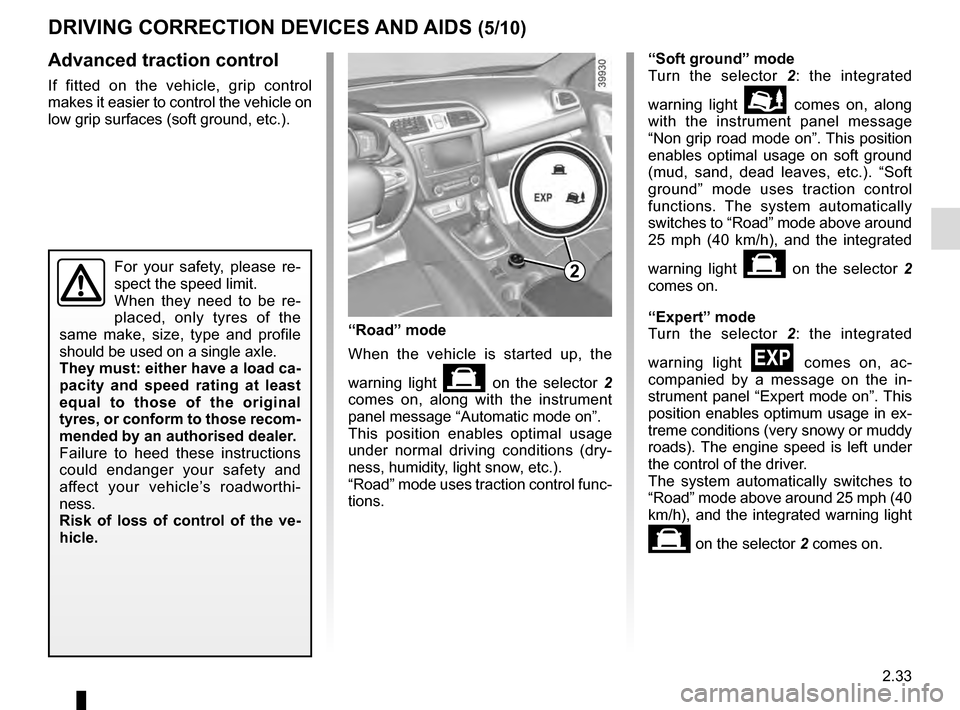
“Road” mode
When the vehicle is started up, the
warning light
on the selector 2
comes on, along with the instrument
panel message “Automatic mode on”.
This position enables optimal usage
under normal driving conditions (dry-
ness, humidity, light snow, etc.).
“Road” mode uses traction control func-
tions. “Soft ground” mode
Turn the selector 2
: the integrated
warning light
\b comes on, along
with the instrument panel message
“Non grip road mode on”. This position
enables optimal usage on soft ground
(mud, sand, dead leaves, etc.). “Soft
ground” mode uses traction control
functions. The system automatically
switches to “Road” mode above around
25 mph (40 km/h), and the integrated
warning light
on the selector 2
comes on.
“Expert” mode
Turn the selector 2 : the integrated
warning light
comes on, ac-
companied by a message on the in-
strument panel “Expert mode on”. This
position enables optimum usage in ex-
treme conditions (very snowy or muddy
roads). The engine speed is left under
the control of the driver.
The system automatically switches to
“Road” mode above around 25 mph (40
km/h), and the integrated warning light
on the selector 2 comes on.
2
Page 143 of 300
2.39
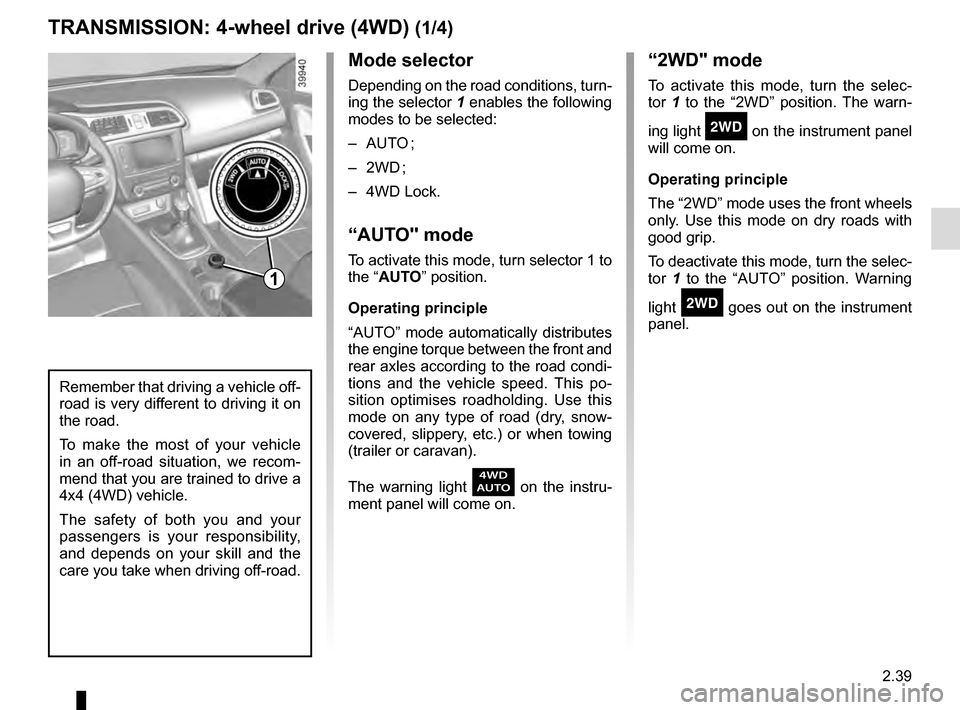
Mode selector
Depending on the road conditions, turn-
ing the selector 1 enables the following
modes to be selected:
– AUTO ;
– 2WD ;
– 4WD Lock.
“AUTO" mode
To activate this mode, turn selector 1 to
the “AUTO” position.
Operating principle
“AUTO” mode automatically distributes
the engine torque between the front and
rear axles according to the road condi-
tions and the vehicle speed. This po-
sition optimises roadholding. Use this
mode on any type of road (dry, snow-
covered, slippery, etc.) or when towing
(trailer or caravan).
The warning light
\f on the instru-
ment panel will come on.
TRANSMISSION: 4-wheel drive (4WD) (1/4)
“2WD" mode
To activate this mode, turn the selec-
tor 1 to the “2WD” position. The warn-
ing light
‘ on the instrument panel
will come on.
Operating principle
The “2WD” mode uses the front wheels
only. Use this mode on dry roads with
good grip.
To deactivate this mode, turn the selec-
tor 1 to the “AUTO” position. Warning
light
‘ goes out on the instrument
panel.
Remember that driving a vehicle off-
road is very different to driving it on
the road.
To make the most of your vehicle
in an off-road situation, we recom-
mend that you are trained to drive a
4x4 (4WD) vehicle.
The safety of both you and your
passengers is your responsibility,
and depends on your skill and the
care you take when driving off-road.
1
Page 144 of 300
2.40
TRANSMISSION: 4-wheel drive (4WD) (2/4)
This problem may be resolved by
changing the tyres. Always use four
identical tyres (same brand, profile,
etc.) and with similar wear.
In the event of excessive wheelspin, the
mechanical components may overheat.
If this happens:
– at first, the
’ warning light
comes on. “4WD Lock” mode is still
active – however, we recommend
that you stop as soon as possible to
allow the system to cool down (until
the warning light goes out);
– if the wheels still spin, the system au- tomatically switches to “2WD” mode
to protect the mechanical compo-
nents.
The message “4WD overheating” is
displayed on the instrument panel.
The mode cannot be changed while
the message is displayed.
Note: If the vehicle speed exceeds
approximately 24.8 mph (40 km/h) in
“4WD Lock” mode, the system auto-
matically switches back to “AUTO”
mode.
The
’ warning light goes out and
the
\f warning light comes on.
Special features of the
4-wheel drive transmission
The vehicle may make more noise when
the “AUTO" or "4WD Lock" modes are
activated. This is normal. If the system
detects a difference in the dimensions
of the front and rear wheels (eg. un-
derinflation, severe wear on an axle),
the system automatically switches to
"2WD" mode.
The message “4WD unavailable unsuit-
able tyres” is displayed on the instru-
ment panel. Drive as soon as possible
at a moderate speed to an approved
dealer.
“4WD Lock" mode
To activate this mode, turn selector 1 to
the “4WD Lock” position. The selector
the returns to the “AUTO” position. The
’ indicator light will light up on the
instrument panel.
Operating principle
“4WD Lock” mode distributes the
engine torque between the front and
rear axles in order to optimise the per-
formance capacity of the vehicle in off-
road situations. This mode should only
be used in extreme driving conditions
(mud, steep slopes, sand).
To deactivate this mode, turn selector 1
to the “4WD Lock” position again. The
warning light goes out on the instru-
ment panel.
Page 145 of 300
2.41
TRANSMISSION: 4-wheel drive (4WD) (3/4)
Electronic stability program and
traction control when driving off-
road
When driving on soft ground (sand,
mud, deep snow), we recommend that
you deactivate the ESC function by
pressing the “ESC” switch.
In this case, only individual wheel brak-
ing remains active. This function ap-
plies the brake to any wheel that is slip-
ping, allowing the engine torque to be
transferred to the wheels with the most
grip. This is particularly useful when
crossing a bridge.
All the ESC functions will be reacti-
vated when the vehicle speed reaches
approximately 31 mph (50 km/h) (24.8
mph [40 km/h] in 4WD Lock mode),
when the engine is restarted or when
the “ESC” switch is pressed again.Operating faults
If the system detects an operating fault,
it automatically switches to “2WD”
mode. The message “Check 4WD” is
displayed on the instrument panel, and
the
‘ and © warning lights
come on.
Drive as soon as possible at a moder-
ate speed to an approved dealer.
For certain operating faults, the system
may not be able to switch to “2WD" or
"4WD Lock" mode. "AUTO" mode re-
mains active.
Contact an approved dealer as soon as
possible.
After stopping the engine, the system
may take up to five minutes to cool
down.
If the system detects excessive wheel-
spin on the front wheels, it adapts the
engine to run in a way that reduces
wheelspin.
Anti-lock braking in
LOCK mode
When “4WD Lock" mode is active, the
ABS switches to off-road mode. In this
case, the wheels may lock intermit-
tently to achieve better grip, thus reduc-
ing braking distances on soft ground.
When this mode is active:
– the vehicle’s manoeuvrability is lim- ited during braking. This operating
mode is therefore not recommended
in very low-grip conditions (eg. ice).
– there may be some noise. This is normal, and does not indicate an op-
erating fault.
Page 168 of 300
2.64
Automatic deactivation of the
parking distance control
The system deactivates:
– when the vehicle speed is above ap-proximately 6 mph (10 km/h);
– depending on the model, when the vehicle is stationary for more than
approximately 5 seconds and an ob-
stacle is detected (such as when in a
traffic jam, etc.);
– when the vehicle is in neutral for manual gearboxes, or in position N
or P for automatic gearboxes.
PARKING DISTANCE CONTROL (5/5)
Operating faults
When the system detects an operating
fault, a beep sounds for approximately
3 seconds each time reverse gear is se-
lected and is accompanied by the mes-
sage “Check parking sensor” shown on
the instrument panel. Please consult an
authorised dealer.
Page 173 of 300
2.69
ASSISTED PARKING (3/4)
Your speed should not exceed around
4 mph (7 km/h).
Once in position to exit the space, the
system will notify you of the end of the
manoeuvre.
Once the warning light
on the
instrument panel goes off and a beep
sounds, the manoeuvre has been com-
pleted.
Suspending the manoeuvreThe manoeuvre is suspended in the fol-
lowing circumstances:
– you take control of the wheel;
– a door or the boot is opened;
– the vehicle is at a standstill for too long;
– an obstacle in the direction of move- ment prevents the manoeuvre from
being completed;
– the engine will stop.
Once the warning light
on the
instrument panel goes off and a beep
sounds, the manoeuvre has been sus-
pended. Then to resume the manoeu-
vre, press and hold the system activa-
tion switch. In this case, the reason for suspending
the manoeuvre will be displayed on the
multifunction screen.
Make sure:
– you have released the steering wheel
and;
– that all doors and the boot are closed, and;
– that no obstacles are in the way of the direction of movement, and;
– that the engine is started.
Cancelling the manoeuvre
The manoeuvre can be stopped in the
following cases:
– by pressing the system activation switch;
– the vehicle speed has exceeded 4 mph (7 km/h);
– You have performed more than ten forwards/backwards movements in
one manoeuvre;
– the parking distance control sensors are dirty or blocked;
– the vehicle wheels have skidded.
Once the warning light
on the
instrument panel goes off and a beep
sounds, the manoeuvre has been
ended.
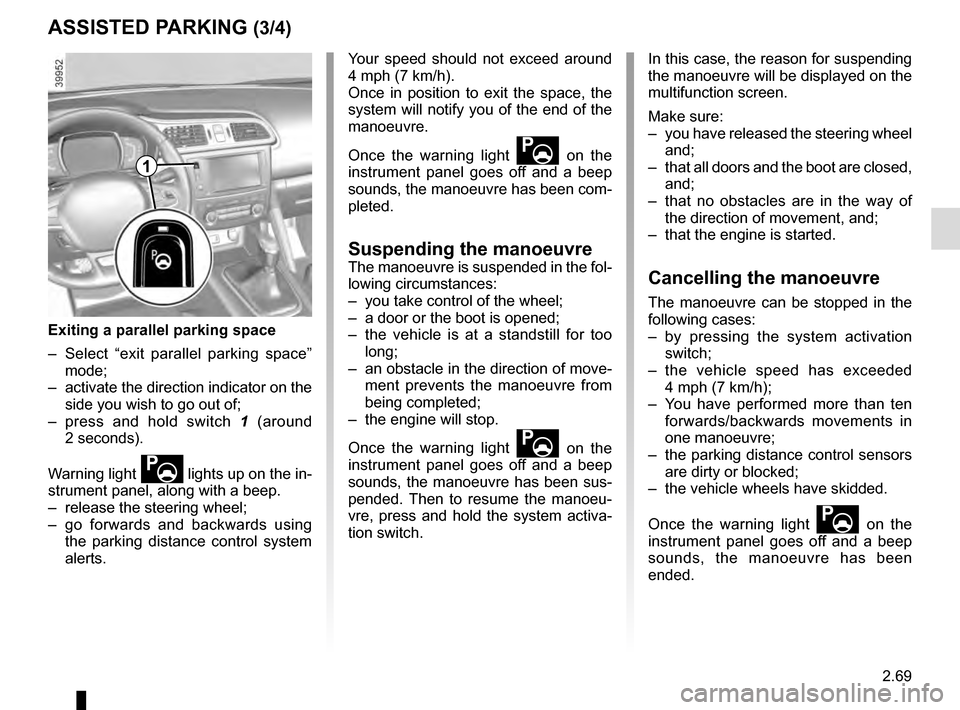
Exiting a parallel parking space
– Select “exit parallel parking space” mode;
– activate the direction indicator on the side you wish to go out of;
– press and hold switch 1 (around
2 seconds).
Warning light
lights up on the in-
strument panel, along with a beep.
– release the steering wheel;
– go forwards and backwards using the parking distance control system
alerts.
1
Page 175 of 300
2.71
AUTOMATIC TRANSMISSION (1/3)
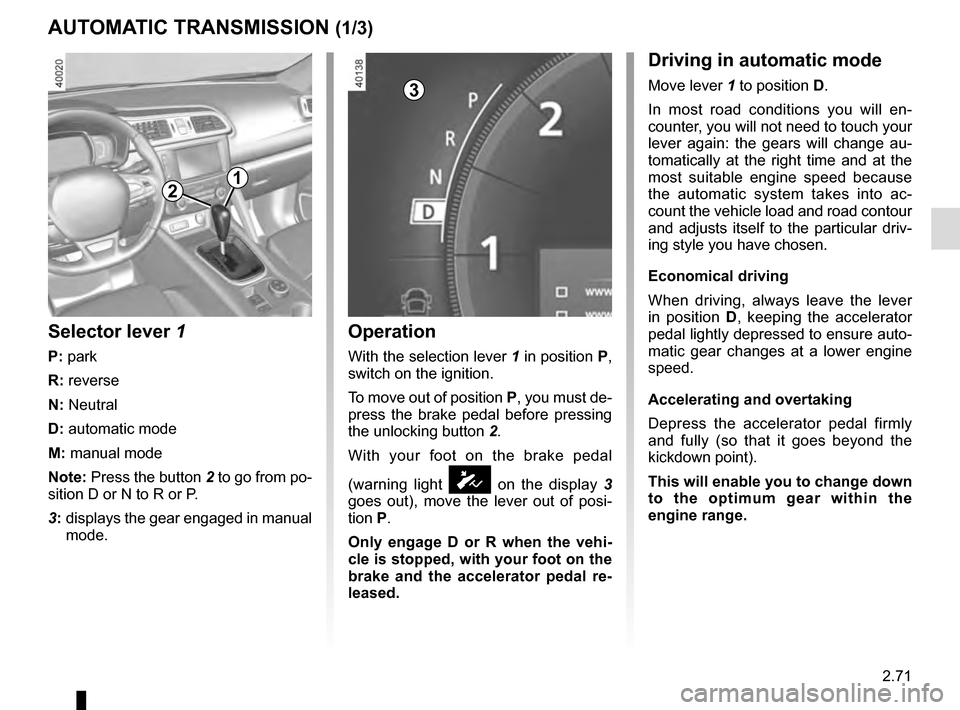
Operation
With the selection lever 1 in position P,
switch on the ignition.
To move out of position P, you must de-
press the brake pedal before pressing
the unlocking button 2.
With your foot on the brake pedal
(warning light
Ó on the display 3
goes out), move the lever out of posi-
tion P.
Only engage D or R when the vehi-
cle is stopped, with your foot on the
brake and the accelerator pedal re-
leased.
Selector lever 1
P: park
R: reverse
N: Neutral
D: automatic mode
M: manual mode
Note: Press the button 2 to go from po-
sition D or N to R or P.
3: displays the gear engaged in manual
mode.
12
Driving in automatic mode
Move lever 1 to position D.
In most road conditions you will en-
counter, you will not need to touch your
lever again: the gears will change au-
tomatically at the right time and at the
most suitable engine speed because
the automatic system takes into ac-
count the vehicle load and road contour
and adjusts itself to the particular driv-
ing style you have chosen.
Economical driving
When driving, always leave the lever
in position D, keeping the accelerator
pedal lightly depressed to ensure auto-
matic gear changes at a lower engine
speed.
Accelerating and overtaking
Depress the accelerator pedal firmly
and fully (so that it goes beyond the
kickdown point).
This will enable you to change down
to the optimum gear within the
engine range.3
Page 176 of 300
2.72
AUTOMATIC TRANSMISSION (2/3)
Special cases
In certain driving conditions (for exam-
ple, engine protection, operation of the
Electronic Stability Programme: the au-
tomatic system may change gear auto-
matically.
Likewise, to prevent incorrect manoeu-
vres, a gear change may be refused by
the automatic system: in this case the
gear display flashes for a few seconds
as a warning.
Special circumstances
– If the bends and road surface do
not allow you to stay in automatic
mode (e.g. in the mountains), we
recommend that you change to
manual mode. This will prevent the
automatic gearbox from changing
gear repeatedly when climbing, and
permit engine braking on long de-
scents.
– In cold weather , start the engine
and wait a few seconds before
moving the selector lever from posi-
tion P or N and engaging it in D or R
to prevent the engine stalling.
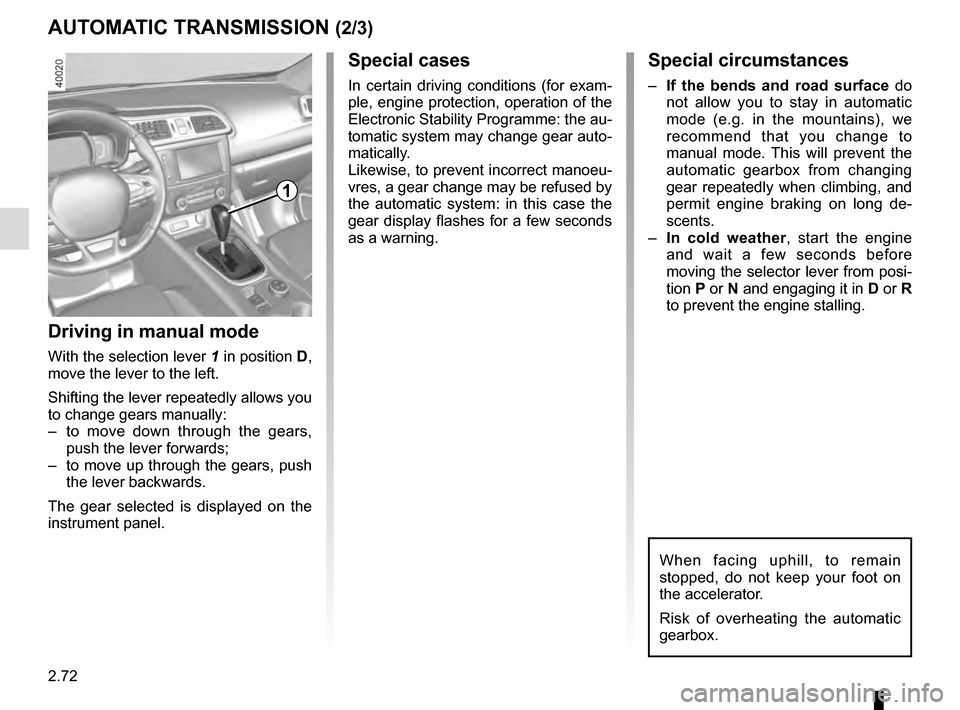
Driving in manual mode
With the selection lever 1 in position D,
move the lever to the left.
Shifting the lever repeatedly allows you
to change gears manually:
– to move down through the gears, push the lever forwards;
– to move up through the gears, push the lever backwards.
The gear selected is displayed on the
instrument panel.
1
When facing uphill, to remain
stopped, do not keep your foot on
the accelerator.
Risk of overheating the automatic
gearbox.
Page 183 of 300
3.5
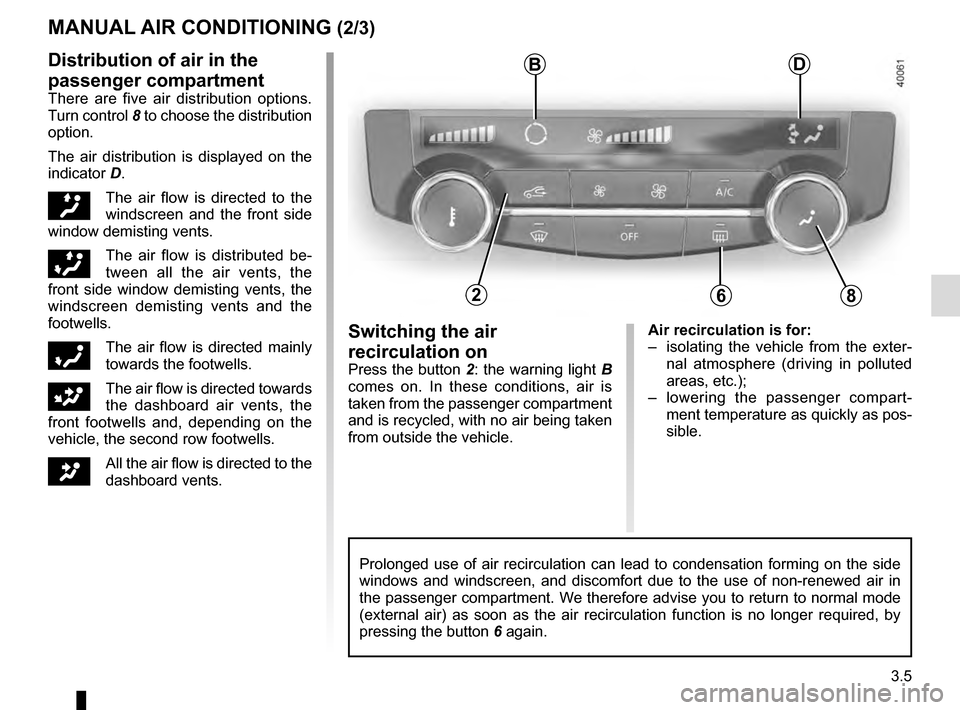
Air recirculation is for:
– isolating the vehicle from the exter-nal atmosphere (driving in polluted
areas, etc.);
– lowering the passenger compart- ment temperature as quickly as pos-
sible.Switching the air
recirculation on
Press the button 2: the warning light B
comes on. In these conditions, air is
taken from the passenger compartment
and is recycled, with no air being taken
from outside the vehicle.
MANUAL AIR CONDITIONING (2/3)
Prolonged use of air recirculation can lead to condensation forming on t\
he side
windows and windscreen, and discomfort due to the use of non-renewed air\
in
the passenger compartment. We therefore advise you to return to normal mode
(external air) as soon as the air recirculation function is no longer \
required, by
pressing the button 6 again.
Distribution of air in the
passenger compartment
There are five air distribution options.
Turn control 8 to choose the distribution
option.
The air distribution is displayed on the
indicator D.
õThe air flow is directed to the
windscreen and the front side
window demisting vents.
÷The air flow is distributed be-
tween all the air vents, the
front side window demisting vents, the
windscreen demisting vents and the
footwells.
óThe air flow is directed mainly
towards the footwells.
GThe air flow is directed towards
the dashboard air vents, the
front footwells and, depending on the
vehicle, the second row footwells.
JAll the air flow is directed to the
dashboard vents.
B
682
D
Page 187 of 300
3.9
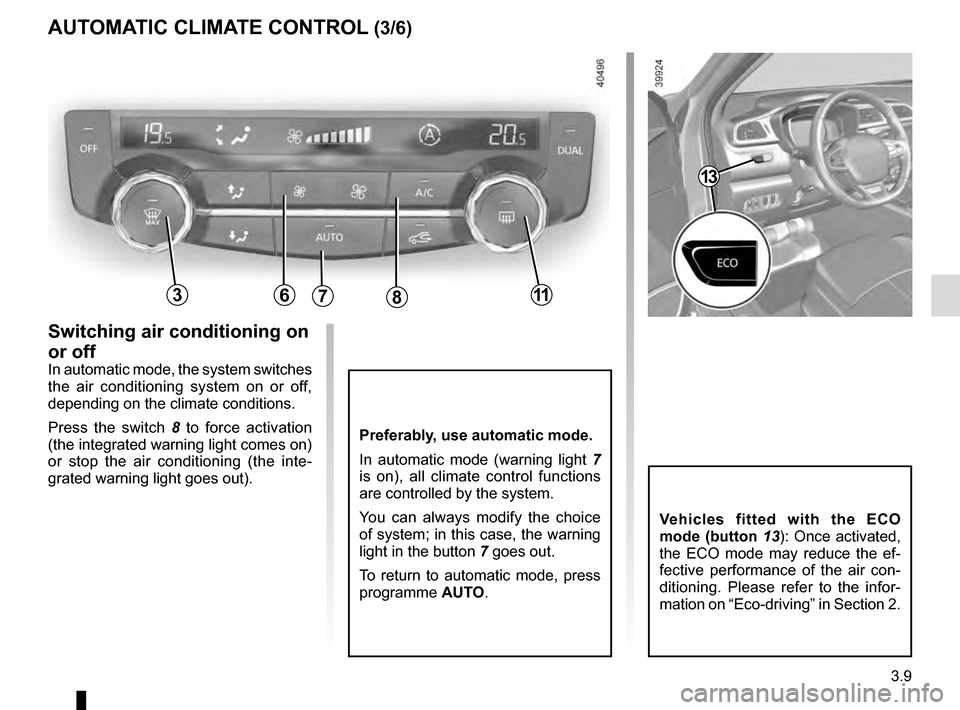
Preferably, use automatic mode.
In automatic mode (warning light 7
is on), all climate control functions
are controlled by the system.
You can always modify the choice
of system; in this case, the warning
light in the button 7 goes out.
To return to automatic mode, press
programme AUTO.
AUTOMATIC CLIMATE CONTROL (3/6)
Switching air conditioning on
or off
In automatic mode, the system switches
the air conditioning system on or off,
depending on the climate conditions.
Press the switch 8 to force activation
(the integrated warning light comes on)
or stop the air conditioning (the inte-
grated warning light goes out).
786311
Vehicles fitted with the ECO
mode (button 13): Once activated,
the ECO mode may reduce the ef-
fective performance of the air con-
ditioning. Please refer to the infor-
mation on “Eco-driving” in Section 2.
13