Sd card RENAULT KADJAR 2016 1.G User Guide
[x] Cancel search | Manufacturer: RENAULT, Model Year: 2016, Model line: KADJAR, Model: RENAULT KADJAR 2016 1.GPages: 300, PDF Size: 3.29 MB
Page 21 of 300
1.15
LOCKING, UNLOCKING THE DOORS (3/3)
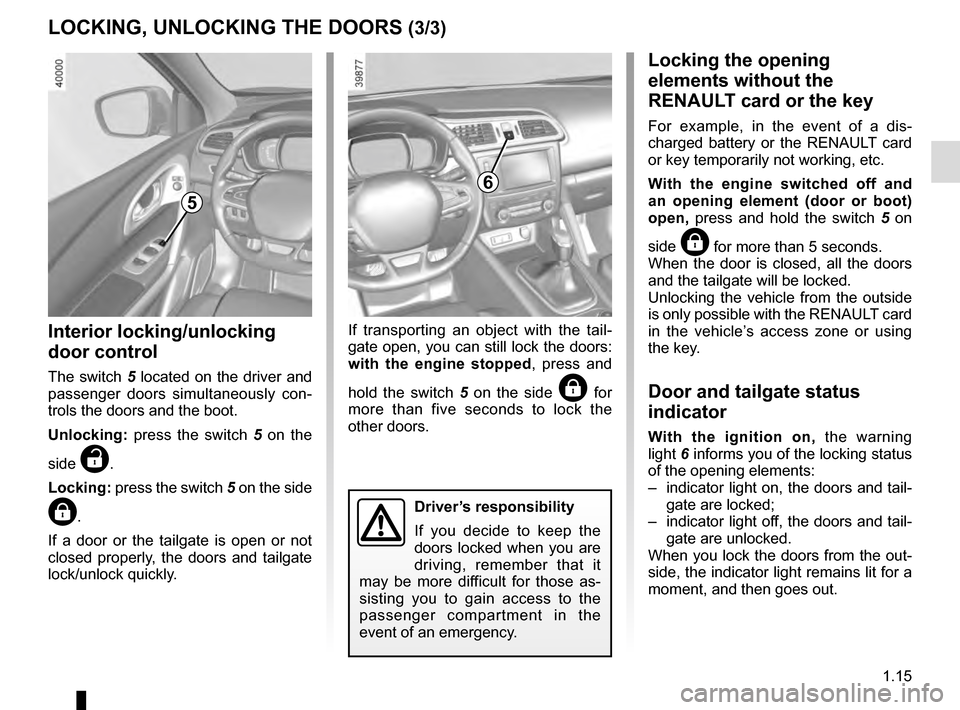
Interior locking/unlocking
door control
The switch 5 located on the driver and
passenger doors simultaneously con-
trols the doors and the boot.
Unlocking: press the switch 5 on the
side
‡.
Locking: press the switch 5 on the side
….
If a door or the tailgate is open or not
closed properly, the doors and tailgate
lock/unlock quickly. If transporting an object with the tail-
gate open, you can still lock the doors:
with the engine stopped
, press and
hold the switch 5 on the side
… for
more than five seconds to lock the
other doors.
Locking the opening
elements without the
RENAULT card or the key
For example, in the event of a dis-
charged battery or the RENAULT card
or key temporarily not working, etc.
With the engine switched off and
an opening element (door or boot)
open, press and hold the switch 5 on
side
… for more than 5 seconds.
When the door is closed, all the doors
and the tailgate will be locked.
Unlocking the vehicle from the outside
is only possible with the RENAULT card
in the vehicle’s access zone or using
the key.
Door and tailgate status
indicator
With the ignition on, the warning
light 6 informs you of the locking status
of the opening elements:
– indicator light on, the doors and tail- gate are locked;
– indicator light off, the doors and tail- gate are unlocked.
When you lock the doors from the out-
side, the indicator light remains lit for a
moment, and then goes out.
6
Driver’s responsibility
If you decide to keep the
doors locked when you are
driving, remember that it
may be more difficult for those as-
sisting you to gain access to the
passenger compartment in the
event of an emergency.
5
Page 22 of 300
1.16
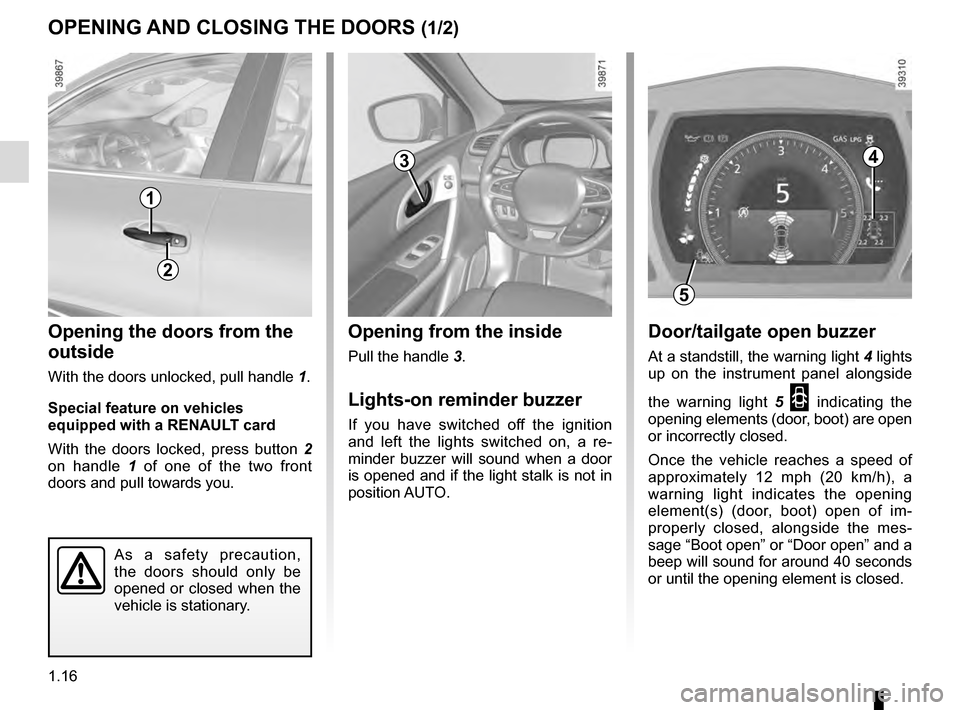
Opening from the inside
Pull the handle 3.
Lights-on reminder buzzer
If you have switched off the ignition
and left the lights switched on, a re-
minder buzzer will sound when a door
is opened and if the light stalk is not in
position AUTO.
Opening the doors from the
outside
With the doors unlocked, pull handle 1.
Special feature on vehicles
equipped with a RENAULT card
With the doors locked, press button 2
on handle 1 of one of the two front
doors and pull towards you.
OPENING AND CLOSING THE DOORS (1/2)
1
3
As a safety precaution,
the doors should only be
opened or closed when the
vehicle is stationary.
2
4
5
Door/tailgate open buzzer
At a standstill, the warning light 4 lights
up on the instrument panel alongside
the warning light 5
2 indicating the
opening elements (door, boot) are open
or incorrectly closed.
Once the vehicle reaches a speed of
approximately 12 mph (20 km/h), a
warning light indicates the opening
element(s) (door, boot) open of im-
properly closed, alongside the mes-
sage “Boot open” or “Door open” and a
beep will sound for around 40 seconds
or until the opening element is closed.
Page 57 of 300
1.51
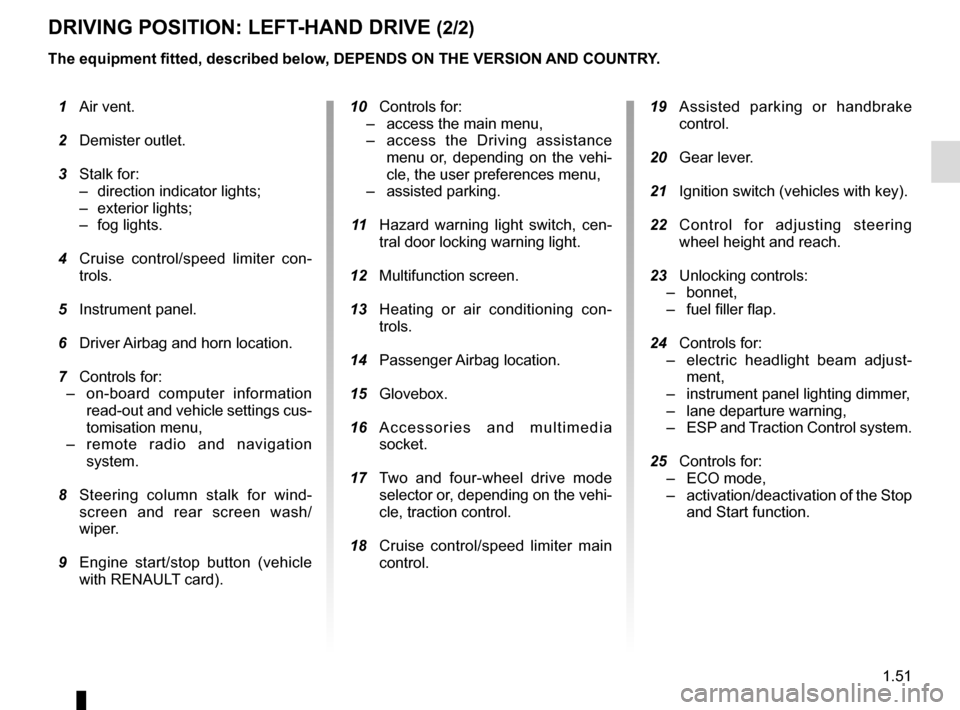
DRIVING POSITION: LEFT-HAND DRIVE (2/2)
The equipment fitted, described below, DEPENDS ON THE VERSION AND COUNTRY. 19 Assisted parking or handbrake
control.
20 Gear lever.
21 Ignition switch (vehicles with key).
22 Control for adjusting steering
wheel height and reach.
23 Unlocking controls:
– bonnet,
– fuel filler flap.
24 Controls for:
– electric headlight beam adjust-
ment,
– instrument panel lighting dimmer,
– lane departure warning,
– ESP and Traction Control system.
25 Controls for:
– ECO mode,
– activation/deactivation of the Stop
and Start function.
1 Air vent.
2 Demister outlet.
3 Stalk for:
– direction indicator lights;
– exterior lights;
– fog lights.
4 Cruise control/speed limiter con-
trols.
5 Instrument panel.
6 Driver Airbag and horn location.
7 Controls for:
– on-board computer information
read-out and vehicle settings cus-
tomisation menu,
– remote radio and navigation
system.
8 Steering column stalk for wind-
screen and rear screen wash/
wiper.
9 Engine start/stop button (vehicle
with RENAULT card).
10 Controls for:
– access the main menu,
– access the Driving assistance
menu or, depending on the vehi-
cle, the user preferences menu,
– assisted parking.
11 Hazard warning light switch, cen-
tral door locking warning light.
12 Multifunction screen.
13 Heating or air conditioning con-
trols.
14 Passenger Airbag location.
15 Glovebox.
16 Accessories and multimedia
socket.
17 Two and four-wheel drive mode
selector or, depending on the vehi-
cle, traction control.
18
Cruise control/speed limiter main
control.
Page 59 of 300
1.53
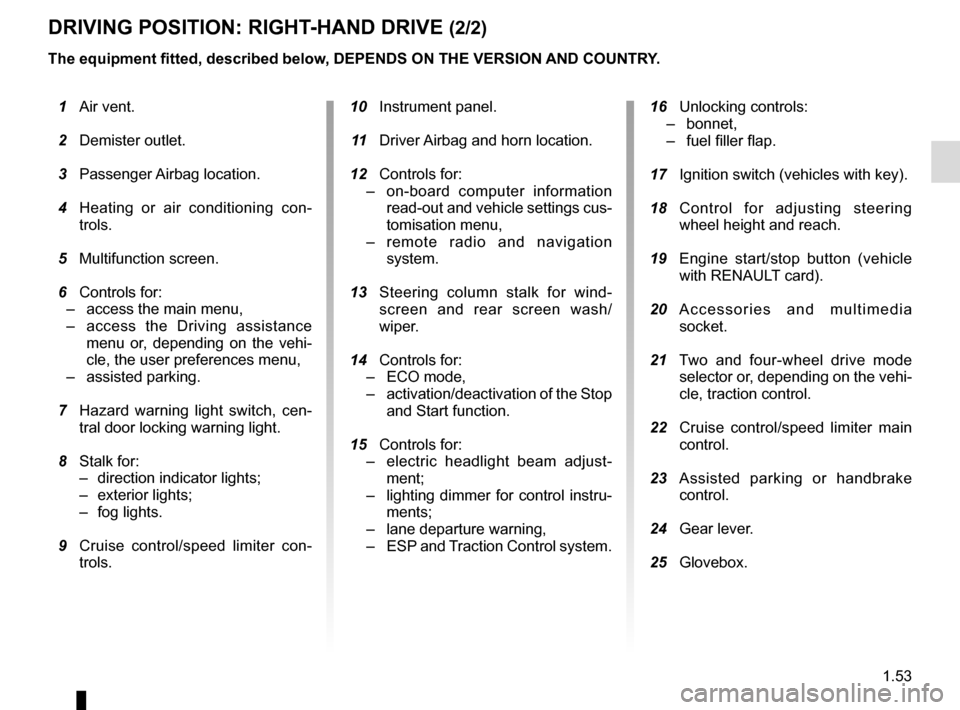
DRIVING POSITION: RIGHT-HAND DRIVE (2/2)
The equipment fitted, described below, DEPENDS ON THE VERSION AND COUNTRY.
16 Unlocking controls:
– bonnet,
– fuel filler flap.
17 Ignition switch (vehicles with key).
18 Control for adjusting steering
wheel height and reach.
19 Engine start/stop button (vehicle
with RENAULT card).
20 Accessories and multimedia
socket.
21 Two and four-wheel drive mode
selector or, depending on the vehi-
cle, traction control.
22 Cruise control/speed limiter main
control.
23 Assisted parking or handbrake
control.
24 Gear lever.
25 Glovebox.
1 Air vent.
2 Demister outlet.
3 Passenger Airbag location.
4 Heating or air conditioning con-
trols.
5 Multifunction screen.
6 Controls for:
– access the main menu,
– access the Driving assistance
menu or, depending on the vehi-
cle, the user preferences menu,
– assisted parking.
7 Hazard warning light switch, cen-
tral door locking warning light.
8 Stalk for:
– direction indicator lights;
– exterior lights;
– fog lights.
9 Cruise control/speed limiter con-
trols.
10 Instrument panel.
11 Driver Airbag and horn location.
12 Controls for:
– on-board computer information
read-out and vehicle settings cus-
tomisation menu,
– remote radio and navigation
system.
13 Steering column stalk for wind-
screen and rear screen wash/
wiper.
14 Controls for:
– ECO mode,
– activation/deactivation of the Stop
and Start function.
15 Controls for:
– electric headlight beam adjust-
ment;
– lighting dimmer for control instru-
ments;
– lane departure warning,
– ESP and T
raction Control system.
Page 82 of 300
1.76
Welcome and goodbye function
(depending on the vehicle)
From the multifunction screen, select
menu “vehicle”, “User settings”,
“External welcome” and activate or de-
activate the function (ON or OFF).
Depending on the selected choice, the
door mirrors will fold out:
– when the ignition is next switched on (function deactivated);
– upon detecting the RENAULT card or upon unlocking the vehicle (func-
tion activated)
REAR-VIEW MIRRORS (1/3)
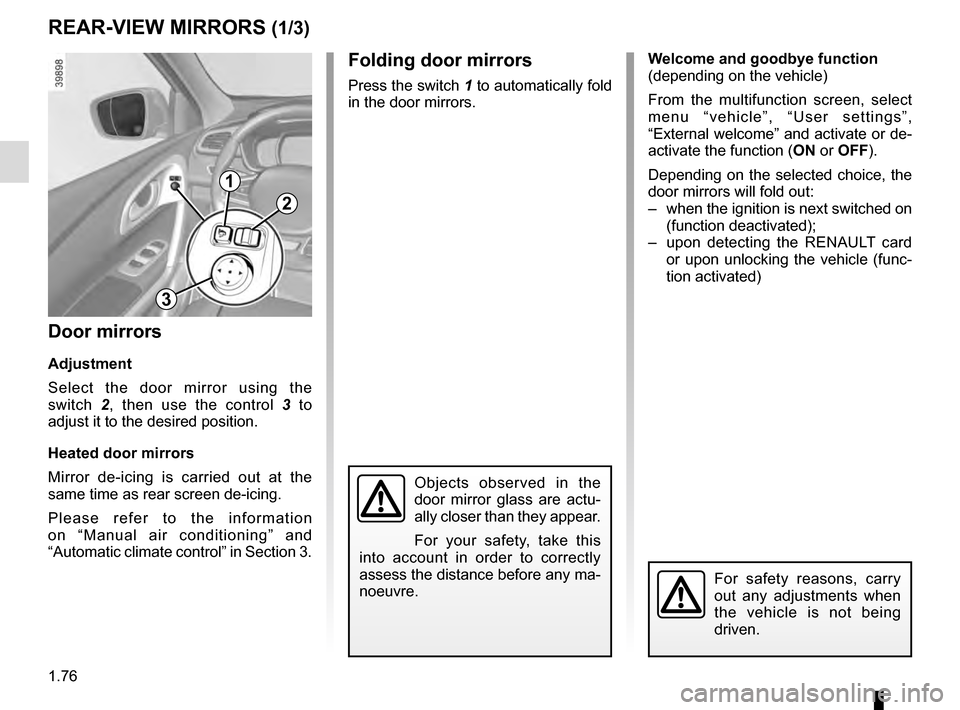
Folding door mirrors
Press the switch 1 to automatically fold
in the door mirrors.
Door mirrors
Adjustment
Select the door mirror using the
switch 2, then use the control 3 to
adjust it to the desired position.
Heated door mirrors
Mirror de-icing is carried out at the
same time as rear screen de-icing.
Please refer to the information
on “Manual air conditioning” and
“Automatic climate control” in Section 3.
Objects observed in the
door mirror glass are actu-
ally closer than they appear.
For your safety, take this
into account in order to correctly
assess the distance before any ma-
noeuvre.
For safety reasons, carry
out any adjustments when
the vehicle is not being
driven.
1
2
3
Page 88 of 300
1.82
“See-me-home lighting”
function
This function allows you to briefly switch
on the dipped beam headlights (to pro-
vide light when opening a gate, etc.).
With the engine and lights switched
off and the ring 3 in position 0 or
AUTO, pull the stalk 1 towards you: the
dipped beam headlights come on for
approximately 30 seconds. To increase
this duration, you may pull the stalk up
to four times (total time limited to ap-
proximately 2 minutes). The message
“Follow-me home for _ _ _” along with
the time the lights will be on for is dis-
played on the instrument panel to con-
firm this action. You can then lock your
vehicle.
To switch off the lights before they go
out automatically, turn ring 3 to any po-
sition, then return it to the AUTO posi-
tion .
EXTERIOR LIGHTING AND SIGNALS (4/5)
Welcome and goodbye
function
(depending on the vehicle)
Once the function is activated, the day-
time running lights and the rear side
light light up automatically upon detect-
ing the RENAULT card or when the ve-
hicle is unlocked.
They switch off automatically:
– approximately one minute after li- ghting up;
– when starting the engine based on the position of the lighting stalk;
or
– upon locking the vehicle. Activating/deactivating the function
From the multifunction screen, select
menu “vehicle”, “User settings” then
“External welcome”. Choose “
ON”
or “OFF” to activate or deactivate the
function.
Page 103 of 300
1.97
FUEL TANK (3/3)
Persistent fuel odour
If you notice a persistent
fuel odour you should:
– stop the vehicle as soon as traf- fic conditions allow and switch off
the ignition;
– switch on the hazard warning lights and ask your passengers to
leave the vehicle and stay clear
of the traffic;
– contact an approved Dealer.
No modifications what-
soever are permitted on
any part of the fuel supply
system (electronic units,
wiring, fuel circuit, injectors, pro-
tective covers, etc.) as this may be
dangerous (unless undertaken by
qualified Network personnel).Running out of fuel on diesel
versions
Vehicles with key/remote control
– Put the ignition key in “On” posi- tion M (please see the information
on the “Ignition switch” in Section
2) and wait for a few minutes before
starting, to enable the fuel circuit to
be primed;
– turn the key to position D . If the
engine does not start, repeat the pro-
cedure.
– If the engine does not start after sev- eral attempts, please contact an au-
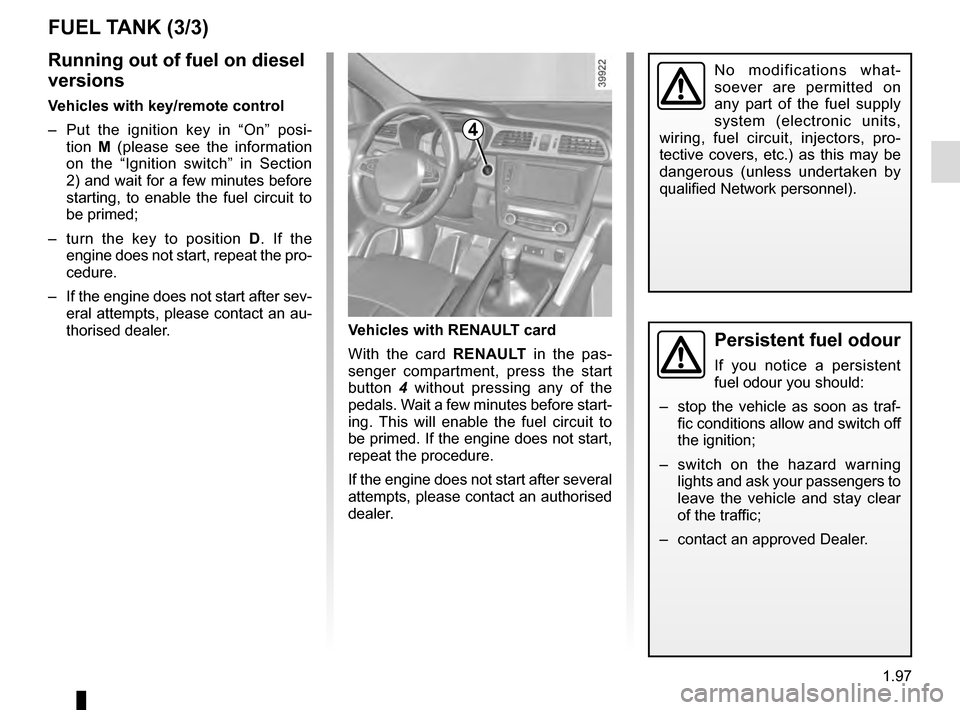
thorised dealer. Vehicles with RENAULT card
With the card RENAULT
in the pas-
senger compartment, press the start
button 4 without pressing any of the
pedals. Wait a few minutes before start-
ing. This will enable the fuel circuit to
be primed. If the engine does not start,
repeat the procedure.
If the engine does not start after several
attempts, please contact an authorised
dealer.
4
Page 105 of 300

Running in . . . . . . . . . . . . . . . . . . . . . . . . . . . . . . . . . . . . \
. . . . . . . . . . . . . . . .")
2.1
Section 2: Driving
(Advice on use relating to fuel economy and the environment)
Running in . . . . . . . . . . . . . . . . . . . . . . . . . . . . . . . . . . . . \
. . . . . . . . . . . . . . . . . . . . . . . . . . . . . . . . . 2.2
Ignition switch . . . . . . . . . . . . . . . . . . . . . . . . . . . . . . . . . . . .\
. . . . . . . . . . . . . . . . . . . . . . . . . . . . . . 2.3
Starting, stopping the engine: vehicle with key/remote control unit . . . . . . . . . . . . . . . . . . . . . . . . . . 2.4
Starting, stopping the engine: vehicle with RENAULT card . . . . . . . . . . . . . . . . . . . . . . . . . . . . . . . . 2.5
Stop and Start Function . . . . . . . . . . . . . . . . . . . . . . . . . . . . . . . . . . . . \
. . . . . . . . . . . . . . . . . . . . . . . 2.8
Special features of petrol versions . . . . . . . . . . . . . . . . . . . . . . . . . . . . . . . . . . . .\
. . . . . . . . . . . . . . 2.12
Special features of diesel versions . . . . . . . . . . . . . . . . . . . . . . . . . . . . . . . . . . . .\
. . . . . . . . . . . . . . 2.13
Gear lever . . . . . . . . . . . . . . . . . . . . . . . . . . . . . . . . . . . .\
. . . . . . . . . . . . . . . . . . . . . . . . . . . . . . . . . 2.14
Handbrake . . . . . . . . . . . . . . . . . . . . . . . . . . . . . . . . . . . . \
. . . . . . . . . . . . . . . . . . . . . . . . . . . . . . . . . 2.15
Electronic parking brake . . . . . . . . . . . . . . . . . . . . . . . . . . . . . . . . . . . .\
. . . . . . . . . . . . . . . . . . . . . . 2.16
ECO driving . . . . . . . . . . . . . . . . . . . . . . . . . . . . . . . . . . . . \
. . . . . . . . . . . . . . . . . . . . . . . . . . . . . . . . 2.19
Maintenance and antipollution advice . . . . . . . . . . . . . . . . . . . . . . . . . . . . . . . . . . . . \
. . . . . . . . . . . . 2.24
Environment . . . . . . . . . . . . . . . . . . . . . . . . . . . . . . . . . . . .\
. . . . . . . . . . . . . . . . . . . . . . . . . . . . . . . 2.25
Tyre pressure loss warning . . . . . . . . . . . . . . . . . . . . . . . \
. . . . . . . . . . . . . . . . . . . . . . . . . . . . . . . . . 2.26
Driver correction devices/aids . . . . . . . . . . . . . . . . . . . . . . . . . . . . . . . . . . . . \
. . . . . . . . . . . . . . . . . . 2.29
Transmission: 4-wheel drive (4WD) . . . . . . . . . . . . . . . . . . . . . . . . . . . . . . . . . . . .\
. . . . . . . . . . . . . 2.39
Lane departure warning. . . . . . . . . . . . . . . . . . . . . . . . . . . . . . . . . . . . \
. . . . . . . . . . . . . . . . . . . . . . . 2.43
Blind spot warning . . . . . . . . . . . . . . . . . . . . . . . . . . . . . . . . . . . . \
. . . . . . . . . . . . . . . . . . . . . . . . . . . 2.46
Speed limiter . . . . . . . . . . . . . . . . . . . . . . . . . . . . . \
. . . . . . . . . . . . . . . . . . . . . . . . . . . . . . . . . . . . . . 2.50
Speeding alert . . . . . . . . . . . . . . . . . . . . . . . . . . . . . . . . . . . . \
. . . . . . . . . . . . . . . . . . . . . . . . . . . . . . 2.53
Cruise control . . . . . . . . . . . . . . . . . . . . . . . . . . . . . . . . . . . .\
. . . . . . . . . . . . . . . . . . . . . . . . . . . . . . 2.56
Parking distance control . . . . . . . . . . . . . . . . . . . . . . . . . . . . . . . . . . . .\
. . . . . . . . . . . . . . . . . . . . . . 2.60
Reversing camera . . . . . . . . . . . . . . . . . . . . . . . . . . . . . . . . . . . . \
. . . . . . . . . . . . . . . . . . . . . . . . . . . 2.65
Assisted parking . . . . . . . . . . . . . . . . . . . . . . . . . . . . . . . . . . . .\
. . . . . . . . . . . . . . . . . . . . . . . . . . . . 2.67
Automatic gearbox. . . . . . . . . . . . . . . . . . . . . . . . . . . .\
. . . . . . . . . . . . . . . . . . . . . . . . . . . . . . . . . . . 2.71
Page 109 of 300
2.5
STARTING, STOPPING THE ENGINE: vehicle with RENAULT CARD (1/3)
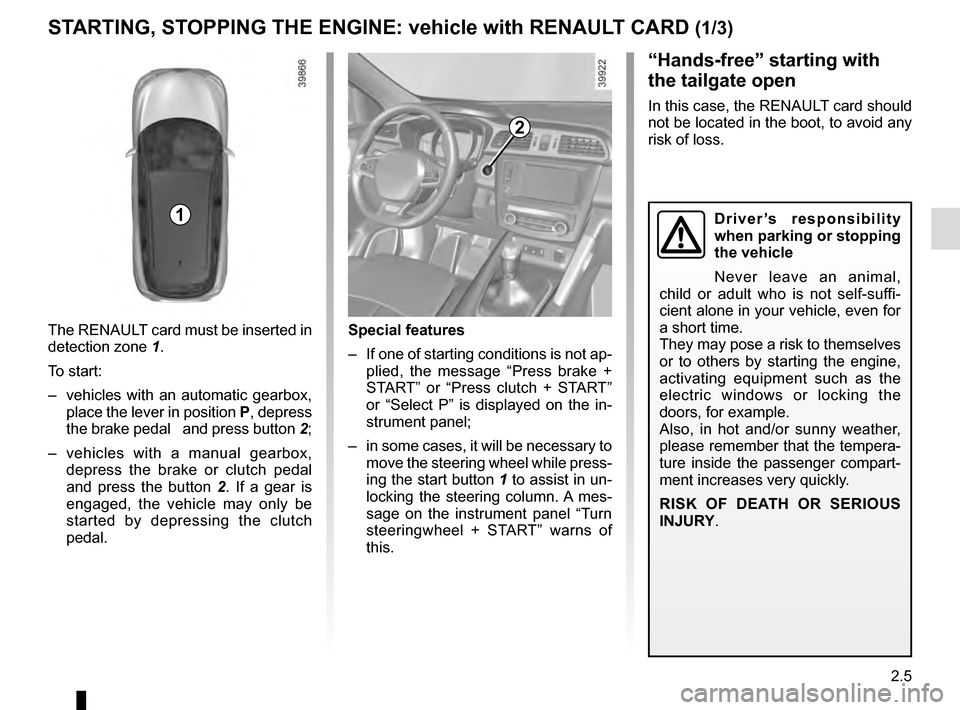
The RENAULT card must be inserted in
detection zone 1.
To start:
– vehicles with an automatic gearbox, place the lever in position P, depress
the brake pedal and press button 2;
– vehicles with a manual gearbox, depress the brake or clutch pedal
and press the button 2 . If a gear is
engaged, the vehicle may only be
started by depressing the clutch
pedal.
“Hands-free” starting with
the tailgate open
In this case, the RENAULT card should
not be located in the boot, to avoid any
risk of loss.
2
1
Special features
– If one of starting conditions is not ap- plied, the message “Press brake +
START” or “Press clutch + START”
or “Select P” is displayed on the in-
strument panel;
– in some cases, it will be necessary to move the steering wheel while press-
ing the start button 1 to assist in un-
locking the steering column. A mes-
sage on the instrument panel “Turn
steeringwheel + START” warns of
this.
Driver’s responsibility
when parking or stopping
the vehicle
Never leave an animal,
child or adult who is not self-suffi-
cient alone in your vehicle, even for
a short time.
They may pose a risk to themselves
or to others by starting the engine,
activating equipment such as the
electric windows or locking the
doors, for example.
Also, in hot and/or sunny weather,
please remember that the tempera-
ture inside the passenger compart-
ment increases very quickly.
RISK OF DEATH OR SERIOUS
INJURY.
Page 110 of 300
2.6
STARTING, STOPPING THE ENGINE: vehicle with RENAULT CARD (2/3)
Operating faults
In certain cases, the RENAULT “hands-
free” card may not work:
– when the RENAULT card battery is drained, etc.;
– near to appliances operating on the same frequency as the card (moni-
tor, mobile phone, video game, etc.);
– vehicle located in a high electromag- netic radiation zone.
The message “Place card close START
and push” appears on the instrument
panel.
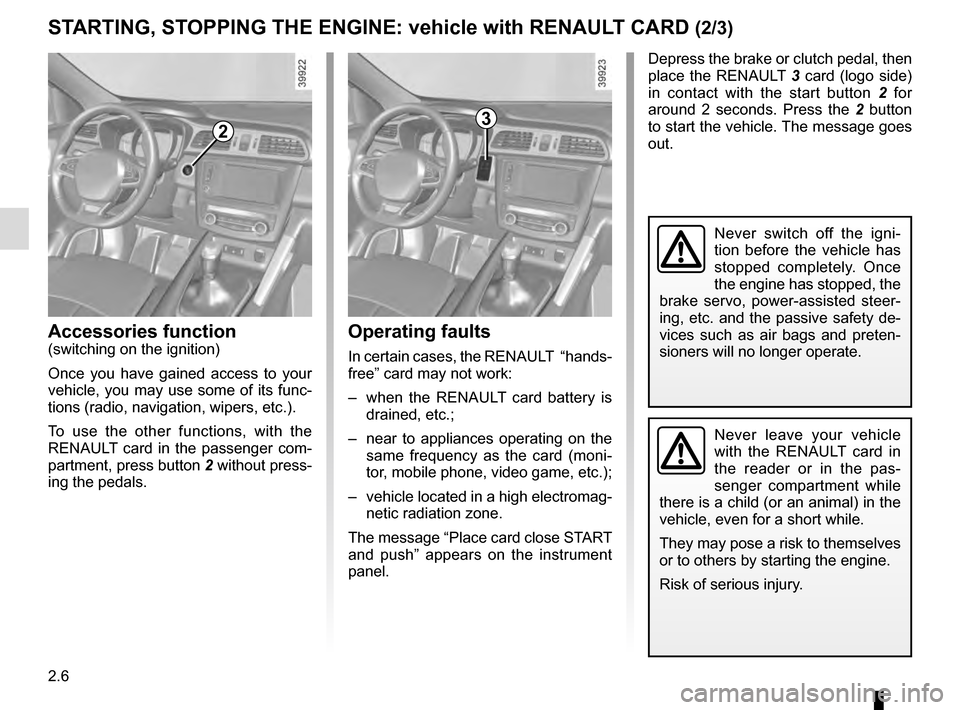
2
Accessories function(switching on the ignition)
Once you have gained access to your
vehicle, you may use some of its func-
tions (radio, navigation, wipers, etc.).
To use the other functions, with the
RENAULT card in the passenger com-
partment, press button 2 without press-
ing the pedals.
Depress the brake or clutch pedal, then
place the RENAULT 3 card (logo side)
in contact with the start button 2 for
around 2 seconds. Press the 2 button
to start the vehicle. The message goes
out.
3
Never leave your vehicle
with the RENAULT card in
the reader or in the pas-
senger compartment while
there is a child (or an animal) in the
vehicle, even for a short while.
They may pose a risk to themselves
or to others by starting the engine.
Risk of serious injury.
Never switch off the igni-
tion before the vehicle has
stopped completely. Once
the engine has stopped, the
brake servo, power-assisted steer-
ing, etc. and the passive safety de-
vices such as air bags and preten-
sioners will no longer operate.