navigation system RENAULT KADJAR 2016 1.G User Guide
[x] Cancel search | Manufacturer: RENAULT, Model Year: 2016, Model line: KADJAR, Model: RENAULT KADJAR 2016 1.GPages: 300, PDF Size: 3.29 MB
Page 148 of 300
2.44
LANE DEPARTURE WARNING (2/3)
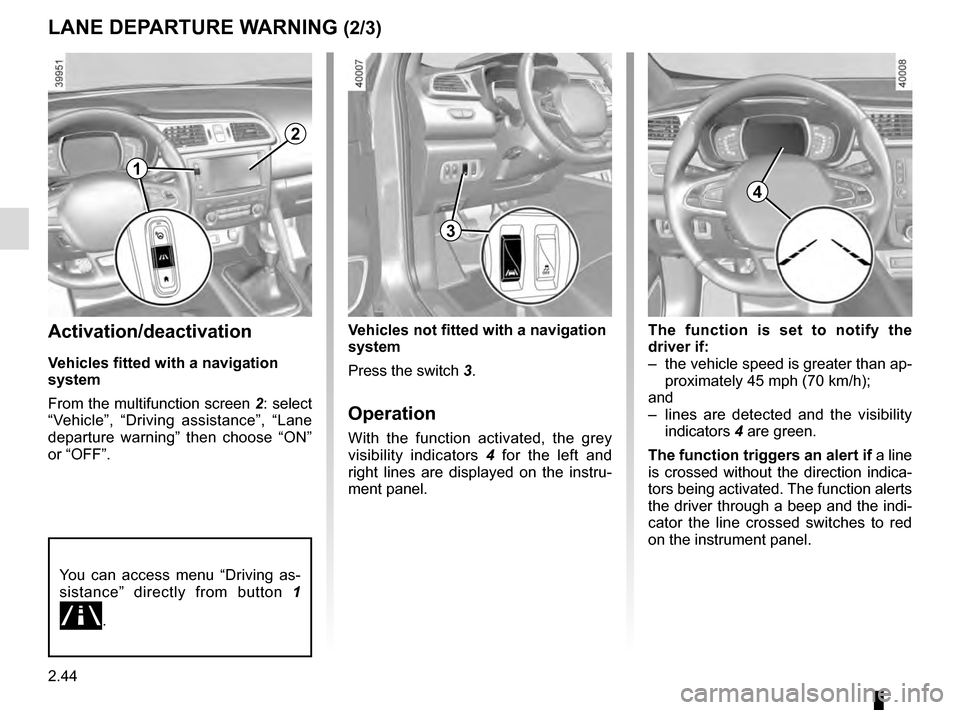
The function is set to notify the
driver if:
– the vehicle speed is greater than ap-proximately 45 mph (70 km/h);
and
– lines are detected and the visibility indicators 4 are green.
The function triggers an alert if a line
is crossed without the direction indica-
tors being activated. The function alerts
the driver through a beep and the indi-
cator the line crossed switches to red
on the instrument panel.Activation/deactivation
Vehicles fitted with a navigation
system
From the multifunction screen 2: select
“Vehicle”, “Driving assistance”, “Lane
departure warning” then choose “ON”
or “OFF”.
Vehicles not fitted with a navigation
system
Press the switch 3.
Operation
With the function activated, the grey
visibility indicators 4 for the left and
right lines are displayed on the instru-
ment panel.
You can access menu “Driving as-
sistance” directly from button 1
.
2
3
4
1
Page 149 of 300
2.45
265
Adjustment
Vehicles fitted with a navigation
system
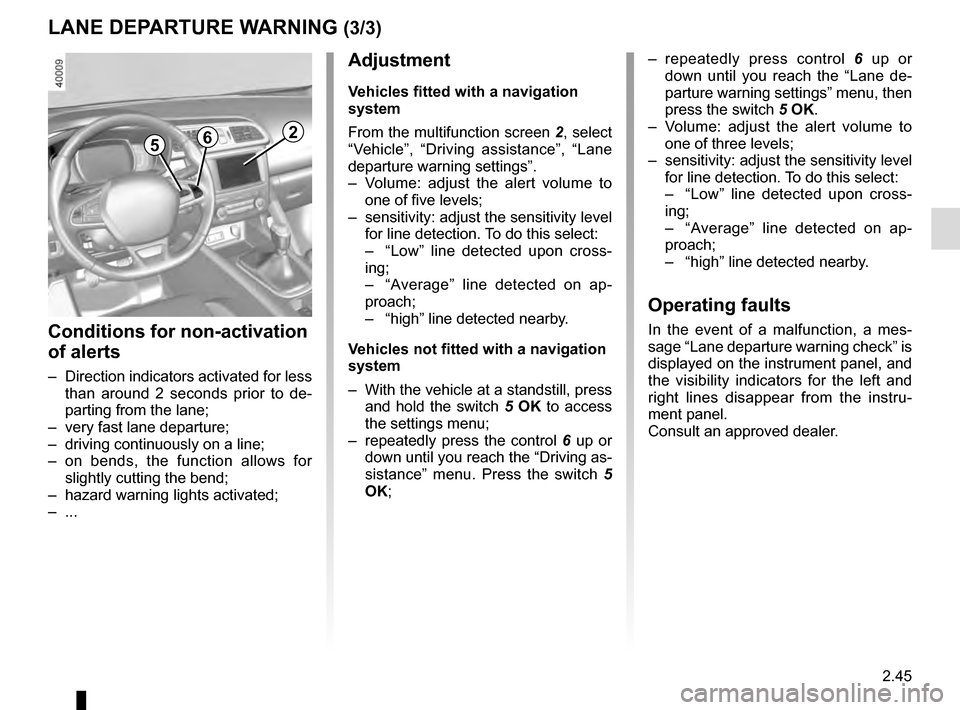
From the multifunction screen 2, select
“Vehicle”, “Driving assistance”, “Lane
departure warning settings”.
– Volume: adjust the alert volume to one of five levels;
– sensitivity: adjust the sensitivity level for line detection. To do this select:
– “Low” line detected upon cross-
ing;
– “Average” line detected on ap-
proach;
– “high” line detected nearby.
Vehicles not fitted with a navigation
system
– With the vehicle at a standstill, press and hold the switch 5 OK to access
the settings menu;
– repeatedly press the control 6 up or
down until you reach the “Driving as-
sistance” menu. Press the switch 5
OK;
– repeatedly press control 6 up or
down until you reach the “Lane de-
parture warning settings” menu, then
press the switch 5 OK.
– Volume: adjust the alert volume to one of three levels;
– sensitivity: adjust the sensitivity level for line detection. To do this select:
– “Low” line detected upon cross-
ing;
– “Average” line detected on ap-
proach;
– “high” line detected nearby.
Operating faults
In the event of a malfunction, a mes-
sage “Lane departure warning check” is
displayed on the instrument panel, and
the visibility indicators for the left and
right lines disappear from the instru-
ment panel.
Consult an approved dealer.
LANE DEPARTURE WARNING (3/3)
Conditions for non-activation
of alerts
– Direction indicators activated for less than around 2 seconds prior to de-
parting from the lane;
– very fast lane departure;
– driving continuously on a line;
– on bends, the function allows for slightly cutting the bend;
– hazard warning lights activated;
– ...
Page 151 of 300
2.47
Activation/deactivation
Vehicles fitted with a navigation
system
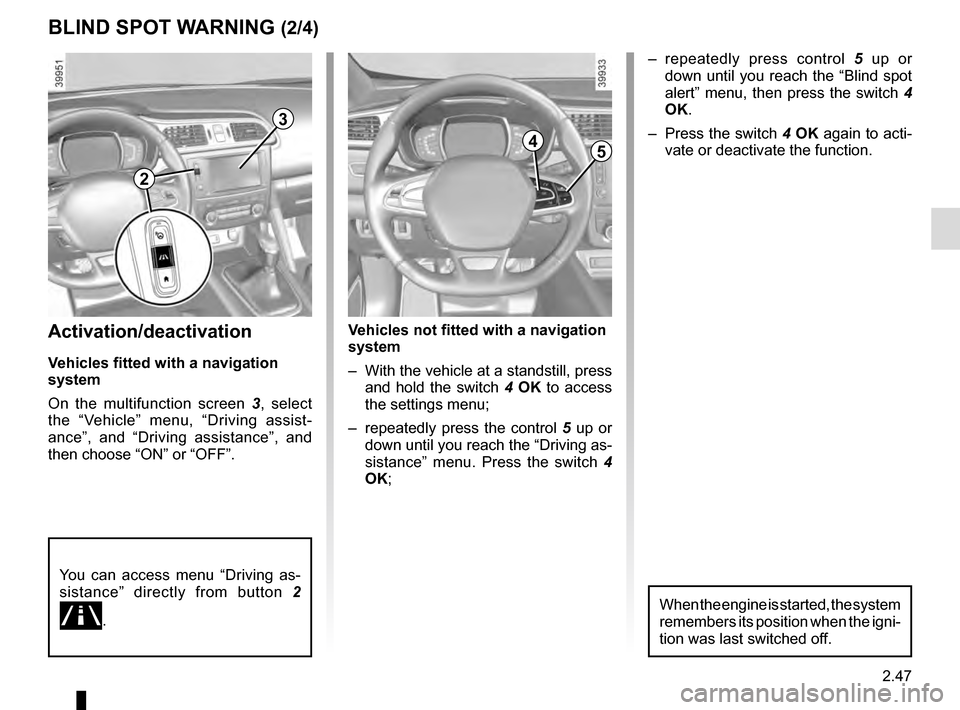
On the multifunction screen 3, select
the “Vehicle” menu, “Driving assist-
ance”, and “Driving assistance”, and
then choose “ON” or “OFF”.
You can access menu “Driving as-
sistance” directly from button 2
.
Vehicles not fitted with a navigation
system
– With the vehicle at a standstill, press
and hold the switch 4 OK to access
the settings menu;
– repeatedly press the control 5 up or
down until you reach the “Driving as-
sistance” menu. Press the switch 4
OK;
BLIND SPOT WARNING (2/4)
– repeatedly press control 5 up or
down until you reach the “Blind spot
alert” menu, then press the switch 4
OK.
– Press the switch 4 OK again to acti-
vate or deactivate the function.
2
3
45
When the engine is started, the system
remembers its position when the igni-
tion was last switched off.
Page 158 of 300
2.54
OVERSPEED ALERT (2/3)
Activating/deactivating the
system
Vehicles fitted with a navigation
system
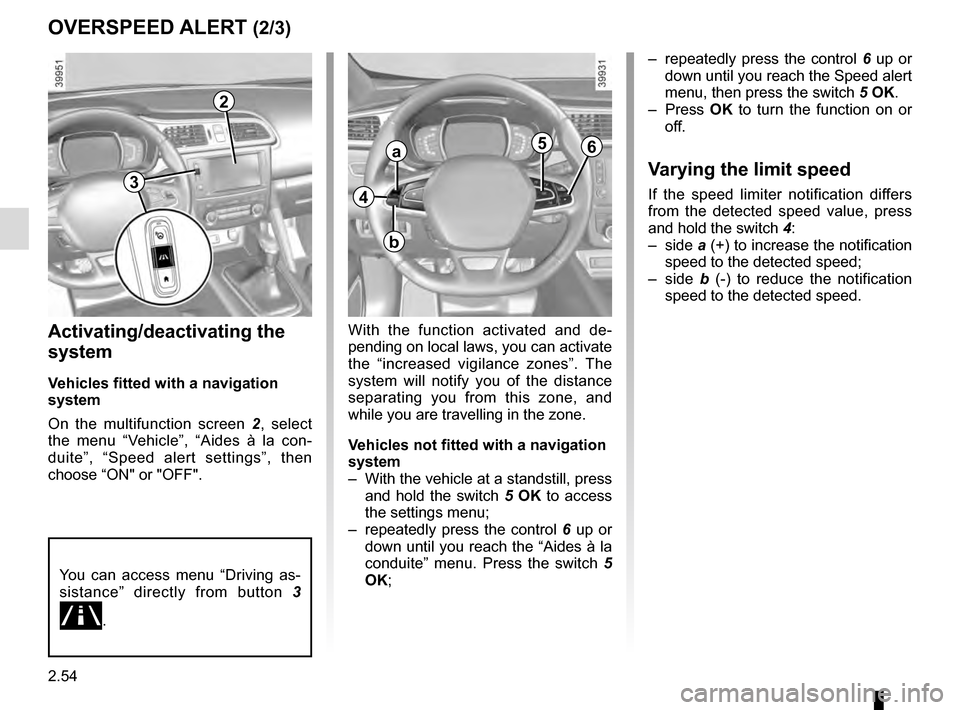
On the multifunction screen 2, select
the menu “Vehicle”, “Aides à la con-
duite”, “Speed alert settings”, then
choose “ON" or "OFF".
With the function activated and de-
pending on local laws, you can activate
the “increased vigilance zones”. The
system will notify you of the distance
separating you from this zone, and
while you are travelling in the zone.
Vehicles not fitted with a navigation
system
– With the vehicle at a standstill, press and hold the switch 5 OK to access
the settings menu;
– repeatedly press the control 6 up or
down until you reach the “Aides à la
conduite” menu. Press the switch 5
OK; – repeatedly press the control
6 up or
down until you reach the Speed alert
menu, then press the switch 5 OK.
– Press OK to turn the function on or
off.
Varying the limit speed
If the speed limiter notification differs
from the detected speed value, press
and hold the switch 4:
– side a (+) to increase the notification
speed to the detected speed;
– side b (-) to reduce the notification
speed to the detected speed.
2
You can access menu “Driving as-
sistance” directly from button 3
.
4
a
b
56
3
Page 167 of 300
2.63
System sound
Enables the system sound to be se-
lected from a choice of 3.
Deactivating the system sound
Activate or deactivate the parking dis-
tance control sound.
Note: If you deactivate the sound, you
will no longer be notified with beeps
when approaching an obstacle.
Deactivating the system
Activate or deactivate parking distance
control.
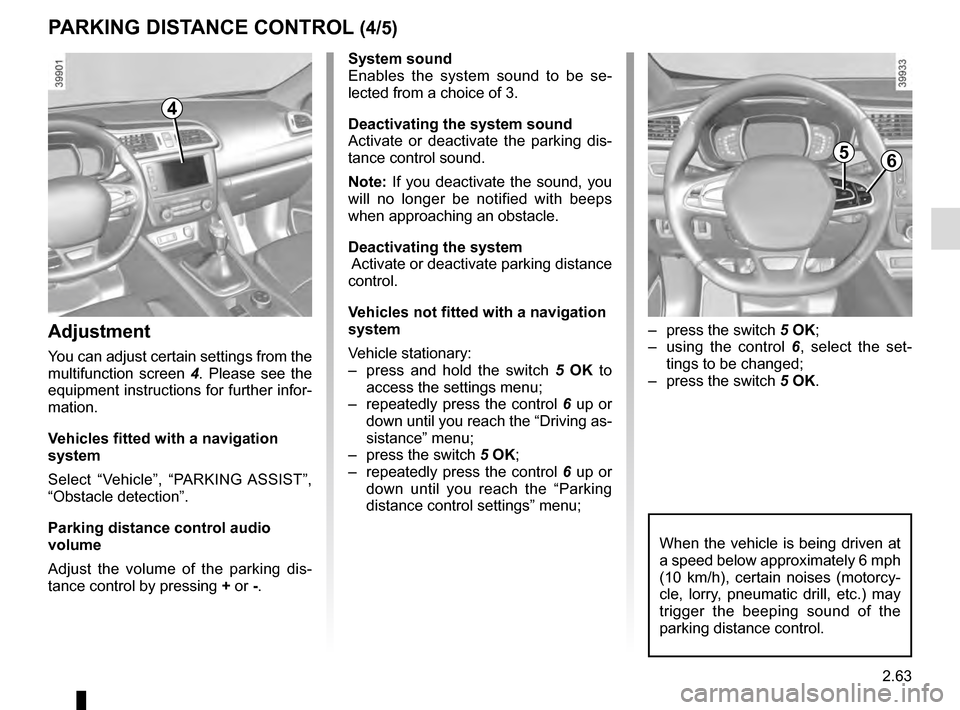
Vehicles not fitted with a navigation
system
Vehicle stationary:
– press and hold the switch 5 OK to
access the settings menu;
– repeatedly press the control 6 up or
down until you reach the “Driving as-
sistance” menu;
– press the switch 5 OK;
– repeatedly press the control 6 up or
down until you reach the “Parking
distance control settings” menu;
PARKING DISTANCE CONTROL (4/5)
When the vehicle is being driven at
a speed below approximately 6 mph
(10 km/h), certain noises (motorcy-
cle, lorry, pneumatic drill, etc.) may
trigger the beeping sound of the
parking distance control.
4
Adjustment
You can adjust certain settings from the
multifunction screen 4. Please see the
equipment instructions for further infor-
mation.
Vehicles fitted with a navigation
system
Select “Vehicle”, “PARKING ASSIST”,
“Obstacle detection”.
Parking distance control audio
volume
Adjust the volume of the parking dis-
tance control by pressing + or -.
– press the switch 5 OK;
– using the control 6, select the set-
tings to be changed;
– press the switch 5 OK.
56
Page 296 of 300

mobile floor ........................................................................\
3.29
multimedia equipment ....................................................... 3")
7.4
ALPHABETICAL INDEX (4/5)
mobile floor ........................................................................\
3.29
multimedia equipment ....................................................... 3.37
N
navigation system .............................................................. 3.37
O
oil change ................................................................... 4.5 – 4.6
opening the doors ..................................................1.13 → 1.17
operating faults ................................ 1.54 → 1.59, 5.33 → 5.39
overspeed warning ................................................2.53 → 2.55
P
paintwork maintenance ..................................................... 4.14 – 4.15
parking assistance: assisted parking .....................2.67 → 2.70
parking distance control.........................................2.60 → 2.64
power-assisted steering.................................................\
.... 1.74
pretensioners .........................................................1\
.27 → 1.30
puncture............................................. 5.2 – 5.3, 5.7, 5.9 – 5.10
R
radio...................................................................\
................ 3.37
radio frequency remote control/key use ....................................................................\
...1.2 → 1.4
rear bench seat....................................................... 3.25 – 3.26
rear parcel shelf ................................................................. 3.28
rear seats..............................................................\
............. 1.25 functions ........................................................... 3.25 – 3.26
rear view mirrors ....................................................1.76 → 1.78
remote control door locking batteries ..............................................................\
......... 5.22
remote control door locking unit ................................1.2 → 1.4
RENAULT ANTI-INTRUDER DEVICE (RAID) ................... 1.18
RENAULT card battery ................................................................\
.......... 5.21 use ................................................... 1.6
→ 1.12, 2.5 → 2.7
RENAULT card battery ...................................................... 5.21
replacement parts ................................................................ 6.7
reverse gear selecting ..................................................2.14, 2.71 → 2.73
reversing sensor ....................................................2.60 → 2.64
roof bars ................................................................. 3.35 – 3.36
roof rack roof bars ............................................................ 3.35 – 3.36
running in .................................................................... 2.2 – 2.3
S
seat belt pretensioners front seat belt ...................................................1.27 → 1.30
seat belts ......................................................1.23 → 1.30, 1.33
service sheets..........................................................\
6.8 → 6.13
side protection devices ...................................................... 1.32
sign detection: overspeed warning ........................2.53 → 2.55
signals and lights ...................................................1.79 → 1.86
special features of diesel versions.....................................\
2.13
special features of petrol vehicles ..................................... 2.12
speed limiter .................................................1.57, 2.50 → 2.52
spoiler ................................................................\
................ 3.36
starting the engine ................................................... 2.3 → 2.11
steering wheel adjustment .............................................................\
...... 1.74
Stop & Start .................................................... 1.57, 2.8 → 2.11
Stop & Start function................................................ 2.8 → 2.11
stopping the engine ...................................................2.4 → 2.7
storage compartment.............................................3.18 → 3.22
storage compartments ...........................................3.18 →
3.22
sun visor ........................................................................\
.... 3.18
switching on the vehicle ignition .........................2.3, 2.5 →
2.7
T
tailgate ..........................................................3.27,\
3.29 → 3.31