service RENAULT KADJAR 2018 User Guide
[x] Cancel search | Manufacturer: RENAULT, Model Year: 2018, Model line: KADJAR, Model: RENAULT KADJAR 2018Pages: 310, PDF Size: 8.35 MB
Page 182 of 310
2.74
AUTOMATIC TRANSMISSION (3/3)
Parking the vehicle
When the vehicle is stopped, move the
lever to position P while keeping your
foot on the brake pedal: the gearbox is
in neutral and the drive wheels are me-
chanically locked by the driveshaft.
Apply the handbrake or, depending
on the vehicle, ensure that the elec-
tronic parking brake is applied.
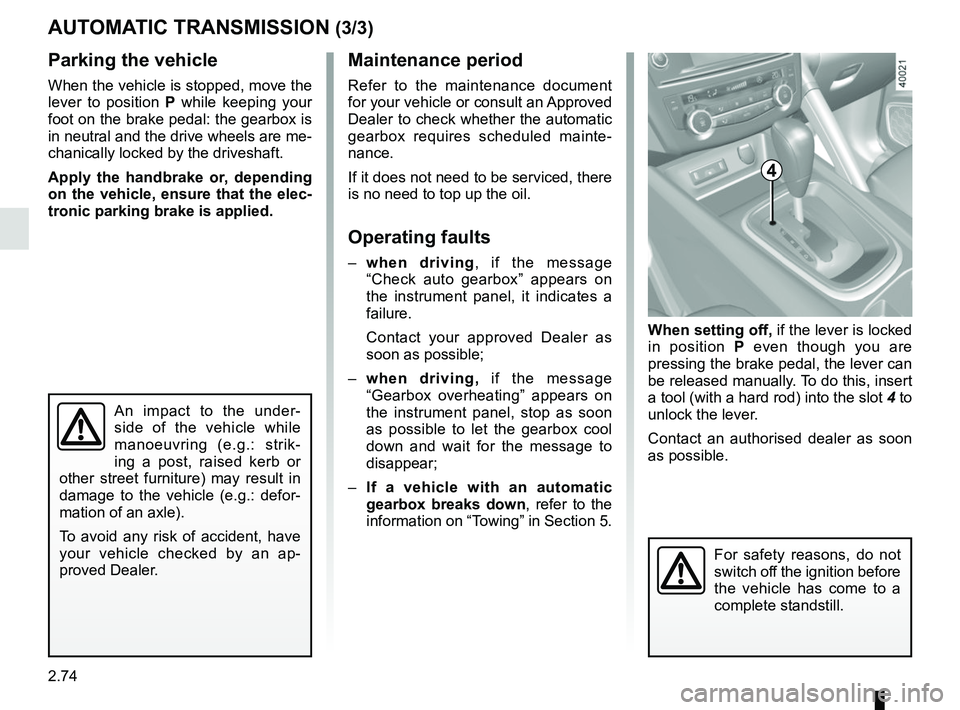
When setting off, if the lever is locked
in position P even though you are
pressing the brake pedal, the lever can
be released manually. To do this, insert
a tool (with a hard rod) into the slot 4 to
unlock the lever.
Contact an authorised dealer as soon
as possible.
Maintenance period
Refer to the maintenance document
for your vehicle or consult an Approved
Dealer to check whether the automatic
gearbox requires scheduled mainte-
nance.
If it does not need to be serviced, there
is no need to top up the oil.
Operating faults
– when driving , if the message
“Check auto gearbox” appears on
the instrument panel, it indicates a
failure.
Contact your approved Dealer as
soon as possible;
– when driving, if the message
“Gearbox overheating” appears on
the instrument panel, stop as soon
as possible to let the gearbox cool
down and wait for the message to
disappear;
– If a vehicle with an automatic
gearbox breaks down, refer to the
information on “Towing” in Section 5.
4
For safety reasons, do not
switch off the ignition before
the vehicle has come to a
complete standstill.
An impact to the under-
side of the vehicle while
manoeuvring (e.g.: strik-
ing a post, raised kerb or
other street furniture) may result in
damage to the vehicle (e.g.: defor-
mation of an axle).
To avoid any risk of accident, have
your vehicle checked by an ap-
proved Dealer.
Page 229 of 310
4.7
Engine oil grade
Refer to the maintenance document for
your vehicle.
ENGINE OIL LEVEL: topping up, filling (3/3)/OIL CHANGE
Never run the engine in an
enclosed space as exhaust
gases are poisonous.
Engine oil change: if you
are changing the oil when
the engine is hot, be care-
ful not to scald yourself as
the oil drains.
Filling: take care when
topping up the oil that
no oil drips onto engine
components - risk of fire.
Remember to refit the cap securely
as there is a risk of fire if oil splashes
onto hot engine components.
When working in the engine
compartment, ensure that
the windscreen wiper stalk
is in the park position.
Risk of injury.
Oil change
Service interval: refer to the
Maintenance Service Booklet for your
vehicle.
Oil change capacity
Please refer to the maintenance docu-
ment for your vehicle, or contact an au-
thorised dealer.
Always check the engine oil level using
the dipstick, as explained previously (it
should never fall below the minimum
level, or be over the maximum level on
the dipstick).Consult your approved dealer at
once if you notice an abnormal or
repeated drop in any of the fluid
levels.
Exceeding the maximum
engine oil level
Under no circumstances
should maximum filling level
be exceeded: this could damage the
engine and the catalytic converter.
If the level exceeds the maximum
level, do not start your vehicle and
contact an authorised dealer.
Please note when work-
ing close to the engine that
it may be hot. The engine
cooling fan may also start
at any moment. The
warning
light in the engine compartment re-
minds you of this.
Risk of injury.
Page 246 of 310
5.4
TYRE PRESSURE KIT (1/3)
The kit is only approved for
inflating the tyres of the ve-
hicle originally equipped
with the kit.
It must never be used to inflate
the tyres of another vehicle, or any
other inflatable object (rubber ring,
rubber boat, etc.).
Avoid spillage on skin when han-
dling the repair product bottle. If
droplets do leak out, rinse them off
with plenty of water.
Keep the repair kit away from chil-
dren.
Do not dispose of the empty bottle
in the countryside. Return it to your
approved dealer or to a recycling or-
ganisation.
The bottle has a limited service
life which is indicated on its label.
Check the expiry date.
Contact an approved dealer to re-
place the inflation tube and repair
product bottle.
A
B
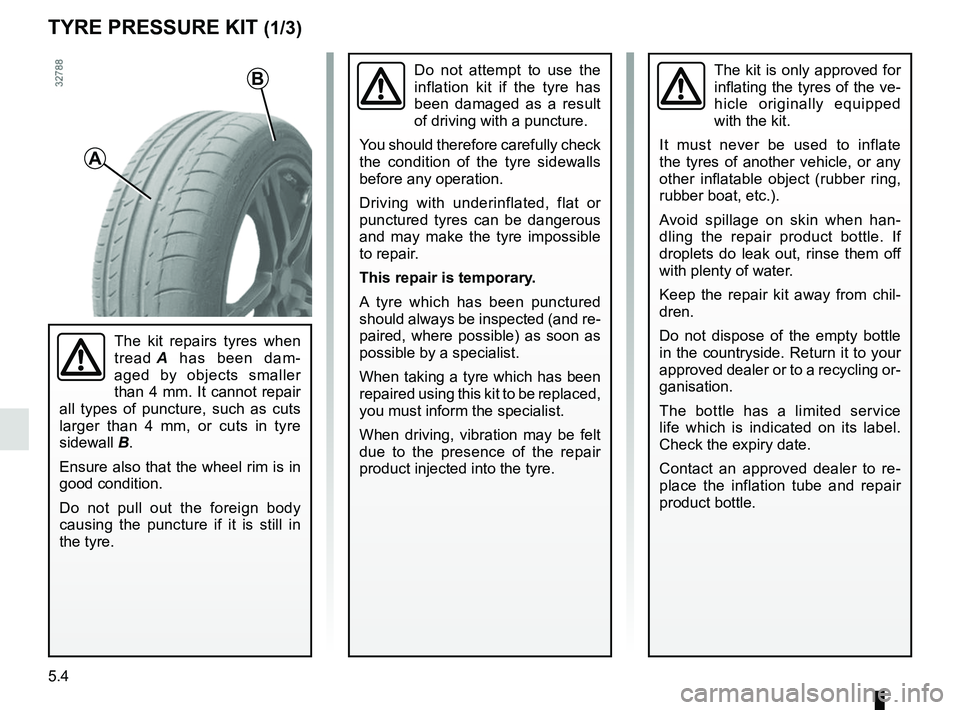
The kit repairs tyres when
tread A has been dam-
aged by objects smaller
than 4 mm. It cannot repair
all types of puncture, such as cuts
larger than 4 mm, or cuts in tyre
sidewall B.
Ensure also that the wheel rim is in
good condition.
Do not pull out the foreign body
causing the puncture if it is still in
the tyre.
Do not attempt to use the
inflation kit if the tyre has
been damaged as a result
of driving with a puncture.
You should therefore carefully check
the condition of the tyre sidewalls
before any operation.
Driving with underinflated, flat or
punctured tyres can be dangerous
and may make the tyre impossible
to repair.
This repair is temporary.
A tyre which has been punctured
should always be inspected (and re-
paired, where possible) as soon as
possible by a specialist.
When taking a tyre which has been
repaired using this kit to be replaced,
you must inform the specialist.
When driving, vibration may be felt
due to the presence of the repair
product injected into the tyre.
Page 264 of 310
5.22
Operating faults
If the battery is too weak to ensure cor-
rect operation, you can still start and
lock/unlock the vehicle (please refer to
the information on “Locking/unlocking
the opening elements” in Section 1).
RENAULT CARD: battery
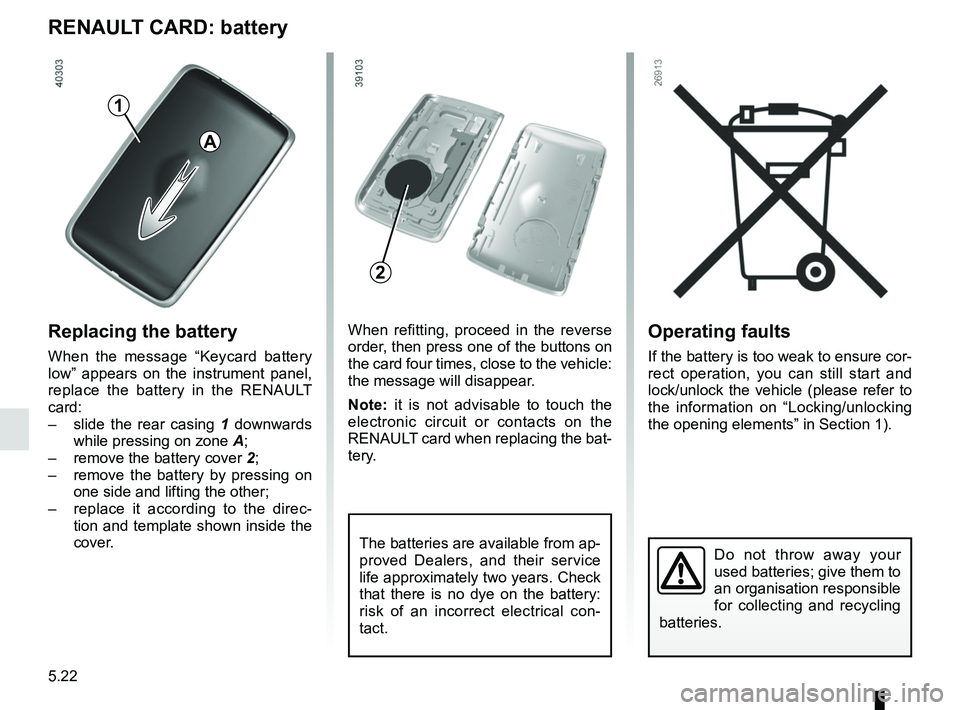
Replacing the battery
When the message “Keycard battery
low” appears on the instrument panel,
replace the battery in the RENAULT
card:
– slide the rear casing 1 downwards
while pressing on zone A;
– remove the battery cover 2;
– remove the battery by pressing on
one side and lifting the other;
– replace it according to the direc-
tion and template shown inside the
cover.
Do not throw away your
used batteries; give them to
an organisation responsible
for collecting and recycling
batteries.
When refitting, proceed in the reverse
order, then press one of the buttons on
the card four times, close to the vehicle:
the message will disappear.
Note: it is not advisable to touch the
electronic circuit or contacts on the
RENAULT card when replacing the bat-
tery.
The batteries are available from ap-
proved Dealers, and their service
life approximately two years. Check
that there is no dye on the battery:
risk of an incorrect electrical con-
tact.
2
A
1
Page 265 of 310
5.23
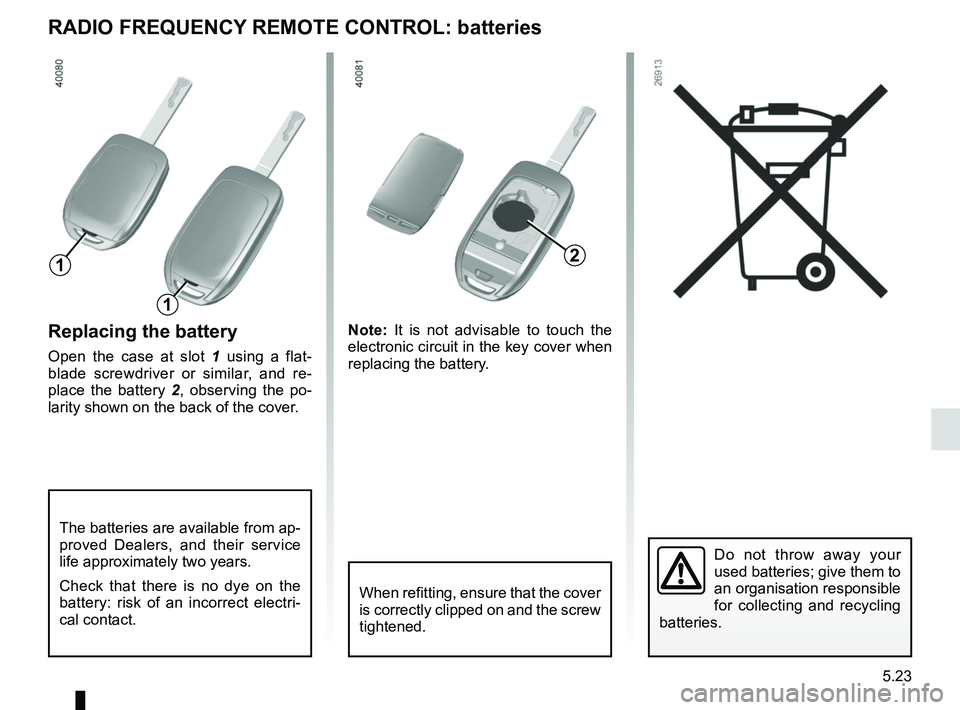
Replacing the battery
Open the case at slot 1 using a flat-
blade screwdriver or similar, and re-
place the battery 2 , observing the po-
larity shown on the back of the cover. Note:
It is not advisable to touch the
electronic circuit in the key cover when
replacing the battery.
Do not throw away your
used batteries; give them to
an organisation responsible
for collecting and recycling
batteries.
RADIO FREQUENCY REMOTE CONTROL: batteries
When refitting, ensure that the cover
is correctly clipped on and the screw
tightened.
The batteries are available from ap-
proved Dealers, and their service
life approximately two years.
Check that there is no dye on the
battery: risk of an incorrect electri-
cal contact.
2
1
1
Page 283 of 310

6.1
Section 6: Technical specifications
Vehicle identification plate . . . . . . . . . . . . . . . . . . . . . . . . . . . . . . . . . . . . \
. . . . . . . . . . . . . . . . . . . . . 6.2
Engine identification plate . . . . . . . . . . . . . . . . . . . . . . . . . . . . . . . . . . . .\
. . . . . . . . . . . . . . . . . . . . . 6.3
Dimensions . . . . . . . . . . . . . . . . . . . . . . . . . . . . . . . . . . . .\
. . . . . . . . . . . . . . . . . . . . . . . . . . . . . . . . 6.4
Engine specifications . . . . . . . . . . . . . . . . . . . . . . . . . . . . . . . . . . . . \
. . . . . . . . . . . . . . . . . . . . . . . . . 6.5
Engine specifications . . . . . . . . . . . . . . . . . . . . . . . . . . . . . . . . . . . . \
. . . . . . . . . . . . . . . . . . . . . . . . . 6.6
Towing weights . . . . . . . . . . . . . . . . . . . . . . . . . . . . . . . . . . . .\
. . . . . . . . . . . . . . . . . . . . . . . . . . . . . 6.7
Weights . . . . . . . . . . . . . . . . . . . . . . . . . . . . . . . . . . . .\
. . . . . . . . . . . . . . . . . . . . . . . . . . . . . . . . . . . 6.7
Replacement parts and repairs . . . . . . . . . . . . . . . . . . . . . . . . . . . . . . . . . . . . \
. . . . . . . . . . . . . . . . . 6.8
Service sheets . . . . . . . . . . . . . . . . . . . . . . . . . . . . . . . . . . . . \
. . . . . . . . . . . . . . . . . . . . . . . . . . . . . . 6.9
Anticorrosion check . . . . . . . . . . . . . . . . . . . . . . . . . . . . . . . . . . . . \
. . . . . . . . . . . . . . . . . . . . . . . . . . 6.15
Page 291 of 310
: \
Invoice number:Comments/miscellaneous
Type of operation: Stamp
Service □
...........")
6.9
Date: Miles (Km): \
Invoice number:Comments/miscellaneous
Type of operation: Stamp
Service □
....................................... □
Anti-corrosion check:
OK □ Not OK* □
*See specific page
Date: Miles (Km): \
Invoice number: Comments/miscellaneous
Type of operation: Stamp
Service □
....................................... □
Anti-corrosion check:
OK □ Not OK* □
*See specific page
Date: Miles (Km): \
Invoice number: Comments/miscellaneous
Type of operation: Stamp
Service □
....................................... □
Anti-corrosion check:
OK □ Not OK* □
*See specific page
VIN: .......................................................................\
...........
SERVICE SHEETS (1/6)
Page 292 of 310

VIN: .......................................................................\
...........
Date: Miles (Km): \
Invoic")
6.10
SERVICE SHEETS (2/6)
VIN: .......................................................................\
...........
Date: Miles (Km): \
Invoice number:Comments/miscellaneous
Type of operation: Stamp
Service □
....................................... □
Anti-corrosion check:
OK □ Not OK* □
*See specific page
Date: Miles (Km): \
Invoice number: Comments/miscellaneous
Type of operation: Stamp
Service □
....................................... □
Anti-corrosion check:
OK □ Not OK* □
*See specific page
Date: Miles (Km): \
Invoice number: Comments/miscellaneous
Type of operation: Stamp
Service □
....................................... □
Anti-corrosion check:
OK □ Not OK* □
*See specific page
Page 293 of 310

VIN: .......................................................................\
...........
Date: Miles (Km): \
Invoic")
6.11
SERVICE SHEETS (3/6)
VIN: .......................................................................\
...........
Date: Miles (Km): \
Invoice number:Comments/miscellaneous
Type of operation: Stamp
Service □
....................................... □
Anti-corrosion check:
OK □ Not OK* □
*See specific page
Date: Miles (Km): \
Invoice number: Comments/miscellaneous
Type of operation: Stamp
Service □
....................................... □
Anti-corrosion check:
OK □ Not OK* □
*See specific page
Date: Miles (Km): \
Invoice number: Comments/miscellaneous
Type of operation: Stamp
Service □
....................................... □
Anti-corrosion check:
OK □ Not OK* □
*See specific page
Page 294 of 310

VIN: .......................................................................\
...........
Date: Miles (Km): \
Invoic")
6.12
SERVICE SHEETS (4/6)
VIN: .......................................................................\
...........
Date: Miles (Km): \
Invoice number:Comments/miscellaneous
Type of operation: Stamp
Service □
....................................... □
Anti-corrosion check:
OK □ Not OK* □
*See specific page
Date: Miles (Km): \
Invoice number: Comments/miscellaneous
Type of operation: Stamp
Service □
....................................... □
Anti-corrosion check:
OK □ Not OK* □
*See specific page
Date: Miles (Km): \
Invoice number: Comments/miscellaneous
Type of operation: Stamp
Service □
....................................... □
Anti-corrosion check:
OK □ Not OK* □
*See specific page