heating RENAULT KADJAR 2018 Owners Manual
[x] Cancel search | Manufacturer: RENAULT, Model Year: 2018, Model line: KADJAR, Model: RENAULT KADJAR 2018Pages: 310, PDF Size: 8.35 MB
Page 26 of 310
1.20
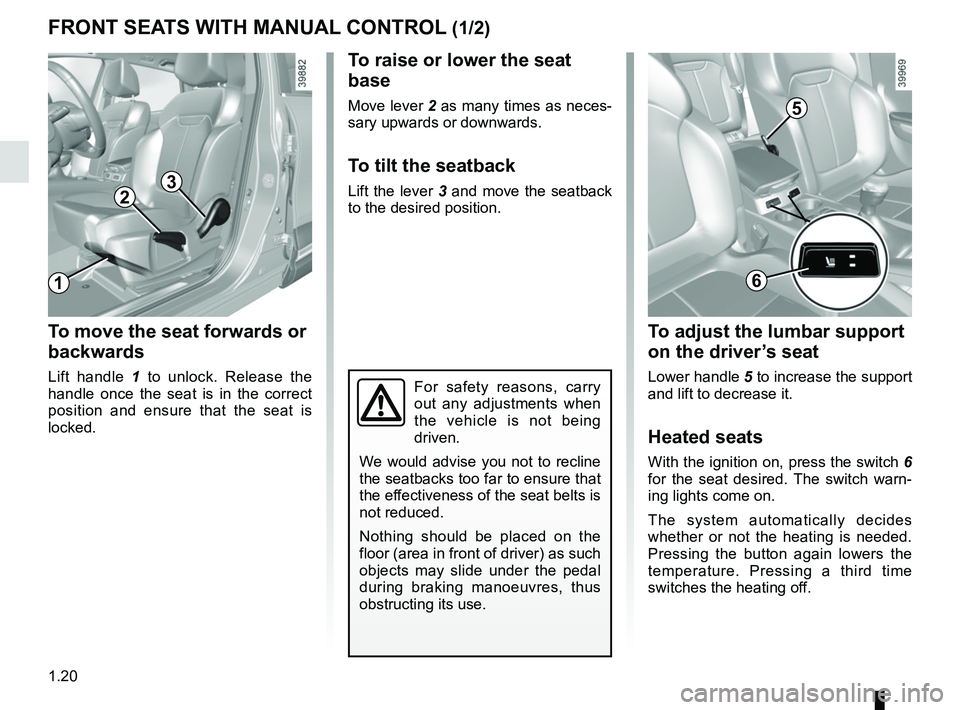
To raise or lower the seat
base
Move lever 2 as many times as neces-
sary upwards or downwards.
To tilt the seatback
Lift the lever 3 and move the seatback
to the desired position.
To move the seat forwards or
backwards
Lift handle 1 to unlock. Release the
handle once the seat is in the correct
position and ensure that the seat is
locked.
FRONT SEATS WITH MANUAL CONTROL (1/2)
2
1
3
For safety reasons, carry
out any adjustments when
the vehicle is not being
driven.
We would advise you not to recline
the seatbacks too far to ensure that
the effectiveness of the seat belts is
not reduced.
Nothing should be placed on the
floor (area in front of driver) as such
objects may slide under the pedal
during braking manoeuvres, thus
obstructing its use.
5
6
To adjust the lumbar support
on the driver’s seat
Lower handle 5 to increase the support
and lift to decrease it.
Heated seats
With the ignition on, press the switch 6
for the seat desired. The switch warn-
ing lights come on.
The system automatically decides
whether or not the heating is needed.
Pressing the button again lowers the
temperature. Pressing a third time
switches the heating off.
Page 28 of 310
1.22
DRIVER’S SEAT WITH ELECTRIC CONTROLS
For safety reasons, carry
out any adjustments when
the vehicle is not being
driven.
Make sure that the seatbacks are
correctly locked in place.
We would advise you not to recline
the seatbacks too far to ensure that
the effectiveness of the seat belts is
not reduced.
No object should be placed on the
floor (in front of the driver). such
objects may slide under the pedals
during sudden braking manoeuvres
and obstruct their use.
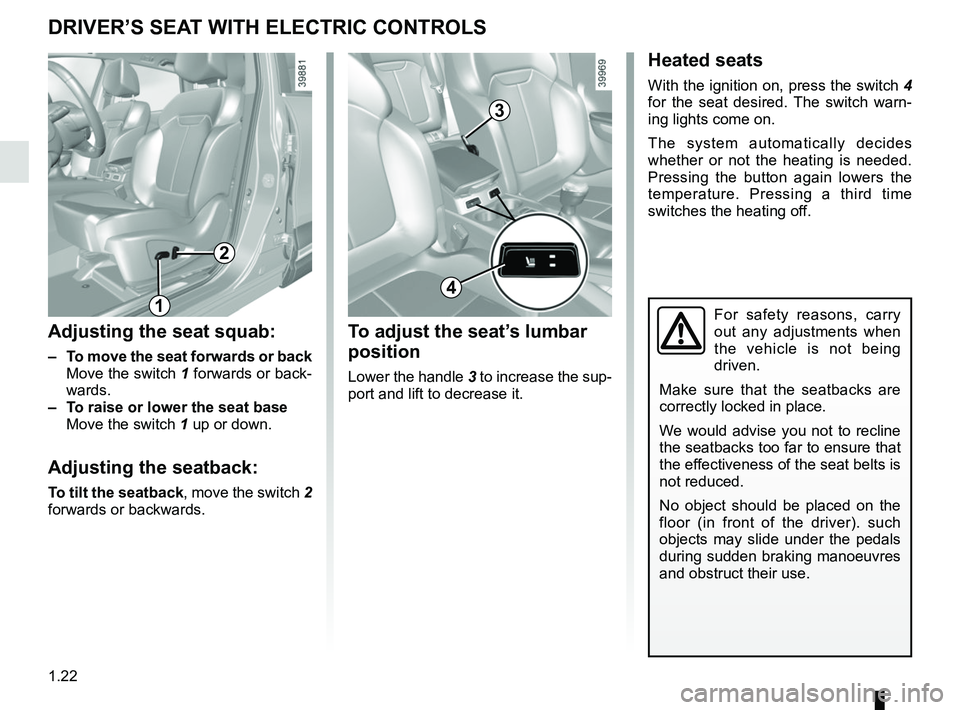
Adjusting the seat squab:
– To move the seat forwards or back
Move the switch 1 forwards or back- wards.
– To raise or lower the seat base
Move the switch 1 up or down.
Adjusting the seatback:
To tilt the seatback, move the switch 2
forwards or backwards.
Heated seats
With the ignition on, press the switch 4
for the seat desired. The switch warn-
ing lights come on.
The system automatically decides
whether or not the heating is needed.
Pressing the button again lowers the
temperature. Pressing a third time
switches the heating off.
1
2
To adjust the seat’s lumbar
position
Lower the handle 3 to increase the sup-
port and lift to decrease it.
3
4
Page 57 of 310
1.51
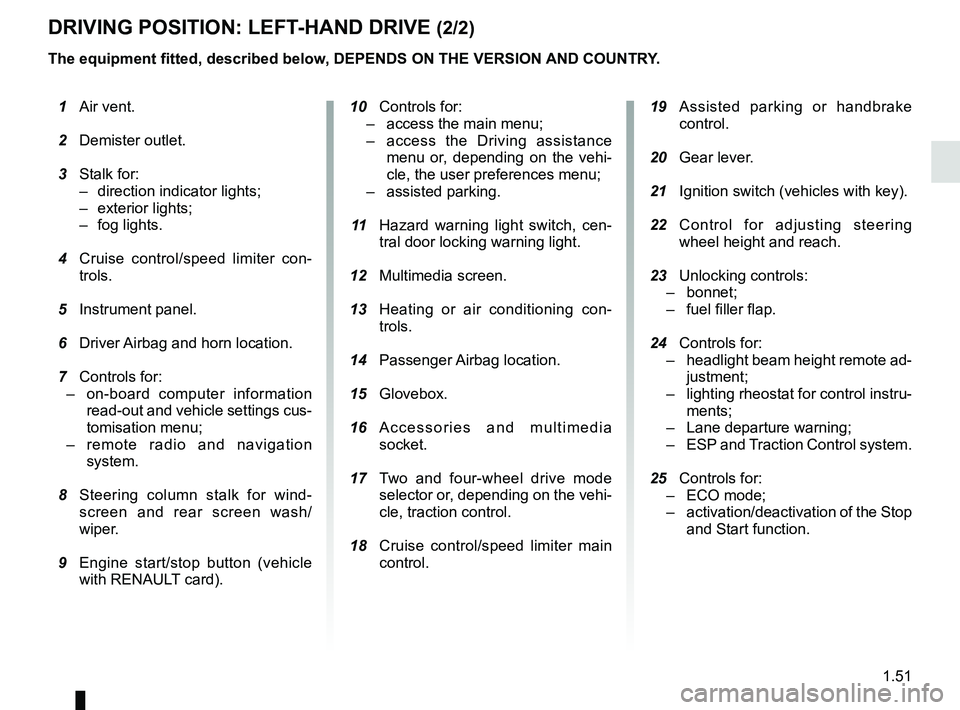
DRIVING POSITION: LEFT-HAND DRIVE (2/2)
The equipment fitted, described below, DEPENDS ON THE VERSION AND COUNTRY. 19 Assisted parking or handbrake
control.
20 Gear lever.
21 Ignition switch (vehicles with key).
22 Control for adjusting steering
wheel height and reach.
23 Unlocking controls:
– bonnet;
– fuel filler flap.
24 Controls for:
– headlight beam height remote ad-
justment;
– lighting rheostat for control instru-
ments;
– Lane departure warning;
– ESP and Traction Control system.
25 Controls for:
– ECO mode;
– activation/deactivation of the Stop
and Start function.
1 Air vent.
2 Demister outlet.
3 Stalk for:
– direction indicator lights;
– exterior lights;
– fog lights.
4 Cruise control/speed limiter con-
trols.
5 Instrument panel.
6 Driver Airbag and horn location.
7 Controls for:
– on-board computer information
read-out and vehicle settings cus-
tomisation menu;
– remote radio and navigation
system.
8 Steering column stalk for wind-
screen and rear screen wash/
wiper.
9 Engine start/stop button (vehicle
with RENAULT card).
10 Controls for:
– access the main menu;
– access the Driving assistance
menu or, depending on the vehi-
cle, the user preferences menu;
– assisted parking.
11 Hazard warning light switch, cen-
tral door locking warning light.
12 Multimedia screen.
13 Heating or air conditioning con-
trols.
14 Passenger Airbag location.
15 Glovebox.
16 Accessories and multimedia
socket.
17 Two and four-wheel drive mode
selector or, depending on the vehi-
cle, traction control.
18 Cruise control/speed limiter main
control.
Page 59 of 310
1.53
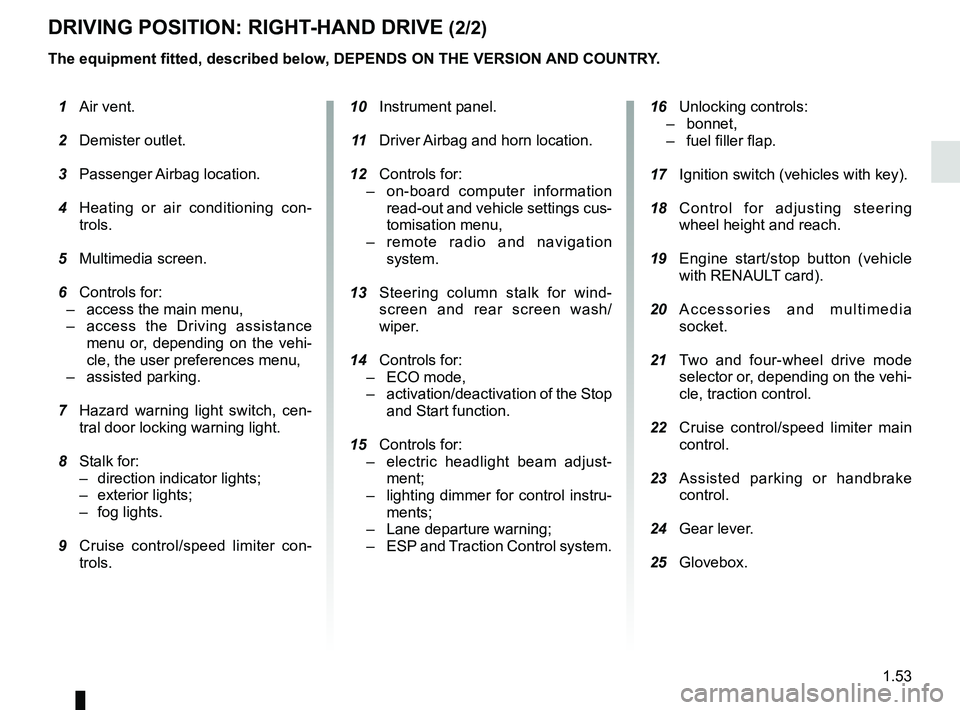
DRIVING POSITION: RIGHT-HAND DRIVE (2/2)
The equipment fitted, described below, DEPENDS ON THE VERSION AND COUNTRY.
16 Unlocking controls:
– bonnet,
– fuel filler flap.
17 Ignition switch (vehicles with key).
18 Control for adjusting steering
wheel height and reach.
19 Engine start/stop button (vehicle
with RENAULT card).
20 Accessories and multimedia
socket.
21 Two and four-wheel drive mode
selector or, depending on the vehi-
cle, traction control.
22 Cruise control/speed limiter main
control.
23 Assisted parking or handbrake
control.
24 Gear lever.
25 Glovebox.
1 Air vent.
2 Demister outlet.
3 Passenger Airbag location.
4 Heating or air conditioning con-
trols.
5 Multimedia screen.
6 Controls for:
– access the main menu,
– access the Driving assistance
menu or, depending on the vehi-
cle, the user preferences menu,
– assisted parking.
7 Hazard warning light switch, cen-
tral door locking warning light.
8 Stalk for:
– direction indicator lights;
– exterior lights;
– fog lights.
9 Cruise control/speed limiter con-
trols.
10 Instrument panel.
11 Driver Airbag and horn location.
12 Controls for:
– on-board computer information
read-out and vehicle settings cus-
tomisation menu,
– remote radio and navigation
system.
13 Steering column stalk for wind-
screen and rear screen wash/
wiper.
14 Controls for:
– ECO mode,
– activation/deactivation of the Stop
and Start function.
15 Controls for:
– electric headlight beam adjust-
ment;
– lighting dimmer for control instru-
ments;
– Lane departure warning;
– ESP and
Traction Control system.
Page 63 of 310
1.57
WARNING LIGHTS (4/6)
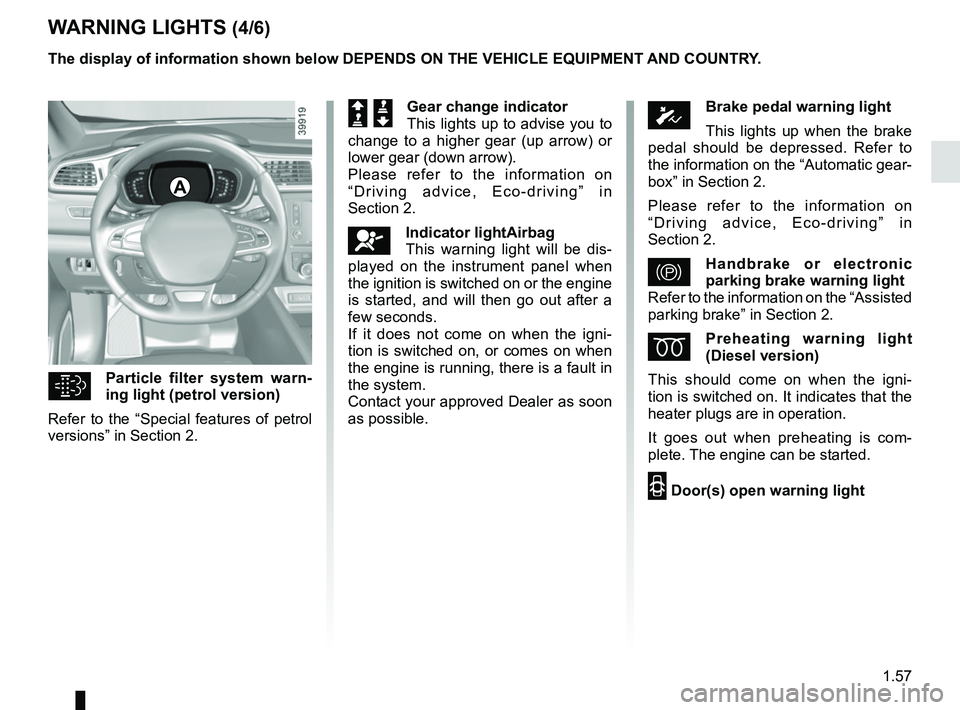
Particle filter system warn-
ing light (petrol version)
Refer to the “Special features of petrol
versions” in Section 2.
A
The display of information shown below DEPENDS ON THE VEHICLE EQUIPMENT \
AND COUNTRY.
ÓBrake pedal warning light
This lights up when the brake
pedal should be depressed. Refer to
the information on the “Automatic gear-
box” in Section 2.
Please refer to the information on
“Driving advice, Eco-driving” in
Section 2.
}Handbrake or electronic
parking brake warning light
Refer to the information on the “Assisted
parking brake” in Section 2.
ÉPreheating warning light
(Diesel version)
This should come on when the igni-
tion is switched on. It indicates that the
heater plugs are in operation.
It goes out when preheating is com-
plete. The engine can be started.
2 Door(s) open warning light
Š ‰Gear change indicator
This lights up to advise you to
change to a higher gear (up arrow) or
lower gear (down arrow).
Please refer to the information on
“Driving advice, Eco-driving” in
Section 2.
åIndicator lightAirbag
This warning light will be dis-
played on the instrument panel when
the ignition is switched on or the engine
is started, and will then go out after a
few seconds.
If it does not come on when the igni-
tion is switched on, or comes on when
the engine is running, there is a fault in
the system.
Contact your approved Dealer as soon
as possible.
Page 93 of 310
1.87
Special note
When driving the vehicle, the wiping
speed slows down whenever the ve-
hicle stops. For example, fast wiping
speed will slow to normal wiping speed.
As soon as the vehicle moves off,
wiping will return to the speed originally
selected.
If stalk 1 is operated, it overrides and
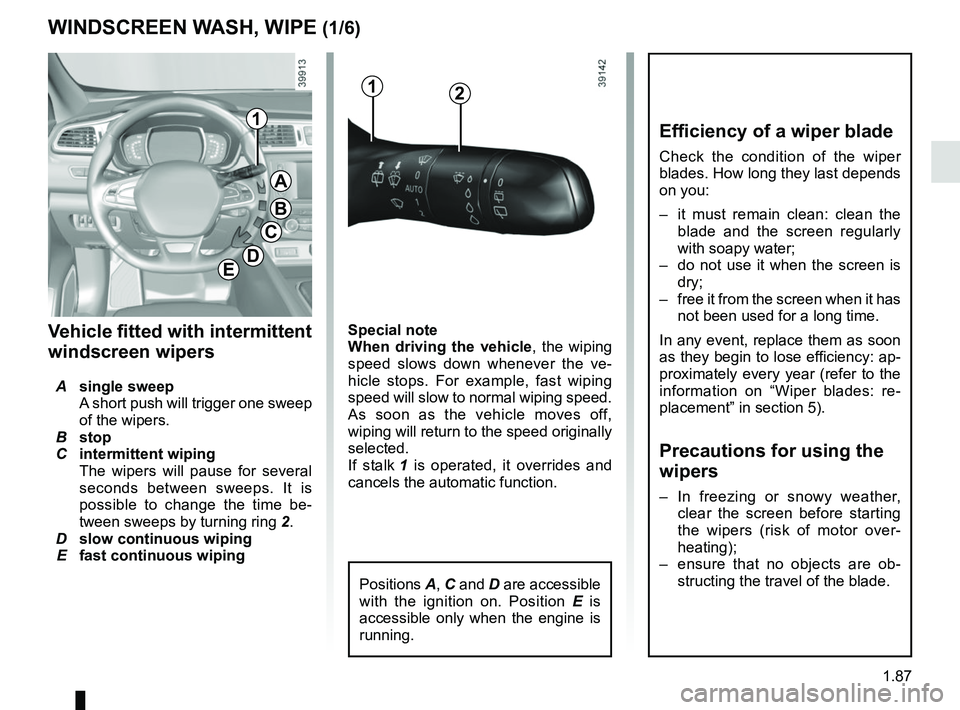
cancels the automatic function.Vehicle fitted with intermittent
windscreen wipers
A single sweep
A short push will trigger one sweep
of the wipers.
B stop
C intermittent wiping
The wipers will pause for several
seconds between sweeps. It is
possible to change the time be-
tween sweeps by turning ring 2.
D slow continuous wiping
E fast continuous wiping
Positions A, C and D are accessible
with the ignition on. Position E is
accessible only when the engine is
running.
1
A
B
C
D
WINDSCREEN WASH, WIPE (1/6)
E
Efficiency of a wiper blade
Check the condition of the wiper
blades. How long they last depends
on you:
– it must remain clean: clean the blade and the screen regularly
with soapy water;
– do not use it when the screen is dry;
– free it from the screen when it has not been used for a long time.
In any event, replace them as soon
as they begin to lose efficiency: ap-
proximately every year (refer to the
information on “Wiper blades: re-
placement” in section 5).
Precautions for using the
wipers
– In freezing or snowy weather, clear the screen before starting
the wipers (risk of motor over-
heating);
– ensure that no objects are ob- structing the travel of the blade.
12
Page 96 of 310
1.90
Note:
After your intervention, to reposition the
blades correctly, make sure the blades
are resting on the windscreen, switch
on the ignition and activate the wiper
control.
Before any action involving
the windscreen (washing
the vehicle, de-icing,
cleaning the windscreen,
etc.) return stalk 1 to position B
(stop).
Risk of injury and/or damage.
In the event of obstacles on the
windscreen (dirt, snow, ice etc.),
clean the windscreen (including the
central area located behind the in-
terior rear view mirror) before oper-
ating the wipers (risk of motor over-
heating).
If an object is preventing a blade
from moving, it may stop function-
ing. Remove the obstacle and react-
ivate the wiper using the wiper stalk.
WINDSCREEN WASH, WIPE (4/6)
Specific front wiper position
(service position)
This position enables the blades to be
lifted to remove them from the winds-
creen.
It may be useful to:
– to clean the blades;
– to release the blades from the winds- creen in winter;
– replace the blades (please refer to the information on “Wiper blades” in
Section 5).
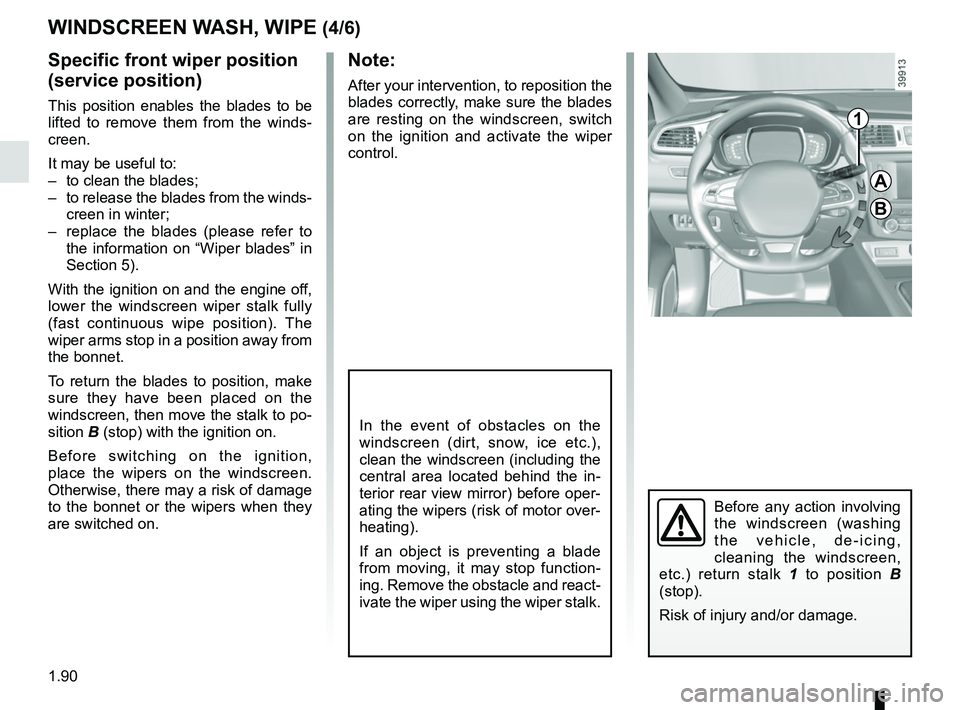
With the ignition on and the engine off,
lower the windscreen wiper stalk fully
(fast continuous wipe position). The
wiper arms stop in a position away from
the bonnet.
To return the blades to position, make
sure they have been placed on the
windscreen, then move the stalk to po-
sition B (stop) with the ignition on.
Before switching on the ignition,
place the wipers on the windscreen.
Otherwise, there may a risk of damage
to the bonnet or the wipers when they
are switched on.1
A
B
Page 99 of 310
1.93
REAR SCREEN WASH, WIPE (1/2)
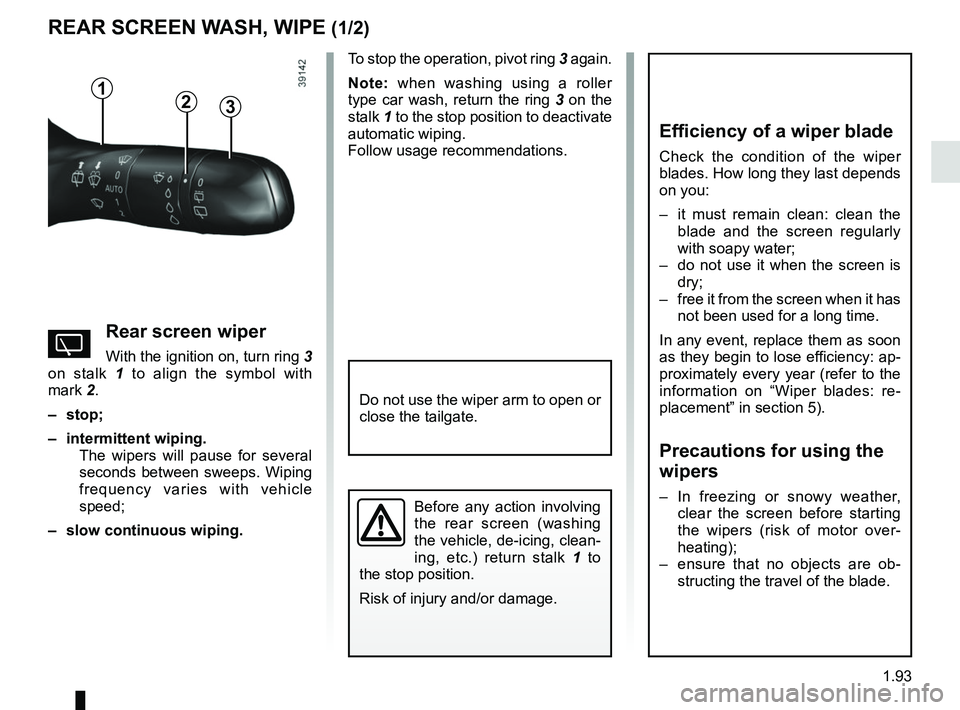
1
3
Efficiency of a wiper blade
Check the condition of the wiper
blades. How long they last depends
on you:
– it must remain clean: clean the blade and the screen regularly
with soapy water;
– do not use it when the screen is dry;
– free it from the screen when it has not been used for a long time.
In any event, replace them as soon
as they begin to lose efficiency: ap-
proximately every year (refer to the
information on “Wiper blades: re-
placement” in section 5).
Precautions for using the
wipers
– In freezing or snowy weather, clear the screen before starting
the wipers (risk of motor over-
heating);
– ensure that no objects are ob- structing the travel of the blade.
YRear screen wiper
With the ignition on, turn ring 3
on stalk 1 to align the symbol with
mark 2.
– stop;
– intermittent wiping. The wipers will pause for several
seconds between sweeps. Wiping
frequency varies with vehicle
speed;
– slow continuous wiping. To stop the operation, pivot ring
3 again.
Note: when washing using a roller
type car wash, return the ring 3 on the
stalk 1 to the stop position to deactivate
automatic wiping.
Follow usage recommendations.
Before any action involving
the rear screen (washing
the vehicle, de-icing, clean-
ing, etc.) return stalk 1 to
the stop position.
Risk of injury and/or damage.
2
Do not use the wiper arm to open or
close the tailgate.
Page 111 of 310
2.3
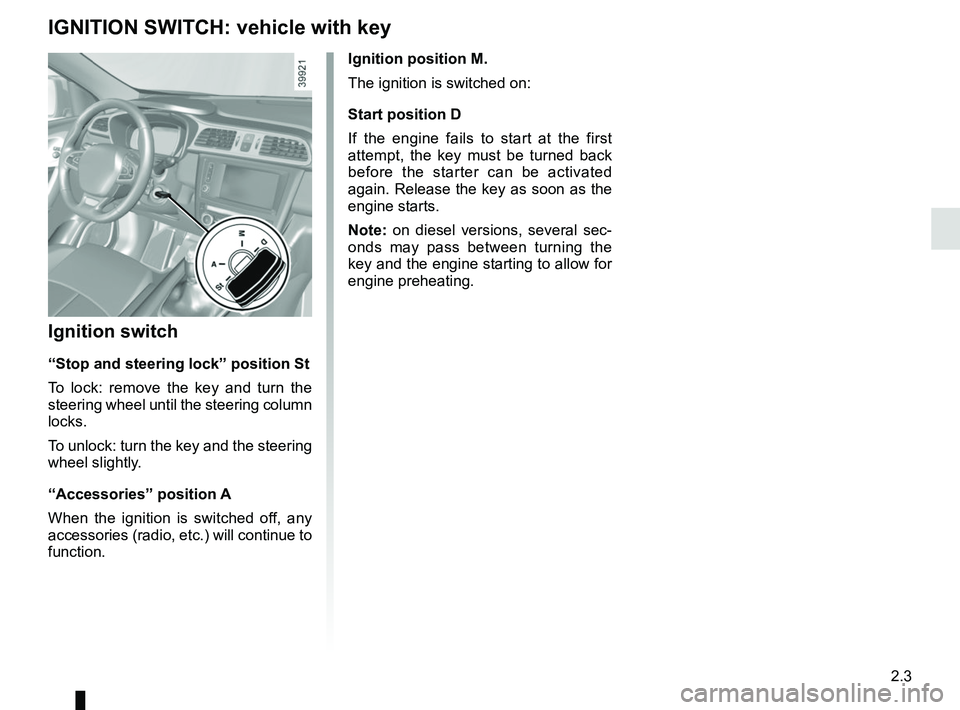
Ignition position M.
The ignition is switched on:
Start position D
If the engine fails to start at the first
attempt, the key must be turned back
before the starter can be activated
again. Release the key as soon as the
engine starts.
Note: on diesel versions, several sec-
onds may pass between turning the
key and the engine starting to allow for
engine preheating.
Ignition switch
“Stop and steering lock” position St
To lock: remove the key and turn the
steering wheel until the steering column
locks.
To unlock: turn the key and the steering
wheel slightly.
“Accessories” position A
When the ignition is switched off, any
accessories (radio, etc.) will continue to
function.
IGNITION SWITCH: vehicle with key
Page 112 of 310
2.4
STARTING, STOPPING THE ENGINE: vehicle with key
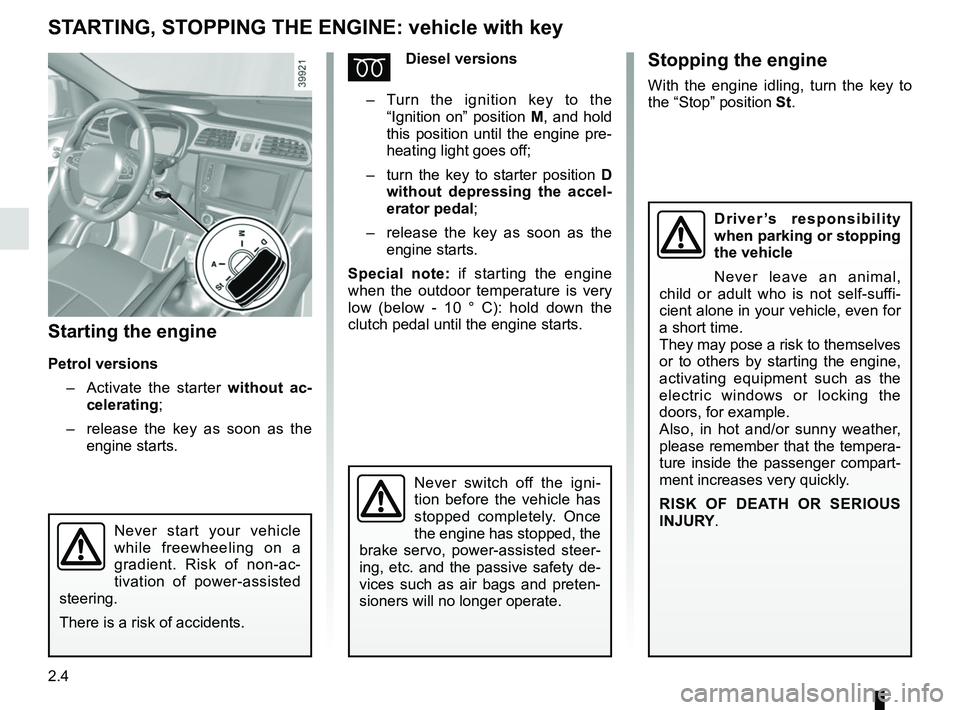
Starting the engine
Petrol versions– Activate the starter without ac-
celerating;
– release the key as soon as the
engine starts.
ÉDiesel versions
– Turn the ignition key to the
“Ignition on” position M, and hold
this position until the engine pre-
heating light goes off;
– turn the key to starter position D
without depressing the accel-
erator pedal;
– release the key as soon as the
engine starts.
Special note: if starting the engine
when the outdoor temperature is very
low (below - 10 ° C): hold down the
clutch pedal until the engine starts.
Never start your vehicle
while freewheeling on a
gradient. Risk of non-ac-
tivation of power-assisted
steering.
There is a risk of accidents.
Never switch off the igni-
tion before the vehicle has
stopped completely. Once
the engine has stopped, the
brake servo, power-assisted steer-
ing, etc. and the passive safety de-
vices such as air bags and preten-
sioners will no longer operate.
Driver’s responsibility
when parking or stopping
the vehicle
Never leave an animal,
child or adult who is not self-suffi-
cient alone in your vehicle, even for
a short time.
They may pose a risk to themselves
or to others by starting the engine,
activating equipment such as the
electric windows or locking the
doors, for example.
Also, in hot and/or sunny weather,
please remember that the tempera-
ture inside the passenger compart-
ment increases very quickly.
RISK OF DEATH OR SERIOUS
INJURY.
Stopping the engine
With the engine idling, turn the key to
the “Stop” position St.