stop start RENAULT KANGOO 2018 Owner's Manual
[x] Cancel search | Manufacturer: RENAULT, Model Year: 2018, Model line: KANGOO, Model: RENAULT KANGOO 2018Pages: 264, PDF Size: 7.09 MB
Page 122 of 264
2.30
DRIVING CORRECTION DEVICES AND AIDS (5/5)
Hill start assistance
This function assists the driver when
starting on hills. It prevents the vehicle
from rolling backwards, depending on
the slope, by automatically applying the
brakes when the driver lifts his/her foot
off the brake pedal to depress the ac-
celerator pedal.
System operation
It only operates when the gear lever is
in a position other than neutral and the
vehicle is completely stationary (brake
pedal depressed).
The system holds the vehicle for ap-
proximately 2 seconds. The brakes are
then gradually released (the vehicle will
move according to the slope).The hill start assistance
system cannot completely
prevent the vehicle from
rolling backwards in all sit-
uations (extremely steep gradients
etc.).
In all cases, the driver may depress
the brake pedal to prevent the vehi-
cle from rolling backwards.
The hill start assistance function
should not be used for prolonged
stops: use the brake pedal.
This function is not designed to im-
mobilise the vehicle permanently.
If necessary, use the brake pedal to
stop the vehicle.
The driver must remain particularly
vigilant when driving on slippery or
low-grip surfaces.
Risk of serious injury.
Page 134 of 264
2.42
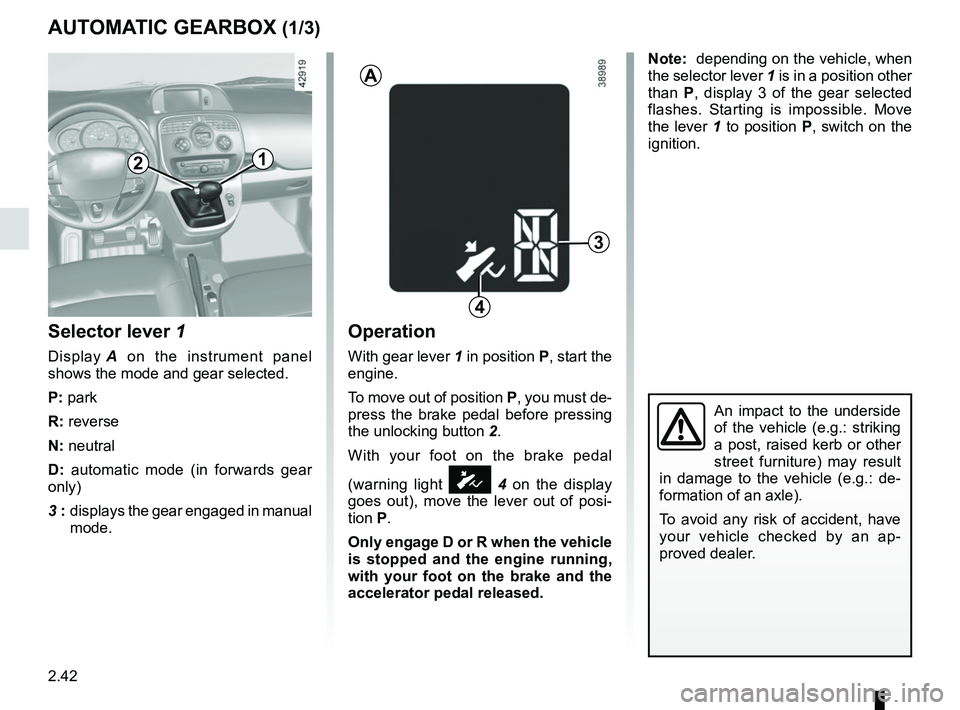
AUTOMATIC GEARBOX (1/3)
Selector lever 1
Display A on the instrument panel
shows the mode and gear selected.
P: park
R: reverse
N: neutral
D: automatic mode (in forwards gear
only)
3 : displays the gear engaged in manual
mode.
Operation
With gear lever 1 in position P, start the
engine.
To move out of position P, you must de-
press the brake pedal before pressing
the unlocking button 2.
With your foot on the brake pedal
(warning light
Ó 4 on the display
goes out), move the lever out of posi-
tion P.
Only engage D or R when the vehicle
is stopped and the engine running,
with your foot on the brake and the
accelerator pedal released.
3
1
A
4
2
Note: depending on the vehicle, when
the selector lever 1 is in a position other
than P, display 3 of the gear selected
flashes. Starting is impossible. Move
the lever 1 to position P, switch on the
ignition.
An impact to the underside
of the vehicle (e.g.: striking
a post, raised kerb or other
street furniture) may result
in damage to the vehicle (e.g.: de-
formation of an axle).
To avoid any risk of accident, have
your vehicle checked by an ap-
proved dealer.
Page 136 of 264
2.44
Operating faults
– When driving, if the “CHECK
GEARBOX” message and the
© warning light appear on the
instrument panel, this indicates a
fault.
Contact your approved Dealer as
soon as possible.
– When driving, if the message
“GEARBOX OVERHEATING” ap-
pears on the instrument panel, drive
at a moderate speed and avoid lea-
ving the gearstick in the D (or R) po-
sition, where traffic conditions allow:
always return to N while the vehicle
is stationary.
Contact your approved Dealer as
soon as possible.
– If a vehicle with an automatic gearbox breaks down, refer to the
information on “Towing” in Section 5.
AUTOMATIC GEARBOX (3/3)
Parking the vehicleWhen the vehicle is stopped, move the
lever to position P while keeping your
foot on the brake pedal: the gearbox is
in neutral and the drive wheels are me-
chanically locked by the driveshaft.
Apply the handbrake.Special circumstances
– If the bends and road surface do
not allow you to stay in automatic
mode (eg. in the mountains), we rec-
ommend that you change to manual
mode.
This will prevent the automatic gear-
box from changing gear repeatedly
when climbing, and permit engine
braking on long descents.
– In cold weather, start the engine
and wait a few seconds before
moving the selector lever from posi-
tion P or N and engaging it in D or R
to prevent the engine stalling..
Page 142 of 264

3.6
Adjusting the ventilation
speed
Normal use
Turn control 3 to one of the four posi-
tions to start the ventilation system and
adjust the power.
Select position 1 for minimum ventila-
tion and position 4 for maximum ven-
tilation.
Position 0
In this position:
– the air conditioning stops automati- cally even if button 6 is activated (the
indicator light remains lit);
– the ventilation speed of air in the passenger compartment is zero;
– there is, however, a slight flow of air when the vehicle is moving.
This position should not normally be
used.
HEATING, AIR CONDITIONING (3/3)
Air recirculation (isolation of
the passenger compartment)
Turn control 1 towards air recirculation
symbol
â.
In these conditions air is taken from the
passenger compartment and is recircu-
lated, with no air being taken from out-
side the vehicle.
Air recirculation is for:
– isolating the passenger compart- ment from the outside air (driving in
polluted areas, unpleasant odours,
etc.);
– bringing the passenger compartment to the desired temperature as quickly
as possible.
Prolonged use of this position can
lead to condensation forming on the
side windows and windscreen and
problems due to the use of non-re-
newed air in the passenger com-
partment.
We therefore advise you to return to
normal mode (outside air) as soon
as the air recirculation function is no
longer required, by turning control 1
again.
13
6
Page 144 of 264

3.8
Only the temperature and the AUTO
symbol are displayed
Functions managed in automatic mode
are not displayed.
– press button 6 to increase the tem-
perature;
– press button 3 to decrease the tem-
perature.
Note: The maximum and minimum
settings of 15°C and 27°C allow the
system to produce a minimum or maxi-
mum temperature, whatever the am-
bient conditions.
In automatic mode (AUTO indica-
tor light on the display is lit), all air
conditioning functions are controlled
by the system.
When you modify certain functions
the AUTO indicator light goes out.
Only the modified function stops
being controlled by the system.
To reach and keep the chosen comfort
level and to maintain good visibility, the
system controls:
– ventilation speed;
– air distribution;
– air recirculation management;
– air conditioning start/stop;
– the air temperature.Automatic mode
Press button 5. The AUTO operating
tell-tale will come on.
The automatic climate control system
guarantees comfort in the passenger
compartment and good visibility (except
in the event of extreme conditions),
while optimising fuel consumption.
This is the recommended mode of
use.
AUTOMATIC CLIMATE CONTROL (2/8)
365
Page 151 of 264
3.15
Operating faults
As a general rule, contact your ap-
proved dealer in the event of an oper-
ating fault.
– Reduction in de-icing, demisting or air conditioning performance.
This may be caused by the passen-
ger compartment filter cartridge be-
coming clogged.
– No cold air is being produced .
Check that the controls are set cor-
rectly and that the fuses are sound.
Otherwise, switch off the system.
Presence of water under the
vehicle
After prolonged use of the air condi-
tioning system, it is normal for water
to be present under the vehicle. This is
caused by condensation.
AIR CONDITIONING: information and operating instructions (1/2)
Do not open the refriger-
ant fluid circuit. The fluid
may damage eyes or skin.
Fuel consumption
You will normally notice an increase in
fuel consumption (especially in town)
when the air conditioning is operating.
For vehicles fitted with air conditioning
with no automatic mode, switch off the
system when it is not required.
Advice for reducing consumption
and helping to preserve the environ-
ment
Drive with the air vents open and the
windows closed.
If the vehicle has been parked in the
sun, open the doors for a few moments
to let the hot air escape before starting
the engine.
Maintenance
Refer to the Maintenance Document
for your vehicle for the inspection fre-
quency.
Advice on use
In some situations (air conditioning off,
air recirculation activated, ventilation
speed at zero or low etc.), you may
notice that condensation starts to form
on the windows and windscreen.
If there is condensation, use the “Clear
View” function to remove it, then use
the air conditioning in automatic mode
to stop it forming again.
Do not add anything to the
vehicle’s ventilation circuit
(for example, to remove
bad odours).
There is a risk of damage or of
fire.
Use the air conditioning system reg-
ularly, even in cold weather, running
it at least once a month for approxi-
mately 5 minutes.
Vehicles equipped with
modeECO
Once activated, ECO mode may
reduce air conditioning perform-
ance. Please refer to the informa-
tion on “Driving advice, Eco-driving”
in Section 2.
Page 152 of 264
3.16
AIR CONDITIONING: information and operating instructions (2/2)
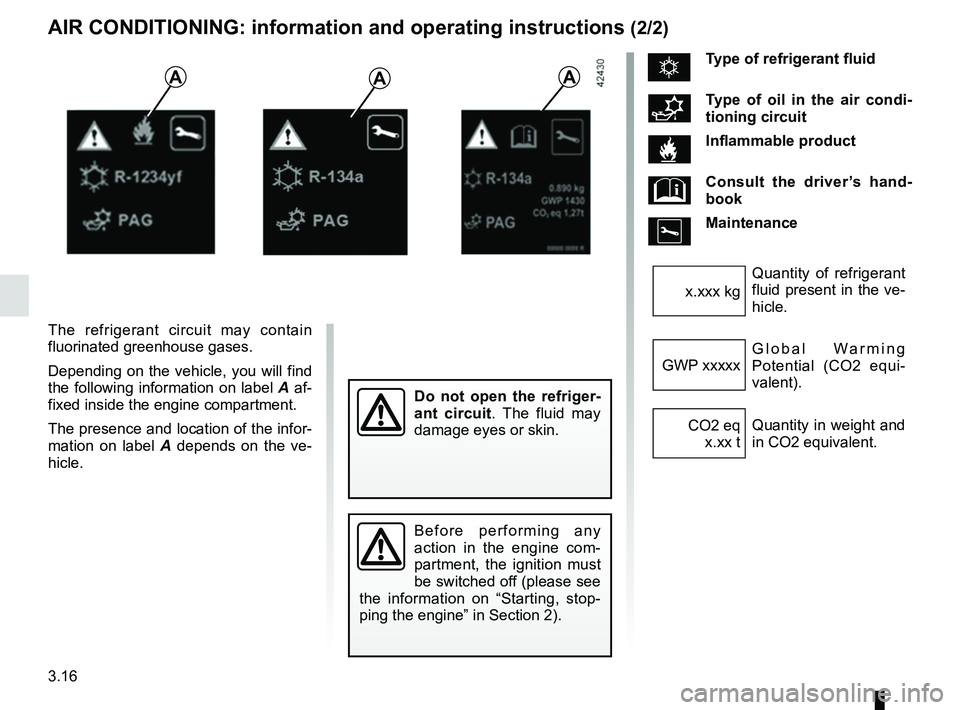
The refrigerant circuit may contain
fluorinated greenhouse gases.
Depending on the vehicle, you will find
the following information on label A af-
fixed inside the engine compartment.
The presence and location of the infor-
mation on label A depends on the ve-
hicle.
AAA
Do not open the refriger-
ant circuit . The fluid may
damage eyes or skin.
Before performing any
action in the engine com-
partment, the ignition must
be switched off (please see
the information on “Starting, stop-
ping the engine” in Section 2).
ÑType of refrigerant fluid
Type of oil in the air condi-
tioning circuit
Inflammable product
Consult the driver’s hand-
book
Maintenance
Quantity of refrigerant
fluid present in the ve-
hicle.
x.xxx kg
Global Warming
Potential (CO2 equi-
valent).
GWP xxxxx
Quantity in weight and
in CO2 equivalent.
CO2 eq
x.xx t
Page 176 of 264
4.2
BONNET (1/2)
1
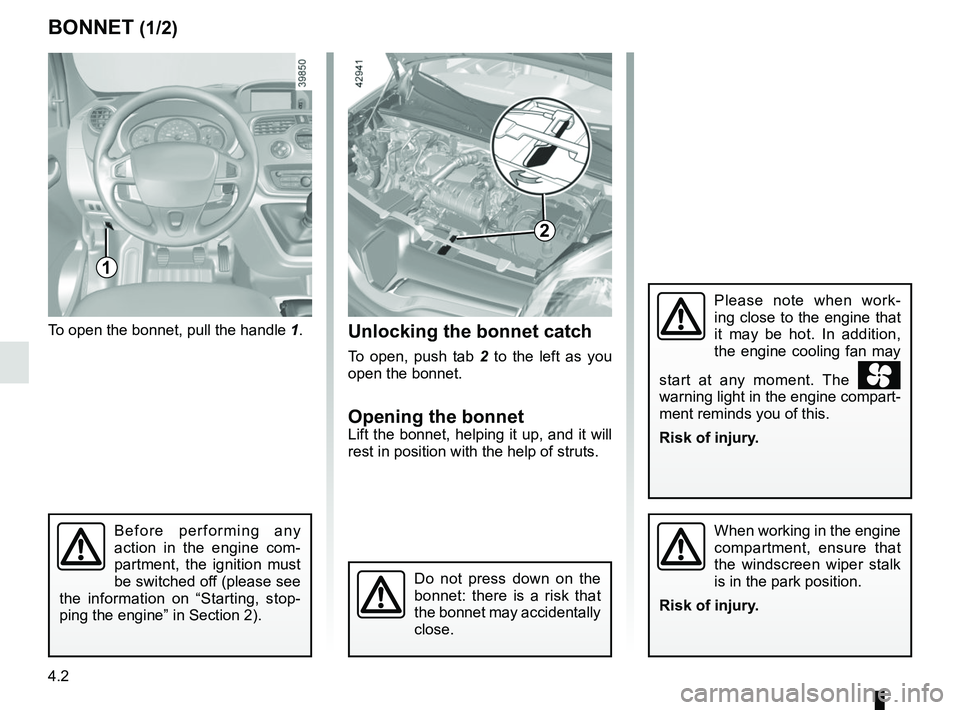
To open the bonnet, pull the handle 1.
Please note when work-
ing close to the engine that
it may be hot. In addition,
the engine cooling fan may
start at any moment. The
warning light in the engine compart-
ment reminds you of this.
Risk of injury.
Unlocking the bonnet catch
To open, push tab 2 to the left as you
open the bonnet.
Opening the bonnetLift the bonnet, helping it up, and it will
rest in position with the help of struts.
Do not press down on the
bonnet: there is a risk that
the bonnet may accidentally
close.
When working in the engine
compartment, ensure that
the windscreen wiper stalk
is in the park position.
Risk of injury.
2
Before performing any
action in the engine com-
partment, the ignition must
be switched off (please see
the information on “Starting, stop-
ping the engine” in Section 2).
Page 179 of 264
4.5
Consult your approved Dealer at
once if you notice an abnormal or
repeated drop in any of the fluid
levels.
Please note when work-
ing close to the engine that
it may be hot. In addition,
the engine cooling fan may
start at any moment. The
warning light in the engine compart-
ment reminds you of this.
Risk of injury.
In order to prevent splashback, it is
recommended that a funnel be used
when topping up/filling with oil.
ENGINE OIL LEVEL: general information (2/2)
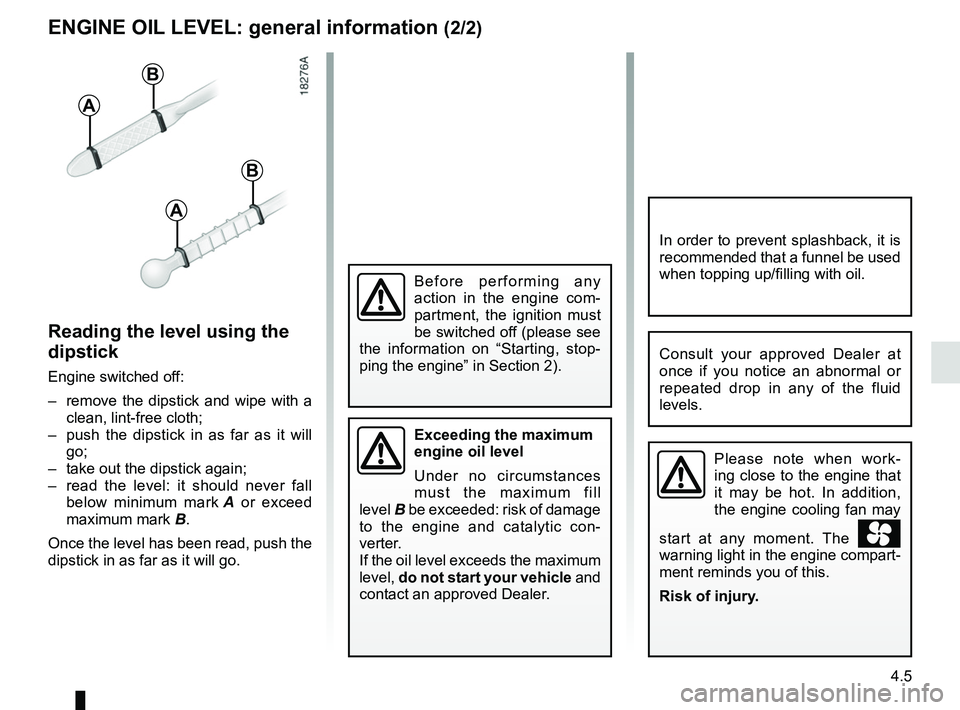
Reading the level using the
dipstick
Engine switched off:
– remove the dipstick and wipe with a clean, lint-free cloth;
– push the dipstick in as far as it will go;
– take out the dipstick again;
– read the level: it should never fall below minimum mark A or exceed
maximum mark B.
Once the level has been read, push the
dipstick in as far as it will go.
A
B
A
B
Exceeding the maximum
engine oil level
Under no circumstances
must the maximum fill
level B be exceeded: risk of damage
to the engine and catalytic con-
verter.
If the oil level exceeds the maximum
level, do not start your vehicle and
contact an approved Dealer.
Before performing any
action in the engine com-
partment, the ignition must
be switched off (please see
the information on “Starting, stop-
ping the engine” in Section 2).
Page 180 of 264
4.6
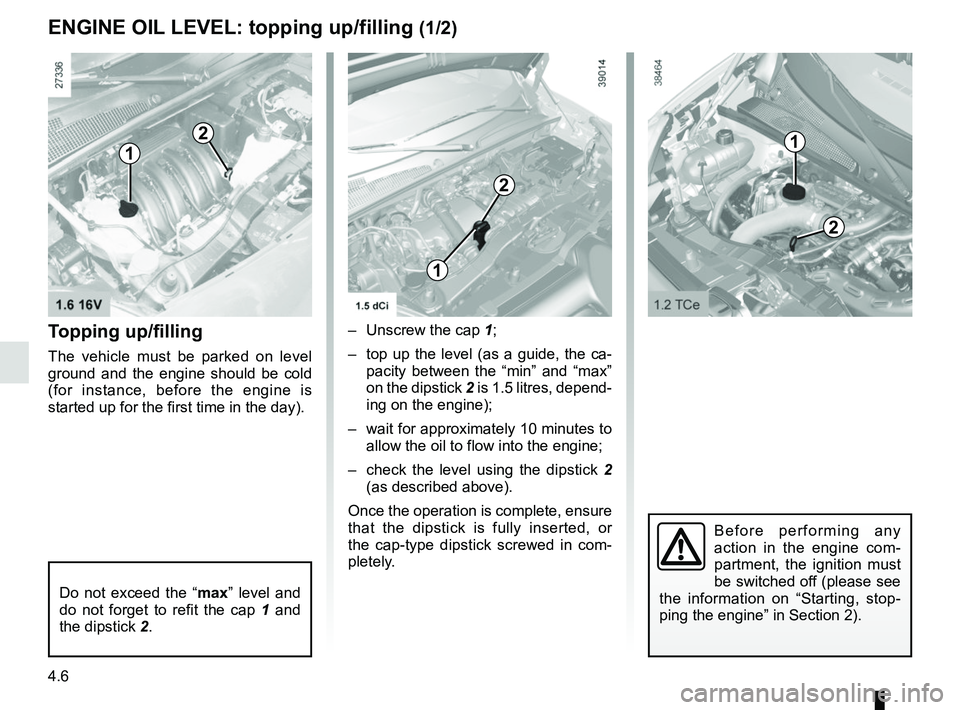
Topping up/filling
The vehicle must be parked on level
ground and the engine should be cold
(for instance, before the engine is
started up for the first time in the day).– Unscrew the cap 1;
– top up the level (as a guide, the ca- pacity between the “min” and “max”
on the dipstick 2 is 1.5 litres, depend-
ing on the engine);
– wait for approximately 10 minutes to allow the oil to flow into the engine;
– check the level using the dipstick 2
(as described above).
Once the operation is complete, ensure
that the dipstick is fully inserted, or
the cap-type dipstick screwed in com-
pletely.
Do not exceed the “ max” level and
do not forget to refit the cap 1 and
the dipstick 2.
1
2
2
1
ENGINE OIL LEVEL: topping up/filling (1/2)
1
2
Before performing any
action in the engine com-
partment, the ignition must
be switched off (please see
the information on “Starting, stop-
ping the engine” in Section 2).