ignition RENAULT KANGOO 2018 Owner's Guide
[x] Cancel search | Manufacturer: RENAULT, Model Year: 2018, Model line: KANGOO, Model: RENAULT KANGOO 2018Pages: 264, PDF Size: 7.09 MB
Page 101 of 264
2.9
SPECIAL FEATURES OF PETROL VERSIONS
Do not park the vehicle or
run the engine in locations
where combustible sub-
stances or materials such
as grass or leaves can come into
contact with the hot exhaust system.
The following operating conditions
should be avoided:
– driving for long periods when the low fuel level warning light is lit;
– using leaded petrol;
– using fuel or lubrication additives which are not approved.
Or operating faults such as:
– faulty ignition, running out of fuel or disconnected spark plugs resulting
in the engine misfiring or cutting out
when driving;
– loss of power,
may cause the catalytic converter to
overheat, reducing its efficiency which
may irreparably damage it and cause
heat damage to the vehicle. If you notice any of the above operating
faults, have the necessary repairs car-
ried out as soon as possible by an ap-
proved dealer.
These faults may be avoided by regu-
larly taking your vehicle to an approved
Dealer at the intervals specified in the
Maintenance Document.
Starting problems
To avoid damaging the catalytic con-
verter,
do not keep trying to start the
engine (using the start button, or by
pushing or towing the vehicle) without
having identified and corrected the
cause of the fault.
If the fault cannot be identified, do not
continue to try and start the engine, but
contact an approved dealer.
Page 107 of 264

2.15
MAINTENANCE AND ANTIPOLLUTION ADVICE
Your vehicle complies with criteria for
recycling and recovering vehicles at the
end of their service life, which entered
into force in 2015.
Some parts of your vehicle have there-
fore been designed to facilitate future
recycling.
These parts are easy to remove so
that they can be recovered and reproc-
essed by recycling companies.
By virtue of its design, moderate fuel
consumption and initial settings, your
vehicle also conforms to current anti-
pollution regulations. The manufac-
turer is actively striving to reduce pol-
lutant exhaust gas emissions and to
save energy. But the fuel consumption
of your vehicle and the level of pollutant
exhaust gas emissions are also your
responsibility. Ensure that it is main-
tained and used correctly.Maintenance
It is important to remember that failure to
respect antipollution regulations could
lead to legal action being taken against
the vehicle owner. In addition, replacing
engine, fuel supply system and exhaust
components with parts other than those
originally recommended by the manu-
facturer may alter your vehicle so that
it no longer complies with antipollution
regulations.
Have your vehicle adjusted and
checked by an approved Dealer, in ac-
cordance with the instructions given in
your maintenance schedule: they will
have all the equipment necessary for
ensuring that your vehicle is maintained
to its original standard.
Engine adjustments
– Air filter, diesel filter: a choked el-
ement will reduce efficiency. It must
be replaced.
– Idle speed: this does not require ad- justment.
Exhaust gas monitoring
system
The exhaust gas monitoring system will
detect any operating faults in the vehi-
cle’s antipollution system.
If this system malfunctions, toxic sub-
stances may be released into the at-
mosphere or damage may occur.
ÄThis warning light on the in-
strument panel will indicate if
there are any faults in the system:
This lights up when the ignition is
switched on and goes out when the
engine is started.
– If it lights up continuously, consult an approved Dealer as soon as possi-
ble;
– if it flashes, reduce the engine speed until the light stops flashing. Contact
your approved dealer as soon as
possible.
Refer to the information on
«Additive tank» in Section 1.
Page 111 of 264
2.19
SYSTEM A (cntd.)
Resetting the standard level for the
tyre pressures
This should be done:
– after each reinflation or readjustment of the pressure of one of the tyres;
– when the standard tyre pressure needs to be changed to adapt to
usage conditions (empty, carrying a
load, motorway driving, etc.);
– after changing a wheel;
– after using the tyre inflation kit;
– after swapping a wheel (however, this practice is not recommended).
It should always be done after checking
the tyre pressure of all four tyres when
cold.
Tyre pressures must correspond to the
current usage of the vehicle (empty,
carrying a load, motorway driving, etc.).
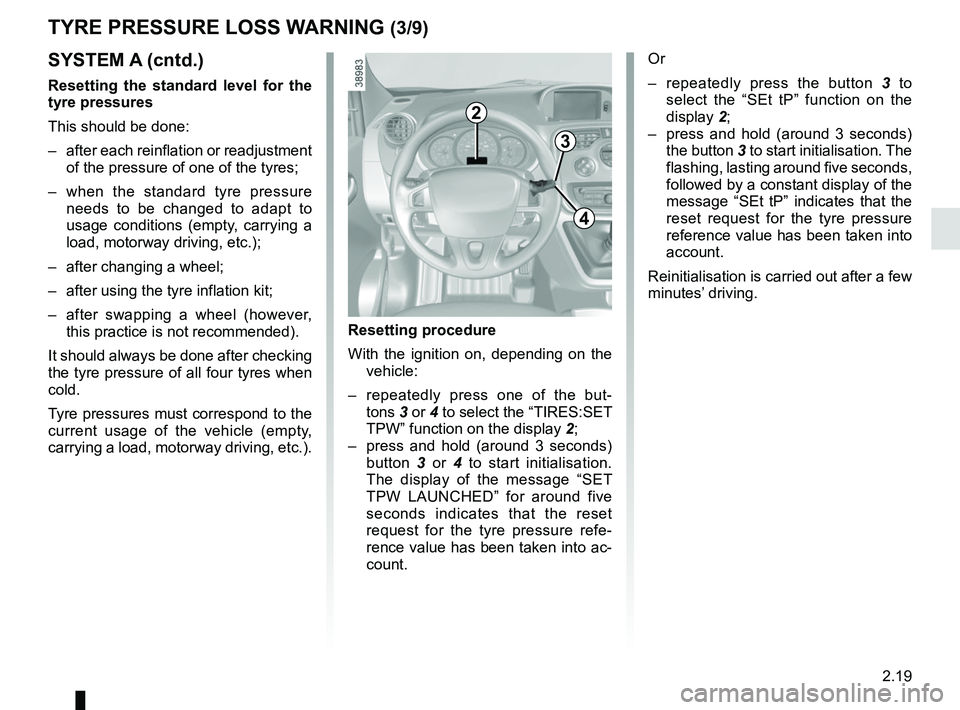
2
3
4
Resetting procedure
With the ignition on, depending on the vehicle:
– repeatedly press one of the but- tons 3 or 4 to select the “TIRES:SET
TPW” function on the display 2;
– press and hold (around 3 seconds) button 3 or 4 to start initialisation.
The display of the message “SET
TPW LAUNCHED” for around five
seconds indicates that the reset
request for the tyre pressure refe-
rence value has been taken into ac-
count. Or
– repeatedly press the button 3
to
select the “SEt tP” function on the
display 2;
– press and hold (around 3 seconds) the button 3 to start initialisation. The
flashing, lasting around five seconds,
followed by a constant display of the
message “SEt tP” indicates that the
reset request for the tyre pressure
reference value has been taken into
account.
Reinitialisation is carried out after a few
minutes’ driving.
TYRE PRESSURE LOSS WARNING (3/9)
Page 115 of 264

2.23
TYRE PRESSURE LOSS WARNING (7/9)
2
3
4
The display of the message “TP ACQUISTION LAUNCHED” for
around five seconds indicates that
the reset request for the tyre pres-
sure reference value has been taken
into account.
Or
– repeatedly press the button 3 to
select the “SEt PP” function on the
display 2;
– press and hold (around 3 seconds) the button 3 to start initialisation. The
flashing, lasting around five seconds,
followed by a constant display of the
message “SEt PP” indicates that the
reset request for the tyre pressure
reference value has been taken into
account.
Reinitialisation is carried out after a few
minutes’ driving.
Note:
The standard tyre pressure cannot be
less than that recommended and indi-
cated on the door frame.
SYSTEM B (cntd.)
Resetting procedure
With the ignition on, depending on the vehicle:
– repeatedly press one of the buttons 3
or 4 to select the “TYRE PRESSURE
ACQUISITION” function on the dis-
play 2;
– press and hold (around 3 seconds) button 3 or 4 to start initialisation.
Page 120 of 264

2.28
Disabling the traction control
system
(depending on vehicle)
In some situations (driving on very wet
ground: snow, mud, etc. or driving with
snow chains fitted), the system may
reduce the engine output to limit wheel-
spin. If this is not required, it is possible
to deactivate the function by pressing
switch 1.
The message “TRACTION CONTROL
OFF” is displayed on the instrument
panel to inform you.The traction control system offers ad-
ditional safety. It is recommended that
you do not drive with the function di-
sabled. Correct this as soon as pos-
sible by pressing the switch
1 again.
Note: The function is reactivated auto-
matically when the ignition is switched
on or when a speed of approximately
24 mph (40 km/h) is exceeded.
Emergency brake assist
This is an additional system to ABS
which helps reduce vehicle stopping
distances.
Operating principle
The system detects an emergency
braking situation. In this case, the brak-
ing assistance immediately develops
maximum power and may trigger ABS
regulation.
ABS braking is maintained as long as
the brake pedal is not released.
DRIVING CORRECTION DEVICES AND AIDS (3/5)
Hazard warning lights switching on
Depending on the vehicle, these may
light up in the event of sudden decel-
eration.
Operating faults
When the system detects an operating
fault the message “BRAKING FAULT”
appears on the instrument panel along
with the
© warning light.
Consult an approved dealer.
Braking anticipation
Depending on the vehicle, when you
rapidly release the accelerator, the
system anticipates the braking ma-
noeuvre in order to reduce stopping
distances.
Special cases
When using the cruise control:
– if you use the accelerator, when you release it, the system may be trig-
gered;
– if you do not use the accelerator, the system will not be triggered.1
Page 131 of 264
2.39
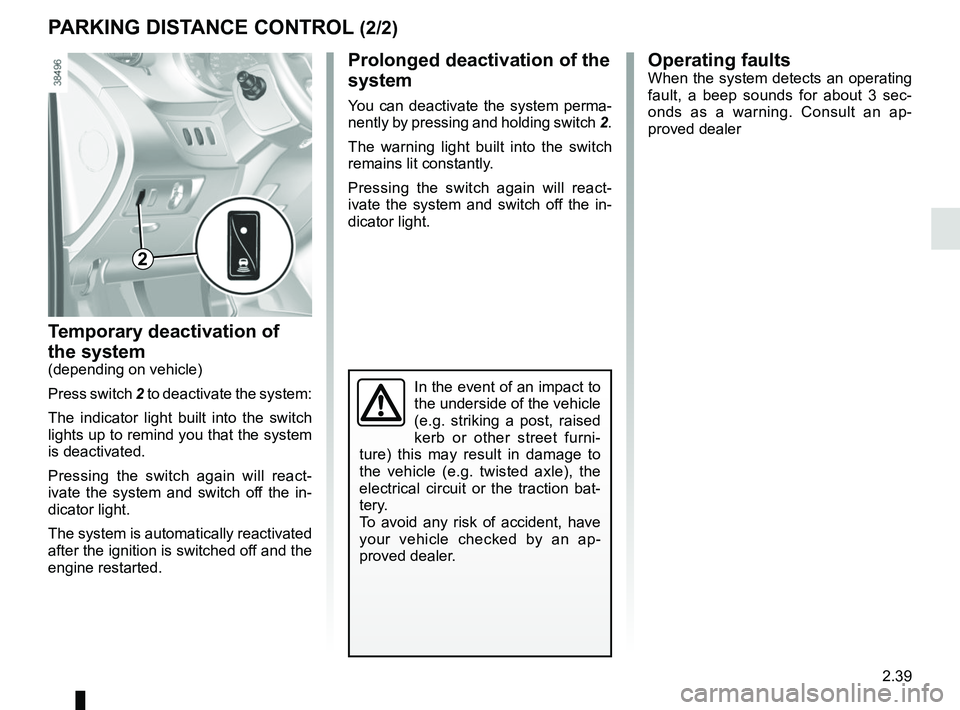
Temporary deactivation of
the system
(depending on vehicle)
Press switch 2 to deactivate the system:
The indicator light built into the switch
lights up to remind you that the system
is deactivated.
Pressing the switch again will react-
ivate the system and switch off the in-
dicator light.
The system is automatically reactivated
after the ignition is switched off and the
engine restarted.
PARKING DISTANCE CONTROL (2/2)
Operating faultsWhen the system detects an operating
fault, a beep sounds for about 3 sec-
onds as a warning. Consult an ap-
proved dealer
In the event of an impact to
the underside of the vehicle
(e.g. striking a post, raised
kerb or other street furni-
ture) this may result in damage to
the vehicle (e.g. twisted axle), the
electrical circuit or the traction bat-
tery.
To avoid any risk of accident, have
your vehicle checked by an ap-
proved dealer.
2
Prolonged deactivation of the
system
You can deactivate the system perma-
nently by pressing and holding switch 2.
The warning light built into the switch
remains lit constantly.
Pressing the switch again will react-
ivate the system and switch off the in-
dicator light.
Page 134 of 264
2.42
AUTOMATIC GEARBOX (1/3)
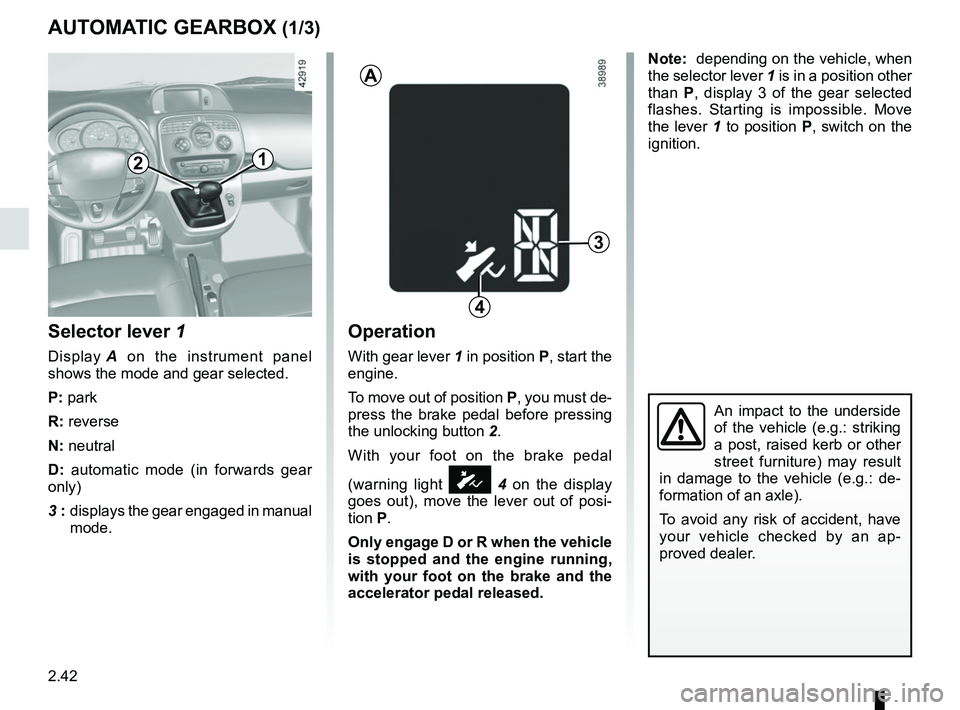
Selector lever 1
Display A on the instrument panel
shows the mode and gear selected.
P: park
R: reverse
N: neutral
D: automatic mode (in forwards gear
only)
3 : displays the gear engaged in manual
mode.
Operation
With gear lever 1 in position P, start the
engine.
To move out of position P, you must de-
press the brake pedal before pressing
the unlocking button 2.
With your foot on the brake pedal
(warning light
Ó 4 on the display
goes out), move the lever out of posi-
tion P.
Only engage D or R when the vehicle
is stopped and the engine running,
with your foot on the brake and the
accelerator pedal released.
3
1
A
4
2
Note: depending on the vehicle, when
the selector lever 1 is in a position other
than P, display 3 of the gear selected
flashes. Starting is impossible. Move
the lever 1 to position P, switch on the
ignition.
An impact to the underside
of the vehicle (e.g.: striking
a post, raised kerb or other
street furniture) may result
in damage to the vehicle (e.g.: de-
formation of an axle).
To avoid any risk of accident, have
your vehicle checked by an ap-
proved dealer.
Page 152 of 264
3.16
AIR CONDITIONING: information and operating instructions (2/2)
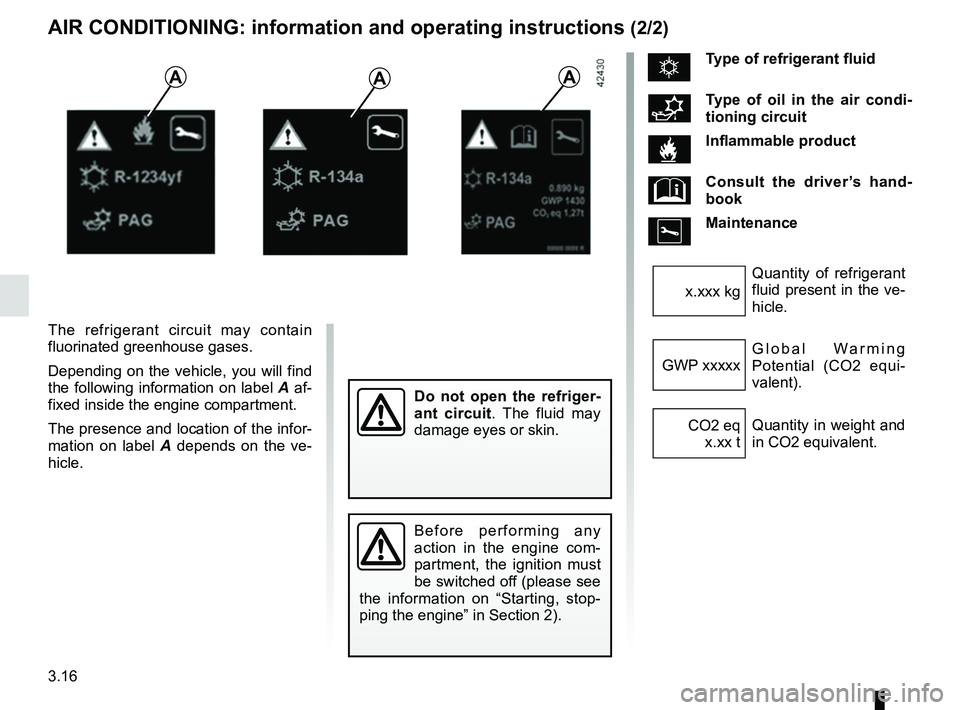
The refrigerant circuit may contain
fluorinated greenhouse gases.
Depending on the vehicle, you will find
the following information on label A af-
fixed inside the engine compartment.
The presence and location of the infor-
mation on label A depends on the ve-
hicle.
AAA
Do not open the refriger-
ant circuit . The fluid may
damage eyes or skin.
Before performing any
action in the engine com-
partment, the ignition must
be switched off (please see
the information on “Starting, stop-
ping the engine” in Section 2).
ÑType of refrigerant fluid
Type of oil in the air condi-
tioning circuit
Inflammable product
Consult the driver’s hand-
book
Maintenance
Quantity of refrigerant
fluid present in the ve-
hicle.
x.xxx kg
Global Warming
Potential (CO2 equi-
valent).
GWP xxxxx
Quantity in weight and
in CO2 equivalent.
CO2 eq
x.xx t
Page 154 of 264
3.18
Special features
Depending on the vehicle, remote un-
locking of the doors triggers timed light-
ing of the passenger compartment. If
one of the front or rear doors is opened,
the period for which the light is switched
on will start again.
Then the courtesy light and the luggage
compartment light dim and go out.
The lighting timer will cut out for vari-
ous reasons:
– if a door has been open for 15 min-utes;
– if all the doors have been closed for 15 seconds or 5 minutes, depending
on the vehicle;
– when the ignition is switched on.
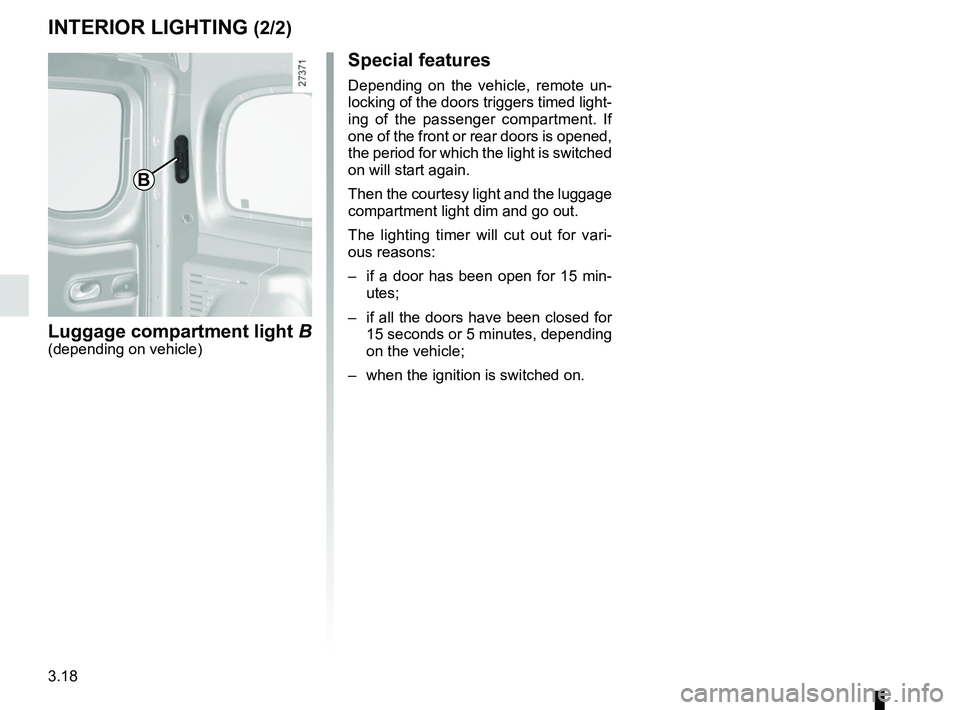
B
Luggage compartment light B(depending on vehicle)
INTERIOR LIGHTING (2/2)
Page 156 of 264
3.20
Electric windows
With the ignition on:
– press the switch for the window concerned to lower it to the desired
height;
– lift the switch for the window con- cerned to raise it to the desired
height.
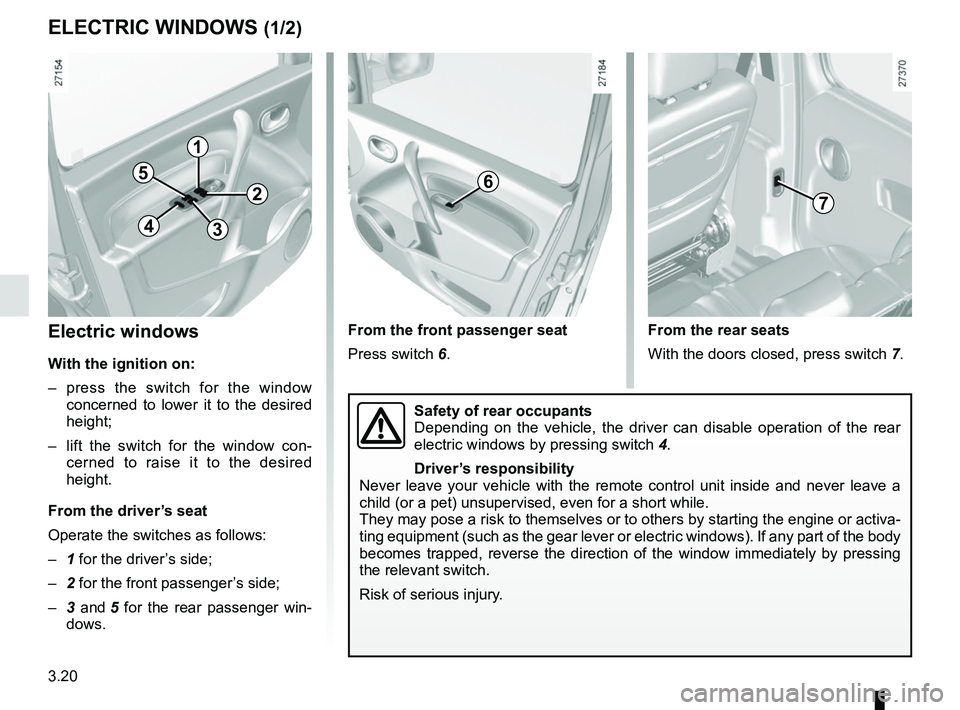
From the driver’s seat
Operate the switches as follows:
– 1 for the driver’s side;
– 2 for the front passenger’s side;
– 3 and 5 for the rear passenger win-
dows.
ELECTRIC WINDOWS (1/2)
From the rear seats
With the doors closed, press switch 7.
From the front passenger seat
Press switch 6.
1
2
34
56
Safety of rear occupants
Depending on the vehicle, the driver can disable operation of the rear
electric windows by pressing switch
4.
Driver’s responsibility
Never leave your vehicle with the remote control unit inside and never l\
eave a
child (or a pet) unsupervised, even for a short while.
They may pose a risk to themselves or to others by starting the engine o\
r activa-
ting equipment (such as the gear lever or electric windows). If any pa\
rt of the body
becomes trapped, reverse the direction of the window immediately by pres\
sing
the relevant switch.
Risk of serious injury.
7