light RENAULT KANGOO 2018 Repair Manual
[x] Cancel search | Manufacturer: RENAULT, Model Year: 2018, Model line: KANGOO, Model: RENAULT KANGOO 2018Pages: 264, PDF Size: 7.09 MB
Page 120 of 264

2.28
Disabling the traction control
system
(depending on vehicle)
In some situations (driving on very wet
ground: snow, mud, etc. or driving with
snow chains fitted), the system may
reduce the engine output to limit wheel-
spin. If this is not required, it is possible
to deactivate the function by pressing
switch 1.
The message “TRACTION CONTROL
OFF” is displayed on the instrument
panel to inform you.The traction control system offers ad-
ditional safety. It is recommended that
you do not drive with the function di-
sabled. Correct this as soon as pos-
sible by pressing the switch
1 again.
Note: The function is reactivated auto-
matically when the ignition is switched
on or when a speed of approximately
24 mph (40 km/h) is exceeded.
Emergency brake assist
This is an additional system to ABS
which helps reduce vehicle stopping
distances.
Operating principle
The system detects an emergency
braking situation. In this case, the brak-
ing assistance immediately develops
maximum power and may trigger ABS
regulation.
ABS braking is maintained as long as
the brake pedal is not released.
DRIVING CORRECTION DEVICES AND AIDS (3/5)
Hazard warning lights switching on
Depending on the vehicle, these may
light up in the event of sudden decel-
eration.
Operating faults
When the system detects an operating
fault the message “BRAKING FAULT”
appears on the instrument panel along
with the
© warning light.
Consult an approved dealer.
Braking anticipation
Depending on the vehicle, when you
rapidly release the accelerator, the
system anticipates the braking ma-
noeuvre in order to reduce stopping
distances.
Special cases
When using the cruise control:
– if you use the accelerator, when you release it, the system may be trig-
gered;
– if you do not use the accelerator, the system will not be triggered.1
Page 121 of 264
2.29
DRIVING CORRECTION DEVICES AND AIDS (4/5)
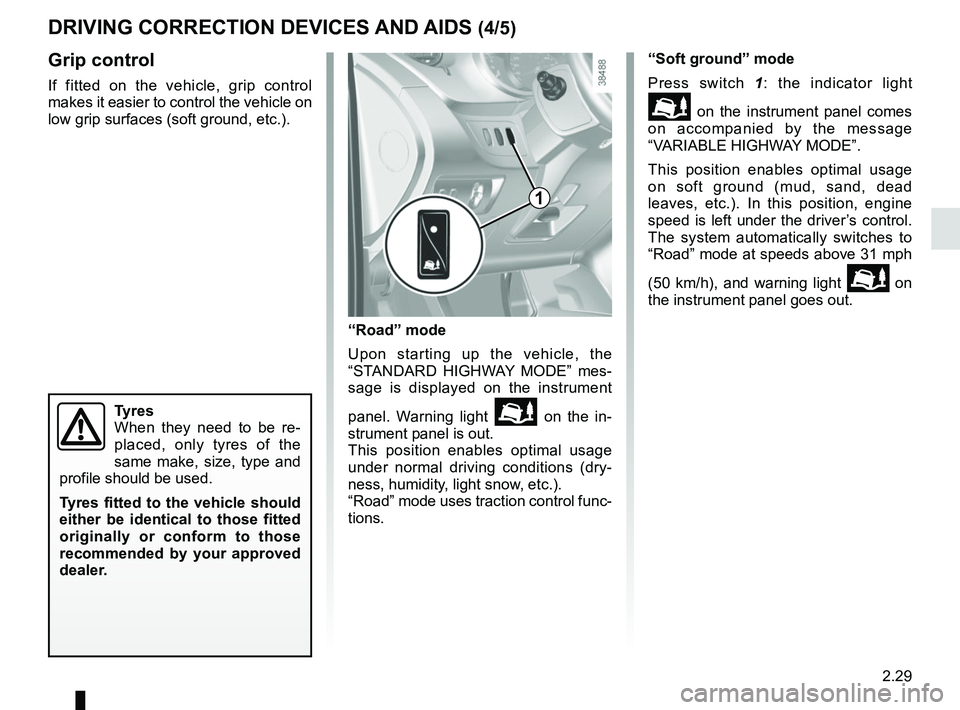
Grip control
If fitted on the vehicle, grip control
makes it easier to control the vehicle on
low grip surfaces (soft ground, etc.).
“Road” mode
Upon starting up the vehicle, the
“STANDARD HIGHWAY MODE” mes-
sage is displayed on the instrument
panel. Warning light
on the in-
strument panel is out.
This position enables optimal usage
under normal driving conditions (dry-
ness, humidity, light snow, etc.).
“Road” mode uses traction control func-
tions. “Soft ground” mode
Press switch 1
: the indicator light
on the instrument panel comes
on accompanied by the message
“VARIABLE HIGHWAY MODE”.
This position enables optimal usage
on soft ground (mud, sand, dead
leaves, etc.). In this position, engine
speed is left under the driver’s control.
The system automatically switches to
“Road” mode at speeds above 31 mph
(50 km/h), and warning light
on
the instrument panel goes out.
Tyres
When they need to be re-
placed, only tyres of the
same make, size, type and
profile should be used.
Tyres fitted to the vehicle should
either be identical to those fitted
originally or conform to those
recommended by your approved
dealer.
1
Page 123 of 264
2.31
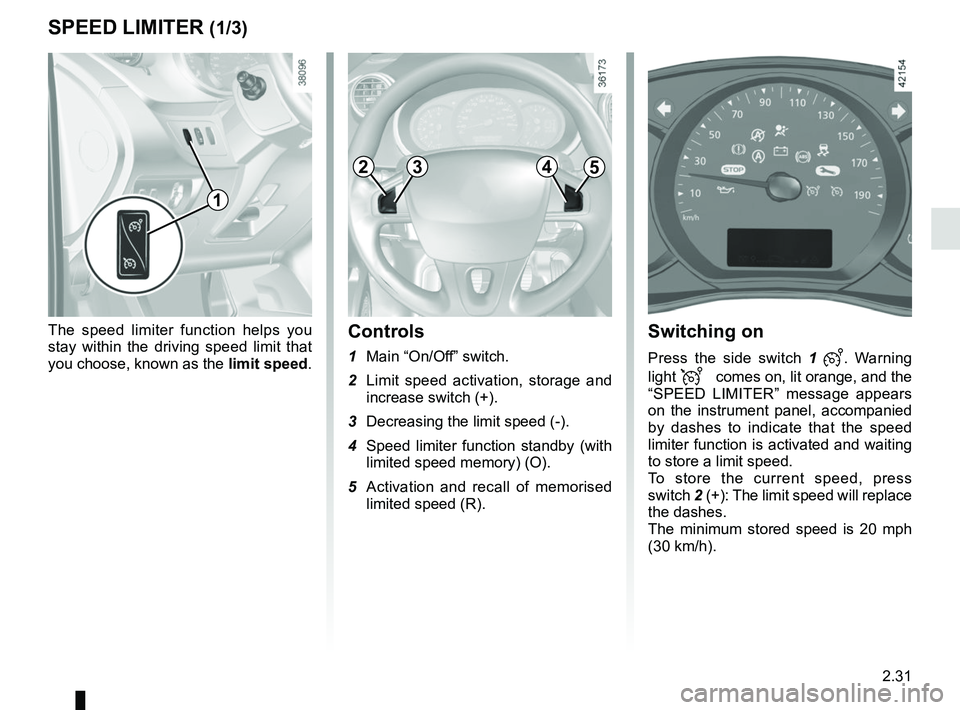
The speed limiter function helps you
stay within the driving speed limit that
you choose, known as the limit speed.
SPEED LIMITER (1/3)
2453
Switching on
Press the side switch 1 . Warning
light
comes on, lit orange, and the
“SPEED LIMITER” message appears
on the instrument panel, accompanied
by dashes to indicate that the speed
limiter function is activated and waiting
to store a limit speed.
To store the current speed, press
switch 2 (+): The limit speed will replace
the dashes.
The minimum stored speed is 20 mph
(30 km/h).
Controls
1 Main “On/Off” switch.
2 Limit speed activation, storage and increase switch (+).
3 Decreasing the limit speed (-).
4 Speed limiter function standby (with limited speed memory) (O).
5 Activation and recall of memorised limited speed (R).
1
Page 125 of 264
2.33
SPEED LIMITER (3/3)
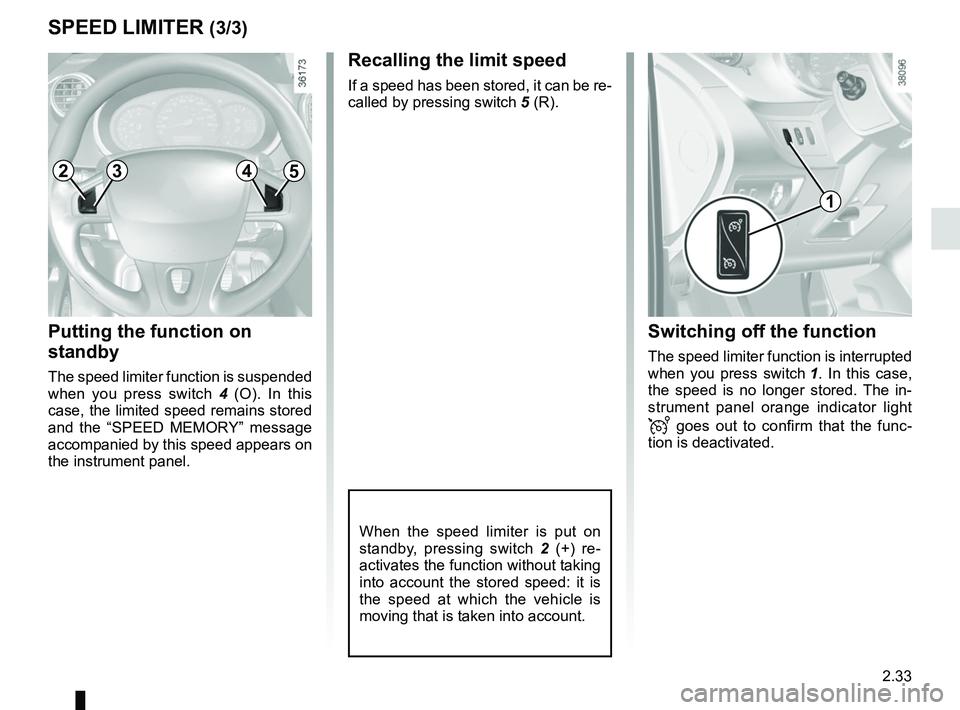
Putting the function on
standby
The speed limiter function is suspended
when you press switch 4 (O). In this
case, the limited speed remains stored
and the “SPEED MEMORY” message
accompanied by this speed appears on
the instrument panel.
Recalling the limit speed
If a speed has been stored, it can be re-
called by pressing switch 5 (R).
When the speed limiter is put on
standby, pressing switch 2 (+) re-
activates the function without taking
into account the stored speed: it is
the speed at which the vehicle is
moving that is taken into account.
Switching off the function
The speed limiter function is interrupted
when you press switch 1. In this case,
the speed is no longer stored. The in-
strument panel orange indicator light
goes out to confirm that the func-
tion is deactivated.
1
2453
Page 127 of 264
2.35
Driving
Once a cruising speed is memorised
and the cruise control function is active,
you may lift your foot off the accelera-
tor pedal.
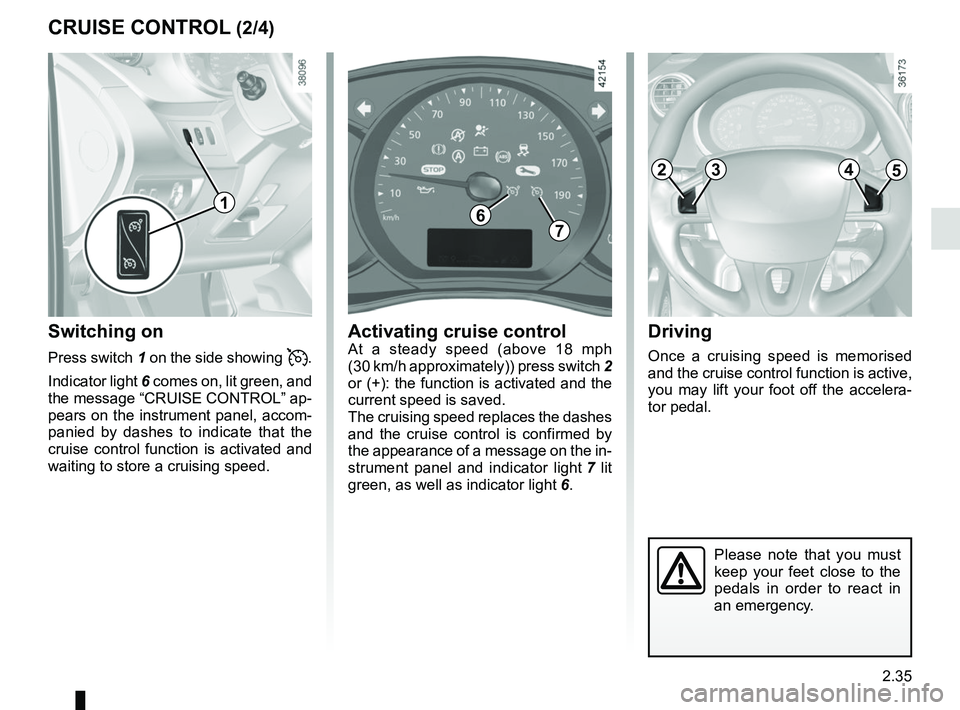
Switching on
Press switch 1 on the side showing .
Indicator light 6 comes on, lit green, and
the message “CRUISE CONTROL” ap-
pears on the instrument panel, accom-
panied by dashes to indicate that the
cruise control function is activated and
waiting to store a cruising speed.
CRUISE CONTROL (2/4)
Activating cruise controlAt a steady speed (above 18 mph
(30 km/h approximately)) press switch 2
or (+): the function is activated and the
current speed is saved.
The cruising speed replaces the dashes
and the cruise control is confirmed by
the appearance of a message on the in-
strument panel and indicator light 7 lit
green, as well as indicator light 6.
1
2453
Please note that you must
keep your feet close to the
pedals in order to react in
an emergency.
67
Page 129 of 264
2.37
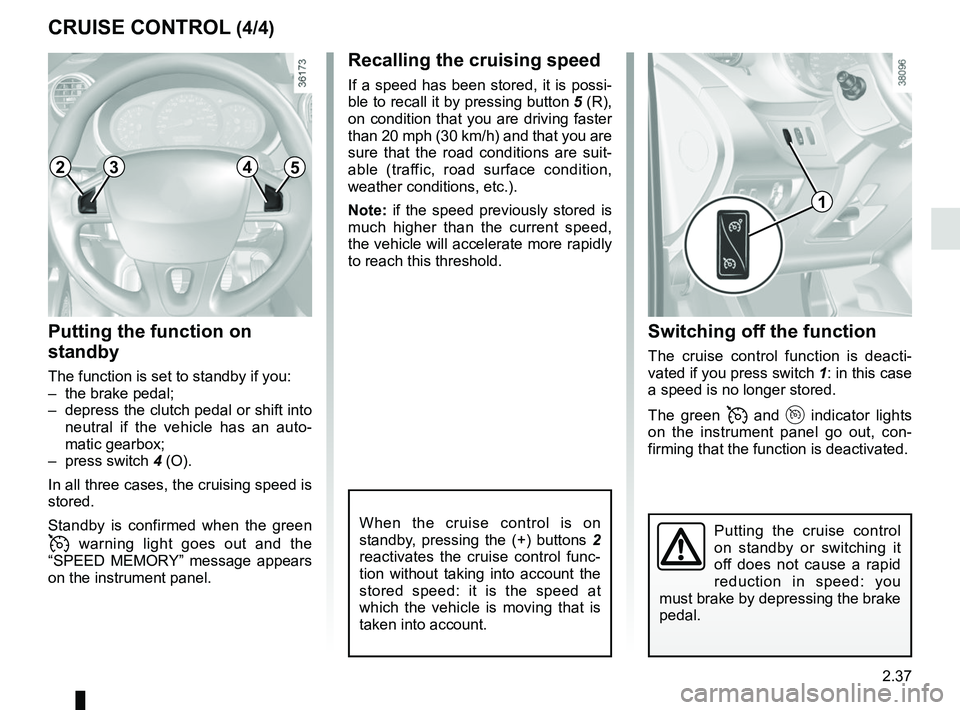
Switching off the function
The cruise control function is deacti-
vated if you press switch 1: in this case
a speed is no longer stored.
The green
and indicator lights
on the instrument panel go out, con-
firming that the function is deactivated.
Recalling the cruising speed
If a speed has been stored, it is possi-
ble to recall it by pressing button 5 (R),
on condition that you are driving faster
than 20 mph (30 km/h) and that you are
sure that the road conditions are suit-
able (traffic, road surface condition,
weather conditions, etc.).
Note: if the speed previously stored is
much higher than the current speed,
the vehicle will accelerate more rapidly
to reach this threshold.
When the cruise control is on
standby, pressing the (+) buttons 2
reactivates the cruise control func-
tion without taking into account the
stored speed: it is the speed at
which the vehicle is moving that is
taken into account.
Putting the function on
standby
The function is set to standby if you:
– the brake pedal;
– depress the clutch pedal or shift into neutral if the vehicle has an auto-
matic gearbox;
– press switch 4 (O).
In all three cases, the cruising speed is
stored.
Standby is confirmed when the green
warning light goes out and the
“SPEED MEMORY” message appears
on the instrument panel.
CRUISE CONTROL (4/4)
Putting the cruise control
on standby or switching it
off does not cause a rapid
reduction in speed: you
must brake by depressing the brake
pedal.
1
2453
Page 131 of 264
2.39
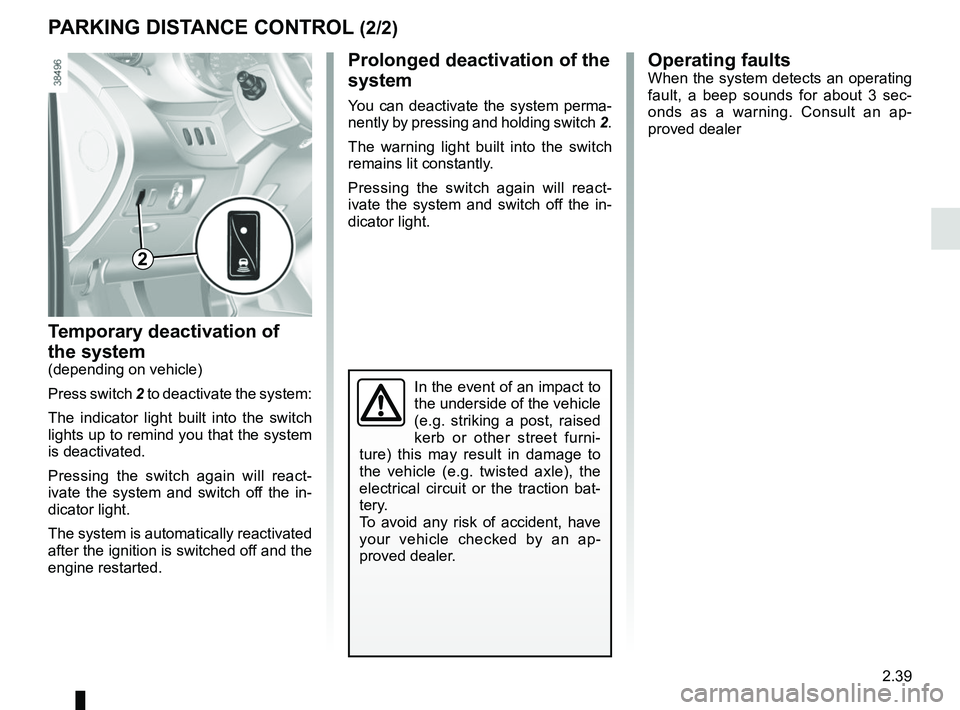
Temporary deactivation of
the system
(depending on vehicle)
Press switch 2 to deactivate the system:
The indicator light built into the switch
lights up to remind you that the system
is deactivated.
Pressing the switch again will react-
ivate the system and switch off the in-
dicator light.
The system is automatically reactivated
after the ignition is switched off and the
engine restarted.
PARKING DISTANCE CONTROL (2/2)
Operating faultsWhen the system detects an operating
fault, a beep sounds for about 3 sec-
onds as a warning. Consult an ap-
proved dealer
In the event of an impact to
the underside of the vehicle
(e.g. striking a post, raised
kerb or other street furni-
ture) this may result in damage to
the vehicle (e.g. twisted axle), the
electrical circuit or the traction bat-
tery.
To avoid any risk of accident, have
your vehicle checked by an ap-
proved dealer.
2
Prolonged deactivation of the
system
You can deactivate the system perma-
nently by pressing and holding switch 2.
The warning light built into the switch
remains lit constantly.
Pressing the switch again will react-
ivate the system and switch off the in-
dicator light.
Page 133 of 264
2.41
REVERSING CAMERA (2/2)
The screen shows a reverse image.
The frames are a representation
projected onto flat ground; this in-
formation must not be taken into
account when superimposed on a
vertical object or an object on the
ground.
Objects which appear on the edge
of the screen may be deformed.
In very bright light (snow, vehicle in
sunshine etc.), the camera vision
may be adversely affected.
If the rear doors are open or poorly
closed, the camera display disap-
pears and, depending on the ve-
hicle, the message “BOOT OPEN”
appears.
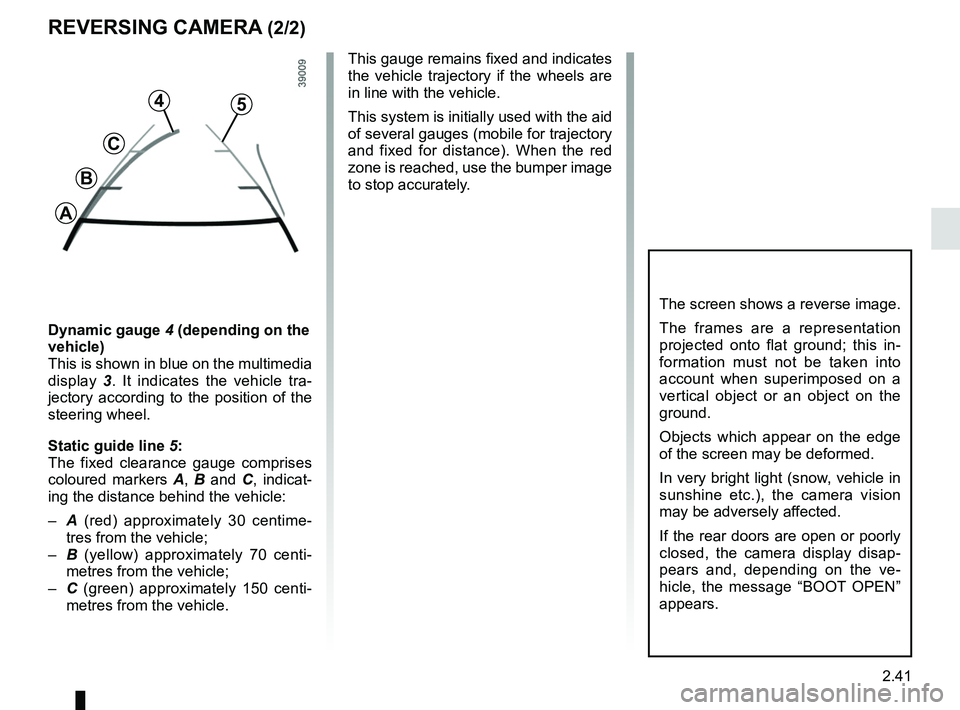
Dynamic gauge 4 (depending on the
vehicle)
This is shown in blue on the multimedia
display 3. It indicates the vehicle tra-
jectory according to the position of the
steering wheel.
Static guide line 5:
The fixed clearance gauge comprises
coloured markers A, B and C , indicat-
ing the distance behind the vehicle:
– A (red) approximately 30 centime-
tres from the vehicle;
– B (yellow) approximately 70 centi-
metres from the vehicle;
– C (green) approximately 150 centi-
metres from the vehicle. This gauge remains fixed and indicates
the vehicle trajectory if the wheels are
in line with the vehicle.
This system is initially used with the aid
of several gauges (mobile for trajectory
and fixed for distance). When the red
zone is reached, use the bumper image
to stop accurately.
4
C
B
A
5
Page 134 of 264
2.42
AUTOMATIC GEARBOX (1/3)
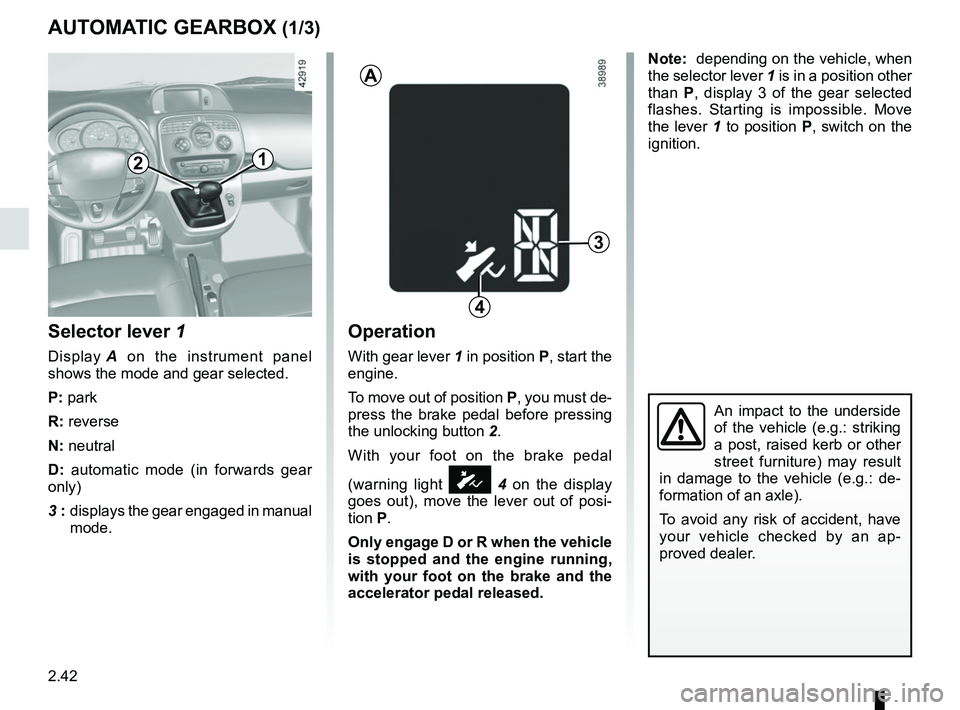
Selector lever 1
Display A on the instrument panel
shows the mode and gear selected.
P: park
R: reverse
N: neutral
D: automatic mode (in forwards gear
only)
3 : displays the gear engaged in manual
mode.
Operation
With gear lever 1 in position P, start the
engine.
To move out of position P, you must de-
press the brake pedal before pressing
the unlocking button 2.
With your foot on the brake pedal
(warning light
Ó 4 on the display
goes out), move the lever out of posi-
tion P.
Only engage D or R when the vehicle
is stopped and the engine running,
with your foot on the brake and the
accelerator pedal released.
3
1
A
4
2
Note: depending on the vehicle, when
the selector lever 1 is in a position other
than P, display 3 of the gear selected
flashes. Starting is impossible. Move
the lever 1 to position P, switch on the
ignition.
An impact to the underside
of the vehicle (e.g.: striking
a post, raised kerb or other
street furniture) may result
in damage to the vehicle (e.g.: de-
formation of an axle).
To avoid any risk of accident, have
your vehicle checked by an ap-
proved dealer.
Page 135 of 264
2.43
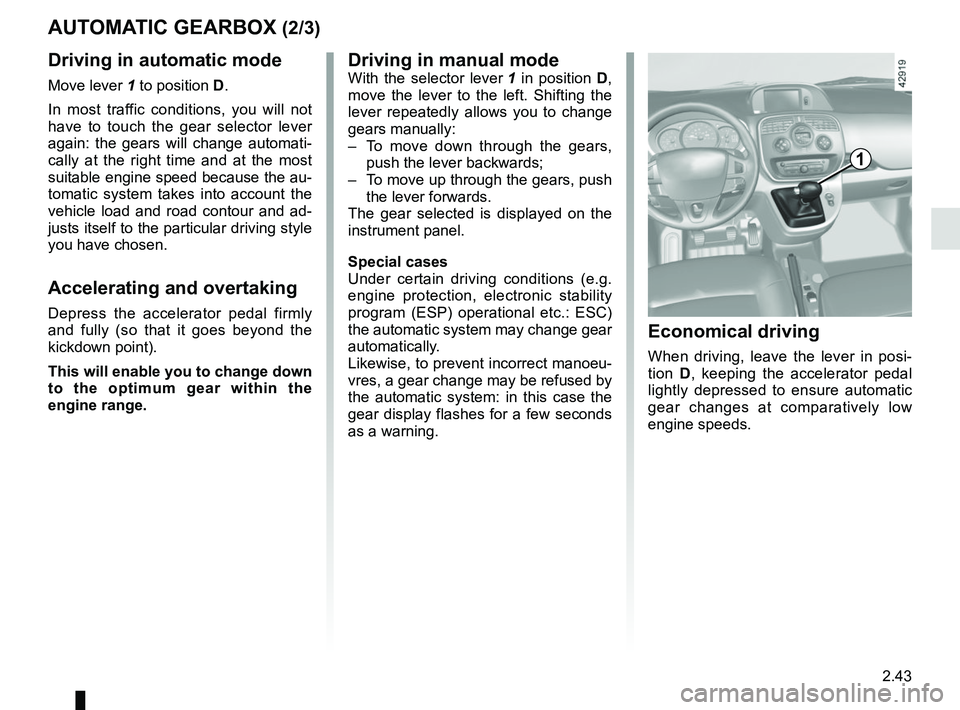
AUTOMATIC GEARBOX (2/3)Driving in manual mode
With the selector lever 1 in position D,
move the lever to the left. Shifting the
lever repeatedly allows you to change
gears manually:
– To move down through the gears, push the lever backwards;
– To move up through the gears, push the lever forwards.
The gear selected is displayed on the
instrument panel.
Special cases
Under certain driving conditions (e.g.
engine protection, electronic stability
program (ESP) operational etc.: ESC)
the automatic system may change gear
automatically.
Likewise, to prevent incorrect manoeu-
vres, a gear change may be refused by
the automatic system: in this case the
gear display flashes for a few seconds
as a warning.
1
Economical driving
When driving, leave the lever in posi-
tion D, keeping the accelerator pedal
lightly depressed to ensure automatic
gear changes at comparatively low
engine speeds.
Driving in automatic mode
Move lever 1 to position D.
In most traffic conditions, you will not
have to touch the gear selector lever
again: the gears will change automati-
cally at the right time and at the most
suitable engine speed because the au-
tomatic system takes into account the
vehicle load and road contour and ad-
justs itself to the particular driving style
you have chosen.
Accelerating and overtaking
Depress the accelerator pedal firmly
and fully (so that it goes beyond the
kickdown point).
This will enable you to change down
to the optimum gear within the
engine range.