wiper blades RENAULT KANGOO 2018 Owners Manual
[x] Cancel search | Manufacturer: RENAULT, Model Year: 2018, Model line: KANGOO, Model: RENAULT KANGOO 2018Pages: 264, PDF Size: 7.09 MB
Page 87 of 264
1.81
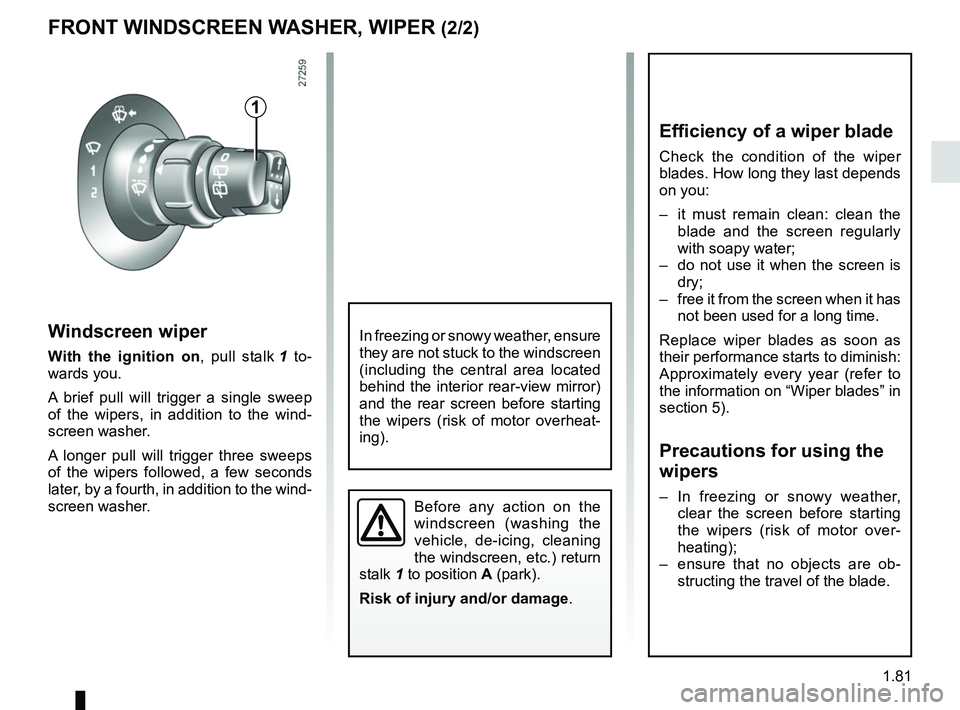
Windscreen wiper
With the ignition on, pull stalk 1 to-
wards you.
A brief pull will trigger a single sweep
of the wipers, in addition to the wind-
screen washer.
A longer pull will trigger three sweeps
of the wipers followed, a few seconds
later, by a fourth, in addition to the wind-
screen washer.
FRONT WINDSCREEN WASHER, WIPER (2/2)
1
Before any action on the
windscreen (washing the
vehicle, de-icing, cleaning
the windscreen, etc.) return
stalk 1 to position A (park).
Risk of injury and/or damage .
In freezing or snowy weather, ensure
they are not stuck to the windscreen
(including the central area located
behind the interior rear-view mirror)
and the rear screen before starting
the wipers (risk of motor overheat-
ing).
Efficiency of a wiper blade
Check the condition of the wiper
blades. How long they last depends
on you:
– it must remain clean: clean the
blade and the screen regularly
with soapy water;
– do not use it when the screen is dry;
– free it from the screen when it has not been used for a long time.
Replace wiper blades as soon as
their performance starts to diminish:
Approximately every year (refer to
the information on “Wiper blades” in
section 5).
Precautions for using the
wipers
– In freezing or snowy weather, clear the screen before starting
the wipers (risk of motor over-
heating);
– ensure that no objects are ob- structing the travel of the blade.
Page 88 of 264
1.82
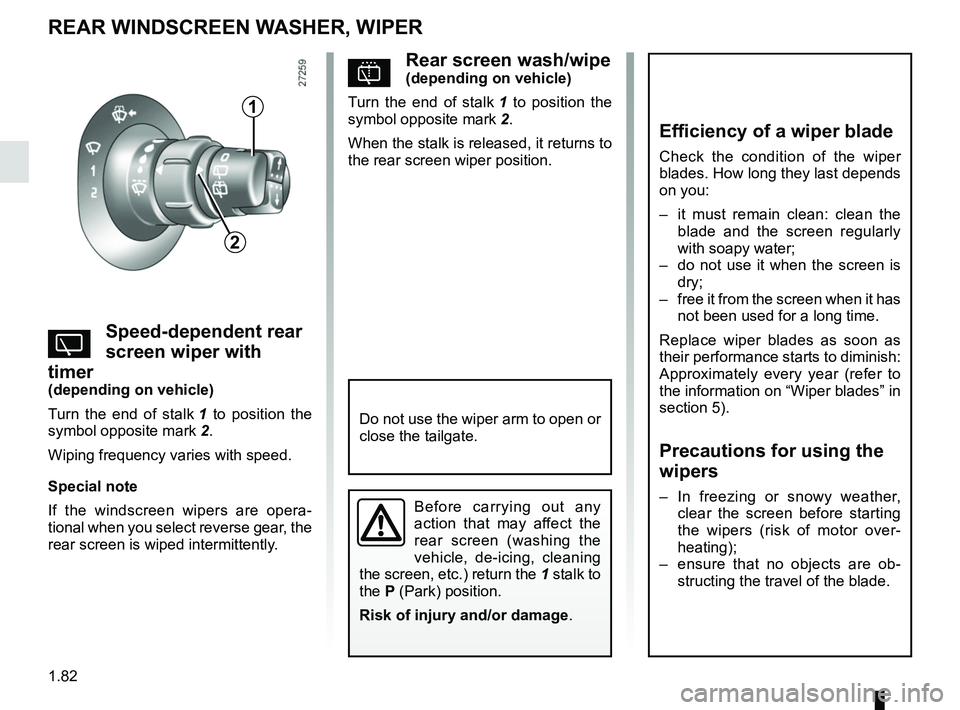
pRear screen wash/wipe(depending on vehicle)
Turn the end of stalk 1 to position the
symbol opposite mark 2.
When the stalk is released, it returns to
the rear screen wiper position.
YSpeed-dependent rear
screen wiper with
timer
(depending on vehicle)
Turn the end of stalk 1 to position the
symbol opposite mark 2.
Wiping frequency varies with speed.
Special note
If the windscreen wipers are opera-
tional when you select reverse gear, the
rear screen is wiped intermittently.
REAR WINDSCREEN WASHER, WIPER
1
2
Efficiency of a wiper blade
Check the condition of the wiper
blades. How long they last depends
on you:
– it must remain clean: clean the blade and the screen regularly
with soapy water;
– do not use it when the screen is dry;
– free it from the screen when it has not been used for a long time.
Replace wiper blades as soon as
their performance starts to diminish:
Approximately every year (refer to
the information on “Wiper blades” in
section 5).
Precautions for using the
wipers
– In freezing or snowy weather, clear the screen before starting
the wipers (risk of motor over-
heating);
– ensure that no objects are ob- structing the travel of the blade.Before carrying out any
action that may affect the
rear screen (washing the
vehicle, de-icing, cleaning
the screen, etc.) return the 1 stalk to
the P (Park) position.
Risk of injury and/or damage .
Do not use the wiper arm to open or
close the tailgate.
Page 191 of 264
4.17
Using a roller type car wash
Return the windscreen wiper stalk to
the Park position (refer to the informa-
tion on the “Windscreen washer, wiper”
in Section 1). Check the mounting of
external accessories, additional lights
and mirrors, and ensure that the wiper
blades are secured with adhesive tape.
Remove the radio aerial mast if your
vehicle is fitted with this equipment.
Remember to remove the tape and refit
the antenna after washing.
Vehicles with a matte paint
finish
This type of paint requires certain pre-
cautions.
You should do the following
Wash the vehicle by hand using plenty
of water, using a soft cloth or a gentle
sponge.
Do not do the following
Use wax-based products (polishing).
Rub too hard.
Wash the vehicle in a roller-type car
wash.
Attach stickers to the paintwork (risk of
leaving marks).
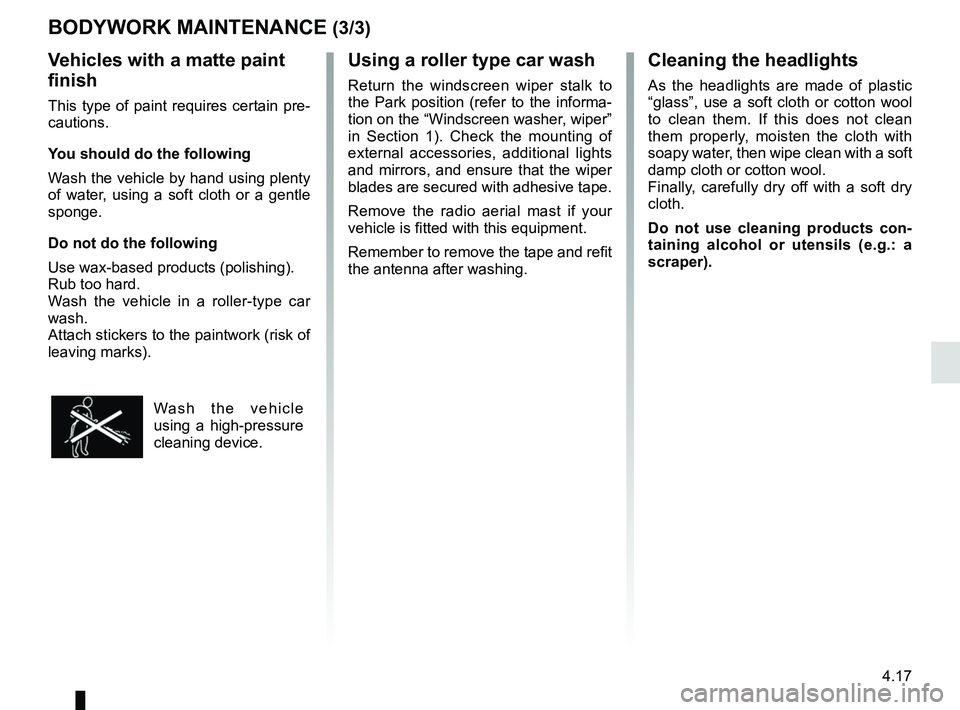
Wash the vehicle
using a high-pressure
cleaning device.
BODYWORK MAINTENANCE (3/3)Cleaning the headlights
As the headlights are made of plastic
“glass”, use a soft cloth or cotton wool
to clean them. If this does not clean
them properly, moisten the cloth with
soapy water, then wipe clean with a soft
damp cloth or cotton wool.
Finally, carefully dry off with a soft dry
cloth.
Do not use cleaning products con-
taining alcohol or utensils (e.g.: a
scraper).
Page 195 of 264

5.1
Section 5: Practical advice
Puncture . . . . . . . . . . . . . . . . . . . . . . . . . . . . . . . . . . . .\
. . . . . . . . . . . . . . . . . . . . . . . . . . . . . . . . . . 5.2
Emergency spare wheel . . . . . . . . . . . . . . . . . . . . . . . . . . . . . . . . . . . .\
. . . . . . . . . . . . . . . . . . . . . . 5.2
Tyre inflation kit . . . . . . . . . . . . . . . . . . . . . . . . . . . . . . . . . . . .\
. . . . . . . . . . . . . . . . . . . . . . . . . . . . . 5.4
Tools . . . . . . . . . . . . . . . . . . . . . . . . . . . . . . . . . . . .\
. . . . . . . . . . . . . . . . . . . . . . . . . . . . . . . . . . . . . 5.8
Wheels, trim . . . . . . . . . . . . . . . . . . . . . . . . . . . . . . . . . . . . \
. . . . . . . . . . . . . . . . . . . . . . . . . . . . . . . . 5.10
Changing a wheel . . . . . . . . . . . . . . . . . . . . . . . . . . . . . . . . . . . .\
. . . . . . . . . . . . . . . . . . . . . . . . . . . 5.11
Tyres . . . . . . . . . . . . . . . . . . . . . . . . . . . . . . . . . . . .\
. . . . . . . . . . . . . . . . . . . . . . . . . . . . . . . . . . . . . 5.13
Headlights: changing bulbs . . . . . . . . . . . . . . . . . . . . . . . . . . . . . . . . . . . . \
. . . . . . . . . . . . . . . . . . . . 5.16
Fog lights: changing bulbs . . . . . . . . . . . . . . . . . . . . . . . . . . . . . . . . . . . . \
. . . . . . . . . . . . . . . . . . . . . 5.18
Rear lights: changing bulbs . . . . . . . . . . . . . . . . . . . . . . . . . . . . . . . . . . . . \
. . . . . . . . . . . . . . . . . . . . 5.19
Indicator lights: changing bulbs . . . . . . . . . . . . . . . . . . . . . . . . . . . . . . . . . . . . \
. . . . . . . . . . . . . . . . . 5.22
Interior lighting: changing bulbs . . . . . . . . . . . . . . . . . . . . . . . . . . . . . . . . . . . . \
. . . . . . . . . . . . . . . . . 5.23
Battery: troubleshooting. . . . . . . . . . . . . . . . . . . . . . . . . . . . . . . . . . . . \
. . . . . . . . . . . . . . . . . . . . . . . 5.25
Fuses . . . . . . . . . . . . . . . . . . . . . . . . . . . . . . . . . . . . \
. . . . . . . . . . . . . . . . . . . . . . . . . . . . . . . . . . . . . 5.27
Wiper blades . . . . . . . . . . . . . . . . . . . . . . . . . . . . . . . . . . . .\
. . . . . . . . . . . . . . . . . . . . . . . . . . . . . . . 5.29
Towing: breakdown . . . . . . . . . . . . . . . . . . . . . . . . . . . . . . . . . . . .\
. . . . . . . . . . . . . . . . . . . . . . . . . . 5.31
Fitting a radio . . . . . . . . . . . . . . . . . . . . . . . . . . . . . . . . . . . . \
. . . . . . . . . . . . . . . . . . . . . . . . . . . . . . . 5.33
Accessories . . . . . . . . . . . . . . . . . . . . . . . . . . . . . . . . . . . . \
. . . . . . . . . . . . . . . . . . . . . . . . . . . . . . . . 5.35
Key, radio frequency remote control: battery . . . . . . . . . . . . . . . . . . . . . . . . . . . . . . . . . . . . \
. . . . . . . 5.36
Operating faults . . . . . . . . . . . . . . . . . . . . . . . . . . . . . . . . . . . . \
. . . . . . . . . . . . . . . . . . . . . . . . . . . . . 5.37
Page 223 of 264
5.29
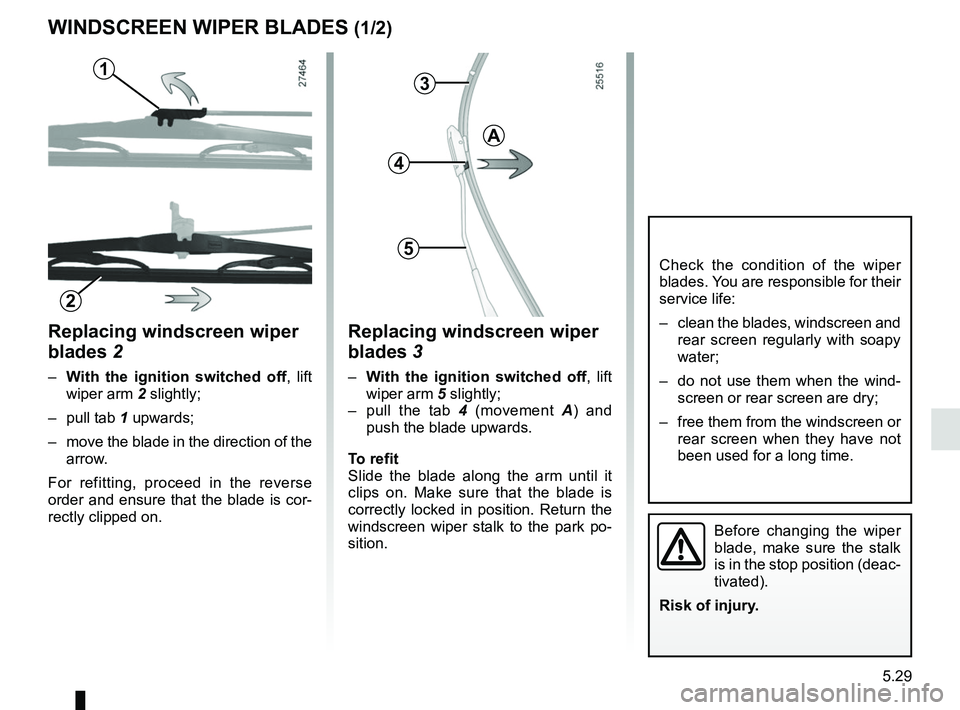
Replacing windscreen wiper
blades 2
– With the ignition switched off , lift
wiper arm 2 slightly;
– pull tab 1 upwards;
– move the blade in the direction of the arrow.
For refitting, proceed in the reverse
order and ensure that the blade is cor-
rectly clipped on.
WINDSCREEN WIPER BLADES (1/2)
Check the condition of the wiper
blades. You are responsible for their
service life:
– clean the blades, windscreen and rear screen regularly with soapy
water;
– do not use them when the wind- screen or rear screen are dry;
– free them from the windscreen or rear screen when they have not
been used for a long time.
1
Replacing windscreen wiper
blades 3
– With the ignition switched off , lift
wiper arm 5 slightly;
– pull the tab 4 (movement A) and
push the blade upwards.
To refit
Slide the blade along the arm until it
clips on. Make sure that the blade is
correctly locked in position. Return the
windscreen wiper stalk to the park po-
sition.
3
4
5
A
2
Before changing the wiper
blade, make sure the stalk
is in the stop position (deac-
tivated).
Risk of injury.
Page 224 of 264
5.30
WINDSCREEN WIPER BLADES (2/2)
– In frosty weather, make
sure that the wiper blades
are not stuck by ice (to
avoid the risk of the motor
overheating).
– Check the condition of the wiper
blades.
Replace the wiper blades as soon
as they begin to lose efficiency
(approximately once a year).
Whilst changing the blade, take care
not to drop the arm onto the window
after it has been removed as this
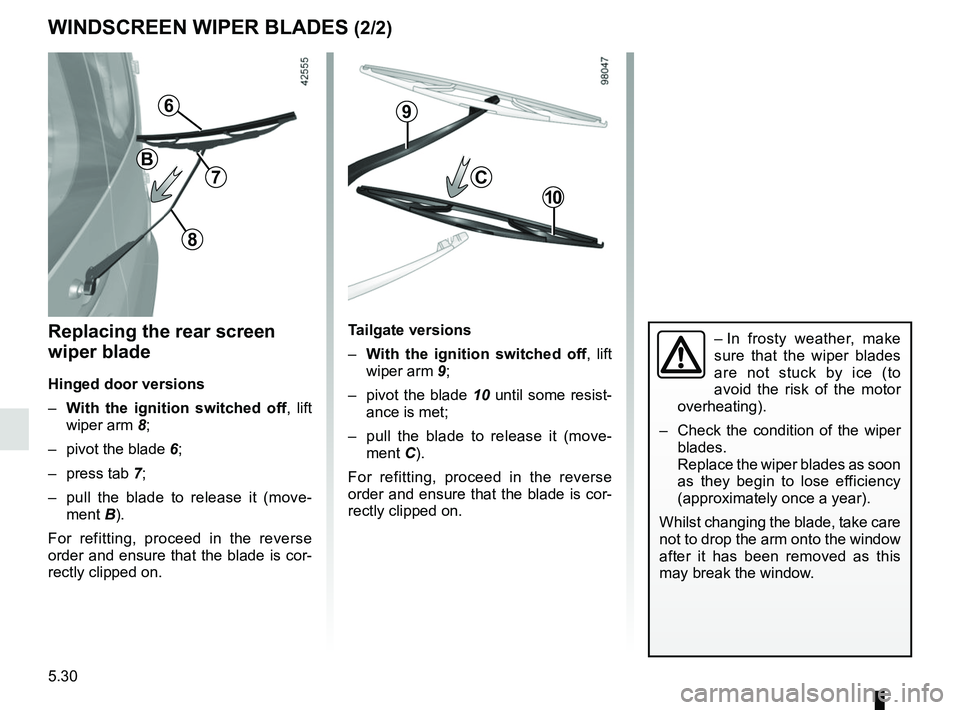
may break the window.Replacing the rear screen
wiper blade
Hinged door versions
– With the ignition switched off , lift
wiper arm 8;
– pivot the blade 6;
– press tab 7;
– pull the blade to release it (move- ment B).
For refitting, proceed in the reverse
order and ensure that the blade is cor-
rectly clipped on.
Tailgate versions
– With the ignition switched off , lift
wiper arm 9;
– pivot the blade 10 until some resist-
ance is met;
– pull the blade to release it (move- ment C).
For refitting, proceed in the reverse
order and ensure that the blade is cor-
rectly clipped on.
C
9
10
6
8
7
B
Page 235 of 264
5.41
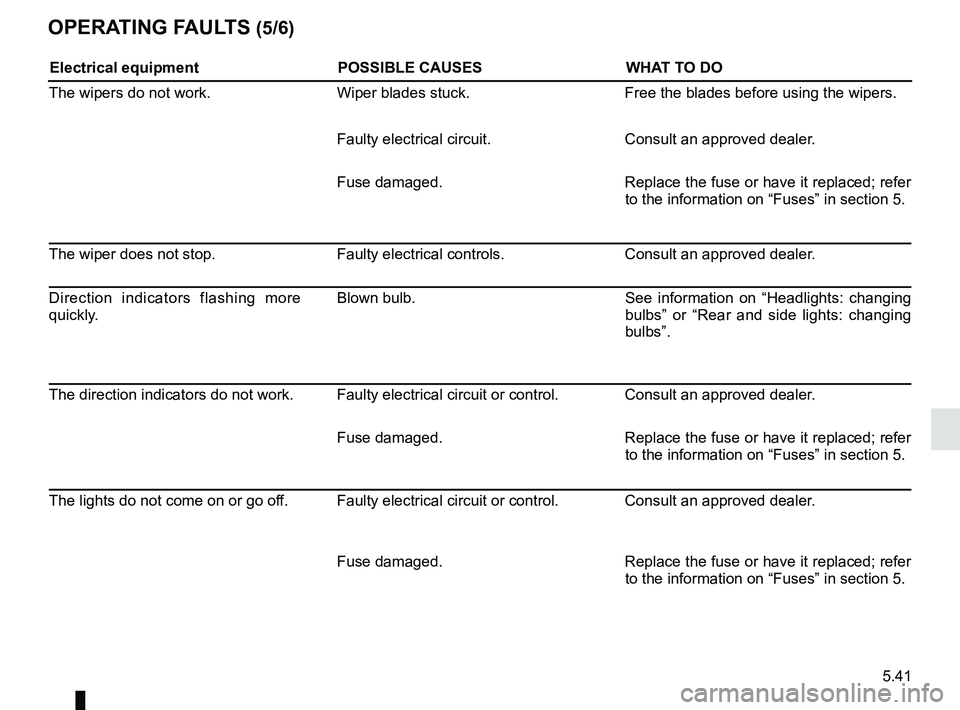
OPERATING FAULTS (5/6)
Electrical equipmentPOSSIBLE CAUSESWHAT TO DO
The wipers do not work. Wiper blades stuck. Free the blades before using the wipers.
Faulty electrical circuit. Consult an approved dealer.
Fuse damaged. Replace the fuse or have it replaced; refer
to the information on “Fuses” in section 5.
The wiper does not stop. Faulty electrical controls.Consult an approved dealer.
Direction indicators flashing more
quickly. Blown bulb.
See information on “Headlights: changing
bulbs” or “Rear and side lights: changing
bulbs”.
The direction indicators do not work. Faulty electrical circuit or control. Consult an approved dealer. Fuse damaged.Replace the fuse or have it replaced; refer
to the information on “Fuses” in section 5.
The lights do not come on or go off. Faulty electrical circuit or control. Consult an approved dealer.
Fuse damaged.Replace the fuse or have it replaced; refer
to the information on “Fuses” in section 5.
Page 261 of 264
7.5
ALPHABETICAL INDEX (5/5)
U
unlocking the doors ................................................ 1.12 – 1.13
V
variable power-assisted steering ....................................... 1.54
vehicle identification ............................................................ 6.2
vehicle identification plates ......................................... 6.2 – 6.3
ventilation ............................................................\
....3.2 → 3.16
W
warning lights................................... 1.54 → 1.57, 1.61 → 1.69
washing ................................................................\
.4.15 → 4.17
weights ................................................................\
................ 6.6
wheelbrace .............................................................\
............. 5.8
wheels (safety) .................................................................. 5.13
windscreen washer ................................................1.80 → 1.82
windscreen washer fluid .................................................... 4.10
windscreen washer/wiper replacing blades ................................................ 5.29 – 5.30
wiper blades ........................................................... 5.29 – 5.30
wipers .................................................................\
...1.80 → 1.82