instrument panel RENAULT KANGOO Z.E. 2018 Owner's Manual
[x] Cancel search | Manufacturer: RENAULT, Model Year: 2018, Model line: KANGOO Z.E., Model: RENAULT KANGOO Z.E. 2018Pages: 230, PDF Size: 5.03 MB
Page 120 of 230
2.20
SPEED LIMITER (3/3)
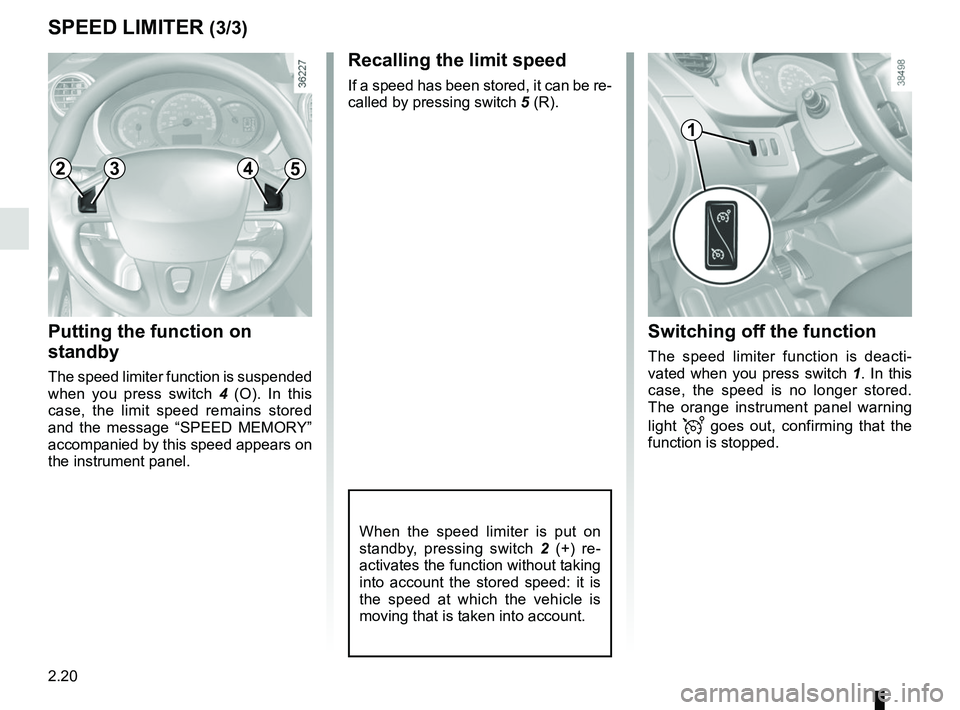
Putting the function on
standby
The speed limiter function is suspended
when you press switch 4 (O). In this
case, the limit speed remains stored
and the message “SPEED MEMORY”
accompanied by this speed appears on
the instrument panel.
Recalling the limit speed
If a speed has been stored, it can be re-
called by pressing switch 5 (R).
When the speed limiter is put on
standby, pressing switch 2 (+) re-
activates the function without taking
into account the stored speed: it is
the speed at which the vehicle is
moving that is taken into account.
Switching off the function
The speed limiter function is deacti-
vated when you press switch 1. In this
case, the speed is no longer stored.
The orange instrument panel warning
light
goes out, confirming that the
function is stopped.
1
2453
Page 122 of 230
2.22
Driving
Once a cruising speed is memorised
and the cruise control function is active,
you may lift your foot off the accelera-
tor pedal.
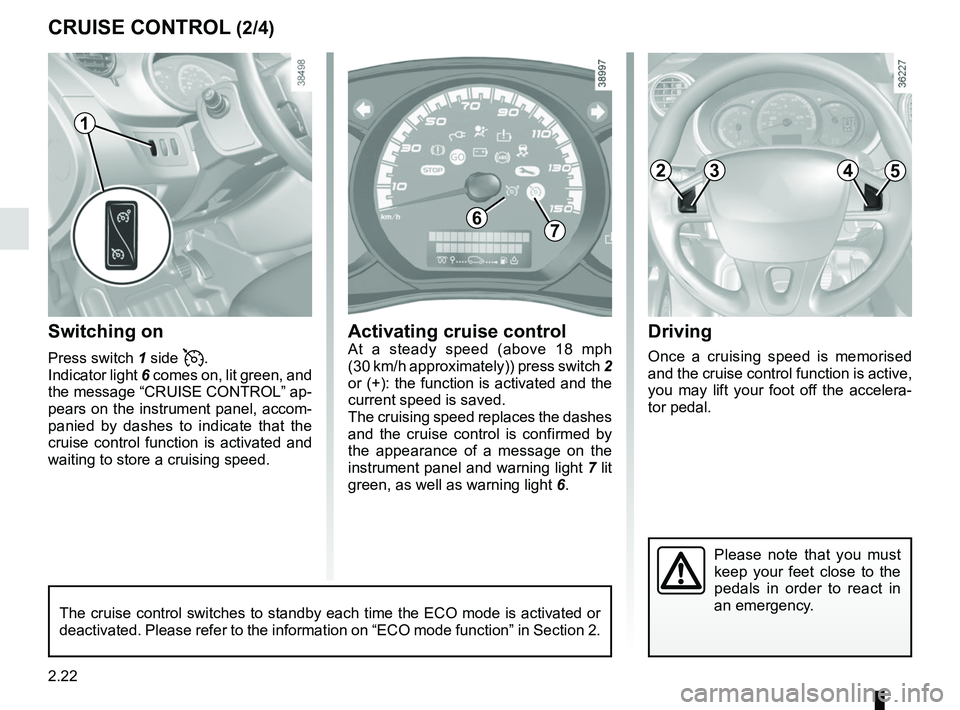
Switching on
Press switch 1 side .
Indicator light 6 comes on, lit green, and
the message “CRUISE CONTROL” ap-
pears on the instrument panel, accom-
panied by dashes to indicate that the
cruise control function is activated and
waiting to store a cruising speed.
Please note that you must
keep your feet close to the
pedals in order to react in
an emergency.
CRUISE CONTROL (2/4)
67
Activating cruise controlAt a steady speed (above 18 mph
(30 km/h approximately)) press switch 2
or (+): the function is activated and the
current speed is saved.
The cruising speed replaces the dashes
and the cruise control is confirmed by
the appearance of a message on the
instrument panel and warning light 7 lit
green, as well as warning light 6.
1
The cruise control switches to standby each time the ECO mode is activat\
ed or
deactivated. Please refer to the information on “ECO mode function”\
in Section 2.
2453
Page 123 of 230
2.23
CRUISE CONTROL (3/4)
Exceeding the cruising speed
The cruising speed may be exceeded
at any time by depressing the accelera-
tor pedal. While it is being exceeded,
the cruising speed flashes on the in-
strument panel.
Then, release the accelerator: after a
few seconds, the vehicle will automati-
cally return to its set cruising speed.
Cruising speed cannot be
maintained
When driving down a steep gradient,
the system is unable to maintain the
cruising speed: the stored speed will
flash on the instrument panel informa-
tion display to inform you of this situ-
ation.
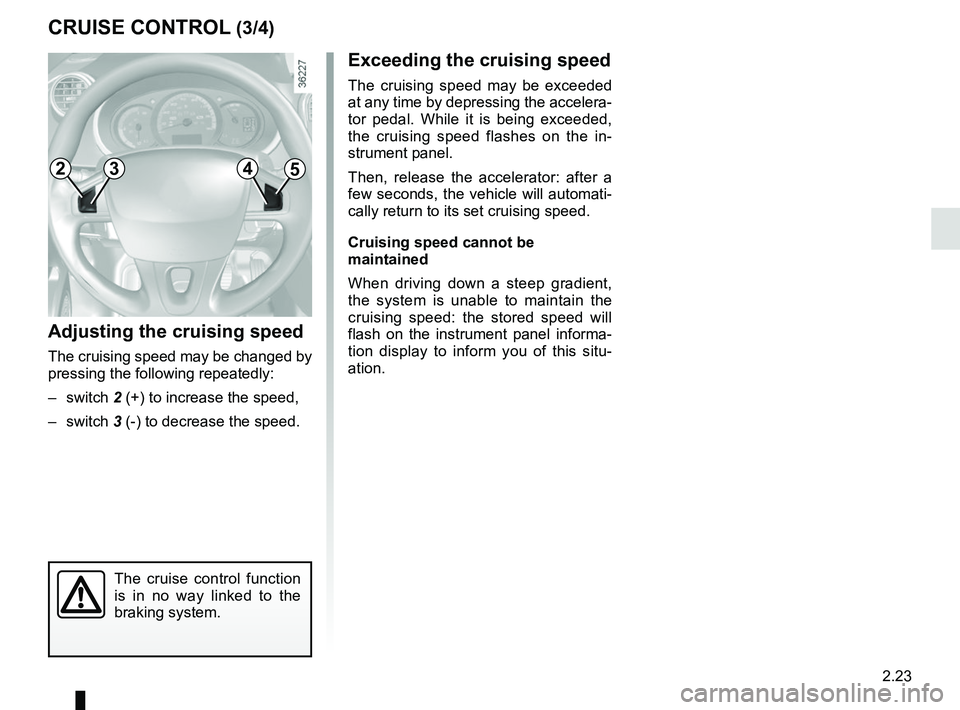
Adjusting the cruising speed
The cruising speed may be changed by
pressing the following repeatedly:
– switch 2 (+) to increase the speed,
– switch 3 (-) to decrease the speed.
The cruise control function
is in no way linked to the
braking system.
2453
Page 124 of 230
2.24
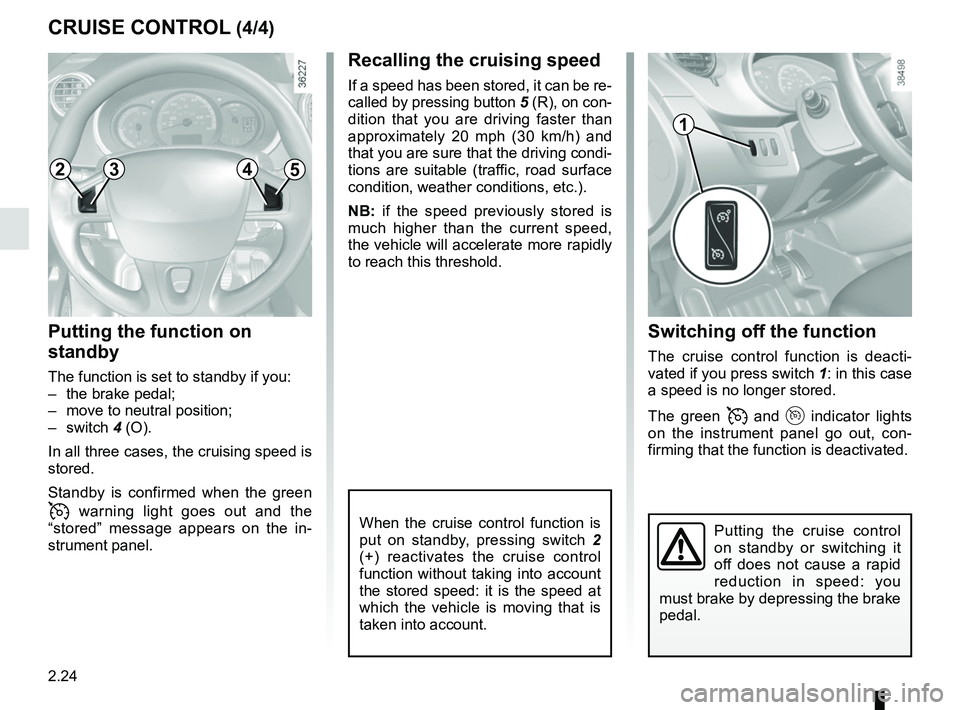
Switching off the function
The cruise control function is deacti-
vated if you press switch 1: in this case
a speed is no longer stored.
The green
and indicator lights
on the instrument panel go out, con-
firming that the function is deactivated.
Recalling the cruising speed
If a speed has been stored, it can be re-
called by pressing button 5 (R), on con-
dition that you are driving faster than
approximately 20 mph (30 km/h) and
that you are sure that the driving condi-
tions are suitable (traffic, road surface
condition, weather conditions, etc.).
NB: if the speed previously stored is
much higher than the current speed,
the vehicle will accelerate more rapidly
to reach this threshold.
When the cruise control function is
put on standby, pressing switch 2
(+) reactivates the cruise control
function without taking into account
the stored speed: it is the speed at
which the vehicle is moving that is
taken into account.
Putting the function on
standby
The function is set to standby if you:
– the brake pedal;
– move to neutral position;
– switch 4 (O).
In all three cases, the cruising speed is
stored.
Standby is confirmed when the green
warning light goes out and the
“stored” message appears on the in-
strument panel.
CRUISE CONTROL (4/4)
Putting the cruise control
on standby or switching it
off does not cause a rapid
reduction in speed: you
must brake by depressing the brake
pedal.
1
2453
Page 137 of 230
3.9
AIR CONDITIONING, HEATING: programming (2/2)
Activating the function
– With the ignition on, position the con-trol 1 in one of the
ṗ positions;
– turn off the ignition. The “COMFORT” message and the programmed time
are displayed on the instrument
panel for a few seconds;
– wait approximately one minute before charging your vehicle;
– plug in your vehicle to a power supply (refer to the information on “Electric
vehicle: charging” in section 1).
The function switches on during the
hour preceding the programmed time in
order to reach a comfortable tempera-
ture.
Automatically switching off the
function
– About 10 minutes after the pro- grammed time;
– if the charging socket is discon- nected;
– if control 1 is not in one of the
ṗ
positions.
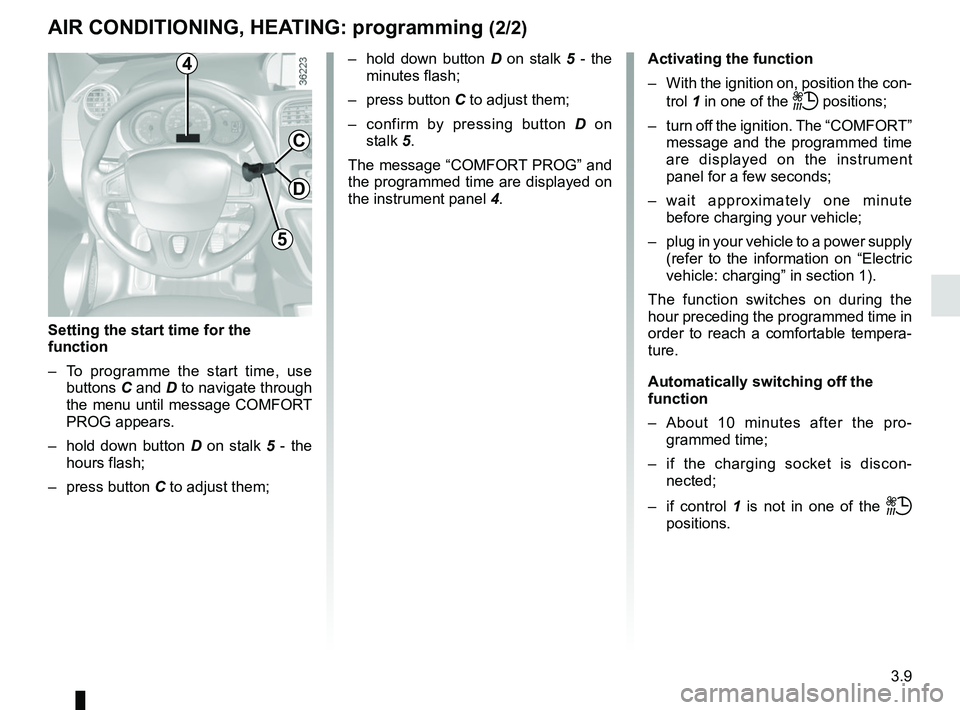
4
5
C
D
Setting the start time for the
function
– To programme the start time, use buttons C and D to navigate through
the menu until message COMFORT
PROG appears.
– hold down button D on stalk 5 - the
hours flash;
– press button C to adjust them; – hold down button
D on stalk 5 - the
minutes flash;
– press button C to adjust them;
– confirm by pressing button D on
stalk 5.
The message “COMFORT PROG” and
the programmed time are displayed on
the instrument panel 4.
Page 138 of 230
3.10
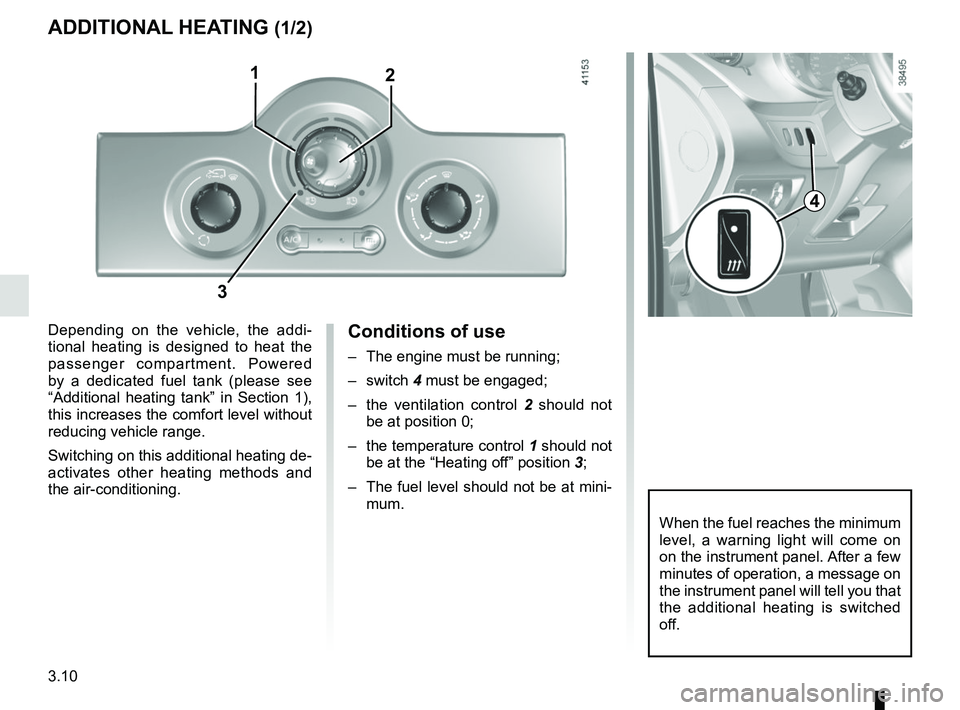
Conditions of use
– The engine must be running;
– switch 4 must be engaged;
– the ventilation control 2 should not
be at position 0;
– the temperature control 1 should not
be at the “Heating off” position 3;
– The fuel level should not be at mini- mum.
ADDITIONAL HEATING (1/2)
Depending on the vehicle, the addi-
tional heating is designed to heat the
passenger compartment. Powered
by a dedicated fuel tank (please see
“Additional heating tank” in Section 1),
this increases the comfort level without
reducing vehicle range.
Switching on this additional heating de-
activates other heating methods and
the air-conditioning.
2
When the fuel reaches the minimum
level, a warning light will come on
on the instrument panel. After a few
minutes of operation, a message on
the instrument panel will tell you that
the additional heating is switched
off.
3
1
4
Page 139 of 230
3.11
ADDITIONAL HEATING (2/2)
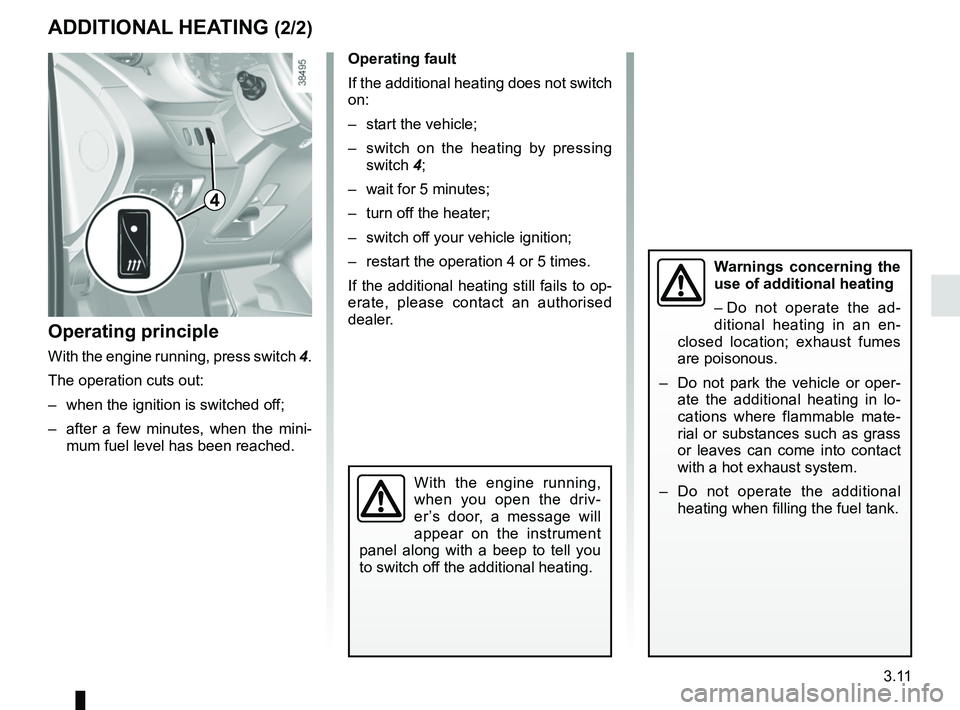
Operating fault
If the additional heating does not switch
on:
– start the vehicle;
– switch on the heating by pressing switch 4;
– wait for 5 minutes;
– turn off the heater;
– switch off your vehicle ignition;
– restart the operation 4 or 5 times.
If the additional heating still fails to op-
erate, please contact an authorised
dealer.
Operating principle
With the engine running, press switch 4.
The operation cuts out:
– when the ignition is switched off;
– after a few minutes, when the mini- mum fuel level has been reached.
With the engine running,
when you open the driv-
er’s door, a message will
appear on the instrument
panel along with a beep to tell you
to switch off the additional heating.
Warnings concerning the
use of additional heating
– Do not operate the ad-
ditional heating in an en-
closed location; exhaust fumes
are poisonous.
– Do not park the vehicle or oper- ate the additional heating in lo-
cations where flammable mate-
rial or substances such as grass
or leaves can come into contact
with a hot exhaust system.
– Do not operate the additional heating when filling the fuel tank.
4
Page 162 of 230
4.8
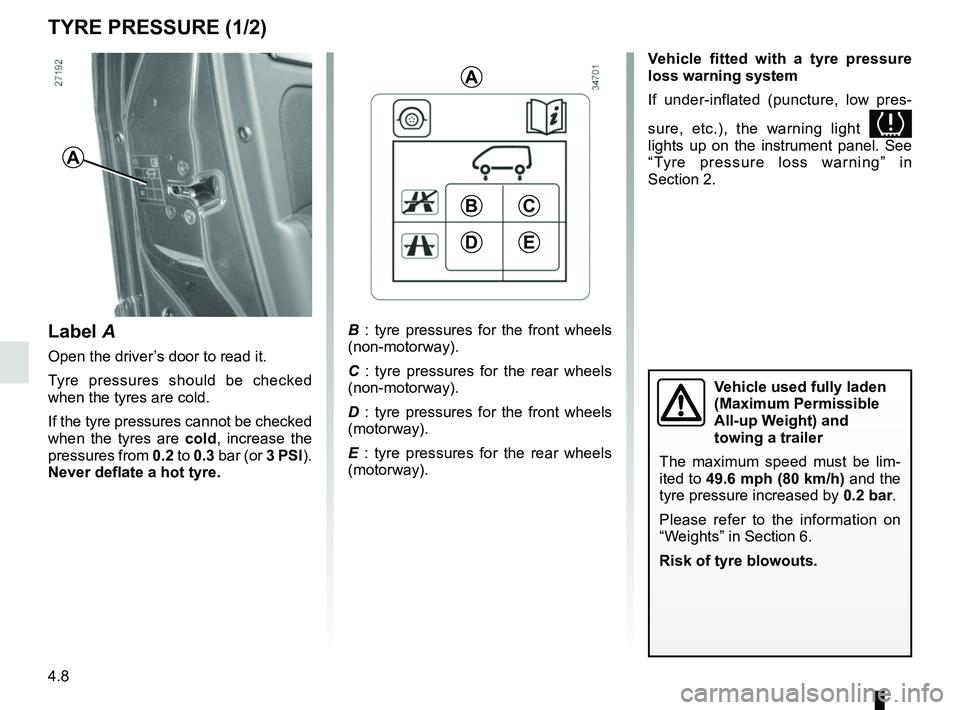
A
B : tyre pressures for the front wheels
(non-motorway).
C : tyre pressures for the rear wheels
(non-motorway).
D : tyre pressures for the front wheels
(motorway).
E : tyre pressures for the rear wheels
(motorway).
BC
ED
A
Label A
Open the driver’s door to read it.
Tyre pressures should be checked
when the tyres are cold.
If the tyre pressures cannot be checked
when the tyres are cold, increase the
pressures from 0.2 to 0.3 bar (or 3 PSI).
Never deflate a hot tyre.
TYRE PRESSURE (1/2)
Vehicle used fully laden
(Maximum Permissible
All-up Weight) and
towing a trailer
The maximum speed must be lim-
ited to 49.6 mph (80 km/h) and the tyre pressure increased by 0.2 bar.
Please refer to the information on
“Weights” in Section 6.
Risk of tyre blowouts.
Vehicle fitted with a tyre pressure
loss warning system
If under-inflated (puncture, low pres-
sure, etc.), the warning light
lights up on the instrument panel. See
“Tyre pressure loss warning” in
Section 2.
Page 167 of 230
4.13
Glass instrument panel(e.g. instrument panel, clock, exterior
temperature display, radio display, etc.)
Use a soft cloth (or cotton wool).
If this does not clean them properly,
use a soft cloth (or cotton wool) slightly
moistened with soapy water and then
wipe clean with another soft damp cloth
or cotton wool.
Finally, carefully dry off with a soft dry
cloth.
Do not use products containing alco-
hol and/or spray fluids on the area.
Seat belts
These must be kept clean.
Use products selected by our Technical
Department (Approved outlets) or
warm, soapy water and a sponge and
wipe with a dry cloth.
Detergents or dyes must not be used
under any circumstances.
INTERIOR TRIM MAINTENANCE (1/2)
Textiles (seats, door trim, etc)
Vacuum-clean the textiles regularly.
Liquid stain
Use soapy water.
Dab lightly (never rub) with a soft cloth,
rinse and remove the excess.
Solid or pasty stain
Carefully remove the excess solid or
pasty material immediately with a
spatula (working from the edges to the
centre to avoid spreading the stain).
Clean as for a liquid stain.
Special instructions for sweets or
chewing gum
Put an ice cube on the stain to solidify
it, then proceed as for a solid stain.
A well-maintained vehicle will last
longer. It is therefore recommended to
maintain the interior of the vehicle regu-
larly.
A stain should always be dealt with
swiftly.
Whatever type of stain is on the trim,
use
cold (or warm) soapy water with
natural soap.
Detergents (washing-up liquid, pow-
dered products, alcohol-based prod-
ucts) should not be used.
Use a soft cloth.
Rinse and soak up the excess.
For further recommendations for
maintaining the interior, and/or for
any unsatisfactory results, please
see an authorised dealer.
Page 190 of 230

5.22
FUSES (2/2)
Number Allocation
1 Not used
2 Not used
3 Air conditioning, pedestrian
horn
4 heating, traction battery
5 Rear windscreen wiper
6 Horn, diagnostic socket
7 Heated seats, telematic box
8 Traction battery
9 Passenger compartment
ECU
10 Windscreen washer
11 Brake lights
12 Passenger compartment
ECU
13 Electric window, ECO mode
14 Heated rear screen
15 Starter
12
3456
78910
11121314
15161718
19202122
23242526
27
28
29
Allocation of fusesThe presence of certain fuses de-
pends on the vehicle equipment
level.
Number Allocation
16 Brake lights, additional
equipment, ABS, ESP,
luggage compartment light,
courtesy light, rain and light
sensor
17 Radio, navigation system,
display, alarm
18 Additional equipment
19 Heated door mirrors
20 Hazard lights, rear fog lights
21 Central locking of opening
elements
22 Instrument panel
23 Not used
24 Radio, heated seats, brake
lights
25 Front accessories socket
26 Towbar
27 Electric front windows
28 Rear-view mirror control
29 Passenger compartment
motor-driven fan assembly