light RENAULT KANGOO Z.E. 2018 Repair Manual
[x] Cancel search | Manufacturer: RENAULT, Model Year: 2018, Model line: KANGOO Z.E., Model: RENAULT KANGOO Z.E. 2018Pages: 230, PDF Size: 5.03 MB
Page 122 of 230
2.22
Driving
Once a cruising speed is memorised
and the cruise control function is active,
you may lift your foot off the accelera-
tor pedal.
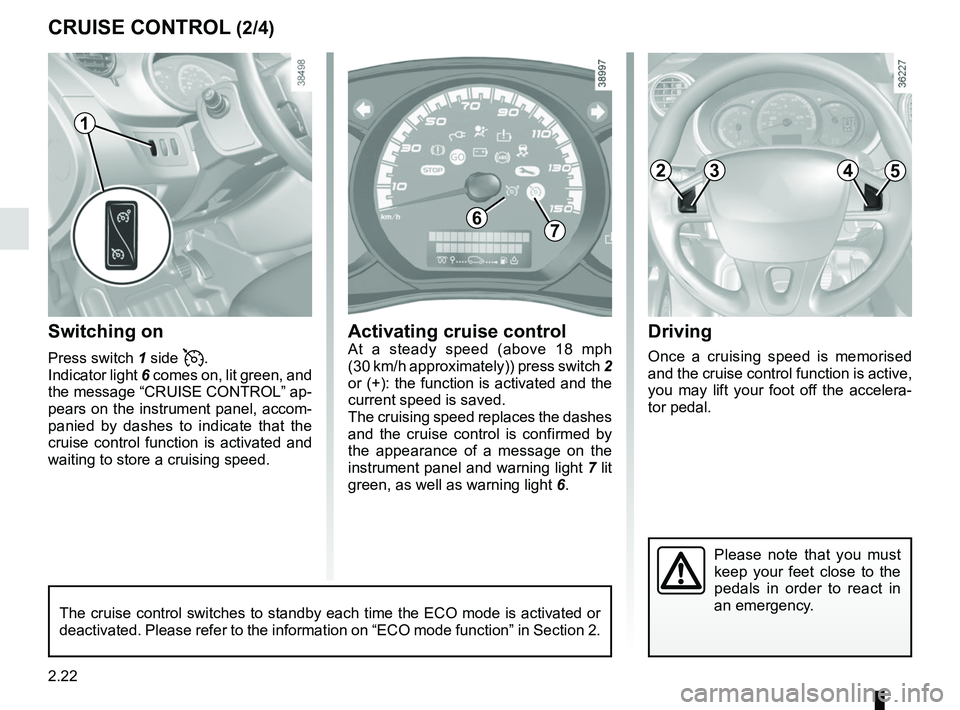
Switching on
Press switch 1 side .
Indicator light 6 comes on, lit green, and
the message “CRUISE CONTROL” ap-
pears on the instrument panel, accom-
panied by dashes to indicate that the
cruise control function is activated and
waiting to store a cruising speed.
Please note that you must
keep your feet close to the
pedals in order to react in
an emergency.
CRUISE CONTROL (2/4)
67
Activating cruise controlAt a steady speed (above 18 mph
(30 km/h approximately)) press switch 2
or (+): the function is activated and the
current speed is saved.
The cruising speed replaces the dashes
and the cruise control is confirmed by
the appearance of a message on the
instrument panel and warning light 7 lit
green, as well as warning light 6.
1
The cruise control switches to standby each time the ECO mode is activat\
ed or
deactivated. Please refer to the information on “ECO mode function”\
in Section 2.
2453
Page 124 of 230
2.24
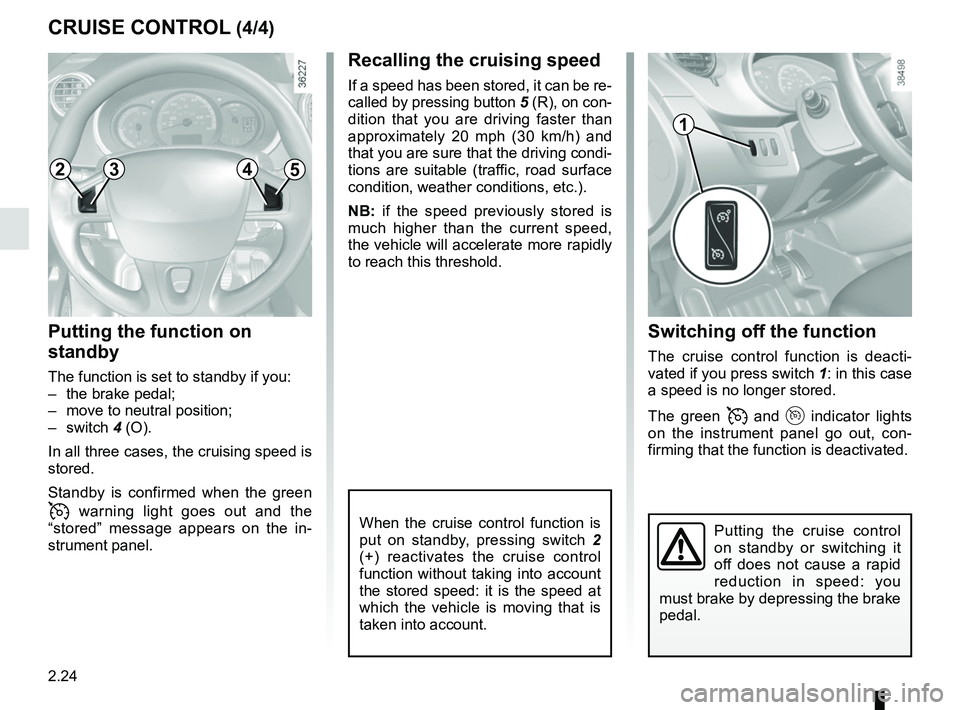
Switching off the function
The cruise control function is deacti-
vated if you press switch 1: in this case
a speed is no longer stored.
The green
and indicator lights
on the instrument panel go out, con-
firming that the function is deactivated.
Recalling the cruising speed
If a speed has been stored, it can be re-
called by pressing button 5 (R), on con-
dition that you are driving faster than
approximately 20 mph (30 km/h) and
that you are sure that the driving condi-
tions are suitable (traffic, road surface
condition, weather conditions, etc.).
NB: if the speed previously stored is
much higher than the current speed,
the vehicle will accelerate more rapidly
to reach this threshold.
When the cruise control function is
put on standby, pressing switch 2
(+) reactivates the cruise control
function without taking into account
the stored speed: it is the speed at
which the vehicle is moving that is
taken into account.
Putting the function on
standby
The function is set to standby if you:
– the brake pedal;
– move to neutral position;
– switch 4 (O).
In all three cases, the cruising speed is
stored.
Standby is confirmed when the green
warning light goes out and the
“stored” message appears on the in-
strument panel.
CRUISE CONTROL (4/4)
Putting the cruise control
on standby or switching it
off does not cause a rapid
reduction in speed: you
must brake by depressing the brake
pedal.
1
2453
Page 126 of 230
2.26
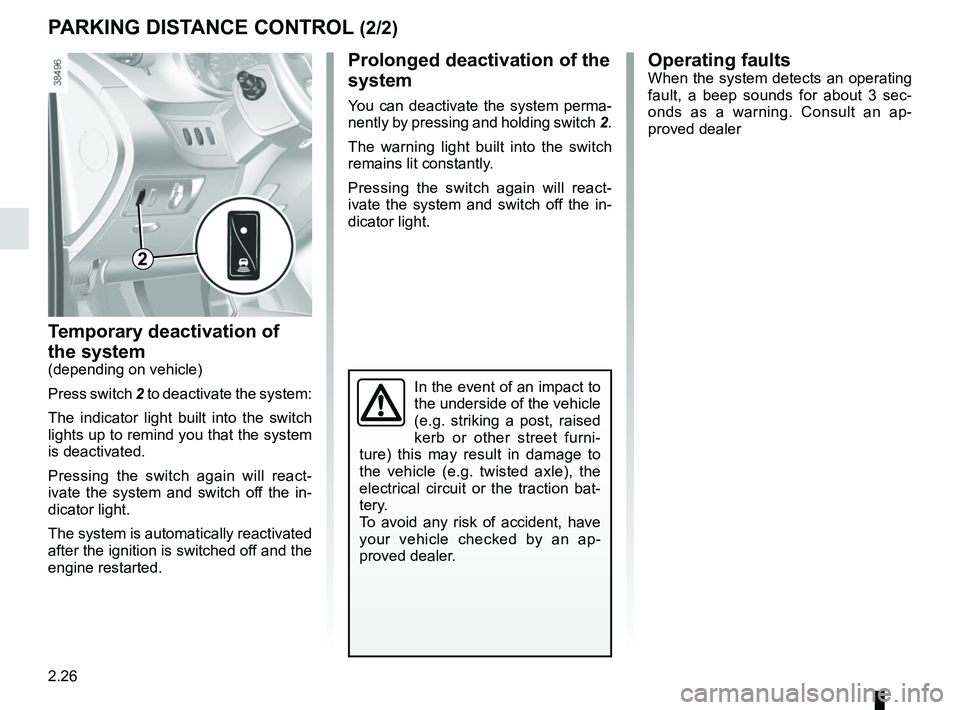
Temporary deactivation of
the system
(depending on vehicle)
Press switch 2 to deactivate the system:
The indicator light built into the switch
lights up to remind you that the system
is deactivated.
Pressing the switch again will react-
ivate the system and switch off the in-
dicator light.
The system is automatically reactivated
after the ignition is switched off and the
engine restarted.
PARKING DISTANCE CONTROL (2/2)
Operating faultsWhen the system detects an operating
fault, a beep sounds for about 3 sec-
onds as a warning. Consult an ap-
proved dealer
In the event of an impact to
the underside of the vehicle
(e.g. striking a post, raised
kerb or other street furni-
ture) this may result in damage to
the vehicle (e.g. twisted axle), the
electrical circuit or the traction bat-
tery.
To avoid any risk of accident, have
your vehicle checked by an ap-
proved dealer.
2
Prolonged deactivation of the
system
You can deactivate the system perma-
nently by pressing and holding switch 2.
The warning light built into the switch
remains lit constantly.
Pressing the switch again will react-
ivate the system and switch off the in-
dicator light.
Page 128 of 230
2.28
REVERSING CAMERA (2/2)
The screen shows a reverse image.
The frames are a representation
projected onto flat ground; this in-
formation must not be taken into
account when superimposed on a
vertical object or an object on the
ground.
Objects which appear on the edge
of the screen may be deformed.
In very bright light (snow, vehicle in
sunshine etc.), the camera vision
may be adversely affected.
If the rear doors are open or poorly
closed, the camera display disap-
pears and, depending on the ve-
hicle, the message “BOOT OPEN”
appears.
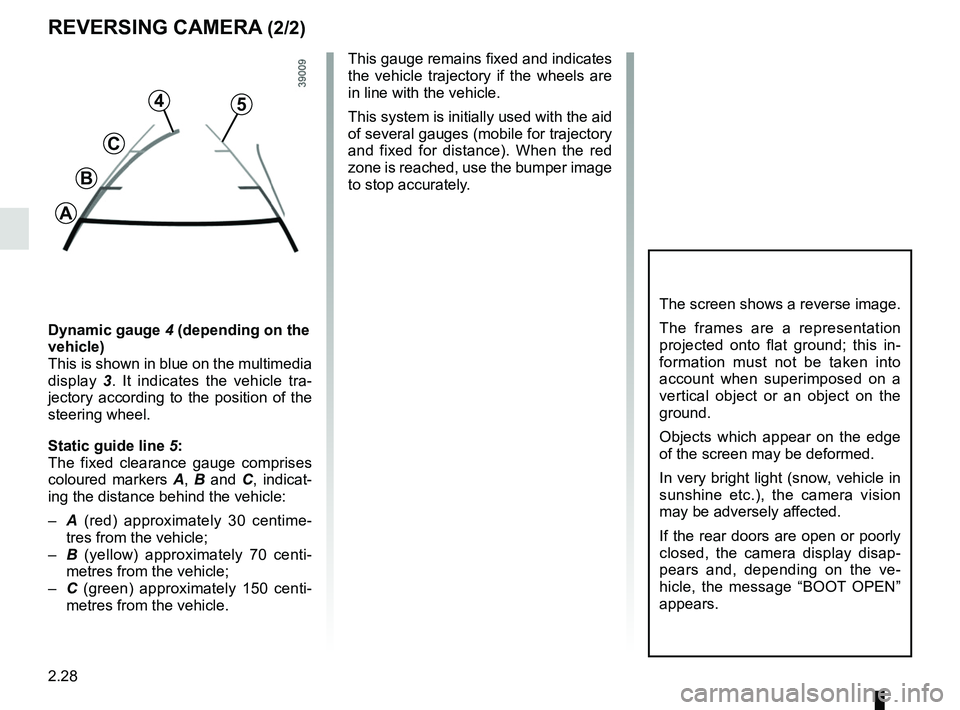
Dynamic gauge 4 (depending on the
vehicle)
This is shown in blue on the multimedia
display 3. It indicates the vehicle tra-
jectory according to the position of the
steering wheel.
Static guide line 5:
The fixed clearance gauge comprises
coloured markers A, B and C , indicat-
ing the distance behind the vehicle:
– A (red) approximately 30 centime-
tres from the vehicle;
– B (yellow) approximately 70 centi-
metres from the vehicle;
– C (green) approximately 150 centi-
metres from the vehicle. This gauge remains fixed and indicates
the vehicle trajectory if the wheels are
in line with the vehicle.
This system is initially used with the aid
of several gauges (mobile for trajectory
and fixed for distance). When the red
zone is reached, use the bumper image
to stop accurately.
4
C
B
A
5
Page 129 of 230

3.1
Section 3: Your comfort
Air vents: air outlets . . . . . . . . . . . . . . . . . . . . . . . . . . . . . . . . . . . . \
. . . . . . . . . . . . . . . . . . . . . . . . . . 3.2
Heating, air-conditioning . . . . . . . . . . . . . . . . . . . . . . . . . . . . . . . . . . . .\
. . . . . . . . . . . . . . . . . . . . . . 3.4programming . . . . . . . . . . . . . . . . . . . . . . . . . . . . . . . . . . . .\
. . . . . . . . . . . . . . . . . . . . . . . . . 3.8
Additional heating . . . . . . . . . . . . . . . . . . . . . . . . . . . . . . . . . . . .\
. . . . . . . . . . . . . . . . . . . . . . . . . . . 3.10
Air conditioning: information and advice on use . . . . . . . . . . . . . . . . . . . . . . . . . . . . . . . . . . . .\
. . . . 3.12
Multimedia equipment . . . . . . . . . . . . . . . . . . . . . . . . . . . . . . . . . . . . \
. . . . . . . . . . . . . . . . . . . . . . . . 3.14
Interior lighting . . . . . . . . . . . . . . . . . . . . . . . . . . . . . . . . . . . . \
. . . . . . . . . . . . . . . . . . . . . . . . . . . . . . 3.15
Sun visor/Mirror . . . . . . . . . . . . . . . . . . . . . . . . . . . . . . . . . . . . \
. . . . . . . . . . . . . . . . . . . . . . . . . . . . . 3.16
Electric windows . . . . . . . . . . . . . . . . . . . . . . . . . . . . . . . . . . . .\
. . . . . . . . . . . . . . . . . . . . . . . . . . . . 3.17
Ashtrays, Cigarette lighter, Accessories socket . . . . . . . . . . . . . . . . . . . . . . . . . . . . . . . . . . . . \
. . . . . 3.18
Passenger compartment storage/fittings . . . . . . . . . . . . . . . . . . . . . . . . . . . . . . . . . . . . \
. . . . . . . . . . 3.19
Rear bench seat . . . . . . . . . . . . . . . . . . . . . . . . . . . . . . . . . . . .\
. . . . . . . . . . . . . . . . . . . . . . . . . . . . 3.23
Transporting objects . . . . . . . . . . . . . . . . . . . . . . . . . . . . . . . . . . . .\
. . . . . . . . . . . . . . . . . . . . . . . . . 3.25 in the boot . . . . . . . . . . . . . . . . . . . . . . . . . . . . . . . . . . . .\
. . . . . . . . . . . . . . . . . . . . . . . . . . . 3.25
Towbar . . . . . . . . . . . . . . . . . . . . . . . . . . . . . . . . . . . .\
. . . . . . . . . . . . . . . . . . . . . . . . . . . . . . 3.26
Page 132 of 230
3.4
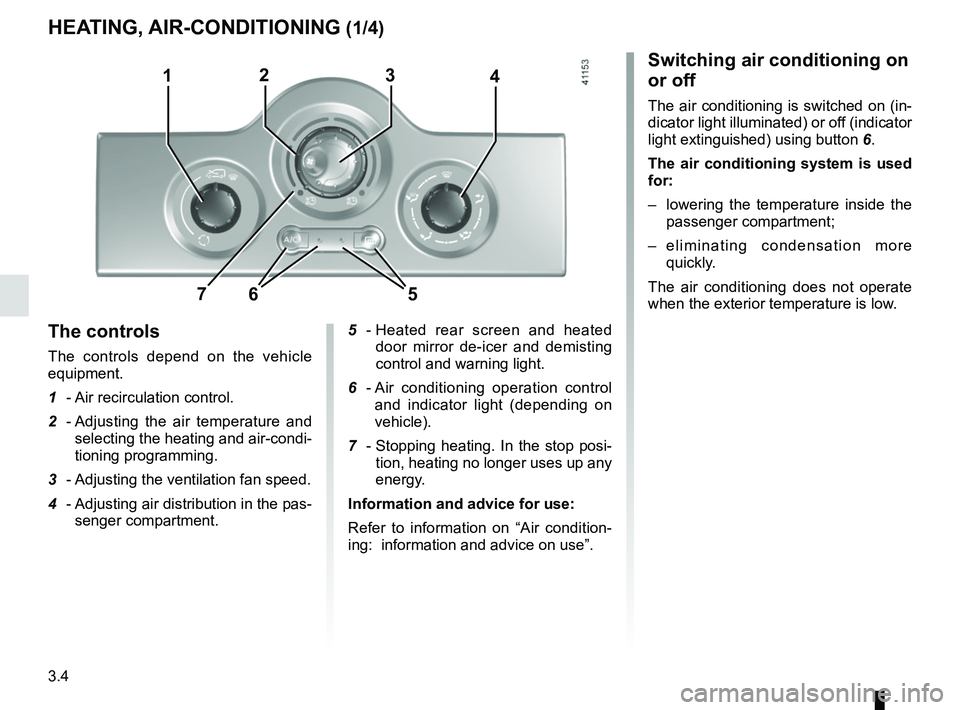
Switching air conditioning on
or off
The air conditioning is switched on (in-
dicator light illuminated) or off (indicator
light extinguished) using button 6.
The air conditioning system is used
for:
– lowering the temperature inside the passenger compartment;
– eliminating condensation more quickly.
The air conditioning does not operate
when the exterior temperature is low.
5 - Heated rear screen and heated
door mirror de-icer and demisting
control and warning light.
6 - Air conditioning operation control
and indicator light (depending on
vehicle).
7 - Stopping heating. In the stop posi-
tion, heating no longer uses up any
energy.
Information and advice for use:
Refer to information on “Air condition-
ing: information and advice on use”.
The controls
The controls depend on the vehicle
equipment.
1 - Air recirculation control.
2 - Adjusting the air temperature and
selecting the heating and air-condi-
tioning programming.
3 - Adjusting the ventilation fan speed.
4 - Adjusting air distribution in the pas-
senger compartment.
HEATING, AIR-CONDITIONING (1/4)
1423
657
Page 134 of 230
3.6
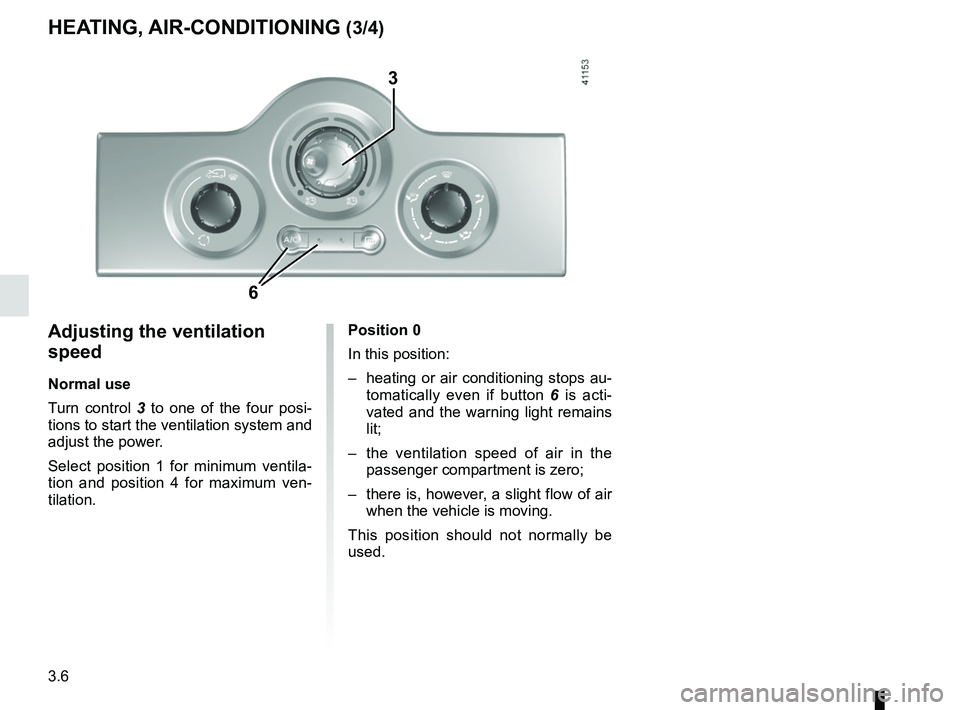
Adjusting the ventilation
speed
Normal use
Turn control 3 to one of the four posi-
tions to start the ventilation system and
adjust the power.
Select position 1 for minimum ventila-
tion and position 4 for maximum ven-
tilation.
HEATING, AIR-CONDITIONING (3/4)
3
6
Position 0
In this position:
– heating or air conditioning stops au- tomatically even if button 6 is acti-
vated and the warning light remains
lit;
– the ventilation speed of air in the passenger compartment is zero;
– there is, however, a slight flow of air when the vehicle is moving.
This position should not normally be
used.
Page 136 of 230
3.8
AIR CONDITIONING, HEATING: programming (1/2)
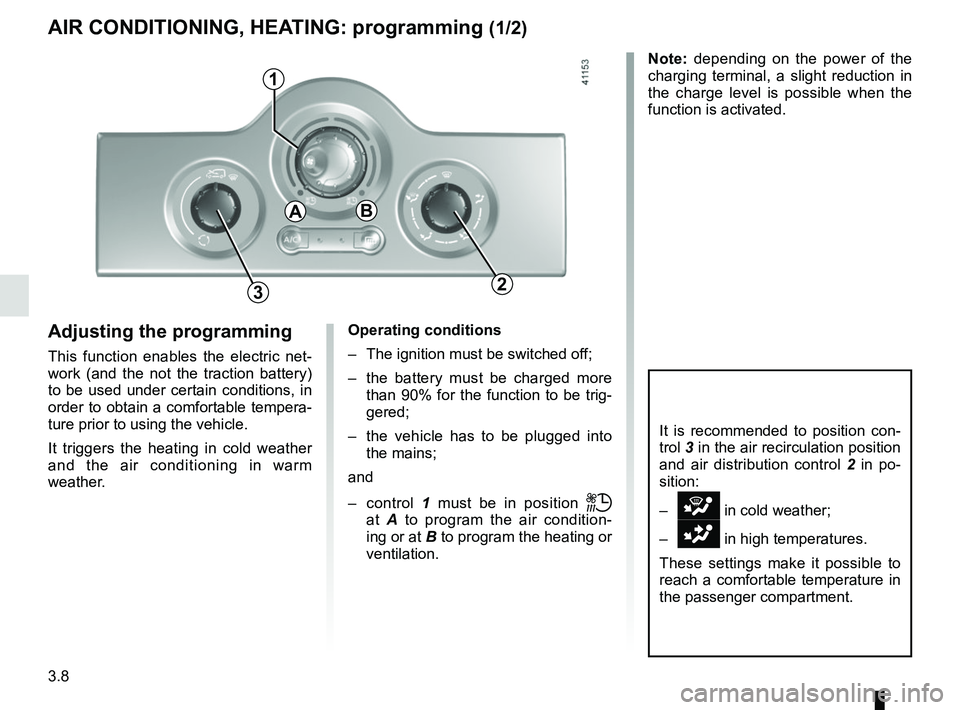
Adjusting the programming
This function enables the electric net-
work (and the not the traction battery)
to be used under certain conditions, in
order to obtain a comfortable tempera-
ture prior to using the vehicle.
It triggers the heating in cold weather
and the air conditioning in warm
weather.
1
Operating conditions
– The ignition must be switched off;
– the battery must be charged more than 90% for the function to be trig-
gered;
– the vehicle has to be plugged into the mains;
and
– control 1 must be in position
ṗ
at A to program the air condition-
ing or at B to program the heating or
ventilation.
3
It is recommended to position con-
trol 3 in the air recirculation position
and air distribution control 2 in po-
sition:
–
i in cold weather;
–
G in high temperatures.
These settings make it possible to
reach a comfortable temperature in
the passenger compartment.
AB
2
Note: depending on the power of the
charging terminal, a slight reduction in
the charge level is possible when the
function is activated.
Page 138 of 230
3.10
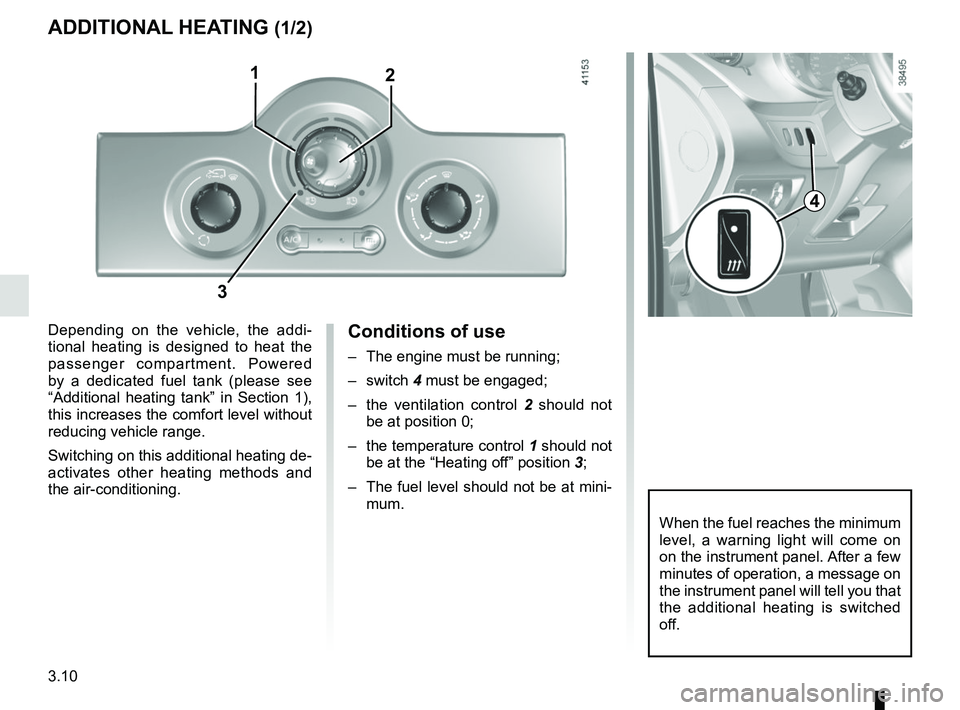
Conditions of use
– The engine must be running;
– switch 4 must be engaged;
– the ventilation control 2 should not
be at position 0;
– the temperature control 1 should not
be at the “Heating off” position 3;
– The fuel level should not be at mini- mum.
ADDITIONAL HEATING (1/2)
Depending on the vehicle, the addi-
tional heating is designed to heat the
passenger compartment. Powered
by a dedicated fuel tank (please see
“Additional heating tank” in Section 1),
this increases the comfort level without
reducing vehicle range.
Switching on this additional heating de-
activates other heating methods and
the air-conditioning.
2
When the fuel reaches the minimum
level, a warning light will come on
on the instrument panel. After a few
minutes of operation, a message on
the instrument panel will tell you that
the additional heating is switched
off.
3
1
4
Page 143 of 230

3.15
Luggage compartment light 2Tilt the switch 2 for permanent lighting.
INTERIOR LIGHTING
1
Courtesy lights
Pressing switch 1 gives:
– permanent lighting;
– intermittent lighting, which comes on when a door is opened. It goes out
when the doors concerned are prop-
erly closed;
– immediate switching off.
2
Special features
Depending on the vehicle, remote un-
locking of the doors triggers timed light-
ing of the passenger compartment. If
one of the front or rear doors is opened,
the period for which the light is switched
on will start again.
Then the courtesy light and the luggage
compartment light dim and go out.
The lighting timer will cut out for vari-
ous reasons:
– if a door has been open for 15 min- utes;
– if all the doors have been closed for 15 seconds or 5 minutes, depending
on the vehicle;
– when the ignition is switched on.