ECO mode RENAULT KANGOO Z.E. 2018 Owners Manual
[x] Cancel search | Manufacturer: RENAULT, Model Year: 2018, Model line: KANGOO Z.E., Model: RENAULT KANGOO Z.E. 2018Pages: 230, PDF Size: 5.03 MB
Page 3 of 230

0.1
Translated from French. Copying or translation, in part or in full, is fo\
rbidden unless prior written permission has been obtained from the vehicle manu-facturer.
This driver’s handbook contains the information necessary:
– for you to familiarise yourself with your vehicle, to use it to its best\
advantage and to benefit fully from the all the func tions and
the technical developments it incorporates.
– to ensure that it always gives the best performance by following the sim\
ple, but comprehensive advice concerning regular main -
tenance.
– to enable you to deal quickly with minor faults not requiring specialist\
attention.
It is well worth taking a few minutes to read this handbook to familiari\
se yourself with the information and guidelines it cont ains
about the vehicle and its functions and new features. If certain points \
are still unclear, our Network technicians will be only too
pleased to provide you with any additional information.
To help you, you will find the following symbols:
and visible in the vehicle, indicate that you should consult the manual for\
detailed information and/or limits on opera-
tions with respect to your vehicle’s equipment.
Welcome to your new electric vehicle
The descriptions of the models given in this handbook are based on the t\
echnical specifications at the time of writing. This hand-
book covers all items of equipment (both standard and optional) available for these models but whether or not these are
fitted to the vehicle depends on the version, options selected and the c\
ountry where the vehicle is sold.
This handbook may also contain information about items of equipment to b\
e introduced later in the model year.
Throughout the manual, the “approved Dealer” is your RENAULT Dealer. anywhere in the manual indicates a hazard, danger or a safety recommenda\
tion.
Enjoy driving your new vehicle.
Page 69 of 230
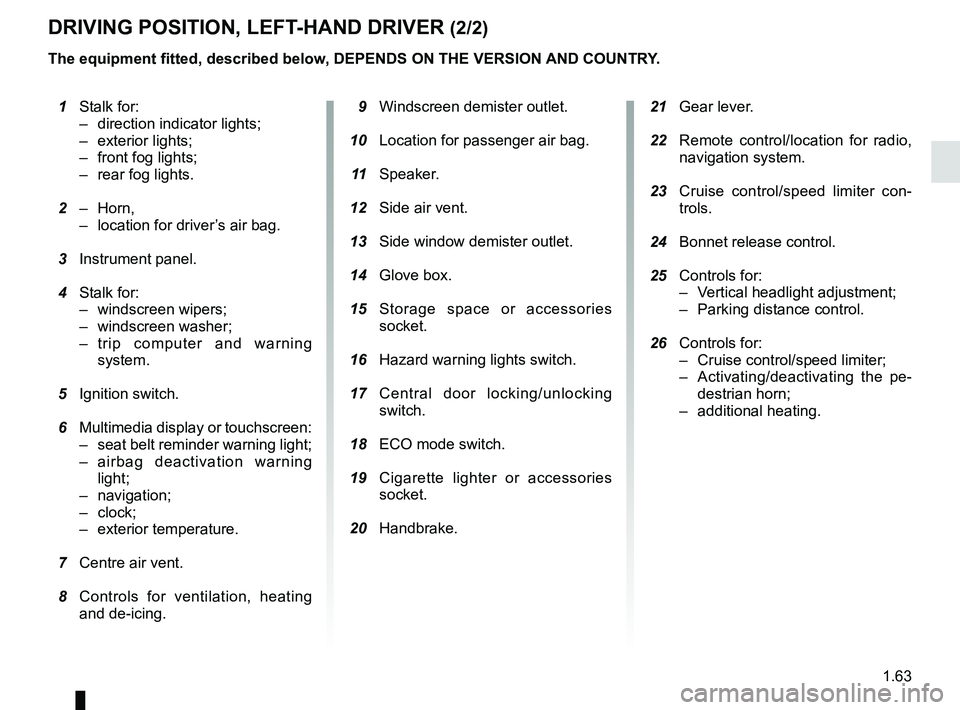
1.63
21 Gear lever.
22 Remote control/location for radio,
navigation system.
23 Cruise control/speed limiter con-
trols.
24 Bonnet release control.
25 Controls for:
– Vertical headlight adjustment;
– Parking distance control.
26 Controls for:
– Cruise control/speed limiter;
– Activating/deactivating the pe-destrian horn;
– additional heating.
1 Stalk for:
– direction indicator lights;
– exterior lights;
– front fog lights;
– rear fog lights.
2 – Horn,
– location for driver’s air bag.
3 Instrument panel.
4 Stalk for:
– windscreen wipers;
– windscreen washer;
– trip computer and warning system.
5 Ignition switch.
6 Multimedia display or touchscreen:
– seat belt reminder warning light;
– airbag deactivation warning light;
– navigation;
– clock;
– exterior temperature.
7 Centre air vent.
8 Controls for ventilation, heating
and de-icing. 9 Windscreen demister outlet.
10 Location for passenger air bag.
11 Speaker.
12 Side air vent.
13 Side window demister outlet.
14 Glove box.
15 Storage space or accessories
socket.
16 Hazard warning lights switch.
17 Central door locking/unlocking
switch.
18 ECO mode switch.
19 Cigarette lighter or accessories
socket.
20 Handbrake.
DRIVING POSITION, LEFT-HAND DRIVER (2/2)
The equipment fitted, described below, DEPENDS ON THE VERSION AND COUNTRY.
Page 71 of 230
1.65
DRIVING POSITION: RIGHT-HAND DRIVE (2/2)
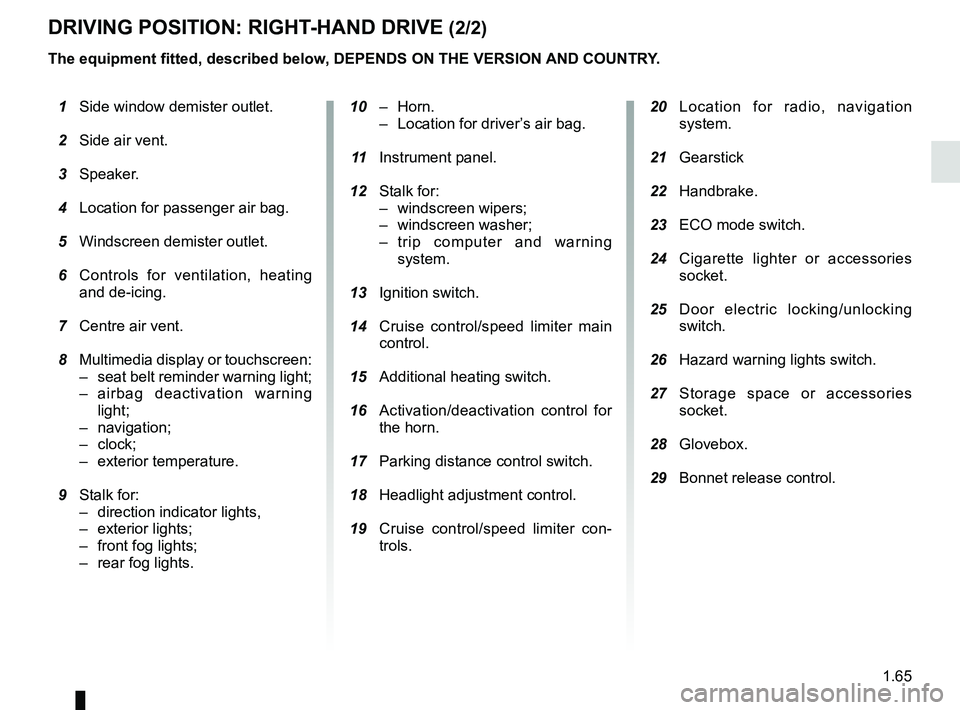
20 Location for radio, navigation
system.
21 Gearstick
22 Handbrake.
23 ECO mode switch.
24 Cigarette lighter or accessories
socket.
25 Door electric locking/unlocking
switch.
26 Hazard warning lights switch.
27 Storage space or accessories
socket.
28 Glovebox.
29 Bonnet release control.
10 – Horn.
– Location for driver’s air bag.
11 Instrument panel.
12 Stalk for:
– windscreen wipers;
– windscreen washer;
– trip computer and warning system.
13 Ignition switch.
14 Cruise control/speed limiter main
control.
15 Additional heating switch.
16 Activation/deactivation control for
the horn.
17 Parking distance control switch.
18 Headlight adjustment control.
19 Cruise control/speed limiter con-
trols.
1 Side window demister outlet.
2 Side air vent.
3 Speaker.
4 Location for passenger air bag.
5 Windscreen demister outlet.
6 Controls for ventilation, heating
and de-icing.
7 Centre air vent.
8 Multimedia display or touchscreen:
– seat belt reminder warning light;
– airbag deactivation warning light;
– navigation;
– clock;
– exterior temperature.
9 Stalk for:
– direction indicator lights,
– exterior lights;
– front fog lights;
–
rear fog lights.
The equipment fitted, described below, DEPENDS ON THE VERSION AND COUNTRY.
Page 87 of 230

1.81
With the ignition on, the time and, de-
pending on the vehicle, exterior tem-
perature are displayed.
Setting the time
Resetting the clock A
(depending on vehicle)
Display the “Clock” page on the instru-
ment panel by pressing one of the but-
tons on stalk 1.
CLOCK AND EXTERIOR TEMPERATURE
Exterior temperature
indicator
As ice formation is related
to climatic exposure, local
air humidity and temperature, the
external temperature alone is not
sufficient to detect ice.
If the electrical supply is cut (battery
disconnected, broken supply wire,
etc.), the clock will lose its time set-
ting. The time must then be set.
A
1
For safety reasons, carry
out any adjustments when
the vehicle is not being
driven.
After two seconds, the hours and min-
utes start flashing.
Press and hold the bottom button to
enter the hour setting mode.
When only the hours flash, press the
top button to scroll through them.
Press and hold the bottom button to
enter the minute setting mode.
When only the minutes flash, press the
top button to scroll through them.
Confirm by pressing and holding the
bottom button on stalk 1.
Vehicles equipped with a navigation
system, radio, etc.
Refer to the equipment instructions for
the special features.Exterior temperature
On equipped vehicles, the exterior tem-
perature is displayed at A. If it is be-
tween -3°C and +3°C, the °C charac-
ters flash (signalling a risk of ice).
Page 106 of 230
2.6
DRIVING ADVICE, ECO-DRIVING (1/2)
The vehicle range depends on vehicle
usage conditions, equipment fitted and
the user’s driving style. To optimise the
energy consumption, please refer to
the following advice.
Depending on the vehicle, you will be
provided with functions which enable
you to lower the energy consumption:
– ECO mode, activated by the ECO button;
– charge meter.
ECO mode
The ECO function optimises vehicle
range by limiting engine performance.
It acts upon certain power consuming
systems in the vehicle (heating, air con-
ditioning, power-assisted steering etc.)
and on certain driving actions (acceler-
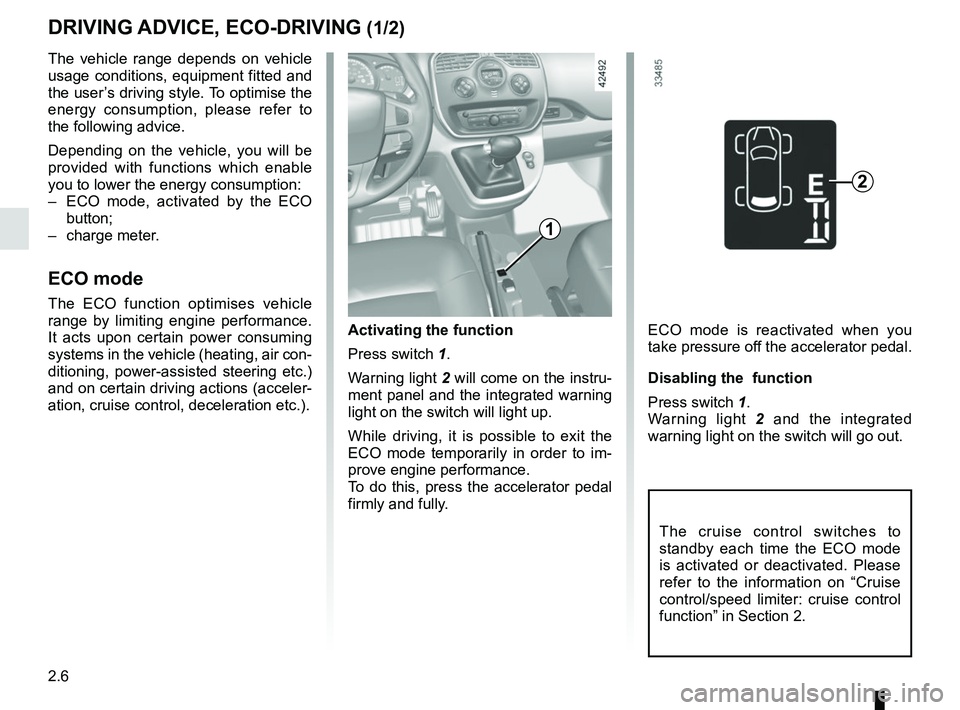
ation, cruise control, deceleration etc.). Activating the function
Press switch 1.
Warning light
2 will come on the instru-
ment panel and the integrated warning
light on the switch will light up.
While driving, it is possible to exit the
ECO mode temporarily in order to im-
prove engine performance.
To do this, press the accelerator pedal
firmly and fully.
2
1
ECO mode is reactivated when you
take pressure off the accelerator pedal.
Disabling the function
Press switch 1.
Warning light 2 and the integrated
warning light on the switch will go out.
The cruise control switches to
standby each time the ECO mode
is activated or deactivated. Please
refer to the information on “Cruise
control/speed limiter: cruise control
function” in Section 2.
Page 108 of 230
2.8
VEHICLE RANGE: recommendations (1/2)
The vehicle range is approved for a
mixed NEDC cycle (New European
Driving Cycle).
In real usage, the range of an electric
vehicle may vary depending on several
factors over which you have partial con-
trol, which may make a considerable
difference to the vehicle range. These
factors are:
– speed and driving style;
– type of road;
– heating level;
– tyres;
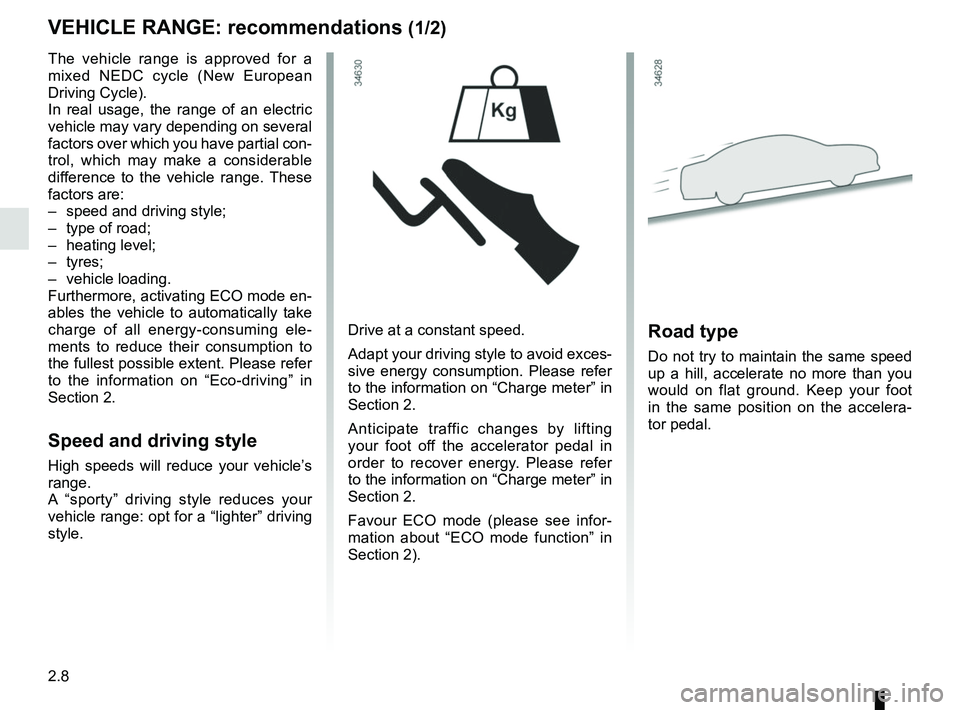
– vehicle loading.
Furthermore, activating ECO mode en-
ables the vehicle to automatically take
charge of all energy-consuming ele-
ments to reduce their consumption to
the fullest possible extent. Please refer
to the information on “Eco-driving” in
Section 2.
Speed and driving style
High speeds will reduce your vehicle’s
range.
A “sporty” driving style reduces your
vehicle range: opt for a “lighter” driving
style.Drive at a constant speed.
Adapt your driving style to avoid exces-
sive energy consumption. Please refer
to the information on “Charge meter” in
Section 2.
Anticipate traffic changes by lifting
your foot off the accelerator pedal in
order to recover energy. Please refer
to the information on “Charge meter” in
Section 2.
Favour ECO mode (please see infor-
mation about “ECO mode function” in
Section 2).
Road type
Do not try to maintain the same speed
up a hill, accelerate no more than you
would on flat ground. Keep your foot
in the same position on the accelera-
tor pedal.
Page 109 of 230
2.9
VEHICLE RANGE: recommendations (2/2)
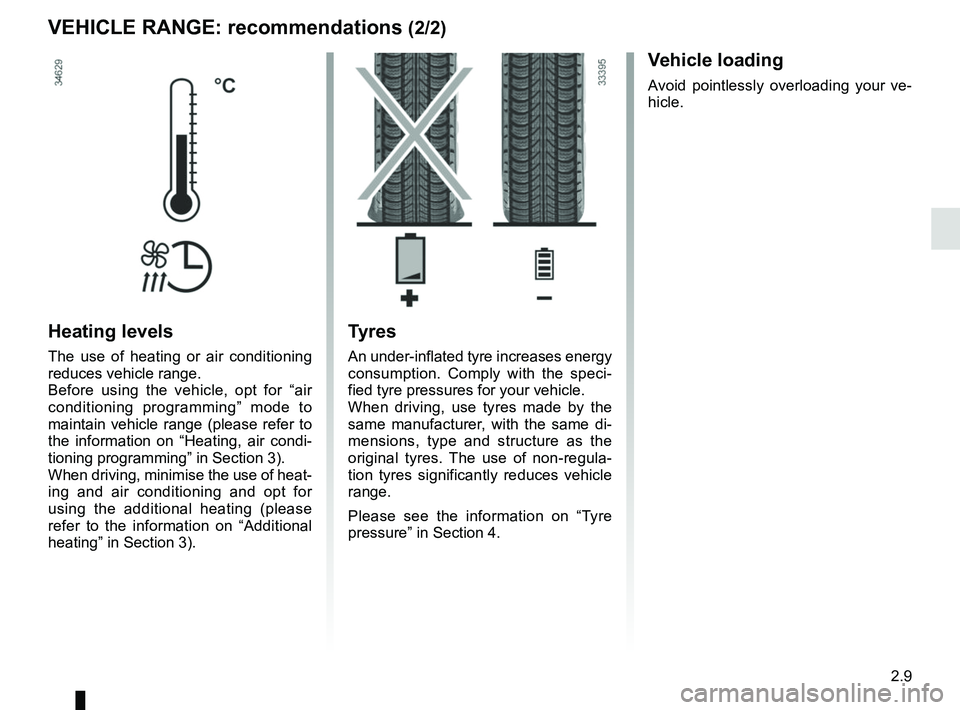
Heating levels
The use of heating or air conditioning
reduces vehicle range.
Before using the vehicle, opt for “air
conditioning programming” mode to
maintain vehicle range (please refer to
the information on “Heating, air condi-
tioning programming” in Section 3).
When driving, minimise the use of heat-
ing and air conditioning and opt for
using the additional heating (please
refer to the information on “Additional
heating” in Section 3).
Tyres
An under-inflated tyre increases energy
consumption. Comply with the speci-
fied tyre pressures for your vehicle.
When driving, use tyres made by the
same manufacturer, with the same di-
mensions, type and structure as the
original tyres. The use of non-regula-
tion tyres significantly reduces vehicle
range.
Please see the information on “Tyre
pressure” in Section 4.
Vehicle loading
Avoid pointlessly overloading your ve-
hicle.
Page 122 of 230
2.22
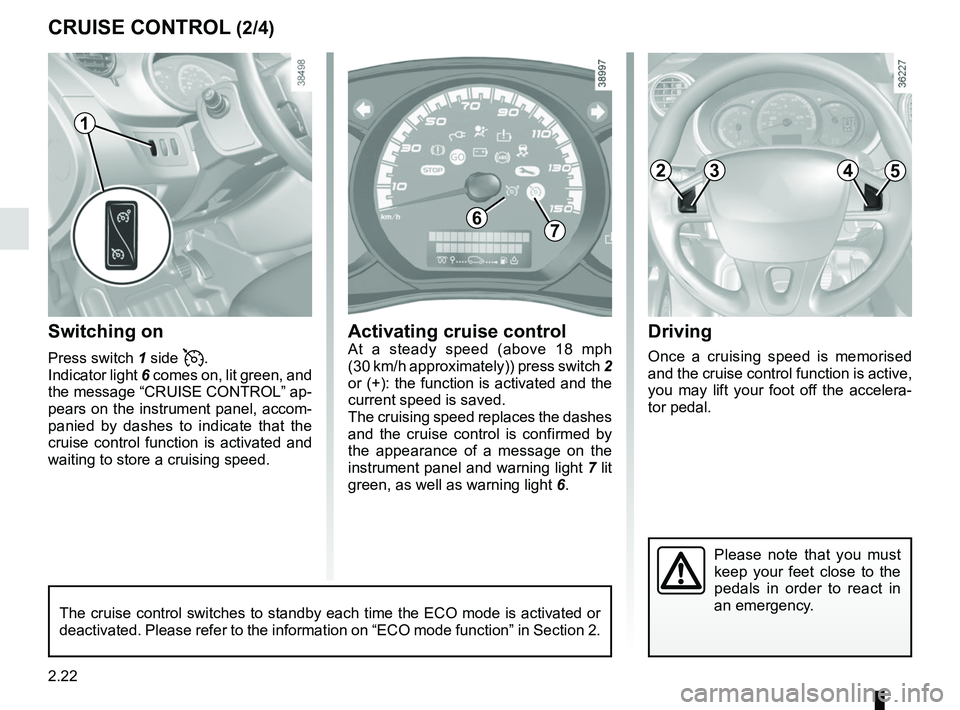
Driving
Once a cruising speed is memorised
and the cruise control function is active,
you may lift your foot off the accelera-
tor pedal.
Switching on
Press switch 1 side .
Indicator light 6 comes on, lit green, and
the message “CRUISE CONTROL” ap-
pears on the instrument panel, accom-
panied by dashes to indicate that the
cruise control function is activated and
waiting to store a cruising speed.
Please note that you must
keep your feet close to the
pedals in order to react in
an emergency.
CRUISE CONTROL (2/4)
67
Activating cruise controlAt a steady speed (above 18 mph
(30 km/h approximately)) press switch 2
or (+): the function is activated and the
current speed is saved.
The cruising speed replaces the dashes
and the cruise control is confirmed by
the appearance of a message on the
instrument panel and warning light 7 lit
green, as well as warning light 6.
1
The cruise control switches to standby each time the ECO mode is activat\
ed or
deactivated. Please refer to the information on “ECO mode function”\
in Section 2.
2453
Page 140 of 230
3.12
AIR CONDITIONING: information and operating instructions (1/2)
Do not open the refriger-
ant fluid circuit. The fluid
may damage eyes or skin.
Operating faults
As a general rule, contact your ap-
proved Dealer in the event of an oper-
ating fault.
– Reduction in de-icing, demisting or air conditioning performance.
This may be caused by the passen-
ger compartment filter cartridge be-
coming clogged.
– No cold air is being produced.
Check that the controls are set cor-
rectly and that the fuses are sound.
Otherwise, switch off the system.
Range
It is normal to notice an increase in
energy usage when the air conditioning
is operating.
Switch off the system when it is not re-
quired.
Advice for reducing consumption
and helping to preserve the environ-
ment
Drive with the air vents on and the win-
dows closed.
If the vehicle has been parked in the
sun, open the doors for a few moments
to let the hot air escape before starting
the engine.
MaintenanceRefer to the Maintenance Document
for your vehicle for the inspection fre-
quency.
Below approximately 10°C, with the
engine off it is normal to notice cold
air enter the passenger compart-
ment via the vents when ventilation
has not stopped (refer to the infor-
mation on “Heating, air condition-
ing” in section 3). It is recommended
to position the ventilation control at
0 in case of brief stops.
Presence of water under the
vehicle.
After prolonged use of the air condi-
tioning system, it is normal for water
to be present under the vehicle. This is
caused by condensation.
Noise
Each time the ignition is switched off,
the ventilation will be switched off after
about ten seconds.
Vehicles equipped with
mode ECO
Once activated, ECO mode may
reduce air conditioning perform-
ance. Please refer to the informa-
tion on “Driving advice, Eco-driving”
in Section 2.
Use the air conditioning system reg-
ularly, even in cold weather, running
it at least once a month for approxi-
mately 5 minutes.
Page 145 of 230
3.17
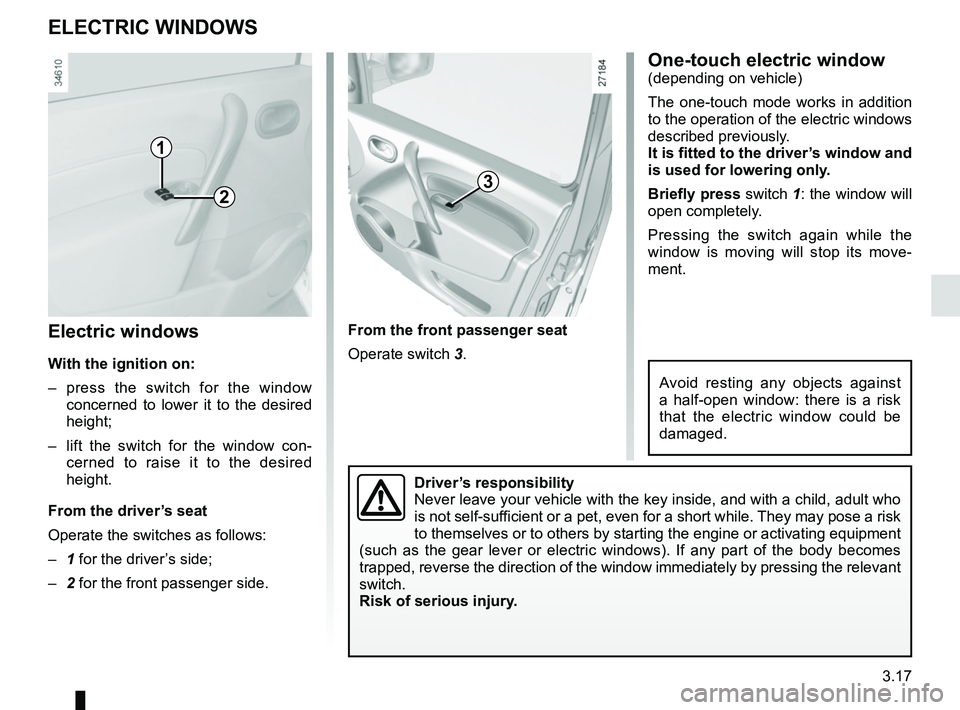
Electric windows
With the ignition on:
– press the switch for the window concerned to lower it to the desired
height;
– lift the switch for the window con- cerned to raise it to the desired
height.
From the driver’s seat
Operate the switches as follows:
– 1 for the driver’s side;
– 2 for the front passenger side.
ELECTRIC WINDOWS
From the front passenger seat
Operate switch 3.
1
23
Driver’s responsibility
Never leave your vehicle with the key inside, and with a child, adult wh\
o
is not self-sufficient or a pet, even for a short while. They may pose a risk
to themselves or to others by starting the engine or activating equipmen\
t
(such as the gear lever or electric windows). If any part of the body \
becomes
trapped, reverse the direction of the window immediately by pressing the\
relevant
switch.
Risk of serious injury.
One-touch electric window(depending on vehicle)
The one-touch mode works in addition
to the operation of the electric windows
described previously.
It is fitted to the driver’s window and
is used for lowering only.
Briefly press switch 1: the window will
open completely.
Pressing the switch again while the
window is moving will stop its move-
ment.
Avoid resting any objects against
a half-open window: there is a risk
that the electric window could be
damaged.