service RENAULT KANGOO Z.E. 2018 Owners Manual
[x] Cancel search | Manufacturer: RENAULT, Model Year: 2018, Model line: KANGOO Z.E., Model: RENAULT KANGOO Z.E. 2018Pages: 230, PDF Size: 5.03 MB
Page 9 of 230
1.3
ELECTRIC VEHICLE: introduction (2/6)
Electric vehicles have special features,
but operate in a similar manner to con-
ventional vehicles.
The main difference in electric vehicles
is the exclusive use of electric energy
instead of fuel, as used in conventional
vehicles.
We therefore recommend that you read
these instructions describing your elec-
tric vehicle carefully.
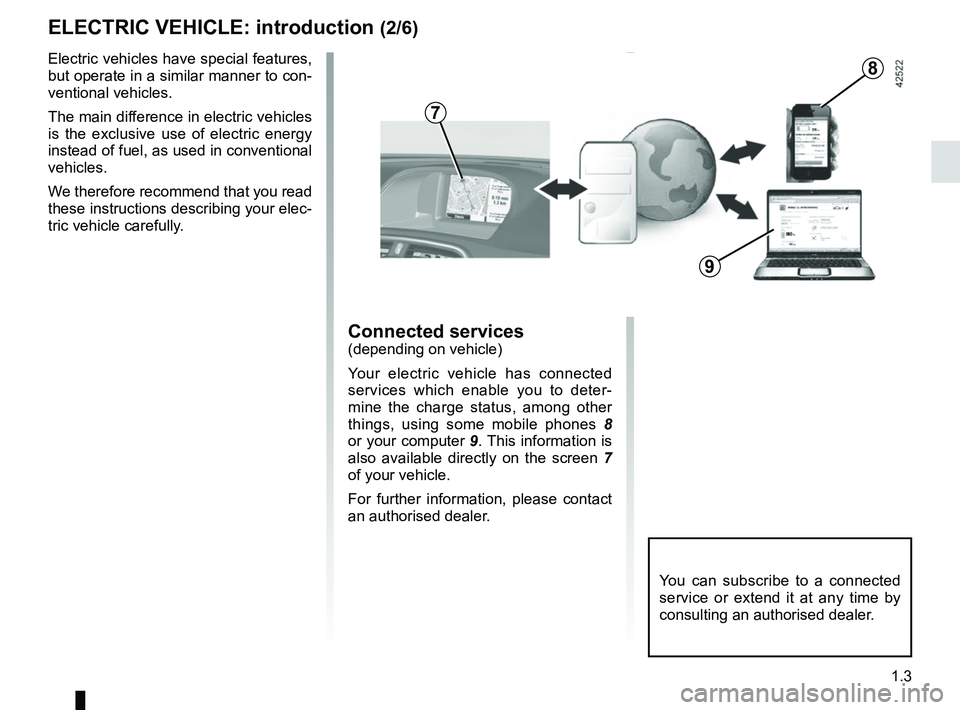
Connected services(depending on vehicle)
Your electric vehicle has connected
services which enable you to deter-
mine the charge status, among other
things, using some mobile phones 8
or your computer 9. This information is
also available directly on the screen 7
of your vehicle.
For further information, please contact
an authorised dealer.
You can subscribe to a connected
service or extend it at any time by
consulting an authorised dealer.
7
8
9
Page 14 of 230
1.8
IMPORTANT RECOMMENDATIONS
Please read these instructions carefully. Failure to follow these instructions may lead to a risk of fire, serious injury
or electric shock which may present a risk to life.
In the event of an accident or impact
In the event of an accident or an impact to the underside of the vehicle\
(e.g.: striking a post, raised kerb or other street fu rni-
ture), this may damage the electric circuit or the traction battery.
Have the vehicle checked by an authorised dealer.
Never touch the “400 volt” components or orange cables which are e\
xposed and visible inside or outside the vehicle.
In the event of serious damage to the traction battery, leaks may occur:
– never touch the liquids (fluids, etc.) coming from the traction batter\
y;
– in the event of contact with the body, wash the affected area with plenty of water and consult a doctor as soon as possibl\
e.
In the event of an impact, even slight, against the charging flap and/or\
valve, have them checked by an authorised dealer as
soon as possible.
In the event of fire
In the event of fire, make everyone evacuate the vehicle immediately and\
contact the emergency services, informing them that
this is an electric vehicle.
Only use extinguishing agents ABC or BC that are permitted for use with electrical fires. Do not use w\
ater or other extinguish-
ing agents.
In the event of damage to the electrical circuit, please call an authori\
sed dealer.
All towing operations
Please refer to the information on “Towing, breakdowns” in Section 5.
Washing the vehicle
Never wash the engine compartment, the charging connection or the tracti\
on battery with a high-pressure jet.
This risks damaging the electric circuit.
Never wash the vehicle while it is charging.
Risk of electric shock and a risk to life.
Page 19 of 230

1.13
ELECTRIC VEHICLE: charging (5/8)
Charging connection 2
The vehicle has a charging connection
located at the front of the vehicle. Avoid charging and parking your ve-
hicle in extreme temperatures (hot or
cold).
When the vehicle is parked in tempera-
tures lower than around -25°C, the bat-
tery cannot be charged.
To preserve the service life of your trac-
tion battery, avoid parking the vehicle
for more than three months with high
charge, especially when the weather is
very hot.
You must charge the traction bat-
tery after driving in very cold weather.
Otherwise, charging may take a longer
period of time or even become impos-
sible.
Recommendations
– In extreme heat, favour parking and
recharging the vehicle in a shaded/
covered location.
– Charging can be performed in the rain or snow.
2
In the absence of any protection
against overvoltage, you are recom-
mended not to charge the vehicle in
stormy weather (lightning, etc.).
Note:
If in a snowy environment, remove
snow from the vehicle charging area
before plugging in or disconnecting.
Snow in the socket may block the in-
sertion of the charging cord plug.
The traction battery charging time
depends on the amount of energy
remaining, the power delivered by
the charging terminal and the tem-
perature conditions (hot or cold).
The information is displayed on
the instrument panel during charg-
ing. Please see the information on
“Displays and indicators” in
Section 1.
In the event of a problem, we rec-
ommend that you replace it with an
identical cord. Please see an autho-
rised dealer.
Page 24 of 230

1.18
Radio frequency remote
control operating range
This varies according to the surroun-
dings: take care not to lock or unlock
the doors by inadvertently pressing the
buttons on the remote control.
Interference
Interference by factors in the imme-
diate vicinity (external installations or
the use of equipment operating on the
same frequency as the remote control)
may affect the operation of the remote
control.
Note: if a door is not opened within
approximately 2 seconds of the door
being unlocked by remote control, the
doors will lock again automatically.
KEY, RADIO FREQUENCY REMOTE CONTROL: general information (2/2)
For replacement, or if you
require an additional remote
control.
You must only contact an approved
Dealer.
– To replace a remote control, the vehicle must be taken to an ap-
proved Dealer as both the vehi-
cle and the remote control are
needed to initialise the system.
– Depending on the vehicle, you have the option of using up to
four remote controls.
Remote control unit failure
Make sure that the correct battery
type is being used, and that the bat-
tery is in good condition and inser-
ted correctly. These batteries have
a service life of approximately two
years.
To learn how to change the battery,
please refer to the information on
the “Key, radio frequency remote
control: Batteries” in Section 5.
Page 78 of 230

1.72
TRIP COMPUTER: general information (1/2)
Trip computer and warning
system A
Depending on the vehicle, this includes
the following functions:
– distance travelled;
– journey parameters;
– information messages;
– operating fault messages (associ-
ated with the
© warning light);
– warning messages (connected to the
® warning light).
All these functions are described on the
following pages. a) Total mileage and trip mileage re-
corder;
b) journey parameters: – Total energy consumption since
the last reset;
– average energy consumption;
– current energy consumption;
– Total energy consumption since
the vehicle first entered into serv-
ice;
– estimated range;
– distance travelled;
– average speed.
c) mileage before service;
d) cruise control and speed limiter pro- grammed speed;
e) Reset the tyre pressure
f) trip log, operating faults and informa- tion message readout.
A
1
2
Display selection keys 1
and 2
Scroll through the following informa-
tion upwards (button 1) or downwards
(button 2 ) by pressing briefly and suc-
cessively (the display depends on the
vehicle equipment and country).
Page 81 of 230

1.75
TRIP COMPUTER AND WARNING SYSTEM: journey parameters (2/4)
Examples of selectionsInterpreting the display selected
RANGE
Estimated range with remaining energy.
The information disappears when the battery is at less than approximatel\
y
4%.
118 km
DISTANCE
Distance travelled since the last reset.
522 km
AVERAGE
Average speed
since the last reset.
The value is displayed after driving 400 metres.
48 km/h
CONSUMPTION
Total energy usage since vehicle first entered service.
487 kWh
The display of information shown below DEPENDS ON THE VEHICLE EQUIPMENT \
AND COUNTRY.
Page 82 of 230

The display of information shown below DEPENDS ON THE VEHICLE EQUIPMENT \
AND COUNTRY.
Examples of selectionsInterpreting the display se")
1.76
TRIP COMPUTER AND WARNING SYSTEM: journey parameters (3/4)
The display of information shown below DEPENDS ON THE VEHICLE EQUIPMENT \
AND COUNTRY.
Examples of selectionsInterpreting the display selected
SERVICE IN
c) Service interval. Distance remaining until the next service (displayed in kilometres),
then when the service nears, several scenarios are possible:
– distance/time remaining less than 900 miles (1,500 km) or one
month: the message “SERVICE IN” is displayed, together with the
nearest distance or time;
– interval equal to 0 miles (0 km) or service date reached: the mes-
sage “SERVICE DUE” is displayed accompanied by warning light
©.
The vehicle requires a service as soon as possible.
1936 km
Resetting the display after the service in accordance with the maintenan\
ce schedule.
The service interval must only be reset after a service which complies w\
ith the recommendations in the maintenance schedule.
Special note: to reset the service interval, press and hold one of the display reset \
buttons for approximately 10 seconds until
the display shows the mileage permanently.
Page 110 of 230
2.10
ENVIRONMENT
Emissions
Your vehicle has been designed to
emit fewer greenhouse gases (CO2)
while in use, and therefore to consume
less fuel (eg. 140 g/km, equivalent to
5.3 l/100 km for a diesel vehicle).
Our vehicles are also equipped with a
particle filter system including a cata-
lytic converter, an oxygen sensor and
an active carbon filter (the latter pre-
vents vapour from the fuel tank being
released into the open air).
For certain diesel vehicles, this system
also has a particle filter to reduce the
volume of soot particles emitted.
Please make your own
contribution towards
protecting the environment
too
– Worn parts replaced in the course of routine vehicle maintenance (vehi-
cle battery, oil filter, air filter, batter-
ies, etc.) and oil containers (empty or
filled with used oil) must be disposed
of through specialist organisations. – At the end of the vehicle’s service
life, it should be sent to approved
centres to ensure that it is recycled.
– In all cases, comply with local legis- lation.
Recycling
Your vehicle is 85% recyclable and
95% recoverable.
To achieve these objectives, many of
the vehicle components have been de-
signed to enable them to be recycled.
The materials and structures have
been carefully designed to allow these
components to be easily removed and
reprocessed by specialist companies.
In order to preserve raw material re-
sources, this vehicle incorporates nu-
merous parts made from recycled plas-
tics or renewable materials (vegetable
or animal-derived materials such as
cotton or wool).
Your vehicle has been designed with
respect for the environment in mind for
its entire service life: during production,
use and at the end of its life.
This commitment is illustrated by the of
the manufacturer eco² signature.Manufacture
Your vehicle has been manufactured at
a factory which complies with a policy
to reduce the environmental impact
on the surrounding areas (reduction of
water and energy consumption, visual
and noise pollution, atmospheric emis-
sions and waste water; sorting and re-
using waste).
Page 171 of 230
5.3
TYRE INFLATION KIT (1/3)
The kit is only approved for
inflating the tyres of the ve-
hicle originally equipped
with the kit.
It must never be used to inflate
the tyres of another vehicle, or any
other inflatable object (rubber ring,
rubber boat, etc.).
Avoid spillage on skin when hand-
ling the repair liquid bottle. If drop-
lets do leak out, rinse them off with
plenty of water.
Keep the repair kit away from chil-
dren.
Do not dispose of the empty bottle
in the countryside. Return it to your
approved dealer or to a recycling or-
ganisation.
The bottle has a limited service
life which is indicated on its label.
Check the expiry date.
Contact an approved dealer to re-
place the inflation tube and repair
product bottle.
A
B
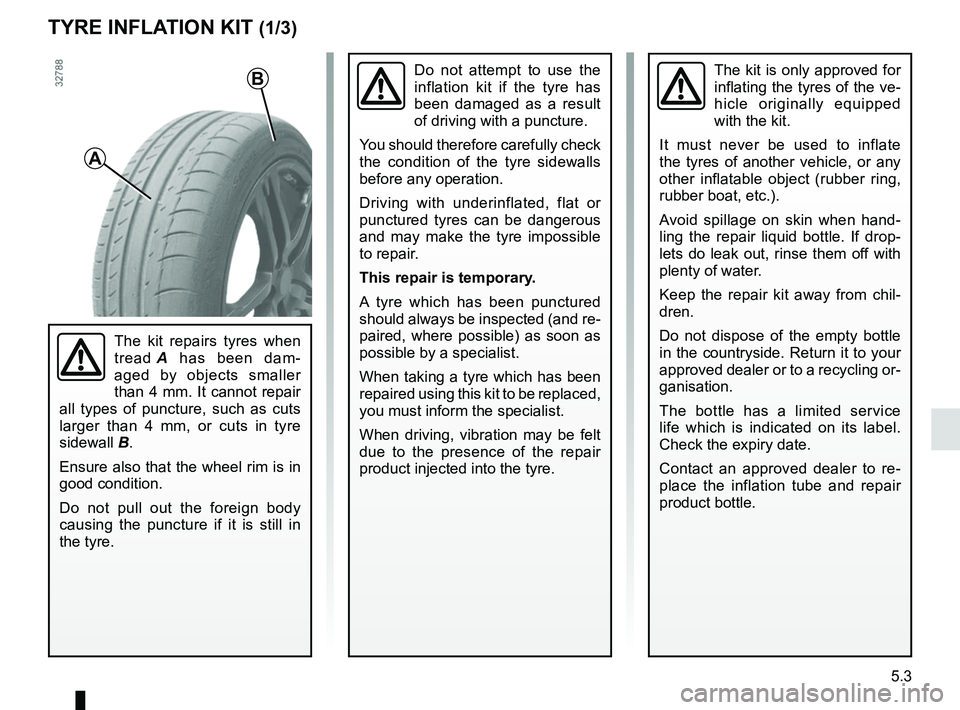
The kit repairs tyres when
tread A has been dam-
aged by objects smaller
than 4 mm. It cannot repair
all types of puncture, such as cuts
larger than 4 mm, or cuts in tyre
sidewall B.
Ensure also that the wheel rim is in
good condition.
Do not pull out the foreign body
causing the puncture if it is still in
the tyre.
Do not attempt to use the
inflation kit if the tyre has
been damaged as a result
of driving with a puncture.
You should therefore carefully check
the condition of the tyre sidewalls
before any operation.
Driving with underinflated, flat or
punctured tyres can be dangerous
and may make the tyre impossible
to repair.
This repair is temporary.
A tyre which has been punctured
should always be inspected (and re-
paired, where possible) as soon as
possible by a specialist.
When taking a tyre which has been
repaired using this kit to be replaced,
you must inform the specialist.
When driving, vibration may be felt
due to the presence of the repair
product injected into the tyre.
Page 191 of 230
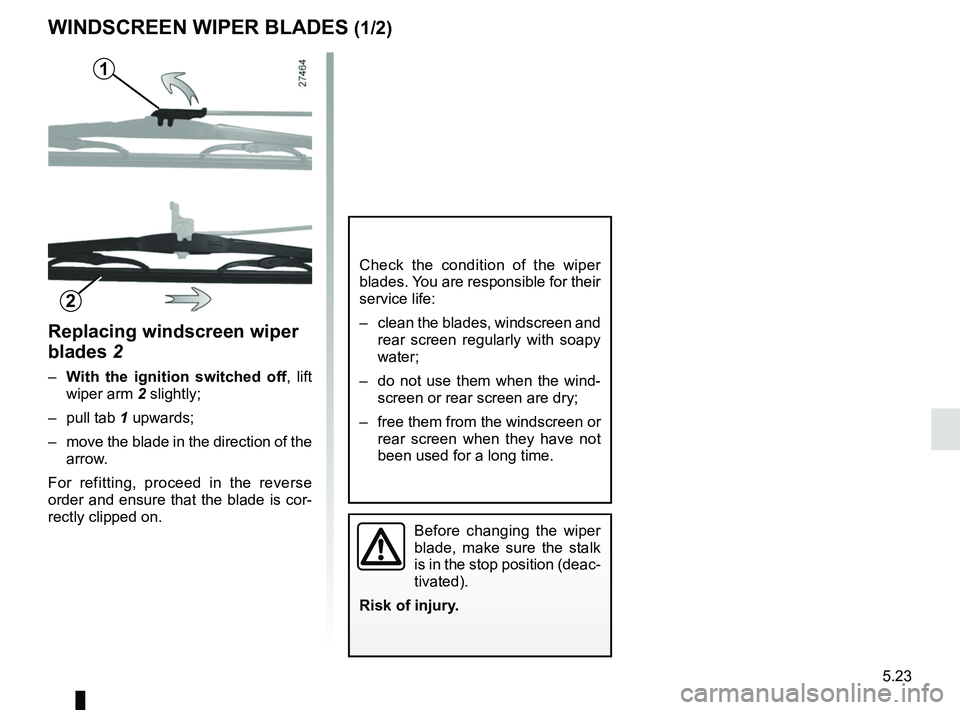
5.23
Replacing windscreen wiper
blades 2
– With the ignition switched off , lift
wiper arm 2 slightly;
– pull tab 1 upwards;
– move the blade in the direction of the arrow.
For refitting, proceed in the reverse
order and ensure that the blade is cor-
rectly clipped on.
WINDSCREEN WIPER BLADES (1/2)
Check the condition of the wiper
blades. You are responsible for their
service life:
– clean the blades, windscreen and rear screen regularly with soapy
water;
– do not use them when the wind- screen or rear screen are dry;
– free them from the windscreen or rear screen when they have not
been used for a long time.
1
2
Before changing the wiper
blade, make sure the stalk
is in the stop position (deac-
tivated).
Risk of injury.