tow RENAULT KOLEOS 2012 1.G User Guide
[x] Cancel search | Manufacturer: RENAULT, Model Year: 2012, Model line: KOLEOS, Model: RENAULT KOLEOS 2012 1.GPages: 233, PDF Size: 7.81 MB
Page 100 of 233
2.22
ENG_UD27290_7
Transmission int grale : 4 roues motrices : 4WD (X45 - H45 - Renault)
ENG_NU_977-2_H45_Ph2_Renault_2
Jaune NoirNoir texte
ALL-wHEEL DRIvE SYSTEM: 4 wheel drive (4wD) (2/3)
Special note on all-wheel
drive system
– The vehicle may make more
noise when the “AUTO” or “4WD
Lock” modes are activated. This
is normal;
– if the system detects a difference
in the size of the front and rear
wheels (as is the case, for exam-
ple, when the wrong size tyres
are fitted, or if the tyres are un -
der-inflated or significantly worn
on one axle etc.) the message
“4WD not available ” is displayed
on the instrument panel and the
indicator light
‘ flashes.
Select “2WD” mode and drive at
a moderate speed;
– always use four tyres with the
same level of wear;
– as soon as the vehicle speed ex-
ceeds 24 mph (40 km/h) in “4WD
Lock” mode, the system automat-
ically switches back to “AUTO”
mode. The indicator light goes
out;
– when the front and rear wheels
are turning at different speeds
(for example, when driving on
uneven road surfaces, sand or
mud, or when being towed, tyres
with different levels of wear), the
oil temperature may rise, given
the mechanical stresses. In this
case, the system automatically
switches back to “2WD” mode to
prevent overheating. The mes-
sage “ 4w D not available ” is
displayed on the instrument
panel and the
‘ or ’
indicator light comes on. Park
the vehicle in a safe place and
wait until the message “4WD not
available ” disappears.
If the warning appears again,
contact an approved Dealer.
Operating faults
When the system detects an operating
fault the message “ Check 4WD” and
warning light
© appear on the in-
strument panel.
Contact your approved Dealer as soon
as possible.
Page 119 of 233
JauneNoirNoir texte
2.41
ENG_UD27292_7
Bo tes de vitesses automatiques ou variation continue (X45 - H45 - Renault)
ENG_NU_977-2_H45_Ph2_Renault_2
AUTOMATIC OR CONTINUOUSLY vARIABLE TRANSMISSION (3/3)
Operating faults
– when driving, if the “Check auto
gearbox ” message appears on the
instrument panel, it indicates a fault.
Contact your approved Dealer as
soon as possible.
– when driving , if the message “Auto
gearbox overheating ” appears on
the instrument panel, shift the gear
lever into position N, as soon as pos-
sible.
Contact your approved dealer as
soon as possible.
– If a vehicle with an automatic
gearbox breaks down , refer to the
information on “Towing” in Section 5.
Special note for vehicles equipped
with continuously variable
transmissions:
Under certain driving conditions at high
speeds, the gearbox may temporarily
limit the maximum engine speed. This
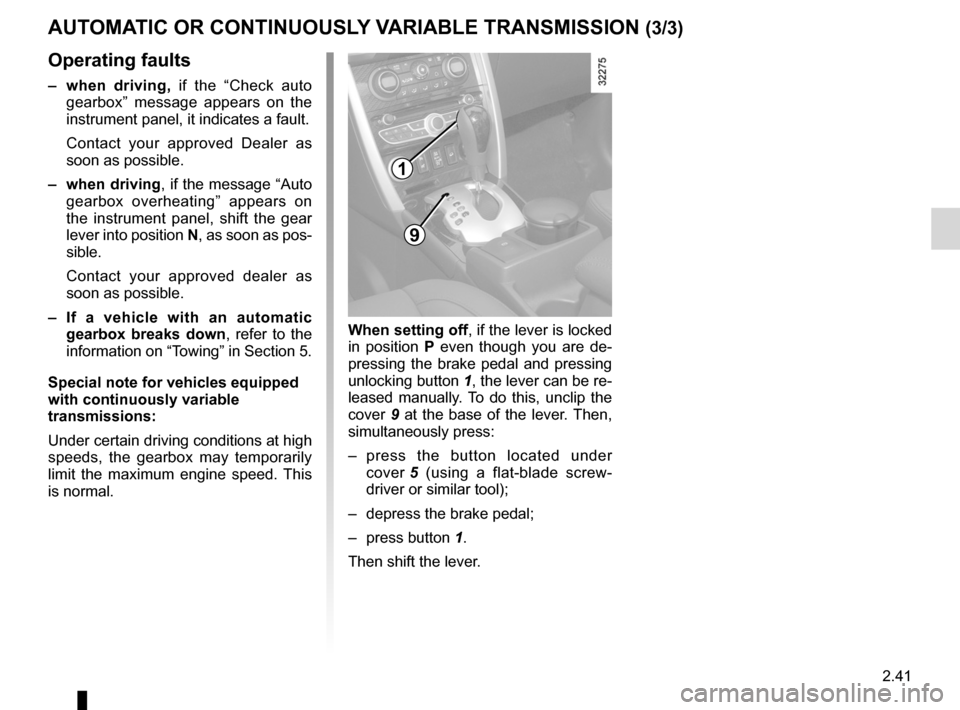
is normal. when setting off, if the lever is locked
in position
P even though you are de -
pressing the brake pedal and pressing
unlocking button 1, the lever can be re-
leased manually. To do this, unclip the
cover 9 at the base of the lever. Then,
simultaneously press:
– press the button located under
cover 5 (using a flat-blade screw -
driver or similar tool);
– depress the brake pedal;
– press button 1.
Then shift the lever.
9
1
Page 121 of 233
3.1
ENG_UD27165_2
Contents 3 (X45 - H45 - Renault)
ENG_NU_977-2_H45_Ph2_Renault_3
Section 3: Your comfort
Air vents (air outlets) . . . . . . . . . . . . . . . . . . . . . . . . . . . . . . . . . . . . . . . . . . . . . . . . . . . . . . . . . . . . . 3.2
Manual air conditioning/heating system . . . . . . . . . . . . . . . . . . . . . . . . . . . . . . . . . . . . . . . . . . . . . . 3.4
Automatic climate control . . . . . . . . . . . . . . . . . . . . . . . . . . . . . . . . . . . . . . . . . . . . . . . . . . . . . . . . . 3.7
Air conditioning: information and advice on use . . . . . . . . . . . . . . . . . . . . . . . . . . . . . . . . . . . . . . . . 3.13
Electric windows . . . . . . . . . . . . . . . . . . . . . . . . . . . . . . . . . . . . . . . . . . . . . . . . . . . . . . . . . . . . . . . . 3.14
Electric sunroof . . . . . . . . . . . . . . . . . . . . . . . . . . . . . . . . . . . . . . . . . . . . . . . . . . . . . . . . . . . . . . . . . 3.16
Sun visor . . . . . . . . . . . . . . . . . . . . . . . . . . . . . . . . . . . . . . . . . . . . . . . . . . . . . . . . . . . . . . . . . . . . . . 3.18
Child minder mirror . . . . . . . . . . . . . . . . . . . . . . . . . . . . . . . . . . . . . . . . . . . . . . . . . . . . . . . . . . . . . . 3.19
Interior lighting . . . . . . . . . . . . . . . . . . . . . . . . . . . . . . . . . . . . . . . . . . . . . . . . . . . . . . . . . . . . . . . . . . 3.20
Passenger compartment storage/fittings . . . . . . . . . . . . . . . . . . . . . . . . . . . . . . . . . . . . . . . . . . . . . . 3.22
Accessories sockets . . . . . . . . . . . . . . . . . . . . . . . . . . . . . . . . . . . . . . . . . . . . . . . . . . . . . . . . . . . . . 3.28
Ashtray/cigarette lighter . . . . . . . . . . . . . . . . . . . . . . . . . . . . . . . . . . . . . . . . . . . . . . . . . . . . . . . . . . . 3.28
Rear headrests . . . . . . . . . . . . . . . . . . . . . . . . . . . . . . . . . . . . . . . . . . . . . . . . . . . . . . . . . . . . . . . . . 3.29
Rear bench seat functions . . . . . . . . . . . . . . . . . . . . . . . . . . . . . . . . . . . . . . . . . . . . . . . . . . . . . . . . . 3.30
Boot . . . . . . . . . . . . . . . . . . . . . . . . . . . . . . . . . . . . . . . . . . . . . . . . . . . . . . . . . . . . . . . . . . . . . . . . . . 3.32
Luggage cover . . . . . . . . . . . . . . . . . . . . . . . . . . . . . . . . . . . . . . . . . . . . . . . . . . . . . . . . . . . . . . . . . . 3.34
Transporting objects in the boot/towing . . . . . . . . . . . . . . . . . . . . . . . . . . . . . . . . . . . . . . . . . . . . . . . 3.35
Anchorage points/luggage net . . . . . . . . . . . . . . . . . . . . . . . . . . . . . . . . . . . . . . . . . . . . . . . . . . . . . . 3.36
Roof bars . . . . . . . . . . . . . . . . . . . . . . . . . . . . . . . . . . . . . . . . . . . . . . . . . . . . . . . . . . . . . . . . . . . . . . 3.37
Multimedia equipment . . . . . . . . . . . . . . . . . . . . . . . . . . . . . . . . . . . . . . . . . . . . . . . . . . . . . . . . . . . . 3.38
Page 126 of 233
rear screen de-icing/demisting .............................. (current page)
windscreen de-icing/demisting .............................. (current page)
3.6
ENG_UD16310_4
Chauffage/air conditionné manuel (X45 - H45 - Renault)
ENG_NU_977-2_H45_Ph2_Renault_3
MANuAl AIR coNDITIoNINg/hEATINg SySTEM (3/3)
Distribution of air in the
passenger compartment
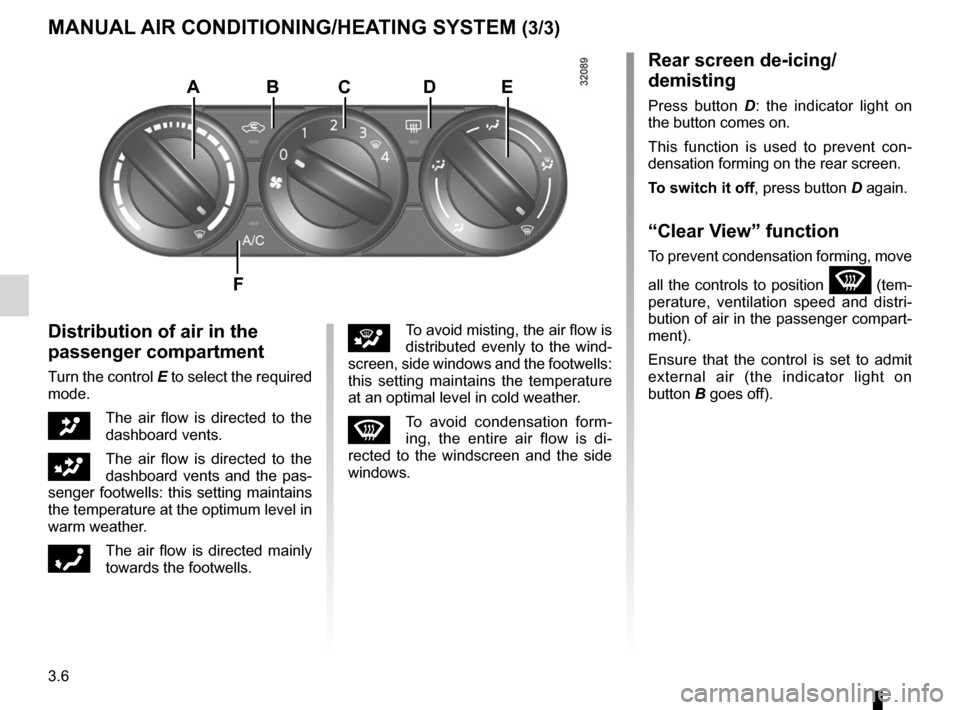
Turn the control E to select the required
mode.
JThe air flow is directed to the
dashboard vents.
GThe air flow is directed to the
dashboard vents and the pas-
senger footwells: this setting maintains
the temperature at the optimum level in
warm weather.
óThe air flow is directed mainly
towards the footwells.
iTo avoid misting, the air flow is
distributed evenly to the wind -
screen, side windows and the footwells:
this setting maintains the temperature
at an optimal level in cold weather.
WTo avoid condensation form -
ing, the entire air flow is di -
rected to the windscreen and the side
windows.
Rear screen de-icing/
demisting
Press button D : the indicator light on
the button comes on.
This function is used to prevent con -
densation forming on the rear screen.
To switch it off , press button D again.
“clear View” function
To prevent condensation forming, move
all the controls to position
W (tem-
perature, ventilation speed and distri -
bution of air in the passenger compart-
ment).
Ensure that the control is set to admit
external air (the indicator light on
button B goes off).
ABcDE
F
Page 133 of 233
air conditioning ..................................... (up to the end of the DU)
heating and air conditioning system ..... (up to the end of the DU)
air conditioning ..................................... (up to the end of the DU)
3.13
ENG_UD20984_3
Air conditionn : informations et conseils d utilisation (X45 - H45 - Renault)
ENG_NU_977-2_H45_Ph2_Renault_3
Air conditioning: information and advice on use
AIR coNDITIoNINg: information and advice on use
Fuel consumption
You will normally notice an increase
in fuel consumption (especially
when driving in town) when the air
conditioning is operating.
For vehicles fitted with manual air
conditioning, switch off the system
when it is not required.
Advice for reducing
consumption and therefore
helping to preserve the
environment:
Drive with the air vents open and
the windows closed.
If the vehicle has been parked in
the sun, open the doors for a few
moments to let the hot air escape
before starting the engine.
Maintenance
Refer to the Maintenance Service
Booklet for your vehicle for the in -
spection frequency.
operating faults
As a general rule, contact your ap-
proved dealer in the event of an op-
erating fault.
– Reduction in de-icing, demist -
ing or air conditioning per -
formance. This may be caused
by the passenger compartment
filter cartridge becoming clogged.
– No cold air is being produced.
Check that the controls are set
correctly and that the fuses are
sound. Otherwise, switch off the
system.
Advice on use
In some situations, (air conditioning
off, air recirculation activated, venti-
lation speed at zero or low, etc.) you
may notice that condensation starts
to form on the windows and wind -
screen.
If there is condensation, use the
“clear View” function to remove it,
then use the air conditioning in auto-
matic mode to stop it forming again.
Do not open the refriger -
ant fluid circuit. The fluid
may damage eyes or skin.
Note
Presence of water under the ve -
hicle. After prolonged use of the air
conditioning system, it is normal for
water to be present under the vehi-
cle. This is caused by condensation.
Page 149 of 233
headrest................................................ (up to the end of the DU)
3.29
ENG_UD23933_3
Appuis-tête arrière (X45 - H45 - Renault)
ENG_NU_977-2_H45_Ph2_Renault_3
Rear headrests
REAR hEADRESTS
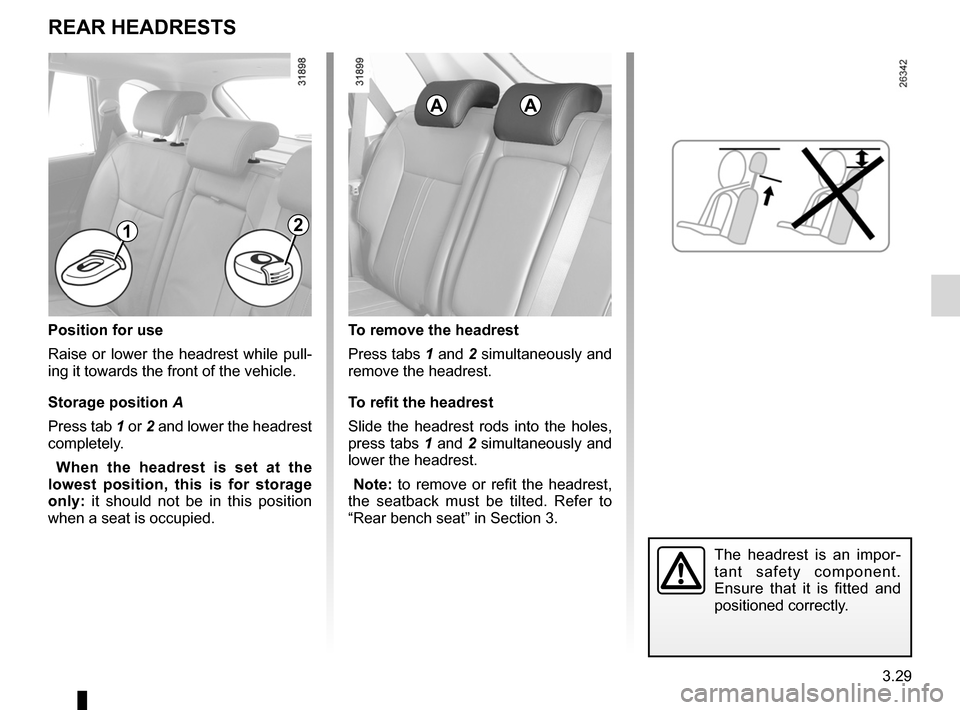
Position for use
Raise or lower the headrest while pull -
ing it towards the front of the vehicle.
Storage position A
Press tab 1 or 2 and lower the headrest
completely.
w hen the headrest is set at the
lowest position, this is for storage
only: it should not be in this position
when a seat is occupied.To remove the headrest
Press tabs 1 and 2 simultaneously and
remove the headrest.
To refit the headrest
Slide the headrest rods into the holes,
press tabs 1 and 2 simultaneously and
lower the headrest.
Note: to remove or refit the headrest,
the seatback must be tilted. Refer to
“Rear bench seat” in Section 3.
The headrest is an impor -
tant safety component.
Ensure that it is fitted and
positioned correctly.
AA
12
Page 154 of 233
luggage compartment cover ................. (up to the end of the DU)
rear parcel shelf .................................... (up to the end of the DU)
rear parcel shelf .................................... (up to the end of the DU)
3.34
ENG_UD27218_3
Cache-bagages (X45 - H45 - Renault)
ENG_NU_977-2_H45_Ph2_Renault_3
Luggage cover
luggAgE coMPARTMENT coVER (DEPENDINg oN ThE VEhIclE)
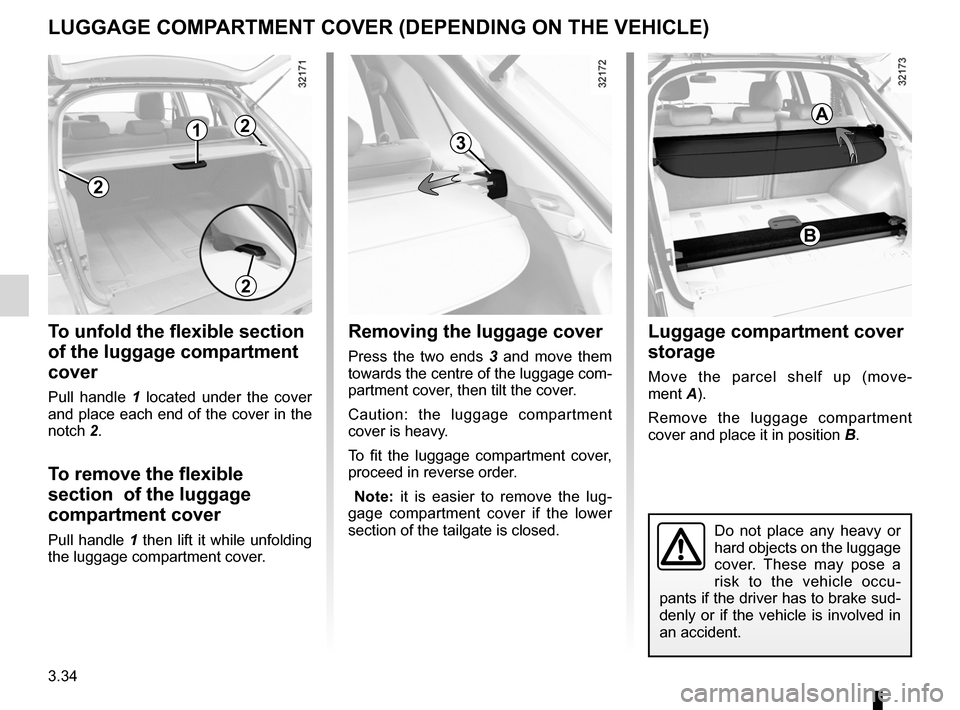
To unfold the flexible section
of the luggage compartment
cover
Pull handle 1 located under the cover
and place each end of the cover in the
notch 2.
To remove the flexible
section of the luggage
compartment cover
Pull handle 1 then lift it while unfolding
the luggage compartment cover.
Removing the luggage cover
Press the two ends 3 and move them
towards the centre of the luggage com-
partment cover, then tilt the cover.
Caution: the luggage compartment
cover is heavy.
To fit the luggage compartment cover,
proceed in reverse order.
Note: it is easier to remove the lug -
gage compartment cover if the lower
section of the tailgate is closed.
luggage compartment cover
storage
Move the parcel shelf up (move -
ment A).
Remove the luggage compartment
cover and place it in position B.
Do not place any heavy or
hard objects on the luggage
cover. These may pose a
risk to the vehicle occu-
pants if the driver has to brake sud-
denly or if the vehicle is involved in
an accident.
2
1
2
3
B
A2
Page 155 of 233
transporting objectsin the luggage compartment ........... (up to the end of the DU)
towing rings .......................................... (up to the end of the DU)
towing towing equipment ............................ (up to the end of the DU)
towing equipment fitting ............................................... (up to the end of the DU)
towing a caravan .................................. (up to the end of the DU)
tailgate .................................................. (up to the end of the DU)
3.35
ENG_UD23502_5
Transport d’objets dans le coffre, remorquage (attelage) (X45 - H45 - Renault)
ENG_NU_977-2_H45_Ph2_Renault_3
32323
Transporting objects in the boot/towing
TRANSPoRTINg oBjEcTS IN ThE luggAgE coMPARTMENT/TowINg (towing equipment)
B
c
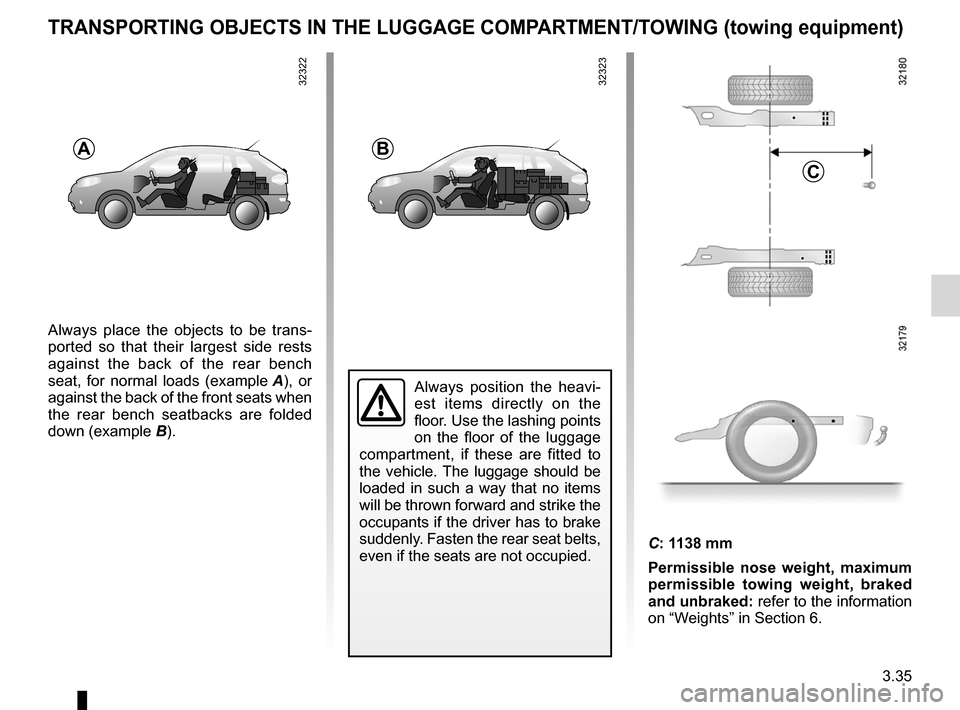
Always place the objects to be trans -
ported so that their largest side rests
against the back of the rear bench
seat, for normal loads (example A ), or
against the back of the front seats when
the rear bench seatbacks are folded
down (example B).
A
Always position the heavi -
est items directly on the
floor. Use the lashing points
on the floor of the luggage
compartment, if these are fitted to
the vehicle. The luggage should be
loaded in such a way that no items
will be thrown forward and strike the
occupants if the driver has to brake
suddenly. Fasten the rear seat belts,
even if the seats are not occupied.
C: 1138 mm
Permissible nose weight, maximum
permissible towing weight, braked
and unbraked: refer to the information
on “Weights” in Section 6.
32322
Page 156 of 233
towing rings .......................................... (up to the end of the DU)
luggage retaining net ............................ (up to the end of the DU)
transporting objects luggage net ..................................... (up to the end of the DU)
3.36
ENG_UD20993_3
Points d’arrimage / Filet de retenue de bagages (X45 - H45 - Renault)
ENG_NU_977-2_H45_Ph2_Renault_3
Anchorage points/luggage net
ANchoRAgE PoINTS/luggAgE NET
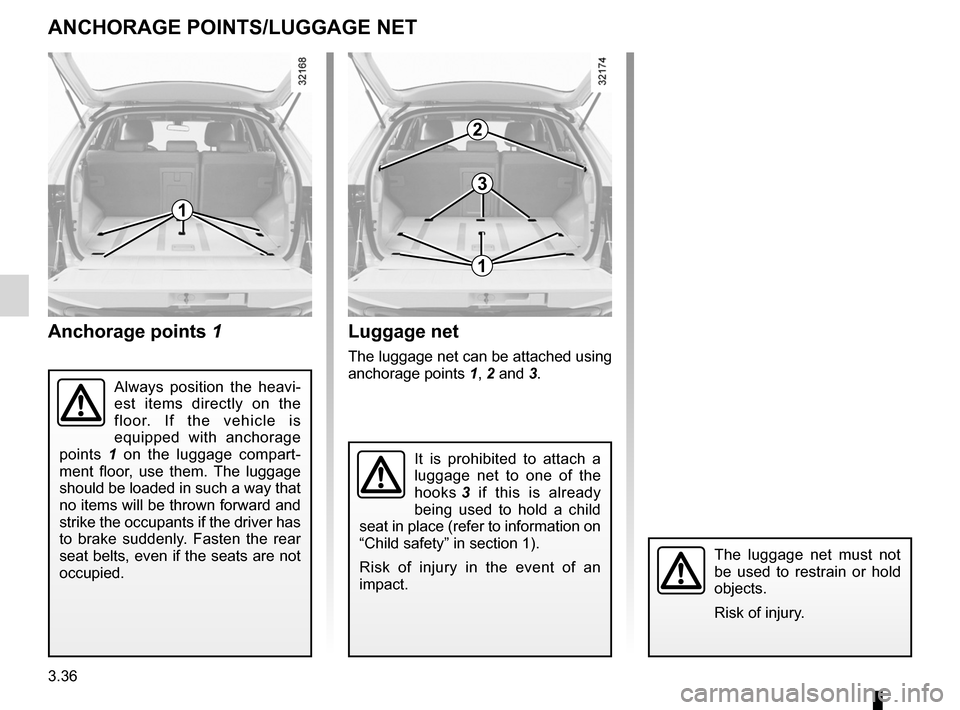
Anchorage points 1
It is prohibited to attach a
luggage net to one of the
hooks 3 if this is already
being used to hold a child
seat in place (refer to information on
“Child safety” in section 1).
Risk of injury in the event of an
impact.
luggage net
The luggage net can be attached using
anchorage points 1, 2 and 3.
2
Always position the heavi -
est items directly on the
floor. If the vehicle is
equipped with anchorage
points 1 on the luggage compart -
ment floor, use them. The luggage
should be loaded in such a way that
no items will be thrown forward and
strike the occupants if the driver has
to brake suddenly. Fasten the rear
seat belts, even if the seats are not
occupied.
3
1
1
The luggage net must not
be used to restrain or hold
objects.
Risk of injury.
Page 168 of 233
tyre pressure......................................... (up to the end of the DU)
tyre pressures ....................................... (up to the end of the DU)
tyres ...................................................... (up to the end of the DU)
4.10
ENG_UD8606_2
Pression pneus (X45 - H45 - Renault)
ENG_NU_977-2_H45_Ph2_Renault_4
Tyre pressures
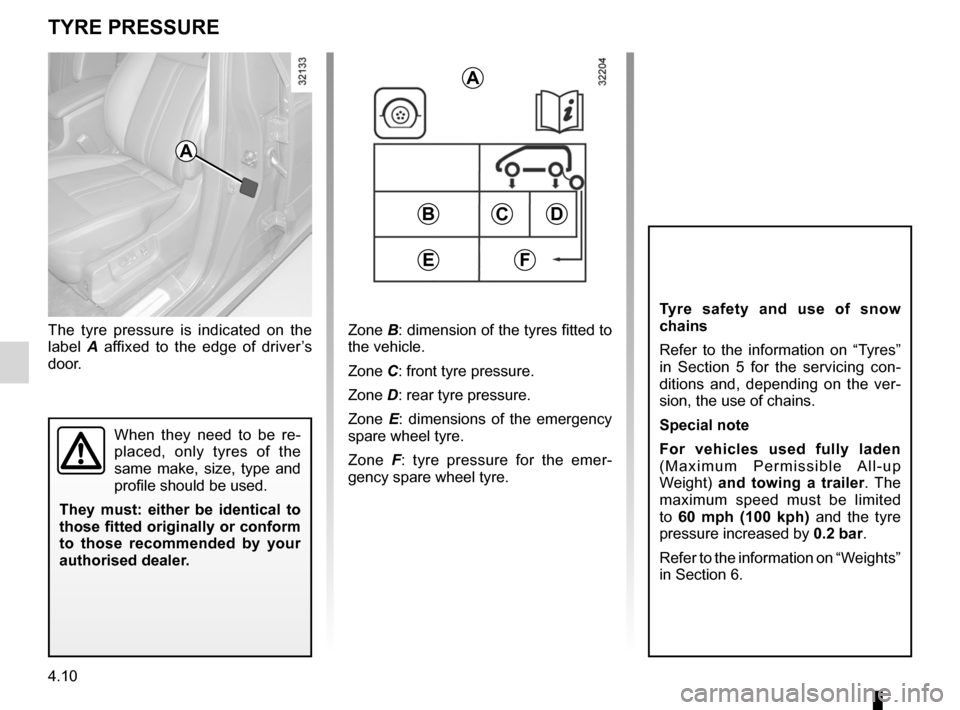
The tyre pressure is indicated on the
label A affixed to the edge of driver’s
door.Zone B: dimension of the tyres fitted to
the vehicle.
Zone C: front tyre pressure.
Zone D: rear tyre pressure.
Zone E : dimensions of the emergency
spare wheel tyre.
Zone F : tyre pressure for the emer -
gency spare wheel tyre.
A
A
BCD
eF
tyRe pReSSuRe
t yre safety and use of snow
chains
Refer to the information on “Tyres”
in Section 5 for the servicing con -
ditions and, depending on the ver -
sion, the use of chains.
Special note
For vehicles used fully laden
( M a x i m u m P e r m i s s i b l e A l l - u p
Weight) and towing a trailer . The
maximum speed must be limited
to 60 mph (100 kph) and the tyre
pressure increased by 0.2 bar.
Refer to the information on “Weights”
in Section 6.
When they need to be re -
placed, only tyres of the
same make, size, type and
profile should be used.
t hey must: either be identical to
those fitted originally or conform
to those recommended by your
authorised dealer.