climate control RENAULT KOLEOS 2018 User Guide
[x] Cancel search | Manufacturer: RENAULT, Model Year: 2018, Model line: KOLEOS, Model: RENAULT KOLEOS 2018Pages: 332, PDF Size: 8.91 MB
Page 209 of 332
3.13
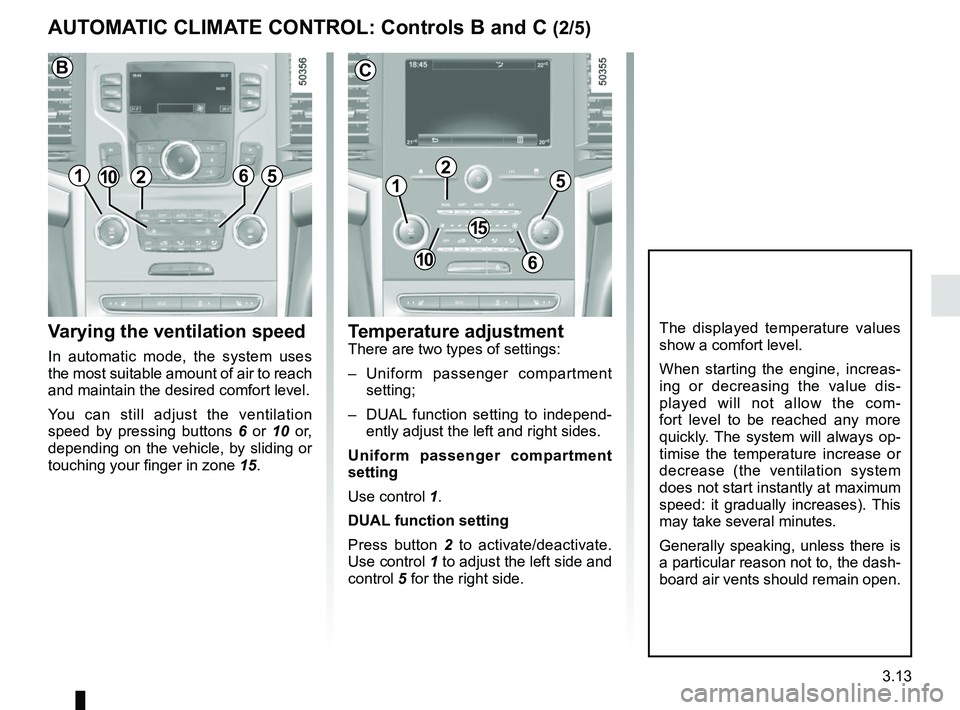
Varying the ventilation speed
In automatic mode, the system uses
the most suitable amount of air to reach
and maintain the desired comfort level.
You can still adjust the ventilation
speed by pressing buttons 6 or 10 or,
depending on the vehicle, by sliding or
touching your finger in zone 15.
Temperature adjustmentThere are two types of settings:
– Uniform passenger compartment
setting;
– DUAL function setting to independ- ently adjust the left and right sides.
Uniform passenger compartment
setting
Use control 1.
DUAL function setting
Press button 2 to activate/deactivate.
Use control 1 to adjust the left side and
control 5 for the right side.
The displayed temperature values
show a comfort level.
When starting the engine, increas-
ing or decreasing the value dis-
played will not allow the com-
fort level to be reached any more
quickly. The system will always op-
timise the temperature increase or
decrease (the ventilation system
does not start instantly at maximum
speed: it gradually increases). This
may take several minutes.
Generally speaking, unless there is
a particular reason not to, the dash-
board air vents should remain open.
AUTOMATIC CLIMATE CONTROL: Controls B and C (2/5)
1
2
C
15
610
5121065
B
Page 210 of 332
3.14
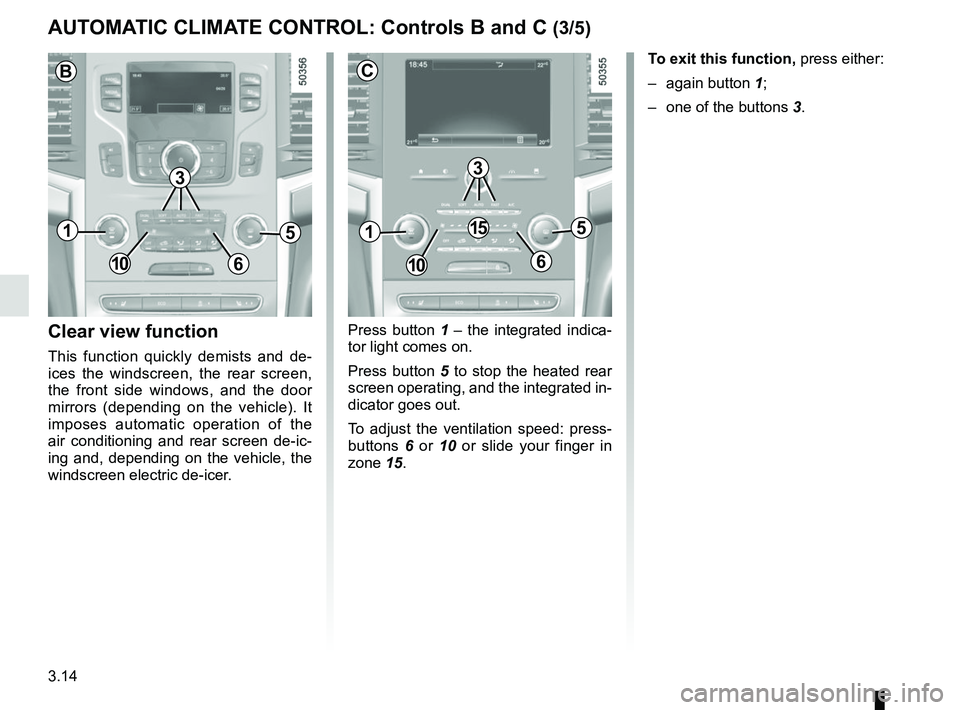
Press button 1 – the integrated indica-
tor light comes on.
Press button 5 to stop the heated rear
screen operating, and the integrated in-
dicator goes out.
To adjust the ventilation speed: press-
buttons 6 or 10 or slide your finger in
zone 15.Clear view function
This function quickly demists and de-
ices the windscreen, the rear screen,
the front side windows, and the door
mirrors (depending on the vehicle). It
imposes automatic operation of the
air conditioning and rear screen de-ic-
ing and, depending on the vehicle, the
windscreen electric de-icer. To exit this function,
press either:
– again button 1;
– one of the buttons 3.
AUTOMATIC CLIMATE CONTROL: Controls B and C (3/5)
51
106
15
3
C
51
106
B
3
Page 211 of 332
3.15
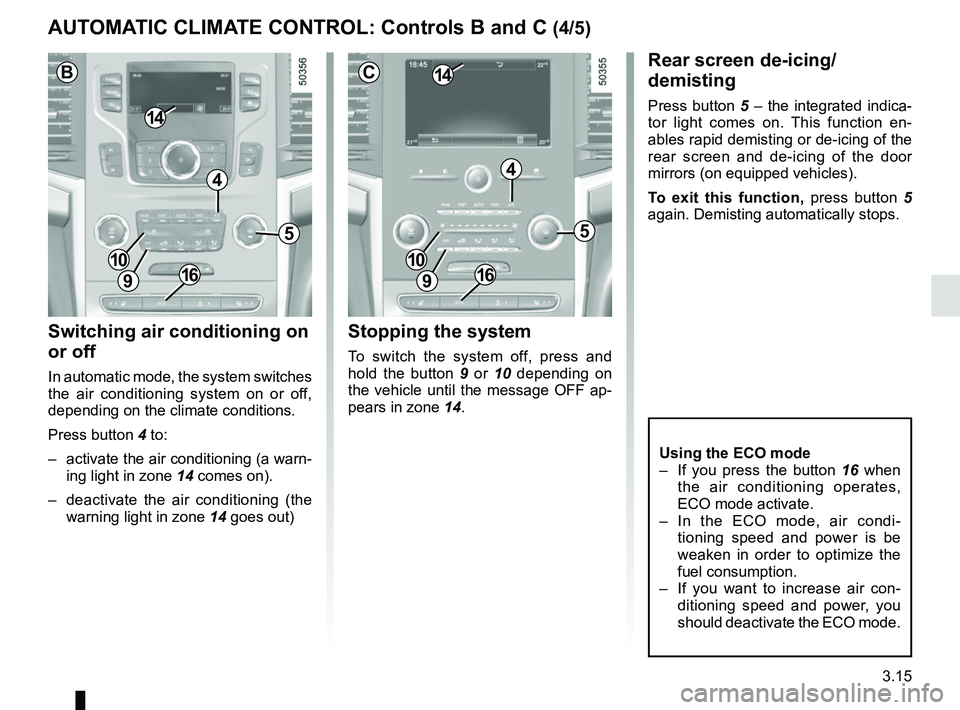
Switching air conditioning on
or off
In automatic mode, the system switches
the air conditioning system on or off,
depending on the climate conditions.
Press button 4 to:
– activate the air conditioning (a warn-ing light in zone 14 comes on).
– deactivate the air conditioning (the warning light in zone 14 goes out)
Rear screen de-icing/
demisting
Press button 5 – the integrated indica-
tor light comes on. This function en-
ables rapid demisting or de-icing of the
rear screen and de-icing of the door
mirrors (on equipped vehicles).
To exit this function, press button 5
again. Demisting automatically stops.
Stopping the system
To switch the system off, press and
hold the button 9 or 10 depending on
the vehicle until the message OFF ap-
pears in zone 14.
AUTOMATIC CLIMATE CONTROL: Controls B and C (4/5)
5
4
9
1410
C
5
4
9
14
B
10
9
10
Using the ECO mode
– If you press the button 16 when
the air conditioning operates,
ECO mode activate.
– In the ECO mode, air condi- tioning speed and power is be
weaken in order to optimize the
fuel consumption.
– If you want to increase air con- ditioning speed and power, you
should deactivate the ECO mode.
1616
Page 212 of 332
3.16
When Ø and ½ are choosed
at the same time, there can be some
drops of dew on the windscreen in
summer and they are recommended to
choose in winter.
½ is designed to
flow a little air for pleasantness.
If you want to demist the windscreen
fast, using Clear view function is rec-
ommended by pressing button 1.
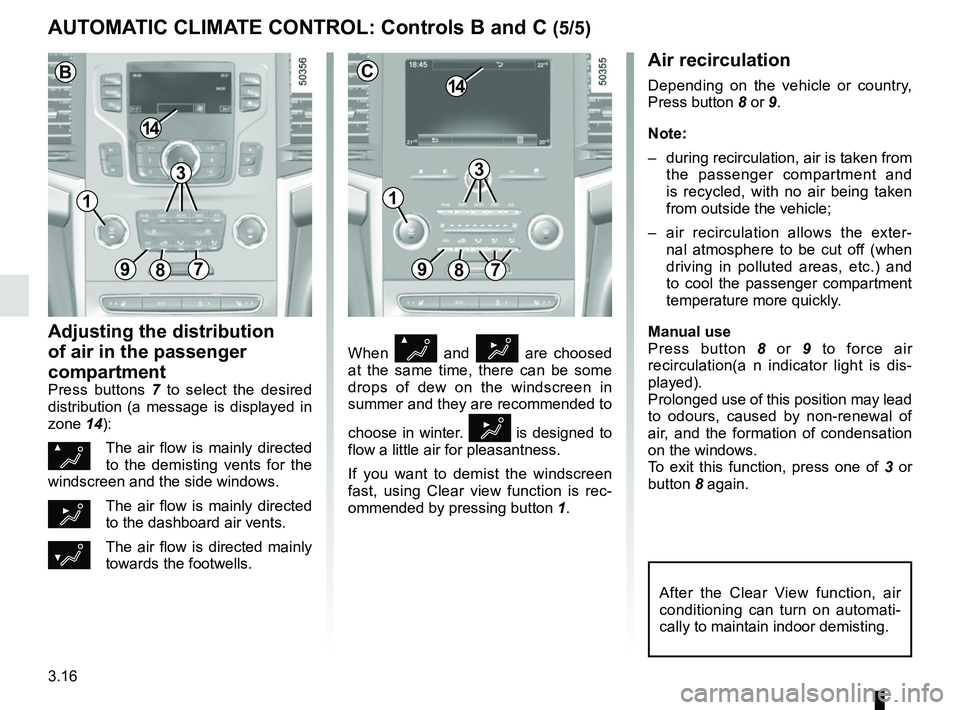
Air recirculation
Depending on the vehicle or country,
Press button 8 or 9.
Note:
– during recirculation, air is taken from
the passenger compartment and
is recycled, with no air being taken
from outside the vehicle;
– air recirculation allows the exter- nal atmosphere to be cut off (when
driving in polluted areas, etc.) and
to cool the passenger compartment
temperature more quickly.
Manual use
Press button 8 or 9 to force air
recirculation(a n indicator light is dis-
played).
Prolonged use of this position may lead
to odours, caused by non-renewal of
air, and the formation of condensation
on the windows.
To exit this function, press one of 3 or
button 8 again.
Adjusting the distribution
of air in the passenger
compartment
Press buttons 7 to select the desired
distribution (a message is displayed in
zone 14):
ØThe air flow is mainly directed
to the demisting vents for the
windscreen and the side windows.
½The air flow is mainly directed
to the dashboard air vents.
¿The air flow is directed mainly
towards the footwells.
AUTOMATIC CLIMATE CONTROL: Controls B and C (5/5)
89
14
7
C
After the Clear View function, air
conditioning can turn on automati-
cally to maintain indoor demisting.
3
897
14
B
3
11