rear view mirror RENAULT KOLEOS 2018 User Guide
[x] Cancel search | Manufacturer: RENAULT, Model Year: 2018, Model line: KOLEOS, Model: RENAULT KOLEOS 2018Pages: 332, PDF Size: 8.91 MB
Page 187 of 332
2.83
This function is an additional
aid. It cannot, therefore,
under any circumstances
replace the vigilance or the
responsibility of the driver.
The driver should always look out
for sudden hazards during driving:
always ensure that there are no
moving obstacles (such as a child,
animal, pram, bicycle, etc.) or small,
narrow objects such as stones or
posts in your path when manoeu-
vring.
The screen shows a reverse mirror
image.
The frames are a representation
projected onto flat ground; this in-
formation must not be taken into
account when superimposed on a
vertical object or an object on the
ground.
Objects which appear on the edge
of the screen may be deformed.
In very bright light (snow, vehicle in
sunshine etc.), the camera vision
may be adversely affected.
If the boot is open or poorly closed,
the message “Boot open” appears
and the camera display disappears.
You can also adjust the camera image
settings (brightness, contrast, etc.)
Activating, deactivating the
reversing camera
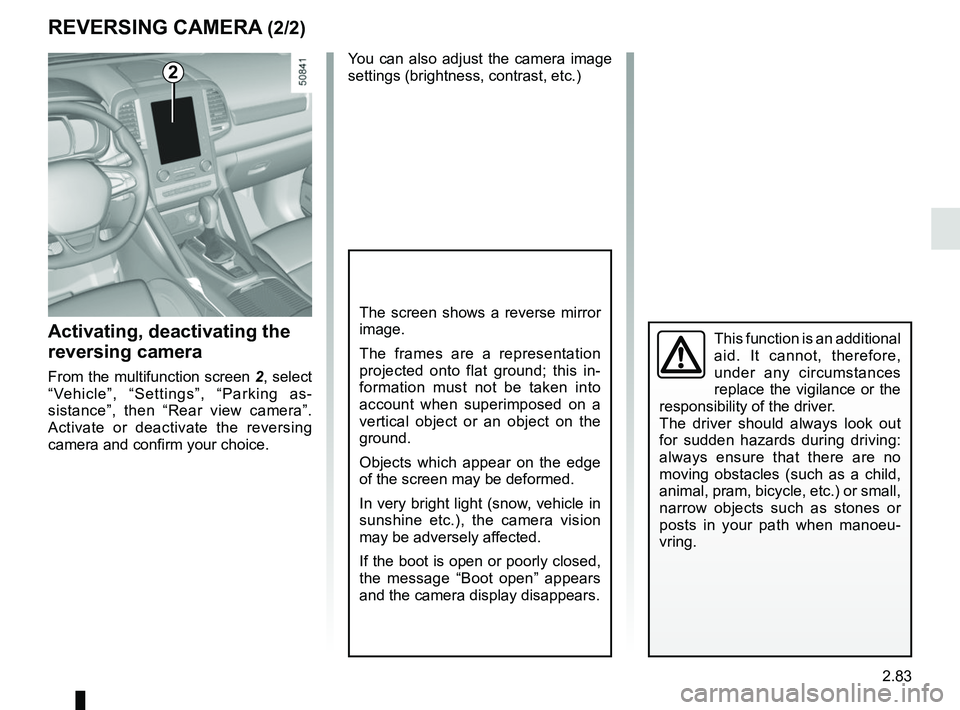
From the multifunction screen 2, select
“Vehicle”, “Settings”, “Parking as-
sistance”, then “Rear view camera”.
Activate or deactivate the reversing
camera and confirm your choice.
REVERSING CAMERA (2/2)
2
Page 200 of 332
3.4
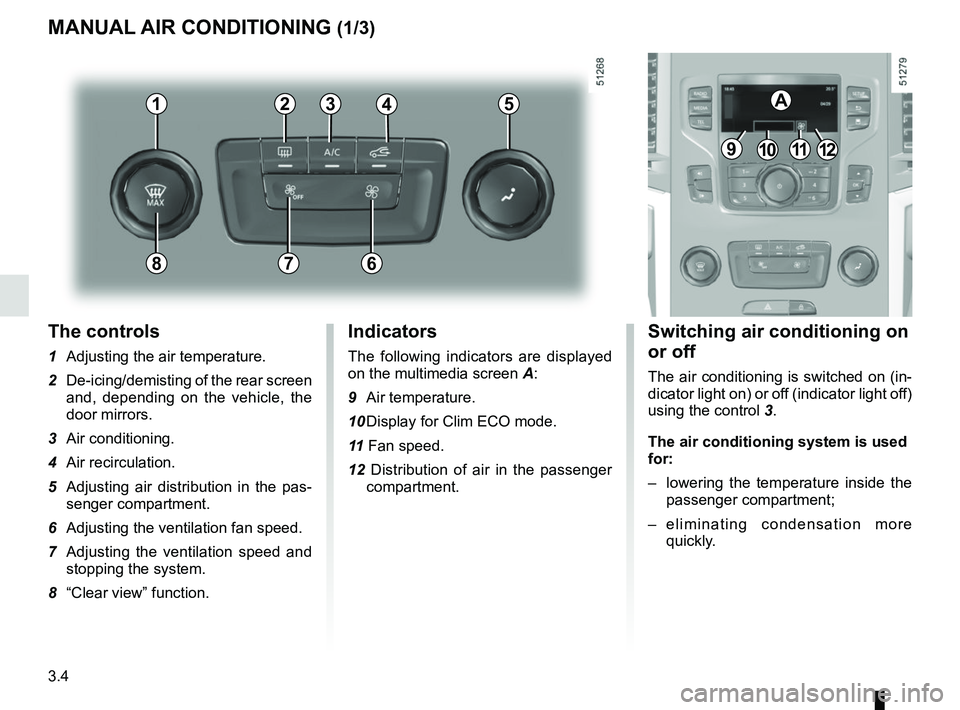
The controls
1 Adjusting the air temperature.
2 De-icing/demisting of the rear screen and, depending on the vehicle, the
door mirrors.
3 Air conditioning.
4 Air recirculation.
5 Adjusting air distribution in the pas- senger compartment.
6 Adjusting the ventilation fan speed.
7 Adjusting the ventilation speed and stopping the system.
8 “Clear view” function.
MANUAL AIR CONDITIONING (1/3)
Switching air conditioning on
or off
The air conditioning is switched on (in-
dicator light on) or off (indicator light off)
using the control 3.
The air conditioning system is used
for:
– lowering the temperature inside the
passenger compartment;
– eliminating condensation more quickly.
Indicators
The following indicators are displayed
on the multimedia screen A:
9 Air temperature.
10 Display for Clim ECO mode.
11 Fan speed.
12 Distribution of air in the passenger compartment.
21
7
34
9101112
A5
68
Page 202 of 332
3.6
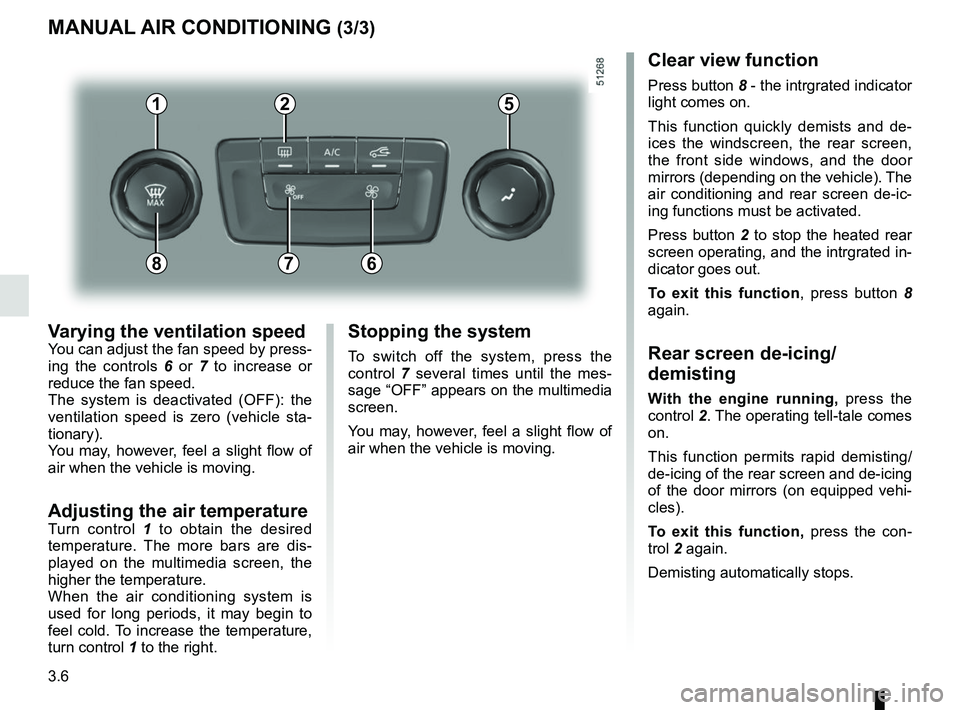
Varying the ventilation speedYou can adjust the fan speed by press-
ing the controls 6 or 7 to increase or
reduce the fan speed.
The system is deactivated (OFF): the
ventilation speed is zero (vehicle sta-
tionary).
You may, however, feel a slight flow of
air when the vehicle is moving.
Adjusting the air temperatureTurn control 1 to obtain the desired
temperature. The more bars are dis-
played on the multimedia screen, the
higher the temperature.
When the air conditioning system is
used for long periods, it may begin to
feel cold. To increase the temperature,
turn control 1 to the right.
MANUAL AIR CONDITIONING (3/3)
Stopping the system
To switch off the system, press the
control 7 several times until the mes-
sage “OFF” appears on the multimedia
screen.
You may, however, feel a slight flow of
air when the vehicle is moving.
Clear view function
Press button 8 - the intrgrated indicator
light comes on.
This function quickly demists and de-
ices the windscreen, the rear screen,
the front side windows, and the door
mirrors (depending on the vehicle). The
air conditioning and rear screen de-ic-
ing functions must be activated.
Press button 2 to stop the heated rear
screen operating, and the intrgrated in-
dicator goes out.
To exit this function , press button 8
again.
Rear screen de-icing/
demisting
With the engine running, press the
control 2. The operating tell-tale comes
on.
This function permits rapid demisting/
de-icing of the rear screen and de-icing
of the door mirrors (on equipped vehi-
cles).
To exit this function, press the con-
trol 2 again.
Demisting automatically stops.
21
7
5
68
Page 203 of 332
3.7
AUTOMATIC CLIMATE CONTROL: Controls A (1/5)
10
15
7654
9
16
17
11
18
11
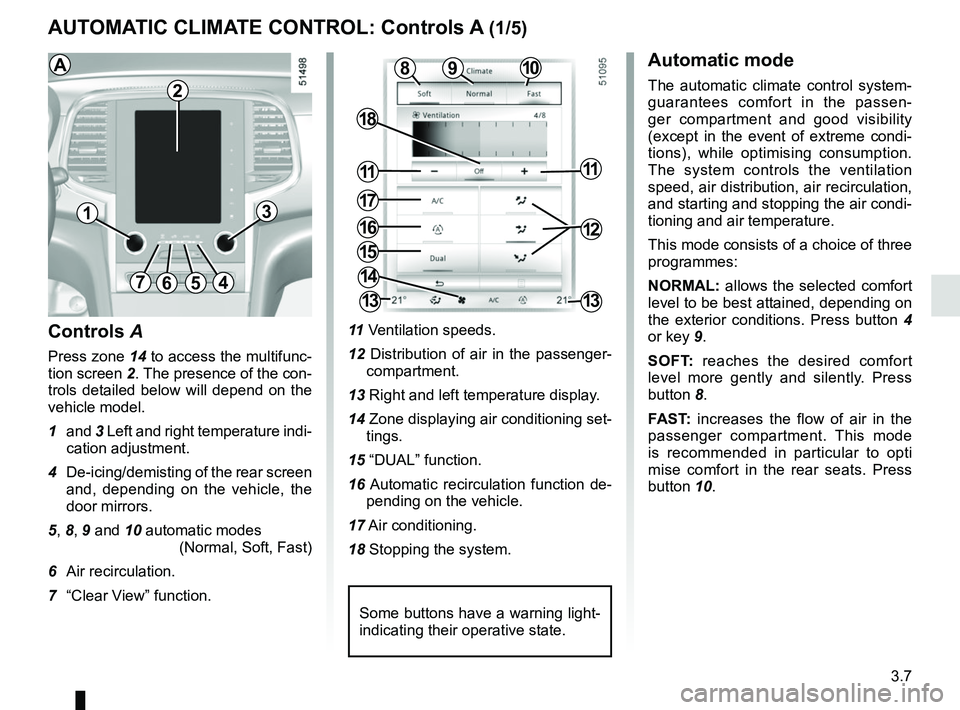
Controls A
Press zone 14 to access the multifunc-
tion screen 2. The presence of the con-
trols detailed below will depend on the
vehicle model.
1 and 3 Left and right temperature indi-
cation adjustment.
4 De-icing/demisting of the rear screen and, depending on the vehicle, the
door mirrors.
5, 8, 9 and 10 automatic modes (Normal, Soft, Fast)
6 Air recirculation.
7 “Clear View” function. 11
Ventilation speeds.
12 Distribution of air in the passenger- compartment.
13 Right and left temperature display.
14 Zone displaying air conditioning set- tings.
15 “DUAL” function.
16 Automatic recirculation function de- pending on the vehicle.
17 Air conditioning.
18 Stopping the system.
8
14
13
13
13
2
Some buttons have a warning light-
indicating their operative state.
AAutomatic mode
The automatic climate control system-
guarantees comfort in the passen-
ger compartment and good visibility
(except in the event of extreme condi-
tions), while optimising consumption.
The system controls the ventilation
speed, air distribution, air recirculation,
and starting and stopping the air condi-
tioning and air temperature.
This mode consists of a choice of three
programmes:
NORMAL: allows the selected comfort
level to be best attained, depending on
the exterior conditions. Press button 4
or key 9.
SOFT: reaches the desired comfort
level more gently and silently. Press
button 8.
FAST: increases the flow of air in the
passenger compartment. This mode
is recommended in particular to opti
mise comfort in the rear seats. Press
button 10.
12
Page 205 of 332
3.9
AUTOMATIC CLIMATE CONTROL: Controls A (3/5)
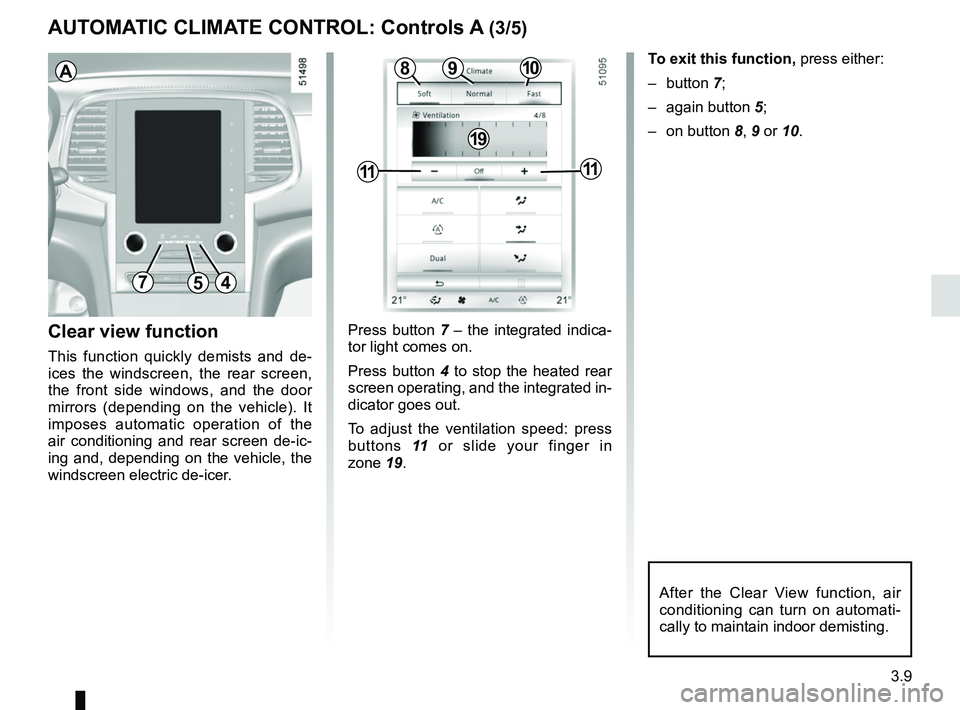
Clear view function
This function quickly demists and de-
ices the windscreen, the rear screen,
the front side windows, and the door
mirrors (depending on the vehicle). It
imposes automatic operation of the
air conditioning and rear screen de-ic-
ing and, depending on the vehicle, the
windscreen electric de-icer.
754
109
1111
8
19
To exit this function, press either:
– button 7;
– again button 5;
– on button 8, 9 or 10.
Press button 7 – the integrated indica-
tor light comes on.
Press button 4 to stop the heated rear
screen operating, and the integrated in-
dicator goes out.
To adjust the ventilation speed: press
buttons 11 or slide your finger in
zone 19.A
After the Clear View function, air
conditioning can turn on automati-
cally to maintain indoor demisting.
Page 208 of 332
3.12
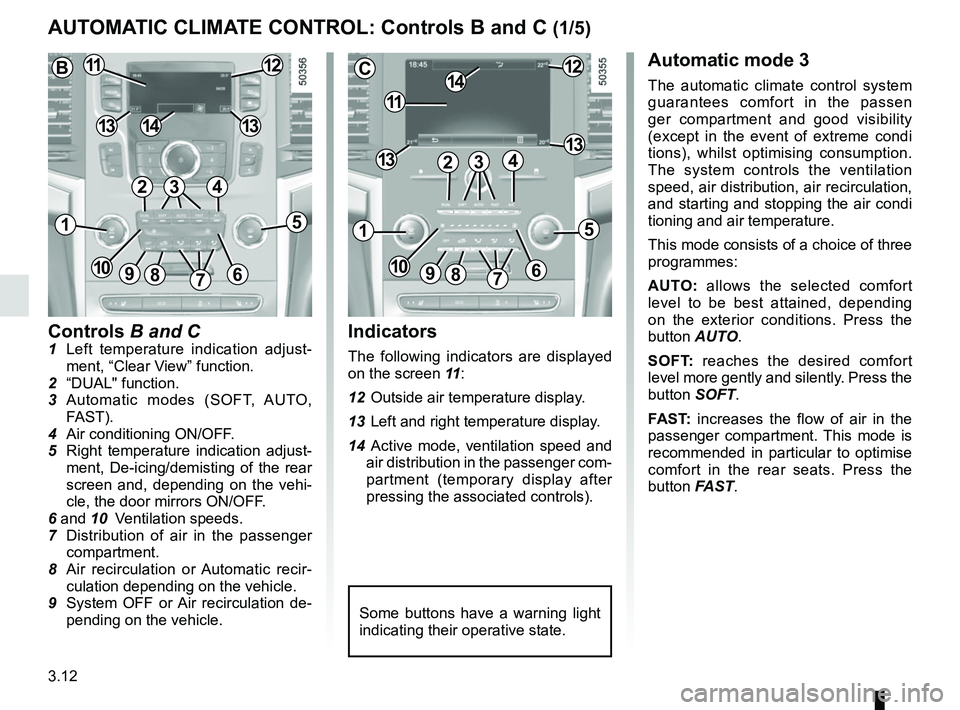
Controls B and C1 Left temperature indication adjust-ment, “Clear View” function.
2 “DUAL" function.
3 Automatic modes (SOFT, AUTO, FAST).
4 Air conditioning ON/OFF.
5 Right temperature indication adjust- ment, De-icing/demisting of the rear
screen and, depending on the vehi-
cle, the door mirrors ON/OFF.
6 and 10 Ventilation speeds.
7 Distribution of air in the passenger
compartment.
8 Air recirculation or Automatic recir- culation depending on the vehicle.
9 System OFF or Air recirculation de- pending on the vehicle.
AUTOMATIC CLIMATE CONTROL: Controls B and C (1/5)
Indicators
The following indicators are displayed
on the screen 11 :
12 Outside air temperature display.
13 Left and right temperature display.
14 Active mode, ventilation speed and air distribution in the passenger com-
partment (temporary display after
pressing the associated controls).
Automatic mode 3
The automatic climate control system
guarantees comfort in the passen
ger compartment and good visibility
(except in the event of extreme condi
tions), whilst optimising consumption.
The system controls the ventilation
speed, air distribution, air recirculation,
and starting and stopping the air condi
tioning and air temperature.
This mode consists of a choice of three
programmes:
AUTO: allows the selected comfort
level to be best attained, depending
on the exterior conditions. Press the
button AUTO.
SOFT: reaches the desired comfort
level more gently and silently. Press the
button SOFT.
FAST: increases the flow of air in the
passenger compartment. This mode is
recommended in particular to optimise
comfort in the rear seats. Press the
button FAST.
Some buttons have a warning light
indicating their operative state.
C
11
1412
131342
1
91086
5
7
3
13
B1112
1413
42
15
7
3
69810
Page 210 of 332
3.14
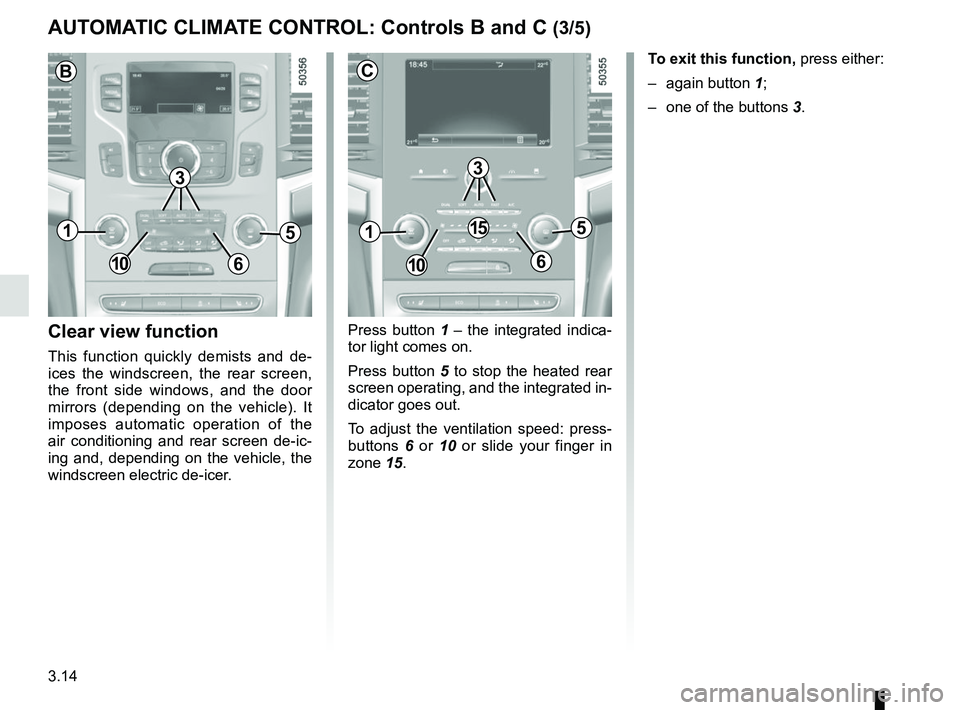
Press button 1 – the integrated indica-
tor light comes on.
Press button 5 to stop the heated rear
screen operating, and the integrated in-
dicator goes out.
To adjust the ventilation speed: press-
buttons 6 or 10 or slide your finger in
zone 15.Clear view function
This function quickly demists and de-
ices the windscreen, the rear screen,
the front side windows, and the door
mirrors (depending on the vehicle). It
imposes automatic operation of the
air conditioning and rear screen de-ic-
ing and, depending on the vehicle, the
windscreen electric de-icer. To exit this function,
press either:
– again button 1;
– one of the buttons 3.
AUTOMATIC CLIMATE CONTROL: Controls B and C (3/5)
51
106
15
3
C
51
106
B
3
Page 289 of 332

Allocation of fuses
(the presence of certain fuses depends on the vehicle equipment level)\
Symbol Allocation Symbol AllocationSymbol Allocation
BLOWER Ventilation VDCVehicle dynami")
5.25
FUSES (3/3)
Allocation of fuses
(the presence of certain fuses depends on the vehicle equipment level)\
Symbol Allocation Symbol AllocationSymbol Allocation
BLOWER Ventilation VDCVehicle dynamic
control H/MIRR Heated door mirrors
TURN
HAZARD Hazard lamp
STOP LAMP Stop lamp HEATER
SEAT Heater seat
2ND
POWER
SOCKET 2nd power socket
POWER
DR LOCK2 Power door lock EC AUTO
ACC Air conditioner control
unit
REAR
WIPER Rear wiper CIGAR
LIGHTER Cigar lighter REAR
VIEW Rear view mirror
POWER
DR LOCK Power door lock HEAT
STEER
WHEEL Heat steering wheel
WASH
MTR Washer motor
ELEC B, B2 Electrical equipment RR DEFElectrically defrosted
rear window GEAR BOX
OIL PUMP Gear box oil pump
IMOB Immobilizer BOSE Bose amp BCM Body control module
AUDIO Audio ACC RADIOAccessory socket,
radio POWER
WINDOW Power window
ABS/EPS Anti lock brake system JUNCTION
MODULE Junction module SEAT BELT
WARNING Seat belt warning
module
MEDIA Multimedia equipment AIR CON Air condition control
unitSTRG
WHEEL ANGLE Steering wheel angle
sensor
Page 328 of 332
7.4
ALPHABETICAL INDEX (4/5)
mechanical ..............................4.4, 4.13 – 4.14, 6.8 → 6.13
map reading lights .................................................3.23 → 3.25
menu for customising the vehicle settings .............. 1.72 – 1.73
methods of restraint in addition to the seat belts ...1.27 → 1.33
multimedia equipment ............................................ 3.49 – 3.50
N
navigation system ................................................... 3.49 – 3.50
O
oil change ..................................................................4.5 → 4.7
opening the doors .................................................. 1.11 → 1.15
operating faults ................................ 1.54 → 1.59, 5.35 → 5.41
overspeed warning ................................................2.59 → 2.61
P
paintwork maintenance ..................................................... 4.15 – 4.16
parking assistance: assisted parking .....................2.84 → 2.89
parking brake ..................................................................... 2.17
parking distance control.........................................2.77 → 2.81
power-assisted steering..................................................... 1.74
powered tailgate ....................................................3.37 → 3.41
pretensioners .........................................................1.27 → 1.30
puncture.....................................................5.2 – 5.3, 5.7 → 5.9
R
radio........................................................................\
3.49 – 3.50
radio frequency remote control/key use ....................................................................\
...1.2 → 1.4
rear bench seat......................................................3.33 → 3.35
rear parcel shelf ................................................................. 3.42
rear screen de-icing/demisting ............................................ 3.9
rear seats........................................................................\
... 1.25 functions ..........................................................3.33 → 3.35
rear view mirrors ..................................................... 1.77 – 1.78 remote control door locking
batteries ..............................................................\
......... 5.22
remote control door locking unit ................................1.2 → 1.4
RENAULT ANTI-INTRUDER DEVICE (RAID) ................... 1.16
RENAULT card battery ................................................................\
.......... 5.21
use ................................................... 1.5 → 1.10, 2.5 → 2.9
RENAULT card battery ...................................................... 5.21
replacement parts ................................................................ 6.7
reverse gear selecting ..................................................2.16, 2.90 → 2.92
reversing sensor ....................................................2.77 → 2.81
roof bars ........................................................................\
.... 3.48
roof rack roof bars ....................................................................... 3.48
running in .................................................................... 2.2 – 2.3
S
seat belt pretensioners front seat belt ...................................................1.27 → 1.30
seat belts ......................................................1.23 → 1.30, 1.33
service sheets..........................................................6.8 → 6.13
side protection devices ...................................................... 1.32
sign detection: overspeed warning ........................2.59 → 2.61
signals and lights ...................................................1.79 → 1.86
special features of diesel versions..................................... 2.15
special features of petrol vehicles ..................................... 2.14
speed limiter .................................................1.57, 2.62 → 2.64
spoiler ................................................................\
................ 3.48
starting the engine ...................................................2.3 → 2.13
steering wheel adjustment ........................................................ 1.74 – 1.75
Stop & Start
..................................................1.57, 2.10 → 2.13
Stop & Start function..............................................2.10 → 2.13
stopping the engine ...................................................2.4 → 2.9
storage compartment.............................................3.26 → 3.30