tow RENAULT KOLEOS 2018 Owner's Manual
[x] Cancel search | Manufacturer: RENAULT, Model Year: 2018, Model line: KOLEOS, Model: RENAULT KOLEOS 2018Pages: 332, PDF Size: 8.91 MB
Page 196 of 332
2.92
AUTOMATIC TRANSMISSION (3/3)
Parking the vehicle
When the vehicle is stopped, move the
lever to position P while keeping your
foot on the brake pedal: the gearbox is
in neutral and the drive wheels are me-
chanically locked by the driveshaft.
Apply the parking brake or, depen-
ding on the vehicle, ensure that the
electronic parking brake is applied.
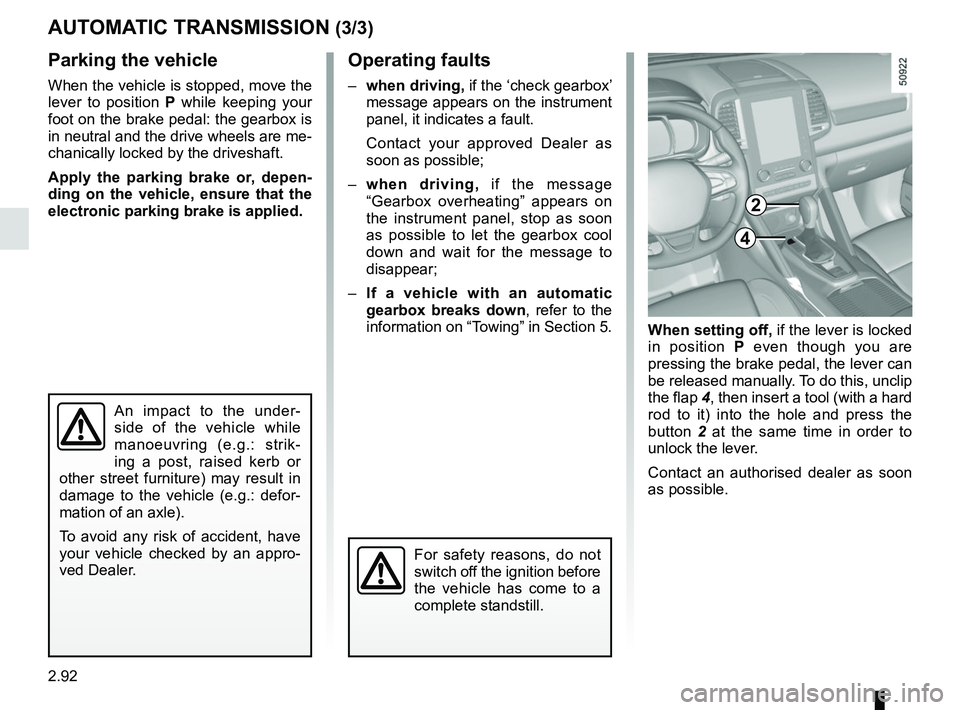
When setting off, if the lever is locked
in position P even though you are
pressing the brake pedal, the lever can
be released manually. To do this, unclip
the flap 4, then insert a tool (with a hard
rod to it) into the hole and press the
button 2 at the same time in order to
unlock the lever.
Contact an authorised dealer as soon
as possible.
Operating faults
– when driving, if the ‘check gearbox’
message appears on the instrument
panel, it indicates a fault.
Contact your approved Dealer as
soon as possible;
– when driving, if the message
“Gearbox overheating” appears on
the instrument panel, stop as soon
as possible to let the gearbox cool
down and wait for the message to
disappear;
– If a vehicle with an automatic
gearbox breaks down, refer to the
information on “Towing” in Section 5.
4
For safety reasons, do not
switch off the ignition before
the vehicle has come to a
complete standstill.
An impact to the under-
side of the vehicle while
manoeuvring (e.g.: strik-
ing a post, raised kerb or
other street furniture) may result in
damage to the vehicle (e.g.: defor-
mation of an axle).
To avoid any risk of accident, have
your vehicle checked by an appro-
ved Dealer.
2
Page 201 of 332
3.5
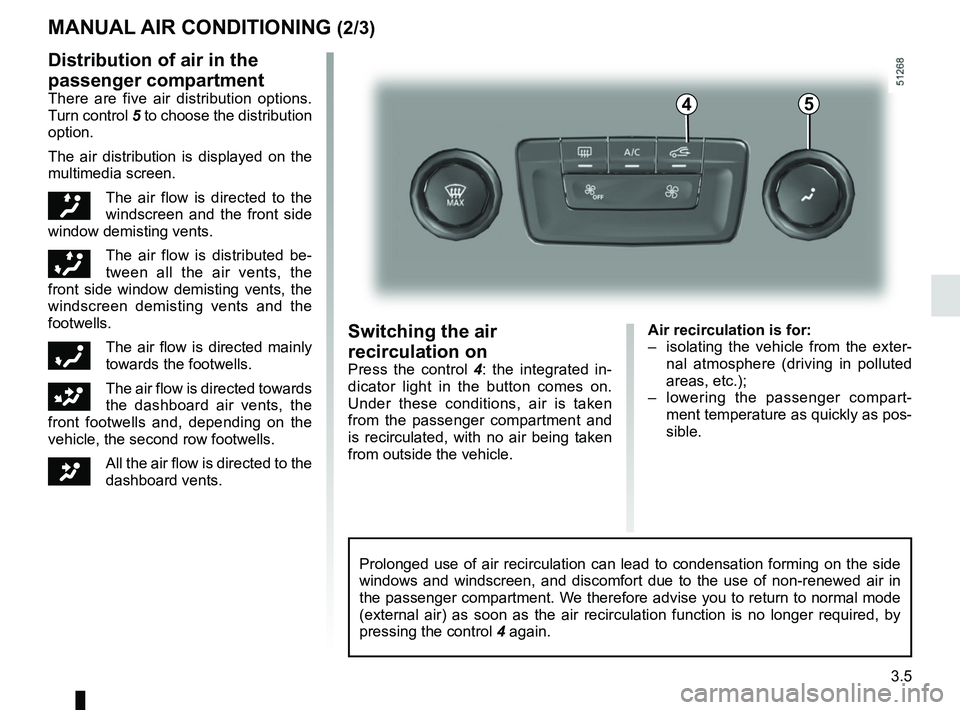
Air recirculation is for:
– isolating the vehicle from the exter-nal atmosphere (driving in polluted
areas, etc.);
– lowering the passenger compart- ment temperature as quickly as pos-
sible.Switching the air
recirculation on
Press the control 4 : the integrated in-
dicator light in the button comes on.
Under these conditions, air is taken
from the passenger compartment and
is recirculated, with no air being taken
from outside the vehicle.
MANUAL AIR CONDITIONING (2/3)
Prolonged use of air recirculation can lead to condensation forming on t\
he side
windows and windscreen, and discomfort due to the use of non-renewed air\
in
the passenger compartment. We therefore advise you to return to normal mode
(external air) as soon as the air recirculation function is no longer \
required, by
pressing the control 4 again.
Distribution of air in the
passenger compartment
There are five air distribution options.
Turn control 5 to choose the distribution
option.
The air distribution is displayed on the
multimedia screen.
õThe air flow is directed to the
windscreen and the front side
window demisting vents.
÷The air flow is distributed be-
tween all the air vents, the
front side window demisting vents, the
windscreen demisting vents and the
footwells.
óThe air flow is directed mainly
towards the footwells.
GThe air flow is directed towards
the dashboard air vents, the
front footwells and, depending on the
vehicle, the second row footwells.
JAll the air flow is directed to the
dashboard vents.
45
Page 207 of 332
3.11
AUTOMATIC CLIMATE CONTROL: Controls A (5/5)
Air recirculation
Note:
– during recirculation, air is taken from the passenger compartment and
is recycled, with no air being taken
from outside the vehicle;
– air recirculation allows the exter- nal atmosphere to be cut off (when
driving in polluted areas, etc.) and
to cool the passenger compartment
temperature more quickly.
Automatic use
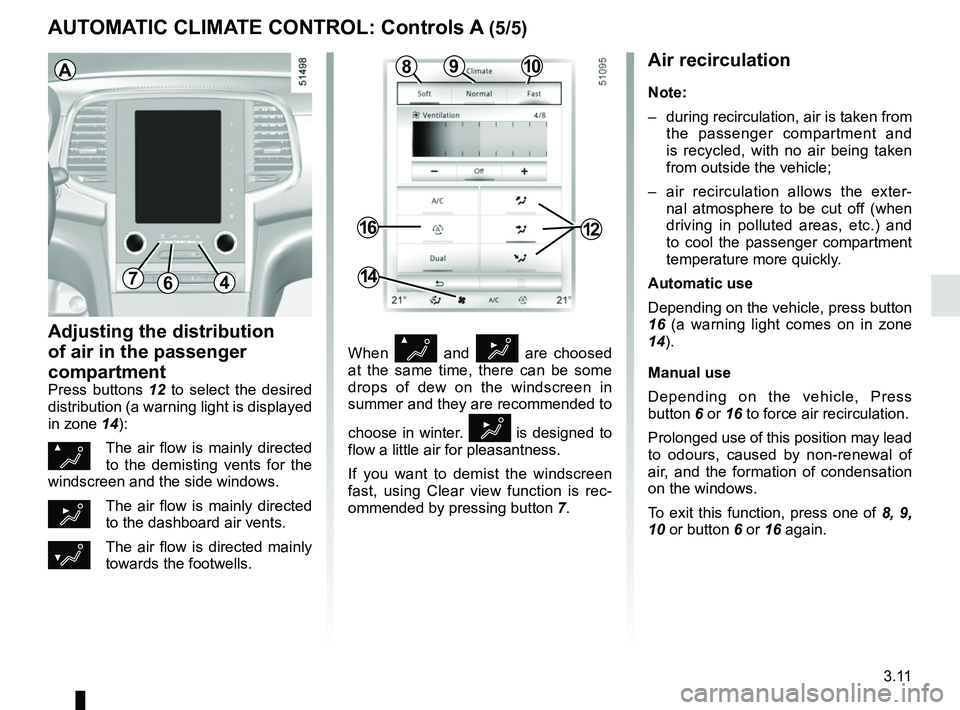
Depending on the vehicle, press button
16 (a warning light comes on in zone
14).
Manual use
Depending on the vehicle, Press
button 6 or 16 to force air recirculation.
Prolonged use of this position may lead
to odours, caused by non-renewal of
air, and the formation of condensation
on the windows.
To exit this function, press one of 8, 9,
10 or button 6 or 16 again.
Adjusting the distribution
of air in the passenger
compartment
Press buttons 12 to select the desired
distribution (a warning light is displayed
in zone 14):
ØThe air flow is mainly directed
to the demisting vents for the
windscreen and the side windows.
½The air flow is mainly directed
to the dashboard air vents.
¿The air flow is directed mainly
towards the footwells.
64
16
14
When Ø and ½ are choosed
at the same time, there can be some
drops of dew on the windscreen in
summer and they are recommended to
choose in winter.
½ is designed to
flow a little air for pleasantness.
If you want to demist the windscreen
fast, using Clear view function is rec-
ommended by pressing button 7.
A
12
1098
7
Page 212 of 332
3.16
When Ø and ½ are choosed
at the same time, there can be some
drops of dew on the windscreen in
summer and they are recommended to
choose in winter.
½ is designed to
flow a little air for pleasantness.
If you want to demist the windscreen
fast, using Clear view function is rec-
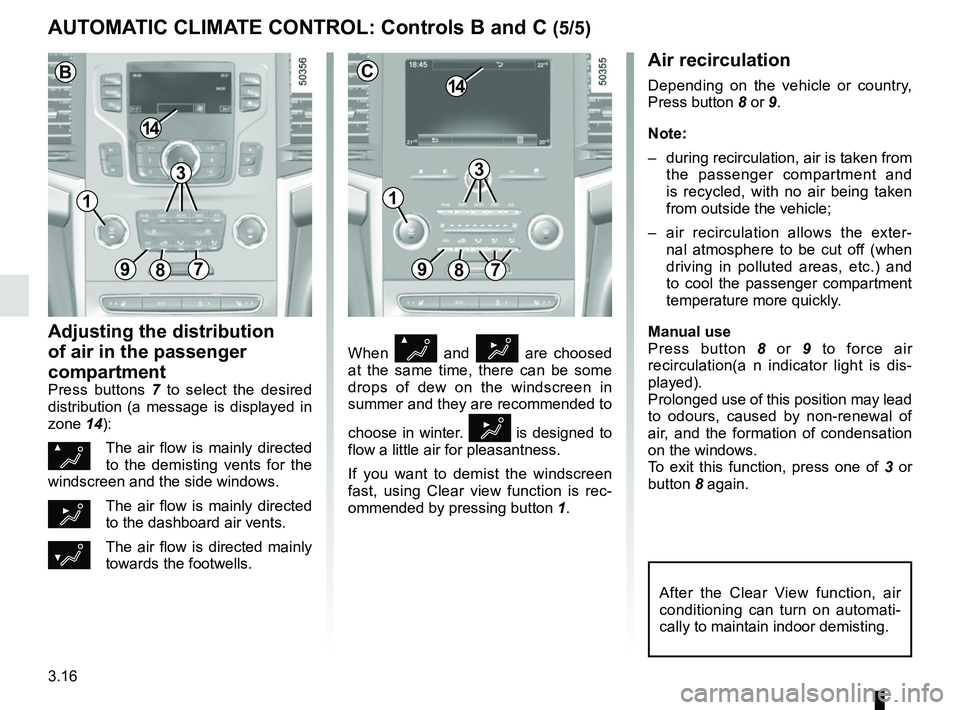
ommended by pressing button 1.
Air recirculation
Depending on the vehicle or country,
Press button 8 or 9.
Note:
– during recirculation, air is taken from
the passenger compartment and
is recycled, with no air being taken
from outside the vehicle;
– air recirculation allows the exter- nal atmosphere to be cut off (when
driving in polluted areas, etc.) and
to cool the passenger compartment
temperature more quickly.
Manual use
Press button 8 or 9 to force air
recirculation(a n indicator light is dis-
played).
Prolonged use of this position may lead
to odours, caused by non-renewal of
air, and the formation of condensation
on the windows.
To exit this function, press one of 3 or
button 8 again.
Adjusting the distribution
of air in the passenger
compartment
Press buttons 7 to select the desired
distribution (a message is displayed in
zone 14):
ØThe air flow is mainly directed
to the demisting vents for the
windscreen and the side windows.
½The air flow is mainly directed
to the dashboard air vents.
¿The air flow is directed mainly
towards the footwells.
AUTOMATIC CLIMATE CONTROL: Controls B and C (5/5)
89
14
7
C
After the Clear View function, air
conditioning can turn on automati-
cally to maintain indoor demisting.
3
897
14
B
3
11
Page 213 of 332
3.17
Operating faults
As a general rule, contact your ap-
proved dealer in the event of an oper-
ating fault.
– Reduction in de-icing, demisting or air conditioning performance.
This may be caused by the passen-
ger compartment filter cartridge be-
coming clogged.
– No cold air is being produced .
Check that the controls are set cor-
rectly and that the fuses are sound.
Otherwise, switch off the system.
Presence of water under the
vehicle
After prolonged use of the air condi-
tioning system, it is normal for water
to be present under the vehicle. This is
caused by condensation.
AIR CONDITIONING: information and advice on use
Do not open the refriger-
ant fluid circuit. The fluid
may damage eyes or skin.
Fuel consumption
You will normally notice an increase in
fuel consumption (especially in town)
when the air conditioning is operating.
For vehicles fitted with air conditioning
with no automatic mode, switch off the
system when it is not required.
Advice for reducing consumption
and helping to preserve the environ-
ment
Drive with the air vents open and the
windows closed.
If the vehicle has been parked in the
sun, open the doors for a few moments
to let the hot air escape before starting
the engine.
Advice on use
In some situations, (air conditioning
off, air recirculation activated, ventila-
tion speed at zero or low, etc.) you may
notice that condensation starts to form
on the windows and windscreen.
If there is condensation, use the “Clear
View” function to remove it, then use
the air conditioning in automatic mode
to stop it forming again.
Maintenance
Refer to the Maintenance Document
for your vehicle for the inspection fre-
quency.
Do not add anything to the
vehicle’s ventilation circuit
(for example, to remove
bad odours).
There is a risk of damage or of
fire.
Page 235 of 332
3.39
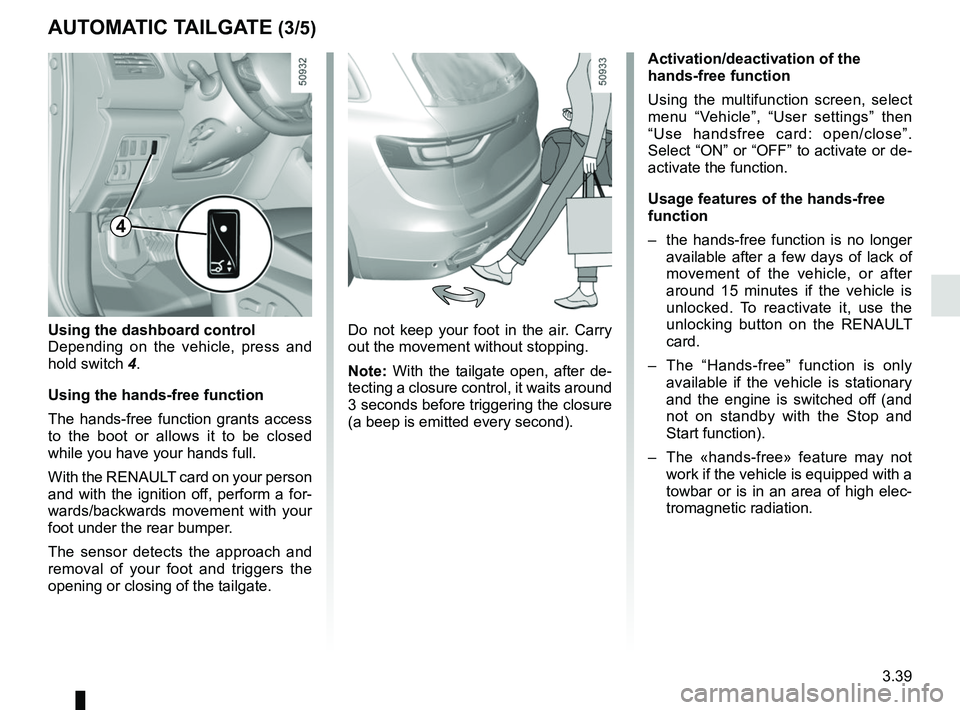
Do not keep your foot in the air. Carry
out the movement without stopping.
Note: With the tailgate open, after de-
tecting a closure control, it waits around
3 seconds before triggering the closure
(a beep is emitted every second).
Using the dashboard control
Depending on the vehicle, press and
hold switch
4.
Using the hands-free function
The hands-free function grants access
to the boot or allows it to be closed
while you have your hands full.
With the RENAULT card on your person
and with the ignition off, perform a for-
wards/backwards movement with your
foot under the rear bumper.
The sensor detects the approach and
removal of your foot and triggers the
opening or closing of the tailgate.
AUTOMATIC TAILGATE (3/5)
Activation/deactivation of the
hands-free function
Using the multifunction screen, select
menu “Vehicle”, “User settings” then
“Use handsfree card: open/close”.
Select “ON” or “OFF” to activate or de-
activate the function.
Usage features of the hands-free
function
– the hands-free function is no longer available after a few days of lack of
movement of the vehicle, or after
around 15 minutes if the vehicle is
unlocked. To reactivate it, use the
unlocking button on the RENAULT
card.
– The “Hands-free” function is only available if the vehicle is stationary
and the engine is switched off (and
not on standby with the Stop and
Start function).
– The «hands-free» feature may not work if the vehicle is equipped with a
towbar or is in an area of high elec-
tromagnetic radiation.
4
Page 237 of 332
3.41
AUTOMATIC TAILGATE (5/5)Operating faults
If you activate the automatic tailgate
continuously for around a minute (se-
quence of opening and closing), it will
stop in order to avoid overheating. The
operation will return to normal after
about a minute.
The automatic tailgate will not operate
if the battery is on low charge. In this
case, operate the automatic tailgate
with the engine started.
Note
In very cold weather conditions, the au-
tomatic opening may not operate if the
trunk lid joints are frozen.
Precautions during use
Before opening/closing the tailgate,
ensure that the surrounding space is
sufficient to allow the tailgate to ope-
rate. If not, stop the tailgate movement
with the external tailgate control and
hold the tailgate in position by hand
(the tailgate may continue to open ma-
nually).
If the tailgate is moving and the engine
is started, the movement will stop for a
seconds before continuing.
Avoid multiple manual stops during the
automatic tailgate movement (risk of
damaging the tailgate system).
Make sure that the sensors are not
obscured (by dirt, mud, snow, road salt
etc.).
Driver’s responsibility
when parking or stopping
the vehicle
Never leave your vehicle
with a child, an adult who is not self-
sufficient or a pet inside or at the
rear of the tailgate, even for a short
while.
They may pose a risk to themselves
or to others by starting the engine,
activating equipment such as the
electric windows, the automatic
tailgate or by locking the doors.
RISK OF DEATH OR SERIOUS
INJURY.
Disable the «hands-free» function before washing the vehicle manua\
lly
or handling the emergency spare wheel or the towbar.
Risk of accidental opening or closing of the tailgate which may
cause injury.
Page 238 of 332
3.42
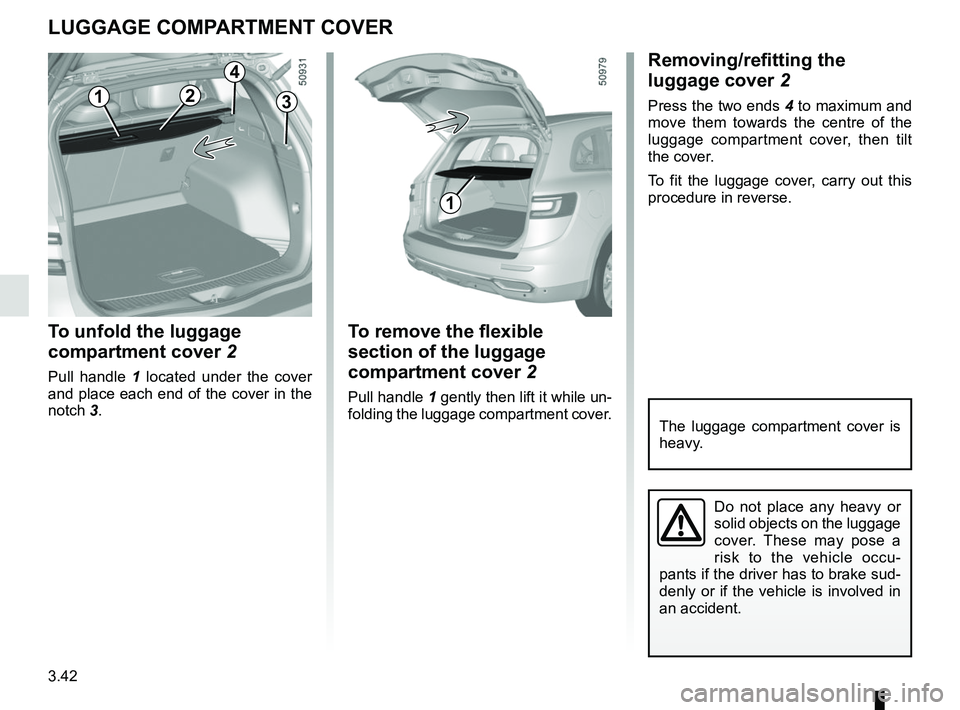
To remove the flexible
section of the luggage
compartment cover 2
Pull handle 1 gently then lift it while un-
folding the luggage compartment cover.
LUGGAGE COMPARTMENT COVER
32
Do not place any heavy or
solid objects on the luggage
cover. These may pose a
risk to the vehicle occu-
pants if the driver has to brake sud-
denly or if the vehicle is involved in
an accident.
1
1
To unfold the luggage
compartment cover 2
Pull handle 1 located under the cover
and place each end of the cover in the
notch 3.
Removing/refitting the
luggage cover 2
Press the two ends 4 to maximum and
move them towards the centre of the
luggage compartment cover, then tilt
the cover.
To fit the luggage cover, carry out this
procedure in reverse.
4
The luggage compartment cover is
heavy.
Page 243 of 332
3.47
Permissible nose weight, maxi-
mum permissible towing weight,
braked and unbraked: refer to
the information on “Weights” in
Section 6.
Choice and fitting of towing
equipment
Maximum weight of towing equip-
ment: 37 kg
For fitting and conditions of use,
refer to the equipment’s fitting in-
structions.
Please keep these instructions with
the rest of the vehicle documenta-
tion.
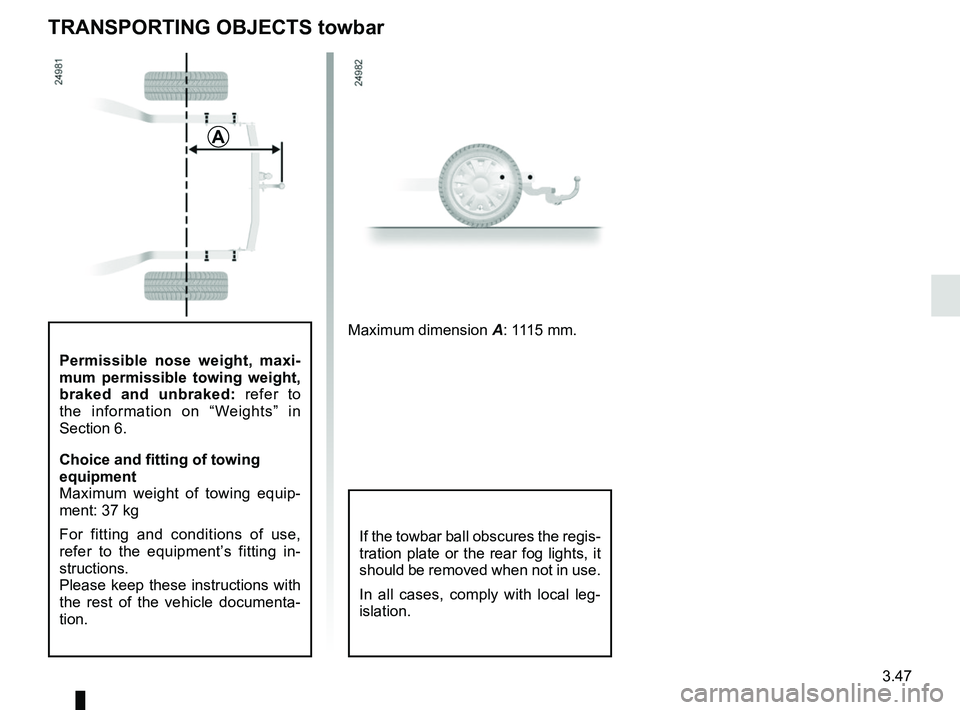
TRANSPORTING OBJECTS towbar
A
Maximum dimension A: 1115 mm.
If the towbar ball obscures the regis-
tration plate or the rear fog lights, it
should be removed when not in use.
In all cases, comply with local leg-
islation.
Page 258 of 332
4.12
TYRE PRESSURE (2/2)
Special note concerning fully laden
vehicles (Maximum Permissible All-Up
Weight) and towing a trailer: the maxi-
mum speed must be limited to 60 mph
(100 kph) and the tyre pressure in-
creased by 0.2 bar.
Please refer to the information on
“Weights” in Section 6.
Tyre safety and use of snow chains:
Refer to the information on “Tyres” in
Section 5 for the servicing conditions
and, depending on the version, the use
of chains. For your safety, please re-
spect the speed limit.
When they need to be re-
placed, only tyres of the
same make, size, type and profile
should be used on a single axle.
They must: either have a load ca-
pacity and speed rating at least
equal to those of the original
tyres, or conform to those recom-
mended by an authorised dealer.
Failure to heed these instructions
could endanger your safety and
affect your vehicle’s roadworthi-
ness.
Risk of loss of control of the ve-
hicle.