Gear RENAULT KOLEOS 2018 Owner's Guide
[x] Cancel search | Manufacturer: RENAULT, Model Year: 2018, Model line: KOLEOS, Model: RENAULT KOLEOS 2018Pages: 332, PDF Size: 8.91 MB
Page 190 of 332
2.86
Special note
– Drive slowly and always be ready to use the brake;
– The system can not detect parking spaces between objects except for
vehicles such as a post, motorbike or
obstacle;
– The system can not detect park- ing spaces made after detecting or
before detecting;
– Maintain the distance about 50~150 cm from the parked vehicles
when looking for parking spaces.
The system may not detect spaces
when the distance is less than 50 cm
or over 150 cm;
– You can move the gear lever position R to D or D to R while parking. The system is still available.
– The driver should look out for the de- tected space if it is possible to park
(obstacles in the space);
– If you fit a different tire or wheel, the system performance may be
changed. For the best performance,
fit the same size with original one;
– The system may not work if the wheels are misaligned. Contact an
approved dealer.
ASSISTED PARKING (3/6)
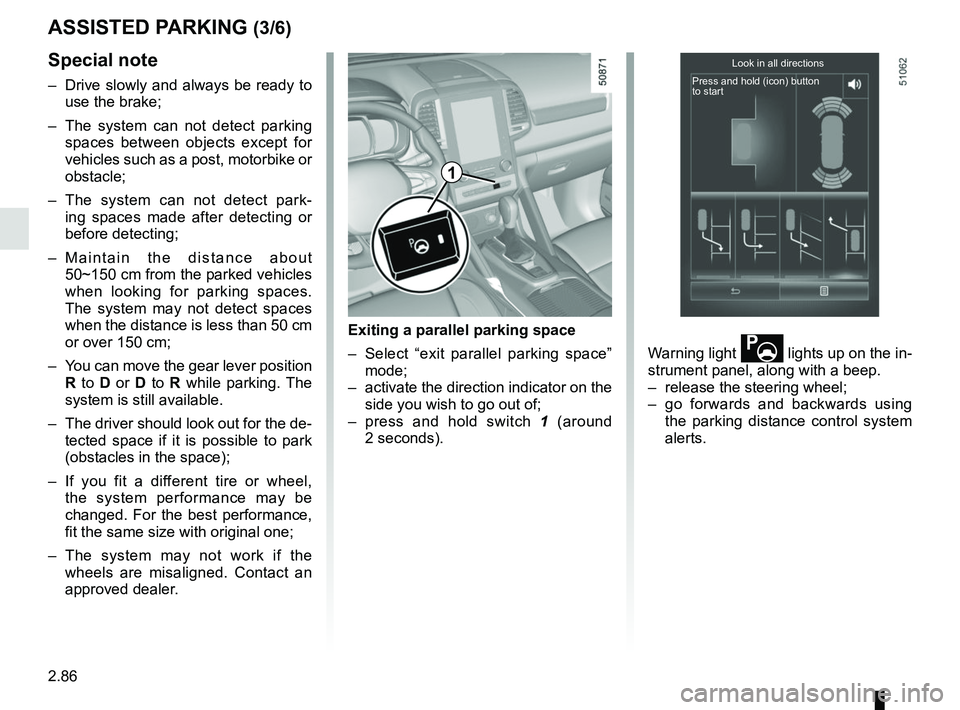
Exiting a parallel parking space
– Select “exit parallel parking space” mode;
– activate the direction indicator on the side you wish to go out of;
– press and hold switch 1 (around
2 seconds). Warning light
lights up on the in-
strument panel, along with a beep.
– release the steering wheel;
– go forwards and backwards using the parking distance control system
alerts.
Look in all directions
Press and hold (icon) button
to start
1
Page 194 of 332
2.90
AUTOMATIC TRANSMISSION (1/3)
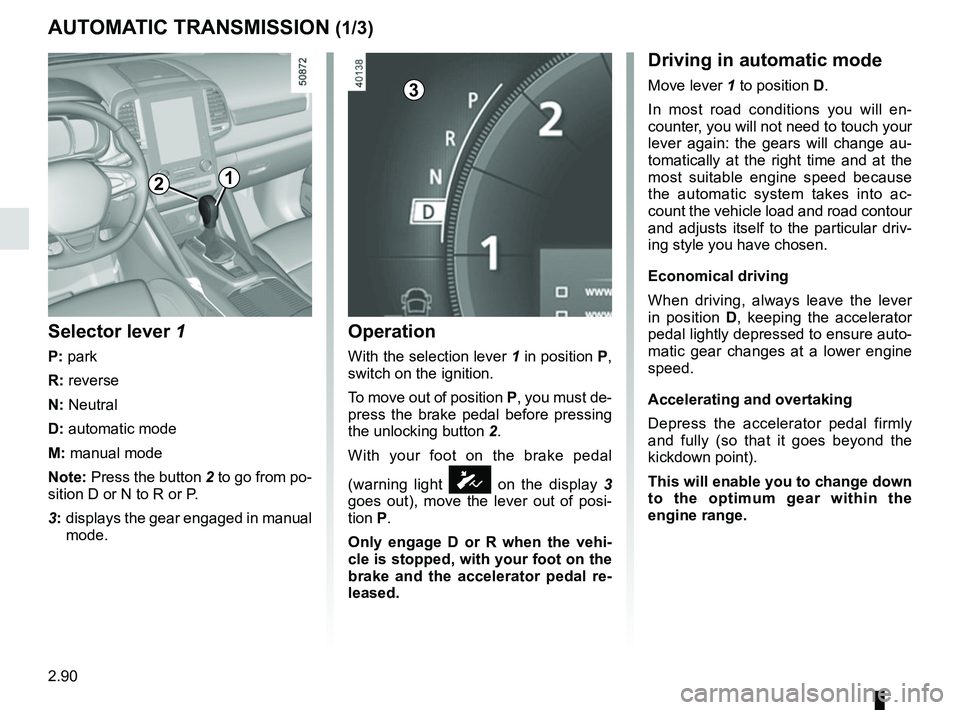
Operation
With the selection lever 1 in position P,
switch on the ignition.
To move out of position P, you must de-
press the brake pedal before pressing
the unlocking button 2.
With your foot on the brake pedal
(warning light
Ó on the display 3
goes out), move the lever out of posi-
tion P.
Only engage D or R when the vehi-
cle is stopped, with your foot on the
brake and the accelerator pedal re-
leased.
Selector lever 1
P: park
R: reverse
N: Neutral
D: automatic mode
M: manual mode
Note: Press the button 2 to go from po-
sition D or N to R or P.
3: displays the gear engaged in manual
mode.
12
Driving in automatic mode
Move lever 1 to position D.
In most road conditions you will en-
counter, you will not need to touch your
lever again: the gears will change au-
tomatically at the right time and at the
most suitable engine speed because
the automatic system takes into ac-
count the vehicle load and road contour
and adjusts itself to the particular driv-
ing style you have chosen.
Economical driving
When driving, always leave the lever
in position D, keeping the accelerator
pedal lightly depressed to ensure auto-
matic gear changes at a lower engine
speed.
Accelerating and overtaking
Depress the accelerator pedal firmly
and fully (so that it goes beyond the
kickdown point).
This will enable you to change down
to the optimum gear within the
engine range.3
Page 195 of 332
2.91
AUTOMATIC TRANSMISSION (2/3)
Special cases
In certain driving conditions (for exam-
ple, engine protection, operation of the
Electronic Stability Programme: the au-
tomatic system may change gear auto-
matically.
Likewise, to prevent incorrect manoeu-
vres, a gear change may be refused by
the automatic system: in this case the
gear display flashes for a few seconds
as a warning.
Special circumstances
– If the bends and road surface do
not allow you to stay in automatic
mode (e.g. in the mountains), we
recommend that you change to
manual mode. This will prevent the
automatic gearbox from changing
gear repeatedly when climbing, and
permit engine braking on long de-
scents.
– In cold weather , start the engine
and wait a few seconds before
moving the selector lever from posi-
tion P or N and engaging it in D or R
to prevent the engine stalling.
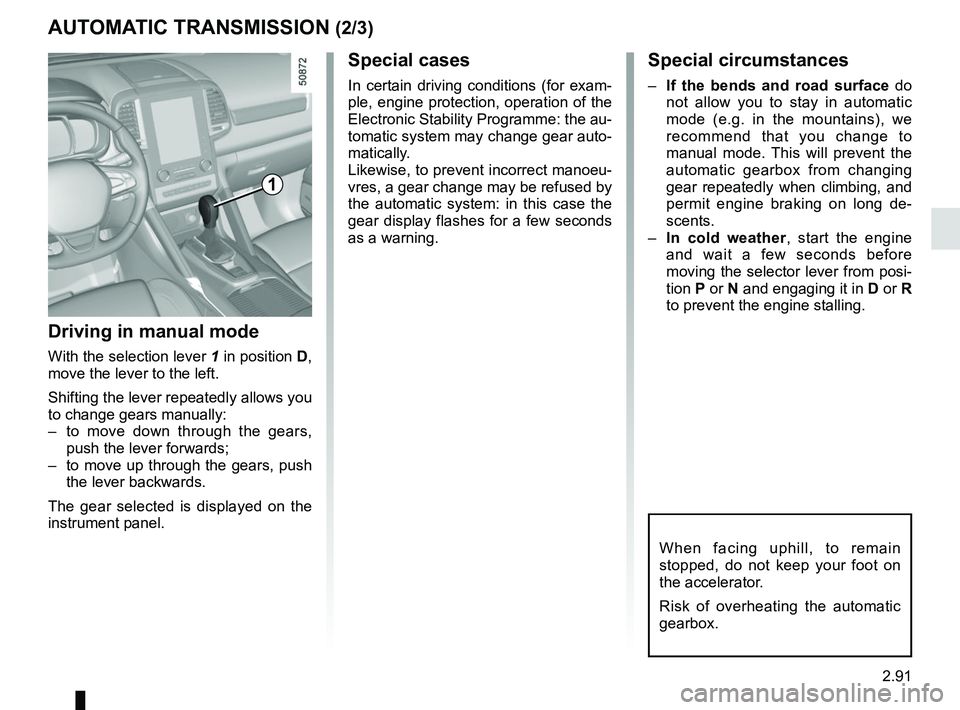
Driving in manual mode
With the selection lever 1 in position D,
move the lever to the left.
Shifting the lever repeatedly allows you
to change gears manually:
– to move down through the gears, push the lever forwards;
– to move up through the gears, push the lever backwards.
The gear selected is displayed on the
instrument panel.
1
When facing uphill, to remain
stopped, do not keep your foot on
the accelerator.
Risk of overheating the automatic
gearbox.
Page 196 of 332
2.92
AUTOMATIC TRANSMISSION (3/3)
Parking the vehicle
When the vehicle is stopped, move the
lever to position P while keeping your
foot on the brake pedal: the gearbox is
in neutral and the drive wheels are me-
chanically locked by the driveshaft.
Apply the parking brake or, depen-
ding on the vehicle, ensure that the
electronic parking brake is applied.
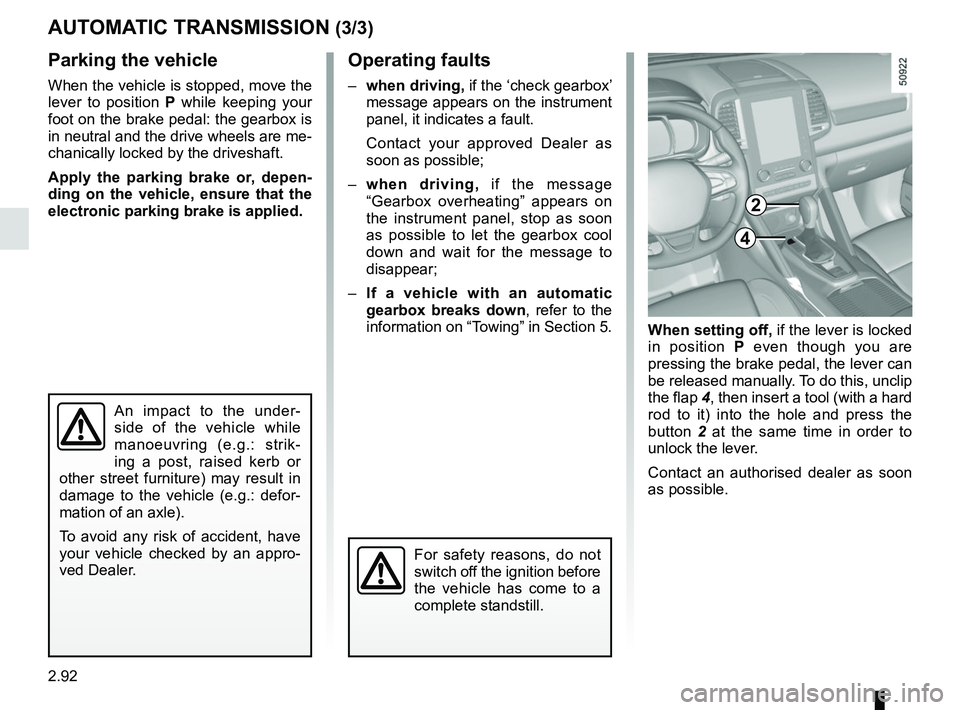
When setting off, if the lever is locked
in position P even though you are
pressing the brake pedal, the lever can
be released manually. To do this, unclip
the flap 4, then insert a tool (with a hard
rod to it) into the hole and press the
button 2 at the same time in order to
unlock the lever.
Contact an authorised dealer as soon
as possible.
Operating faults
– when driving, if the ‘check gearbox’
message appears on the instrument
panel, it indicates a fault.
Contact your approved Dealer as
soon as possible;
– when driving, if the message
“Gearbox overheating” appears on
the instrument panel, stop as soon
as possible to let the gearbox cool
down and wait for the message to
disappear;
– If a vehicle with an automatic
gearbox breaks down, refer to the
information on “Towing” in Section 5.
4
For safety reasons, do not
switch off the ignition before
the vehicle has come to a
complete standstill.
An impact to the under-
side of the vehicle while
manoeuvring (e.g.: strik-
ing a post, raised kerb or
other street furniture) may result in
damage to the vehicle (e.g.: defor-
mation of an axle).
To avoid any risk of accident, have
your vehicle checked by an appro-
ved Dealer.
2
Page 215 of 332
3.19
ELECTRIC WINDOWS (1/2)
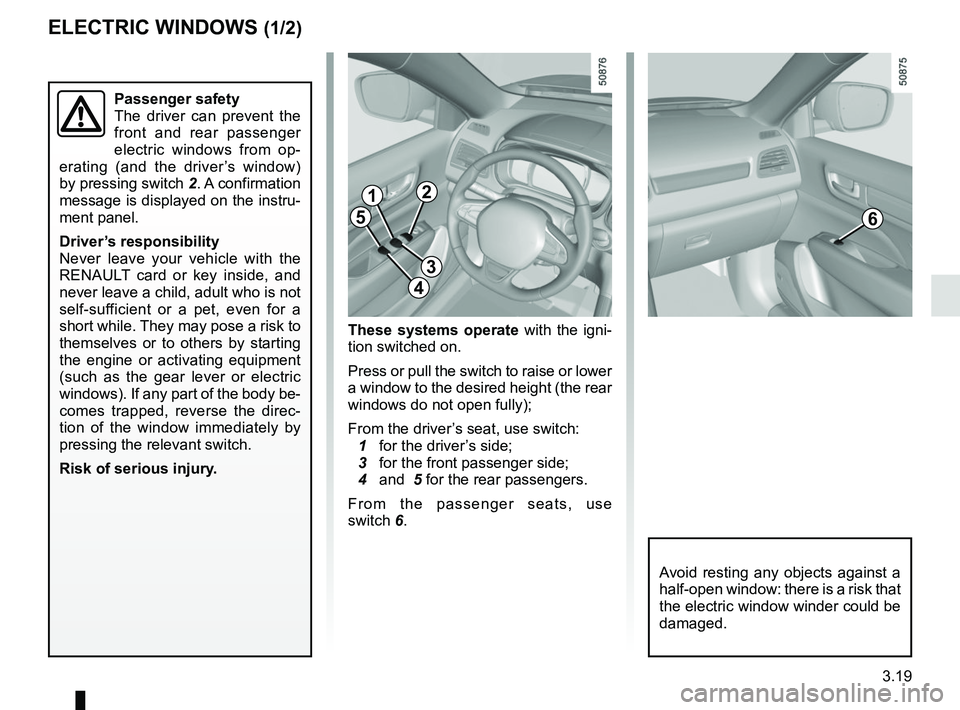
These systems operate with the igni-
tion switched on.
Press or pull the switch to raise or lower
a window to the desired height (the rear
windows do not open fully);
From the driver’s seat, use switch:
1 for the driver’s side;
3 for the front passenger side;
4 and 5 for the rear passengers.
From the passenger seats, use
switch 6.
1
3
4
56
Avoid resting any objects against a
half-open window: there is a risk that
the electric window winder could be
damaged.
Passenger safety
The driver can prevent the
front and rear passenger
electric windows from op-
erating (and the driver’s window)
by pressing switch 2. A confirmation
message is displayed on the instru-
ment panel.
Driver’s responsibility
Never leave your vehicle with the
RENAULT card or key inside, and
never leave a child, adult who is not
self-sufficient or a pet, even for a
short while. They may pose a risk to
themselves or to others by starting
the engine or activating equipment
(such as the gear lever or electric
windows). If any part of the body be-
comes trapped, reverse the direc-
tion of the window immediately by
pressing the relevant switch.
Risk of serious injury.
2
Page 272 of 332
5.8
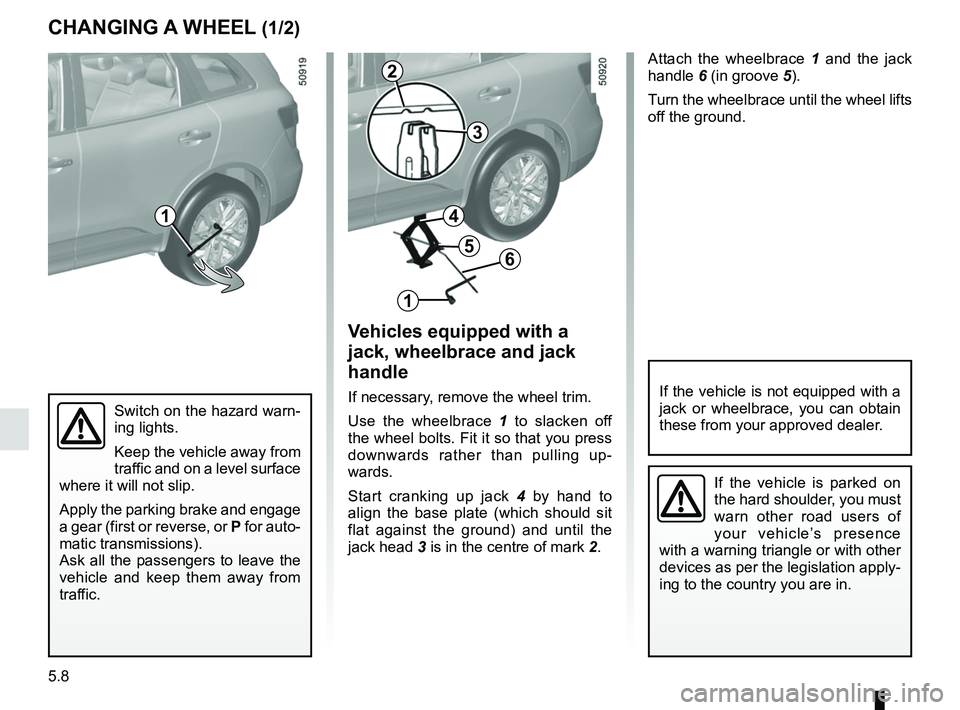
Attach the wheelbrace 1 and the jack
handle 6 (in groove 5).
Turn the wheelbrace until the wheel lifts
off the ground.
Switch on the hazard warn-
ing lights.
Keep the vehicle away from
traffic and on a level surface
where it will not slip.
Apply the parking brake and engage
a gear (first or reverse, or P for auto-
matic transmissions).
Ask all the passengers to leave the
vehicle and keep them away from
traffic.
CHANGING A WHEEL (1/2)
Vehicles equipped with a
jack, wheelbrace and jack
handle
If necessary, remove the wheel trim.
Use the wheelbrace 1 to slacken off
the wheel bolts. Fit it so that you press
downwards rather than pulling up-
wards.
Start cranking up jack 4 by hand to
align the base plate (which should sit
flat against the ground) and until the
jack head 3 is in the centre of mark 2.If the vehicle is not equipped with a
jack or wheelbrace, you can obtain
these from your approved dealer.
If the vehicle is parked on
the hard shoulder, you must
warn other road users of
your vehicle’s presence
with a warning triangle or with other
devices as per the legislation apply-
ing to the country you are in.
1
2
3
1
6
4
5
Page 289 of 332

Allocation of fuses
(the presence of certain fuses depends on the vehicle equipment level)\
Symbol Allocation Symbol AllocationSymbol Allocation
BLOWER Ventilation VDCVehicle dynami")
5.25
FUSES (3/3)
Allocation of fuses
(the presence of certain fuses depends on the vehicle equipment level)\
Symbol Allocation Symbol AllocationSymbol Allocation
BLOWER Ventilation VDCVehicle dynamic
control H/MIRR Heated door mirrors
TURN
HAZARD Hazard lamp
STOP LAMP Stop lamp HEATER
SEAT Heater seat
2ND
POWER
SOCKET 2nd power socket
POWER
DR LOCK2 Power door lock EC AUTO
ACC Air conditioner control
unit
REAR
WIPER Rear wiper CIGAR
LIGHTER Cigar lighter REAR
VIEW Rear view mirror
POWER
DR LOCK Power door lock HEAT
STEER
WHEEL Heat steering wheel
WASH
MTR Washer motor
ELEC B, B2 Electrical equipment RR DEFElectrically defrosted
rear window GEAR BOX
OIL PUMP Gear box oil pump
IMOB Immobilizer BOSE Bose amp BCM Body control module
AUDIO Audio ACC RADIOAccessory socket,
radio POWER
WINDOW Power window
ABS/EPS Anti lock brake system JUNCTION
MODULE Junction module SEAT BELT
WARNING Seat belt warning
module
MEDIA Multimedia equipment AIR CON Air condition control
unitSTRG
WHEEL ANGLE Steering wheel angle
sensor
Page 295 of 332
5.31
TOWING: breakdown recovery (1/4)
Do not remove the key from
the ignition when the vehi-
cle is being towed.
Before towing, put the gearbox in neu-
tral, unlock the steering column and re-
lease the parking brake.
For vehicles fitted with an automa-
tic gearbox, if it is not possible to put
the gear lever into position N, please
consult an authorised dealer.
Steering column unlocking
Insert the key into the ignition or, de-
pending on the vehicle, having the
RENAULT card on you, press the
engine start button for approximately
2 seconds.
Reposition the lever to neutral (position
N for vehicles fitted with an automatic
gearbox).
The steering column unlocks, the ac-
cessory functions are powered: you
can use the vehicle’s lights (direction
indicators, brake lights, etc.). At night
the vehicle must have its lights on.
Depending on the vehicle, once you
have finished towing, press the engine
start button twice (risk of running down
the battery). The speed specified by current legisla-
tion for towing must always be obser-
ved. If your vehicle is the towing vehi-
cle, do not exceed the maximum towing
weight for your vehicle (refer to the in-
formation on “Weights” in Section 6).
Towing a vehicle with an
automatic gearbox
Transport the vehicle on a trailer or tow
it with the front wheels off the ground.
In exceptional circumstances, you may
tow it with all four wheels on the ground,
only in a forward gear, with the gear in
neutral position
N over a maximum dis-
tance of 50 miles (80 km) and not ex-
ceeding a speed of 15 mph (25 km/h).
Page 296 of 332
5.32
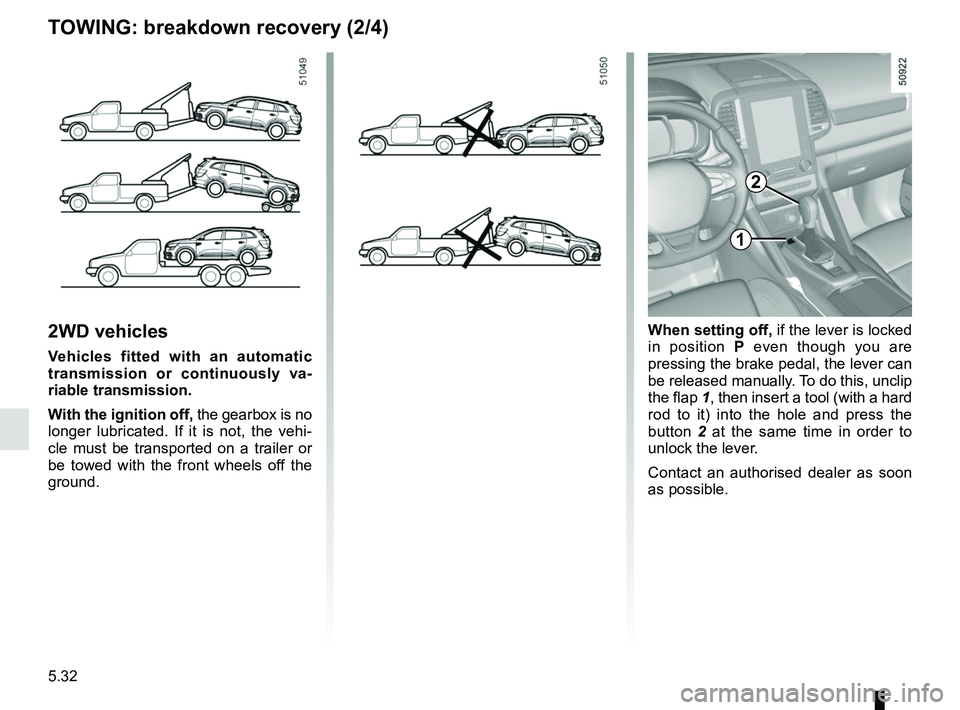
2WD vehicles
Vehicles fitted with an automatic
transmission or continuously va-
riable transmission.
With the ignition off, the gearbox is no
longer lubricated. If it is not, the vehi-
cle must be transported on a trailer or
be towed with the front wheels off the
ground.
1
2
When setting off, if the lever is locked
in position P even though you are
pressing the brake pedal, the lever can
be released manually. To do this, unclip
the flap 1, then insert a tool (with a hard
rod to it) into the hole and press the
button 2 at the same time in order to
unlock the lever.
Contact an authorised dealer as soon
as possible.
TOWING: breakdown recovery (2/4)
Page 297 of 332
5.33
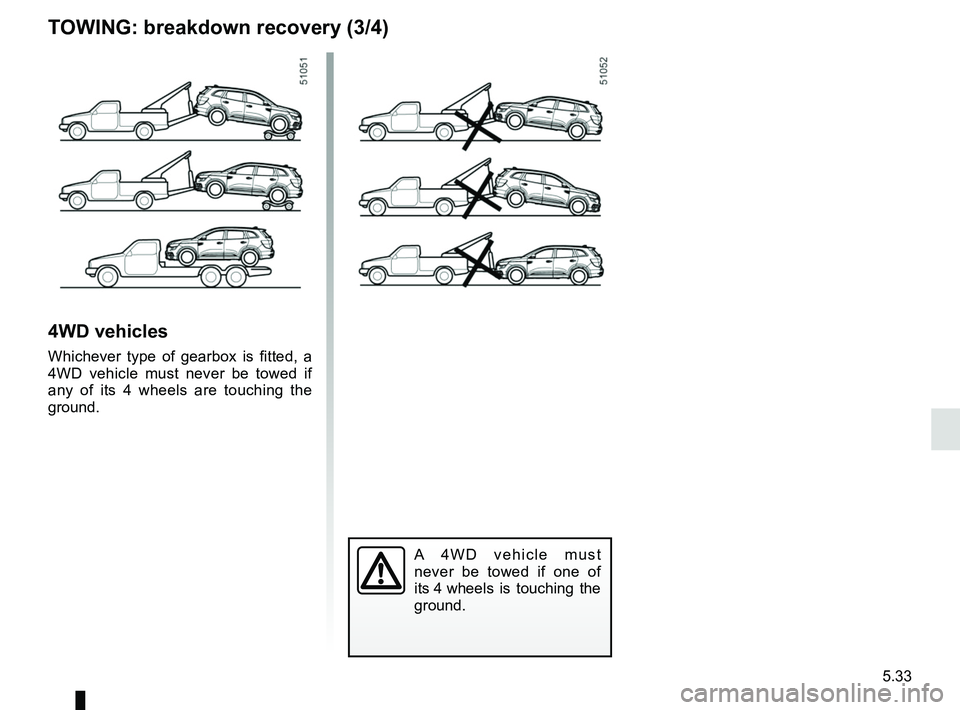
4WD vehicles
Whichever type of gearbox is fitted, a
4WD vehicle must never be towed if
any of its 4 wheels are touching the
ground.
A 4WD vehicle must
never be towed if one of
its 4 wheels is touching the
ground.
TOWING: breakdown recovery (3/4)