Service RENAULT KOLEOS 2018 Owners Manual
[x] Cancel search | Manufacturer: RENAULT, Model Year: 2018, Model line: KOLEOS, Model: RENAULT KOLEOS 2018Pages: 332, PDF Size: 8.91 MB
Page 9 of 332
1.3
KEY, RADIO FREQUENCY REMOTE CONTROL: general information (2/2)
Radio frequency remote
control operating range
This varies according to the surround-
ings: take care not to lock or unlock the
doors by inadvertently pressing the but-
tons on the remote control.
Note: If a door or the boot is open or
not closed properly, the doors and boot
lock/unlock in quick succession.
Interference
Interference by factors in the immediate
vicinity (external installations or the use
of equipment operating on the same
frequency as the remote control) may
affect the operation of the remote con-
trol.
Replacement and additional keys
or remote controls.
You must only contact an approved
dealer:
– If you need to replace a key it will be necessary to take the vehicle
and all of its keys to an approved
Dealer in order to initialise the
system.
– Depending on the vehicle, you have the option of using up to
four remote controls.
Remote control unit failure
Make sure that the correct battery
type is being used, and that the
battery is in good condition and in-
serted correctly. These batteries
have a service life of approximately
two years.
Refer to Section 5: “Radio fre-
quency remote control: batteries”
for the battery changing procedure.
Page 11 of 332
1.5
RENAULT CARD: general information (1/2)
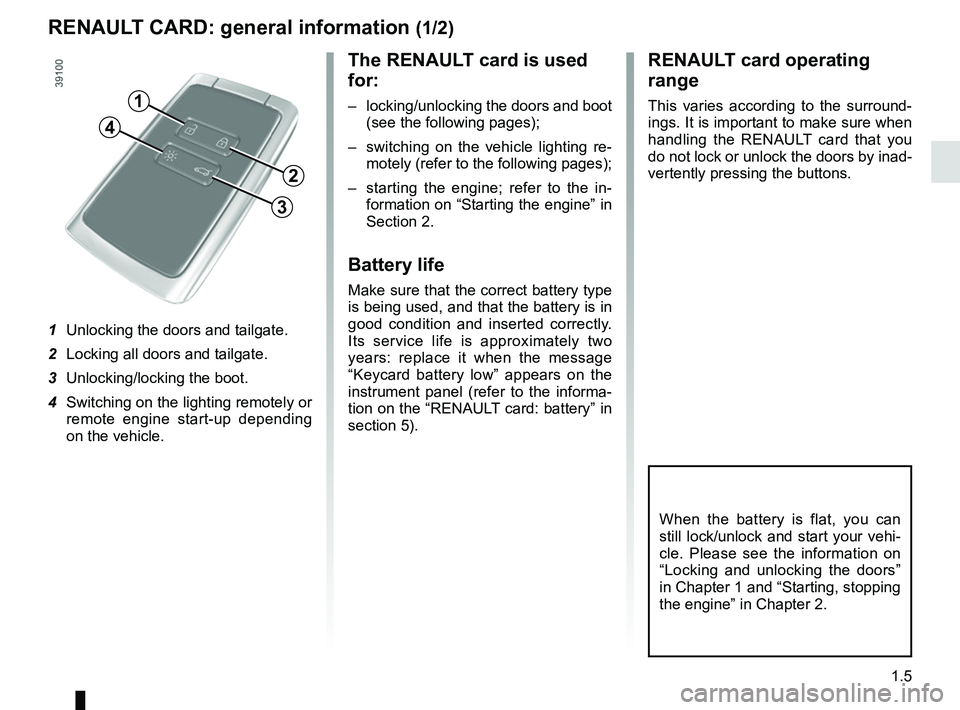
The RENAULT card is used
for:
– locking/unlocking the doors and boot (see the following pages);
– switching on the vehicle lighting re- motely (refer to the following pages);
– starting the engine; refer to the in- formation on “Starting the engine” in
Section 2.
Battery life
Make sure that the correct battery type
is being used, and that the battery is in
good condition and inserted correctly.
Its service life is approximately two
years: replace it when the message
“Keycard battery low” appears on the
instrument panel (refer to the informa-
tion on the “RENAULT card: battery” in
section 5).
RENAULT card operating
range
This varies according to the surround-
ings. It is important to make sure when
handling the RENAULT card that you
do not lock or unlock the doors by inad-
vertently pressing the buttons.
When the battery is flat, you can
still lock/unlock and start your vehi-
cle. Please see the information on
“Locking and unlocking the doors”
in Chapter 1 and “Starting, stopping
the engine” in Chapter 2.
1
2
3
4
1 Unlocking the doors and tailgate.
2 Locking all doors and tailgate.
3 Unlocking/locking the boot.
4 Switching on the lighting remotely or remote engine start-up depending
on the vehicle.
Page 23 of 332

1.17
EMERGENCY CALL (1/2)
1
23
4
5
A call is always made as follows:
– the call is set up with the emergency services;
– data related to the event is sent out;
– voice communication with the emer- gency services;
– if necessary, emergency assistance is called.
Emergency call has two modes:
– automatic mode;
– manual mode;
1 Phone network availability light: on if
network available (green light), off if
network not available;
2 Automatic mode warning light;
3 SOS switch;
4 Microphone;
5 Speaker.
If the vehicle is equipped with it, the
emergency call is a system that allows
the emergency services to be called
automatically or manually in the event
of an accident or illness, in order to
reduce the time they take to arrive on
the scene.
If you use the emergency call func-
tion to report an accident which you
have witnessed, this implies stopping
where traffic conditions allow to allow
the emergency services to locate your
vehicle and therefore the location of the
reported accident.
Use emergency call only in
the event of an emergency
if you are involved in or wit-
ness an accident or if you
feel ill.In the event of an accident,
it is recommended that you
stay close to the vehicle so
that you can respond to the
call centre if necessary.
Page 24 of 332
1.18
EMERGENCY CALL (2/2)
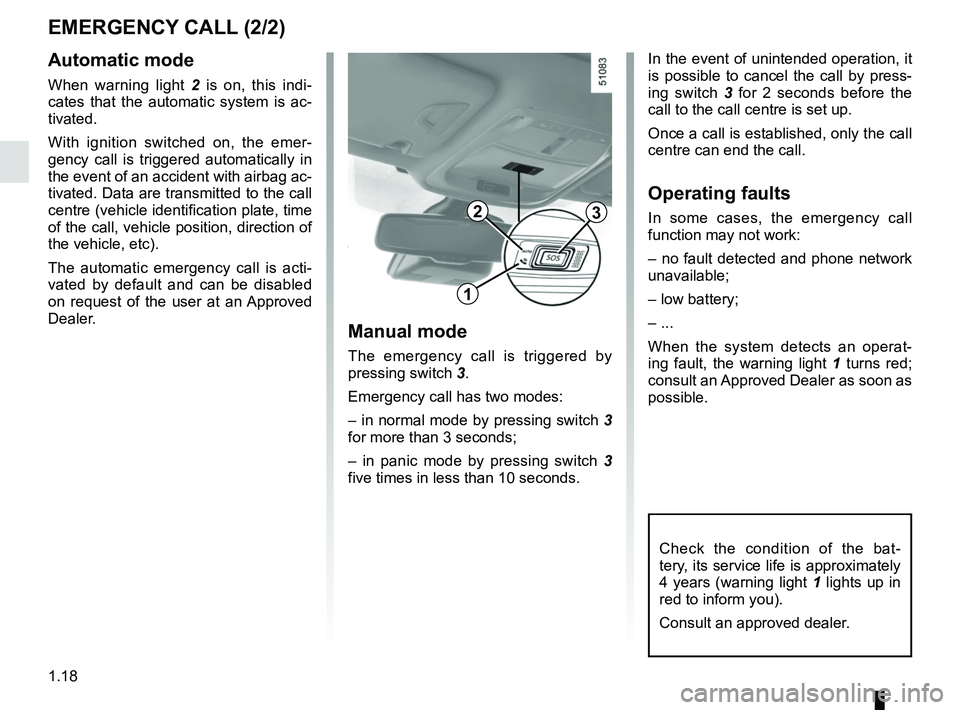
Check the condition of the bat-
tery, its service life is approximately
4 years (warning light 1 lights up in
red to inform you).
Consult an approved dealer.
23
1
Manual mode
The emergency call is triggered by
pressing switch 3.
Emergency call has two modes:
– in normal mode by pressing switch 3
for more than 3 seconds;
– in panic mode by pressing switch 3
five times in less than 10 seconds.
Automatic mode
When warning light 2 is on, this indi-
cates that the automatic system is ac-
tivated.
With ignition switched on, the emer-
gency call is triggered automatically in
the event of an accident with airbag ac-
tivated. Data are transmitted to the call
centre (vehicle identification plate, time
of the call, vehicle position, direction of
the vehicle, etc).
The automatic emergency call is acti-
vated by default and can be disabled
on request of the user at an Approved
Dealer. In the event of unintended operation, it
is possible to cancel the call by press-
ing switch 3
for 2 seconds before the
call to the call centre is set up.
Once a call is established, only the call
centre can end the call.
Operating faults
In some cases, the emergency call
function may not work:
– no fault detected and phone network
unavailable;
– low battery;
– ...
When the system detects an operat-
ing fault, the warning light 1 turns red;
consult an Approved Dealer as soon as
possible.
Page 68 of 332
1.62
1
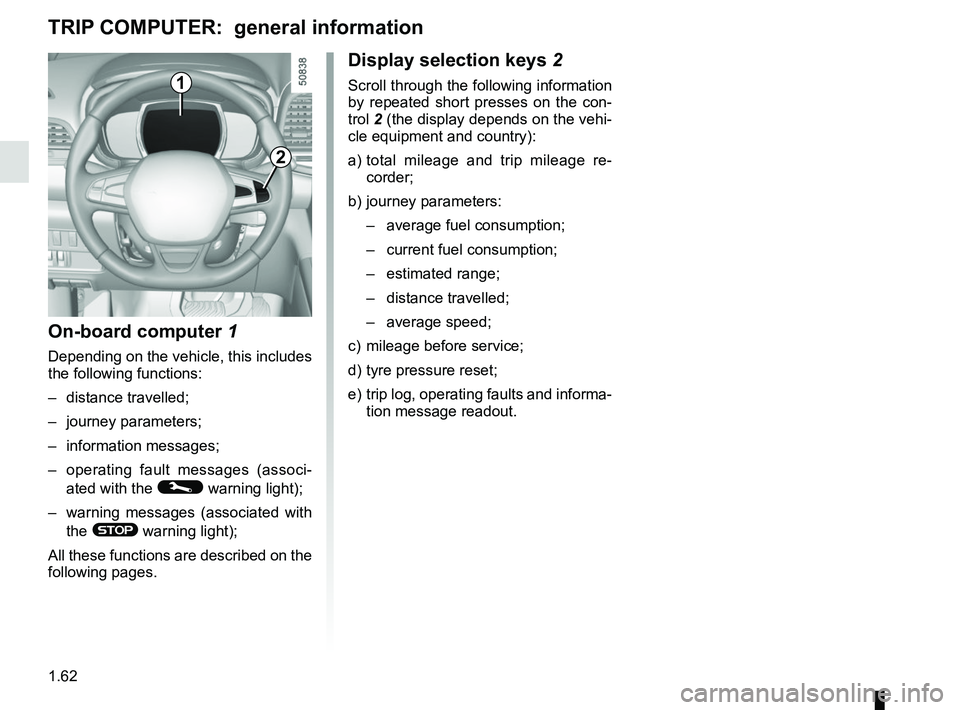
Display selection keys 2
Scroll through the following information
by repeated short presses on the con-
trol 2 (the display depends on the vehi-
cle equipment and country):
a) total mileage and trip mileage re-
corder;
b) journey parameters: – average fuel consumption;
– current fuel consumption;
– estimated range;
– distance travelled;
– average speed;
c) mileage before service;
d) tyre pressure reset;
e) trip log, operating faults and informa- tion message readout.
On-board computer 1
Depending on the vehicle, this includes
the following functions:
– distance travelled;
– journey parameters;
– information messages;
– operating fault messages (associ-
ated with the
© warning light);
– warning messages (associated with the
® warning light);
All these functions are described on the
following pages.
TRIP COMPUTER: general information
2
Page 72 of 332

The display of information shown below DEPENDS ON THE VEHICLE EQUIPMENT \
AND COUNTRY.
Examples of selectionsInterpreting the display selected
On-board comp")
1.66
ON-BOARD COMPUTER: trip settings (3/5)
The display of information shown below DEPENDS ON THE VEHICLE EQUIPMENT \
AND COUNTRY.
Examples of selectionsInterpreting the display selected
On-board computer with mileage-
before-service message
c) Mileage before service or oil change.Mileage before service
With the ignition switched on, the engine not running and
the display set to “Service Intervals”, press button OK for ap-
proximately 5 seconds to display the mileage before service (dis-
tance or time to the next service). When the range approaches
its limit, there are several possible scenarios:
– distance/time remaining less than 900 miles (1,500 km) or
one month : the message “Service due in” is displayed along
with the nearest limit (distance or time);
– range equal to 0 km/miles or service date reached: the
message “Service required” is displayed accompanied by
warning light
©.
The vehicle requires a service as soon as possible.
Service Intervals
Service in
30 000 Kms / 12 mo
Service due in
300 Kms / 24 days
Service required
Resetting: to reset the distance before service, press and hold button 2 for approximately 10 seconds until the display shows
the mileage permanently.
NB: if a service is performed without changing the engine oil, only the mi\
leage before the next service should be reset. In the
event of an oil change, both the distance before the next service and th\
e next oil change should be reset.
Page 73 of 332

Examples of selectionsInterpreting the display selected
On-board comp")
1.67
The display of information shown below DEPENDS ON THE VEHICLE EQUIPMENT \
AND COUNTRY.
ON-BOARD COMPUTER: trip settings (4/5)
Examples of selectionsInterpreting the display selected
On-board computer with distance before
next service message (cntd.)
c) Mileage before service or oil change.Mileage before service
With the ignition switched on and the engine not running ,
and the selected display is “Mileage before service”, press
button OK for about 5 seconds to display the mileage before
the next service, then press button 2 to view the mileage before
the next oil change (distance or time remaining before the next
service). When the range approaches its limit, there are several
possible scenarios:
– distance/time remaining less than 900 miles (1,500 km) or
one month : the message “Service due in” is displayed, ac-
companied by the nearest term (distance or time);
– range equal to 0 km/miles or service date reached: the
message “Service required” is displayed accompanied by
warning light
©.
The vehicle requires an oil change as soon as possible.
Service Intervals
Oil change in
30 000 Kms / 24 mo
Service due in
300 Kms / 24 days
Service required
Depending on the vehicle, the mileage before an oil change varies accord\
ing to the driving style (frequent driving at low speed ,
door-to-door journeys, extensive use at idling speed, towing a trailer, etc.). The distance remaining until the next oil change can
therefore decrease more quickly in some cases than the actual distance t\
ravelled.
Resetting: to reset the mileage before a service, press and hold button 2 for approximately 10 seconds until the display shows
the range permanently.
NB: if a service is performed without changing the engine oil, only the mi\
leage before the next service should be reset. In the
event of an oil change, both the distance before the next service and th\
e next oil change should be reset.
Page 93 of 332
1.87
Special note
When driving the vehicle, the wiping
speed slows down whenever the ve-
hicle stops. For example, fast wiping
speed will slow to normal wiping speed.
As soon as the vehicle moves off,
wiping will return to the speed originally
selected.
If stalk 1 is operated, it overrides and
cancels the automatic function.Vehicle fitted with intermittent
windscreen wipers
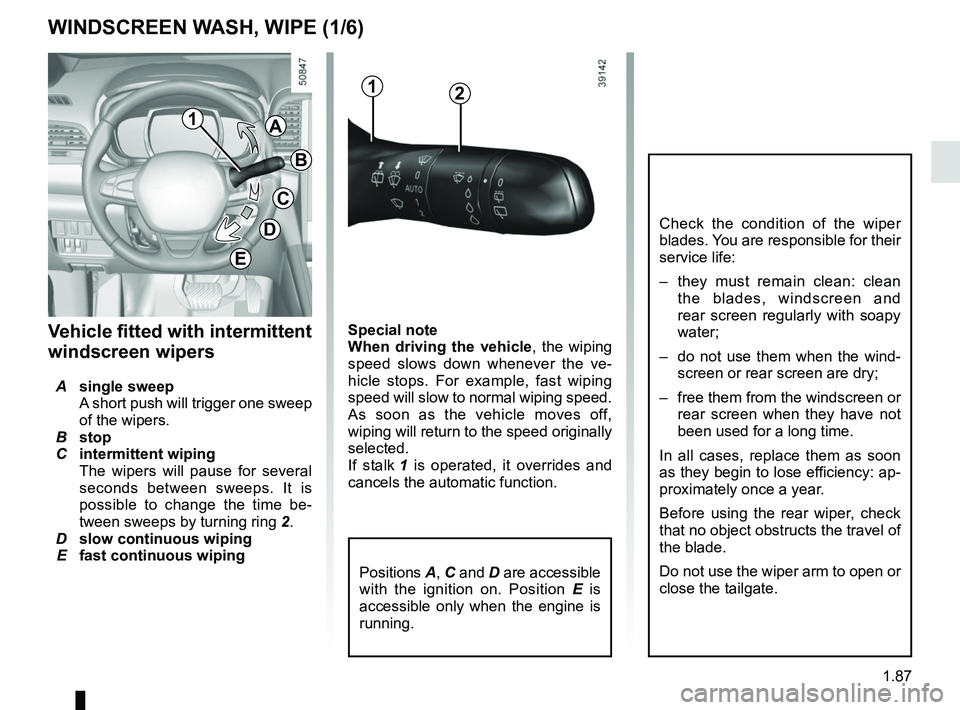
A single sweep
A short push will trigger one sweep
of the wipers.
B stop
C intermittent wiping
The wipers will pause for several
seconds between sweeps. It is
possible to change the time be-
tween sweeps by turning ring 2.
D slow continuous wiping
E fast continuous wiping
Positions A, C and D are accessible
with the ignition on. Position E is
accessible only when the engine is
running.
1A
B
C
D
WINDSCREEN WASH, WIPE (1/6)
E
Check the condition of the wiper
blades. You are responsible for their
service life:
– they must remain clean: clean the blades, windscreen and
rear screen regularly with soapy
water;
– do not use them when the wind- screen or rear screen are dry;
– free them from the windscreen or rear screen when they have not
been used for a long time.
In all cases, replace them as soon
as they begin to lose efficiency: ap-
proximately once a year.
Before using the rear wiper, check
that no object obstructs the travel of
the blade.
Do not use the wiper arm to open or
close the tailgate.
12
Page 96 of 332
1.90
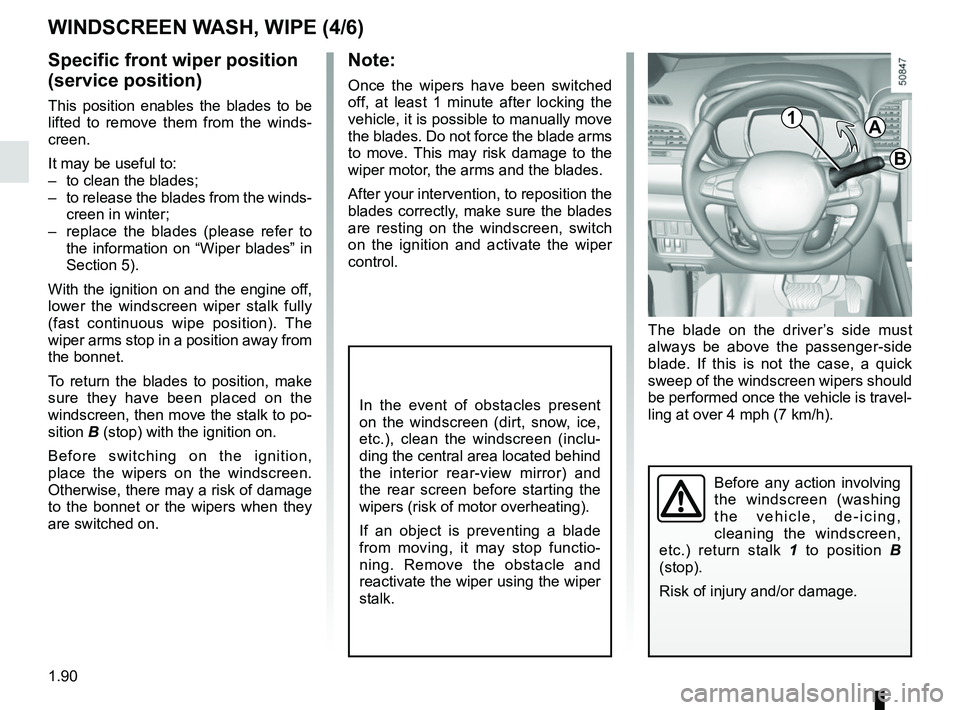
The blade on the driver’s side must
always be above the passenger-side
blade. If this is not the case, a quick
sweep of the windscreen wipers should
be performed once the vehicle is travel-
ling at over 4 mph (7 km/h).
Note:
Once the wipers have been switched
off, at least 1 minute after locking the
vehicle, it is possible to manually move
the blades. Do not force the blade arms
to move. This may risk damage to the
wiper motor, the arms and the blades.
After your intervention, to reposition the
blades correctly, make sure the blades
are resting on the windscreen, switch
on the ignition and activate the wiper
control.
Before any action involving
the windscreen (washing
the vehicle, de-icing,
cleaning the windscreen,
etc.) return stalk 1 to position B
(stop).
Risk of injury and/or damage.
In the event of obstacles present
on the windscreen (dirt, snow, ice,
etc.), clean the windscreen (inclu-
ding the central area located behind
the interior rear-view mirror) and
the rear screen before starting the
wipers (risk of motor overheating).
If an object is preventing a blade
from moving, it may stop functio-
ning. Remove the obstacle and
reactivate the wiper using the wiper
stalk.
WINDSCREEN WASH, WIPE (4/6)
Specific front wiper position
(service position)
This position enables the blades to be
lifted to remove them from the winds-
creen.
It may be useful to:
– to clean the blades;
– to release the blades from the winds- creen in winter;
– replace the blades (please refer to the information on “Wiper blades” in
Section 5).
With the ignition on and the engine off,
lower the windscreen wiper stalk fully
(fast continuous wipe position). The
wiper arms stop in a position away from
the bonnet.
To return the blades to position, make
sure they have been placed on the
windscreen, then move the stalk to po-
sition B (stop) with the ignition on.
Before switching on the ignition,
place the wipers on the windscreen.
Otherwise, there may a risk of damage
to the bonnet or the wipers when they
are switched on.1A
B
Page 99 of 332
1.93
REAR SCREEN WASH, WIPE (1/2)
1
3
Check the condition of the wiper
blades. You are responsible for their
service life:
– they must remain clean: clean the blades, windscreen and
rear screen regularly with soapy
water;
– do not use them when the wind- screen or rear screen are dry;
– free them from the windscreen or rear screen when they have not
been used for a long time.
In all cases, replace them as soon
as they begin to lose efficiency: ap-
proximately once a year.
Before using the rear wiper, check
that no object obstructs the travel of
the blade.
Do not use the wiper arm to open or
close the tailgate.
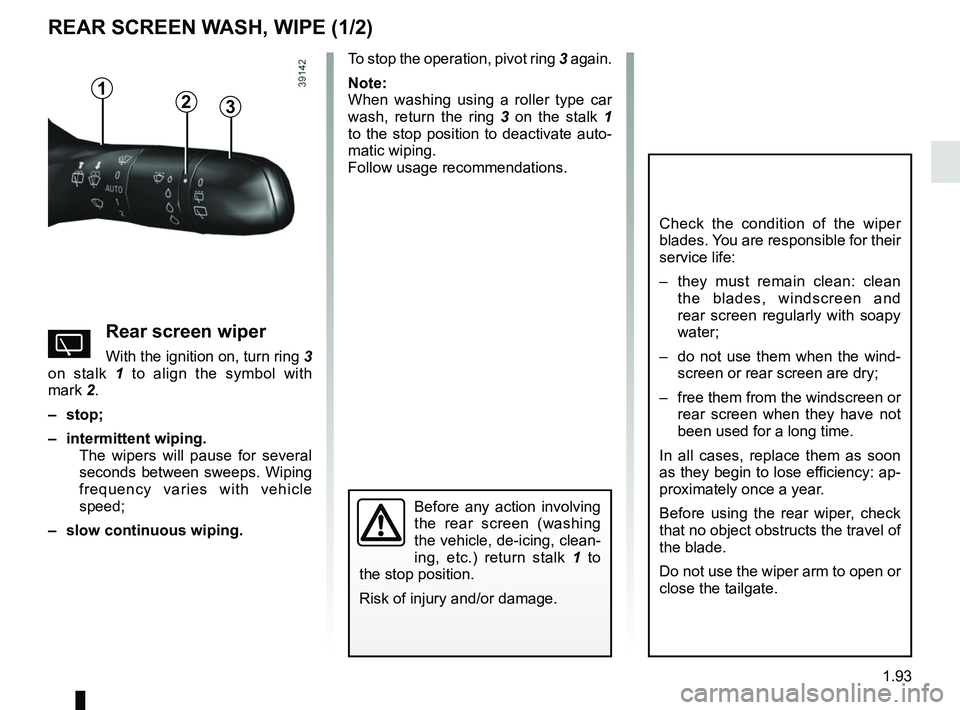
YRear screen wiper
With the ignition on, turn ring 3
on stalk 1 to align the symbol with
mark 2.
– stop;
– intermittent wiping. The wipers will pause for several
seconds between sweeps. Wiping
frequency varies with vehicle
speed;
– slow continuous wiping. To stop the operation, pivot ring
3 again.
Note:
When washing using a roller type car
wash, return the ring 3 on the stalk 1
to the stop position to deactivate auto-
matic wiping.
Follow usage recommendations.
Before any action involving
the rear screen (washing
the vehicle, de-icing, clean-
ing, etc.) return stalk 1 to
the stop position.
Risk of injury and/or damage.
2