bonnet RENAULT KOLEOS 2018 Owners Manual
[x] Cancel search | Manufacturer: RENAULT, Model Year: 2018, Model line: KOLEOS, Model: RENAULT KOLEOS 2018Pages: 332, PDF Size: 8.91 MB
Page 57 of 332
1.51
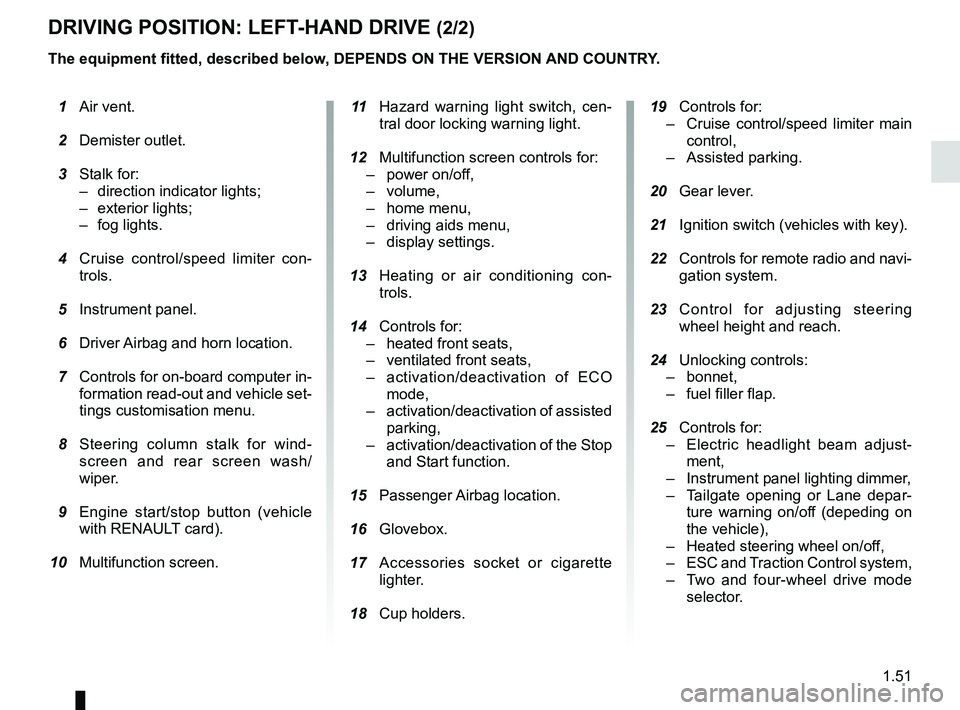
DRIVING POSITION: LEFT-HAND DRIVE (2/2)
The equipment fitted, described below, DEPENDS ON THE VERSION AND COUNTRY. 19 Controls for:
– Cruise control/speed limiter main
control,
– Assisted parking.
20 Gear lever.
21 Ignition switch (vehicles with key).
22 Controls for remote radio and navi-
gation system.
23 Control for adjusting steering
wheel height and reach.
24 Unlocking controls:
– bonnet,
– fuel filler flap.
25 Controls for:
– Electric headlight beam adjust-
ment,
– Instrument panel lighting dimmer,
– Tailgate opening or Lane depar-
ture warning on/off (depeding on
the vehicle),
– Heated steering wheel on/off,
– ESC and Traction Control system,
– Two and four-wheel drive mode
selector.
1 Air vent.
2 Demister outlet.
3 Stalk for:
– direction indicator lights;
– exterior lights;
– fog lights.
4 Cruise control/speed limiter con-
trols.
5 Instrument panel.
6 Driver Airbag and horn location.
7 Controls for on-board computer in-
formation read-out and vehicle set-
tings customisation menu.
8 Steering column stalk for wind-
screen and rear screen wash/
wiper.
9 Engine start/stop button (vehicle
with RENAULT card).
10 Multifunction screen.
11 Hazard warning light switch, cen-
tral door locking warning light.
12 Multifunction screen controls for:
– power on/off,
– volume,
– home menu,
– driving aids menu,
– display settings.
13 Heating or air conditioning con-
trols.
14 Controls for:
– heated front seats,
– ventilated front seats,
– activation/deactivation of ECO
mode,
– activation/deactivation of assisted
parking,
– activation/deactivation of the Stop
and Start function.
15 Passenger Airbag location.
16
Glovebox.
17 Accessories socket or cigarette
lighter.
18 Cup holders.
Page 59 of 332
1.53
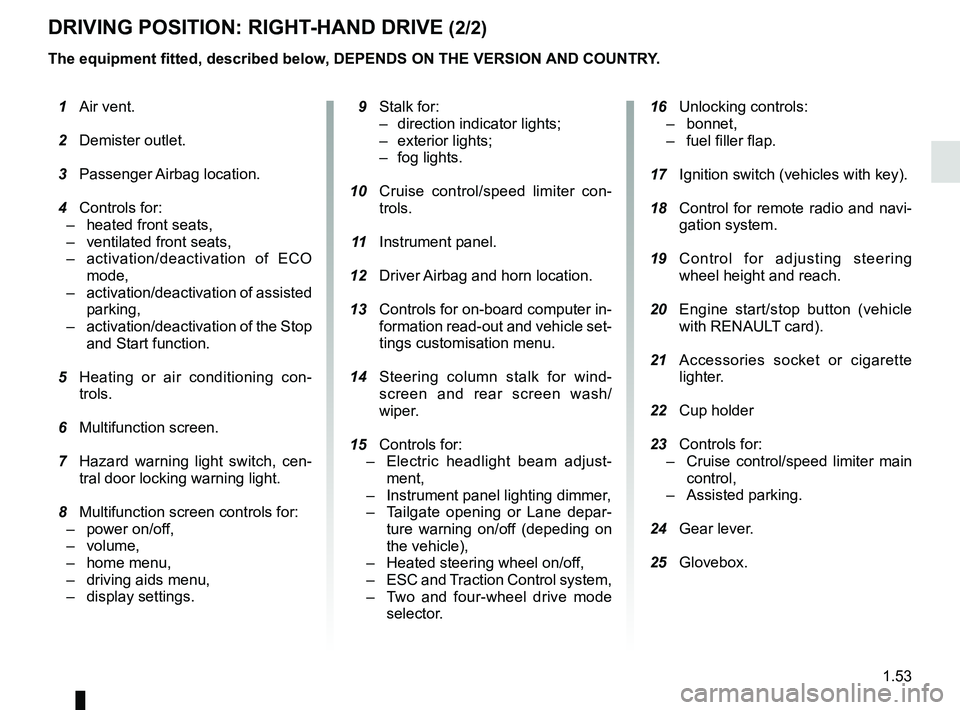
DRIVING POSITION: RIGHT-HAND DRIVE (2/2)
The equipment fitted, described below, DEPENDS ON THE VERSION AND COUNTRY.
16 Unlocking controls:
– bonnet,
– fuel filler flap.
17 Ignition switch (vehicles with key).
18 Control for remote radio and navi-
gation system.
19 Control for adjusting steering
wheel height and reach.
20 Engine start/stop button (vehicle
with RENAULT card).
21 Accessories socket or cigarette
lighter.
22 Cup holder
23 Controls for:
– Cruise control/speed limiter main
control,
– Assisted parking.
24 Gear lever.
25 Glovebox.
1 Air vent.
2 Demister outlet.
3 Passenger Airbag location.
4 Controls for:
– heated front seats,
– ventilated front seats,
– activation/deactivation of ECO
mode,
– activation/deactivation of assisted
parking,
– activation/deactivation of the Stop
and Start function.
5 Heating or air conditioning con-
trols.
6 Multifunction screen.
7 Hazard warning light switch, cen-
tral door locking warning light.
8 Multifunction screen controls for:
– power on/off,
– volume,
– home menu,
– driving aids menu,
– display settings.
9 Stalk for:
– direction indicator lights;
– exterior lights;
– fog lights.
10 Cruise control/speed limiter con-
trols.
11 Instrument panel.
12 Driver Airbag and horn location.
13 Controls for on-board computer in-
formation read-out and vehicle set-
tings customisation menu.
14 Steering column stalk for wind-
screen and rear screen wash/
wiper.
15
Controls for:
– Electric headlight beam adjust-
ment,
– Instrument panel lighting dimmer,
– Tailgate opening or Lane depar-
ture warning on/of
f (depeding on
the vehicle),
– Heated steering wheel on/off,
– ESC and Traction Control system,
– Two and four-wheel drive mode
selector.
Page 92 of 332
1.86
HEADLIGHT BEAM ADJUSTMENT (2/2)
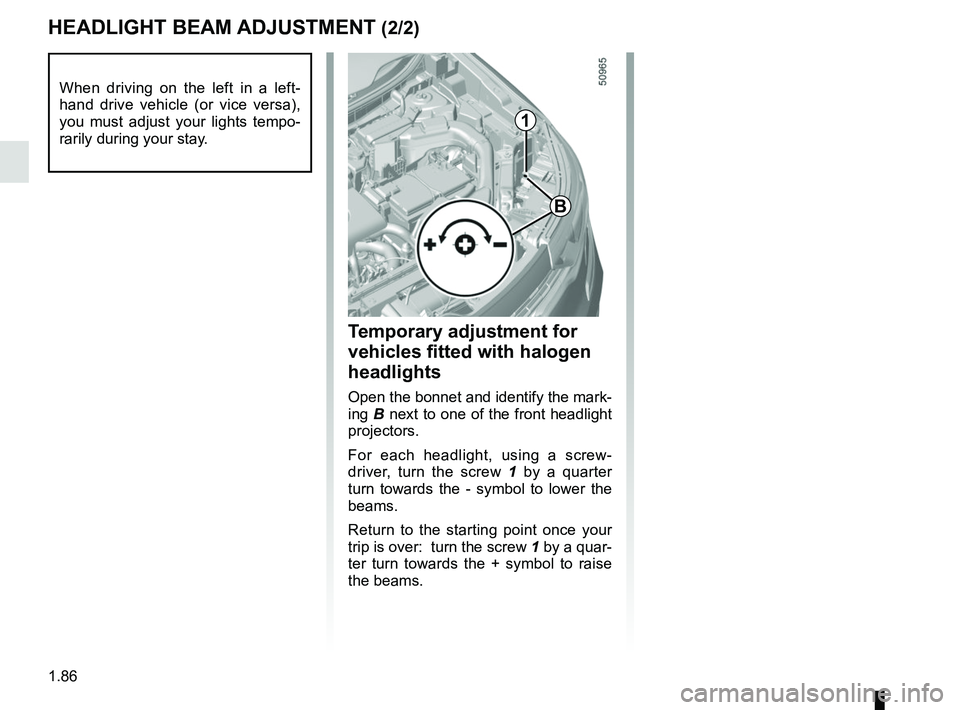
Temporary adjustment for
vehicles fitted with halogen
headlights
Open the bonnet and identify the mark-
ing B next to one of the front headlight
projectors.
For each headlight, using a screw-
driver, turn the screw 1 by a quarter
turn towards the - symbol to lower the
beams.
Return to the starting point once your
trip is over: turn the screw 1 by a quar-
ter turn towards the + symbol to raise
the beams.
When driving on the left in a left-
hand drive vehicle (or vice versa),
you must adjust your lights tempo-
rarily during your stay.
1
B
Page 96 of 332
1.90
The blade on the driver’s side must
always be above the passenger-side
blade. If this is not the case, a quick
sweep of the windscreen wipers should
be performed once the vehicle is travel-
ling at over 4 mph (7 km/h).
Note:
Once the wipers have been switched
off, at least 1 minute after locking the
vehicle, it is possible to manually move
the blades. Do not force the blade arms
to move. This may risk damage to the
wiper motor, the arms and the blades.
After your intervention, to reposition the
blades correctly, make sure the blades
are resting on the windscreen, switch
on the ignition and activate the wiper
control.
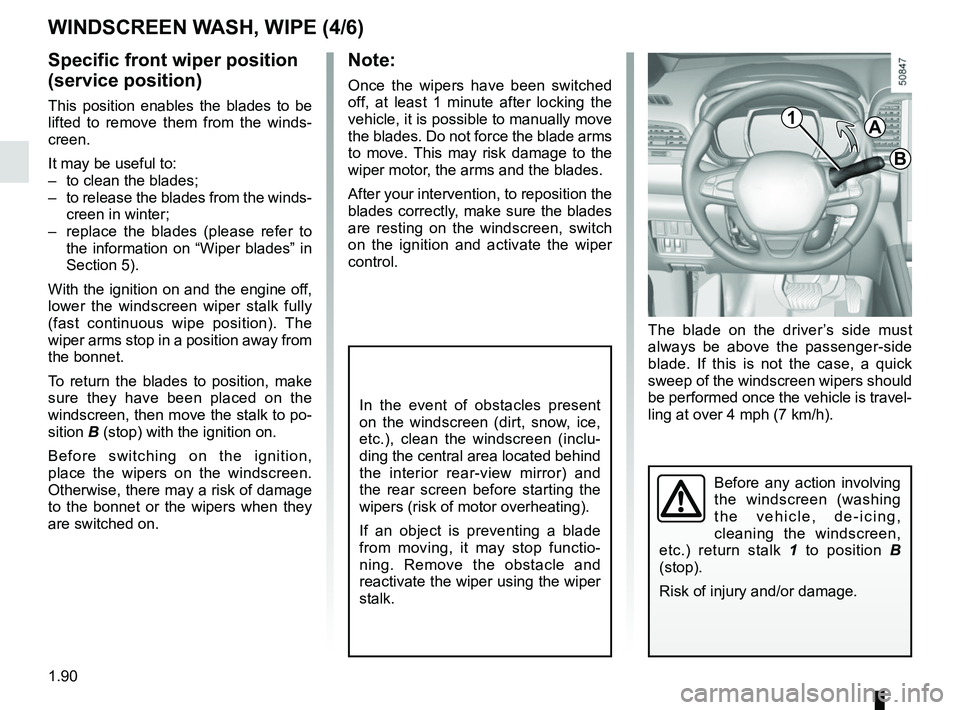
Before any action involving
the windscreen (washing
the vehicle, de-icing,
cleaning the windscreen,
etc.) return stalk 1 to position B
(stop).
Risk of injury and/or damage.
In the event of obstacles present
on the windscreen (dirt, snow, ice,
etc.), clean the windscreen (inclu-
ding the central area located behind
the interior rear-view mirror) and
the rear screen before starting the
wipers (risk of motor overheating).
If an object is preventing a blade
from moving, it may stop functio-
ning. Remove the obstacle and
reactivate the wiper using the wiper
stalk.
WINDSCREEN WASH, WIPE (4/6)
Specific front wiper position
(service position)
This position enables the blades to be
lifted to remove them from the winds-
creen.
It may be useful to:
– to clean the blades;
– to release the blades from the winds- creen in winter;
– replace the blades (please refer to the information on “Wiper blades” in
Section 5).
With the ignition on and the engine off,
lower the windscreen wiper stalk fully
(fast continuous wipe position). The
wiper arms stop in a position away from
the bonnet.
To return the blades to position, make
sure they have been placed on the
windscreen, then move the stalk to po-
sition B (stop) with the ignition on.
Before switching on the ignition,
place the wipers on the windscreen.
Otherwise, there may a risk of damage
to the bonnet or the wipers when they
are switched on.1A
B
Page 113 of 332
2.9
Do not use the engine
remote start-up function or
its programming when:
– the vehicle is in a garage
or in a confined space.
Risk of poisoning or suffoca-
tion by exhaust gas emissions.
– the vehicle is covered with a pro- tective cover.
Fire hazard.
– the bonnet is open or before it opens.
Risk of burns or serious injury.
Depending on the country, the use of the remote starting
function or its programming
can be prohibited by the legis
lation and/or the regulations in force.
Before using this function, check the legislation and/or the regu-
lations for the country in force.The remote engine start-up operates:
– the lever is in neutral for vehicles with a manual or sequential gearbox;
– the lever is in position P for vehicles
with an automatic gearbox;
– the ignition is off and no key is in- serted into the ignition switch;
– the bonnet is closed;
– all of the opening elements (doors and luggage compartment) are
closed and locked when you leave
the vehicle;
– in very cold weather conditions, the remote engine start-up by program-
ming may not operate;
– If the vehicle is equipped with an au- tomatic transmission, after the stop
of the engine or an attempt failed the
remote engine start-up, wait 10 sec-
onds to make a new attempt.
If one of the conditions is not respected,
flashers will turn on during approxi-
mately 3 seconds.
Note: In some rare case, the engine
can be stopped just after engine start
by remote engine start-up. In this case,
remote engine start-up is available and
driver can try to use again.
If the engine is stopped continuously,
consult an approved Dealer as soon as
possible.
STARTING, STOPPING THE ENGINE: vehicle with RENAULT CARD (5/5)
Special feature of vehicles
equipped with the “wake up every
2 hours” function
It is imperative to drive at least 10
minutes between each use of the
function. If you use this function,
there are risk of degradation of the
engine oil.
Refer to the multimedia instructions
for your vehicle.
Page 116 of 332
2.12
STOP AND START FUNCTION (3/4)
Conditions for preventing the
standby of the engine
Certain conditions prevent the system
from using the engine standby function,
including when:
for vehicles equipped with a
RENAULT card:
– the driver’s door is not closed;
– the driver’s seatbelt is not fastened;
for all vehicles:
– reverse gear is engaged;
– the bonnet is not locked;
– the outdoor temperature is too low or too high;
– the battery is not sufficiently char- ged;
– if available, “4WD Lock” mode is activated (please see the section
“Transmission: 4-wheel drive (4WD)”
in Section 2);
– the difference between the vehicle interior temperature and the auto-
matic climate control instruction is
too high; – parking distance control is in opera-
tion;
– for vehicles with automatic gear- boxes, the gradient is steeper than
approximately 12%;
– the “Clear View” function is activa- ted (please see “Automatic Climate
Control” in Section 3);
– the engine temperature is too low or high;
– the emission control system is being regenerated;
or
– ...
Warning light
is displayed on the
instrument panel. This notifies you that
engine standby is not available.
Deactivate the Stop and
Start function when perfor-
ming any operations in the
engine compartment.
Special cases for vehicles
with a RENAULT card
With the engine on standby (traffic jam,
traffic lights, etc.), if the driver unfas-
tens the seat belt and opens the driv-
er’s door, or gets out of the seat, the
ignition is switched off.
The assisted parking brake is applied
automatically.
To restart and reactivate the Stop and
Start system, start the engine (please
refer to “Starting, stopping the engine”
in Section 2).
Special cases of vehicles
with a key
With the engine on standby (traffic
jam, traffic lights, etc.), if you get out of
the vehicle, a beep warns you that the
engine is on standby and has not been
stopped.
After engine standby, even
driver takes off the vehicle,
it could be restarted. Please
check the safety before you
leave.
Page 247 of 332

4.1
Section 4: Maintenance
Bonnet . . . . . . . . . . . . . . . . . . . . . . . . . . . . . . . . . . . . \
. . . . . . . . . . . . . . . . . . . . . . . . . . . . . . . . . . . . 4.2
Engine oil level: general information . . . . . . . . . . . . . . . . . . . . . . . . . . . . . . . . . . . .\
. . . . . . . . . . . . . 4.4
Engine oil level: topping up, filling . . . . . . . . . . . . . . . . . . . . . . . . . . . . . . . . . . . . \
. . . . . . . . . . . . . . . 4.5
Engine oil change . . . . . . . . . . . . . . . . . . . . . . . . . . . . . . . . . . . .\
. . . . . . . . . . . . . . . . . . . . . . . . . . . 4.7
Levels . . . . . . . . . . . . . . . . . . . . . . . . . . . . . . . . . . . .\
. . . . . . . . . . . . . . . . . . . . . . . . . . . . . . . . . . . . 4.8engine coolant . . . . . . . . . . . . . . . . . . . . . . . . . . . . . . . . . . . .\
. . . . . . . . . . . . . . . . . . . . . . . . 4.8
brake fluid . . . . . . . . . . . . . . . . . . . . . . . . . . . . . . . . . . . . \
. . . . . . . . . . . . . . . . . . . . . . . . . . . . 4.9
windscreen washer reservoir . . . . . . . . . . . . . . . . . . . . . . . . . . . . . . . . . . . . \
. . . . . . . . . . . . . 4.10
Filters . . . . . . . . . . . . . . . . . . . . . . . . . . . . . . . . . . . . \
. . . . . . . . . . . . . . . . . . . . . . . . . . . . . . . . . . . . . 4.10
Tyre pressure. . . . . . . . . . . . . . . . . . . . . . . . . . . . . . . . . . . . \
. . . . . . . . . . . . . . . . . . . . . . . . . . . . . . . 4.11
Battery . . . . . . . . . . . . . . . . . . . . . . . . . . . . . . . . . . . . \
. . . . . . . . . . . . . . . . . . . . . . . . . . . . . . . . . . . . 4.13
Bodywork maintenance . . . . . . . . . . . . . . . . . . . . . . . . . . . . . . . . . . . . \
. . . . . . . . . . . . . . . . . . . . . . . 4.15
Interior trim maintenance . . . . . . . . . . . . . . . . . . . . . . . . . . . . . . . . . . . . \
. . . . . . . . . . . . . . . . . . . . . . 4.17
Page 248 of 332
4.2
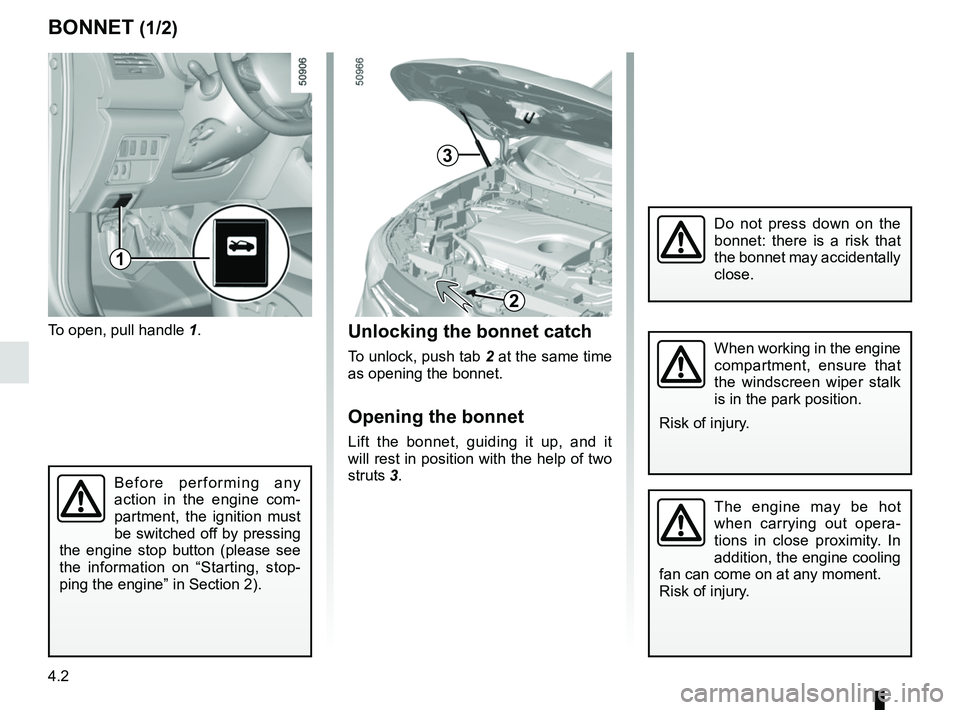
To open, pull handle 1.
BONNET (1/2)
The engine may be hot
when carrying out opera-
tions in close proximity. In
addition, the engine cooling
fan can come on at any moment.
Risk of injury.
Unlocking the bonnet catch
To unlock, push tab 2 at the same time
as opening the bonnet.
Opening the bonnet
Lift the bonnet, guiding it up, and it
will rest in position with the help of two
struts 3.
2
When working in the engine
compartment, ensure that
the windscreen wiper stalk
is in the park position.
Risk of injury.
Before performing any
action in the engine com-
partment, the ignition must
be switched off by pressing
the engine stop button (please see
the information on “Starting, stop-
ping the engine” in Section 2).
3
1
Do not press down on the
bonnet: there is a risk that
the bonnet may accidentally
close.
Page 249 of 332
4.3
BONNET (2/2)
Closing the bonnet
Check that nothing has been left in the
engine compartment.
To close the bonnet again, hold the
bonnet in the middle and guide it down,
allowing a 30 cm gap before it is closed,
then release it. It will latch automatically
under its own weight.
After carrying out any work
in the engine compart-
ment, check that nothing
has been left behind (cloth,
tools, etc.).
These may damage the engine or
cause a fire.
Ensure that the bonnet is
properly locked.
Check that nothing is pre-
venting the catch from lock-
ing (gravel, cloth, etc.).
In the event of even a slight
impact involving the radia-
tor grille or bonnet, have
the bonnet lock checked by
an approved dealer as soon as pos-
sible.
Page 293 of 332
5.29
WINDSCREEN WIPER BLADES: replacement (1/2)
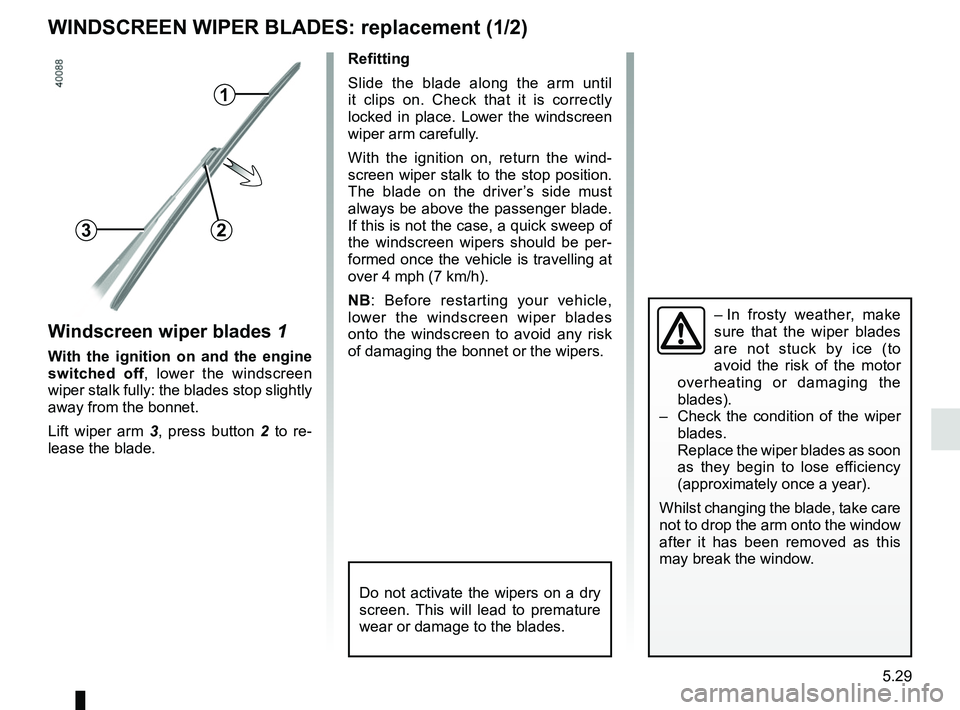
Windscreen wiper blades 1
With the ignition on and the engine
switched off, lower the windscreen
wiper stalk fully: the blades stop slightly
away from the bonnet.
Lift wiper arm 3 , press button 2 to re-
lease the blade.
1
23
Refitting
Slide the blade along the arm until
it clips on. Check that it is correctly
locked in place. Lower the windscreen
wiper arm carefully.
With the ignition on, return the wind-
screen wiper stalk to the stop position.
The blade on the driver’s side must
always be above the passenger blade.
If this is not the case, a quick sweep of
the windscreen wipers should be per-
formed once the vehicle is travelling at
over 4 mph (7 km/h).
NB: Before restarting your vehicle,
lower the windscreen wiper blades
onto the windscreen to avoid any risk
of damaging the bonnet or the wipers.
– In frosty weather, make
sure that the wiper blades
are not stuck by ice (to
avoid the risk of the motor
overheating or damaging the
blades).
– Check the condition of the wiper
blades.
Replace the wiper blades as soon
as they begin to lose efficiency
(approximately once a year).
Whilst changing the blade, take care
not to drop the arm onto the window
after it has been removed as this
may break the window.
Do not activate the wipers on a dry
screen. This will lead to premature
wear or damage to the blades.