height RENAULT KOLEOS 2018 Owners Manual
[x] Cancel search | Manufacturer: RENAULT, Model Year: 2018, Model line: KOLEOS, Model: RENAULT KOLEOS 2018Pages: 332, PDF Size: 8.91 MB
Page 25 of 332
1.19
FRONT HEADRESTS
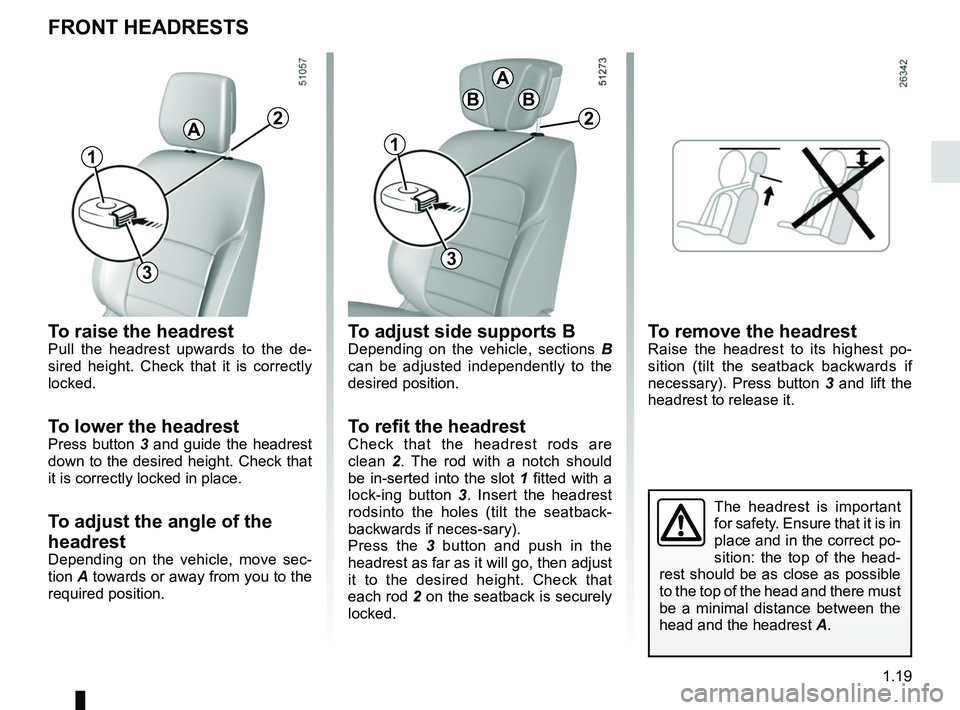
To raise the headrestPull the headrest upwards to the de-
sired height. Check that it is correctly
locked.
To lower the headrestPress button 3 and guide the headrest
down to the desired height. Check that
it is correctly locked in place.
To adjust the angle of the
headrest
Depending on the vehicle, move sec-
tion A towards or away from you to the
required position.
A
3
To adjust side supports BDepending on the vehicle, sections B
can be adjusted independently to the
desired position.
To refit the headrestCheck that the headrest rods are
clean 2. The rod with a notch should
be in-serted into the slot 1 fitted with a
lock-ing button 3 . Insert the headrest
rodsinto the holes (tilt the seatback-
backwards if neces-sary).
Press the 3 button and push in the
headrest as far as it will go, then adjust
it to the desired height. Check that
each rod 2 on the seatback is securely
locked.
The headrest is important
for safety. Ensure that it is in
place and in the correct po-
sition: the top of the head-
rest should be as close as possible
to the top of the head and there must
be a minimal distance between the
head and the headrest A.
2
11
3
2
A
BB
To remove the headrestRaise the headrest to its highest po-
sition (tilt the seatback backwards if
necessary). Press button 3 and lift the
headrest to release it.
Page 29 of 332
1.23
Always wear your seat belt when trav-
elling in your vehicle. You must also
comply with the legislation of the par-
ticular country you are in.
SEAT BELTS (1/4)
1
2
Incorrectly adjusted or
twisted seat belts may
cause injuries in the event
of an accident.
Use one seat belt per person,
whether child or adult.
Even pregnant women should wear
a seat belt. In this case, ensure that
the lap belt is not exerting too much
pressure on the abdomen, but do
not allow any slack.
Before starting, first adjust your driv-
ing position, then ask all occupants
to adjust their seat belts to ensure
optimum protection.
Adjusting your driving
position
– Sit well back in your seat (having
first removed your coat or jacket).
This is essential to ensure your back
is positioned correctly;
– adjust the distance between the seat and the pedals. Your seat
should be as far back as possible
while still allowing you to depress
the clutch pedal fully. The seatback
should be adjusted so that your arms
are slightly bent when you hold the
steering wheel;
– adjust the position of your head- rest. For the maximum safety, your
head must be as close as possible to
the headrest;
– adjust the height of the seat. This
adjustment allows you to select the
seat position which offers you the
best possible view ;
– adjust the position of the steering
wheel.
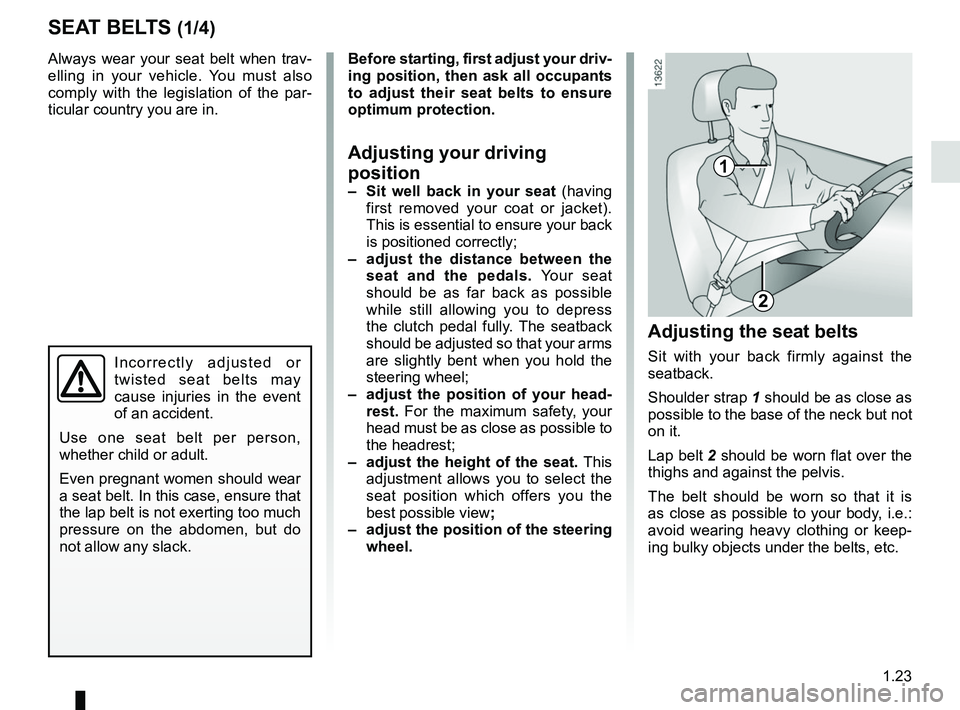
Adjusting the seat belts
Sit with your back firmly against the
seatback.
Shoulder strap 1 should be as close as
possible to the base of the neck but not
on it.
Lap belt 2 should be worn flat over the
thighs and against the pelvis.
The belt should be worn so that it is
as close as possible to your body, i.e.:
avoid wearing heavy clothing or keep-
ing bulky objects under the belts, etc.
Page 31 of 332
1.25
SEAT BELTS (3/4)
Check that the rear seat
belts are positioned and
operating correctly each
time the rear bench seat is
moved.
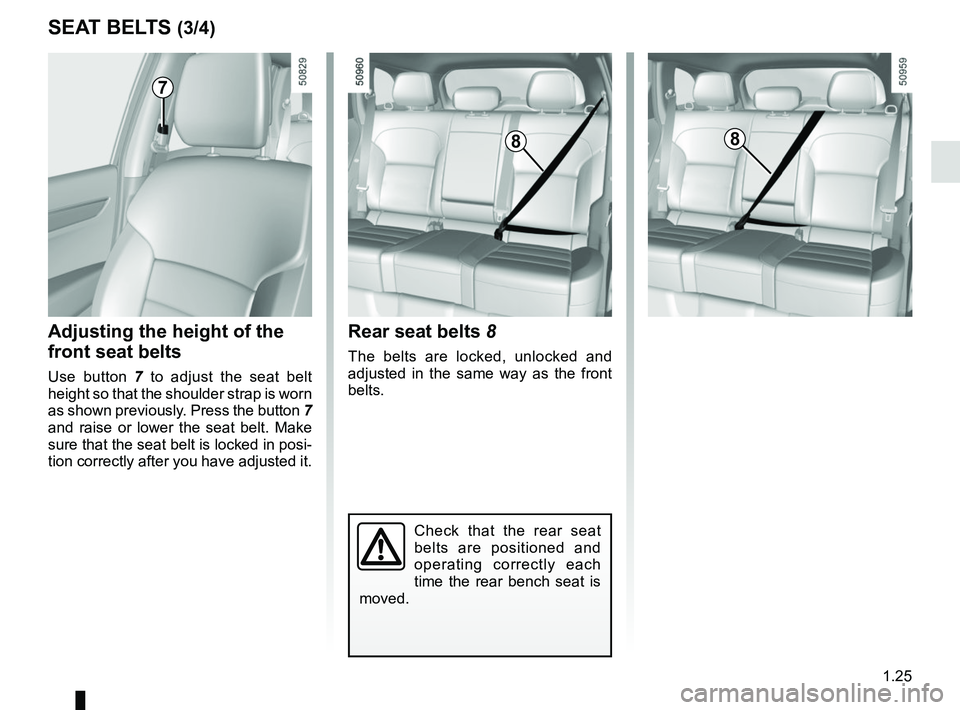
Rear seat belts 8
The belts are locked, unlocked and
adjusted in the same way as the front
belts.
Adjusting the height of the
front seat belts
Use button 7 to adjust the seat belt
height so that the shoulder strap is worn
as shown previously. Press the button 7
and raise or lower the seat belt. Make
sure that the seat belt is locked in posi-
tion correctly after you have adjusted it.
7
88
Page 42 of 332
1.36
CHILD SAFETY: choosing a child seat
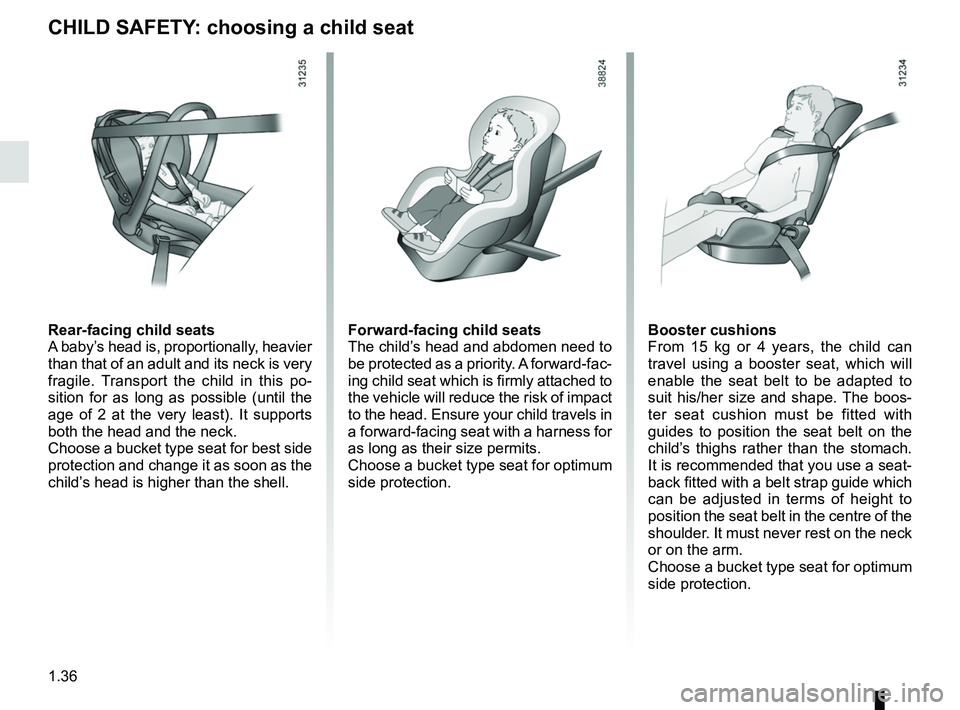
Rear-facing child seats
A baby’s head is, proportionally, heavier
than that of an adult and its neck is very
fragile. Transport the child in this po-
sition for as long as possible (until the
age of 2 at the very least). It supports
both the head and the neck.
Choose a bucket type seat for best side
protection and change it as soon as the
child’s head is higher than the shell.Forward-facing child seats
The child’s head and abdomen need to
be protected as a priority. A forward-fac-
ing child seat which is firmly attached to
the vehicle will reduce the risk of impact
to the head. Ensure your child travels in
a forward-facing seat with a harness for
as long as their size permits.
Choose a bucket type seat for optimum
side protection.Booster cushions
From 15 kg or 4 years, the child can
travel using a booster seat, which will
enable the seat belt to be adapted to
suit his/her size and shape. The boos-
ter seat cushion must be fitted with
guides to position the seat belt on the
child’s thighs rather than the stomach.
It is recommended that you use a seat-
back fitted with a belt strap guide which
can be adjusted in terms of height to
position the seat belt in the centre of the
shoulder. It must never rest on the neck
or on the arm.
Choose a bucket type seat for optimum
side protection.
Page 57 of 332
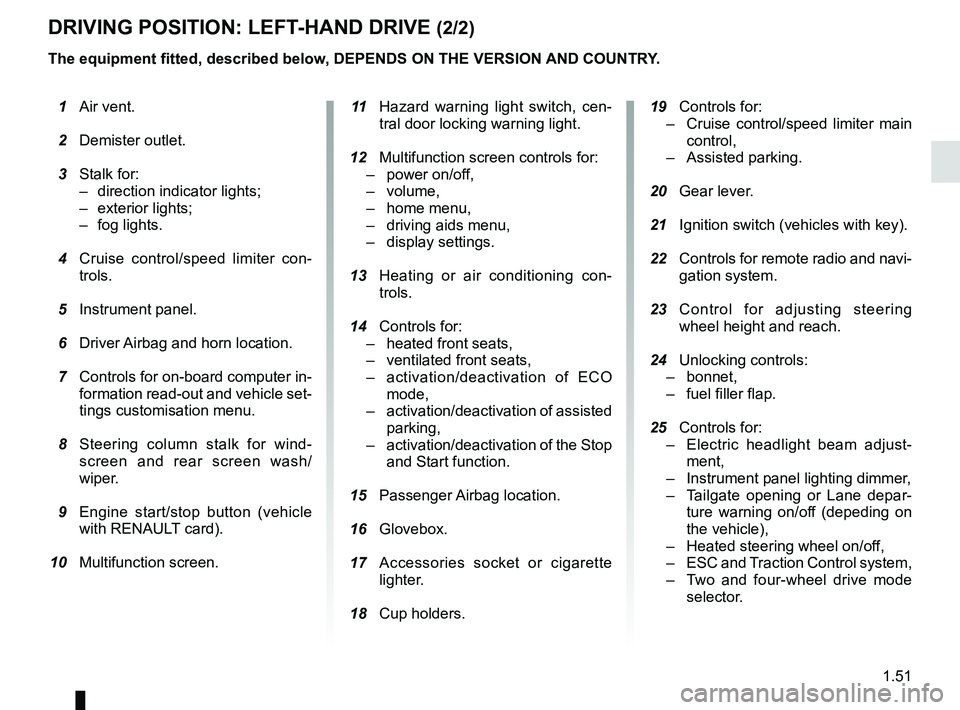
1.51
DRIVING POSITION: LEFT-HAND DRIVE (2/2)
The equipment fitted, described below, DEPENDS ON THE VERSION AND COUNTRY. 19 Controls for:
– Cruise control/speed limiter main
control,
– Assisted parking.
20 Gear lever.
21 Ignition switch (vehicles with key).
22 Controls for remote radio and navi-
gation system.
23 Control for adjusting steering
wheel height and reach.
24 Unlocking controls:
– bonnet,
– fuel filler flap.
25 Controls for:
– Electric headlight beam adjust-
ment,
– Instrument panel lighting dimmer,
– Tailgate opening or Lane depar-
ture warning on/off (depeding on
the vehicle),
– Heated steering wheel on/off,
– ESC and Traction Control system,
– Two and four-wheel drive mode
selector.
1 Air vent.
2 Demister outlet.
3 Stalk for:
– direction indicator lights;
– exterior lights;
– fog lights.
4 Cruise control/speed limiter con-
trols.
5 Instrument panel.
6 Driver Airbag and horn location.
7 Controls for on-board computer in-
formation read-out and vehicle set-
tings customisation menu.
8 Steering column stalk for wind-
screen and rear screen wash/
wiper.
9 Engine start/stop button (vehicle
with RENAULT card).
10 Multifunction screen.
11 Hazard warning light switch, cen-
tral door locking warning light.
12 Multifunction screen controls for:
– power on/off,
– volume,
– home menu,
– driving aids menu,
– display settings.
13 Heating or air conditioning con-
trols.
14 Controls for:
– heated front seats,
– ventilated front seats,
– activation/deactivation of ECO
mode,
– activation/deactivation of assisted
parking,
– activation/deactivation of the Stop
and Start function.
15 Passenger Airbag location.
16
Glovebox.
17 Accessories socket or cigarette
lighter.
18 Cup holders.
Page 59 of 332
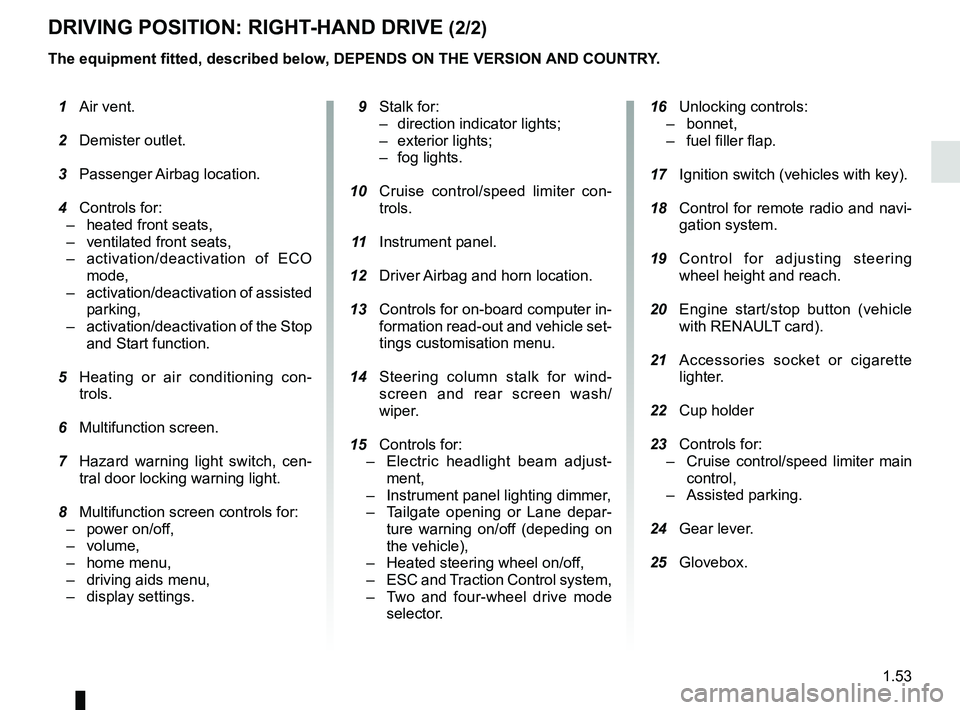
1.53
DRIVING POSITION: RIGHT-HAND DRIVE (2/2)
The equipment fitted, described below, DEPENDS ON THE VERSION AND COUNTRY.
16 Unlocking controls:
– bonnet,
– fuel filler flap.
17 Ignition switch (vehicles with key).
18 Control for remote radio and navi-
gation system.
19 Control for adjusting steering
wheel height and reach.
20 Engine start/stop button (vehicle
with RENAULT card).
21 Accessories socket or cigarette
lighter.
22 Cup holder
23 Controls for:
– Cruise control/speed limiter main
control,
– Assisted parking.
24 Gear lever.
25 Glovebox.
1 Air vent.
2 Demister outlet.
3 Passenger Airbag location.
4 Controls for:
– heated front seats,
– ventilated front seats,
– activation/deactivation of ECO
mode,
– activation/deactivation of assisted
parking,
– activation/deactivation of the Stop
and Start function.
5 Heating or air conditioning con-
trols.
6 Multifunction screen.
7 Hazard warning light switch, cen-
tral door locking warning light.
8 Multifunction screen controls for:
– power on/off,
– volume,
– home menu,
– driving aids menu,
– display settings.
9 Stalk for:
– direction indicator lights;
– exterior lights;
– fog lights.
10 Cruise control/speed limiter con-
trols.
11 Instrument panel.
12 Driver Airbag and horn location.
13 Controls for on-board computer in-
formation read-out and vehicle set-
tings customisation menu.
14 Steering column stalk for wind-
screen and rear screen wash/
wiper.
15
Controls for:
– Electric headlight beam adjust-
ment,
– Instrument panel lighting dimmer,
– Tailgate opening or Lane depar-
ture warning on/of
f (depeding on
the vehicle),
– Heated steering wheel on/off,
– ESC and Traction Control system,
– Two and four-wheel drive mode
selector.
Page 80 of 332
1.74
Power-assisted steering
Variable power-assisted steering
The variable power assisted steering
system is equipped with an electronic
control system which alters the level of
assistance to suit the vehicle speed.
Steering is made easier during parking
manoeuvres (for added comfort) while
the force needed to steer increases
progressively as the speed rises (for
enhanced safety at high speeds).
STEERING WHEEL, POWER-ASSISTED STEERING (1/2)
For safety reasons, only
adjust the steering wheel
when the vehicle is station-
ary.
Never leave the steering wheel at
full lock while stationary.
Do not switch off the engine
when driving downhill and,
as a general rule, when
driving (the power-assisted
steering and brake cannot operate
normally).
With the engine switched off, or if
there is a system fault, it is still pos-
sible to turn the steering wheel. The
force required will be greater.
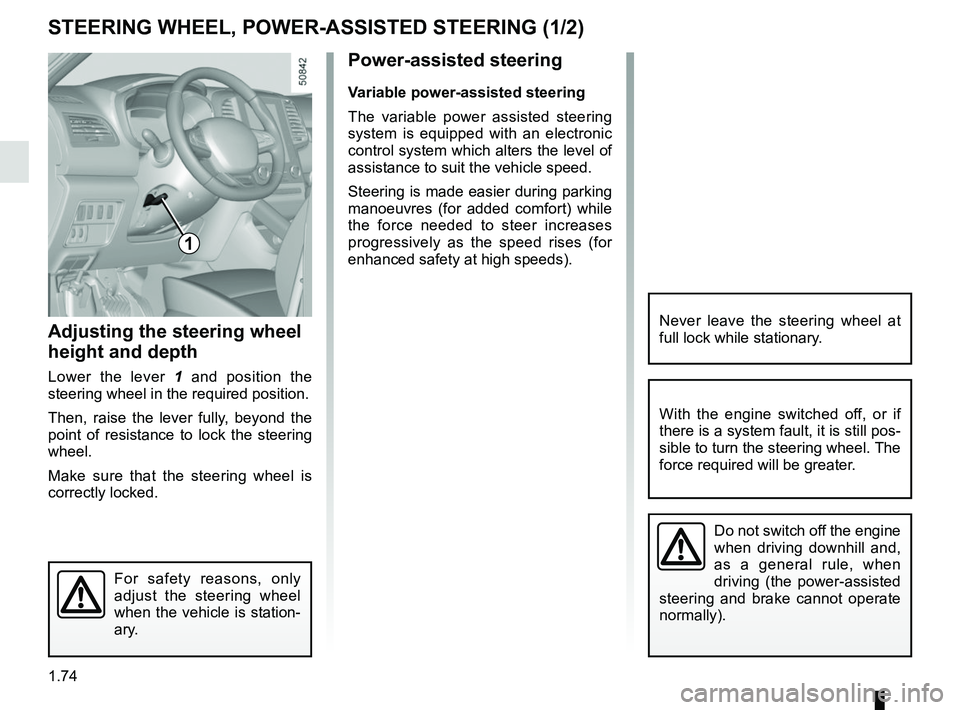
1
Adjusting the steering wheel
height and depth
Lower the lever 1 and position the
steering wheel in the required position.
Then, raise the lever fully, beyond the
point of resistance to lock the steering
wheel.
Make sure that the steering wheel is
correctly locked.
Page 91 of 332
1.85
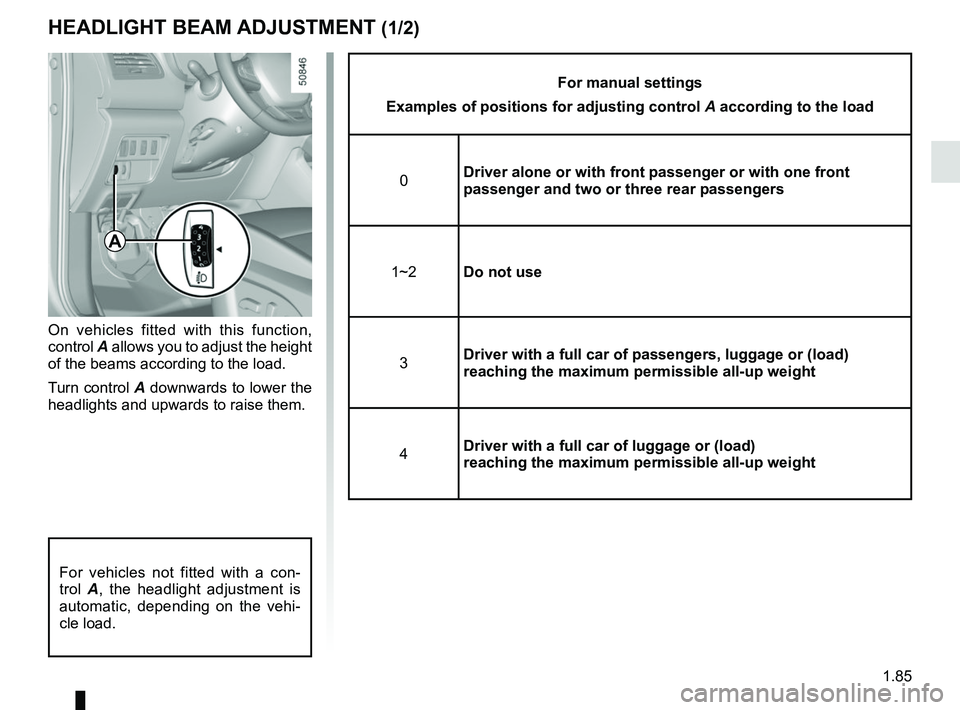
HEADLIGHT BEAM ADJUSTMENT (1/2)
On vehicles fitted with this function,
control A allows you to adjust the height
of the beams according to the load.
Turn control A downwards to lower the
headlights and upwards to raise them.
For manual settings
Examples of positions for adjusting control A according to the load
0 Driver alone or with front passenger or with one front
passenger and two or three rear passengers
1~2 Do not use
3 Driver with a full car of passengers, luggage or (load)
reaching the maximum permissible all-up weight
4 Driver with a full car of luggage or (load)
reaching the maximum permissible all-up weight
A
For vehicles not fitted with a con-
trol
A, the headlight adjustment is
automatic, depending on the vehi-
cle load.
Page 215 of 332
3.19
ELECTRIC WINDOWS (1/2)
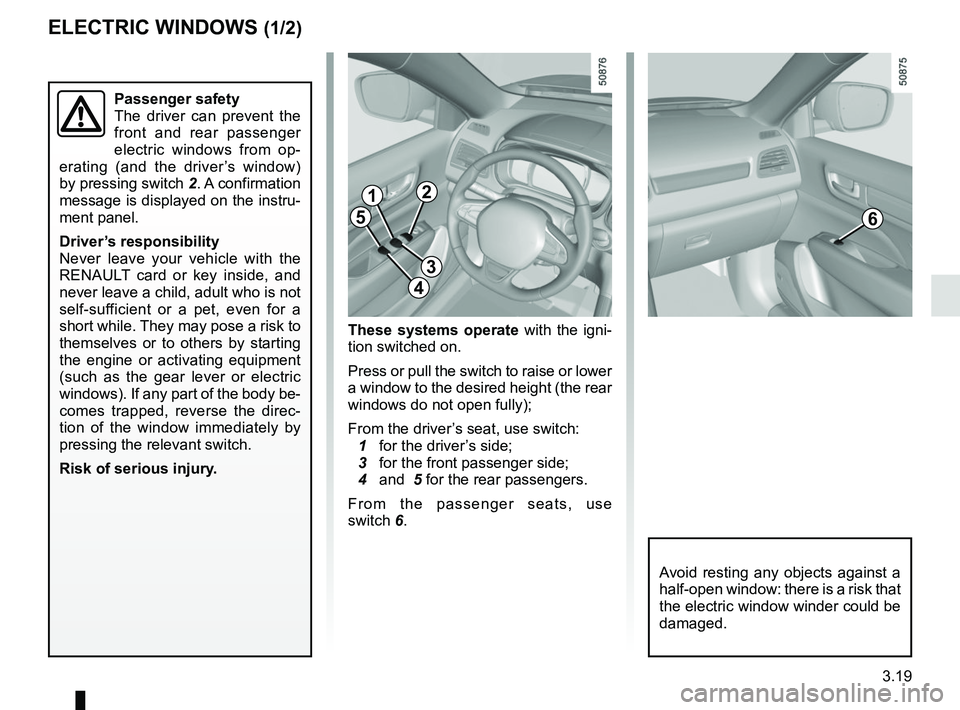
These systems operate with the igni-
tion switched on.
Press or pull the switch to raise or lower
a window to the desired height (the rear
windows do not open fully);
From the driver’s seat, use switch:
1 for the driver’s side;
3 for the front passenger side;
4 and 5 for the rear passengers.
From the passenger seats, use
switch 6.
1
3
4
56
Avoid resting any objects against a
half-open window: there is a risk that
the electric window winder could be
damaged.
Passenger safety
The driver can prevent the
front and rear passenger
electric windows from op-
erating (and the driver’s window)
by pressing switch 2. A confirmation
message is displayed on the instru-
ment panel.
Driver’s responsibility
Never leave your vehicle with the
RENAULT card or key inside, and
never leave a child, adult who is not
self-sufficient or a pet, even for a
short while. They may pose a risk to
themselves or to others by starting
the engine or activating equipment
(such as the gear lever or electric
windows). If any part of the body be-
comes trapped, reverse the direc-
tion of the window immediately by
pressing the relevant switch.
Risk of serious injury.
2
Page 228 of 332
3.32
The headrest is a safety
component; check that it is
fitted and in the correct po-
sition. The top of the head-
rest should be as close as possible
to the top of the head.
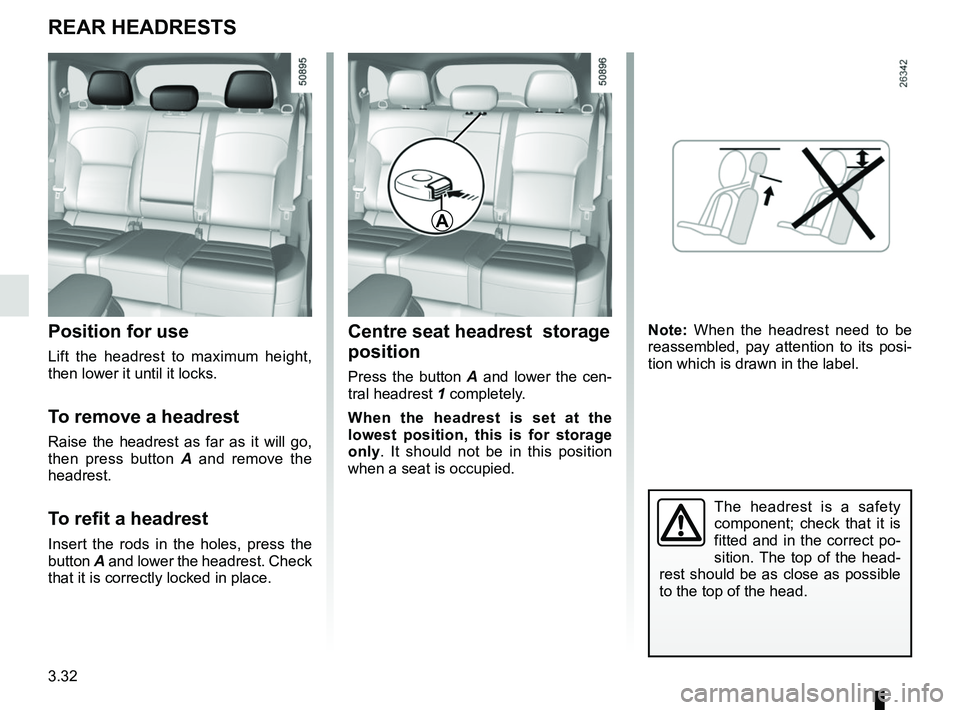
Centre seat headrest storage
position
Press the button A and lower the cen-
tral headrest 1 completely.
When the headrest is set at the
lowest position, this is for storage
only. It should not be in this position
when a seat is occupied.
Position for use
Lift the headrest to maximum height,
then lower it until it locks.
To remove a headrest
Raise the headrest as far as it will go,
then press button A and remove the
headrest.
To refit a headrest
Insert the rods in the holes, press the
button A and lower the headrest. Check
that it is correctly locked in place.
REAR HEADRESTS
A
Note: When the headrest need to be
reassembled, pay attention to its posi-
tion which is drawn in the label.