ECO mode RENAULT MASTER 2018 User Guide
[x] Cancel search | Manufacturer: RENAULT, Model Year: 2018, Model line: MASTER, Model: RENAULT MASTER 2018Pages: 290, PDF Size: 7.1 MB
Page 138 of 290
2.22
DRIVER CORRECTION DEVICES AND AIDS (7/8)
Grip control
If fitted on the vehicle, grip control
makes it easier to control the vehicle on
low grip surfaces (soft ground, etc.).“Soft ground” mode
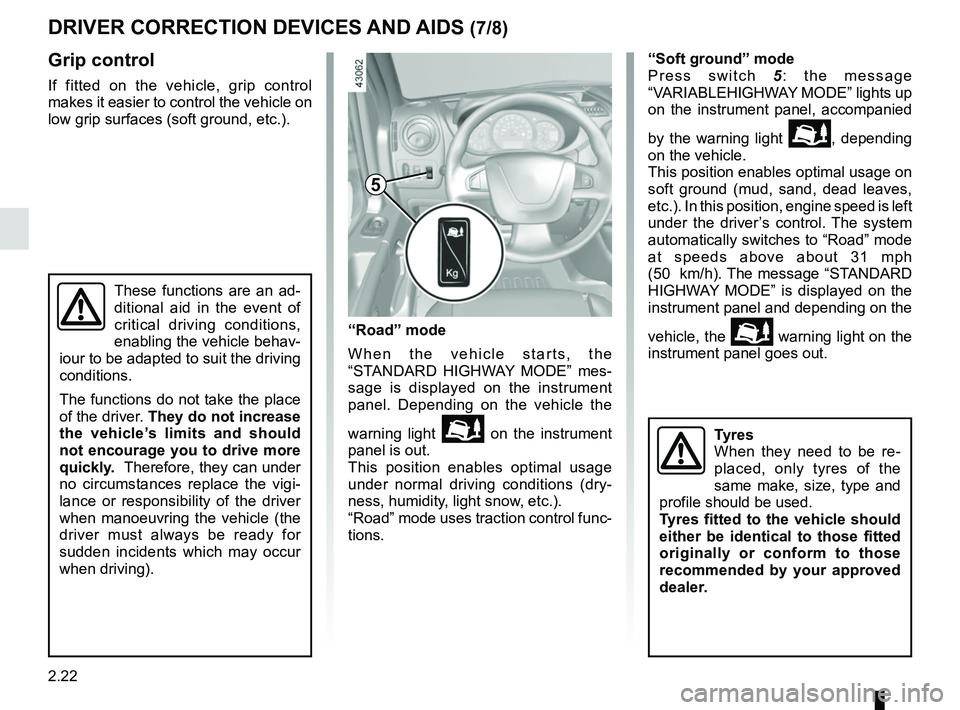
Press switch
5: the message
“VARIABLEHIGHWAY MODE” lights up
on the instrument panel, accompanied
by the warning light
\b, depending
on the vehicle.
This position enables optimal usage on
soft ground (mud, sand, dead leaves,
etc.). In this position, engine speed is left
under the driver’s control. The system
automatically switches to “Road” mode
at speeds above about 31 mph
(50 km/h). The message “STANDARD
HIGHWAY MODE” is displayed on the
instrument panel and depending on the
vehicle, the
\b warning light on the
instrument panel goes out.
These functions are an ad-
ditional aid in the event of
critical driving conditions,
enabling the vehicle behav-
iour to be adapted to suit the driving
conditions.
The functions do not take the place
of the driver. They do not increase
the vehicle’s limits and should
not encourage you to drive more
quickly. Therefore, they can under
no circumstances replace the vigi-
lance or responsibility of the driver
when manoeuvring the vehicle (the
driver must always be ready for
sudden incidents which may occur
when driving).
“Road” mode
When the vehicle starts, the
“STANDARD HIGHWAY MODE” mes-
sage is displayed on the instrument
panel. Depending on the vehicle the
warning light
\b on the instrument
panel is out.
This position enables optimal usage
under normal driving conditions (dry-
ness, humidity, light snow, etc.).
“Road” mode uses traction control func-
tions.
5
Tyres
When they need to be re-
placed, only tyres of the
same make, size, type and
profile should be used.
Tyres fitted to the vehicle should
either be identical to those fitted
originally or conform to those
recommended by your approved
dealer.
Page 165 of 290
2.49
SEQUENTIAL GEARBOX (5/5)
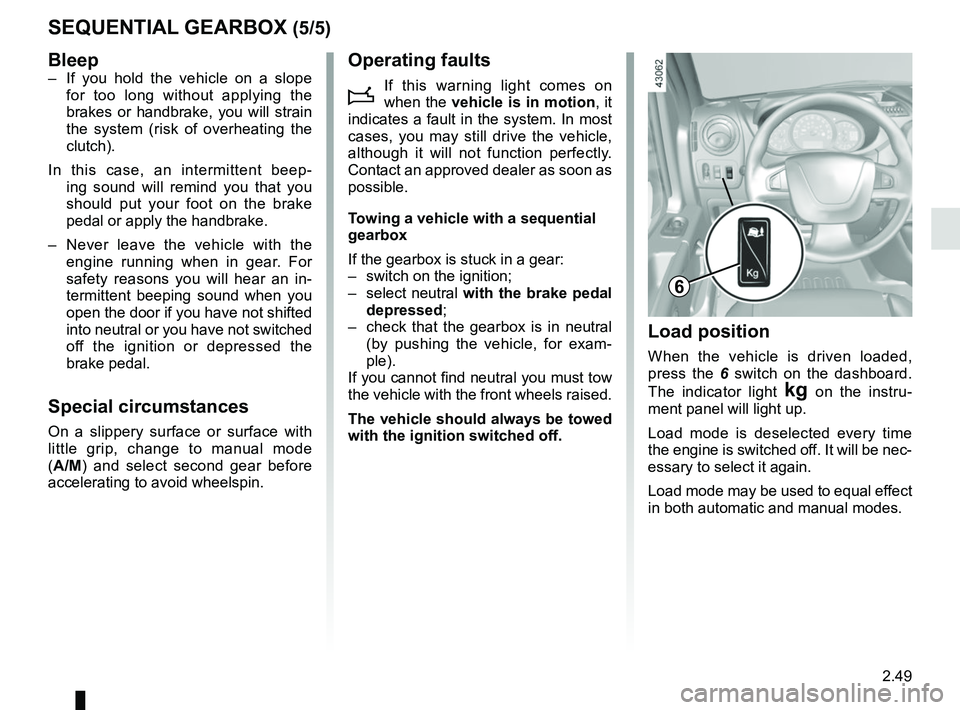
Load position
When the vehicle is driven loaded,
press the 6 switch on the dashboard.
The indicator light
§ on the instru-
ment panel will light up.
Load mode is deselected every time
the engine is switched off. It will be nec-
essary to select it again.
Load mode may be used to equal effect
in both automatic and manual modes.
6
Bleep– If you hold the vehicle on a slope for too long without applying the
brakes or handbrake, you will strain
the system (risk of overheating the
clutch).
In this case, an intermittent beep- ing sound will remind you that you
should put your foot on the brake
pedal or apply the handbrake.
– Never leave the vehicle with the engine running when in gear. For
safety reasons you will hear an in-
termittent beeping sound when you
open the door if you have not shifted
into neutral or you have not switched
off the ignition or depressed the
brake pedal.
Special circumstances
On a slippery surface or surface with
little grip, change to manual mode
(A/M) and select second gear before
accelerating to avoid wheelspin.
Operating faults
i
If this warning light comes on
when the vehicle is in motion , it
indicates a fault in the system. In most
cases, you may still drive the vehicle,
although it will not function perfectly.
Contact an approved dealer as soon as
possible.
Towing a vehicle with a sequential
gearbox
If the gearbox is stuck in a gear:
– switch on the ignition;
– select neutral with the brake pedal
depressed;
– check that the gearbox is in neutral (by pushing the vehicle, for exam-
ple).
If you cannot find neutral you must tow
the vehicle with the front wheels raised.
The vehicle should always be towed
with the ignition switched off.
Page 174 of 290
3.8
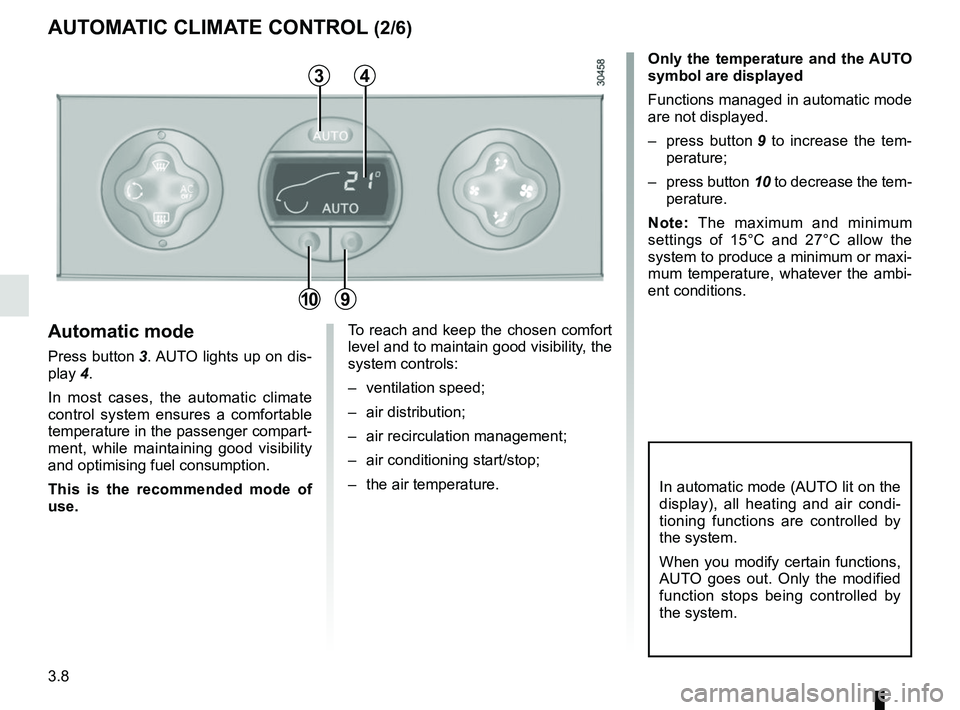
Only the temperature and the AUTO
symbol are displayed
Functions managed in automatic mode
are not displayed.
– press button 9 to increase the tem-
perature;
– press button 10 to decrease the tem-
perature.
Note: The maximum and minimum
settings of 15°C and 27°C allow the
system to produce a minimum or maxi-
mum temperature, whatever the ambi-
ent conditions.
In automatic mode (AUTO lit on the
display), all heating and air condi-
tioning functions are controlled by
the system.
When you modify certain functions,
AUTO goes out. Only the modified
function stops being controlled by
the system.
To reach and keep the chosen comfort
level and to maintain good visibility, the
system controls:
– ventilation speed;
– air distribution;
– air recirculation management;
– air conditioning start/stop;
– the air temperature.Automatic mode
Press button 3. AUTO lights up on dis-
play 4.
In most cases, the automatic climate
control system ensures a comfortable
temperature in the passenger compart-
ment, while maintaining good visibility
and optimising fuel consumption.
This is the recommended mode of
use.
AUTOMATIC CLIMATE CONTROL (2/6)
3
910
4
Page 175 of 290
3.9
Adjusting automatic mode
The system normally operates in auto-
matic mode but you can alter the stand-
ard settings used by the system (air
distribution, etc.). These options are
explained on the following pages.
Automatic mode is the recom-
mended mode of use
In most cases, the automatic cli-
mate control system ensures a com-
fortable temperature in the passen-
ger compartment, while maintaining
good visibility and optimising fuel
consumption.
The types of adjustments that can
be made are described in the follow-
ing pages.
Return to automatic mode as soon
as possible.
The displayed temperature values
show a comfort level.
When starting the engine, increas-
ing or decreasing the value dis-
played will not allow the com-
fort level to be reached any more
quickly. The system will always op-
timise the temperature increase or
decrease (the ventilation system
does not start instantly at maximum
speed: it gradually increases). This
may take several minutes.
Generally speaking, unless there is
a particular reason not to, the dash-
board air vents should remain open.
AUTOMATIC CLIMATE CONTROL (3/6)
Page 177 of 290
3.11
In automatic mode, depending on
the outside air conditions, the ven-
tilation may not start immediately at
maximum power but will increase
progressively until the engine tem-
perature is warm enough to heat the
passenger compartment air. This
may take from a few seconds to
several minutes.
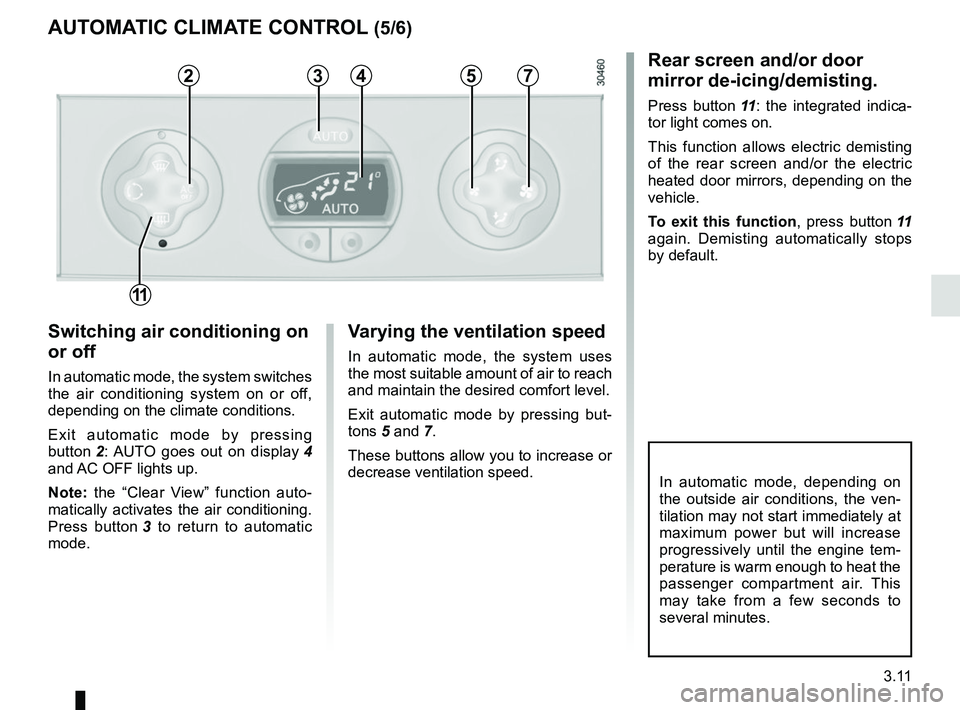
Switching air conditioning on
or off
In automatic mode, the system switches
the air conditioning system on or off,
depending on the climate conditions.
Exit automatic mode by pressing
button 2: AUTO goes out on display 4
and AC OFF lights up.
Note: the “Clear View” function auto-
matically activates the air conditioning.
Press button 3 to return to automatic
mode.
Varying the ventilation speed
In automatic mode, the system uses
the most suitable amount of air to reach
and maintain the desired comfort level.
Exit automatic mode by pressing but-
tons 5 and 7.
These buttons allow you to increase or
decrease ventilation speed.
Rear screen and/or door
mirror de-icing/demisting.
Press button 11: the integrated indica-
tor light comes on.
This function allows electric demisting
of the rear screen and/or the electric
heated door mirrors, depending on the
vehicle.
To exit this function , press button 11
again. Demisting automatically stops
by default.
AUTOMATIC CLIMATE CONTROL (5/6)
23457
11
Page 179 of 290
3.13
Operating faults
As a general rule, contact your ap-
proved dealer in the event of an oper-
ating fault.
– Reduction in de-icing, demisting or air conditioning performance.
This may be caused by the passen-
ger compartment filter cartridge be-
coming clogged.
– No cold air is being produced .
Check that the controls are set cor-
rectly and that the fuses are sound.
Otherwise, switch off the system.
Presence of water under the
vehicle
After prolonged use of the air condi-
tioning system, it is normal for water
to be present under the vehicle. This is
caused by condensation.
AIR CONDITIONING: information and operating instructions (1/2)
Do not open the refriger-
ant fluid circuit. The fluid
may damage eyes or skin.
Fuel consumption
You will normally notice an increase in
fuel consumption (especially in town)
when the air conditioning is operating.
For vehicles fitted with air conditioning
with no automatic mode, switch off the
system when it is not required.
Advice for reducing consumption
and helping to preserve the environ-
ment
Drive with the air vents open and the
windows closed.
If the vehicle has been parked in the
sun, open the doors for a few moments
to let the hot air escape before starting
the engine.
Maintenance
Refer to the Maintenance Document
for your vehicle for the inspection fre-
quency.
Advice on use
In some situations (air conditioning off,
air recirculation activated, ventilation
speed at zero or low etc.), you may
notice that condensation starts to form
on the windows and windscreen.
If there is condensation, use the “Clear
View” function to remove it, then use
the air conditioning in automatic mode
to stop it forming again.
Do not add anything to the
vehicle’s ventilation circuit
(for example, to remove
bad odours).
There is a risk of damage or of
fire.
Use the air conditioning system reg-
ularly, even in cold weather, running
it at least once a month for approxi-
mately 5 minutes.
Vehicles equipped with
modeECO
Once activated, ECO mode may
reduce air conditioning perform-
ance. Please refer to the informa-
tion on “Driving advice, Eco-driving”
in Section 2.
Page 209 of 290
4.13
When the ignition is off, some consu-
mers may also be switched off (dipped
beam headlights, radio, ventilation,
etc.). On the instrument panel, the mes-
sage “BATTERY MODE: ECONOMY”
appears when switched off. When the
level is extremely low, the message
“BATTERY LOW START ENGINE” is
displayed.
The charge status of the battery can
decrease, especially if you use your
vehicle:
– for short journeys;
– for driving in town;
– when the temperature drops;
– with the vehicle stopped and the engine off.
Replacing the battery
As this operation is complex, we advise
you to contact an approved Dealer.
BATTERY
123
456
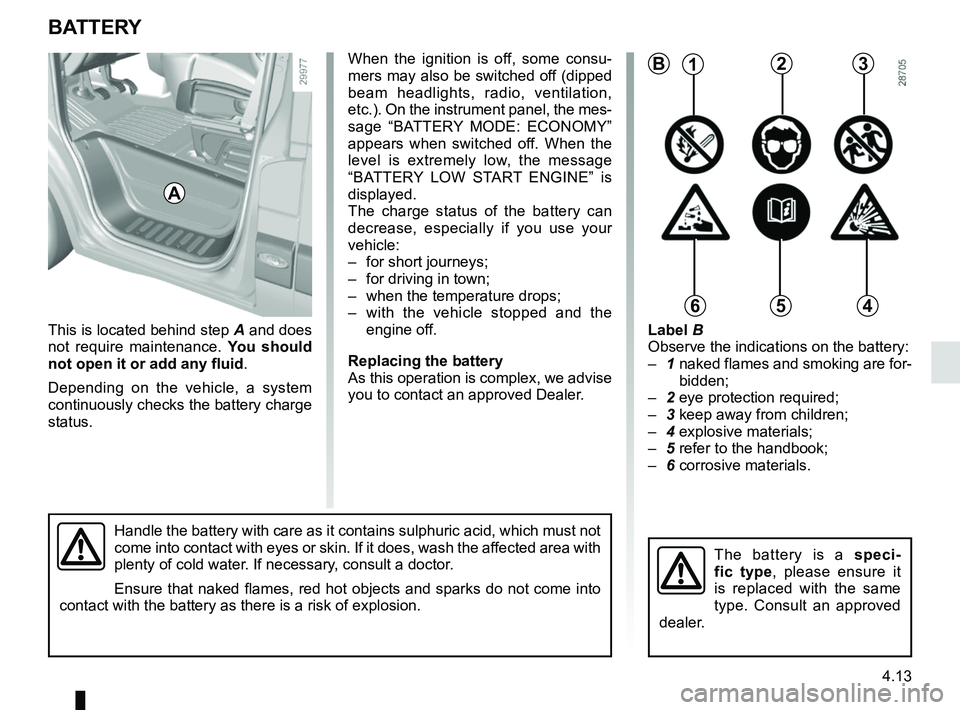
This is located behind step A and does
not require maintenance. You should
not open it or add any fluid .
Depending on the vehicle, a system
continuously checks the battery charge
status.
Handle the battery with care as it contains sulphuric acid, which must n\
ot
come into contact with eyes or skin. If it does, wash the affected area with
plenty of cold water. If necessary, consult a doctor.
Ensure that naked flames, red hot objects and sparks do not come into
contact with the battery as there is a risk of explosion.
Label B
Observe the indications on the battery:
– 1 naked flames and smoking are for-
bidden;
– 2 eye protection required;
– 3 keep away from children;
– 4 explosive materials;
– 5 refer to the handbook;
– 6 corrosive materials.
The battery is a speci-
fic type, please ensure it
is replaced with the same
type. Consult an approved
dealer.
B
A
Page 283 of 290

A
ABS ....................................................................\
...2.16 → 2.23
accessories...................................................................")
7.1
ALPHABETICAL INDEX (1/4)
A
ABS ....................................................................\
...2.16 → 2.23
accessories........................................................................\
5.41
accessories socket ............................................................ 3.19
AdBlue ...............................................................1.104 → 1.109
AdBlue additive..................................................1.104 → 1.109
additional systems to the seat belts................................... 1.31
additive (tank) ....................................................1.104 → 1.109
additive tank ......................................................1.104 → 1.109
adjusting the seats............................................................. 1.24
adjusting your driving position ........................................... 1.24
advice on antipollution ....................................................... 2.12
air bag....................................................................1.28 → 1.31
activating the front passenger air bags ............1.70 → 1.72
deactivating the front passenger air bags ........1.70 → 1.72
air conditioning ........................................................3.2 → 3.14
air vents ...................................................................... 3.2 – 3.3
anti-corrosion check ..............................................6.16 → 6.21
anti-corrosion protection .................................................... 4.14
anti-lock braking system: ABS ...............................2.16 → 2.23
antipollution advice .................................................................\
......... 2.12
ashtrays ...............................................................\
.............. 3.19
audible and visual signals................................................ 1.101
automatic gearbox selector lever...........................2.45 → 2.49
B
battery........................................................................\
........ 4.13 troubleshooting ................................................. 5.33 – 5.34
bonnet........................................................................\
.......... 4.2
brake fluid ........................................................................\
.... 4.8
bulbs changing ......................................5.21 – 5.22, 5.25 → 5.27
C
capacity of mechanical components........................4.8 → 4.10central door locking ........................... 1.2
→ 1.12, 1.15 → 1.18
changing a bulb .................................5.21 – 5.22, 5.25 → 5.27
changing a wheel........................ 5.2 → 5.4, 5.11 → 5.15, 5.17
changing gear .................................................................... 2.14
child restraint/seat 1.30, 1.33 – 1.34, 1.38 → 1.57, 1.70 → 1.72
child safety................... 1.33 – 1.34, 1.38 → 1.57, 1.70 → 1.72
child seats..........................................1.33 – 1.34, 1.38 → 1.57
children ................................................................... 1.33 – 1.34
cigar lighter ........................................................................\
3.19
cleaning: inside the vehicle .............................................. 4.17 – 4.18
clock ..................................................................\
................ 1.93
control instruments ................................................1.78 → 1.85
coolant ................................................................\
............... 1.83
courtesy light ............................................................ 3.17, 5.27
cruise control .........................................................2.33 → 2.36
cruise control-speed limiter....................................2.30 → 2.36
D
deadlocking the doors ......................................................... 1.7
demisting windscreen ..................................................3.4, 3.7 → 3.12
dimensions ................................................................. 6.6 – 6.7
dipstick................................................................\
........ 4.4 – 4.5
display .................................................................... 1.84 – 1.85
doors................................................... 1.13 – 1.14, 1.17 – 1.18
driver’s position .....................................................1.74 → 1.77
driving ...........................................2.2, 2.10, 2.16 → 2.26, 2.37
driving recommendations ........................................ 2.8 → 2.11
E
ECO driving .............................................................
2.8 → 2.11
ECO mode ........................................................................\
... 2.9
electric beam height adjustment ...................................... 1.100
electric windows ..................................................... 3.15 – 3.16
electronic stability control: ESC .............................2.16 → 2.23