instrument panel RENAULT MASTER 2018 Owner's Manual
[x] Cancel search | Manufacturer: RENAULT, Model Year: 2018, Model line: MASTER, Model: RENAULT MASTER 2018Pages: 290, PDF Size: 7.1 MB
Page 135 of 290
2.19
DRIVER CORRECTION DEVICES AND AIDS (4/8)
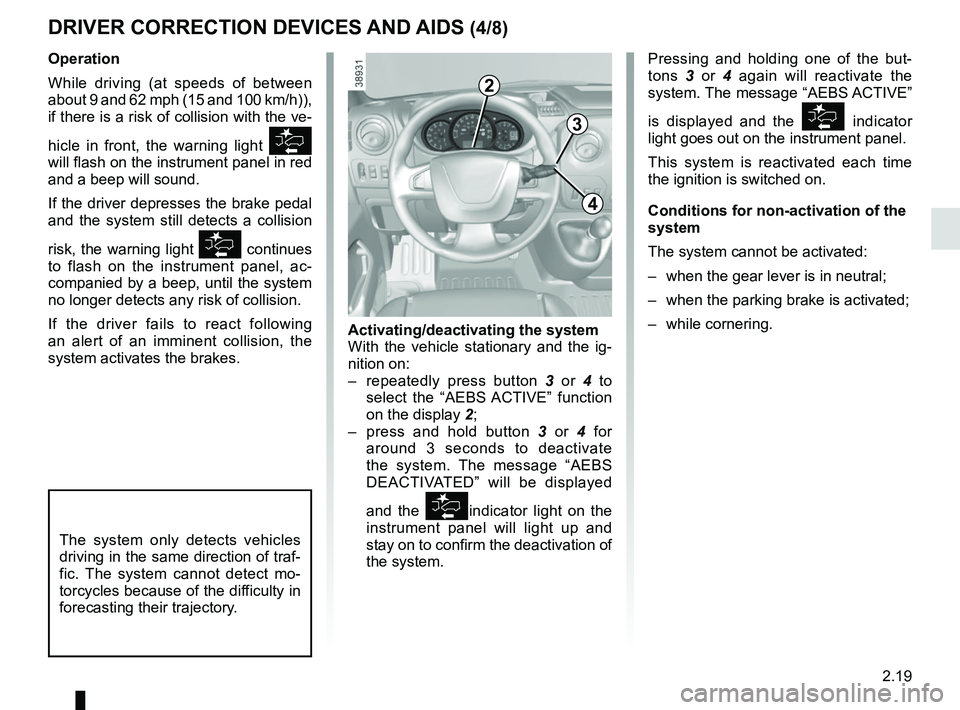
Pressing and holding one of the but-
tons 3 or 4 again will reactivate the
system. The message “AEBS ACTIVE”
is displayed and the
indicator
light goes out on the instrument panel.
This system is reactivated each time
the ignition is switched on.
Conditions for non-activation of the
system
The system cannot be activated:
– when the gear lever is in neutral;
– when the parking brake is activated;
– while cornering.
Operation
While driving (at speeds of between
about 9 and 62 mph (15 and 100 km/h)),
if there is a risk of collision with the ve-
hicle in front, the warning light
will flash on the instrument panel in red
and a beep will sound.
If the driver depresses the brake pedal
and the system still detects a collision
risk, the warning light
continues
to flash on the instrument panel, ac-
companied by a beep, until the system
no longer detects any risk of collision.
If the driver fails to react following
an alert of an imminent collision, the
system activates the brakes.
The system only detects vehicles
driving in the same direction of traf-
fic. The system cannot detect mo-
torcycles because of the difficulty in
forecasting their trajectory.
Activating/deactivating the system
With the vehicle stationary and the ig-
nition on:
– repeatedly press button 3 or 4 to
select the “AEBS ACTIVE” function
on the display 2;
– press and hold button 3 or 4 for
around 3 seconds to deactivate
the system. The message “AEBS
DEACTIVATED” will be displayed
and the
indicator light on the
instrument panel will light up and
stay on to confirm the deactivation of
the system.
3
4
2
Page 136 of 290
2.20
DRIVER CORRECTION DEVICES AND AIDS (5/8)
Active emergency braking
This function is an additional driving aid. This function is not under any
circumstances intended to replace the due care and attention of the
driver, who should at all times be in control of the vehicle.
System servicing/repairs
– In the event of an impact, the sensor alignment may become changed, and \
its operation will consequently be affected. Deactivate the function, then consult
an authorised dealer.
– Any work in the area where the radar is located (repairs, replacements,\
touch- ing up of paintwork) must be carried out by a qualified professional.
Only an authorised dealer is qualified to service the system.
In the event of system disturbance
Some conditions can disturb or damage the operation of the system, such \
as:
– a complex environment (metal bridge, tunnel etc.) ;
– poor weather conditions (snow, hail, black ice, etc.).
Risk of inadvertent braking.
Operating faults
The warning lights
and
lit up on the instrument panel accom-
panied by the message “WARNING
AEBSCHECK” indicate a system
fault. Consult an approved dealer.
When the system detects that the func-
tion is not available, the
warn-
ing light lights up on the instrument
panel and stays on, with the message
“WARNING AEBS DISABLED”.
There are two possibilities:
– The system is temporarily disrupted (for example: radar obscured by
dirt, mud, snow etc.). In this case,
park the vehicle and switch off the
engine. Clean the detection zone of
the radar. When you next start the
engine, the warning light and the
message go out;
– If this is not the case, this may arise from another cause; contact an
Approved Dealer.
Page 138 of 290
2.22
DRIVER CORRECTION DEVICES AND AIDS (7/8)
Grip control
If fitted on the vehicle, grip control
makes it easier to control the vehicle on
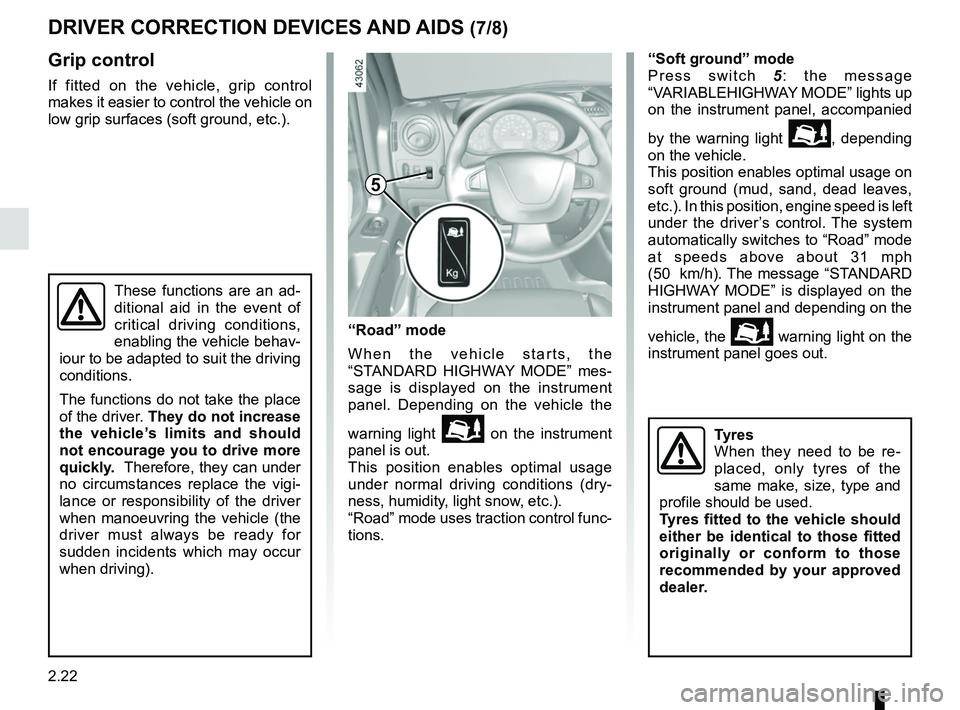
low grip surfaces (soft ground, etc.).“Soft ground” mode
Press switch
5: the message
“VARIABLEHIGHWAY MODE” lights up
on the instrument panel, accompanied
by the warning light
\b, depending
on the vehicle.
This position enables optimal usage on
soft ground (mud, sand, dead leaves,
etc.). In this position, engine speed is left
under the driver’s control. The system
automatically switches to “Road” mode
at speeds above about 31 mph
(50 km/h). The message “STANDARD
HIGHWAY MODE” is displayed on the
instrument panel and depending on the
vehicle, the
\b warning light on the
instrument panel goes out.
These functions are an ad-
ditional aid in the event of
critical driving conditions,
enabling the vehicle behav-
iour to be adapted to suit the driving
conditions.
The functions do not take the place
of the driver. They do not increase
the vehicle’s limits and should
not encourage you to drive more
quickly. Therefore, they can under
no circumstances replace the vigi-
lance or responsibility of the driver
when manoeuvring the vehicle (the
driver must always be ready for
sudden incidents which may occur
when driving).
“Road” mode
When the vehicle starts, the
“STANDARD HIGHWAY MODE” mes-
sage is displayed on the instrument
panel. Depending on the vehicle the
warning light
\b on the instrument
panel is out.
This position enables optimal usage
under normal driving conditions (dry-
ness, humidity, light snow, etc.).
“Road” mode uses traction control func-
tions.
5
Tyres
When they need to be re-
placed, only tyres of the
same make, size, type and
profile should be used.
Tyres fitted to the vehicle should
either be identical to those fitted
originally or conform to those
recommended by your approved
dealer.
Page 141 of 290
2.25
TYRE PRESSURE LOSS WARNING (2/3)
2
3
4
Note:
The standard tyre pressure cannot be
less than that recommended and indi-
cated on the door frame.
Display
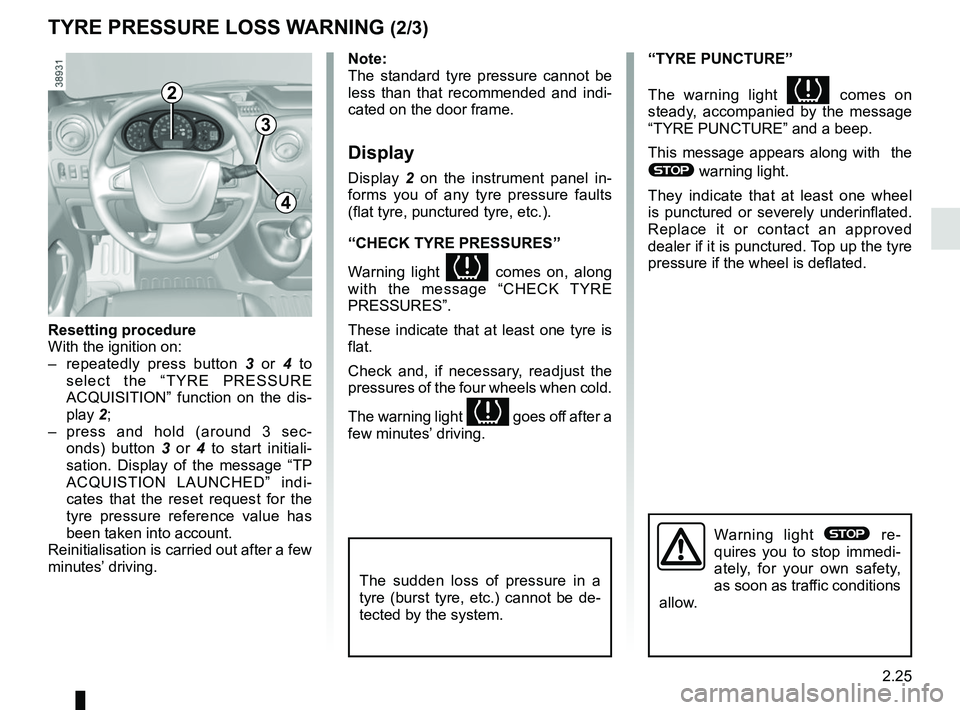
Display 2 on the instrument panel in-
forms you of any tyre pressure faults
(flat tyre, punctured tyre, etc.).
“CHECK TYRE PRESSURES”
Warning light
comes on, along
with the message “CHECK TYRE
PRESSURES”.
These indicate that at least one tyre is
flat.
Check and, if necessary, readjust the
pressures of the four wheels when cold.
The warning light
goes off after a
few minutes’ driving.
“TYRE PUNCTURE”
The warning light
comes on
steady, accompanied by the message
“TYRE PUNCTURE” and a beep.
This message appears along with the
® warning light.
They indicate that at least one wheel
is punctured or severely underinflated.
Replace it or contact an approved
dealer if it is punctured. Top up the tyre
pressure if the wheel is deflated.
Warning light ® re-
quires you to stop immedi-
ately, for your own safety,
as soon as traffic conditions
allow.
Resetting procedure
With the ignition on:
– repeatedly press button 3 or 4 to
select the “TYRE PRESSURE
ACQUISITION” function on the dis-
play 2;
– press and hold (around 3 sec- onds) button 3 or 4 to start initiali-
sation. Display of the message “TP
ACQUISTION LAUNCHED” indi-
cates that the reset request for the
tyre pressure reference value has
been taken into account.
Reinitialisation is carried out after a few
minutes’ driving.
The sudden loss of pressure in a
tyre (burst tyre, etc.) cannot be de-
tected by the system.
Page 142 of 290
2.26
TYRE PRESSURE LOSS WARNING (3/3)
“CHECK TYRE SENSORS”
The warning light
flashes for
several seconds, then stays on, along
with the message “CHECK TYRE
SENSORS”.
This message appears along with the
© warning light.
They indicate that at least one tyre is
not fitted with sensors (e.g. emergency
spare wheel). Otherwise, consult an
authorised dealer.
Readjustment of tyre
pressures
The tyre pressures must be adjusted
when cold (please refer to the label lo-
cated on the edge of the driver’s door).
If tyre pressures cannot be checked
when the tyres are cold, the recom-
mended pressures must be increased
by 0.2 to 0.3 bar (3 PSI).
Never deflate a hot tyre.
Replacing wheels/tyres
This system requires specific equip-
ment (wheels, tyres, hubcaps, etc.).
Please see the information on “Tyres”
in Section 5.
Contact an approved Dealer to fit new
tyres and to find out about available ac-
cessories compatible with the system
and available from your dealer net-
work: the use of any other accessory
could affect the correct operation of the
system or damage a sensor.
Emergency spare wheel
If the vehicle is equipped with an emer-
gency spare wheel, it will not have a
sensor. When it is fitted on the vehicle,
the warning light
flashes for sev-
eral seconds, then stays on, together
with the warning light
© and the
message “CHECK TYRE SENSORS”
appears on the instrument panel.
Tyre repair product and
inflation kit
Because the valves are specially de-
signed, only use equipment approved
by the approved network. Please refer
to “Tyre inflation kit” in Section 5.
Changing a wheel
The system may take sev-
eral minutes depending on
use for the new wheel pres-
sures to be recognised; check the
tyre pressures after all operations.
Page 144 of 290
2.28
LANE DEPARTURE WARNING (2/3)Conditions for non-activation
of alerts
– Indicators activated or having been activated less than approximately
four seconds prior to departing from
the lane;
– Very fast lane departure;
– Driving continuously on a line;
– ...
Operating faults
In the event of a malfunction, a mes-
sage “LANE DEPARTURE CHECK” is
displayed on the instrument panel ac-
companied by the warning light
©.
Consult an approved dealer.
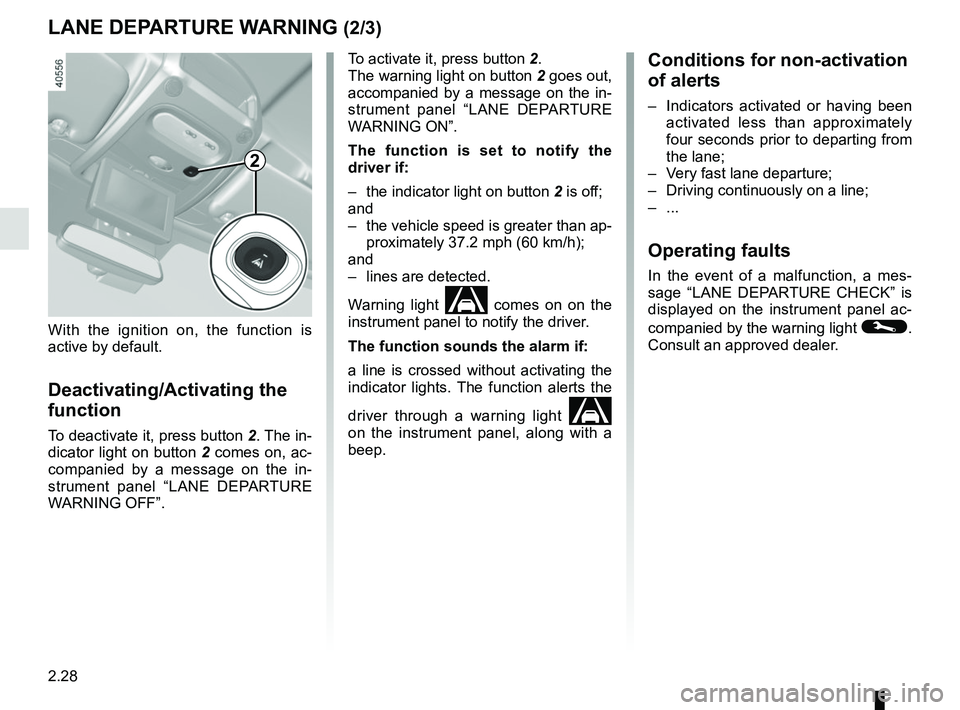
To activate it, press button 2.
The warning light on button
2 goes out,
accompanied by a message on the in-
strument panel “LANE DEPARTURE
WARNING ON”.
The function is set to notify the
driver if:
– the indicator light on button 2 is off;
and
– the vehicle speed is greater than ap- proximately 37.2 mph (60 km/h);
and
– lines are detected.
Warning light
comes on on the
instrument panel to notify the driver.
The function sounds the alarm if:
a line is crossed without activating the
indicator lights. The function alerts the
driver through a warning light
on the instrument panel, along with a
beep.
2
With the ignition on, the function is
active by default.
Deactivating/Activating the
function
To deactivate it, press button 2. The in-
dicator light on button 2 comes on, ac-
companied by a message on the in-
strument panel “LANE DEPARTURE
WARNING OFF”.
Page 146 of 290
2.30
SPEED LIMITER (1/3)
The speed limiter function helps you
stay within the driving speed limit that
you choose, known as the limit speed.
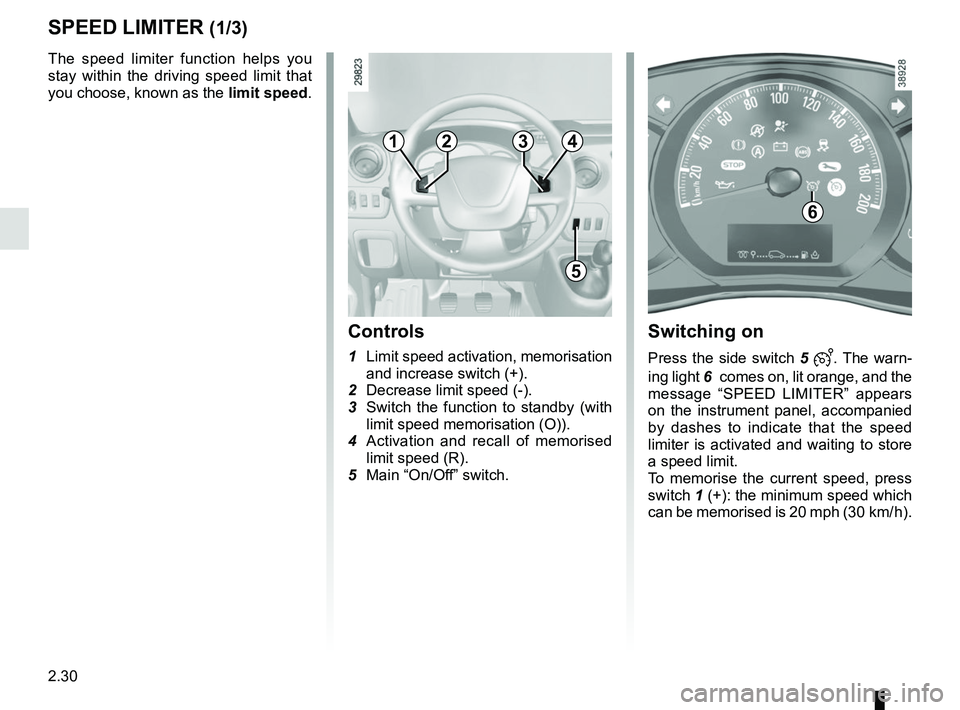
Controls
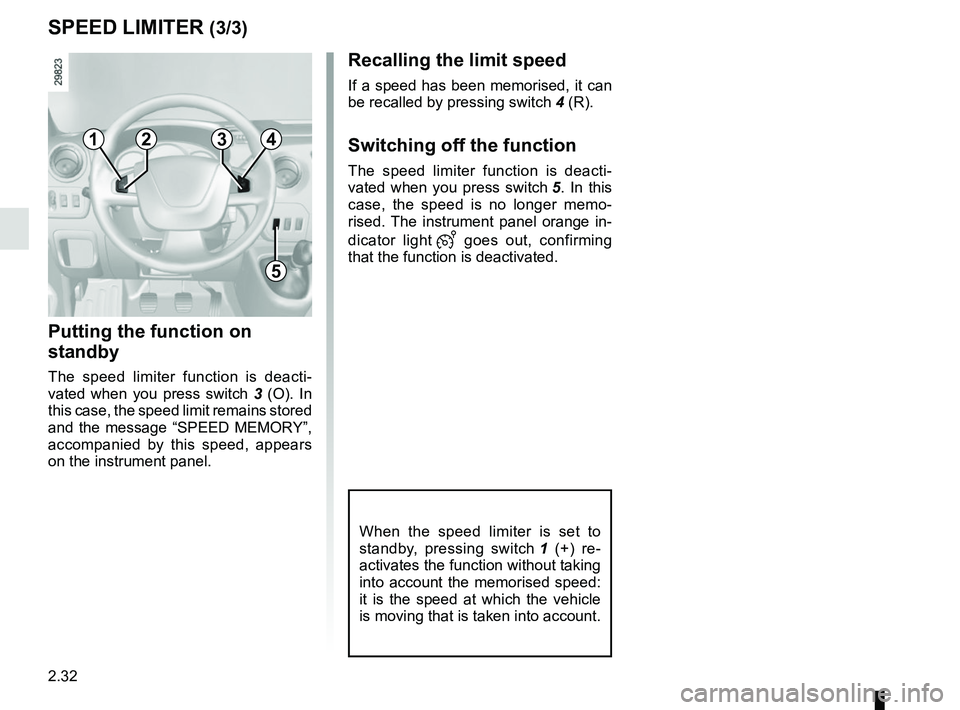
1 Limit speed activation, memorisation
and increase switch (+).
2 Decrease limit speed (-).
3 Switch the function to standby (with limit speed memorisation (O)).
4 Activation and recall of memorised limit speed (R).
5 Main “On/Off” switch.
Switching on
Press the side switch 5 . The warn-
ing light 6
comes on, lit orange, and the
message “SPEED LIMITER” appears
on the instrument panel, accompanied
by dashes to indicate that the speed
limiter is activated and waiting to store
a speed limit.
To memorise the current speed, press
switch 1 (+): the minimum speed which
can be memorised is 20 mph (30 km/ h).
6
1
5
234
Page 147 of 290
2.31
SPEED LIMITER (2/3)
Exceeding the limit speed
It is possible to exceed the limit speed
at any moment. To do this: press the
accelerator pedal firmly and fully
(beyond the kickdown point).
Whilst the speed is being exceeded,
the limit speed displayed on the instru-
ment panel flashes.
Then, as far as is possible, release
the accelerator pedal: the speed lim-
iter function will return as soon as you
reach a speed lower than the memo-
rised speed.
Limited speed cannot be maintained
When driving down a steep gradient,
the system is unable to maintain the
limit speed: the memorised speed will
flash on the instrument panel informa-
tion display to inform you of this situ-
ation.
The speed limiter function is
in no way linked to the brak-
ing system.
Driving
When a limited speed has been stored
and this speed is not reached, driving is
similar to driving a vehicle without the
speed limiter function.
Once you have reached the stored
speed, no effort on the accelera-
tor pedal will allow you to exceed
the programmed speed except in an
emergency (refer to information on
“Exceeding the limit speed”).
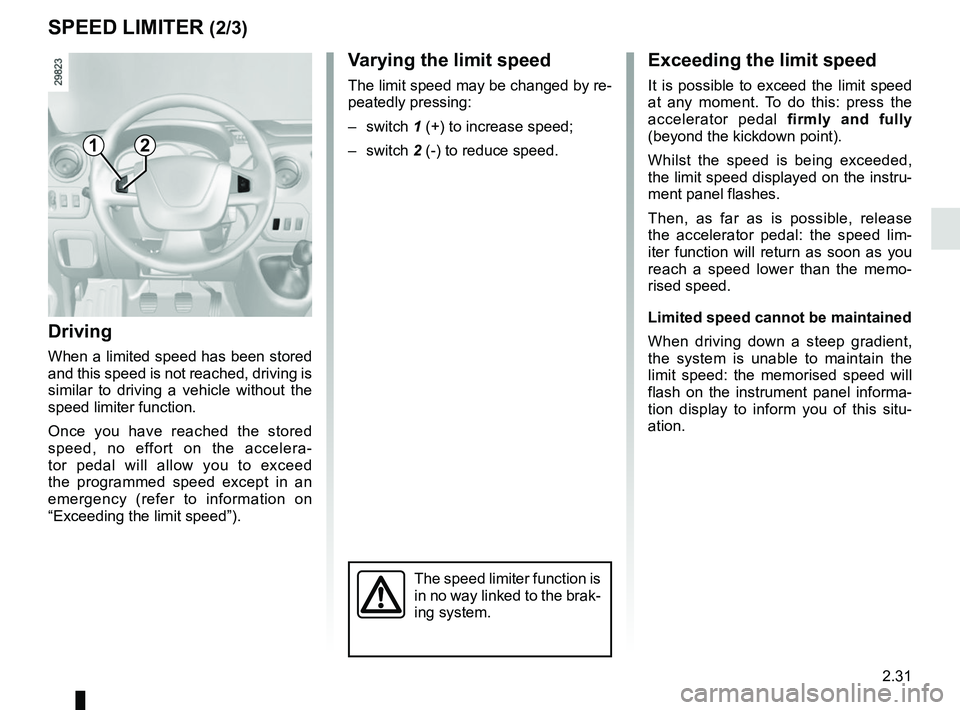
1
Varying the limit speed
The limit speed may be changed by re-
peatedly pressing:
– switch 1 (+) to increase speed;
– switch 2 (-) to reduce speed.
2
Page 148 of 290
2.32
Recalling the limit speed
If a speed has been memorised, it can
be recalled by pressing switch 4 (R).
Switching off the function
The speed limiter function is deacti-
vated when you press switch 5. In this
case, the speed is no longer memo-
rised. The instrument panel orange in-
dicator light
goes out, confirming
that the function is deactivated.
SPEED LIMITER (3/3)
Putting the function on
standby
The speed limiter function is deacti-
vated when you press switch 3 (O). In
this case, the speed limit remains stored
and the message “SPEED MEMORY”,
accompanied by this speed, appears
on the instrument panel.
When the speed limiter is set to
standby, pressing switch 1 (+) re-
activates the function without taking
into account the memorised speed:
it is the speed at which the vehicle
is moving that is taken into account.
1
5
234
Page 150 of 290
2.34
CRUISE CONTROL (2/4)
Switching on
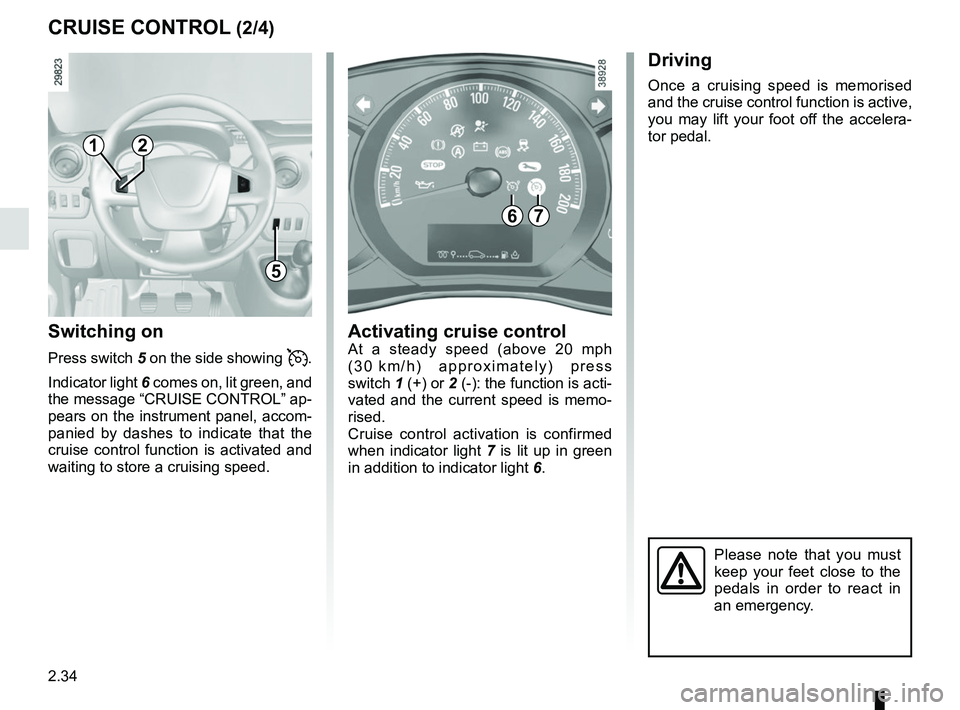
Press switch 5 on the side showing .
Indicator light 6 comes on, lit green, and
the message “CRUISE CONTROL” ap-
pears on the instrument panel, accom-
panied by dashes to indicate that the
cruise control function is activated and
waiting to store a cruising speed.
Driving
Once a cruising speed is memorised
and the cruise control function is active,
you may lift your foot off the accelera-
tor pedal.
Activating cruise controlAt a steady speed (above 20 mph
(30 km/h) approximately) press
switch 1 (+) or 2 (-): the function is acti-
vated and the current speed is memo-
rised.
Cruise control activation is confirmed
when indicator light 7 is lit up in green
in addition to indicator light 6.
Please note that you must
keep your feet close to the
pedals in order to react in
an emergency.
67
1
5
2