lock RENAULT MASTER 2018 Owner's Guide
[x] Cancel search | Manufacturer: RENAULT, Model Year: 2018, Model line: MASTER, Model: RENAULT MASTER 2018Pages: 290, PDF Size: 7.1 MB
Page 78 of 290
1.72
Operating faultsIn the event that the front passenger air
bag activation/deactivation system is
faulty, child seats must not be fitted to
the front seat.
Allowing any other passenger to sit in
that seat is not recommended.
Contact your approved Dealer as soon
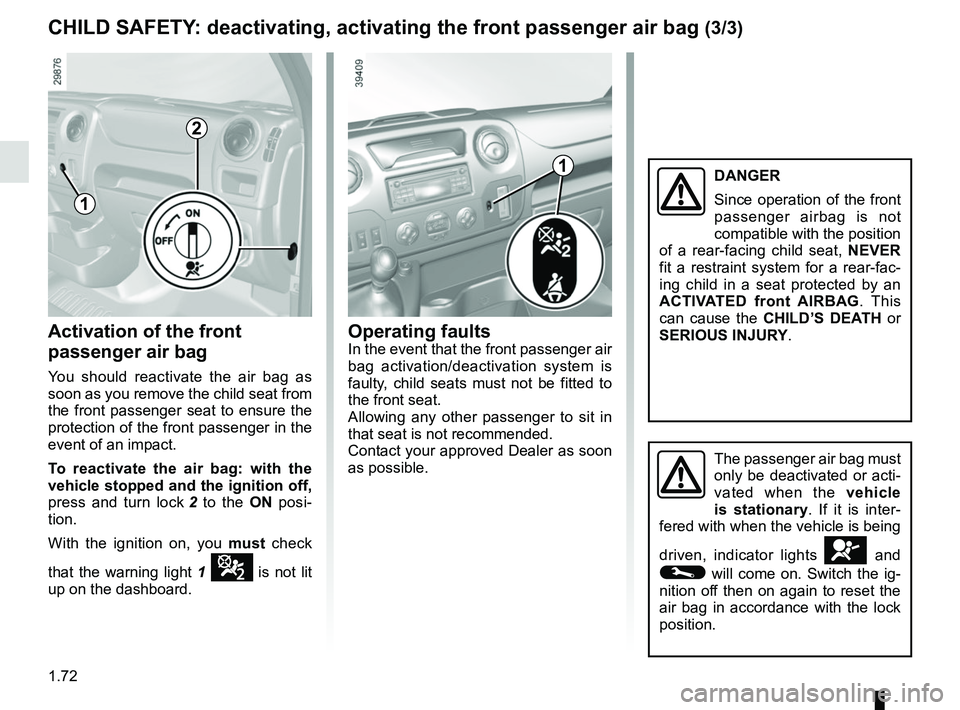
as possible.Activation of the front
passenger air bag
You should reactivate the air bag as
soon as you remove the child seat from
the front passenger seat to ensure the
protection of the front passenger in the
event of an impact.
To reactivate the air bag: with the
vehicle stopped and the ignition off,
press and turn lock 2 to the ON posi-
tion.
With the ignition on, you must check
that the warning light 1
¹ is not lit
up on the dashboard.
CHILD SAFETY: deactivating, activating the front passenger air bag (3/3)
1
2
The passenger air bag must
only be deactivated or acti-
vated when the vehicle
is stationary. If it is inter-
fered with when the vehicle is being
driven, indicator lights
å and
© will come on. Switch the ig-
nition off then on again to reset the
air bag in accordance with the lock
position.
1DANGER
Since operation of the front
passenger airbag is not
compatible with the position
of a rear-facing child seat, NEVER
fit a restraint system for a rear-fac-
ing child in a seat protected by an
ACTIVATED front AIRBAG . This
can cause the CHILD’S DEATH or
SERIOUS INJURY.
Page 86 of 290

The presence and operation of the warning lights DEPEND ON THE EQUIPMENT\
AND COUNTRY.
xAnti-lock braking warning
light
This light comes on when the ignition is
switched o")
1.80
WARNING LIGHTS (3/4)
The presence and operation of the warning lights DEPEND ON THE EQUIPMENT\
AND COUNTRY.
xAnti-lock braking warning
light
This light comes on when the ignition is
switched on and goes out within about
3 seconds. If it comes on when you are
driving, it indicates a fault in the anti-
lock braking system. Braking will then
occur normally, without the anti-lock
system.
Contact an approved dealer as soon as
possible.
^Water in the diesel filter
warning light
If it comes on when you are driving, it
indicates the presence of water in the
diesel. Contact your approved dealer
as soon as possible.
ÀOil pressure warning light
This light comes on when the
ignition is switched on and goes out
within about 3 seconds. If it lights up
while you are driving, stop at once and
switch off the ignition. Check the oil
level. If the level is correct, the light has
come on for another reason; contact an
approved dealer.
Traction control warning
light
Refer to the information on “Driving cor-
rection devices and aids” in Section 2.
zBrake pad wear warning
light
Depending on the vehicle, if the warn-
ing light comes on, you must have your
brake pads checked as soon as possi-
ble.
Emergency active brake
assist
Refer to the information on “Driving cor-
rection devices and aids” in Section 2.
ÉPreheating warning light
This should come on when
the ignition is switched on. It indicates
that the heater plugs are in operation. It
goes out as soon as preheating is suf-
ficient and the engine may be started.
T Digital tacograph warning light
If it comes on, there is a fault in the
system. Refer to the handbook for the
equipment.
Engine standby warning
light
Please see information about “Stop and
Start function” in Section 2.
\fUnavailability of engine
standby warning light
Please see information in the para-
graph on “Stop and Start Function” in
Section 2.
A
Page 99 of 290
1.93
Exterior temperature
When the temperature is between –3°C
and +3°C, the °C characters flash (indi-
cates risk of ice formation).
CLOCK AND EXTERIOR TEMPERATURE
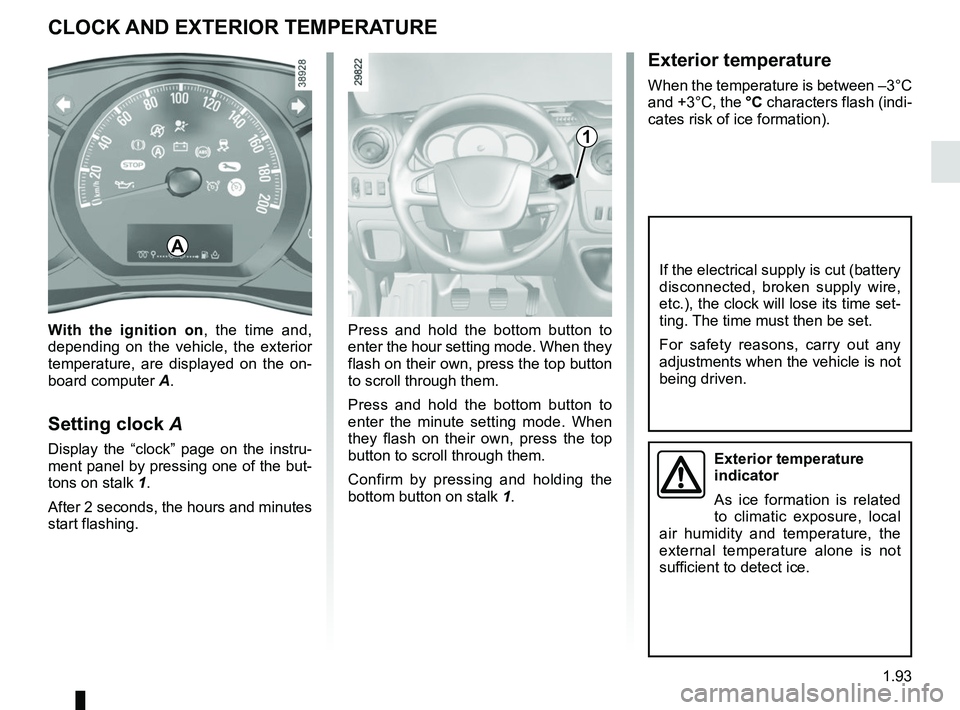
Press and hold the bottom button to
enter the hour setting mode. When they
flash on their own, press the top button
to scroll through them.
Press and hold the bottom button to
enter the minute setting mode. When
they flash on their own, press the top
button to scroll through them.
Confirm by pressing and holding the
bottom button on stalk 1.
With the ignition on
, the time and,
depending on the vehicle, the exterior
temperature, are displayed on the on-
board computer A.
Setting clock A
Display the “clock” page on the instru-
ment panel by pressing one of the but-
tons on stalk 1.
After 2 seconds, the hours and minutes
start flashing.
1
A
If the electrical supply is cut (battery
disconnected, broken supply wire,
etc.), the clock will lose its time set-
ting. The time must then be set.
For safety reasons, carry out any
adjustments when the vehicle is not
being driven.
Exterior temperature
indicator
As ice formation is related
to climatic exposure, local
air humidity and temperature, the
external temperature alone is not
sufficient to detect ice.
Page 105 of 290
1.99
EXTERIOR LIGHTING AND SIGNALS (4/5)
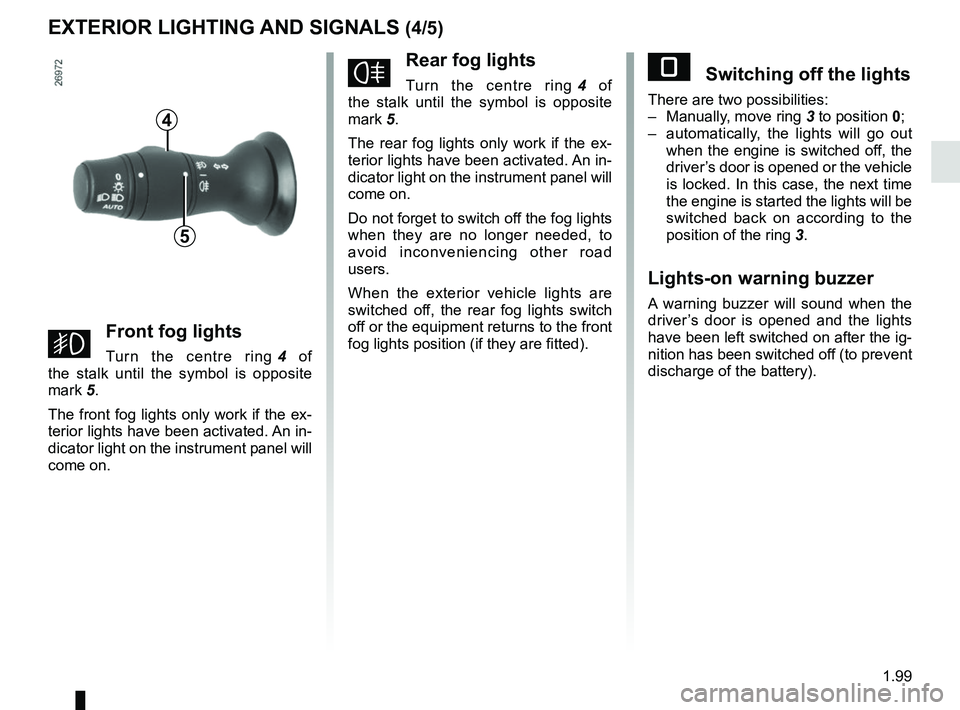
gFront fog lights
Turn the centre ring 4 of
the stalk until the symbol is opposite
mark 5.
The front fog lights only work if the ex-
terior lights have been activated. An in-
dicator light on the instrument panel will
come on.
fRear fog lights
Turn the centre ring 4 of
the stalk until the symbol is opposite
mark 5.
The rear fog lights only work if the ex-
terior lights have been activated. An in-
dicator light on the instrument panel will
come on.
Do not forget to switch off the fog lights
when they are no longer needed, to
avoid inconveniencing other road
users.
When the exterior vehicle lights are
switched off, the rear fog lights switch
off or the equipment returns to the front
fog lights position (if they are fitted).
4
5
eSwitching off the lights
There are two possibilities:
– Manually, move ring 3 to position 0;
– automatically, the lights will go out when the engine is switched off, the
driver’s door is opened or the vehicle
is locked. In this case, the next time
the engine is started the lights will be
switched back on according to the
position of the ring 3.
Lights-on warning buzzer
A warning buzzer will sound when the
driver’s door is opened and the lights
have been left switched on after the ig-
nition has been switched off (to prevent
discharge of the battery).
Page 108 of 290
1.102
FUEL TANK (1/2)
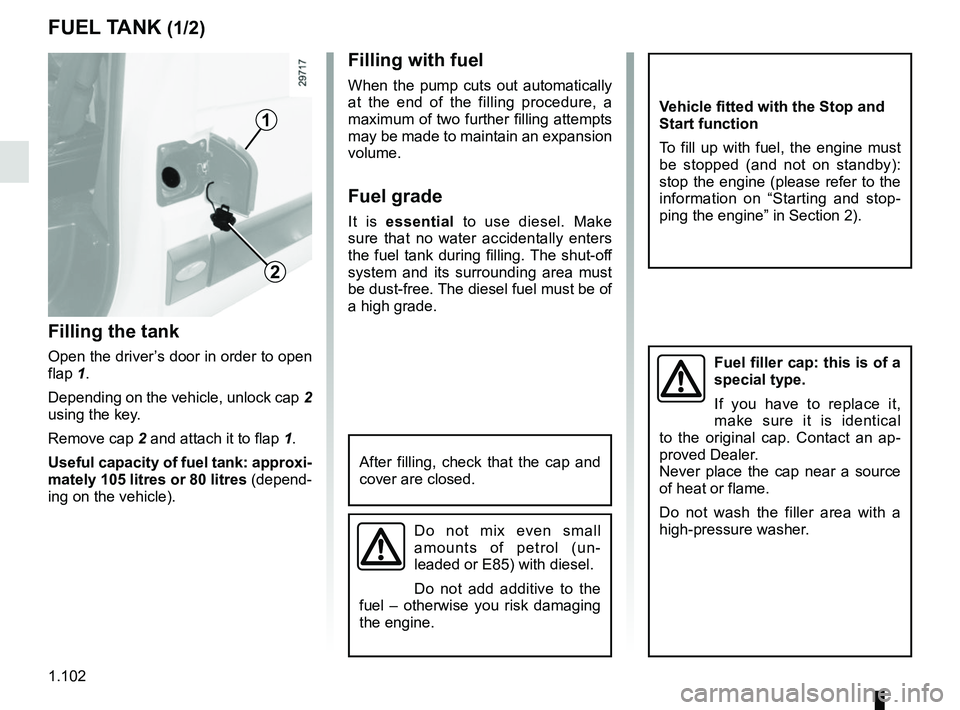
Filling the tank
Open the driver’s door in order to open
flap 1.
Depending on the vehicle, unlock cap 2
using the key.
Remove cap 2 and attach it to flap 1.
Useful capacity of fuel tank: approxi-
mately 105 litres or 80 litres (depend-
ing on the vehicle).
Filling with fuel
When the pump cuts out automatically
at the end of the filling procedure, a
maximum of two further filling attempts
may be made to maintain an expansion
volume.
Fuel grade
It is essential to use diesel. Make
sure that no water accidentally enters
the fuel tank during filling. The shut-off
system and its surrounding area must
be dust-free. The diesel fuel must be of
a high grade.
2
1
After filling, check that the cap and
cover are closed.
Fuel filler cap: this is of a
special type.
If you have to replace it,
make sure it is identical
to the original cap. Contact an ap-
proved Dealer.
Never place the cap near a source
of heat or flame.
Do not wash the filler area with a
high-pressure washer.
Do not mix even small
amounts of petrol (un-
leaded or E85) with diesel.
Do not add additive to the
fuel – otherwise you risk damaging
the engine.
Vehicle fitted with the Stop and
Start function
To fill up with fuel, the engine must
be stopped (and not on standby):
stop the engine (please refer to the
information on “Starting and stop-
ping the engine” in Section 2).
Page 117 of 290

Running in, ignition switch . . . . . . . . . . . . . . . . . . . . . . . . . . . . . . . . . . . . \
. . . . . . .")
2.1
Section 2: Driving
(advice on use relating to fuel economy and the environment)
Running in, ignition switch . . . . . . . . . . . . . . . . . . . . . . . . . . . . . . . . . . . . \
. . . . . . . . . . . . . . . . . . . . . 2.2
Starting, stopping the engine . . . . . . . . . . . . . . . . . . . . . . . . . . . . . . . . . . . . \
. . . . . . . . . . . . . . . . . . . 2.3
Stop and Start Function . . . . . . . . . . . . . . . . . . . . . . . . . . . . . . . . . . . . \
. . . . . . . . . . . . . . . . . . . . . . . 2.4
Special features of diesel versions . . . . . . . . . . . . . . . . . . . . . . . . . . . . . . . . . . . .\
. . . . . . . . . . . . . . 2.7
Driving advice, Eco-driving . . . . . . . . . . . . . . . . . . . . . . . . . . . . . . . . . . . .\
. . . . . . . . . . . . . . . . . . . . 2.8
Maintenance and antipollution advice . . . . . . . . . . . . . . . . . . . . . . . . . . . . . . . . . . . . \
. . . . . . . . . . . . 2.12
Environment . . . . . . . . . . . . . . . . . . . . . . . . . . . . . . . . . . . .\
. . . . . . . . . . . . . . . . . . . . . . . . . . . . . . . 2.13
Gear lever . . . . . . . . . . . . . . . . . . . . . . . . . . . . . . . . . . . .\
. . . . . . . . . . . . . . . . . . . . . . . . . . . . . . . . . 2.14
Handbrake . . . . . . . . . . . . . . . . . . . . . . . . . . . . . . . . . . . . \
. . . . . . . . . . . . . . . . . . . . . . . . . . . . . . . . . 2.15
Driver correction devices/aids . . . . . . . . . . . . . . . . . . . . . . . . . . . . . . . . . . . . \
. . . . . . . . . . . . . . . . . . 2.16
Tyre pressure loss warning . . . . . . . . . . . . . . . . . . . . . . . . . . . . . . . . . . . .\
. . . . . . . . . . . . . . . . . . . . 2.24
Lane departure warning. . . . . . . . . . . . . . . . . . . . . . . . . . . . . . . . . . . . \
. . . . . . . . . . . . . . . . . . . . . . . 2.27
Speed limiter . . . . . . . . . . . . . . . . . . . . . . . . . . . . . . . . . . . .\
. . . . . . . . . . . . . . . . . . . . . . . . . . . . . . . 2.30
Cruise control . . . . . . . . . . . . . . . . . . . . . . . . . . . . . . . . . . . .\
. . . . . . . . . . . . . . . . . . . . . . . . . . . . . . 2.33
Overspeed function . . . . . . . . . . . . . . . . . . . . . . . . . . . . . . . . . . . . \
. . . . . . . . . . . . . . . . . . . . . . . . . . 2.37
Parking distance control . . . . . . . . . . . . . . . . . . . . . . . . . . . . . . . . . . . .\
. . . . . . . . . . . . . . . . . . . . . . 2.38
Reversing camera . . . . . . . . . . . . . . . . . . . . . . . . . . . . . . . . . . . . \
. . . . . . . . . . . . . . . . . . . . . . . . . . . 2.40
Power take-off . . . . . . . . . . . . . . . . . . . . . . . . . . . . . . . . . . . . \
. . . . . . . . . . . . . . . . . . . . . . . . . . . . . . 2.42
Fast idle speed . . . . . . . . . . . . . . . . . . . . . . . . . . . . . . . . . . . .\
. . . . . . . . . . . . . . . . . . . . . . . . . . . . . 2.43
Self-locking differential . . . . . . . . . . . . . . . . . . . . . . . . . . . . . . . . . . . .\
. . . . . . . . . . . . . . . . . . . . . . . 2.44
Sequential gearbox . . . . . . . . . . . . . . . . . . . . . . . . . . . . . . . . . . . .\
. . . . . . . . . . . . . . . . . . . . . . . . . . 2.45
Page 118 of 290
2.2
RUNNING IN, IGNITION SWITCH
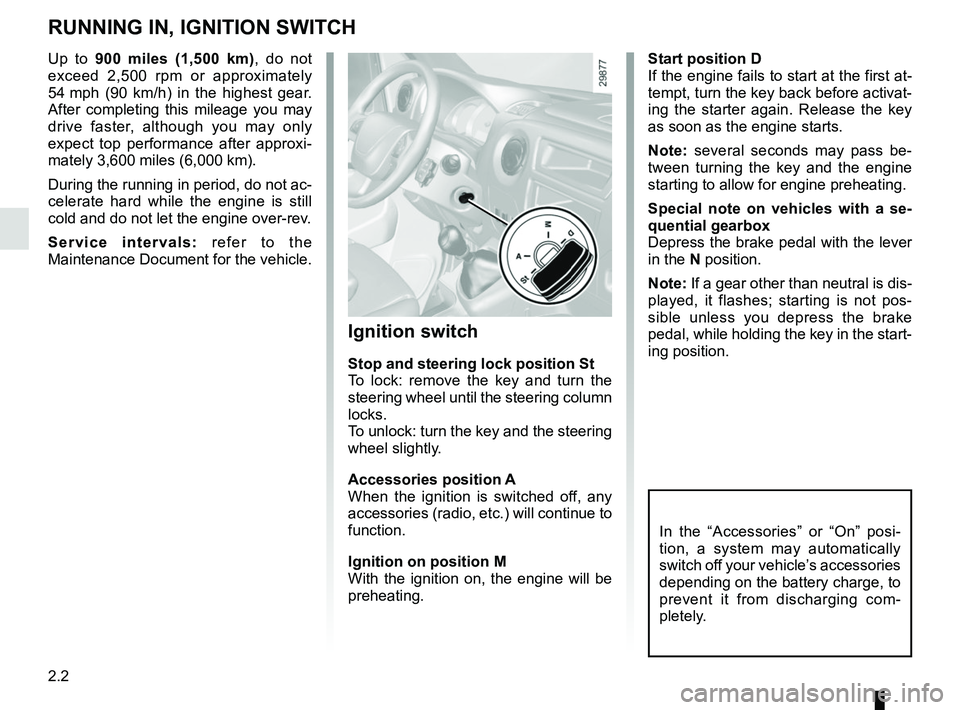
Start position D
If the engine fails to start at the first at-
tempt, turn the key back before activat-
ing the starter again. Release the key
as soon as the engine starts.
Note: several seconds may pass be-
tween turning the key and the engine
starting to allow for engine preheating.
Special note on vehicles with a se-
quential gearbox
Depress the brake pedal with the lever
in the N position.
Note: If a gear other than neutral is dis-
played, it flashes; starting is not pos-
sible unless you depress the brake
pedal, while holding the key in the start-
ing position.
Ignition switch
Stop and steering lock position St
To lock: remove the key and turn the
steering wheel until the steering column
locks.
To unlock: turn the key and the steering
wheel slightly.
Accessories position A
When the ignition is switched off, any
accessories (radio, etc.) will continue to
function.
Ignition on position M
With the ignition on, the engine will be
preheating.
In the “Accessories” or “On” posi-
tion, a system may automatically
switch off your vehicle’s accessories
depending on the battery charge, to
prevent it from discharging com-
pletely.
Up to 900 miles (1,500 km), do not exceed 2,500 rpm or approximately
54 mph (90 km/h) in the highest gear.
After completing this mileage you may
drive faster, although you may only
expect top performance after approxi-
mately 3,600 miles (6,000 km).
During the running in period, do not ac-
celerate hard while the engine is still
cold and do not let the engine over-rev.
Service intervals: refer to the
Maintenance Document for the vehicle.
Page 119 of 290
2.3
STARTING, STOPPING THE ENGINE
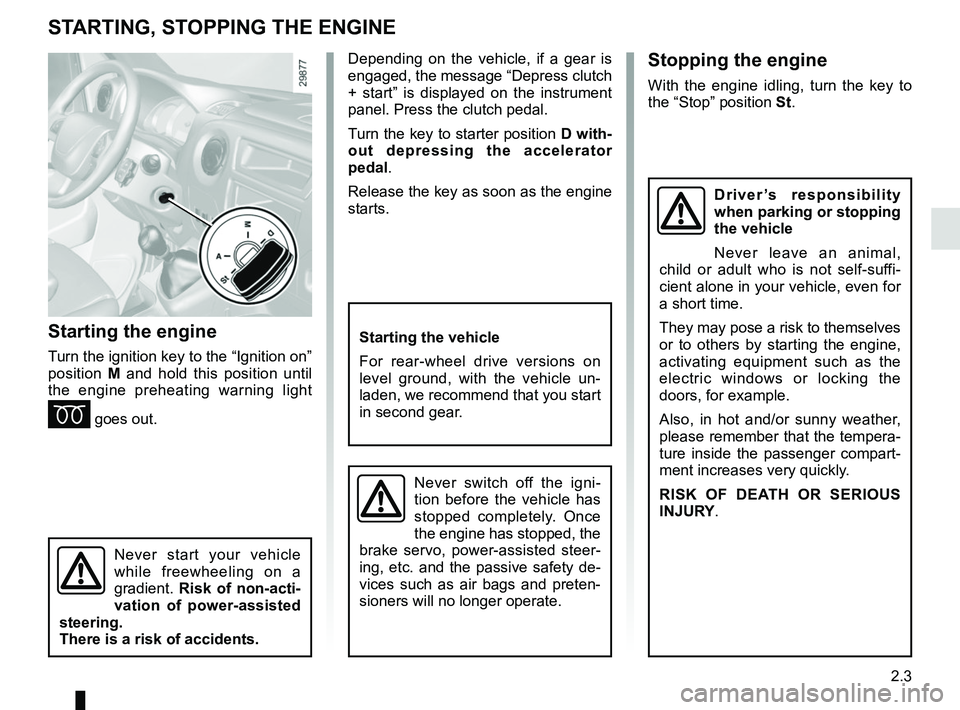
Starting the engine
Turn the ignition key to the “Ignition on”
position M and hold this position until
the engine preheating warning light
É goes out.
Stopping the engine
With the engine idling, turn the key to
the “Stop” position St.
Starting the vehicle
For rear-wheel drive versions on
level ground, with the vehicle un-
laden, we recommend that you start
in second gear.
Never switch off the igni-
tion before the vehicle has
stopped completely. Once
the engine has stopped, the
brake servo, power-assisted steer-
ing, etc. and the passive safety de-
vices such as air bags and preten-
sioners will no longer operate.
Driver’s responsibility
when parking or stopping
the vehicle
Never leave an animal,
child or adult who is not self-suffi-
cient alone in your vehicle, even for
a short time.
They may pose a risk to themselves
or to others by starting the engine,
activating equipment such as the
electric windows or locking the
doors, for example.
Also, in hot and/or sunny weather,
please remember that the tempera-
ture inside the passenger compart-
ment increases very quickly.
RISK OF DEATH OR SERIOUS
INJURY.
Never start your vehicle
while freewheeling on a
gradient. Risk of non-acti-
vation of power-assisted
steering.
There is a risk of accidents.
Depending on the vehicle, if a gear is
engaged, the message “Depress clutch
+ start” is displayed on the instrument
panel. Press the clutch pedal.
Turn the key to starter position D with-
out depressing the accelerator
pedal.
Release the key as soon as the engine
starts.
Page 121 of 290
2.5
Preventing the engine from
standing by
In certain situations, such as negotiat-
ing a crossroads for instance, it is pos-
sible (with the system activated) to keep
the engine running so as to be ready to
move off quickly.
SEQUENTIAL gearbox
Keep the vehicle stationary without
pressing too hard on the brake pedal.
Manual gearbox
Keep the clutch pedal pressed right
down.
STOP AND START FUNCTION (2/3)Conditions for coming out of
engine standby
For sequential gearbox:
– the brake pedal is released, position A or M engaged, or;
– the brake pedal is released, position N engaged and the handbrake off,
or;
– or the brake pedal is pressed again, with position P engaged or position
N engaged with the parking brake
applied or;
– position R is engaged or;
– the accelerator pedal is pressed.
For manual gearboxes:
– the gearbox is in neutral and the clutch pedal is slightly depressed, or
– the engine is in gear and the clutch pedal is pressed right down.
Conditions preventing the
standby of the engine
Certain conditions prevent the system
from using the engine standby function,
including when:
– reverse gear is engaged;
– the bonnet is not locked; – the outdoor temperature is too low or
too high (less than around 0 °C or
higher than around 35 °C);
– the battery is not sufficiently charged;
– the difference between the vehicle interior temperature and the auto-
matic climate control instruction is
too high;
– the “Clear View” function is activated (please see “Automatic Climate
Control” in Section 3);
– the engine coolant temperature is too low;
– automatic particle filter cleaning is underway;
– the “Fast Idle Speed” function is acti- vated (please refer to the information
on “Fast Idle Speed” in section 2);
– ...
Warning light
is displayed on the
instrument panel. This notifies you that
the engine is on standby.
To fill up with fuel, the engine must
be stopped (and not on standby):
stop the engine (Please See
“Starting, stopping the engine” in
Section 2).
Page 132 of 290
2.16
DRIVING CORRECTION DEVICES AND AIDS (1/8)
Operating faults:
–
© and x lit up on the in-
strument panel accompanied by the
messages “CHECK ABS”, “check
braking system” and “CHECK ESC”:
the ABS, the ESC and the emer-
gency brake assist are disabled.
Braking is always enabled;
–
x, D, © and ®
lit on the instrument panel accom-
panied by the message “BRAKING
FAULT”: this indicates a fault with
the braking system.
In both cases, please consult an
Authorised Dealer.
Anti-lock braking system
(ABS)
Under heavy braking, the ABS prevents
the wheels from locking, allowing the
stopping distance to be managed and
keeping control of the vehicle.
Under these circumstances, the vehi-
cle can be steered to avoid an obstacle
whilst braking. In addition, this system
can increase stopping distances, par-
ticularly on roads with low surface grip
(wet ground etc.).
You will feel a pulsation through the
brake pedal each time the system is
activated. The ABS does not in any
way improve the vehicle's physical per-
formance relating to the road surface
and road-holding. It is still essential to
follow the rules of good driving practice
(such as driving at a safe distance from
the vehicle in front etc.).
In an emergency, apply firm and
continuous pressure to the brake
pedal. There is no need to pump
it repeatedly. The ABS will modu-
late the force applied in the braking
system.
Your braking systems
are partially operational.
However, it is dangerous
to brake suddenly and
it is essential to stop immediately,
as soon as traffic conditions allow.
Contact an approved dealer.
Depending on the vehicle, this is com-
posed of:
– anti-lock braking system (ABS);
– electronic stability program (ESC) with understeer control and trac-
tion control;
– driver assistance with a trailer;
– emergency brake assist;
– active emergency braking;
– grip control;
– hill start assistance.
Other driving assistance systems are
detailed on the following pages.