change time RENAULT MASTER 2018 Owners Manual
[x] Cancel search | Manufacturer: RENAULT, Model Year: 2018, Model line: MASTER, Model: RENAULT MASTER 2018Pages: 290, PDF Size: 7.1 MB
Page 94 of 290
1.88
TRIP COMPUTER: journey parameters (3/4)
Examples of selectionsInterpreting the display selected
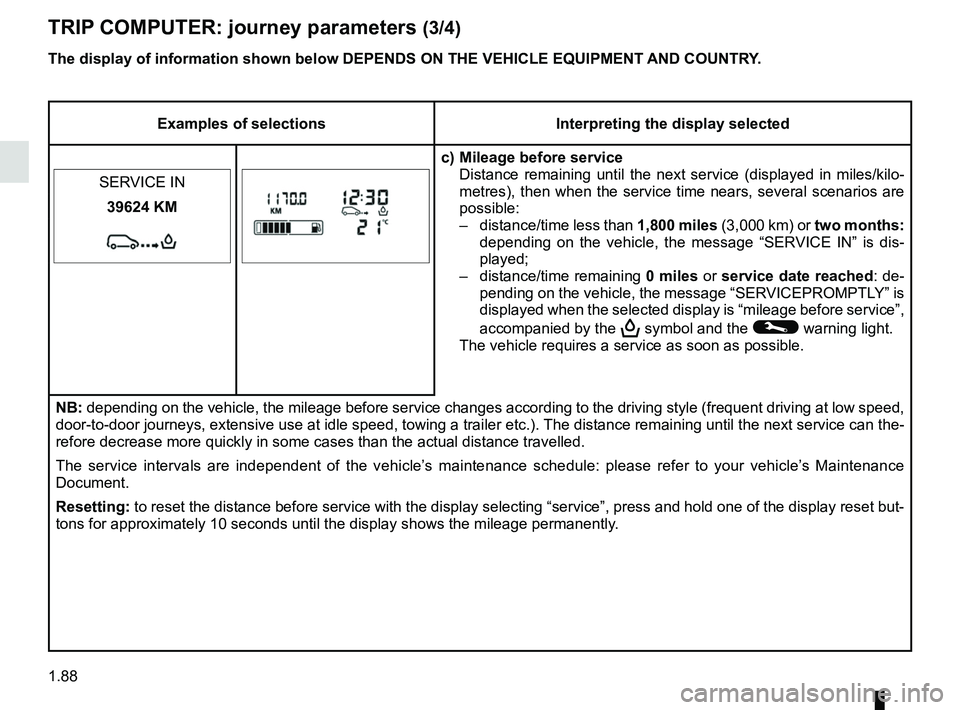
c) Mileage before service Distance remaining until the next service (displayed in miles/kilo-
metres), then when the service time nears, several scenarios are
possible:
– distance/time less than 1,800 miles (3,000 km) or two months:
depending on the vehicle, the message “SERVICE IN” is dis-
played;
– distance/time remaining 0 miles or service date reached : de-
pending on the vehicle, the message “SERVICEPROMPTLY” is
displayed when the selected display is “mileage before service”,
accompanied by the
9 symbol and the © warning light.
The vehicle requires a service as soon as possible.
SERVICE IN
39624 KM
NB: depending on the vehicle, the mileage before service changes according \
to the driving style (frequent driving at low speed,
door-to-door journeys, extensive use at idle speed, towing a trailer etc\
.). The distance remaining until the next service can t
he-
refore decrease more quickly in some cases than the actual distance trav\
elled.
The service intervals are independent of the vehicle’s maintenance schedule: please refer to your vehicle’s Maintenance
Document.
Resetting: to reset the distance before service with the display selecting “ser\
vice”, press and hold one of the display reset but-
tons for approximately 10 seconds until the display shows the mileage pe\
rmanently.
The display of information shown below DEPENDS ON THE VEHICLE EQUIPMENT \
AND COUNTRY.
Page 100 of 290
1.94
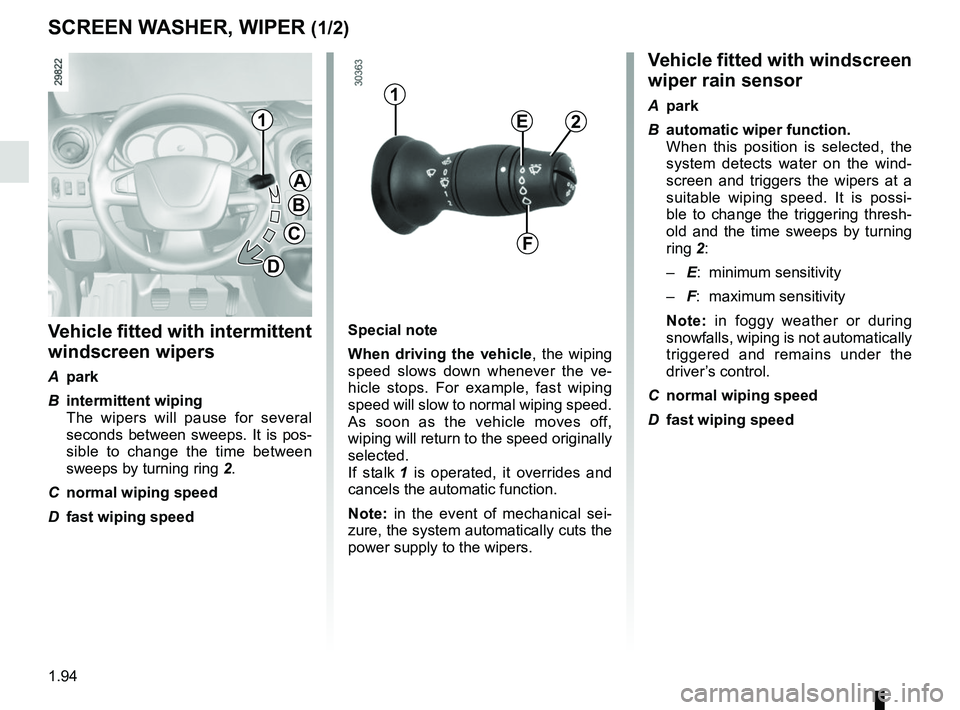
SCREEN WASHER, WIPER (1/2)Vehicle fitted with windscreen
wiper rain sensor
A park
B automatic wiper function.
When this position is selected, the system detects water on the wind-
screen and triggers the wipers at a
suitable wiping speed. It is possi-
ble to change the triggering thresh-
old and the time sweeps by turning
ring 2:
– E: minimum sensitivity
– F: maximum sensitivity
Note: in foggy weather or during
snowfalls, wiping is not automatically
triggered and remains under the
driver’s control.
C normal wiping speed
D fast wiping speed
Vehicle fitted with intermittent
windscreen wipers
A park
B intermittent wiping
The wipers will pause for several seconds between sweeps. It is pos-
sible to change the time between
sweeps by turning ring 2.
C normal wiping speed
D fast wiping speed
1
A
B
C
D
1
2E
F
Special note
When driving the vehicle, the wiping
speed slows down whenever the ve-
hicle stops. For example, fast wiping
speed will slow to normal wiping speed.
As soon as the vehicle moves off,
wiping will return to the speed originally
selected.
If stalk 1 is operated, it overrides and
cancels the automatic function.
Note: in the event of mechanical sei-
zure, the system automatically cuts the
power supply to the wipers.
Page 124 of 290
2.8
DRIVING ADVICE, ECO-DRIVING (1/4)
Fuel consumption is accredited in ac-
cordance with a standard regulatory
method. Identical for all manufactu-
rers, this enables vehicles to be com-
pared with one another. Consumption
in real time depends on vehicle usage
conditions, the equipment fitted and the
user’s driving style. To optimise fuel
consumption, please refer to the fol-
lowing advice.
Depending on the vehicle, you will have
various functions which enable you to
lower your fuel consumption:
– the rev counter;
– gear change indicator;
– the journey record and eco-driving advice via the multimedia display;
– ECO mode – activated by the ECO button.
If fitted on the vehicle, the navigation
system provides additional information.
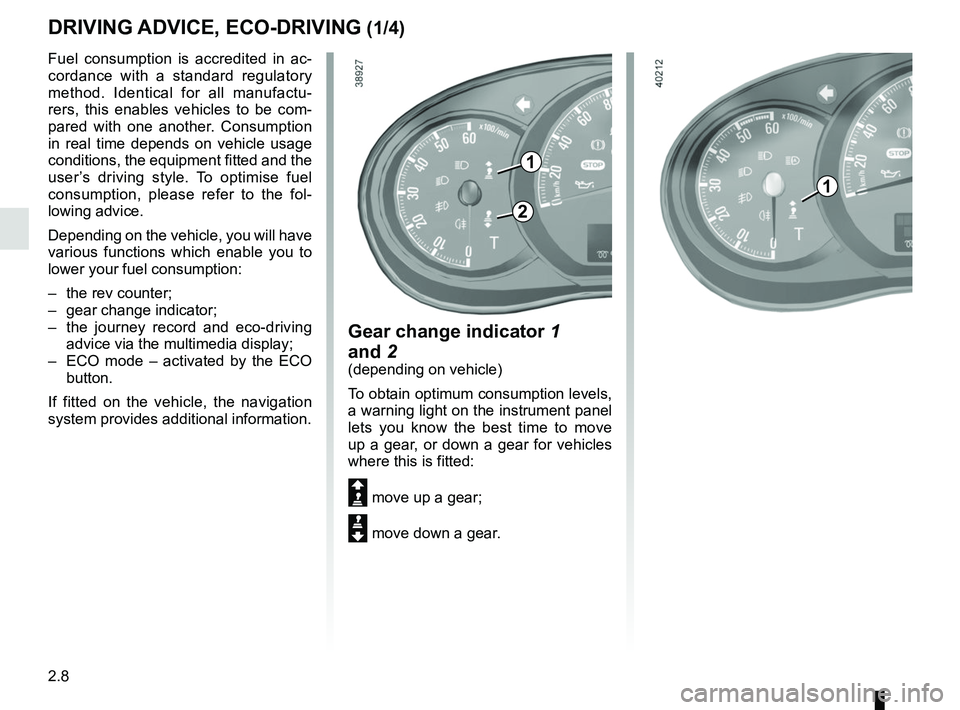
Gear change indicator 1
and 2
(depending on vehicle)
To obtain optimum consumption levels,
a warning light on the instrument panel
lets you know the best time to move
up a gear, or down a gear for vehicles
where this is fitted:
Š move up a gear;
‰ move down a gear.
1
2
1
Page 136 of 290
2.20
DRIVER CORRECTION DEVICES AND AIDS (5/8)
Active emergency braking
This function is an additional driving aid. This function is not under any
circumstances intended to replace the due care and attention of the
driver, who should at all times be in control of the vehicle.
System servicing/repairs
– In the event of an impact, the sensor alignment may become changed, and \
its operation will consequently be affected. Deactivate the function, then consult
an authorised dealer.
– Any work in the area where the radar is located (repairs, replacements,\
touch- ing up of paintwork) must be carried out by a qualified professional.
Only an authorised dealer is qualified to service the system.
In the event of system disturbance
Some conditions can disturb or damage the operation of the system, such \
as:
– a complex environment (metal bridge, tunnel etc.) ;
– poor weather conditions (snow, hail, black ice, etc.).
Risk of inadvertent braking.
Operating faults
The warning lights
and
lit up on the instrument panel accom-
panied by the message “WARNING
AEBSCHECK” indicate a system
fault. Consult an approved dealer.
When the system detects that the func-
tion is not available, the
warn-
ing light lights up on the instrument
panel and stays on, with the message
“WARNING AEBS DISABLED”.
There are two possibilities:
– The system is temporarily disrupted (for example: radar obscured by
dirt, mud, snow etc.). In this case,
park the vehicle and switch off the
engine. Clean the detection zone of
the radar. When you next start the
engine, the warning light and the
message go out;
– If this is not the case, this may arise from another cause; contact an
Approved Dealer.
Page 145 of 290

2.29
This function is an additional driving aid. This function is not under any circumstances intended to replace the due\
care
and attention of the driver, who should at all times be in control of the vehicle.
System servicing/repairs
– In the event of an impact, the camera alignment may be changed, and its \
operation may consequently be affected. Deactivate the function, then consult an authorised dealer.
– Any work in the area where the camera is located (repairs, replacements\
, windscreen modifications etc.) must be carried out by a qualified professional.
Only an authorised dealer is qualified to service the system.
In the event of system disturbance
Some conditions can disturb or damage the operation of the system, such \
as:
– a complex environment (tunnel etc.);
– poor weather conditions (snow, hail, black ice etc.);
– poor visibility (night, fog etc.);
– road markings which are worn, lacking in contrast or very widely spaced \
from one another (lines partially erased etc);
– being dazzled (glaring sun, lights of vehicles travelling in the opposi\
te direction etc.);
– the road is narrow, winding or undulating (tight bends etc.);
– closely following a vehicle travelling in the same lane.
Risk of false alarms or absence of warnings
LANE DEPARTURE WARNING (3/3)
Page 151 of 290
2.35
CRUISE CONTROL (3/4)
Exceeding the cruising speed
The cruising speed may be exceeded
at any time by depressing the accelera-
tor pedal. While it is being exceeded,
the cruising speed flashes on the in-
strument panel.
Then, release the accelerator pedal:
after a few seconds, the vehicle will
automatically return to its set cruising
speed.
Cruising speed cannot be
maintained
When driving down a steep gradient,
the system is unable to maintain the
cruising speed: the stored speed will
flash on the instrument panel informa-
tion display to inform you of this situ-
ation.
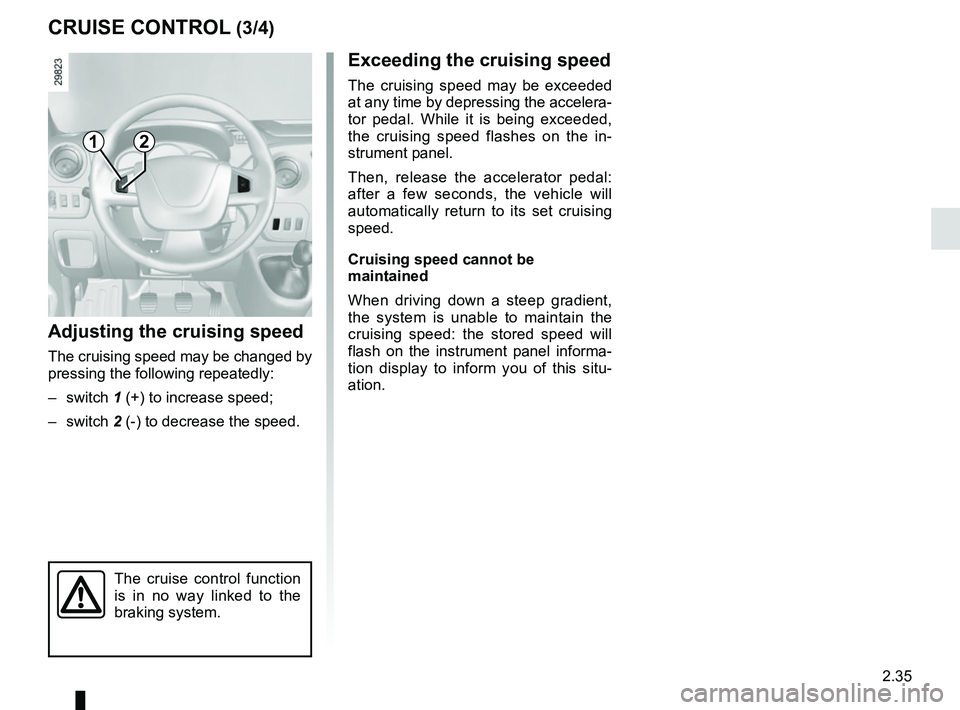
Adjusting the cruising speed
The cruising speed may be changed by
pressing the following repeatedly:
– switch 1 (+) to increase speed;
– switch 2 (-) to decrease the speed.
The cruise control function
is in no way linked to the
braking system.
12
Page 161 of 290
2.45
SEQUENTIAL GEARBOX (1/5)
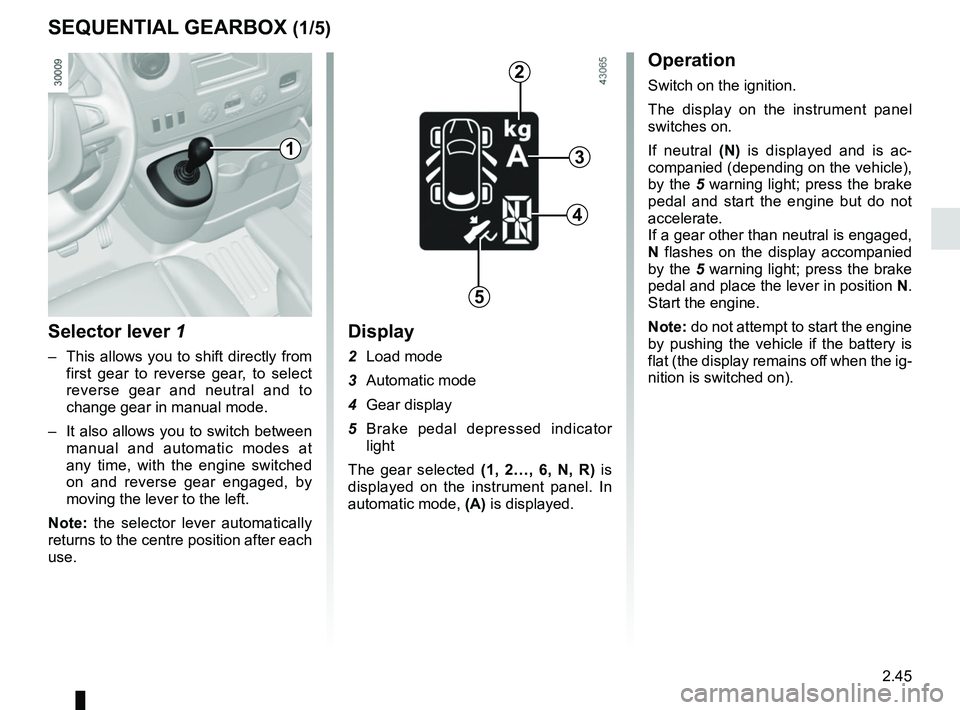
Selector lever 1
– This allows you to shift directly from first gear to reverse gear, to select
reverse gear and neutral and to
change gear in manual mode.
– It also allows you to switch between manual and automatic modes at
any time, with the engine switched
on and reverse gear engaged, by
moving the lever to the left.
Note: the selector lever automatically
returns to the centre position after each
use.
Display
2 Load mode
3 Automatic mode
4 Gear display
5 Brake pedal depressed indicator light
The gear selected (1, 2…, 6, N, R) is
displayed on the instrument panel. In
automatic mode, (A) is displayed.
Operation
Switch on the ignition.
The display on the instrument panel
switches on.
If neutral (N) is displayed and is ac-
companied (depending on the vehicle),
by the 5 warning light; press the brake
pedal and start the engine but do not
accelerate.
If a gear other than neutral is engaged,
N flashes on the display accompanied
by the 5 warning light; press the brake
pedal and place the lever in position N.
Start the engine.
Note: do not attempt to start the engine
by pushing the vehicle if the battery is
flat (the display remains off when the ig-
nition is switched on).
1
2
3
4
5
Page 163 of 290
2.47
SEQUENTIAL GEARBOX (3/5)
Operation in semiautomatic
mode (manual)
This mode can be activated at any time
when driving by pushing the lever to the
left. The mode is switched without shift-
ing up a gear.
You can initiate gear changes using the
selector lever.
To shift up a gear, push the selector
lever forwards; the accelerator pedal
does not have to be lifted.
To shift down a gear, push the selector
lever backwards; the accelerator pedal
does not have to be lifted. The system will not tolerate a series
of up or down changes that cause the
engine to underrev or overrev.
By pushing the lever forwards twice
you can move up two gears at a time
(except if underrevving). By pushing
the lever backwards twice you can
move down two gears at a time (unless
this causes overrevving).
When decelerating with the foot off
the pedal, the gears will automatically
drop to the low engine speed limit to
avoid stalling. First gear automatically
shifts below a certain speed limit. You
can stop the vehicle at red lights or
junctions etc. by depressing the brake
pedal; there is no need to change to
neutral (N).
The vehicle will move off again:
– either slowly, if you release the brake
without accelerating (e.g. when in a
traffic jam);
– or quickly, if you release the brake and accelerate.
Note: neutral may only be selected
when the vehicle is being driven or is
stationary when the brake pedal is
depressed (if you forget, warning
light 5 will come on) .
Push the gear selector lever to the right
to engage neutral.
If the engine speed is too high or too
low, the system will choose the opti-
mum gear.
Semiautomatic mode can be deacti-
vated and reactivated at any time when
the engine is running by pushing the
lever to the left.
Page 164 of 290
2.48
SEQUENTIAL GEARBOX (4/5)
Operation in automatic mode
Automatic mode is selected by default
every time the ignition is switched on.
The letter A appears on the display.
The vehicle is controlled using the ac-
celerator and the brake. Gears will
change automatically at the correct
moment and at a suitable engine speed
because the automatic mode takes the
road surface and the chosen driving
style into consideration.
Gears may be shifted manually in this
mode. Pushing the lever forwards
or backwards shifts a gear upwards
(except if there is a risk of underrev-
ving) or downwards (except if there is a
risk of overrevving).
Note: automatic mode takes account
of:
– the position and speed of depression of the accelerator pedal to assess
driving style and select the optimum
gear;
– action on the brake pedal, to com- mence engine braking in preparation
for a downshift.
You can stop the vehicle at red lights,
with the gear engaged, by depressing
the brake pedal; there is no need to
change to neutral (N).
The vehicle will move off again:
– either slowly, if you release the brake without accelerating (e.g. when in a
traffic jam);
– or quickly, if you release the brake and accelerate.
Accelerating and overtaking
– Slowly depress the accelerator pedal to accelerate gradually;
The oil level in the automatic gear-
box system reservoir varies depend-
ing on use. Adding oil is strictly
forbidden (except by qualified ap-
proved network personnel).
– to obtain maximum vehicle per-
formance regardless of the mode
selected (automatic or manual),
quickly depress the accelerator
pedal beyond the kickdown point.
The speed with which you depress the
pedal will allow you to downshift ac-
cording to the vehicle’s capabilities.
Parking the vehicle
It is possible to park in gear (for exam-
ple, on a slope):
– with the ignition on, select a gear with your foot on the brake ;
– check that a gear other than N is dis- played on the instrument panel, then
remove the ignition key;
– apply the handbrake.
To disengage the gear, switch on the
ignition without starting the engine and
shift the selector lever to neutral with
the brake pedal depressed . Check
that N is displayed on the instrument
panel.
Page 165 of 290
2.49
SEQUENTIAL GEARBOX (5/5)
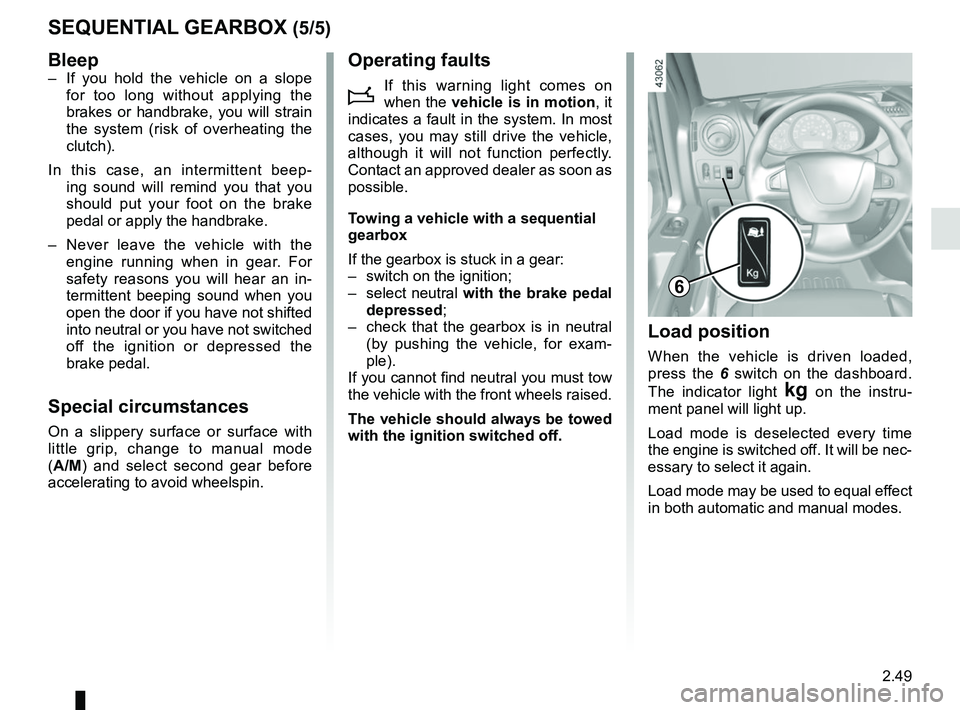
Load position
When the vehicle is driven loaded,
press the 6 switch on the dashboard.
The indicator light
§ on the instru-
ment panel will light up.
Load mode is deselected every time
the engine is switched off. It will be nec-
essary to select it again.
Load mode may be used to equal effect
in both automatic and manual modes.
6
Bleep– If you hold the vehicle on a slope for too long without applying the
brakes or handbrake, you will strain
the system (risk of overheating the
clutch).
In this case, an intermittent beep- ing sound will remind you that you
should put your foot on the brake
pedal or apply the handbrake.
– Never leave the vehicle with the engine running when in gear. For
safety reasons you will hear an in-
termittent beeping sound when you
open the door if you have not shifted
into neutral or you have not switched
off the ignition or depressed the
brake pedal.
Special circumstances
On a slippery surface or surface with
little grip, change to manual mode
(A/M) and select second gear before
accelerating to avoid wheelspin.
Operating faults
i
If this warning light comes on
when the vehicle is in motion , it
indicates a fault in the system. In most
cases, you may still drive the vehicle,
although it will not function perfectly.
Contact an approved dealer as soon as
possible.
Towing a vehicle with a sequential
gearbox
If the gearbox is stuck in a gear:
– switch on the ignition;
– select neutral with the brake pedal
depressed;
– check that the gearbox is in neutral (by pushing the vehicle, for exam-
ple).
If you cannot find neutral you must tow
the vehicle with the front wheels raised.
The vehicle should always be towed
with the ignition switched off.