steering wheel RENAULT MEGANE 2016 X95 / 3.G Owner's Manual
[x] Cancel search | Manufacturer: RENAULT, Model Year: 2016, Model line: MEGANE, Model: RENAULT MEGANE 2016 X95 / 3.GPages: 316, PDF Size: 3.03 MB
Page 179 of 316
2.71
REVERSING CAMERA (1/2)
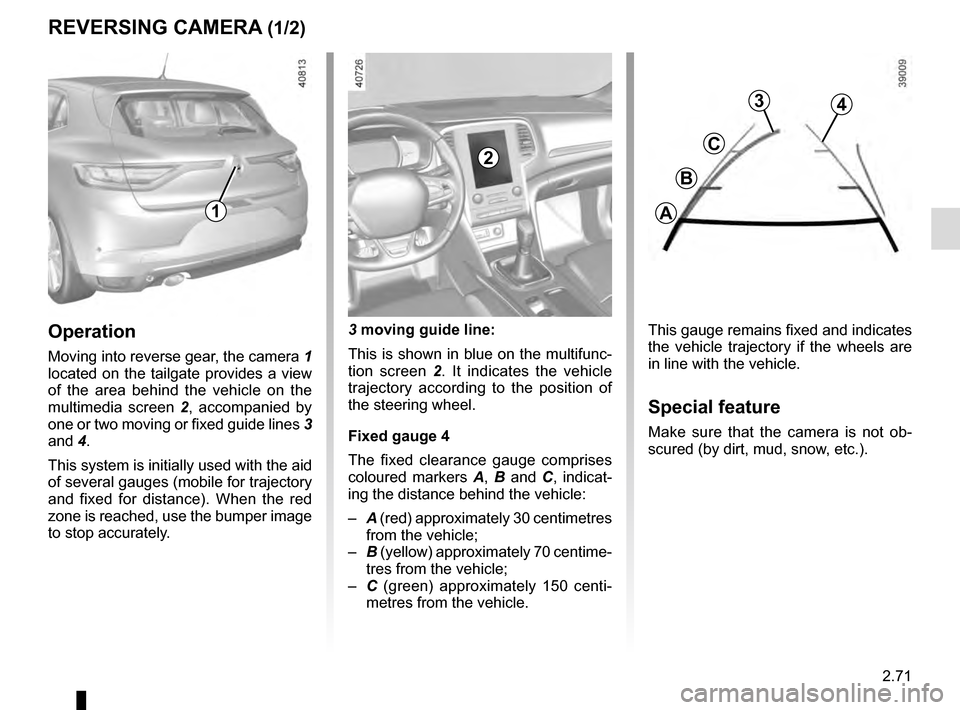
This gauge remains fixed and indicates
the vehicle trajectory if the wheels are
in line with the vehicle.
Special feature
Make sure that the camera is not ob-
scured (by dirt, mud, snow, etc.).
Operation
Moving into reverse gear, the camera 1
located on the tailgate provides a view
of the area behind the vehicle on the
multimedia screen 2, accompanied by
one or two moving or fixed guide lines 3
and 4.
This system is initially used with the aid
of several gauges (mobile for trajectory
and fixed for distance). When the red
zone is reached, use the bumper image
to stop accurately. 3 moving guide line:
This is shown in blue on the multifunc-
tion screen 2
. It indicates the vehicle
trajectory according to the position of
the steering wheel.
Fixed gauge 4
The fixed clearance gauge comprises
coloured markers A, B and C , indicat-
ing the distance behind the vehicle:
– A (red) approximately 30 centimetres
from the vehicle;
– B (yellow) approximately 70 centime-
tres from the vehicle;
– C (green) approximately 150 centi-
metres from the vehicle.
1
2
3
C
B
A
4
Page 181 of 316
2.73
ASSISTED PARKING (1/4)
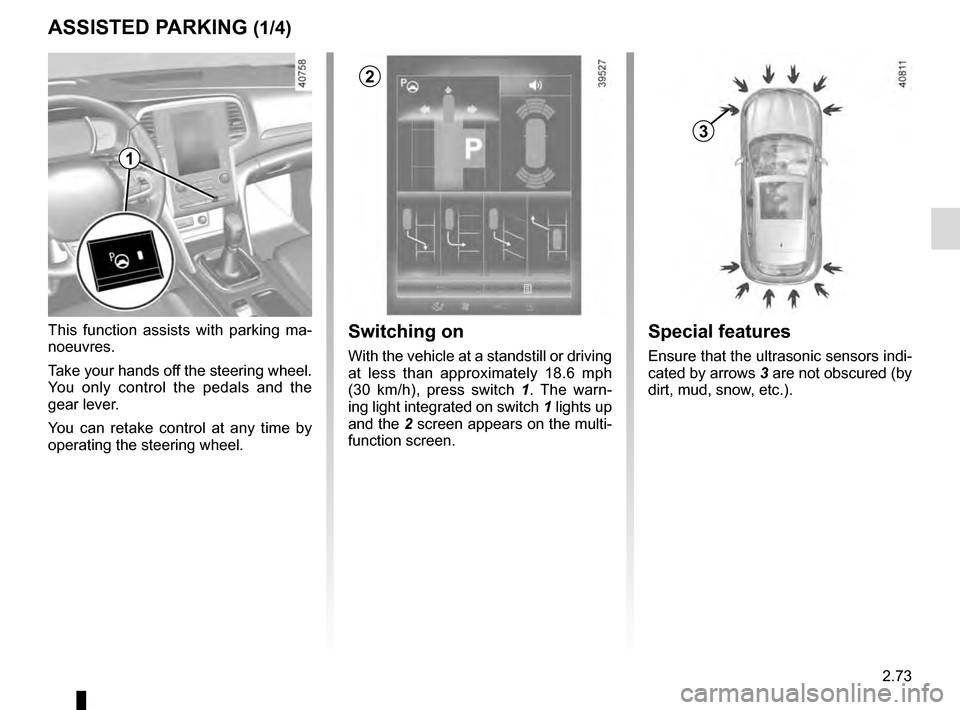
This function assists with parking ma-
noeuvres.
Take your hands off the steering wheel.
You only control the pedals and the
gear lever.
You can retake control at any time by
operating the steering wheel.Switching on
With the vehicle at a standstill or driving
at less than approximately 18.6 mph
(30 km/h), press switch 1. The warn-
ing light integrated on switch 1 lights up
and the 2 screen appears on the multi-
function screen.
1
2
Special features
Ensure that the ultrasonic sensors indi-
cated by arrows 3 are not obscured (by
dirt, mud, snow, etc.).
3
Page 182 of 316
2.74
Choice of manoeuvre
The system can perform four types of
manoeuvres:
– parallel parking;
– perpendicular parking;
– angle parking;
– moving out of a parallel parking space.
From the multifunction screen, select
the manoeuvre to be performed.
Note: When starting the vehicle, or
after successfully completed parallel
parking using the system, the default
manoeuvre proposed by the system is
assistance in exiting a parallel parking
space. In other cases, the default ma-
noeuvre can be set from the multifunc-
tion screen.
ASSISTED PARKING (2/4)
Operation
Parking
As long as the vehicle speed is less
than 20 mph (30 km/h), the system
looks for available parking spaces on
both sides of the vehicle.
Once a space has been found, it is dis-
played on the multifunction screen, indi-
cated by a small letter “P”. Drive slowly,
with the indicators activated on the side
of the space, until the message “Stop”
is displayed, alongside a beep.
The space is then indicated on the mul-
tifunction screen by a capital “P”.
– Stop the vehicle;
– select reverse gear.
Warning light
lights up on the in-
strument panel, along with a beep.
– release the steering wheel;
– follow the system instructions pro- vided on the multifunction screen. Your speed should not exceed around 4
mph (7 km/h).
Once the warning light
on the
instrument panel goes off and a beep
sounds, the manoeuvre has been com-
pleted.
Page 183 of 316

2.75
ASSISTED PARKING (3/4)
Your speed should not exceed around
4 mph (7 km/h).
Once in position to exit the space, the
system will notify you of the end of the
manoeuvre.
Once the warning light
on the
instrument panel goes off and a beep
sounds, the manoeuvre has been com-
pleted.
Suspending the manoeuvreThe manoeuvre is suspended in the fol-
lowing circumstances:
– you take control of the wheel;
– a door or the boot is opened;
– the vehicle is at a standstill for too long;
– an obstacle in the direction of move- ment prevents the manoeuvre from
being completed;
– the engine will stop.
Once the warning light
on the
instrument panel goes off and a beep
sounds, the manoeuvre has been sus-
pended. Then to resume the manoeu-
vre, press and hold the system activa-
tion switch. In this case, the reason for suspending
the manoeuvre will be displayed on the
multifunction screen.
Make sure:
– you have released the steering wheel
and;
– that all doors and the boot are closed, and;
– that no obstacles are in the way of the direction of movement, and;
– that the engine is started.
Cancelling the manoeuvre
The manoeuvre can be stopped in the
following cases:
– by pressing the system activation switch;
– the vehicle speed has exceeded 4 mph (7 km/h);
– You have performed more than ten forwards/backwards movements in
one manoeuvre;
– the parking distance control sensors are dirty or blocked;
– the vehicle wheels have skidded.
Once the warning light
on the
instrument panel goes off and a beep
sounds, the manoeuvre has been com-
pleted.
Exiting a parallel parking space
– Select “exit parallel parking space” mode;
– activate the direction indicator on the side you wish to go out of;
– press and hold switch 1 (around
2 seconds).
Warning light
lights up on the in-
strument panel, along with a beep.
– release the steering wheel;
– go forwards and backwards using the parking distance control system
alerts.
1
Page 184 of 316
2.76
ASSISTED PARKING (4/4)
This function is an additional driving aid. However, this function is not under any circumstances intended to replace the
due care and attention of the driver, who should at all times be in control of the vehicle.
Make sure that the manoeuvre complies with the applicable traffic regulations at your location.
– The driver should always look out for sudden hazards during driving: alw\
ays ensure that there are no moving obstacles (such as a child, animal, pram, bicycle, etc.) or small, narrow object\
s such as stones or posts in your path when manoeu-
vring.
– The system cannot detect objects located in the sensor blind spots.
– During manoeuvring, the steering wheel may turn quickly: do not place yo\
ur hands inside the wheel, and ensure nothing is located in this space.
– Always visually check that the parking space proposed by the system is s\
till available and contains no obstacles.
– The system should be deactivated when towing a trailer.
Page 190 of 316
3.2
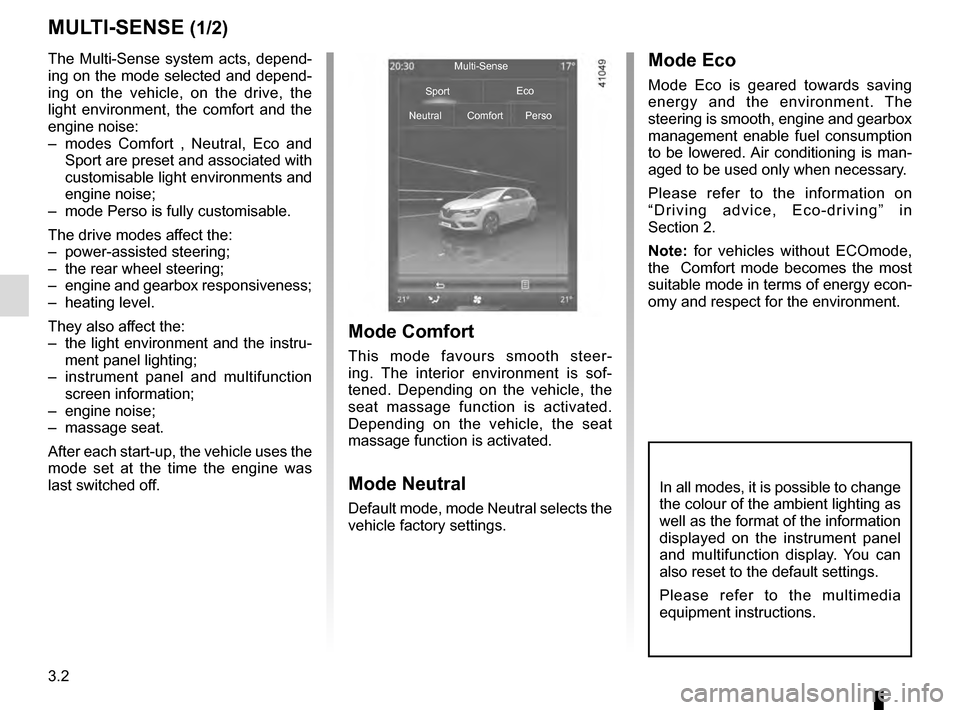
MULTI-SENSE (1/2)
The Multi-Sense system acts, depend-
ing on the mode selected and depend-
ing on the vehicle, on the drive, the
light environment, the comfort and the
engine noise:
– modes Comfort , Neutral, Eco and Sport are preset and associated with
customisable light environments and
engine noise;
– mode Perso is fully customisable.
The drive modes affect the:
– power-assisted steering;
– the rear wheel steering;
– engine and gearbox responsiveness;
– heating level.
They also affect the:
– the light environment and the instru- ment panel lighting;
– instrument panel and multifunction screen information;
– engine noise;
– massage seat.
After each start-up, the vehicle uses the
mode set at the time the engine was
last switched off.
Mode Comfort
This mode favours smooth steer-
ing. The interior environment is sof-
tened. Depending on the vehicle, the
seat massage function is activated.
Depending on the vehicle, the seat
massage function is activated.
Mode Neutral
Default mode, mode Neutral selects the
vehicle factory settings.
Mode Eco
Mode Eco is geared towards saving
energy and the environment. The
steering is smooth, engine and gearbox
management enable fuel consumption
to be lowered. Air conditioning is man-
aged to be used only when necessary.
Please refer to the information on
“Driving advice, Eco-driving” in
Section 2.
Note: for vehicles without ECOmode,
the Comfort mode becomes the most
suitable mode in terms of energy econ-
omy and respect for the environment.
Multi-Sense
Sport Eco
Neutral Comfort Perso
In all modes, it is possible to change
the colour of the ambient lighting as
well as the format of the information
displayed on the instrument panel
and multifunction display. You can
also reset to the default settings.
Please refer to the multimedia
equipment instructions.
Page 230 of 316
3.42
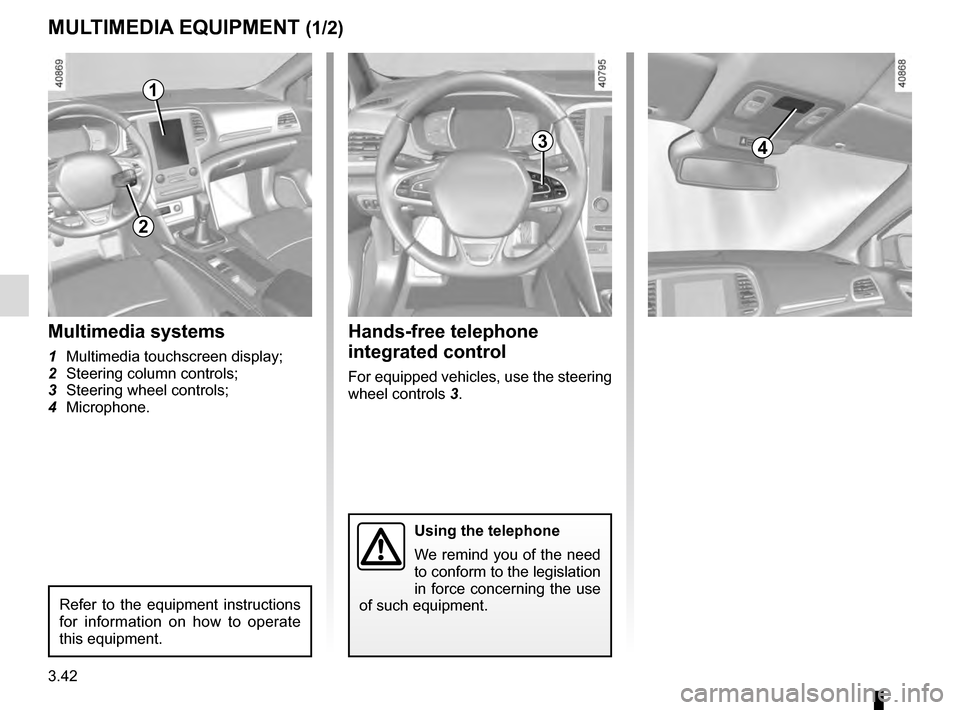
MULTIMEDIA EQUIPMENT (1/2)
Using the telephone
We remind you of the need
to conform to the legislation
in force concerning the use
of such equipment.
4
Hands-free telephone
integrated control
For equipped vehicles, use the steering
wheel controls 3.
Multimedia systems
1 Multimedia touchscreen display;
2 Steering column controls;
3 Steering wheel controls;
4 Microphone.
1
3
Refer to the equipment instructions
for information on how to operate
this equipment.
2
Page 263 of 316
5.13
TYRES (3/3)
For safety reasons, this op-
eration must be carried out
by a specialist.
Fitting different tyres may
change your vehicle as follows:
– it may mean that your vehicle no longer conforms to current regu-
lations;
– it may change the way it handles when cornering;
– it may cause the steering to be heavy;
– It may affect the use of snow chains.
Use in winter
Chains
For safety reasons, fitting snow
chains to the rear axle is strictly for-
bidden.
Chains cannot be fitted to tyres which
are larger than those originally fitted to
the vehicle.
Snow or Winter tyres
We would recommend that these be
fitted to all four wheels to ensure that
your vehicle retains maximum adhe-
sion.
Warning : These tyres sometimes have
a specific direction of rotation and a
maximum speed index which may be
lower than the maximum speed of your
vehicle.
Snow chains may only be
fitted to tyres of the same
size as those originally
fitted to your vehicle.
In all cases, we would recommend
that you contact an authorised
dealer who will be able to advise you
on the choice of equipment which is
most suitable for your vehicle.
Changing a wheel
As the tyre pressure moni-
tor may take several min-
utes to correctly determine
the positions of the wheels and the
pressure values after driving, check
the tyre pressures following any op-
eration.
Studded tyres
This type of equipment may only be
used for a limited period and as laid
down by local legislation. It is neces-
sary to observe the speed specified by
current legislation.
These tyres must, at a minimum, be
fitted to the two front wheels.
17” wheels and larger
cannot be fitted with
chains.
If you wish to use special
equipment, please consult an au-
thorised dealer.
Fitting new tyres
Page 280 of 316
5.30
TOWING: breakdown recovery (1/2)
Before towing, put the gearbox in neu-
tral, unlock the steering column and re-
lease the parking brake.
For vehicles fitted with an automatic
gearbox, if it is not possible to put the
gear lever into position N, please con-
sult an authorised dealer.
Steering column unlocking
Insert the key into the ignition or, de-
pending on the vehicle, having the
RENAULT card on you, press the
engine start button for 2 seconds.
Reposition the lever to neutral (posi-
tion N for vehicles fitted with an auto-
matic gearbox).
The column is unlocked, the acces-
sory functions are supplied: the vehi-
cle lights can be used (indicators, brake
lights etc.). At night the vehicle must
have its lights on.
Depending on the vehicle, once you
have finished towing, press the engine
start button twice (risk of running down
the battery). The speed specified by current legis-
lation for towing must always be ob-
served. If your vehicle is the towing
vehicle, do not exceed the maximum
towing weight for your vehicle (refer
to the information on “Weights” in
Section 6).
Towing a vehicle with an
automatic gearbox
Transport the vehicle on a trailer or tow
it with the front wheels off the ground.
In exceptional circumstances
, you
may tow it with all four wheels on the
ground, only in a forward gear, with the
gear in neutral position N over a maxi-
mum distance of 50 miles and not ex-
ceeding a speed of 15 mph (25 km/h).
1
2
Do not remove the key from
the ignition when the vehi-
cle is being towed.
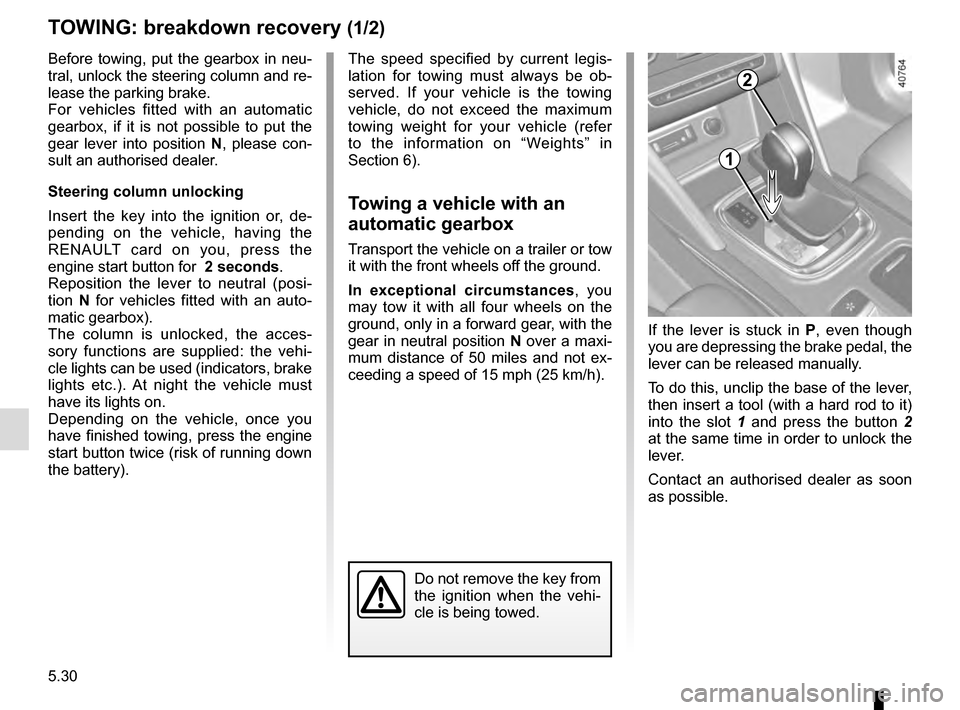
If the lever is stuck in P , even though
you are depressing the brake pedal, the
lever can be released manually.
To do this, unclip the base of the lever,
then insert a tool (with a hard rod to it)
into the slot 1 and press the button 2
at the same time in order to unlock the
lever.
Contact an authorised dealer as soon
as possible.
Page 284 of 316

5.34
OPERATING FAULTS (3/7)
The starter is activatedPOSSIBLE CAUSES WHAT TO DO
The instrument panel indicator lights are
weak or fail to light up and the starter
does not turn. Battery terminals not tight,
battery terminals discon-
nected or oxidised.Retighten or reconnect the terminals, or clean them if
they are oxidised.
Discharged battery or not
operational. Connect another battery to the faulty battery. Refer to
information on “Battery: troubleshooting” in Section 5
or replace the battery if necessary.
Do not push the vehicle if the steering column is
locked.
Faulty circuit. Consult an approved dealer.
The engine will not start. Starting conditions are not
fulfilled.Please refer to the information on “Starting, stopping
the engine” in Section 2.
The RENAULT card does
not work. Please refer to the information on “Starting, stopping
the engine” in Section 2.
The engine cannot be switched off. Card not detected. Please refer to the information on “Starting, stopping
the engine” in Section 2.
Electronic fault. Press the starter button quickly five times.
The steering column remains locked. Steering wheel locked. Move the steering wheel while pressing the engine
start button or, depending on the vehicle, while turning
the key (refer to the information on “Starting, stopping
the engine” in Section 2).
Faulty circuit. Consult an approved dealer.