Hazard RENAULT MEGANE 2017 4.G User Guide
[x] Cancel search | Manufacturer: RENAULT, Model Year: 2017, Model line: MEGANE, Model: RENAULT MEGANE 2017 4.GPages: 346, PDF Size: 7.04 MB
Page 111 of 346
1.105
Persistent smell of
fuel
If you notice a persistent
smell of fuel you should:
– stop the vehicle as soon as traf- fic conditions allow and switch off
the ignition;
– switch on the hazard warning lights and ask your passengers
to leave the vehicle and to keep
away from traffic;
– contact an approved Dealer.
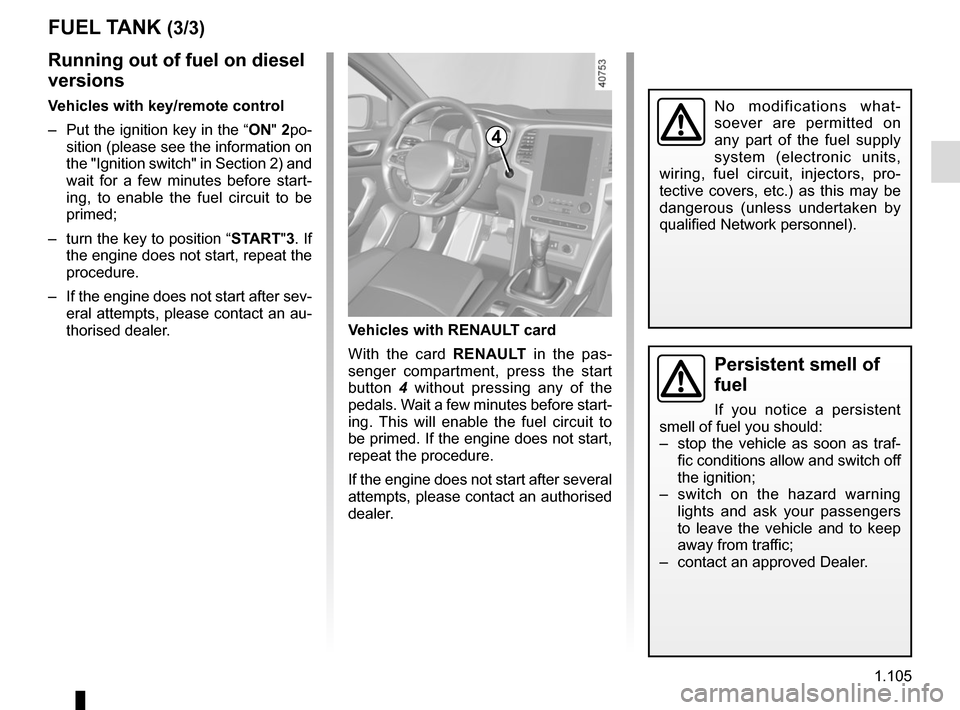
Vehicles with RENAULT card
With the card RENAULT in the pas-
senger compartment, press the start
button 4 without pressing any of the
pedals. Wait a few minutes before start-
ing. This will enable the fuel circuit to
be primed. If the engine does not start,
repeat the procedure.
If the engine does not start after several
attempts, please contact an authorised
dealer.
No modifications what-
soever are permitted on
any part of the fuel supply
system (electronic units,
wiring, fuel circuit, injectors, pro-
tective covers, etc.) as this may be
dangerous (unless undertaken by
qualified Network personnel).
4
FUEL TANK (3/3)
Running out of fuel on diesel
versions
Vehicles with key/remote control
– Put the ignition key in the “ON" 2po-
sition (please see the information on
the "Ignition switch" in Section 2) and
wait for a few minutes before start-
ing, to enable the fuel circuit to be
primed;
– turn the key to position “START"3. If the engine does not start, repeat the
procedure.
– If the engine does not start after sev- eral attempts, please contact an au-
thorised dealer.
Page 145 of 346
2.33
DRIVER CORRECTION DEVICES AND AIDS (4/10)
Emergency brake assist
This system supplements the ABS
and helps reduce vehicle stopping dis-
tances.
Operating principle
The system is for detecting an emer-
gency braking situation. In this case,
the braking assistance immediately de-
velops maximum power and may trig-
ger ABS regulation.
ABS braking is maintained as long as
the brake pedal is applied.
Hazard warning lights switching on
Depending on the vehicle, these may
light up in the event of sudden decel-
eration. Braking anticipation
Depending on the vehicle, when you
rapidly release the accelerator, the
system anticipates the braking ma-
noeuvre in order to reduce stopping
distances.
Special cases
When using the cruise control:
– if you use the accelerator, when you
release it, the system may be trig-
gered;
– if you do not use the accelerator, the system will not be triggered.
Operating faults
When the system detects an operat-
ing fault the message “Check brak-
ing system” appears on the instrument
panel along with the
© warning
light.
Consult an approved dealer.
Page 154 of 346
2.42
1
76
Adjustment
Vehicles fitted with a navigation
system
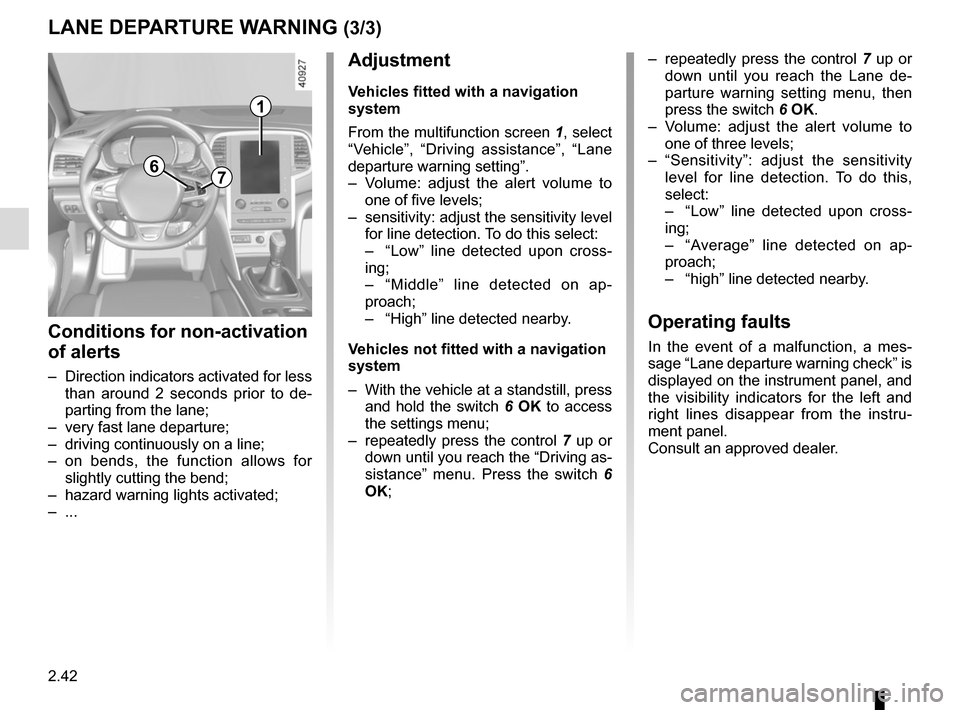
From the multifunction screen 1, select
“Vehicle”, “Driving assistance”, “Lane
departure warning setting”.
– Volume: adjust the alert volume to one of five levels;
– sensitivity: adjust the sensitivity level for line detection. To do this select:
– “Low” line detected upon cross-
ing;
– “Middle” line detected on ap-
proach;
– “High” line detected nearby.
Vehicles not fitted with a navigation
system
– With the vehicle at a standstill, press and hold the switch 6 OK to access
the settings menu;
– repeatedly press the control 7 up or
down until you reach the “Driving as-
sistance” menu. Press the switch 6
OK;
– repeatedly press the control 7 up or
down until you reach the Lane de-
parture warning setting menu, then
press the switch 6 OK.
– Volume: adjust the alert volume to one of three levels;
– “Sensitivity”: adjust the sensitivity level for line detection. To do this,
select:
– “Low” line detected upon cross-
ing;
– “Average” line detected on ap-
proach;
– “high” line detected nearby.
Operating faults
In the event of a malfunction, a mes-
sage “Lane departure warning check” is
displayed on the instrument panel, and
the visibility indicators for the left and
right lines disappear from the instru-
ment panel.
Consult an approved dealer.
LANE DEPARTURE WARNING (3/3)
Conditions for non-activation
of alerts
– Direction indicators activated for less than around 2 seconds prior to de-
parting from the lane;
– very fast lane departure;
– driving continuously on a line;
– on bends, the function allows for slightly cutting the bend;
– hazard warning lights activated;
– ...
Page 155 of 346
2.43
BLIND SPOT WARNING (1/4)
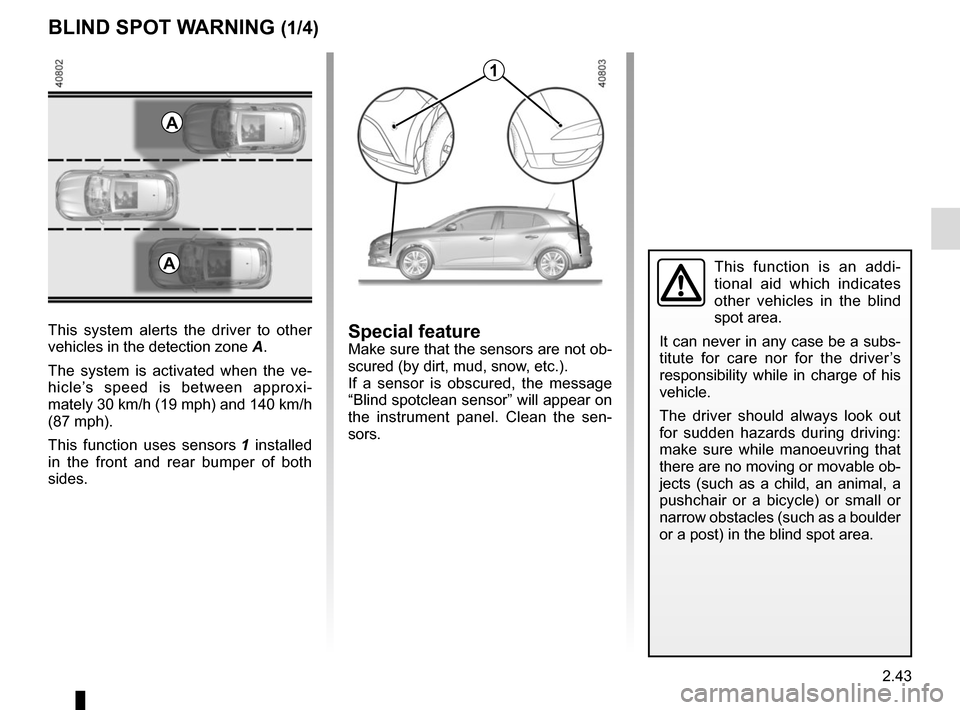
This system alerts the driver to other
vehicles in the detection zone A.
The system is activated when the ve-
hicle’s speed is between approxi-
mately 30 km/h (19 mph) and 140 km/h
(87 mph).
This function uses sensors 1 installed
in the front and rear bumper of both
sides.
1
A
Special featureMake sure that the sensors are not ob-
scured (by dirt, mud, snow, etc.).
If a sensor is obscured, the message
“Blind spotclean sensor” will appear on
the instrument panel. Clean the sen-
sors.
AThis function is an addi-
tional aid which indicates
other vehicles in the blind
spot area.
It can never in any case be a subs-
titute for care nor for the driver’s
responsibility while in charge of his
vehicle.
The driver should always look out
for sudden hazards during driving:
make sure while manoeuvring that
there are no moving or movable ob-
jects (such as a child, an animal, a
pushchair or a bicycle) or small or
narrow obstacles (such as a boulder
or a post) in the blind spot area.
Page 190 of 346

This function is an additional driving aid. This function is not under any circumstances intended to replace the due\
care
and attention of the driver, who should at all")
2.78
ASSISTED PARKING (4/4)
This function is an additional driving aid. This function is not under any circumstances intended to replace the due\
care
and attention of the driver, who should at all times be in control of the vehicle.
Make sure that the manoeuvre complies with the applicable traffic regulations at your location.
– The driver should always look out for sudden hazards during driving: alw\
ays ensure that there are no moving obstacles (such as a child, animal, pram, bicycle, etc.) or small, narrow object\
s such as stones or posts in your path when manoeu-
vring.
– The system cannot detect objects located in the sensor blind spots.
– During manoeuvring, the steering wheel may turn quickly: do not place yo\
ur hands inside the wheel, and ensure nothing is located in this space.
– Always visually check that the parking space proposed by the system is s\
till available and contains no obstacles.
– The system should be deactivated when towing a trailer.
Page 227 of 346
3.33
ASHTRAY, CIGARETTE LIGHTER, ACCESSORIES SOCKET (1/2)
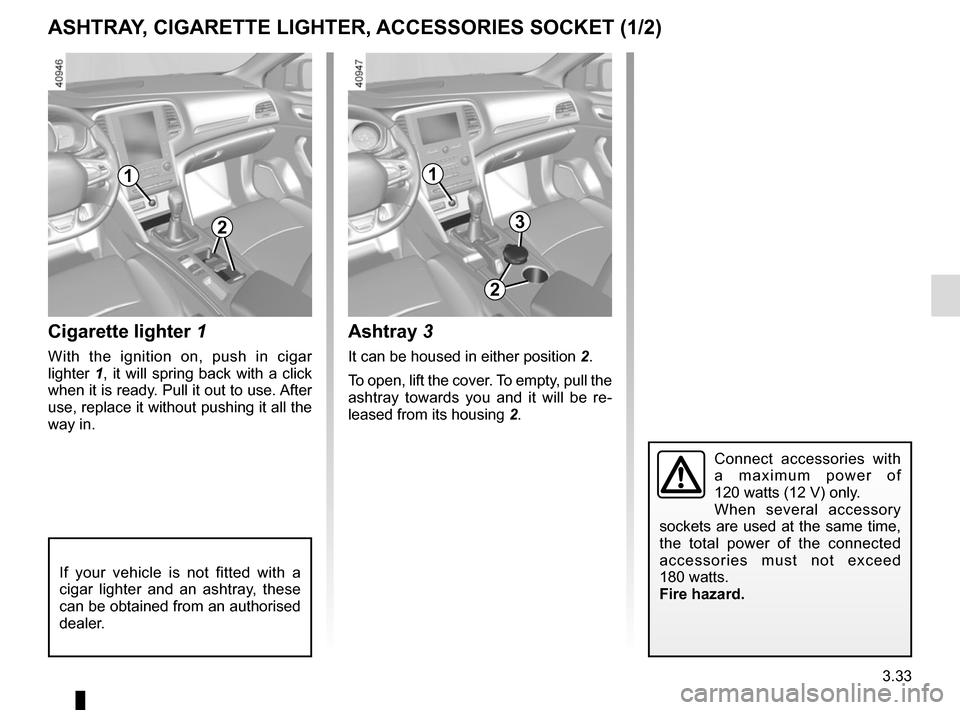
1
Cigarette lighter 1
With the ignition on, push in cigar
lighter 1, it will spring back with a click
when it is ready. Pull it out to use. After
use, replace it without pushing it all the
way in.
Connect accessories with
a maximum power of
120 watts (12 V) only.
When several accessory
sockets are used at the same time,
the total power of the connected
accessories must not exceed
180 watts.
Fire hazard.
23
1
If your vehicle is not fitted with a
cigar lighter and an ashtray, these
can be obtained from an authorised
dealer.
Ashtray 3
It can be housed in either position 2.
To open, lift the cover. To empty, pull the
ashtray towards you and it will be re-
leased from its housing 2.
2
Page 228 of 346
3.34
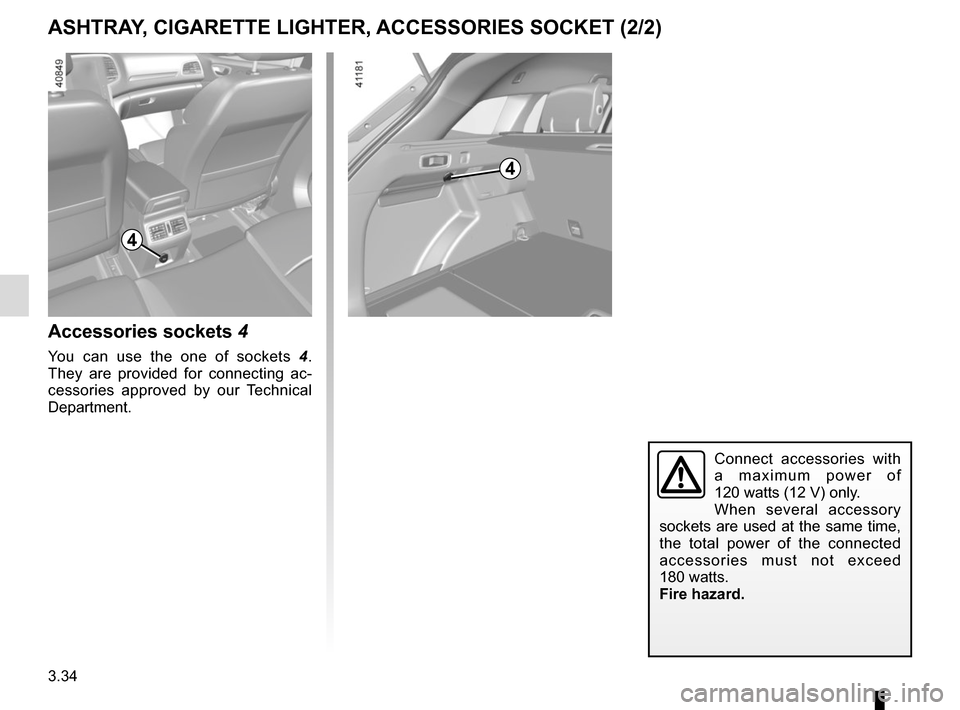
4
Accessories sockets 4
You can use the one of sockets 4.
They are provided for connecting ac-
cessories approved by our Technical
Department.
Connect accessories with
a maximum power of
120 watts (12 V) only.
When several accessory
sockets are used at the same time,
the total power of the connected
accessories must not exceed
180 watts.
Fire hazard.
ASHTRAY, CIGARETTE LIGHTER, ACCESSORIES SOCKET (2/2)
4
Page 251 of 346
3.57
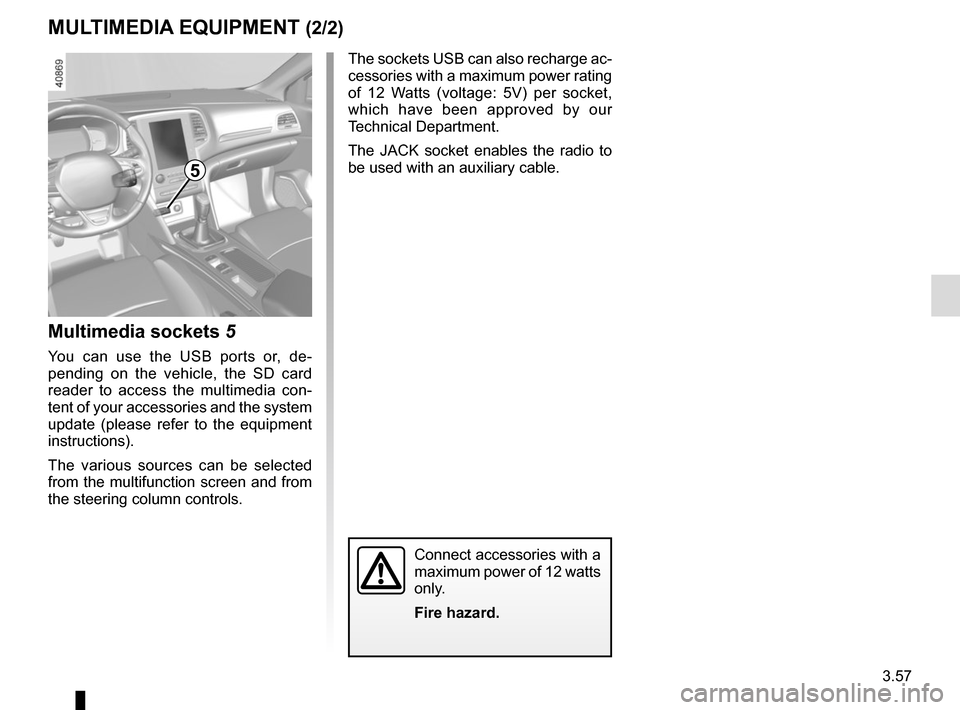
Multimedia sockets 5
You can use the USB ports or, de-
pending on the vehicle, the SD card
reader to access the multimedia con-
tent of your accessories and the system
update (please refer to the equipment
instructions).
The various sources can be selected
from the multifunction screen and from
the steering column controls.
MULTIMEDIA EQUIPMENT (2/2)
The sockets USB can also recharge ac-
cessories with a maximum power rating
of 12 Watts (voltage: 5V) per socket,
which have been approved by our
Technical Department.
The JACK socket enables the radio to
be used with an auxiliary cable.
Connect accessories with a
maximum power of 12 watts
only.
Fire hazard.
5
Page 275 of 346
5.5
TYRE PRESSURE KIT (2/3)
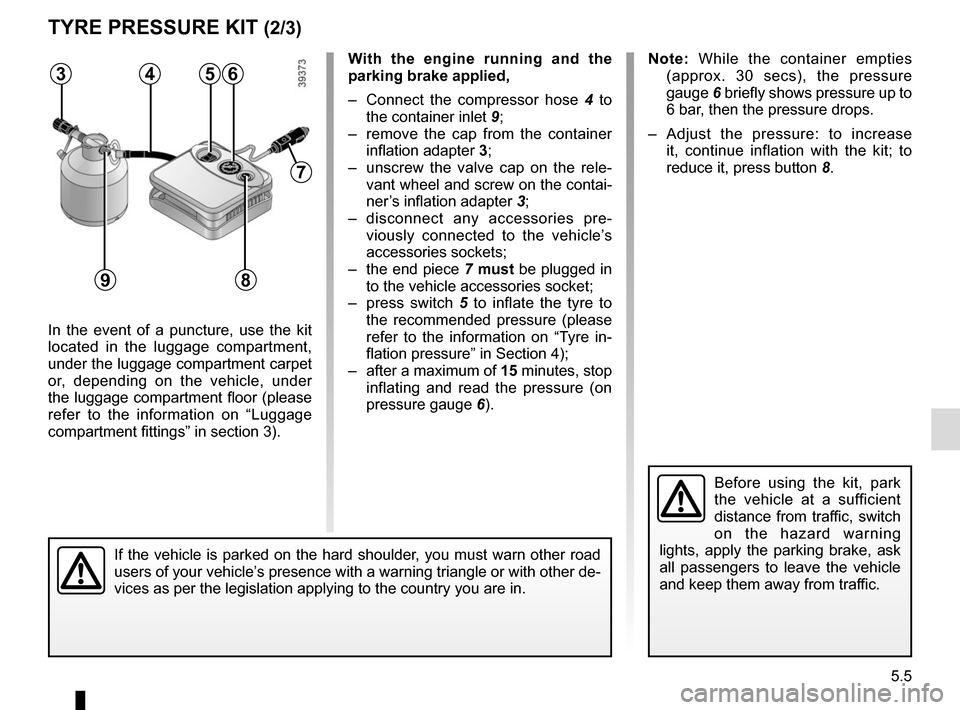
In the event of a puncture, use the kit
located in the luggage compartment,
under the luggage compartment carpet
or, depending on the vehicle, under
the luggage compartment floor (please
refer to the information on “Luggage
compartment fittings” in section 3).
Before using the kit, park
the vehicle at a sufficient
distance from traffic, switch
on the hazard warning
lights, apply the parking brake, ask
all passengers to leave the vehicle
and keep them away from traffic.
Note: While the container empties (approx. 30 secs), the pressure
gauge 6 briefly shows pressure up to
6 bar, then the pressure drops.
– Adjust the pressure: to increase it, continue inflation with the kit; to
reduce it, press button 8.
If the vehicle is parked on the hard shoulder, you must warn other road
users of your vehicle’s presence with a warning triangle or with other de-
vices as per the legislation applying to the country you are in.
With the engine running and the
parking brake applied,
– Connect the compressor hose 4 to
the container inlet 9;
– remove the cap from the container inflation adapter 3;
– unscrew the valve cap on the rele- vant wheel and screw on the contai-
ner’s inflation adapter 3;
– disconnect any accessories pre- viously connected to the vehicle’s
accessories sockets;
– the end piece 7 must be plugged in
to the vehicle accessories socket;
– press switch 5 to inflate the tyre to
the recommended pressure (please
refer to the information on “Tyre in-
flation pressure” in Section 4);
– after a maximum of 15 minutes, stop inflating and read the pressure (on
pressure gauge 6).563
9
7
4
8
Page 279 of 346
5.9
CHANGING A WHEEL (1/2)
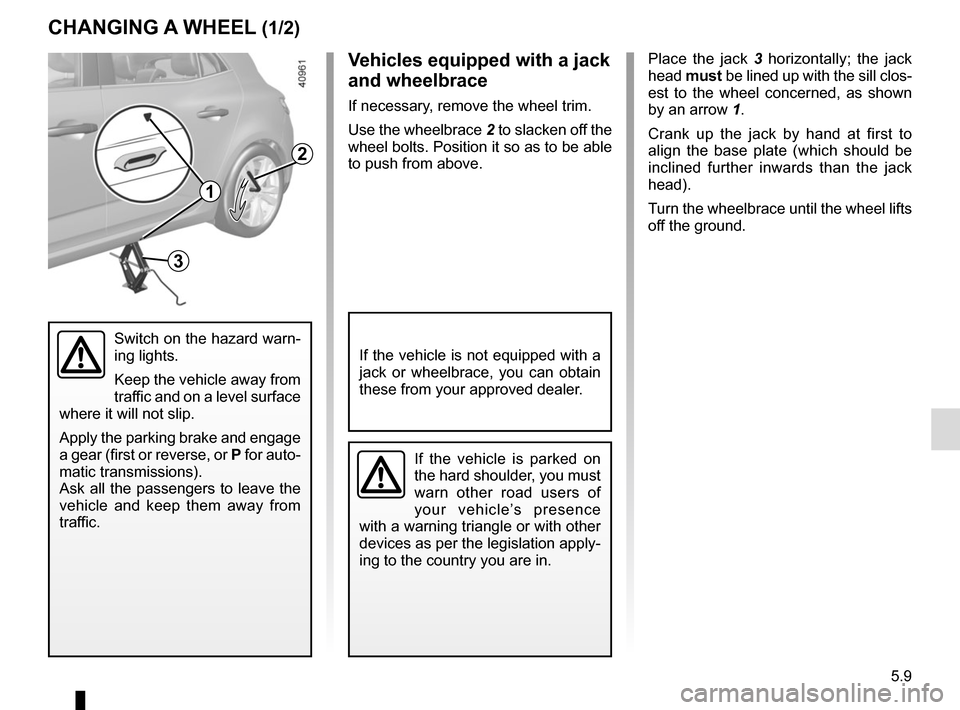
Place the jack 3 horizontally; the jack
head must be lined up with the sill clos-
est to the wheel concerned, as shown
by an arrow 1.
Crank up the jack by hand at first to
align the base plate (which should be
inclined further inwards than the jack
head).
Turn the wheelbrace until the wheel lifts
off the ground.
Switch on the hazard warn-
ing lights.
Keep the vehicle away from
traffic and on a level surface
where it will not slip.
Apply the parking brake and engage
a gear (first or reverse, or P for auto-
matic transmissions).
Ask all the passengers to leave the
vehicle and keep them away from
traffic.
If the vehicle is parked on
the hard shoulder, you must
warn other road users of
your vehicle’s presence
with a warning triangle or with other
devices as per the legislation apply-
ing to the country you are in.
If the vehicle is not equipped with a
jack or wheelbrace, you can obtain
these from your approved dealer.
Vehicles equipped with a jack
and wheelbrace
If necessary, remove the wheel trim.
Use the wheelbrace 2 to slacken off the
wheel bolts. Position it so as to be able
to push from above.
3
2
1