Trip RENAULT MEGANE 2017 4.G User Guide
[x] Cancel search | Manufacturer: RENAULT, Model Year: 2017, Model line: MEGANE, Model: RENAULT MEGANE 2017 4.GPages: 346, PDF Size: 7.04 MB
Page 83 of 346
1.77
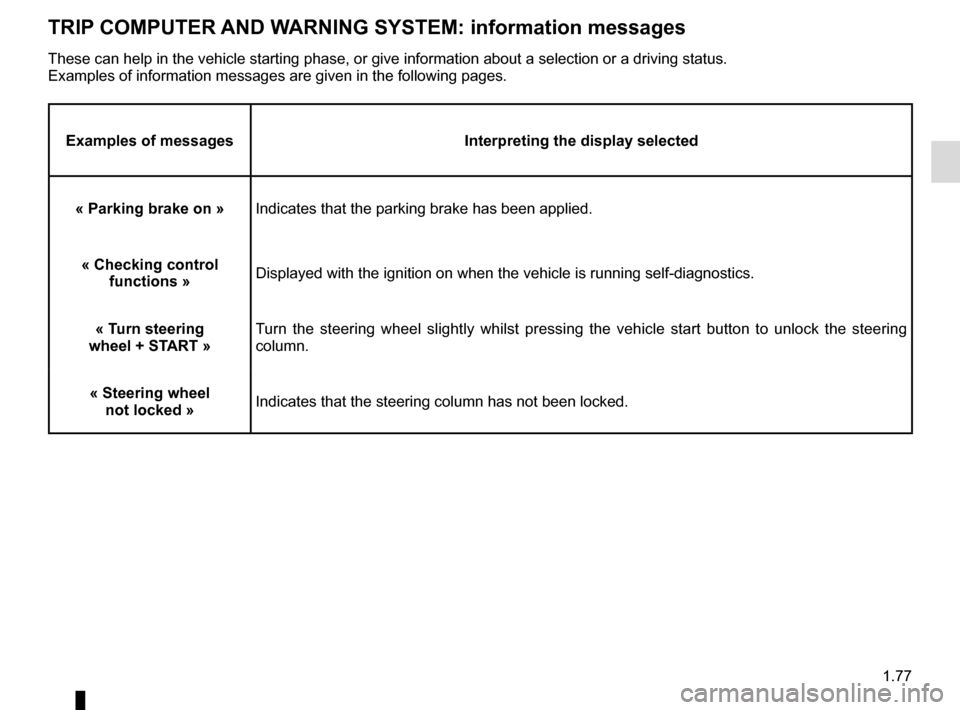
TRIP COMPUTER AND WARNING SYSTEM: information messages
Examples of messagesInterpreting the display selected
« Parking brake on » Indicates that the parking brake has been applied.
« Checking control functions » Displayed with the ignition on when the vehicle is running self-diagnost\
ics.
« Turn steering
wheel + START » Turn the steering wheel slightly whilst pressing the vehicle start button\
to unlock the steering
column.
« Steering wheel not locked » Indicates that the steering column has not been locked.
These can help in the vehicle starting phase, or give information about \
a selection or a driving status.
Examples of information messages are given in the following pages.
Page 84 of 346

1.78
TRIP COMPUTER AND WARNING SYSTEM: operating fault messages
These appear with the © warning light and mean that you should drive very carefully to an author\
ised dealer as
soon as possible. If you fail to follow this recommendation, you risk da\
maging your vehicle.
They disappear when the display selection key is pressed or after severa\
l seconds and are stored in the computer log. The
© warning light stays on. Examples of operating fault messages are given \
in the following pages.
Examples of messages Interpreting the display selected
« Clean diesel filter » Indicates the presence of water in the diesel filter; contact an approve\
d Dealer
as soon as possible.
« Check lighting » Indicates a fault in the headlights.
« Check vehicle » Indicates a fault in one of the pedal sensors, battery management system\
or oil
level sensor.
« Check airbag » Indicates a fault in the restraint system in addition to the seat belts.\
In the event
of an accident, it is possible that they may not be triggered.
« Check anti-pollution system » Indicates a fault in the vehicle’s particle filter system.
Page 85 of 346
1.79
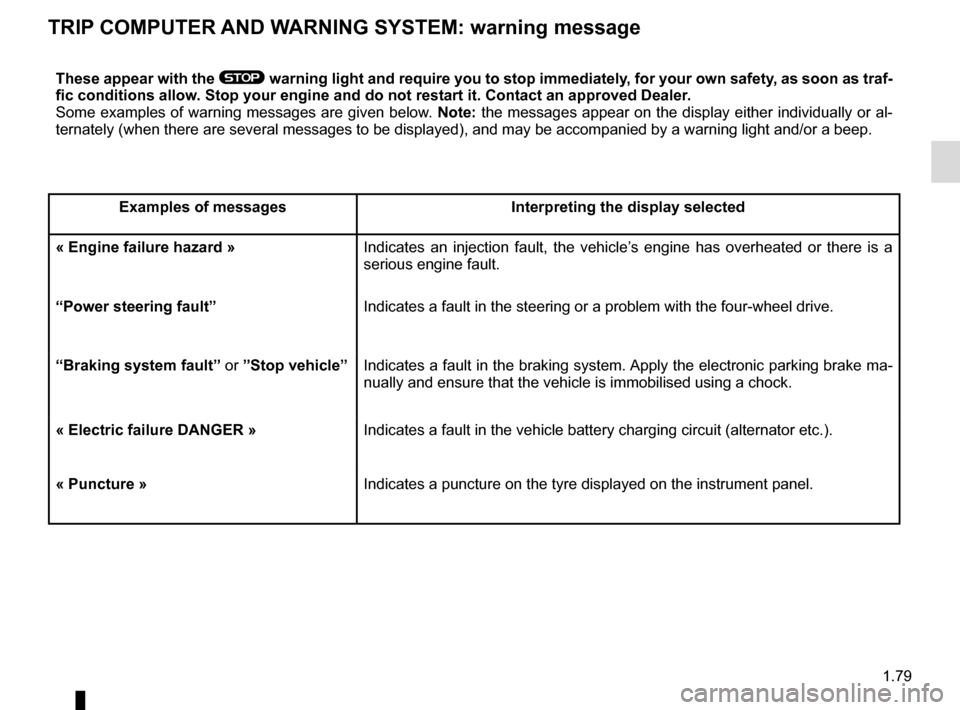
TRIP COMPUTER AND WARNING SYSTEM: warning message
These appear with the ® warning light and require you to stop immediately, for your own safety, as soon as traf-
fic conditions allow. Stop your engine and do not restart it. Contact an approved Dealer.
Some examples of warning messages are given below. Note: the messages appear on the display either individually or al-
ternately (when there are several messages to be displayed), and may b\
e accompanied by a warning light and/or a beep.
Examples of messages Interpreting the display selected
« Engine failure hazard » Indicates an injection fault, the vehicle’s engine has overheated or there is a
serious engine fault.
“Power steering fault” Indicates a fault in the steering or a problem with the four-wheel drive\
.
“Braking system fault” or ”Stop vehicle” Indicates a fault in the braking system. Apply the electronic parking brake ma-
nually and ensure that the vehicle is immobilised using a chock.
« Electric failure DANGER » Indicates a fault in the vehicle battery charging circuit (alternator e\
tc.).
« Puncture » Indicates a puncture on the tyre displayed on the instrument panel.
Page 87 of 346
1.81
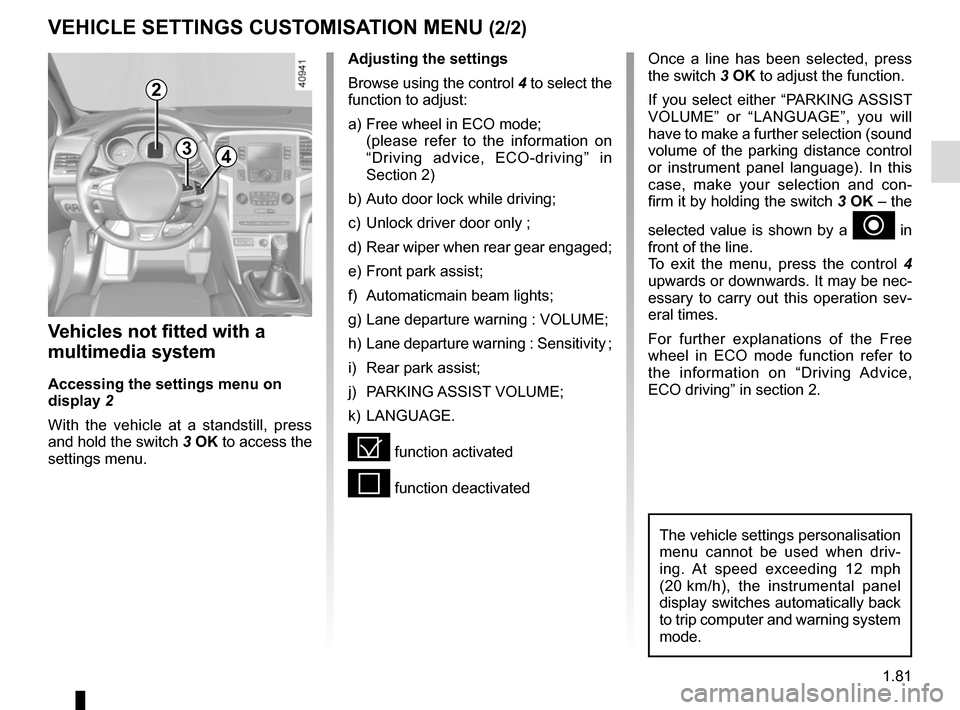
VEHICLE SETTINGS CUSTOMISATION MENU (2/2)
34
Once a line has been selected, press
the switch 3 OK to adjust the function.
If you select either “PARKING ASSIST
VOLUME” or “LANGUAGE”, you will
have to make a further selection (sound
volume of the parking distance control
or instrument panel language). In this
case, make your selection and con-
firm it by holding the switch 3 OK – the
selected value is shown by a
~ in
front of the line.
To exit the menu, press the control 4
upwards or downwards. It may be nec-
essary to carry out this operation sev-
eral times.
For further explanations of the Free
wheel in ECO mode function refer to
the information on “Driving Advice,
ECO driving” in section 2.
Vehicles not fitted with a
multimedia system
Accessing the settings menu on
display 2
With the vehicle at a standstill, press
and hold the switch 3 OK to access the
settings menu.
Adjusting the settings
Browse using the control 4 to select the
function to adjust:
a) Free wheel in ECO mode;
(please refer to the information on “Driving advice, ECO-driving” in
Section 2)
b) Auto door lock while driving;
c) Unlock driver door only ;
d) Rear wiper when rear gear engaged;
e) Front park assist;
f) Automaticmain beam lights;
g) Lane departure warning : VOLUME;
h) Lane departure warning : Sensitivity ;
i) Rear park assist;
j) PARKING ASSIST VOLUME;
k) LANGUAGE.
= function activated
< function deactivated
The vehicle settings personalisation
menu cannot be used when driv-
ing. At speed exceeding 12 mph
(20 km/h), the instrumental panel
display switches automatically back
to trip computer and warning system
mode.
2
Page 94 of 346
1.88
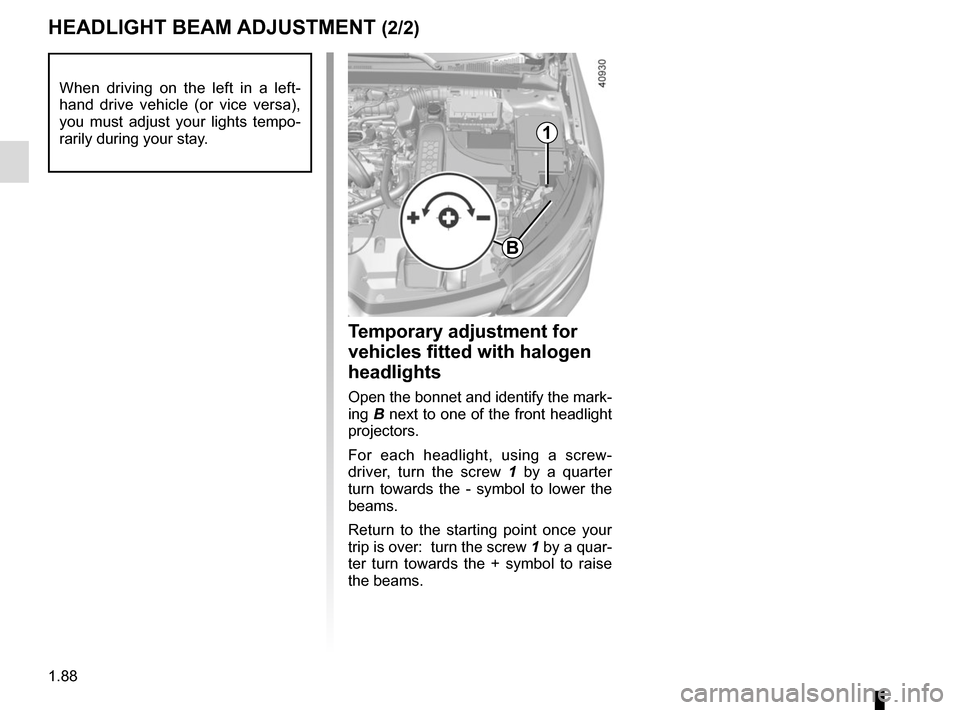
HEADLIGHT BEAM ADJUSTMENT (2/2)
Temporary adjustment for
vehicles fitted with halogen
headlights
Open the bonnet and identify the mark-
ing B next to one of the front headlight
projectors.
For each headlight, using a screw-
driver, turn the screw 1 by a quarter
turn towards the - symbol to lower the
beams.
Return to the starting point once your
trip is over: turn the screw 1 by a quar-
ter turn towards the + symbol to raise
the beams.
When driving on the left in a left-
hand drive vehicle (or vice versa),
you must adjust your lights tempo-
rarily during your stay.
1
B
Page 133 of 346
2.21
DRIVING ADVICE, ECO-DRIVING (2/5)
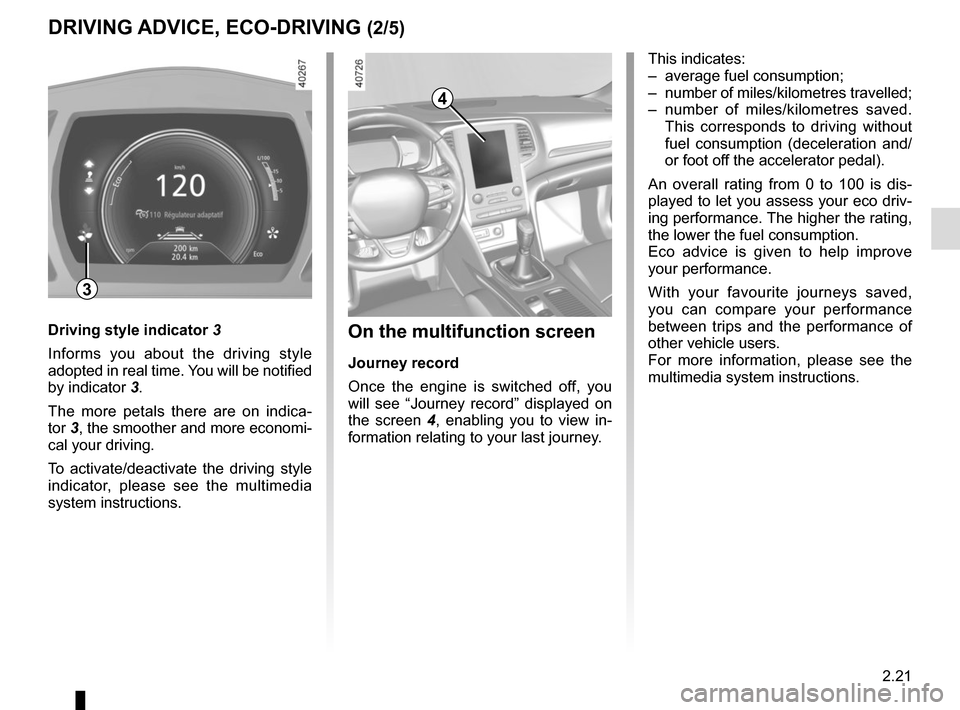
4
On the multifunction screen
Journey record
Once the engine is switched off, you
will see “Journey record” displayed on
the screen 4, enabling you to view in-
formation relating to your last journey.
This indicates:
– average fuel consumption;
– number of miles/kilometres travelled;
– number of miles/kilometres saved. This corresponds to driving without
fuel consumption (deceleration and/
or foot off the accelerator pedal).
An overall rating from 0 to 100 is dis-
played to let you assess your eco driv-
ing performance. The higher the rating,
the lower the fuel consumption.
Eco advice is given to help improve
your performance.
With your favourite journeys saved,
you can compare your performance
between trips and the performance of
other vehicle users.
For more information, please see the
multimedia system instructions.
Driving style indicator 3
Informs you about the driving style
adopted in real time. You will be notified
by indicator 3.
The more petals there are on indica-
tor 3, the smoother and more economi-
cal your driving.
To activate/deactivate the driving style
indicator, please see the multimedia
system instructions.
3
Page 139 of 346
2.27
TYRE PRESSURE MONITORING SYSTEM (1/3)
If the vehicle is equipped with the func-
tion, this system monitors the tyre pres-
sure.
Operating principle
Each wheel (except for the emergency
spare wheel) has a sensor in the infla-
tion valve which periodically measures
the tyre pressure.
The system displays the current pres-
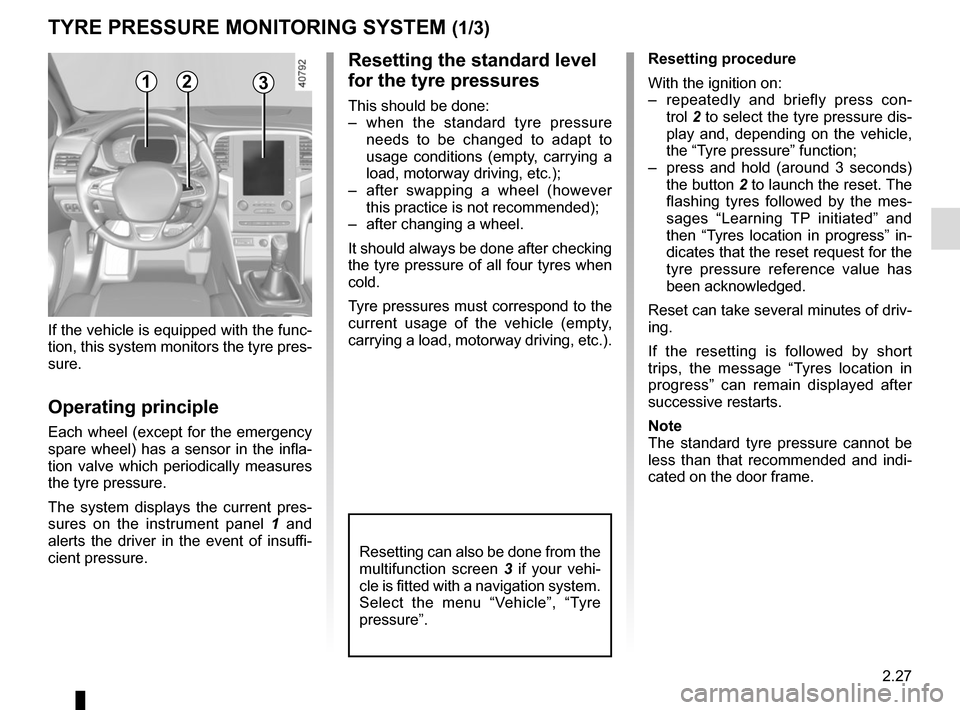
sures on the instrument panel 1 and
alerts the driver in the event of insuffi-
cient pressure.
Resetting the standard level
for the tyre pressures
This should be done:
– when the standard tyre pressure needs to be changed to adapt to
usage conditions (empty, carrying a
load, motorway driving, etc.);
– after swapping a wheel (however this practice is not recommended);
– after changing a wheel.
It should always be done after checking
the tyre pressure of all four tyres when
cold.
Tyre pressures must correspond to the
current usage of the vehicle (empty,
carrying a load, motorway driving, etc.).
21
Resetting procedure
With the ignition on:
– repeatedly and briefly press con- trol 2 to select the tyre pressure dis-
play and, depending on the vehicle,
the “Tyre pressure” function;
– press and hold (around 3 seconds) the button 2 to launch the reset. The
flashing tyres followed by the mes-
sages “Learning TP initiated” and
then “Tyres location in progress” in-
dicates that the reset request for the
tyre pressure reference value has
been acknowledged.
Reset can take several minutes of driv-
ing.
If the resetting is followed by short
trips, the message “Tyres location in
progress” can remain displayed after
successive restarts.
Note
The standard tyre pressure cannot be
less than that recommended and indi-
cated on the door frame.
3
Resetting can also be done from the
multifunction screen 3 if your vehi-
cle is fitted with a navigation system.
Select the menu “Vehicle”, “Tyre
pressure”.
Page 262 of 346
4.10
LEVELS (3/3)/FILTERS
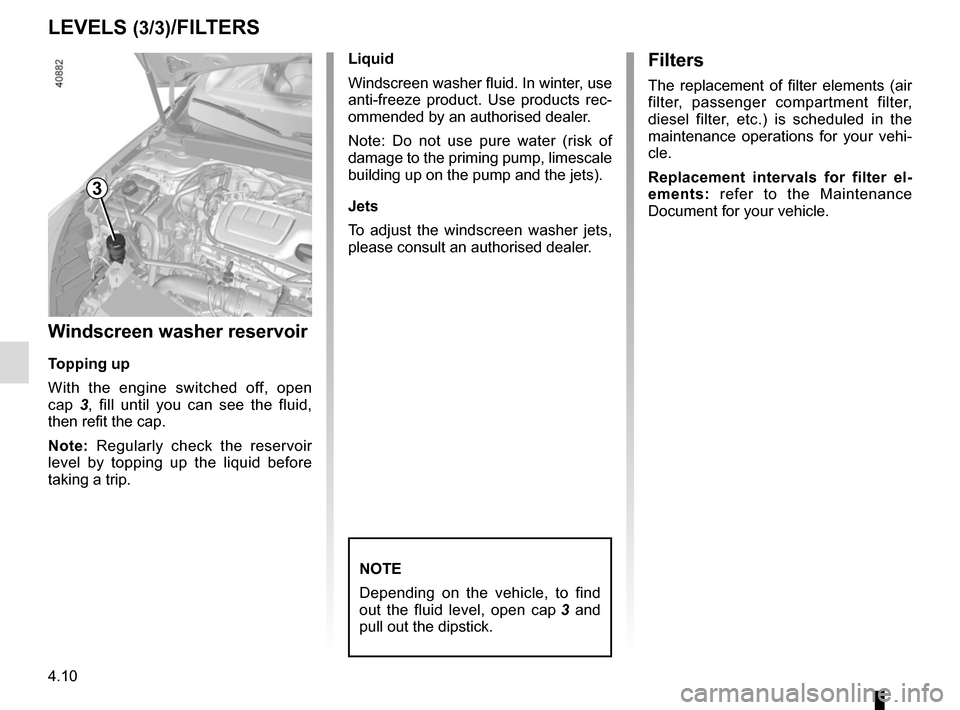
Windscreen washer reservoir
Topping up
With the engine switched off, open
cap 3, fill until you can see the fluid,
then refit the cap.
Note: Regularly check the reservoir
level by topping up the liquid before
taking a trip. Liquid
Windscreen washer fluid. In winter, use
anti-freeze product. Use products rec-
ommended by an authorised dealer.
Note: Do not use pure water (risk of
damage to the priming pump, limescale
building up on the pump and the jets).
Jets
To adjust the windscreen washer jets,
please consult an authorised dealer.
NOTE
Depending on the vehicle, to find
out the fluid level, open cap
3 and
pull out the dipstick.
Filters
The replacement of filter elements (air
filter, passenger compartment filter,
diesel filter, etc.) is scheduled in the
maintenance operations for your vehi-
cle.
Replacement intervals for filter el-
ements: refer to the Maintenance
Document for your vehicle.
3
Page 281 of 346
5.11
TYRES (1/3)
Maintaining the tyres
The tyres must be in good condition
and the tread form must have sufficient
depth; tyres approved by our Technical
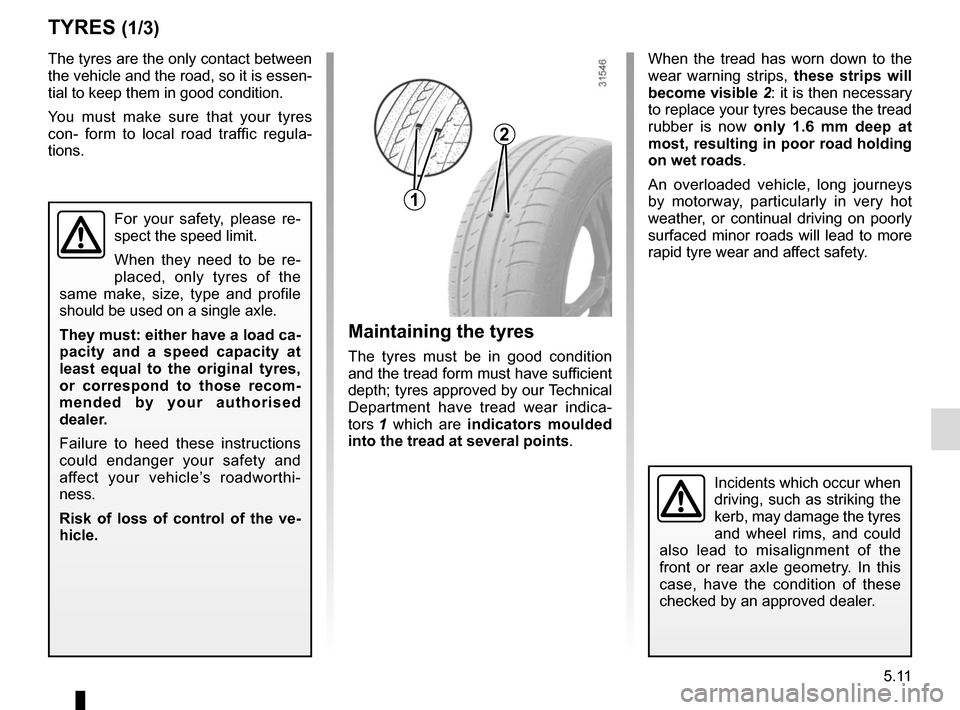
Department have tread wear indica-
tors 1 which are indicators moulded
into the tread at several points .
The tyres are the only contact between
the vehicle and the road, so it is essen-
tial to keep them in good condition.
You must make sure that your tyres
con- form to local road traffic regula-
tions.
When the tread has worn down to the
wear warning strips,
these strips will
become visible 2: it is then necessary
to replace your tyres because the tread
rubber is now only 1.6 mm deep at
most, resulting in poor road holding
on wet roads.
An overloaded vehicle, long journeys
by motorway, particularly in very hot
weather, or continual driving on poorly
surfaced minor roads will lead to more
rapid tyre wear and affect safety.
Incidents which occur when
driving, such as striking the
kerb, may damage the tyres
and wheel rims, and could
also lead to misalignment of the
front or rear axle geometry. In this
case, have the condition of these
checked by an approved dealer.
2
1
For your safety, please re-
spect the speed limit.
When they need to be re-
placed, only tyres of the
same make, size, type and profile
should be used on a single axle.
They must: either have a load ca-
pacity and a speed capacity at
least equal to the original tyres,
or correspond to those recom-
mended by your authorised
dealer.
Failure to heed these instructions
could endanger your safety and
affect your vehicle’s roadworthi-
ness.
Risk of loss of control of the ve-
hicle.
Page 343 of 346

steering wheeladjustment .............................................................\
...... 1.82
Stop & Start ..........................................................")
7.5
ALPHABETICAL INDEX (5/5)
steering wheeladjustment .............................................................\
...... 1.82
Stop & Start ...........................................................2.10 → 2.13
Stop & Start function..............................................2.10 → 2.13
stopping the engine ............................................................. 2.4
storage compartment.............................................3.29 → 3.32
storage compartments ..................... 3.29 → 3.32, 3.47 → 3.51
sun blinds ........................................................................\
.. 3.28
sun visor ........................................................................\
.... 3.28
sunroof...................................................................3.23 → 3.25
switching on the vehicle ignition ................................... 2.3, 2.6
T
tailgate ............................................. 3.39 → 3.43, 3.47 → 3.52
tanks and reservoirs brake fluid ...................................................................... 4.9
coolant ................................................................\
........... 4.8
tanks and reservoirs: windscreen washer ...................................................... 4.10
technical specifications ............................................6.5 → 6.10
telephone ................................................................ 3.56 – 3.57
temperature regulation ............................................3.9 → 3.19
tool kit ........................................................................\
.......... 5.7
towing breakdown ........................................................ 5.37 – 5.38
towing equipment .............................................. 3.52 – 3.53
towing a caravan ............................................. 3.52 – 3.53, 6.9
towing hitch...................................................... 5.7, 5.37 – 5.38
towing rings .............................................................. 3.46, 3.52
towing weights ..................................................................... 6.9
traction control .......................................................2.30 → 2.39
transporting children ..........................1.35 – 1.36, 1.38 → 1.49
transporting objects in the luggage compartment ........................................ 3.52
luggage net ....................................................... 3.45 – 3.46
trims ..................................................................\
................... 5.8 trip computer and warning system... 1.58
→ 1.63, 1.70 → 1.79
tyre inflation kit...........................................................5.4 → 5.6
tyre pressure.............................2.27 → 2.29, 4.13 – 4.14, 5.12
tyre pressure monitor.............................................2.27 → 2.29
tyre pressures ...........................2.27 → 2.29, 4.13 – 4.14, 4.14
tyres .................... 2.24, 2.27 → 2.29, 4.13 – 4.14, 5.11 → 5.13
U
unlocking the doors ...............................................1.13 → 1.15
V
ventilation ............................................................\
....3.6 → 3.19
W
warning buzzer ......................................................... 1.16, 1.53
warning lights................................... 1.58 → 1.63, 1.70 → 1.79
washing .................................................................. 4.15 – 4.16
weights ................................................................\
................ 6.9
wheelbrace .............................................................\
............. 5.7
wheels (safety) ...................................................... 5.11 → 5.13
windscreen de-icing/demisting ................................. 3.11, 3.16
windscreen washer .....................................1.95 → 1.100, 4.10
windscreen washer/wiper ....................................1.95 → 1.100
wiper blades ........................................................... 5.35 – 5.36
wipers .................................................................\
.1.95 → 1.100
blades ............................................................... 5.35 – 5.36