dash RENAULT MEGANE 2017 4.G User Guide
[x] Cancel search | Manufacturer: RENAULT, Model Year: 2017, Model line: MEGANE, Model: RENAULT MEGANE 2017 4.GPages: 346, PDF Size: 7.04 MB
Page 201 of 346
3.7
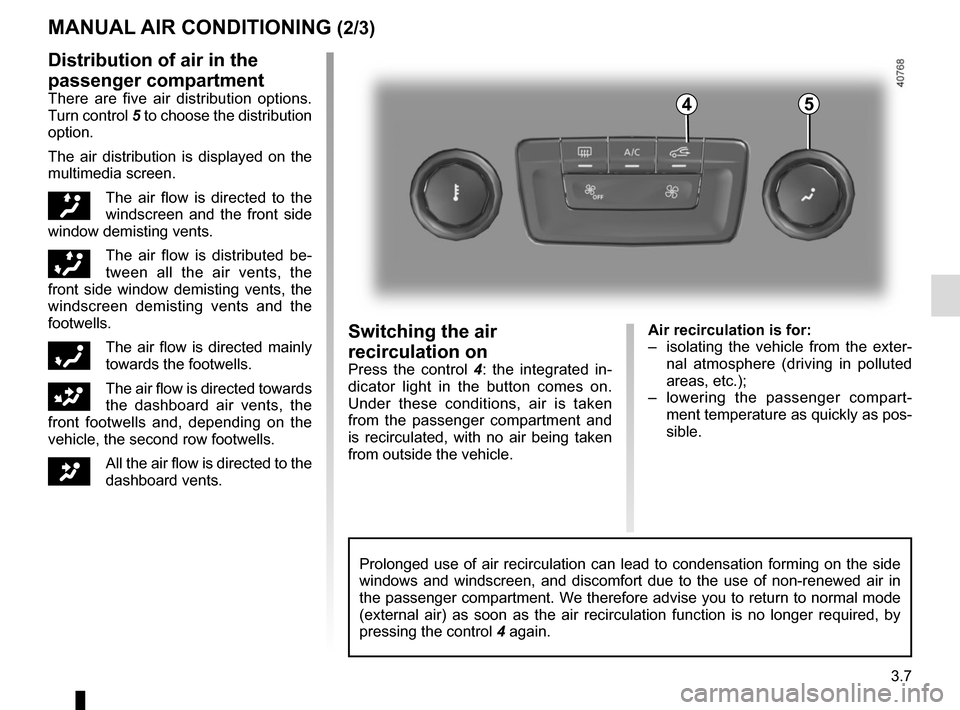
Air recirculation is for:
– isolating the vehicle from the exter-nal atmosphere (driving in polluted
areas, etc.);
– lowering the passenger compart- ment temperature as quickly as pos-
sible.Switching the air
recirculation on
Press the control 4 : the integrated in-
dicator light in the button comes on.
Under these conditions, air is taken
from the passenger compartment and
is recirculated, with no air being taken
from outside the vehicle.
MANUAL AIR CONDITIONING (2/3)
Prolonged use of air recirculation can lead to condensation forming on t\
he side
windows and windscreen, and discomfort due to the use of non-renewed air\
in
the passenger compartment. We therefore advise you to return to normal mode
(external air) as soon as the air recirculation function is no longer \
required, by
pressing the control 4 again.
Distribution of air in the
passenger compartment
There are five air distribution options.
Turn control 5 to choose the distribution
option.
The air distribution is displayed on the
multimedia screen.
õThe air flow is directed to the
windscreen and the front side
window demisting vents.
÷The air flow is distributed be-
tween all the air vents, the
front side window demisting vents, the
windscreen demisting vents and the
footwells.
óThe air flow is directed mainly
towards the footwells.
GThe air flow is directed towards
the dashboard air vents, the
front footwells and, depending on the
vehicle, the second row footwells.
JAll the air flow is directed to the
dashboard vents.
45
Page 204 of 346
3.10
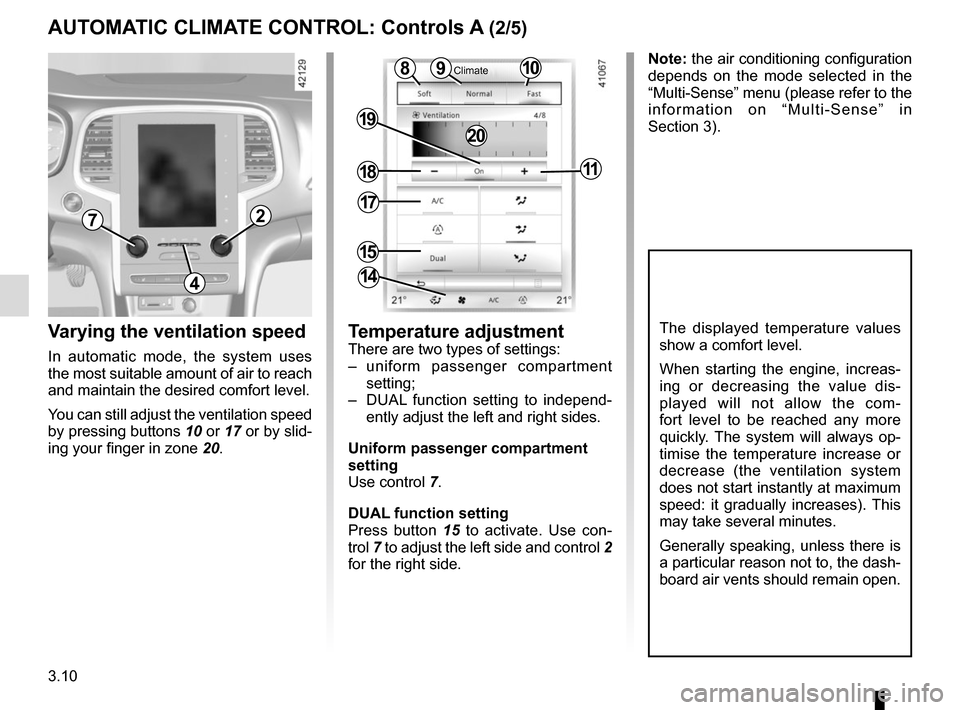
Varying the ventilation speed
In automatic mode, the system uses
the most suitable amount of air to reach
and maintain the desired comfort level.
You can still adjust the ventilation speed
by pressing buttons 10 or 17 or by slid-
ing your finger in zone 20.
Temperature adjustmentThere are two types of settings:
– uniform passenger compartment
setting;
– DUAL function setting to independ- ently adjust the left and right sides.
Uniform passenger compartment
setting
Use control 7.
DUAL function setting
Press button 15 to activate. Use con-
trol 7 to adjust the left side and control 2
for the right side.
The displayed temperature values
show a comfort level.
When starting the engine, increas-
ing or decreasing the value dis-
played will not allow the com-
fort level to be reached any more
quickly. The system will always op-
timise the temperature increase or
decrease (the ventilation system
does not start instantly at maximum
speed: it gradually increases). This
may take several minutes.
Generally speaking, unless there is
a particular reason not to, the dash-
board air vents should remain open.
4
72
10
15
9
18
19
11
8
14
Note: the air conditioning configuration
depends on the mode selected in the
“Multi-Sense” menu (please refer to the
information on “Multi-Sense” in
Section 3).
20
AUTOMATIC CLIMATE CONTROL: Controls A (2/5)
Climate
17
Page 207 of 346
3.13
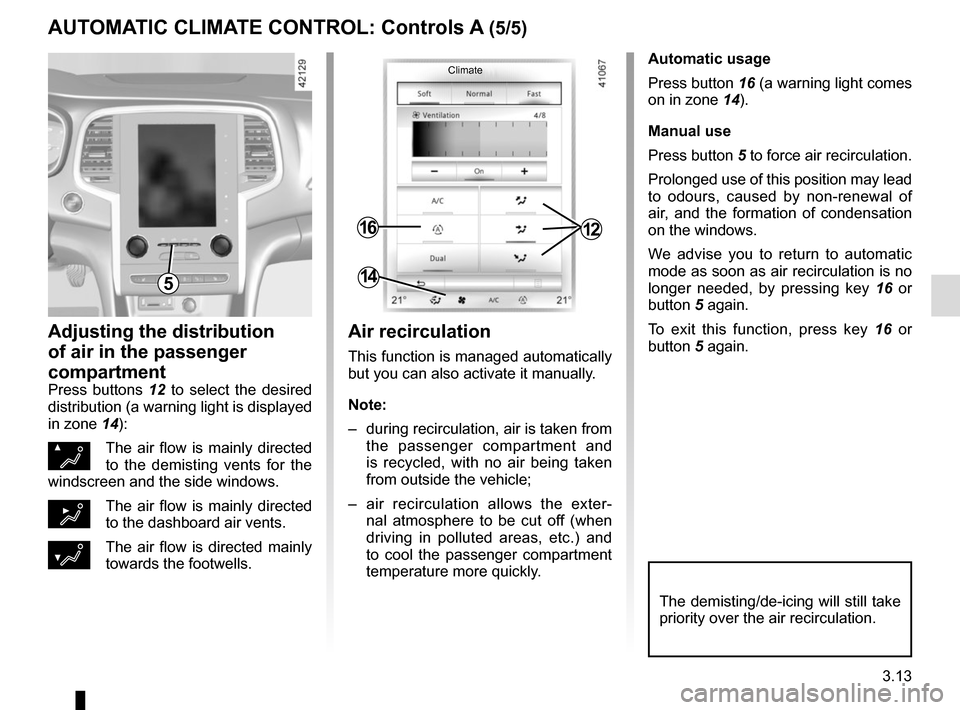
Automatic usage
Press button 16 (a warning light comes
on in zone 14).
Manual use
Press button 5 to force air recirculation.
Prolonged use of this position may lead
to odours, caused by non-renewal of
air, and the formation of condensation
on the windows.
We advise you to return to automatic
mode as soon as air recirculation is no
longer needed, by pressing key 16 or
button 5 again.
To exit this function, press key 16 or
button 5 again.
Adjusting the distribution
of air in the passenger
compartment
Press buttons 12 to select the desired
distribution (a warning light is displayed
in zone 14):
ØThe air flow is mainly directed
to the demisting vents for the
windscreen and the side windows.
½The air flow is mainly directed
to the dashboard air vents.
¿The air flow is directed mainly
towards the footwells.
The demisting/de-icing will still take
priority over the air recirculation.
5
1216
14
Air recirculation
This function is managed automatically
but you can also activate it manually.
Note:
– during recirculation, air is taken from the passenger compartment and
is recycled, with no air being taken
from outside the vehicle;
– air recirculation allows the exter- nal atmosphere to be cut off (when
driving in polluted areas, etc.) and
to cool the passenger compartment
temperature more quickly.
AUTOMATIC CLIMATE CONTROL: Controls A (5/5)
Climate
Page 209 of 346
3.15
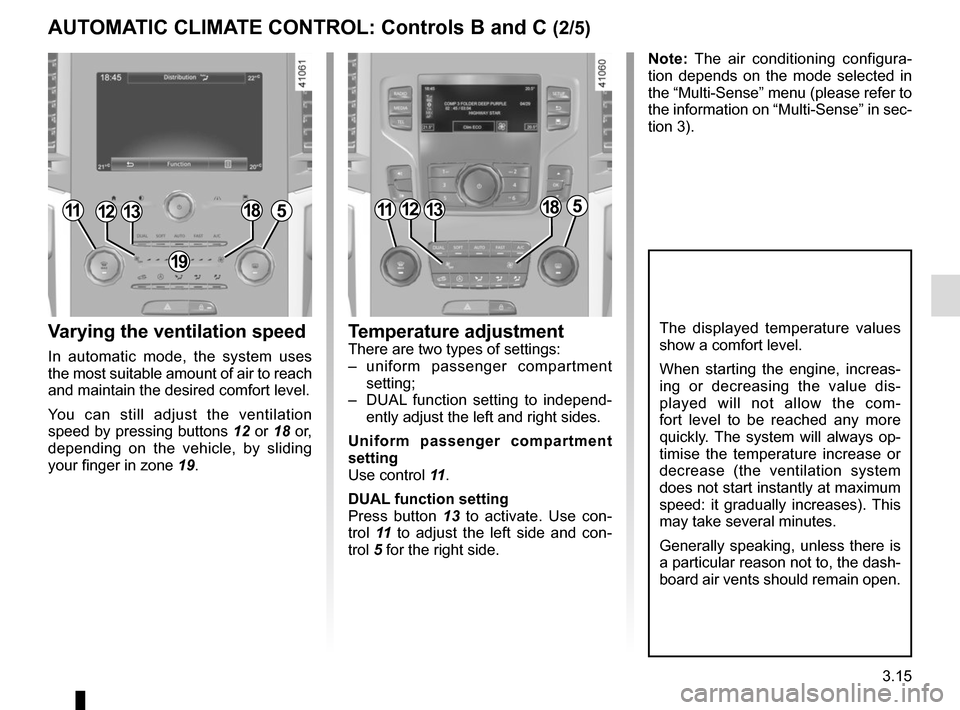
Varying the ventilation speed
In automatic mode, the system uses
the most suitable amount of air to reach
and maintain the desired comfort level.
You can still adjust the ventilation
speed by pressing buttons 12 or 18 or,
depending on the vehicle, by sliding
your finger in zone 19.
Temperature adjustmentThere are two types of settings:
– uniform passenger compartment
setting;
– DUAL function setting to independ- ently adjust the left and right sides.
Uniform passenger compartment
setting
Use control 11 .
DUAL function setting
Press button 13 to activate. Use con-
trol 11 to adjust the left side and con-
trol 5 for the right side.
The displayed temperature values
show a comfort level.
When starting the engine, increas-
ing or decreasing the value dis-
played will not allow the com-
fort level to be reached any more
quickly. The system will always op-
timise the temperature increase or
decrease (the ventilation system
does not start instantly at maximum
speed: it gradually increases). This
may take several minutes.
Generally speaking, unless there is
a particular reason not to, the dash-
board air vents should remain open.
Note: The air conditioning configura-
tion depends on the mode selected in
the “Multi-Sense” menu (please refer to
the information on “Multi-Sense” in sec-
tion 3).
111312185111312185
19
AUTOMATIC CLIMATE CONTROL: Controls B and C (2/5)
Page 212 of 346
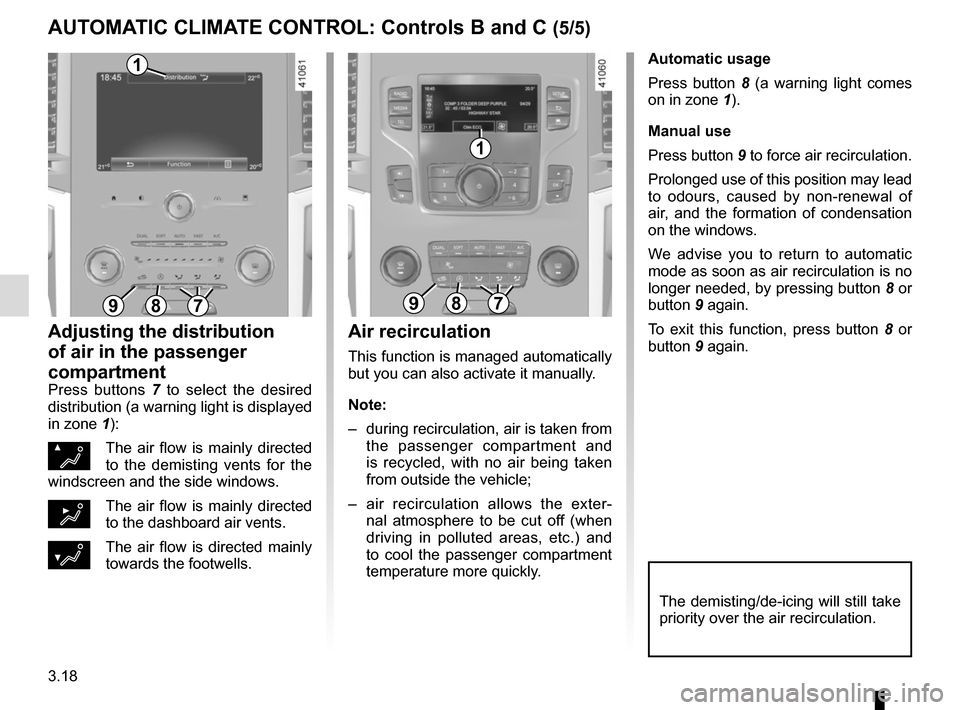
3.18
Automatic usage
Press button 8 (a warning light comes
on in zone 1).
Manual use
Press button 9 to force air recirculation.
Prolonged use of this position may lead
to odours, caused by non-renewal of
air, and the formation of condensation
on the windows.
We advise you to return to automatic
mode as soon as air recirculation is no
longer needed, by pressing button 8 or
button 9 again.
To exit this function, press button 8 or
button 9 again.
Adjusting the distribution
of air in the passenger
compartment
Press buttons 7 to select the desired
distribution (a warning light is displayed
in zone 1):
ØThe air flow is mainly directed
to the demisting vents for the
windscreen and the side windows.
½The air flow is mainly directed
to the dashboard air vents.
¿The air flow is directed mainly
towards the footwells.
The demisting/de-icing will still take
priority over the air recirculation.
Air recirculation
This function is managed automatically
but you can also activate it manually.
Note:
– during recirculation, air is taken from the passenger compartment and
is recycled, with no air being taken
from outside the vehicle;
– air recirculation allows the exter- nal atmosphere to be cut off (when
driving in polluted areas, etc.) and
to cool the passenger compartment
temperature more quickly.
897897
1
1
AUTOMATIC CLIMATE CONTROL: Controls B and C (5/5)
Page 233 of 346
3.39
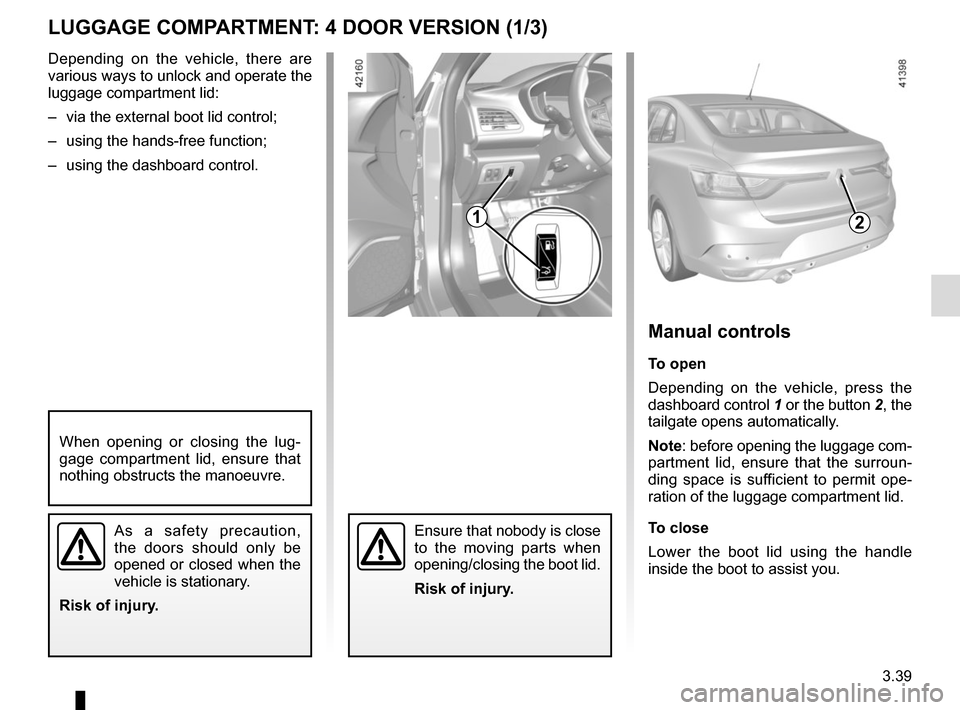
LUGGAGE COMPARTMENT: 4 DOOR VERSION (1/3)
2
Manual controls
To open
Depending on the vehicle, press the
dashboard control 1 or the button 2, the
tailgate opens automatically.
Note: before opening the luggage com-
partment lid, ensure that the surroun-
ding space is sufficient to permit ope-
ration of the luggage compartment lid.
To close
Lower the boot lid using the handle
inside the boot to assist you.
Ensure that nobody is close
to the moving parts when
opening/closing the boot lid.
Risk of injury.
When opening or closing the lug-
gage compartment lid, ensure that
nothing obstructs the manoeuvre.
As a safety precaution,
the doors should only be
opened or closed when the
vehicle is stationary.
Risk of injury.
Depending on the vehicle, there are
various ways to unlock and operate the
luggage compartment lid:
– via the external boot lid control;
– using the hands-free function;
– using the dashboard control.
1
Page 254 of 346
4.2
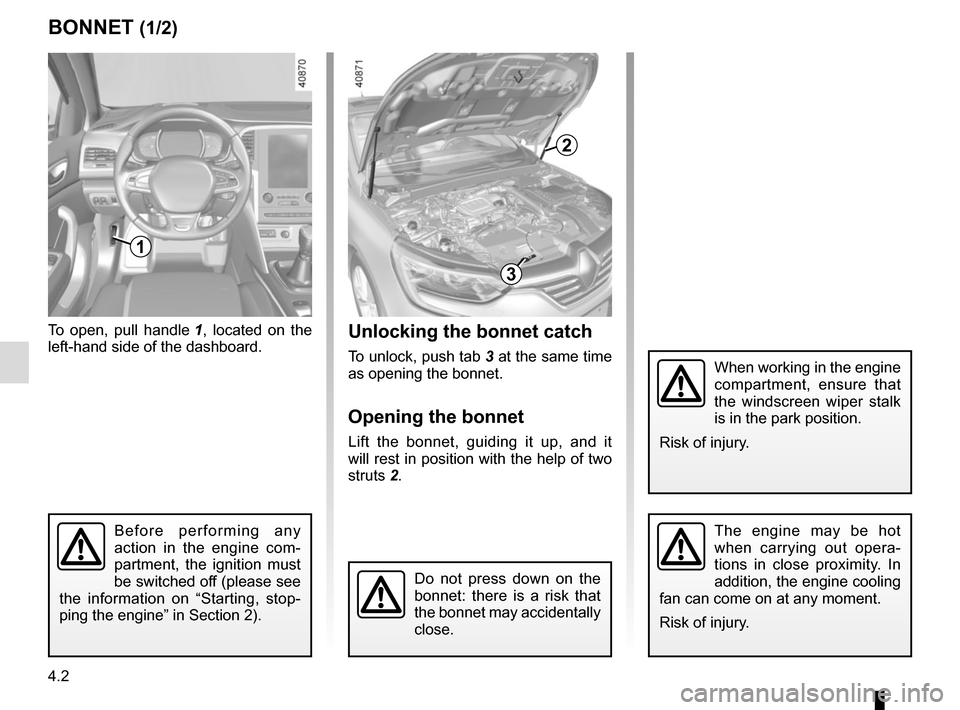
BONNET (1/2)Unlocking the bonnet catch
To unlock, push tab 3 at the same time
as opening the bonnet.
Opening the bonnet
Lift the bonnet, guiding it up, and it
will rest in position with the help of two
struts 2.
To open, pull handle
1, located on the
left-hand side of the dashboard.
The engine may be hot
when carrying out opera-
tions in close proximity. In
addition, the engine cooling
fan can come on at any moment.
Risk of injury.
1
Do not press down on the
bonnet: there is a risk that
the bonnet may accidentally
close.
Before performing any
action in the engine com-
partment, the ignition must
be switched off (please see
the information on “Starting, stop-
ping the engine” in Section 2).
When working in the engine
compartment, ensure that
the windscreen wiper stalk
is in the park position.
Risk of injury.
3
2
Page 270 of 346
4.18
You are strongly recom-
mended not to use high-
pressure or spray cleaning
equipment inside the pas-
senger compartment: use of such
equipment could impair the correct
functioning of the electrical or elec-
tronic components in the vehicle, or
have other detrimental effects.
INTERIOR TRIM MAINTENANCE (2/2)
You should not:
You are strongly advised not to po-
sition objects such as deodorants,
scents, etc. near air vents, as this could
damage your dashboard trim.
Removal/replacing removable
equipment originally fitted in
the vehicle
If you need to remove equipment in
order to clean the passenger com-
partment (for example, mats), always
ensure that they are correctly refitted
and are the right way around (the driv-
er’s mat should be fitted on the driver’s
side, etc.) and fit them with the compo-
nents supplied with the equipment (for
example, the driver mat should always
be fixed using the pre-fitted mounting
components).
With the vehicle stationary, always
ensure that nothing will impede driving
(anything obstructing the pedals, heel
wedged by the mat etc.).
Page 276 of 346
5.6
TYRE PRESSURE KIT (3/3)
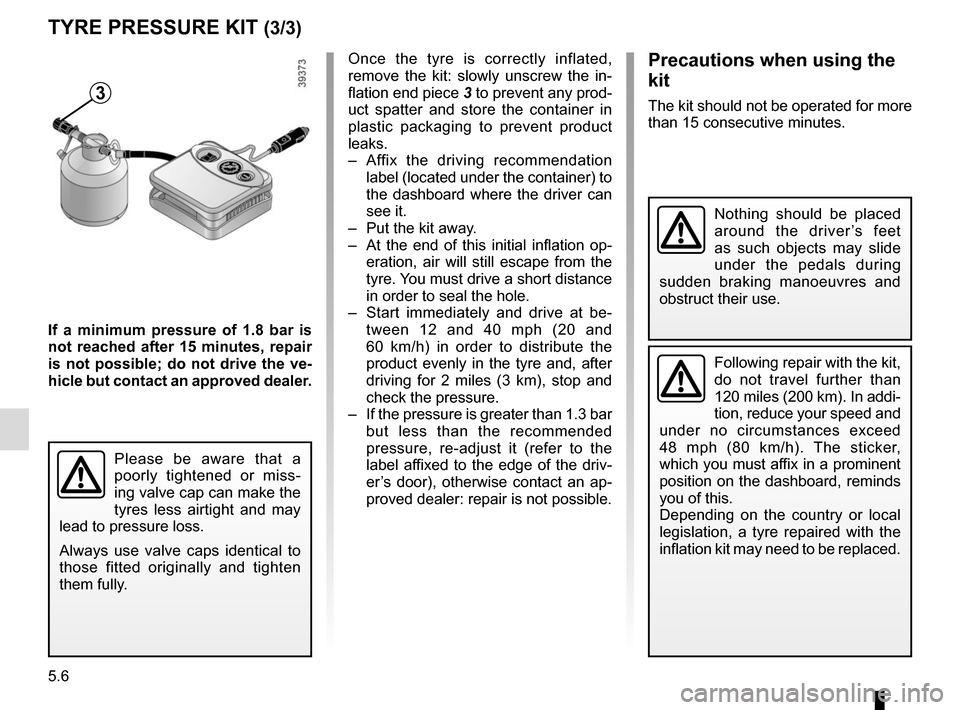
3
If a minimum pressure of 1.8 bar is
not reached after 15 minutes, repair
is not possible; do not drive the ve-
hicle but contact an approved dealer.Once the tyre is correctly inflated,
remove the kit: slowly unscrew the in-
flation end piece
3 to prevent any prod-
uct spatter and store the container in
plastic packaging to prevent product
leaks.
– Affix the driving recommendation label (located under the container) to
the dashboard where the driver can
see it.
– Put the kit away.
– At the end of this initial inflation op- eration, air will still escape from the
tyre. You must drive a short distance
in order to seal the hole.
– Start immediately and drive at be- tween 12 and 40 mph (20 and
60 km/h) in order to distribute the
product evenly in the tyre and, after
driving for 2 miles (3 km), stop and
check the pressure.
– If the pressure is greater than 1.3 bar but less than the recommended
pressure, re-adjust it (refer to the
label affixed to the edge of the driv-
er’s door), otherwise contact an ap-
proved dealer: repair is not possible.
Please be aware that a
poorly tightened or miss-
ing valve cap can make the
tyres less airtight and may
lead to pressure loss.
Always use valve caps identical to
those fitted originally and tighten
them fully.
Following repair with the kit,
do not travel further than
120 miles (200 km). In addi-
tion, reduce your speed and
under no circumstances exceed
48 mph (80 km/h). The sticker,
which you must affix in a prominent
position on the dashboard, reminds
you of this.
Depending on the country or local
legislation, a tyre repaired with the
inflation kit may need to be replaced.
Nothing should be placed
around the driver’s feet
as such objects may slide
under the pedals during
sudden braking manoeuvres and
obstruct their use.
Precautions when using the
kit
The kit should not be operated for more
than 15 consecutive minutes.
Page 299 of 346

Allocation of fuses
(the presence of certain fuses depends on the vehicle equipment level)\
Symbol Allocation SymbolAllocation
HWindscreen washerÝTowbar socket
ëNot usedNot use")
5.29
FUSES (2/2)
Allocation of fuses
(the presence of certain fuses depends on the vehicle equipment level)\
Symbol Allocation SymbolAllocation
HWindscreen washerÝTowbar socket
ëNot usedNot used
ÆFront cigarette lighter, front and rear second row
accessories socketDiagnostic socket, audio alarm
Not usedÌHorn
Heated door mirrorsInstrument panel, dashboard control lighting
×Brake lights, passenger compartment central unitOLocking opening elements, boot opening and
closing control
Parking brakeDDirection indicator lights, hazard warning lights
\bAdditional servoRear USB sockets on console
îRadio, multifunction screen, multimedia acces-
sories sockets, parking brake control
Passenger compartment centre unit, rear wiper,
rear fog light