Rear only RENAULT MEGANE 2017 4.G Owners Manual
[x] Cancel search | Manufacturer: RENAULT, Model Year: 2017, Model line: MEGANE, Model: RENAULT MEGANE 2017 4.GPages: 346, PDF Size: 7.04 MB
Page 38 of 346
1.32
METHODS OF RESTRAINT IN ADDITION TO THE REAR SEAT BELTS
Force limiter
Above a certain severity of impact, this
mechanism is used to limit the force of
the belt against the body so that it is at
an acceptable level.
– Have the entire restraint
system checked following
an accident.
– No operation whatsoever
is permitted on any part of the
system (air bags, electronic con-
trol units, wiring) and the system
components must not be reused
on any other vehicle, even if iden-
tical.
– Only qualified personnel from our Network may work on the air
bags; otherwise the system may
trigger accidentally and cause
injury.
Page 40 of 346

1.34
ADDITIONAL METHODS OF RESTRAINT
The air bag is designed to complement the action of the seat belt. Both \
the air bags and seat belts are integral parts of
the same protection system. It is therefore essential to wear seat belts\
at all times. If seat belts are not worn, the occu-
pants are exposed to the risk of serious injury in the event of an accid\
ent. It may also increase the risk of minor super-
ficial injuries occurring when the air bag is deployed, although such mi\
nor injuries are always possible with air bags.
If the vehicle should overturn or suffer a rear impact, however severe, the pretensioners and air bags are no\
t always triggered .
Shocks to the underbody of the vehicle, e.g. from pavements, potholes or\
stones, can all trigger these systems.
– No work or modification whatsoever may be carried out on any part of the air bag system (air bags, preten\
sioners, compu-
ter, wiring harness, etc.), except by qualified personnel from an approved\
dealer.
– To ensure that the system is in good working order and to avoid accidenta\
l triggering of the system which may cause injury, only qualified Network personnel may work on the air bag system.
– As a safety precaution, have the air bag system checked if your vehicle has been involved in an accident, or is stolen or broken into.
– When selling or lending the vehicle, inform the user of these points and\
hand over this driver’s handbook with the vehicle.
– When scrapping your vehicle, contact your approved dealer for disposal o\
f the gas generator(s).
All of the warnings below are given so that the air bag is not obstructed in any way when it is inflated and also to prevent
the risk of serious injuries caused by items which may be dislodged when\
the air bag inflates.
Page 56 of 346
1.50
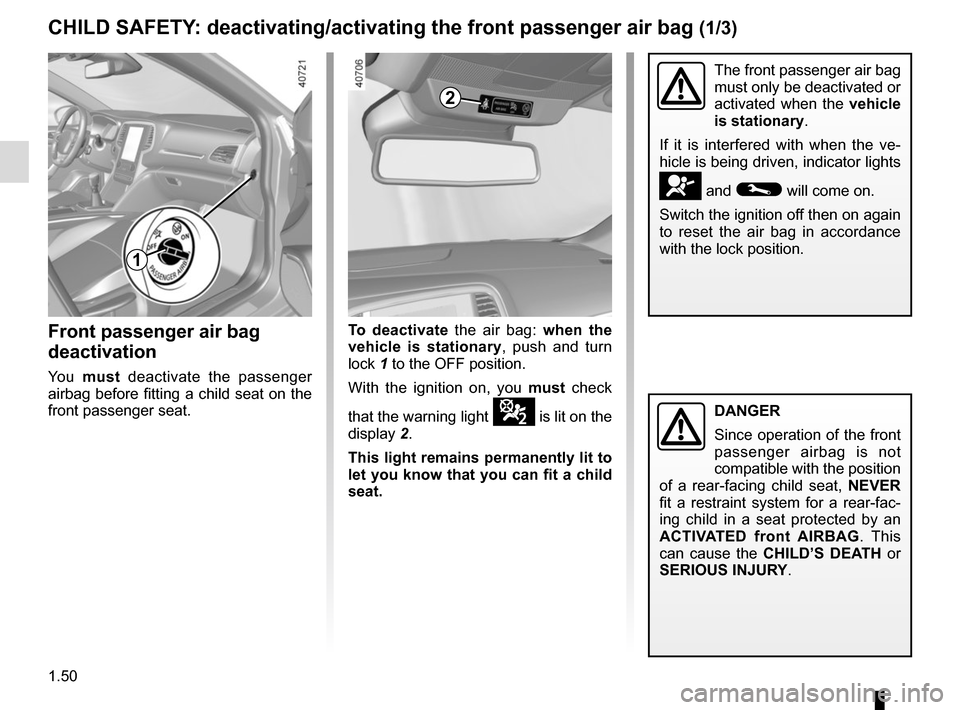
Front passenger air bag
deactivation
Yo u must deactivate the passenger
airbag before fitting a child seat on the
front passenger seat.
The front passenger air bag
must only be deactivated or
activated when the vehicle
is stationary.
If it is interfered with when the ve-
hicle is being driven, indicator lights
å and © will come on.
Switch the ignition off then on again
to reset the air bag in accordance
with the lock position.
CHILD SAFETY: deactivating/activating the front passenger air bag (1/3)
To deactivate the air bag: when the
vehicle is stationary, push and turn
lock 1 to the OFF position.
With the ignition on, you must check
that the warning light
¹ is lit on the
display 2.
This light remains permanently lit to
let you know that you can fit a child
seat.
2
1
DANGER
Since operation of the front
passenger airbag is not
compatible with the position
of a rear-facing child seat, NEVER
fit a restraint system for a rear-fac-
ing child in a seat protected by an
ACTIVATED front AIRBAG . This
can cause the CHILD’S DEATH or
SERIOUS INJURY.
Page 58 of 346
1.52
CHILD SAFETY: deactivating/activating the front passenger air bag (3/3)
Operating faults
It is forbidden to fit a rear-facing child
seat to the front passenger seat if the
airbag activation/deactivation system is
faulty.
Allowing any other passenger to sit in
that seat is not recommended.
Contact your approved dealer as soon
as possible.
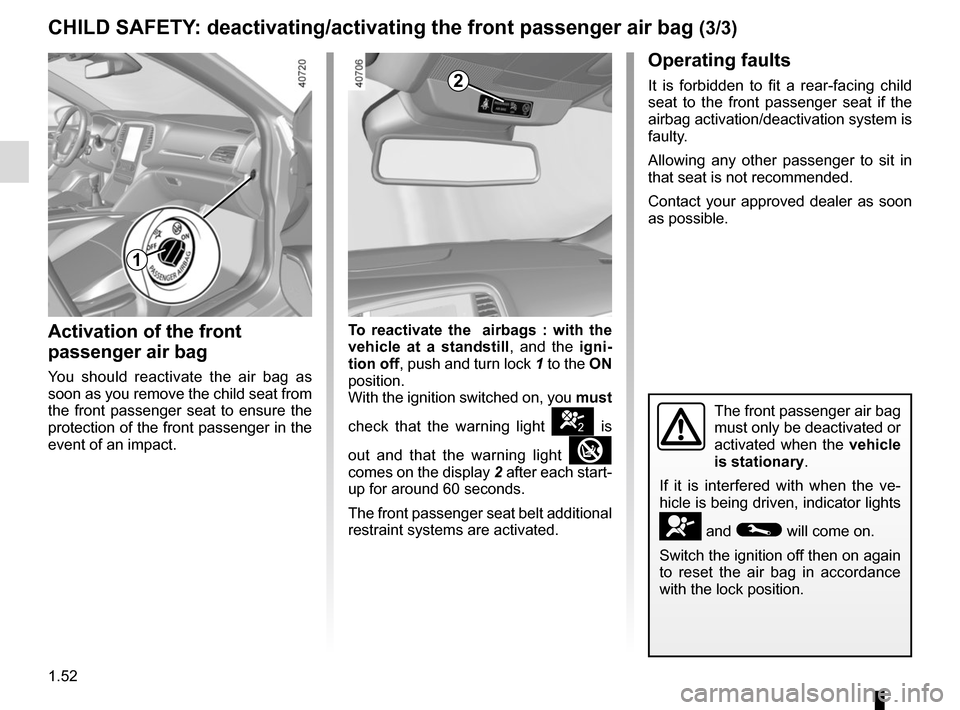
Activation of the front
passenger air bag
You should reactivate the air bag as
soon as you remove the child seat from
the front passenger seat to ensure the
protection of the front passenger in the
event of an impact.To reactivate the
airbags : with the
vehicle at a standstill, and the igni-
tion off , push and turn lock 1 to the ON
position.
With the ignition switched on, you must
check that the warning light
] is
out and that the warning light
comes on the display 2 after each start-
up for around 60 seconds.
The front passenger seat belt additional
restraint systems are activated.
The front passenger air bag
must only be deactivated or
activated when the vehicle
is stationary.
If it is interfered with when the ve-
hicle is being driven, indicator lights
å and © will come on.
Switch the ignition off then on again
to reset the air bag in accordance
with the lock position.
2
1
Page 87 of 346
1.81
VEHICLE SETTINGS CUSTOMISATION MENU (2/2)
34
Once a line has been selected, press
the switch 3 OK to adjust the function.
If you select either “PARKING ASSIST
VOLUME” or “LANGUAGE”, you will
have to make a further selection (sound
volume of the parking distance control
or instrument panel language). In this
case, make your selection and con-
firm it by holding the switch 3 OK – the
selected value is shown by a
~ in
front of the line.
To exit the menu, press the control 4
upwards or downwards. It may be nec-
essary to carry out this operation sev-
eral times.
For further explanations of the Free
wheel in ECO mode function refer to
the information on “Driving Advice,
ECO driving” in section 2.
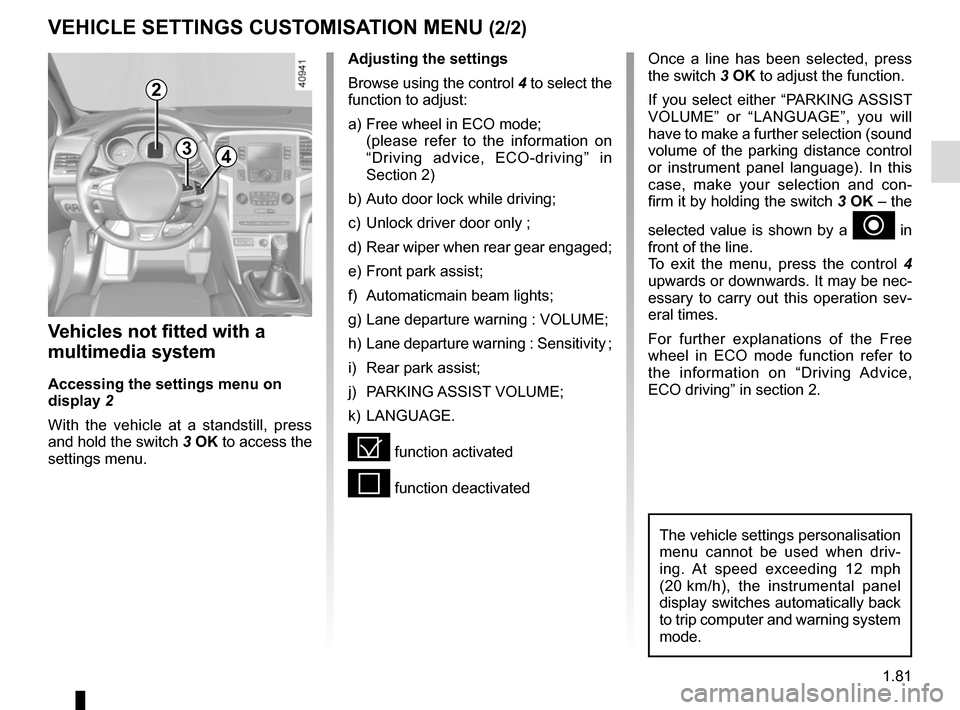
Vehicles not fitted with a
multimedia system
Accessing the settings menu on
display 2
With the vehicle at a standstill, press
and hold the switch 3 OK to access the
settings menu.
Adjusting the settings
Browse using the control 4 to select the
function to adjust:
a) Free wheel in ECO mode;
(please refer to the information on “Driving advice, ECO-driving” in
Section 2)
b) Auto door lock while driving;
c) Unlock driver door only ;
d) Rear wiper when rear gear engaged;
e) Front park assist;
f) Automaticmain beam lights;
g) Lane departure warning : VOLUME;
h) Lane departure warning : Sensitivity ;
i) Rear park assist;
j) PARKING ASSIST VOLUME;
k) LANGUAGE.
= function activated
< function deactivated
The vehicle settings personalisation
menu cannot be used when driv-
ing. At speed exceeding 12 mph
(20 km/h), the instrumental panel
display switches automatically back
to trip computer and warning system
mode.
2
Page 101 of 346
1.95
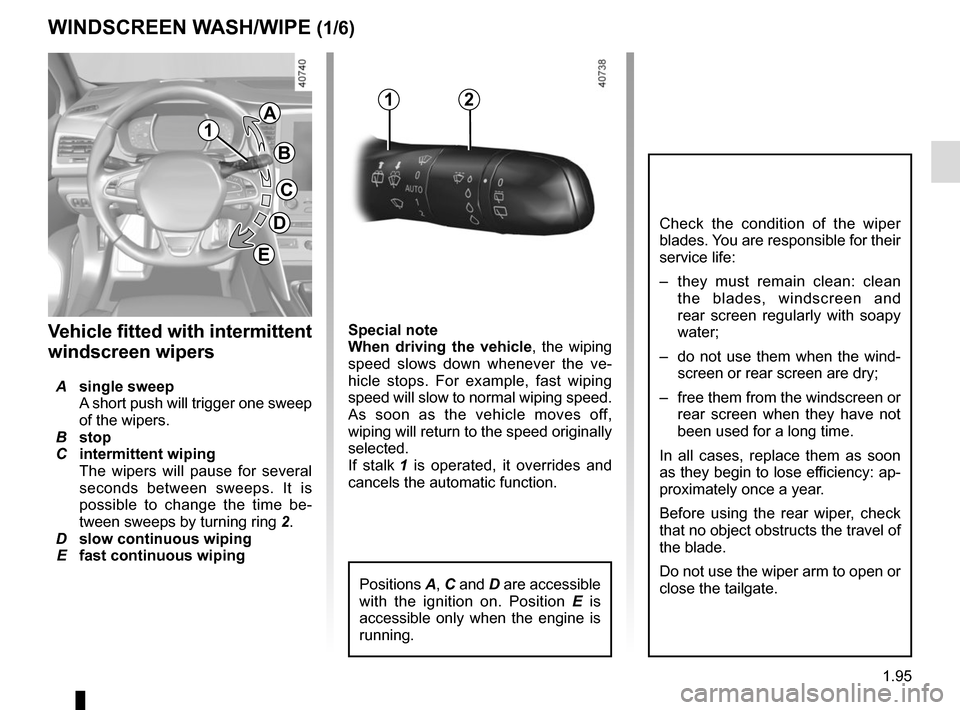
Special note
When driving the vehicle, the wiping
speed slows down whenever the ve-
hicle stops. For example, fast wiping
speed will slow to normal wiping speed.
As soon as the vehicle moves off,
wiping will return to the speed originally
selected.
If stalk 1 is operated, it overrides and
cancels the automatic function.Vehicle fitted with intermittent
windscreen wipers
A single sweep
A short push will trigger one sweep
of the wipers.
B stop
C intermittent wiping
The wipers will pause for several
seconds between sweeps. It is
possible to change the time be-
tween sweeps by turning ring 2.
D slow continuous wiping
E fast continuous wiping
WINDSCREEN WASH/WIPE (1/6)
1
1A
B
C
D
2
Positions A, C and D are accessible
with the ignition on. Position E is
accessible only when the engine is
running.
Check the condition of the wiper
blades. You are responsible for their
service life:
– they must remain clean: clean the blades, windscreen and
rear screen regularly with soapy
water;
– do not use them when the wind- screen or rear screen are dry;
– free them from the windscreen or rear screen when they have not
been used for a long time.
In all cases, replace them as soon
as they begin to lose efficiency: ap-
proximately once a year.
Before using the rear wiper, check
that no object obstructs the travel of
the blade.
Do not use the wiper arm to open or
close the tailgate.
E
Page 102 of 346
1.96
WINDSCREEN WASH/WIPE (2/6)
1
F
2
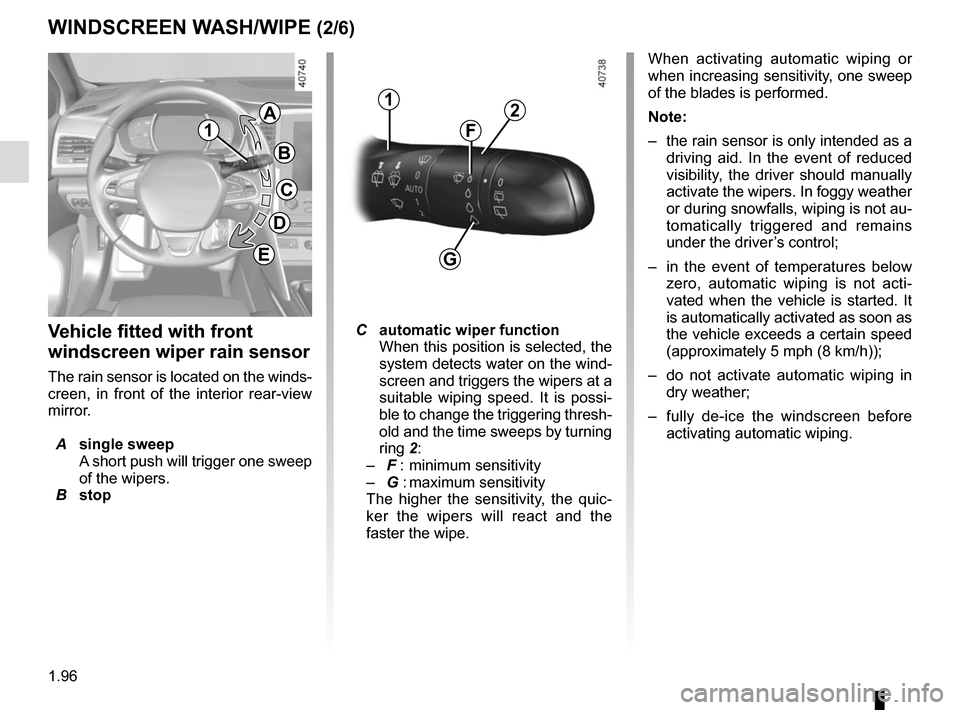
Vehicle fitted with front
windscreen wiper rain sensor
The rain sensor is located on the winds-
creen, in front of the interior rear-view
mirror.
A single sweep
A short push will trigger one sweep
of the wipers.
B stop
C automatic wiper function
When this position is selected, the
system detects water on the wind-
screen and triggers the wipers at a
suitable wiping speed. It is possi-
ble to change the triggering thresh-
old and the time sweeps by turning
ring 2:
– F : minimum sensitivity
– G : maximum sensitivity
The higher the sensitivity, the quic-
ker the wipers will react and the
faster the wipe. When activating automatic wiping or
when increasing sensitivity, one sweep
of the blades is performed.
Note:
–
the rain sensor is only intended as a
driving aid. In the event of reduced
visibility, the driver should manually
activate the wipers. In foggy weather
or during snowfalls, wiping is not au-
tomatically triggered and remains
under the driver’s control;
– in the event of temperatures below
zero, automatic wiping is not acti-
vated when the vehicle is started. It
is automatically activated as soon as
the vehicle exceeds a certain speed
(approximately 5 mph (8 km/h));
– do not activate automatic wiping in
dry weather;
– fully de-ice the windscreen before
activating automatic wiping.
G
1
A
B
C
D
E
Page 180 of 346
2.68
PARKING DISTANCE CONTROL (1/5)
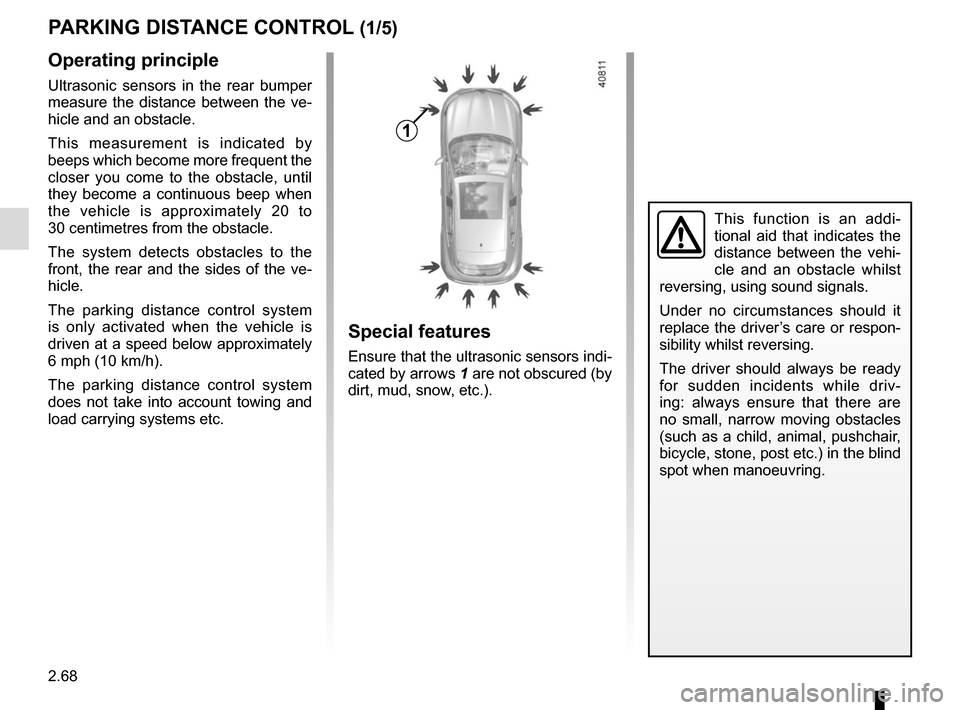
Operating principle
Ultrasonic sensors in the rear bumper
measure the distance between the ve-
hicle and an obstacle.
This measurement is indicated by
beeps which become more frequent the
closer you come to the obstacle, until
they become a continuous beep when
the vehicle is approximately 20 to
30 centimetres from the obstacle.
The system detects obstacles to the
front, the rear and the sides of the ve-
hicle.
The parking distance control system
is only activated when the vehicle is
driven at a speed below approximately
6 mph (10 km/h).
The parking distance control system
does not take into account towing and
load carrying systems etc.
This function is an addi-
tional aid that indicates the
distance between the vehi-
cle and an obstacle whilst
reversing, using sound signals.
Under no circumstances should it
replace the driver’s care or respon-
sibility whilst reversing.
The driver should always be ready
for sudden incidents while driv-
ing: always ensure that there are
no small, narrow moving obstacles
(such as a child, animal, pushchair,
bicycle, stone, post etc.) in the blind
spot when manoeuvring.
Special features
Ensure that the ultrasonic sensors indi-
cated by arrows 1 are not obscured (by
dirt, mud, snow, etc.).
1
Page 196 of 346
3.2
MULTI-SENSE (1/2)
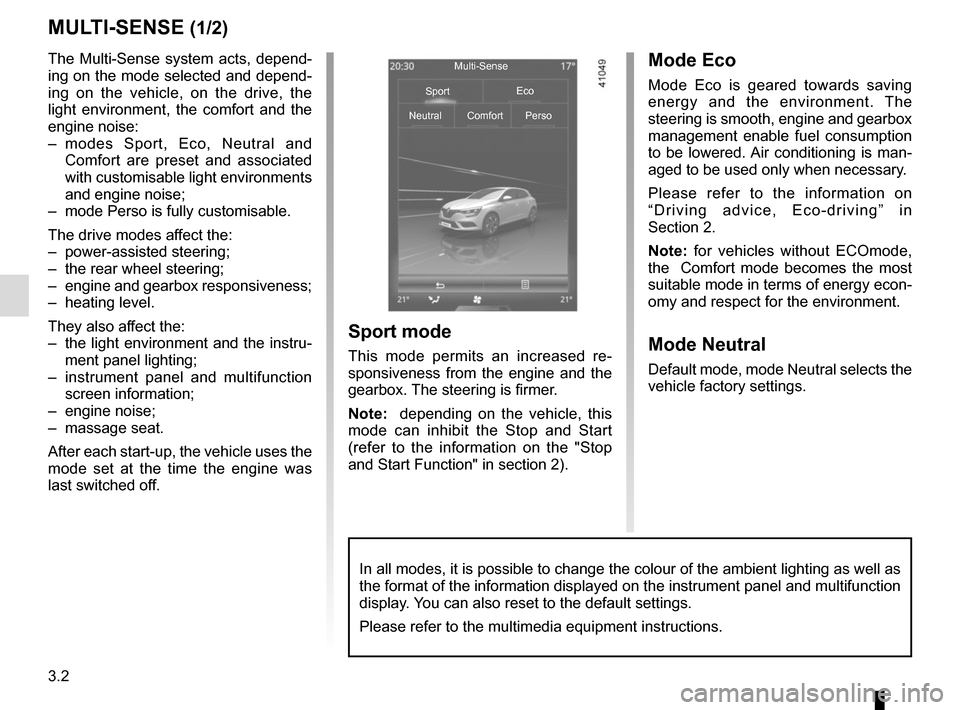
The Multi-Sense system acts, depend-
ing on the mode selected and depend-
ing on the vehicle, on the drive, the
light environment, the comfort and the
engine noise:
– modes Sport, Eco, Neutral and Comfort are preset and associated
with customisable light environments
and engine noise;
– mode Perso is fully customisable.
The drive modes affect the:
– power-assisted steering;
– the rear wheel steering;
– engine and gearbox responsiveness;
– heating level.
They also affect the:
– the light environment and the instru- ment panel lighting;
– instrument panel and multifunction screen information;
– engine noise;
– massage seat.
After each start-up, the vehicle uses the
mode set at the time the engine was
last switched off.Mode Eco
Mode Eco is geared towards saving
energy and the environment. The
steering is smooth, engine and gearbox
management enable fuel consumption
to be lowered. Air conditioning is man-
aged to be used only when necessary.
Please refer to the information on
“Driving advice, Eco-driving” in
Section 2.
Note: for vehicles without ECOmode,
the Comfort mode becomes the most
suitable mode in terms of energy econ-
omy and respect for the environment.
Mode Neutral
Default mode, mode Neutral selects the
vehicle factory settings.
Multi-Sense
Sport Eco
Neutral Comfort Perso
Sport mode
This mode permits an increased re-
sponsiveness from the engine and the
gearbox. The steering is firmer.
Note: depending on the vehicle, this
mode can inhibit the Stop and Start
(refer to the information on the "Stop
and Start Function" in section 2).
In all modes, it is possible to change the colour of the ambient lightin\
g as well as
the format of the information displayed on the instrument panel and mult\
ifunction
display. You can also reset to the default settings.
Please refer to the multimedia equipment instructions.
Page 199 of 346
3.5
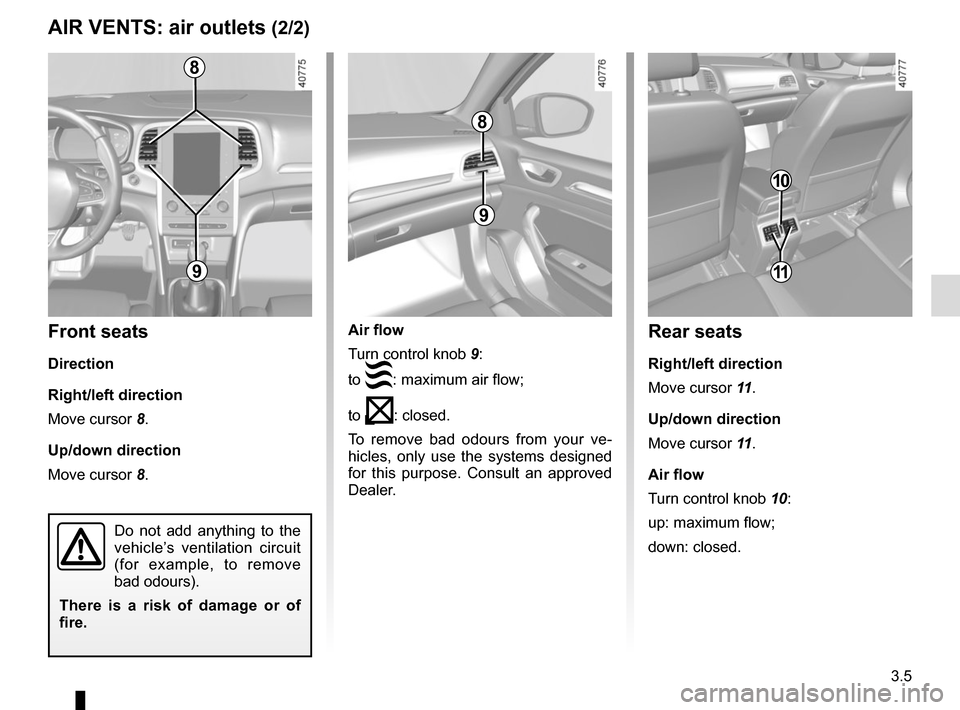
Air flow
Turn control knob 9:
to
: maximum air flow;
to
: closed.
To remove bad odours from your ve-
hicles, only use the systems designed
for this purpose. Consult an approved
Dealer.
AIR VENTS: air outlets (2/2)
8
9
8
9
Front seats
Direction
Right/left direction
Move cursor 8.
Up/down direction
Move cursor 8.
Do not add anything to the
vehicle’s ventilation circuit
(for example, to remove
bad odours).
There is a risk of damage or of
fire.
10
Rear seats
Right/left direction
Move cursor 11 .
Up/down direction
Move cursor 11 .
Air flow
Turn control knob 10:
up: maximum flow;
down: closed.
11