Braking system RENAULT MEGANE 2018 User Guide
[x] Cancel search | Manufacturer: RENAULT, Model Year: 2018, Model line: MEGANE, Model: RENAULT MEGANE 2018Pages: 348, PDF Size: 9.25 MB
Page 145 of 348
2.33
DRIVER CORRECTION DEVICES AND AIDS (4/10)
Emergency brake assist
This system supplements the ABS
and helps reduce vehicle stopping dis-
tances.
Operating principle
The system is for detecting an emer-
gency braking situation. In this case,
the braking assistance immediately de-
velops maximum power and may trig-
ger ABS regulation.
ABS braking is maintained as long as
the brake pedal is applied.
Hazard warning lights switching on
Depending on the vehicle, these may
light up in the event of sudden decel-
eration. Braking anticipation
Depending on the vehicle, when you
rapidly release the accelerator, the
system anticipates the braking ma-
noeuvre in order to reduce stopping
distances.
Special cases
When using the cruise control:
– if you use the accelerator, when you
release it, the system may be trig-
gered;
– if you do not use the accelerator, the system will not be triggered.
Operating faults
When the system detects an operat-
ing fault the message “Check brak-
ing system” appears on the instrument
panel along with the
© warning
light.
Consult an approved dealer.
Page 146 of 348
2.34
DRIVER CORRECTION DEVICES AND AIDS (5/10)
If the driver depresses the brake pedal
and the system still detects a risk of col-
lision, the brake force is increased.
If the driver fails to react following
an alert of an imminent collision, the
system activates the brakes.
Active emergency braking
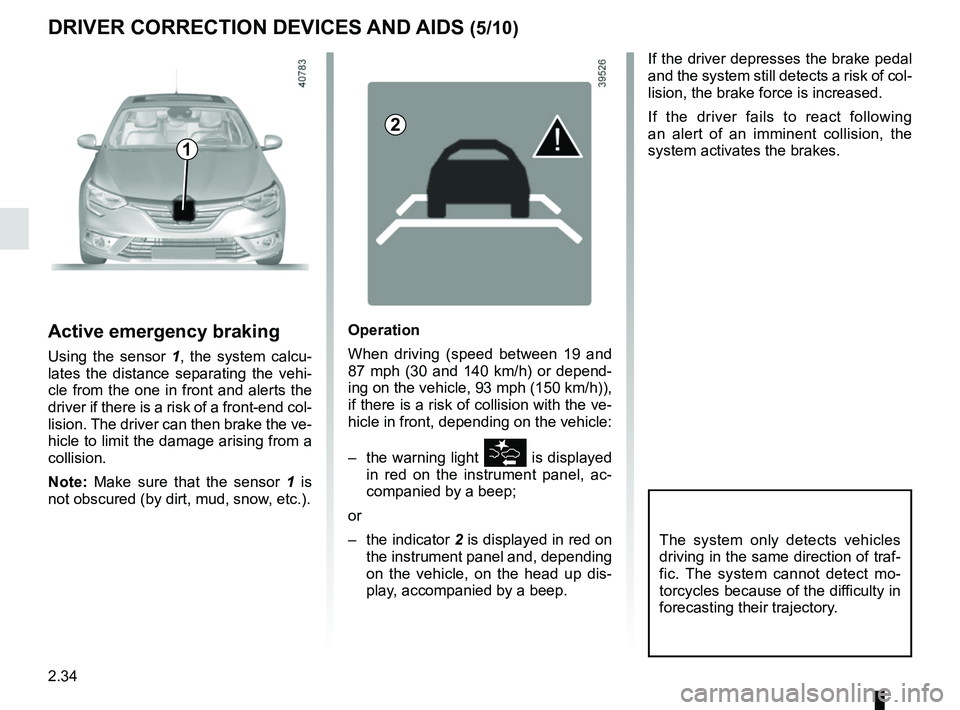
Using the sensor 1, the system calcu-
lates the distance separating the vehi-
cle from the one in front and alerts the
driver if there is a risk of a front-end col-
lision. The driver can then brake the ve-
hicle to limit the damage arising from a
collision.
Note: Make sure that the sensor 1 is
not obscured (by dirt, mud, snow, etc.).
Operation
When driving (speed between 19 and
87 mph (30 and 140 km/h) or depend-
ing on the vehicle, 93 mph (150 km/h)),
if there is a risk of collision with the ve-
hicle in front, depending on the vehicle:
– the warning light
\b is displayed
in red on the instrument panel, ac-
companied by a beep;
or
– the indicator 2 is displayed in red on
the instrument panel and, depending
on the vehicle, on the head up dis- play, accompanied by a beep.
The system only detects vehicles
driving in the same direction of traf-
fic. The system cannot detect mo-
torcycles because of the difficulty in
forecasting their trajectory.
1
2
Page 147 of 348
2.35
DRIVER CORRECTION DEVICES AND AIDS (6/10)
Activating or deactivating the
system
For vehicles fitted with a navigation
system
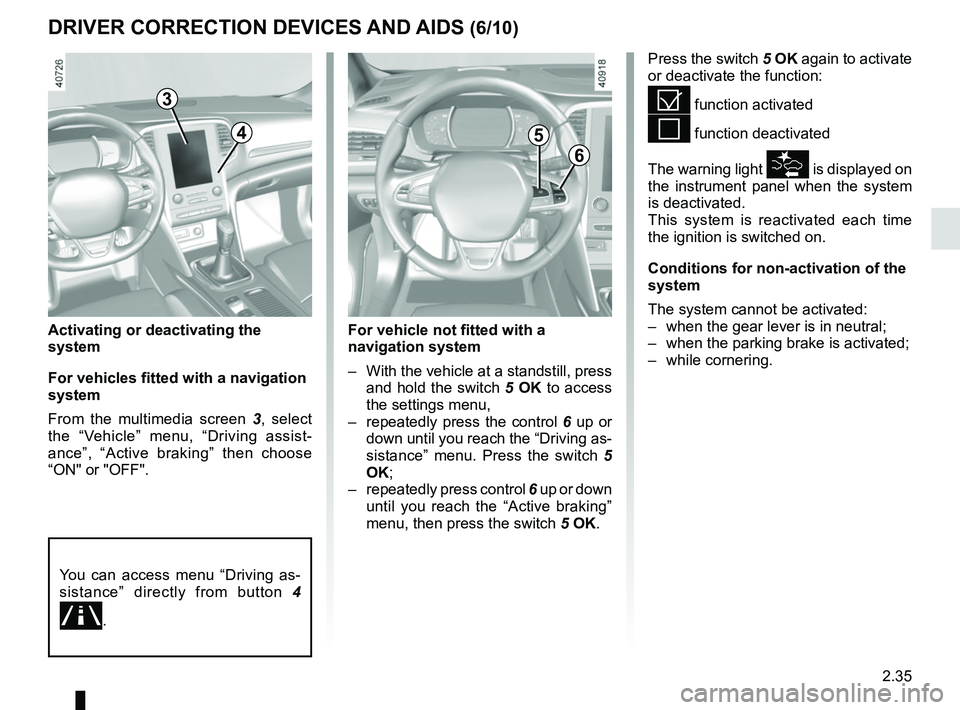
From the multimedia screen 3, select
the “Vehicle” menu, “Driving assist-
ance”, “Active braking” then choose
“ON" or "OFF".
Press the switch 5 OK again to activate
or deactivate the function:
= function activated
< function deactivated
The warning light
\b is displayed on
the instrument panel when the system
is deactivated.
This system is reactivated each time
the ignition is switched on.
Conditions for non-activation of the
system
The system cannot be activated:
– when the gear lever is in neutral;
– when the parking brake is activated;
– while cornering.
3
6
5
For vehicle not fitted with a
navigation system
– With the vehicle at a standstill, press and hold the switch 5 OK to access
the settings menu,
– repeatedly press the control 6 up or
down until you reach the “Driving as-
sistance” menu. Press the switch 5
OK;
– repeatedly press control 6 up or down
until you reach the “Active braking”
menu, then press the switch 5 OK.
You can access menu “Driving as-
sistance” directly from button 4
.
4
Page 148 of 348
2.36
DRIVER CORRECTION DEVICES AND AIDS (7/10)
Active emergency braking
This function is an additional driving aid. This function is not under any
circumstances intended to replace the due care and attention of the
driver, who should at all times be in control of the vehicle.
System servicing/repairs
– In the event of an impact, the sensor alignment may become changed, and \
its operation will consequently be affected. Deactivate the function, then consult
an authorised dealer.
– Any work in the area where the radar is located (repairs, replacements,\
touch- ing up of paintwork) must be carried out by a qualified professional.
Only an authorised dealer is qualified to service the system.
In the event of system disturbance
Some conditions can disturb or damage the operation of the system, such \
as:
– a complex environment (metal bridge, etc.);
– poor weather conditions (snow, hail, black ice, etc.).
Risk of inadvertent braking.
Operating faults
When the system detects an operating
fault, the
\b warning light lights up
on the instrument panel, with the mes-
sage “Active braking disconnected”.
There are two possibilities:
– The system is temporarily experienc- ing difficulties (for example: sensor
obscured by dirt, mud, snow etc.);
in this case, park the vehicle and
switch off the engine. Clean the de-
tection zone of the radar. When you
next start the engine, the warning
light and the message go out;
– If this is not the case, this may arise from another cause; contact an
Approved Dealer.
Page 149 of 348

Active emergency braking
Limitation of the system operation
– The system will only respond to vehicles which are moving or which have \
been sensed as")
2.37
DRIVER CORRECTION DEVICES AND AIDS (8/10)
Active emergency braking
Limitation of the system operation
– The system will only respond to vehicles which are moving or which have \
been sensed as moving.
– A vehicle travelling in the opposite direction will not trigger any alert\
or any action on the system operation.
– The sensor area should be kept clean and free of any modifications in or\
der to ensure the proper operation of the system.
– The system cannot respond to small vehicles such as motorbikes or bicycl\
es as effectively as to other vehicles.
Deactivating the function
You must disable the function if:
– the brake lights are not functioning;
– the front of the vehicle has undergone an impact or been damaged;
– the vehicle is being towed (breakdowns).
Halting the function
You can halt the active braking function at any time by tapping the accel\
erator pedal or by turning the steering wheel in a avo id-
ance manoeuvre.
If the driver notices any unusual behaviour in the system, please consul\
t an authorised dealer.
Page 160 of 348
2.48
SAFE DISTANCE ALERT (2/2)
The measurement is dis-
played for information only:
the system performs no
action on the vehicle.
This function is not designed for use
in urban conditions or for a dynamic
driving style (sudden cornering, ac-
celeration, braking, etc.), but rather
for stable driving conditions.
The function does not interact with
the braking system.
The sensor area should be kept
clean and free of any modifications
in order to ensure the proper opera-
tion of the system.
Any work in the area where the
radar is located (repairs, replace-
ments, touching up of paintwork)
must be carried out by a qualified
professional.
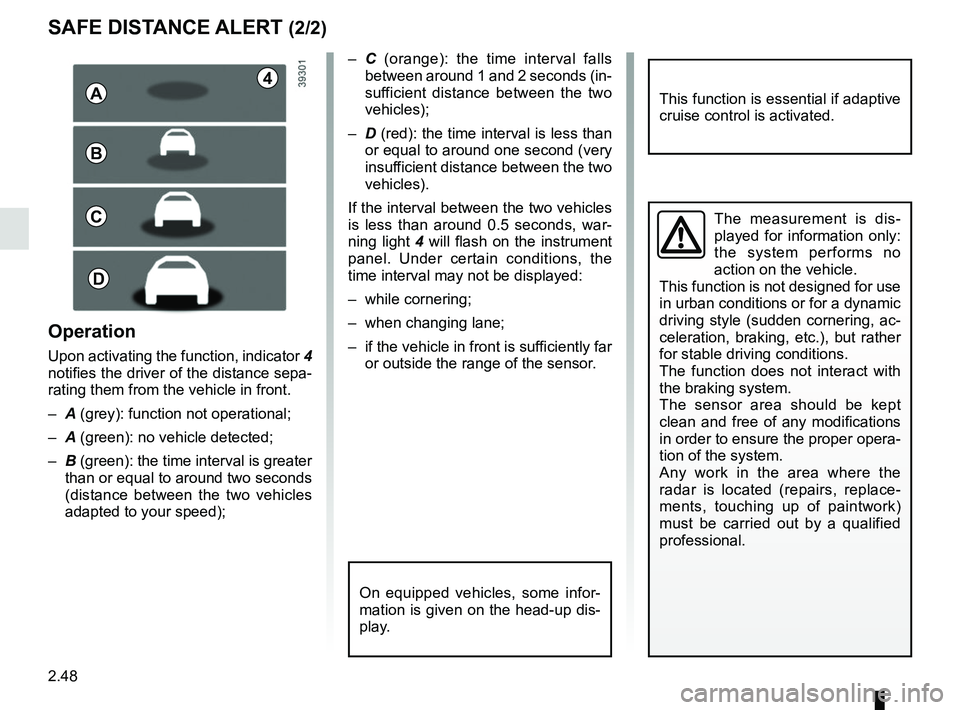
– C (orange): the time interval falls
between around 1 and 2 seconds (in-
sufficient distance between the two
vehicles);
– D (red): the time interval is less than
or equal to around one second (very
insufficient distance between the two
vehicles).
If the interval between the two vehicles
is less than around 0.5 seconds, war-
ning light 4 will flash on the instrument
panel. Under certain conditions, the
time interval may not be displayed:
– while cornering;
– when changing lane;
– if the vehicle in front is sufficiently far or outside the range of the sensor.
This function is essential if adaptive
cruise control is activated.
On equipped vehicles, some infor-
mation is given on the head-up dis-
play.
4A
B
C
D
Operation
Upon activating the function, indicator 4
notifies the driver of the distance sepa-
rating them from the vehicle in front.
– A (grey): function not operational;
– A (green): no vehicle detected;
– B (green): the time interval is greater
than or equal to around two seconds
(distance between the two vehicles
adapted to your speed);
Page 169 of 348
2.57
CRUISE CONTROL (1/4)
The cruise control function helps you to
maintain your driving speed at a speed
that you choose, called the cruising
speed.
This cruising speed may be set at any
speed above 20 mph (30 km/h).
The cruise control function
is in no way linked to the
braking system.
This function is an addi-
tional driving aid. This func-
tion does not take the place
of the driver. Therefore, it
can under no circumstances replace
the driver’s responsibility to respect
speed limits and to be vigilant (the
driver must always be ready to
brake). Cruise control must not be
used in heavy traffic, on winding or
slippery roads (black ice, aquaplan-
ing, gravel) and during bad weather
(fog, rain, side winds etc.).
There is a risk of accidents.
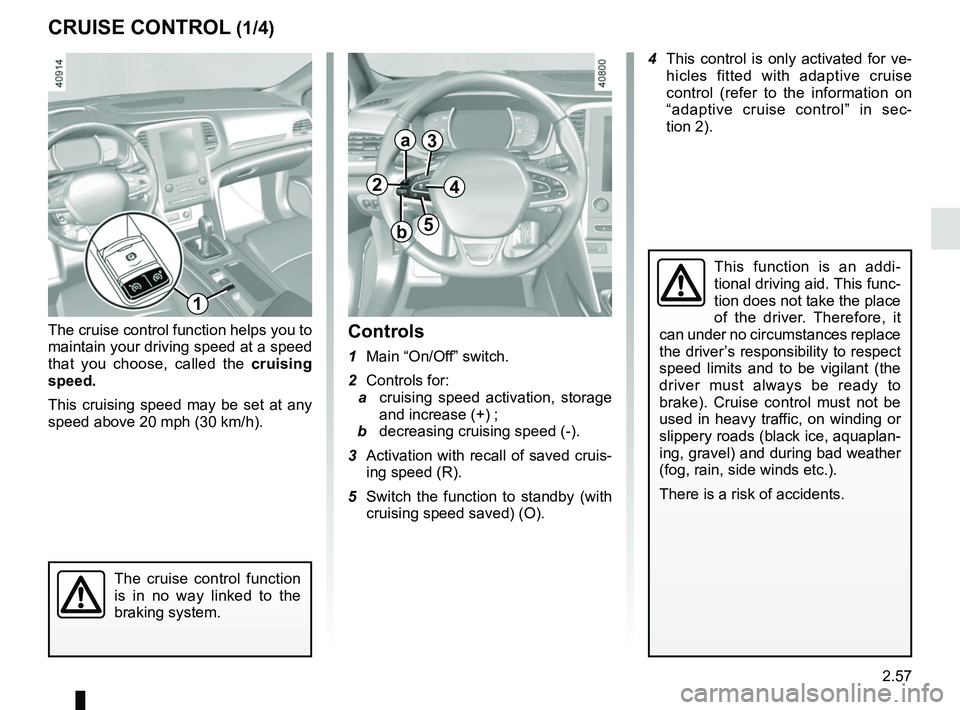
Controls
1 Main “On/Off” switch.
2 Controls for:
a cruising speed activation, storage
and increase (+) ;
b decreasing cruising speed (-).
3 Activation with recall of saved cruis- ing speed (R).
5 Switch the function to standby (with cruising speed saved) (O).
1
2
a
b
3
5
4
4 This control is only activated for ve- hicles fitted with adaptive cruise
control (refer to the information on
“adaptive cruise control” in sec-
tion 2).
Page 171 of 348
2.59
CRUISE CONTROL (3/4)
Exceeding the cruising speed
The cruising speed may be exceeded
at any time by depressing the accelera-
tor pedal. While it is being exceeded,
the cruising speed flashes on the in-
strument panel.
Then, release the accelerator: after a
few seconds, the vehicle will automati-
cally return to its set cruising speed.
Cruising speed cannot be
maintained
When driving down a steep gradient,
the system is unable to maintain the
cruising speed: the stored speed will
flash on the instrument panel informa-
tion display to inform you of this situ-
ation.
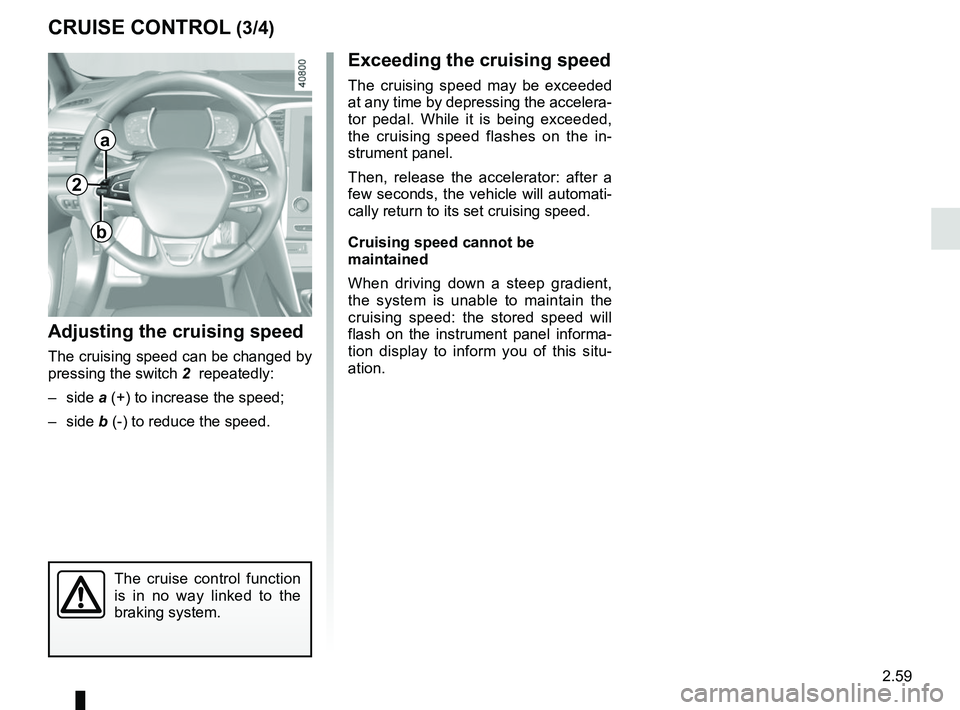
Adjusting the cruising speed
The cruising speed can be changed by
pressing the switch 2 repeatedly:
– side a (+) to increase the speed;
– side b (-) to reduce the speed.
The cruise control function
is in no way linked to the
braking system.
2
a
b
Page 178 of 348
2.66
ADAPTIVE CRUISE CONTROL (6/7)
This function is an additional driving aid. This function is not under any
circumstances intended to replace the due care and attention of the
driver, who should at all times be in control of the vehicle.
The driver should always adapt their speed to the traffic conditions, re-
gardless of the system indications.
The system should under no circumstances be taken to be an obstacle dete\
ctor
or an anti-collision system.
System servicing/repairs
– In the event of an impact, the sensor alignment may become changed, and \
its operation will consequently be affected. Deactivate the function, then consult
an authorised dealer.
– Any work in the area where the radar is located (repairs, replacements,\
touch- ing up of paintwork) must be carried out by a qualified professional.
System disturbance
In a complex environment (metal bridge, etc.), the system may be affected.
Risk of inadvertent braking.
Operating faults
When the system detects an operating
fault, the
\b warning light lights up
on the instrument panel, with the mes-
sage “Check cruise control”.
There are two possibilities:
– the system is temporarily disrupted (for example: radar obscured by
dirt, mud, snow etc.). In this case,
park the vehicle and switch off the
engine. Clean the detection zone of
the radar. When you next start the
engine, the warning light and the
message go out.
– Otherwise, this may be caused by another fault. Consult an approved
dealer
Page 179 of 348

Limitation of the system operation
– A vehicle travelling in the opposite direction will not trigger any alert\
or any action on the system operation.
– The sen")
2.67
ADAPTIVE CRUISE CONTROL (7/7)
Limitation of the system operation
– A vehicle travelling in the opposite direction will not trigger any alert\
or any action on the system operation.
– The sensor area should be kept clean and free of any modifications in or\
der to ensure the proper operation of the
system.
– Fixed obstacles (stationary vehicles, traffic jams, toll booths etc.) or objects travelling at low speed or of a \
small size ( motor-
bikes, bicycles, pedestrians etc.) may not be detected by the system.
– A vehicle entering the same lane will only be detected once it has entere\
d the detection zone. Sudden or late braking may then take place.
– When entering a bend or curve, the sensor may temporarily no longer dete\
ct the vehicle in front, and this may lead to acce- leration.
– When exiting a curve, the detection of the vehicle in front may be affected or delayed. Sudden or late braking may then take place.
– A slower vehicle travelling in an adjacent lane may be detected and cause\
a slowing down if one of the two vehicles is trav- elling too close to the lane of the other.
– The system is deactivated below around 20 mph (40 km/h). Drivers must \
react accordingly.
– Sudden changes in situation are not instantly taken into account by the \
system. Drivers must remain vigilant at all times and
under all circumstances.
Deactivating the function
You must disable the function if:
– the brake lights are not functioning;
– the front of the vehicle has undergone an impact or been damaged;
– the vehicle is being towed (breakdowns);
– traffic is heavy;
– the vehicle is travelling in a tunnel;
– the vehicle is travelling on a windy road;
– the vehicle is travelling on a slippery road or in poor weather conditio\
ns (fog, snow, rain, side winds etc.).
In the event of the system behaving abnormally, deactivate it and consult an authorised dealer.